
Navigating The Maze Of Marketing Attribution
In the fast-paced world of digital marketing, accurately tracking and attributing conversions across multiple channels can feel like trying to find your way through a maze. Have you ever launched a campaign, only to realize that you're not sure which channel is actually driving sales? This issue is common among marketers who wrestle with fragmented data that makes it difficult to trace the customer journey effectively.
Many marketers find themselves frustrated when they can't pinpoint which ad or campaign led to a conversion. This lack of clarity not only hinders strategic planning but can also lead to wasted resources on ineffective channels. Traditional attribution models often fall short, leaving marketers in the dark about where to allocate their budgets for maximum impact.
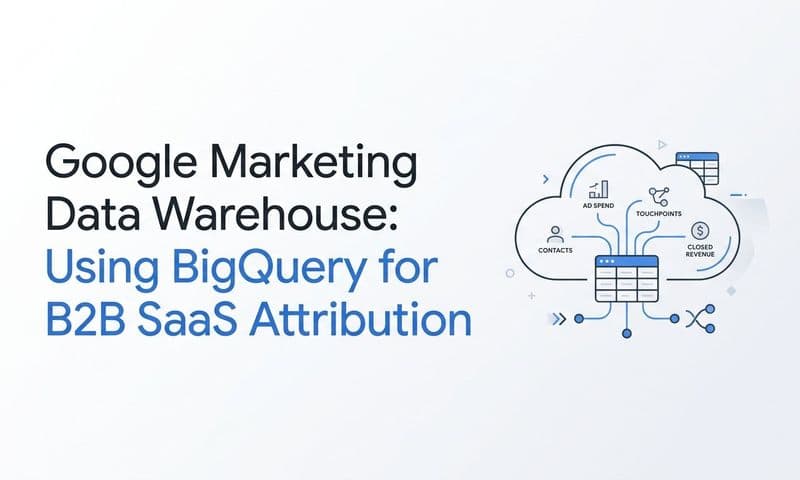
But what if there was a way to bring clarity to this chaos? By integrating BigQuery with Google Analytics 4 (GA4), you can gain deeper insights into your marketing performance and accurately attribute conversions to the right channels. Think of it like having a GPS for your marketing campaigns—it helps you navigate the complex landscape of customer interactions.
By the end of this guide, you'll know exactly how to set up and leverage BigQuery with GA4 for enhanced marketing attribution. Let's walk through how to do this step-by-step.
Essential Setup For Effective Attribution
Before diving into the integration process, you need to ensure that you have the right setup in place. Here’s what you’ll need:
1. Google Analytics 4 Account: This is essential for tracking user interactions across your website and apps. To create an account, go to the Google Analytics website and follow the prompts to set up your property.
2. Google Cloud Platform (GCP) Account: You’ll need this to access BigQuery. Sign up at the Google Cloud website, and ensure you create a project within GCP.
3. Permissions and Access: Ensure that you have the necessary permissions set for both GA4 and BigQuery. You’ll need to grant access to the service account to allow GA4 to send data to BigQuery.
Having these accounts set up correctly is crucial for a successful integration. Misconfigurations can lead to significant issues down the line, such as data loss or inaccurate reporting. Many marketers overlook setup details, which can lead to wasted efforts and missed insights.
For detailed guidance on setting up your GA4 and GCP accounts, refer to the official documentation from Google. This will help you avoid common pitfalls. Additionally, understanding GA4 marketing attribution can provide further insights into how to effectively track your campaigns.
Creating Data Streams For Seamless Tracking
With your accounts set up, the next step is to create data streams in GA4. Data streams are critical for capturing user interactions across different platforms, such as your website and mobile applications.
1. Navigate to Your GA4 Property: In your Google Analytics dashboard, click on your GA4 property.
2. Create a Data Stream: Under the “Data Streams” section, click on “Add stream” and choose whether it’s a web or app stream. Follow the prompts to configure it, including entering your website URL or app details.
3. Configure Stream Settings: Set up the data collection settings, such as enabling Enhanced Measurement features to automatically track events like page views and scrolls.
4. Verify Your Stream: After creating the stream, use the real-time reporting feature in GA4 to ensure that data is flowing correctly. This step is crucial to confirm that your setup is capturing user interactions accurately.
Properly configured data streams are foundational for effective attribution. They ensure that you're collecting comprehensive data about how users interact with your marketing efforts. Companies that implement robust data streams often see improved accuracy in their attribution models. For more insights on marketing attribution reports, check out this guide.
Linking BigQuery And GA4 For Enhanced Insights
Now that your data streams are set up, it’s time to link your GA4 account with BigQuery. This integration allows you to perform advanced analytics and gain deeper insights into your marketing performance.
1. Access BigQuery in GCP: Log into your Google Cloud account and navigate to BigQuery.
2. Link GA4 to BigQuery: In your GA4 property, go to “Admin” and then select “BigQuery Linking” under the property settings. Click on “Link” and follow the prompts to connect your GA4 property to BigQuery.
3. Configure Your Link: Choose the data you want to export to BigQuery. You can opt for daily or streaming exports depending on your needs.
4. Manage Permissions: Ensure that the appropriate permissions are set for your service account to allow data flow between GA4 and BigQuery.
Linking BigQuery to GA4 enhances your data analysis capabilities significantly. With this integration, you can conduct detailed analyses that help you understand user behavior, attribution, and overall marketing effectiveness. Businesses that leverage this integration often report improved decision-making processes based on actionable insights.
If you need further assistance, consider seeking help from a digital analytics agency that specializes in GA4 and BigQuery integration.
Crafting Your Attribution Model
Once your data is flowing into BigQuery, the next step is to craft your attribution model. The right attribution model will help you understand how various channels contribute to conversions.
1. Understand Attribution Models: Familiarize yourself with common models like last-click, first-click, and linear attribution. Each model has its strengths and weaknesses, depending on your business goals.
2. Select the Right Model: Choose a model that aligns with your marketing objectives. For instance, if your goal is to increase brand awareness, a first-click model might be more appropriate.
3. Implement Custom Models: If standard models don't fit your needs, consider creating a custom attribution model using BigQuery SQL queries to analyze your data more effectively.
4. Monitor and Adjust: After implementing your model, continuously monitor its effectiveness. Use insights gained from your BigQuery data to make necessary adjustments to your attribution approach.
The right attribution model can significantly impact your marketing strategy's effectiveness by providing insights into which channels are driving conversions. Many companies find that adjusting their attribution models leads to better resource allocation and improved ROI. To learn more about multi-channel attribution models, refer to our guide.
Advanced Techniques For Optimizing Attribution
With your attribution model in place, it's time to explore advanced techniques that can help you optimize your data analysis and attribution efforts.
1. Utilize Advanced Segmentation: Use BigQuery to segment your audience based on behavior, demographics, and interactions. This can help you tailor your marketing efforts more effectively.
2. Automate Reporting: Set up automated reporting processes using BigQuery to save time and ensure consistent analysis of your marketing performance.
3. Implement Pro-Level Tips: Leverage advanced SQL queries in BigQuery to uncover deeper insights about your user data that standard reporting may not reveal.
4. Scale Your Efforts: As your data analysis capabilities grow, scale your attribution efforts by expanding into new channels or refining existing campaigns based on your insights.
Advanced segmentation allows for deeper insights into customer behavior, enhancing targeting and improving campaign performance. Companies utilizing these techniques often report higher engagement rates and improved conversion metrics. For more ideas on leveraging your analytics insights, check out our post on SaaS marketing ideas.
Navigating Common Troubles In Attribution
As you implement your integration and attribution strategies, it’s vital to be aware of common issues that may arise.
1. Linkage Errors: Sometimes, the integration between GA4 and BigQuery may not work as expected. Symptoms include missing data or incomplete reports.
2. Diagnosing Discrepancies: If you notice discrepancies in your data, check your permissions settings and ensure that data streams are correctly configured.
3. Recovery Strategies: If you encounter data loss, attempt to reconfigure your data streams or consult with your analytics provider for support.
4. Frequent Issues FAQ: Keep a list of common issues and solutions to streamline your troubleshooting process.
Being able to troubleshoot effectively can save you time and resources. Many marketers find that regularly auditing their setups reduces the likelihood of encountering significant issues. For further insights into improving your analytics setup, consider reviewing signs you need better marketing analytics.
Validating Your Attribution Strategy
To ensure your marketing attribution models are effective, you must continuously validate your strategy.
1. Key Metrics to Monitor: Focus on metrics such as conversion rates, customer lifetime value, and return on investment to assess the success of your attribution efforts.
2. Performance Benchmarks: Establish benchmarks for your key metrics to evaluate performance over time effectively.
3. ROI Calculation Methods: Use the data from BigQuery to calculate the ROI of your marketing campaigns and adjust your strategies accordingly.
4. Validating Model Effectiveness: Regularly assess the effectiveness of your chosen attribution model and make changes based on your findings.
Regular monitoring of key metrics ensures sustained success in your marketing attribution efforts. Many marketers find that continuous validation leads to better alignment of marketing strategies with business goals.
For insights into tracking ad performance, check out our article on Facebook ad tracking.
Putting It All Together
As we wrap up this guide, let’s recap the key points covered:
1. Setup Required Accounts: Ensure you have the necessary GA4 and GCP accounts set up.
2. Create Data Streams: Establish data streams in GA4 to capture user interactions.
3. Link BigQuery and GA4: Integrate BigQuery for enhanced data analysis capabilities.
4. Craft Your Attribution Model: Choose and implement the right attribution model based on your business needs.
5. Optimize Using Advanced Techniques: Utilize advanced segmentation and automation to enhance your attribution efforts.
6. Troubleshoot Common Issues: Be equipped to handle potential issues that may arise during integration.
7. Validate Your Strategy: Continually assess the effectiveness of your attribution model and metrics.
By following these steps, you can achieve greater insight into your marketing performance and optimize your strategies for success. As you implement your strategies, consider exploring our post on B2B demand generation for additional insights and ongoing learning.