For any online brand, your Shopify sales numbers are just one part of the story. The real measure of success—the financial health of your business—is found in your accounting. This is where e-commerce accounting comes in, acting as the critical bridge between what you sell online and the actual profit that hits your bank account.
It’s about moving past vanity metrics like gross sales and digging into the true profitability of every single transaction. To do that, you have to connect the dots between your marketing spend, payment processing fees, inventory costs, and the final numbers on your balance sheet.
Bridging Sales Data and Financial Truth
 Your Guide to E Commerce and Accounting Integration
The explosion of online retail created a massive challenge that traditional accounting was never built to handle: a relentless, high-volume stream of transactions coming from dozens of different platforms. It’s a recipe for chaos, and it’s why so many brands fall into a dangerous trap—celebrating record-breaking sales while being completely blind to their actual bottom line.
This disconnect is almost always caused by data silos. Your sales data lives in Shopify, your marketing data is stuck in Facebook Ads Manager, and your financial records are in a totally separate system like QuickBooks. Without a way to connect them, you’re flying blind. You can't answer the most important questions, like whether that hot new ad campaign actually made you money after factoring in refunds and payment fees.
A Specialized Discipline for Online Business
This is where e-commerce accounting carves out its niche. It’s not just bookkeeping with an online store. It’s a modern approach built on three pillars that old-school methods just can't replicate:
- Real-time Data Reconciliation: This means automatically pulling data from your storefront, payment gateways, and ad platforms, then matching it all up so the numbers actually make sense.
- Intelligent Automation: The goal here is to kill manual data entry. This not only saves hundreds of hours but also dramatically reduces the human errors that can wreck your financial statements.
- Precise Revenue Attribution: This is the holy grail—connecting every dollar of revenue directly back to the marketing effort that generated it.
Of course, getting your sales data and financial truth to align is impossible if you don’t understand how your payments are handled. For a closer look at payment solutions and how they impact your data, it's worth digging into resources from those with deep payment processing expertise. Nailing this down is the first real step toward building financial records you can trust.
The whole point of modern e-commerce accounting is to shift the conversation from "What did we sell?" to "How profitable was each sale, and why?" You can only answer that when your marketing, sales, and finance data are all speaking the same language.
Connecting Marketing Spend to Financial Reality
At the end of the day, this discipline gives your finance team the context they desperately need. When your accounting system can confirm that the revenue your ad platform claims a campaign generated has actually landed in your bank account—after all the fees, returns, and chargebacks—your financial reports transform from historical documents into powerful decision-making tools.
This unified view is what gives you the confidence to pour money into winning campaigns and ruthlessly cut the ones that are bleeding you dry. If you want to dive deeper into connecting marketing efforts to real financial outcomes, a great next step is exploring detailed guides on revenue analytics.
Throughout this guide, we'll walk through the exact workflows and tools you need to build this bridge, ensuring your financial truth always reflects your sales reality.
Understanding Core E Commerce Accounting Workflows
 Your Guide to E Commerce and Accounting Integration
To really get a handle on your e-commerce finances, you need to understand the five core workflows that transform a simple sale into a clean financial record. It helps to think of it as following a single product’s financial journey—from the moment a customer clicks "buy" to the final entry on your profit and loss statement.
Each stage reveals another piece of the profitability puzzle. Let's break these processes down, moving past the dry definitions to see how they actually work in a real online store.
Recognizing Revenue the Right Way
The moment a customer pays you isn’t always the moment you’ve earned the money. This idea, known as revenue recognition, is a pillar of accrual accounting and it's essential for getting an accurate read on your performance. For e-commerce brands, revenue should only be recognized when the product has been shipped and the order fulfilled.
Why the delay? Because until that product is on its way to the customer, the sale isn't truly complete. This simple rule stops you from overstating your income in a given month based on pre-orders or processing lags, ensuring your financial reports reflect what’s actually happening in your business.
This is a huge deal for brands using dropshipping or third-party logistics (3PLs). You don't have direct control over the shipping timeline, so it's critical to have systems that sync fulfillment data with your accounting software to trigger revenue recognition at just the right time.
Managing Inventory and Cost of Goods Sold
Think of your inventory as a digital stockroom. Every single product has a cost tied to it—not just what you paid to buy it, but also the shipping and import fees it took to get it into your warehouse. That total cost is your Cost of Goods Sold (COGS), and tracking it is the only way to know if you're actually making a profit.
When you sell a product, its COGS moves from being an asset (inventory on your balance sheet) to an expense on your income statement. The difference between what you sold it for and your COGS is your gross profit.
Gross Profit = Total Revenue - Cost of Goods Sold (COGS)
This simple formula is the most direct signal of your product-level profitability. If your COGS is too high, even massive sales volume won’t save your bottom line.
Without precise inventory tracking, you can't calculate COGS accurately. This is why connecting your sales channels to an inventory management system is a must. Platforms like Shopify offer incredible tools, and learning how to set up a proper Shopify integration can automate a huge chunk of this tracking, keeping your financial data and physical stock perfectly aligned.
Handling Refunds and Chargebacks
Refunds and chargebacks are just part of the e-commerce game, but they do a lot more than just reverse a sale. From an accounting standpoint, they introduce new complexities because they touch multiple financial accounts. A refund isn't just a loss of cash; it's a contra-revenue event.
This means you have to:
- Decrease your revenue: The original sale is now effectively canceled out.
- Adjust your inventory: The returned item (if you can resell it) needs to be added back to your inventory count.
- Account for fees: You almost never get payment processor fees back, which becomes another business expense you have to track.
Chargebacks are even messier, often coming with hefty penalty fees from the payment processor. Properly tracking these events is absolutely critical for understanding your true net revenue and the hidden costs that come with customer dissatisfaction or fraud.
Navigating Sales Tax Compliance
Finally, we have sales tax—one of the biggest headaches for any scaling e-commerce brand. Sales tax laws are determined by "nexus," which is just a fancy term for having a significant business presence in a state. The problem is, the rules are wildly different from one place to the next.
For a growing online store, this creates a massive compliance burden. You could suddenly find yourself responsible for collecting and remitting dozens of different tax rates depending on where your customers live.
Trying to track all this manually is nearly impossible and incredibly risky. This is where automation is no longer a "nice-to-have." Modern e-commerce platforms and accounting software can integrate to automatically calculate, collect, and even file sales tax for you, turning a major liability into a manageable, automated workflow. Each of these five areas builds on the last, creating a complete financial picture you can actually trust.
Tracking the Right KPIs for Sustainable Growth
Collecting data is easy. It’s turning that data into smart business decisions that’s the real challenge. In e-commerce accounting, this means looking past surface-level numbers like website traffic or gross sales and digging into the Key Performance Indicators (KPIs) that reveal the true health and profitability of your business.
Think of these metrics as your financial compass. They guide everything from your marketing budget to your long-term growth strategy, connecting the dots between what you spend to acquire customers and how much value those customers actually bring in over time.
Marketing and Sales KPIs You Cannot Ignore
For any online store, the relationship between marketing spend and revenue is everything. Three KPIs, in particular, are non-negotiable for understanding this dynamic. Together, they tell a complete story about how efficiently you’re acquiring new customers.
- Customer Acquisition Cost (CAC): This is the total cost of your sales and marketing efforts to acquire a single new customer. The formula is simple: Total Marketing Spend / New Customers Acquired. A low CAC means your marketing is efficient.
- Customer Lifetime Value (LTV): This metric predicts the total revenue a single customer will generate throughout their entire relationship with your brand. A high LTV means you're not just getting one-off sales; you're building a base of loyal, repeat buyers.
- Return on Ad Spend (ROAS): This measures the gross revenue generated for every dollar you spend on advertising. It’s a direct indicator of campaign profitability and is calculated as: Total Revenue from Ads / Total Ad Spend.
These KPIs provide the context your financial reports are often missing. While your accounting software shows what you earned, these metrics explain how you earned it and at what cost. Tracking them is essential, and you can explore more in our guide to building a powerful marketing dashboard with the right KPIs to monitor them effectively.
A solid grasp of these metrics is what separates brands that scale profitably from those that just spin their wheels. Below is a quick breakdown of the essential KPIs that get finance and marketing teams speaking the same language.
Essential E-Commerce KPIs for Finance and Marketing
Customer Acquisition Cost (CAC) is the total cost to acquire one new customer. It’s one of the clearest indicators of marketing efficiency, because when CAC rises it usually means something is breaking, like ad fatigue, poor targeting, or wasted spend. Tracking CAC helps you spot problems early and cut waste before it scales.
Customer Lifetime Value (LTV) is the total projected revenue a customer will generate over their lifetime. This metric shows how strong your retention and customer loyalty really are. When LTV is high, it gives you permission to spend more to acquire customers, and it also helps you decide where to invest in retention strategies that keep customers coming back.
The LTV:CAC Ratio compares the value a customer generates to what it costs to acquire them. This is one of the best “business health” metrics because it tells you if your growth is sustainable. In most cases, a ratio of 3:1 or higher signals a profitable model that can scale without falling apart.
Return on Ad Spend (ROAS) measures how much gross revenue you earn for every dollar spent on ads. It’s important because it gives you fast feedback on whether campaigns are profitable right now. ROAS helps you make quick optimization decisions and shift budget toward the ads and channels that are producing the best returns.
Conversion Rate (CVR) is the percentage of website visitors who complete a desired action, like making a purchase or submitting a form. This metric directly reflects how effective your website and funnel are at turning traffic into customers. Even small conversion rate improvements can create huge revenue gains without increasing ad spend.
Average Order Value (AOV) is the average amount a customer spends per order. Increasing AOV is one of the fastest ways to grow revenue because you can earn more from the same amount of traffic and ad spend. Common ways to raise AOV include bundles, upsells, and stronger offer packaging.
Ultimately, these KPIs bridge the gap between a campaign click and a balance sheet entry. When both teams are aligned on these numbers, you're not just growing—you're growing smarter.
Translating Key Financial Reports for E-Commerce
While marketing KPIs give you performance insights, your core financial statements tell the official story of your business's health. Understanding them is fundamental to sustainable growth. In an e-commerce context, these reports become even more powerful when paired with accurate sales and marketing data.
The Profit & Loss (P&L) Statement
Also known as the income statement, your P&L summarizes your revenues, costs, and expenses over a specific period. For e-commerce businesses, getting this right starts with accurately calculating your Cost of Goods Sold (COGS). Your P&L is your ultimate report card, answering the most critical question: "Are we profitable?"
The Balance Sheet
The balance sheet provides a snapshot of your company's financial standing at a single point in time. It follows a simple formula: Assets = Liabilities + Equity. For online stores, your biggest assets are usually cash and inventory, while liabilities might include loans or payments owed to suppliers.
A healthy balance sheet shows that your assets are growing without being outweighed by debt. It’s a crucial indicator of long-term stability and your ability to weather economic shifts or invest in future growth.
The Cash Flow Statement
This report tracks the movement of cash into and out of your business, broken down into operating, investing, and financing activities. The cash flow statement is arguably the most important report for an e-commerce brand because it reveals your ability to pay for inventory, run ad campaigns, and cover payroll. You can have a profitable business on paper (according to your P&L) but still run out of cash.
When you combine precise marketing attribution data with these financial reports, you create a powerful strategic loop. You can see not just that you made a profit last month, but that a specific ad campaign drove 70% of that profit, giving you the confidence to scale your spend intelligently.
Building Your Automated Financial Engine
If you're still relying on manual data entry to run your online business, you're building on a shaky foundation. Juggling spreadsheets and manual imports doesn't just eat up your time; it injects errors that can completely warp your understanding of your own financials. The only way to scale with confidence is to build an automated ecosystem where your financial data flows seamlessly between systems.
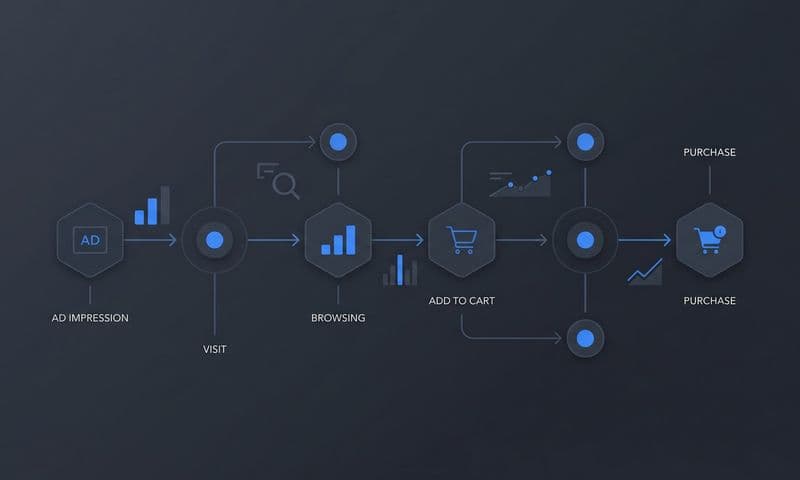
Think of it as a digital assembly line for your money. At the very start, you have the raw materials—sales data from Shopify and transaction details from Stripe. As this information moves down the line, it's automatically processed, categorized, and sent to its final destination: your accounting software. This setup removes the friction and risk of human error, giving you a single source of truth you can actually trust.
Mapping the Ideal Data Flow
Creating this automated engine means connecting three core components in a specific order. The whole point is to get data moving from one platform to the next without anyone having to lift a finger, which keeps the information clean and gives you a clear audit trail from the initial ad click all the way to the final financial statement.
This journey is all about connecting the dots between how you acquire customers and how you turn a profit.
 Your Guide to E Commerce and Accounting Integration
As you can see, a winning e-commerce strategy isn't just about driving sales. It's about balancing your acquisition costs against the long-term value of your customers to make sure you’re actually profitable.
Here’s the logical path your data should follow:
- Sales Channels and Payment Processors: This is where it all begins. Platforms like Shopify or BigCommerce are where sales happen, while processors like Stripe or PayPal handle the money. These systems are the first to record every single order, discount, tax, and fee.
- Central Accounting Software: This is the heart of your financial engine. Software like QuickBooks, Xero, or NetSuite acts as the central hub where all that transaction data gets funneled. A good integration will automatically create journal entries for sales, fees, and refunds.
- Marketing Attribution Platform: This is the final—and most critical—layer. By connecting an attribution tool, you enrich your financial data with marketing context. This link lets you see not just what you sold, but which specific ad or campaign drove that sale.
The Power of Native Integrations
The real magic of this entire system is in the integrations. Modern software is built to "talk" to other platforms through APIs, creating a network where data can be shared automatically. For example, a direct integration between Shopify and QuickBooks can sync daily sales summaries—breaking down revenue, sales tax, and shipping income—without a single click.
These connections are the backbone of accurate e-commerce and accounting. The right setup gets rid of that dreaded month-end scramble, where you’re trying to piece together thousands of transactions from a dozen different reports.
By automating the flow of data, you're not just saving time—you're building a scalable financial infrastructure. This frees up your team to actually analyze the numbers and make strategic decisions instead of just collecting them.
A truly robust system goes beyond just sales. Advanced integrations can also sync inventory levels, COGS data, and even payroll expenses, giving you a complete, real-time picture of your business's financial health. You can learn more about getting your most important platforms connected by reading up on powerful e-commerce integrations.
Unifying Revenue with Marketing Attribution
Ultimately, the goal of this automated engine is to get to a place of true financial clarity. That happens when you can confidently trace every single dollar of revenue back to the marketing activity that generated it. This is where your marketing attribution platform becomes the most valuable player in your tech stack.
When your attribution data is synced with your accounting software, you can finally answer the questions that really matter for growth:
- Which of our Facebook ad campaigns delivered the highest net profit after all the fees and refunds?
- Is our Google Ads spend actually generating a positive return once we factor in the cost of goods sold?
- What is the true lifetime value of customers we acquired through our email marketing?
This level of insight transforms your accounting from a simple record-keeping task into a strategic weapon. You can now allocate your marketing budget with surgical precision, doubling down on what works and cutting what doesn't—all based on verified financial data. Your automated engine doesn't just report on the past; it actively shapes a more profitable future.
A Practical Workflow for Reconciling Ad Spend and Revenue
Alright, let's get down to brass tacks. This is where the theory ends and the real work begins. You can build the most sophisticated, automated system in the world, but if you're not running a monthly reconciliation, you're flying blind. For most e-commerce brands, figuring out if ad spend actually turned into profit is the biggest financial headache.
But it doesn't have to be.
A simple, repeatable workflow can cut through the noise. This process is all about bridging the massive gap between the flashy performance numbers you see in your ad dashboards and the actual cash that hits your bank account. Think of it as a crucial monthly health check—the moment of truth that confirms your marketing is truly profitable.
Step 1: Gather Your Raw Data
Before you can make sense of anything, you need to pull the right information from three different places. The key is to grab reports from the exact same time period (say, the entire month of April) to make sure you're comparing apples to apples.
Start by exporting these three reports:
- Sales Data: Get your detailed sales report from your e-commerce platform, like Shopify. This needs to have everything: gross sales, discounts, refunds, shipping, and taxes for the month.
- Payout Reports: Head over to your payment processors like Stripe or PayPal and download your transaction and payout reports. These show the actual cash deposits heading to your bank, minus their fees.
- Marketing Performance Data: Finally, pull the campaign reports from your attribution tool or directly from ad platforms like Meta Ads and Google Ads. This gives you the reported revenue that the platforms are taking credit for.
Step 2: Match Transactions and Hunt for Discrepancies
Got all your spreadsheets? Good. Now the real work begins inside your accounting software. Your first job is to match the batch deposits from your payment processors with the individual sales from your e-commerce store.
For example, Stripe might drop a lump sum of $8,750 into your account. Your task is to tie that single deposit to the dozens—or hundreds—of individual Shopify orders it represents. This simple act immediately uncovers your payment processing fees, which need to be logged as an expense.
Next up, you compare the revenue numbers from your marketing reports to your actual sales data. This is almost always where you find the gaps. Your ad platform might proudly report $10,000 in revenue, but your Shopify report only shows $9,500. Why? It could be anything from canceled orders and returns to differences in attribution windows. Getting a handle on these nuances is critical, which is why brands often dig into guides comparing Shopify reporting and Google Analytics for ad tracking to see the full picture.
Reconciliation is the act of financial truth-telling. It forces you to confront the real numbers, moving beyond the often-inflated reports from ad platforms to see what your business actually earned.
Step 3: Adjust for Fees, Refunds, and Taxes
Once your core numbers are matched up, the last step is to make the final adjustments in your accounting software. This is how you create a complete, accurate financial picture and find your true profitability.
Your monthly reconciliation checklist should look something like this:
- Book Payment Processor Fees: Create journal entries to categorize every fee from Stripe, PayPal, and other gateways. These are a cost of doing business.
- Account for Refunds and Chargebacks: Make sure every dollar refunded is correctly recorded as contra-revenue, which directly reduces your total sales number.
- Verify Sales Tax Payable: Double-check that the sales tax you collected matches what you actually owe to the state authorities. You don't want any surprises there.
- Recognize COGS: For all the sales you've now confirmed, record the corresponding Cost of Goods Sold as an expense against that revenue.
Following this methodical process turns a mess of disconnected data into a reliable P&L statement. It gives you an unshakeable understanding of your marketing ROI and the real health of your business.
Your Top E-Commerce Accounting Questions, Answered
Let's be honest, navigating e-commerce accounting can feel like you're trying to solve a puzzle with pieces from five different boxes. As you start connecting your sales channels, ad platforms, and financial software, a lot of questions pop up. We've been there.
Below are the straightforward, no-fluff answers to the most common questions we hear from founders and marketers. Think of this as your cheat sheet for building a rock-solid financial foundation for your store.
What's the Single Biggest Accounting Mistake E-Commerce Stores Make?
The most common—and by far the most destructive—mistake is mixing business and personal finances. It’s a classic rookie error. When you pay for inventory with your personal credit card or use the business account for groceries, you create a tangled mess that’s nearly impossible to sort out. It makes tracking real expenses, calculating profitability, or filing taxes a nightmare.
Rule number one: open a dedicated business bank account and credit card from day one. Full stop.
A close second is completely neglecting inventory and the Cost of Goods Sold (COGS). If you don't have a tight grip on COGS, your profit margins are just wishful thinking, which leads to terrible decisions on everything from product pricing to ad spend.
How Does Marketing Attribution Fit into Accounting?
This is a great question because it connects two worlds that often operate in silos. Think of it like this: your accounting software tells you what you earned. Your marketing attribution platform tells you why you earned it.
Standard accounting shows the revenue hitting your bank account, but a tool like Cometly traces that dollar all the way back to the specific Facebook ad, Google search, or email campaign that brought the customer in the door.
This link is everything. It allows you to prove that your marketing spend is generating actual, deposited revenue. It transforms a boring old P&L statement from a historical document into a strategic roadmap for growth.
For marketers, this means you can finally calculate a true Return on Ad Spend (ROAS) and Customer Acquisition Cost (CAC), ensuring your financial reports actually reflect marketing’s real impact on the bottom line.
Should I Use Cash or Accrual Accounting for My E-Commerce Business?
While cash accounting feels simpler upfront, almost every growing e-commerce brand should be using the accrual method. It gives you a far more accurate and realistic snapshot of your company's financial health.
Here’s why accrual accounting is the only real choice for a serious online store:
- It Tracks Revenue When It's Earned: Accrual accounting records a sale when the order is placed and the item ships—not weeks later when the payment from Stripe finally clears. This gives you a real-time view of sales performance.
- It Matches Expenses to Revenue: It records expenses when they happen. This allows you to perfectly match costs (like the cost of your inventory) to the revenue that inventory generated in the same period.
- It Handles Inventory Correctly: This is critical. The accrual method treats your inventory as an asset on your balance sheet until it sells, at which point it becomes an expense (COGS). Cash accounting can't do this properly.
Simply put, accrual accounting is the gold standard for making smart business decisions based on what’s actually happening, not just what’s in your bank account today.
How Often Should I Reconcile My E-Commerce Books?
For the vast majority of online businesses, monthly reconciliation is the sweet spot. Closing out your books every month forces you to catch errors, spot weird discrepancies, and maintain a crystal-clear view of your cash flow. This allows you to make quick, informed decisions.
Waiting until the end of the quarter—or worse, the end of the year—is a recipe for disaster. Small errors compound over time, creating a completely distorted picture of your business's health that can lead to some very expensive mistakes. Stay on top of it.
Ready to connect your marketing spend to your financial truth? Cometly provides the clear, accurate attribution data you need to prove your ROI and scale with confidence. Get started with Cometly today and see exactly which campaigns are driving your bottom line.