You're spending $50,000 a month across Google Ads, Facebook, LinkedIn, and email campaigns. Your sales are up 30%. But which channel actually drove those sales?
If you can't answer that question with confidence, you're not tracking your marketing campaigns—you're guessing with expensive consequences.
Here's the painful reality: Most marketing leaders are making budget decisions based on incomplete data. Facebook Ads Manager shows 50 conversions. Google Analytics claims 45. Your actual closed deals? 38. Each platform is taking credit for conversions the others also claim, and some of those "conversions" were people who would have bought anyway.
Without unified tracking, you're likely over-investing in channels that look impressive in their own dashboards but don't actually drive revenue. Meanwhile, you're under-funding the touchpoints that genuinely influence purchase decisions.
The modern customer journey spans 6-8 touchpoints across multiple platforms before conversion. Someone sees your Facebook ad but doesn't click. They search your brand on Google three days later. They receive your email campaign and click through. Then they convert. Which channel deserves credit? Which one should get more budget?
Single-platform analytics can't answer these questions because each platform only sees its own piece of the puzzle. You need a complete system that tracks every touchpoint and connects them to actual revenue—not just platform-reported conversions that may or may not represent real business outcomes.
This isn't just about better reporting. It's about knowing whether that $15,000 you're spending on LinkedIn ads is generating $50,000 in pipeline or just expensive clicks that go nowhere. It's about confidently shifting budget from channels that look good to channels that actually perform.
By the end of this guide, you'll have a complete system to track every campaign touchpoint across all your channels and know exactly what's driving revenue. You'll understand which ads deserve credit, which platforms are over-claiming conversions, and where your next dollar of ad spend will generate the highest return.
We'll walk through the foundation most marketers get wrong, the technical implementation that ensures accurate data capture, and the attribution framework that connects ad clicks to closed deals. This isn't theory—it's the exact process marketing teams use to track millions in ad spend with confidence.
Let's start with understanding what "tracking" actually means in 2025, because the approach that worked three years ago is leaving massive gaps in your data today.
Step 1: Set Up Your Tracking Foundation
Before you install a single tracking pixel, you need the right infrastructure in place. Most marketers skip this step and jump straight to code implementation—then spend months cleaning up fragmented data that could have been prevented with two hours of proper planning.
Think of this like building a house. You wouldn't start with the roof. The foundation determines whether your tracking system provides reliable insights or becomes a maintenance nightmare that nobody trusts.
Here's what you need to get right from day one.
Essential Tools You'll Need
Successful campaign tracking requires an integrated tech stack, not just individual platform pixels operating in isolation. Each tool serves a specific purpose, and the magic happens when they work together.
Analytics Platform:Google Analytics 4 captures website behavior—page views, session duration, conversion paths. This shows you what visitors do after they click your ads, but it can't tell you which specific ad or campaign drove the visit without proper tagging.
Ad Platform Pixels: Meta Pixel, Google Ads tag, LinkedIn Insight Tag, and TikTok Pixel track conversions within their respective platforms. Each pixel reports back to its platform, enabling optimization and retargeting. The problem? Each platform only sees its own touchpoints and often takes credit for conversions it didn't actually drive.
Tag Management System:Google Tag Manager is non-negotiable. It lets you add, update, and remove tracking codes without touching your website's source code or waiting for developer resources. One hour learning Tag Manager saves hundreds of hours of maintenance work later.
Attribution Platform: This is where most tracking systems break down. You need a unified system that connects ad clicks from all platforms to actual revenue in your CRM. A comprehensive marketing campaign tracker becomes the central hub that connects all these disparate systems, providing the unified view that individual platform analytics can't deliver.
CRM or Sales System: Salesforce, HubSpot, or your sales database tracks deals and revenue. Without connecting this to your ad data, you're tracking clicks and form fills—not actual business outcomes. This is where marketing attribution software becomes non-negotiable—it's the bridge that connects your ad clicks to actual closed deals and revenue.
Here's why this matters: Sarah runs marketing for a B2B SaaS company. She started with just Google Analytics, assuming it would show her which campaigns drove her $10K enterprise deals. Three months in, she realized GA4 showed website conversions, but she couldn't see which LinkedIn ads led to actual closed deals. She had ad click data in LinkedIn, website behavior in GA4, and deal values in Salesforce—three separate systems with no connection between them.
Your tracking is only as good as your ability to connect these systems. Missing even one piece means you're making budget decisions based on incomplete data.
Creating Your Tracking Taxonomy
Consistent naming conventions are the difference between actionable data and chaos. If your team uses "fb", "FB", and "facebook" interchangeably, your reporting will show three separate traffic sources instead of one unified channel. This fragmentation makes it impossible to accurately analyze marketing performance across campaigns and time periods.
Start by documenting your standard naming conventions in a shared document that every team member can access. Define exactly how each platform should be named, which separators to use (hyphens, not underscores or spaces), and how dates should be formatted. When everyone follows the same system, your data becomes immediately more valuable.
Step 2: Implement Cross-Platform Tracking Codes
Here's where theory meets reality. You've got your tools selected and your taxonomy documented. Now it's time to actually install the tracking codes that will capture every campaign touchpoint.
Most marketers make a critical mistake at this stage: they install pixels directly into their website code. This creates a maintenance nightmare that requires developer involvement for every single update. There's a better way.
Installing Platform Pixels Correctly
Google Tag Manager is your secret weapon for tracking implementation. It's a free container that holds all your tracking codes in one place, letting you add, update, or remove pixels without touching your website code.
Think of it like a control panel for all your tracking. Instead of hardcoding Facebook's pixel, Google's conversion tag, and LinkedIn's Insight Tag directly into your site, you install Tag Manager once. Then you manage everything through its interface.
Here's the installation process that actually works:
Step 1: Get Your Pixel Codes. Log into each ad platform and locate the tracking code. For Meta, go to Events Manager, select your pixel, and copy the base code. For Google Ads, navigate to Tools & Settings, then Conversions, and create your conversion action. LinkedIn's Insight Tag lives in Campaign Manager under Account Assets.
Step 2: Add to Tag Manager. In Google Tag Manager, create a new tag and select "Custom HTML" as the tag type. Paste your pixel code here. Set the trigger to "All Pages" for base tracking pixels—these need to fire on every page of your site to track visitor behavior.
Step 3: Configure Event Tracking. Base pixels track page views, but you need event tracking for conversions. In Meta, set up standard events like Purchase, Lead, or CompleteRegistration. In Google Ads, configure specific conversion actions for form submissions, purchases, or signups. Understanding Facebook ads attribution is particularly critical since Meta's platform has unique attribution challenges following iOS privacy updates that affect how conversions are reported.
Step 4: Test Before Publishing. Use Tag Manager's Preview mode to test everything before it goes live. Navigate through your site as a customer would. The preview panel shows which tags fire on each page. If a tag doesn't fire when it should, you'll catch it now instead of discovering broken tracking three weeks later.
The beauty of Tag Manager is flexibility. Need to update your Facebook pixel? Change it in Tag Manager and publish—no developer required. Want to add TikTok tracking? Create a new tag in five minutes. This independence is worth the initial setup investment.
Setting Up Server-Side Tracking
Browser-based tracking is dying. iOS privacy features, ad blockers, and cookie restrictions are blocking 30-40% of tracking pixels from firing. If you're relying solely on browser pixels, you're missing a huge chunk of your actual conversions.
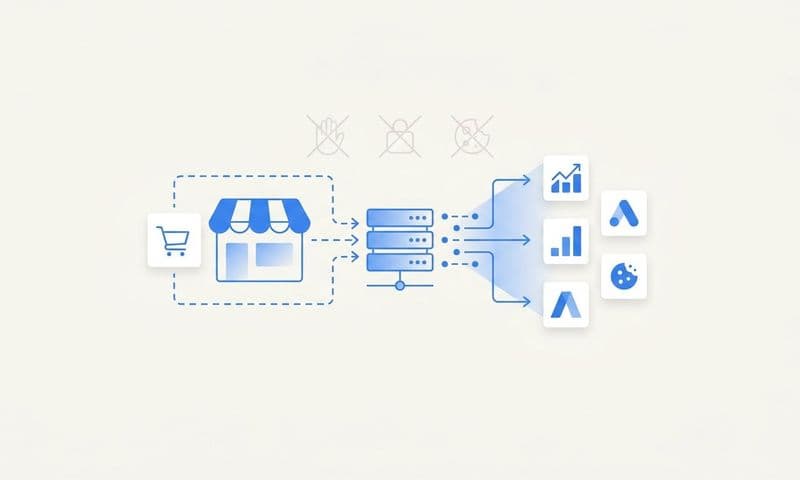
Server-side tracking solves this problem by capturing data on your server before it reaches the browser. When someone converts on your site, the conversion data is sent from your server directly to ad platforms, bypassing all the browser-based blocking.
Here's why this matters: A B2B company running LinkedIn ads discovered that 35% of their actual conversions weren't being tracked by their browser pixel. Privacy-conscious users with ad blockers were converting, but LinkedIn never saw those conversions. Their campaigns appeared to be underperforming when they were actually generating solid results. Implementing attribution software with server-side tracking revealed the true performance and allowed them to scale confidently.
How Cometly Simplifies Server-Side Tracking: While server-side tracking traditionally requires significant technical resources, Cometly provides a turnkey solution that handles the complex infrastructure for you. Instead of building and maintaining your own server containers, configuring tagging servers, and managing data routing, Cometly's platform includes server-side tracking as a core feature.
 How To Measure Touchpoints: A Marketer's Guide To Attribution That Actually Works
The implementation process is straightforward. You connect your ad platforms to Cometly through their integrations dashboard, add Cometly's tracking code to your website (either directly or through Google Tag Manager), and configure your conversion events. Cometly then captures conversion data server-side and routes it to all your connected ad platforms automatically.
This approach addresses the browser-based tracking limitations we discussed earlier. When someone converts on your site, Cometly captures that conversion on the server level before browser restrictions can interfere. The platform then sends conversion data directly to Facebook, Google, TikTok, and other ad platforms through their server-side APIs, ensuring these platforms receive accurate conversion signals even when browser pixels are blocked.
For marketing teams without dedicated engineering resources, this eliminates the technical barrier to implementing server-side tracking. You don't need to provision servers, write custom code, or maintain complex tracking infrastructure. The platform handles the technical complexity while you focus on analyzing the data and optimizing your campaigns.
Cometly also solves the attribution challenge by connecting these server-side conversion events back to the specific ads, campaigns, and keywords that drove them. This creates a complete tracking loop: ad click → website visit → conversion event → revenue outcome. You can see not just which platforms claim credit for conversions, but which specific campaigns and ad variations are actually driving closed deals and revenue in your CRM.
The practical benefit is immediate data accuracy improvement. Marketing teams can compare performance reports before and after implementing server-side tracking to identify previously invisible conversions. This visibility enables more accurate attribution and more confident budget allocation decisions based on complete data rather than the partial picture that browser-only tracking provides.
Server-side tracking requires more technical setup than browser pixels, but the data accuracy improvement is worth it. You'll need to configure a server container in Google Tag Manager, set up a tagging server, and route conversion data through your server infrastructure. Most attribution platforms now offer server-side tracking as a standard feature, making implementation significantly easier than building it yourself.
Step 3: Build Your UTM Tracking System
Here's the uncomfortable truth: You can have perfect pixels and flawless server-side tracking, but if your team tags campaigns inconsistently, your attribution data will be worthless.
Most marketers discover this the hard way. They open their analytics dashboard three months into the year and see "facebook," "Facebook," "fb," and "FB" listed as four separate traffic sources. Their LinkedIn campaigns show up as "linkedin," "LinkedIn," and "linked-in." Their email traffic appears under six different source names because different team members use different conventions.
This isn't just messy reporting—it's strategic paralysis. You can't compare channel performance when the same channel appears under multiple names. You can't track campaign trends when naming conventions change monthly. You can't make confident budget decisions when your data is fragmented.
The solution is a systematic UTM tracking framework that every team member follows without exception. This takes two hours to set up and prevents months of data cleanup later.
The Five UTM Parameters Explained
UTM parameters are the tags you add to campaign URLs that tell your analytics platform where traffic originated. They're the foundation of accurate source attribution.
utm_source: The platform sending traffic. Examples: facebook, google, linkedin, newsletter. Use the platform's official lowercase name consistently. Never abbreviate. If you start with "facebook," never use "fb" or "Facebook" later. Consistent source tagging is essential for accurate channel comparison and performance analysis.
utm_medium: The traffic type. Examples: cpc (paid search), social (organic social), email, display, video. This categorizes how the traffic arrived, regardless of platform. Use the same medium consistently across all platforms—if LinkedIn ads use "cpc," Facebook ads should too.
utm_campaign: The specific campaign identifier. Examples: spring-sale-2025, webinar-jan-leads, product-launch-q1. This is your campaign name, formatted consistently. Use hyphens instead of spaces or underscores. Include date identifiers when relevant. Make it descriptive enough that you'll understand it six months later.
utm_content: The ad variation identifier. Examples: video-ad-1, carousel-test-b, headline-variation-2. This differentiates multiple ads within the same campaign. It's essential for A/B testing and understanding which creative performs best. If you're running three different ad variations, each needs a unique content parameter.
utm_term: The keyword for paid search campaigns. Examples: marketing-attribution, campaign-tracking-software. This is primarily for Google Ads and other paid search platforms. It captures which search term triggered your ad. For non-search campaigns, you can leave this blank or use it for additional segmentation.
Creating UTMs at Scale
Building individual UTM URLs manually is tedious and error-prone. You need a systematic approach that ensures consistency across your entire team.
Build a UTM Template Spreadsheet: Create a Google Sheet with columns for each parameter and formulas that automatically generate properly formatted URLs. Include dropdown menus for source, medium, and other standardized values to prevent typos. This single source of truth ensures everyone on your team creates URLs the same way.
Document Your Standards: Write down exactly how each parameter should be formatted. Specify lowercase for sources, hyphen separators for campaigns, and date formats for time-based campaigns. Share this document with every team member who creates campaign URLs. When someone new joins your team, they should be able to create properly formatted UTMs on day one by following your documentation.
Automate Where Possible: Many ad platforms now support dynamic UTM parameters that automatically populate based on campaign settings. Facebook's URL parameters can insert campaign name, ad set name, and ad name automatically. Google Ads offers ValueTrack parameters that capture keyword, match type, and device. Use these automated options to reduce manual tagging work and eliminate human error.
Putting It All Together
You now have the complete framework to track marketing campaigns with confidence. Start with your tracking foundation—install Google Tag Manager, set up your taxonomy, and connect your essential tools. Then implement cross-platform tracking codes using both browser-based pixels and server-side tracking to capture the full picture. Finally, build your UTM system with consistent naming conventions that make your data actually usable.
The difference between guessing and knowing comes down to implementation. Marketing teams that track properly can confidently answer "Which channel drove that $50,000 deal?" while others are still reconciling conflicting platform reports. The upfront investment of 8-10 hours saves hundreds of hours of manual reporting and prevents budget misallocation based on incomplete data.
Remember: Your tracking is only as good as your ability to connect ad clicks to actual revenue. Platform analytics show you traffic and engagement, but unified attribution shows you what's actually driving business results. That's where most tracking systems break down—and where the right infrastructure makes all the difference.
Start with one channel, validate your tracking works end-to-end, then expand to additional platforms. Test everything twice. Document your conventions. Train your team. The marketers who master campaign tracking aren't just better at reporting—they're making fundamentally smarter budget decisions because they know what's working.
Ready to see exactly which campaigns are driving your revenue? Get your free demo and discover how Cometly connects every ad click to actual closed deals across all your marketing channels.