Your ad dashboards show one story, your CRM tells another, and your actual revenue numbers don't match either one. If this sounds familiar, browser tracking prevention is likely the culprit.
Over the past few years, browsers like Safari, Firefox, and even Chrome have rolled out increasingly aggressive privacy features that block or limit the cookies and scripts marketers rely on to track conversions. Safari's Intelligent Tracking Prevention (ITP), Firefox's Enhanced Tracking Protection (ETP), and similar browser-level controls now strip away critical attribution data before it ever reaches your analytics tools.
The result? Broken conversion paths, inflated cost-per-acquisition numbers, and ad platform algorithms that optimize on incomplete data. For digital marketers running paid campaigns across multiple platforms, these browser tracking prevention issues create a compounding problem.
You cannot scale what you cannot measure. And when your tracking is silently degraded by browser-level privacy controls, you end up making budget decisions based on gaps rather than facts.
This guide walks you through a practical, step-by-step process to identify where browser tracking prevention is breaking your data, quantify the impact, and implement solutions that restore accurate attribution. Whether you are running campaigns on Meta, Google, TikTok, or all of the above, these steps will help you regain visibility into what is actually driving your revenue.
Step 1: Audit Your Current Tracking Setup for Vulnerability Points
Before you can fix anything, you need to know exactly what you are working with. Most marketing teams have tracking setups that evolved organically over time, with pixels added here, scripts dropped there, and UTM conventions that vary by campaign. The first step is to map all of it clearly so you can see where browser tracking prevention is hitting hardest.
Map every tracking mechanism you use. Start by listing out every method you rely on to capture conversion data. This includes client-side pixels (Meta Pixel, Google Ads tag, TikTok Pixel), JavaScript-based event tracking, UTM parameters in your URLs, first-party cookies set by your own domain, and any third-party cookies set by external scripts. Each of these has a different vulnerability profile when it comes to browser privacy controls.
Check your browser audience breakdown. Pull up your analytics platform and look at the browser breakdown report. What percentage of your visitors are using Safari? Firefox? Brave? This matters because Safari and Firefox users are subject to the strictest tracking restrictions, and if a significant portion of your audience uses these browsers, your data loss is likely more severe than you realize. Understanding Safari tracking prevention problems is essential since ITP caps JavaScript-set first-party cookies at seven days, and in some cases as little as 24 hours when the referring domain is classified as a tracker.
Flag your high-risk dependencies. Once you have your browser breakdown, identify the tracking methods that are most vulnerable. Third-party cookies are the most obvious target since Firefox blocks them by default and Chrome has been progressively restricting them. Long-lived first-party cookies set via JavaScript are also at risk under ITP. Redirect-based click tracking, which some tools use to capture click data before passing users to the destination URL, can also be degraded or blocked entirely by modern browsers.
Test your pixels across browsers. Open Safari, Firefox, and Brave, and visit your key landing pages and conversion pages. Use each browser's developer tools (Network tab) to check whether your Meta Pixel, Google Ads tag, and other platform pixels are actually firing. You may find that certain events fire in Chrome but fail silently in Safari. This is one of the most common and underdiagnosed causes of conversion discrepancies, and our guide on tracking pixel firing issues walks through detailed troubleshooting steps.
Build a vulnerability matrix. Document your findings in a simple table with three columns: tracking method, browser affected, and severity of data loss. Rate severity as high, medium, or low based on how critical the tracking method is and how aggressively the browser blocks it. This matrix becomes your action plan for the steps that follow. It also gives you something concrete to share with your team or clients when explaining why your reported numbers do not match reality.
This audit is not glamorous work, but it is the foundation everything else builds on. Without knowing where your tracking is broken, you are just guessing at solutions.
Step 2: Quantify the Data Gap Between Reported and Actual Conversions
Now that you know where your tracking is vulnerable, it is time to put a number on how much data you are actually losing. This step is about creating a clear baseline so you can measure the impact of browser tracking prevention issues and demonstrate the improvement after you implement fixes.
Compare three data sources side by side. Pull conversion numbers from three places: your ad platform dashboards (Meta Ads Manager, Google Ads, etc.), your analytics tool, and your CRM or actual sales records. For the same time period, how many conversions does each source report? In most cases, you will find that ad platforms report the highest numbers, analytics tools report fewer, and your CRM or actual revenue records tell a different story again. Each gap represents a different type of tracking failure, and understanding ad tracking data discrepancy causes helps you diagnose the root issues faster.
Calculate your discrepancy rate by platform. For each ad platform, divide the number of conversions it reports by the number of actual conversions in your CRM, then express this as a ratio. If Meta reports 200 conversions but your CRM only shows 120 leads from Meta-attributed sources, your discrepancy rate is significant. Do this for every platform and every major campaign. Some campaigns may have worse discrepancy rates than others, often because they drive more traffic from Safari or Firefox users.
Segment by browser to isolate the ITP and ETP impact. If your analytics platform allows you to segment conversion data by browser, compare the conversion rates of Safari and Firefox visitors against Chrome visitors. A meaningful gap between Safari and Chrome conversion rates is a strong signal that ITP is stripping attribution data before your pixels can fire. This segment-level analysis helps you separate browser privacy features breaking tracking from other conversion rate factors like page quality or offer relevance.
Look for timing patterns. Check your historical data for sudden drops in reported conversions that coincide with browser update releases. Safari and Firefox have both rolled out significant privacy updates over the years, and each update tends to create a visible dip in reported conversion numbers even when actual conversions remain stable. These timing correlations are strong evidence that browser tracking prevention is the cause rather than a change in campaign performance.
Save this analysis as your baseline. Record your current discrepancy rates, your browser-segmented conversion data, and any timing patterns you identified. This baseline is essential. Without it, you have no way to demonstrate that your fixes are actually working. Store it somewhere accessible because you will return to it in Step 6.
Step 3: Implement Server-Side Tracking to Bypass Client-Side Restrictions
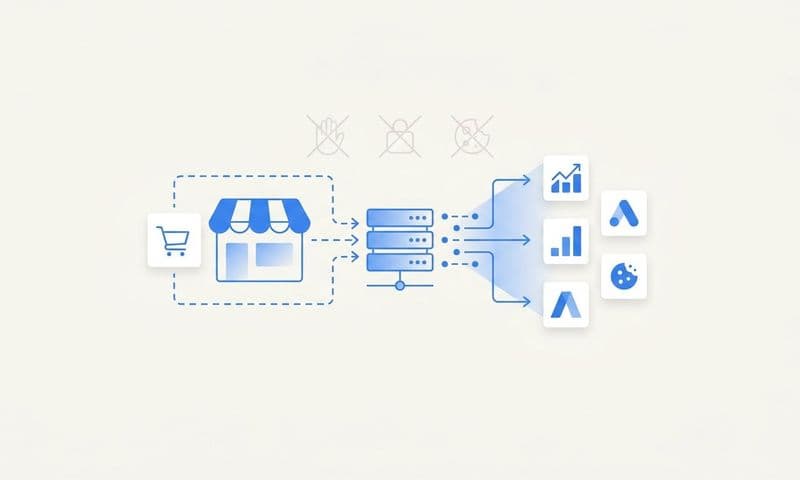
Here is where the real fix begins. Server-side tracking is the most effective technical solution to browser tracking prevention because it sidesteps the problem entirely. Instead of relying on the browser to fire a pixel and send data to an ad platform, server-side tracking captures conversion events on your server and sends them directly to the platforms. The browser's privacy controls never enter the picture.
Understand why this works at a fundamental level. Browser-based pixels are client-side scripts. They run in the user's browser, which means they are subject to whatever restrictions that browser imposes. ITP, ETP, ad blockers, and browser extensions can all interfere with them. Server-side tracking moves the data collection to your server environment, which operates independently of the browser. Our deep dive into why server-side tracking is more accurate explains the technical advantages in detail. When a conversion happens, your server captures the event and sends it to Meta, Google, or any other platform through a direct API connection. No browser involvement, no browser restrictions.
Set up server-side event tracking. Platforms like Cometly offer server-side tracking that captures conversion events at the server level and sends them directly to your ad platforms. This means that even when a user's browser blocks your pixel from firing, the conversion event is still captured and attributed correctly. Setting this up typically involves placing a lightweight first-party script on your site that communicates with your server, which then handles the data transmission to ad platforms.
Configure your Conversions API connections. Meta's Conversions API (CAPI), Google's server-side tagging through Google Tag Manager, and similar platform-specific solutions all work on the server-to-server principle. For each platform you advertise on, configure the API connection so that conversion data flows server-to-server rather than relying solely on browser pixels. This is not an either/or decision. You want both layers active, but server-side should be your primary data source.
Keep your client-side pixels as a secondary layer. Do not remove your browser pixels entirely. They still capture data for users whose browsers do not block them, and running both layers gives you redundancy. The key is to implement deduplication logic so that when both your pixel and your server-side tracking capture the same event, the platform counts it only once. Addressing duplicate conversion tracking issues is critical here, and both Meta and Google have built-in deduplication mechanisms you can configure using event ID matching.
Verify the implementation with a direct comparison. After your server-side tracking is live, compare the conversion events it captures against your CRM records. Server-side data should align much more closely with your actual sales and lead data than pixel-only data did. If you are still seeing large discrepancies, review your event triggers and API configurations to ensure all key conversion events are being captured correctly at the server level.
This step alone will close a significant portion of your data gap. Many marketers are surprised by how many conversions were happening that their browser pixels were simply never capturing.
Step 4: Strengthen First-Party Data Collection Across Every Touchpoint
Server-side tracking solves the technical data collection problem, but it works best when it has rich first-party data to work with. This step is about building a data collection strategy that does not depend on third-party cookies or browser-based identifiers that can be stripped away.
Collect first-party identifiers at every opportunity. Email addresses, phone numbers, and form submissions are your most valuable first-party data assets. Every touchpoint in your funnel should have a natural opportunity to collect this information: lead forms, newsletter signups, checkout flows, webinar registrations, free trial signups. When you have a first-party identifier tied to a user, you can stitch together their journey across sessions and devices even when cookies are absent. A robust first-party data tracking strategy is the foundation of resilient attribution in the privacy-first era.
Use first-party cookies set by your own domain. Not all cookies are treated equally by browsers. First-party cookies set by your own server (via HTTP response headers) are treated more favorably than cookies set by JavaScript from your own domain, and far more favorably than third-party cookies. Work with your development team to ensure that your session and attribution cookies are set server-side by your own domain. This approach maintains better persistence under ITP restrictions than JavaScript-set cookies.
Implement proper UTM parameter hygiene. UTM parameters are one of the most reliable attribution mechanisms available because they live in the URL rather than in a cookie. But they only work if you use them consistently and capture them properly when users land on your site. Make sure every paid campaign uses UTM parameters, that your landing pages capture and store these parameters in your CRM or database when a form is submitted, and that your attribution logic reads these stored values rather than relying on cookie-based session data that may have expired.
Connect your data sources through a unified attribution platform. First-party data is most powerful when it flows between your systems. Connecting your CRM, ad platforms, and website through a platform like Cometly allows you to stitch together the full customer journey using first-party identifiers rather than third-party cookies. When a lead submits a form, their email address becomes the thread that ties their ad click, their website sessions, and their eventual purchase together into a single, coherent attribution path. Following attribution tracking best practices ensures this data flows cleanly across every system.
Build consent-based data collection flows. Collecting first-party data responsibly means giving users clear choices about what they share. Implement consent management that is transparent and easy to understand. Users who actively opt in to data sharing tend to provide higher-quality data, and consent-based collection ensures your first-party data strategy remains sustainable as privacy regulations continue to evolve.
Step 5: Feed Enriched Conversion Data Back to Ad Platform Algorithms
Fixing your tracking is only half the equation. The other half is making sure that the accurate data you are now capturing actually improves your ad performance. This step is about closing the loop between your improved attribution and the algorithms that control your ad delivery.
Understand why this step matters so much. Ad platform algorithms like Meta's Advantage+ and Google's Smart Bidding do not optimize based on what actually happened in your business. They optimize based on the conversion signals you send them. If you have been sending incomplete, browser-filtered conversion data for months, the algorithm has been learning from a distorted picture. It may be bidding on the wrong audiences, at the wrong times, or toward the wrong conversion events. Understanding how lost ad revenue from tracking issues compounds over time makes it clear why feeding better data back to platforms is urgent.
Use conversion sync to send server-verified events back to platforms. With server-side tracking in place, you now have conversion events that are not filtered by browser restrictions. Use conversion sync capabilities to push these accurate, server-verified events back to Meta, Google, TikTok, and any other platforms you advertise on. Cometly's conversion sync is designed to do exactly this, sending enriched conversion data directly to ad platforms so their algorithms have the complete picture they need to optimize effectively.
Enrich the signals you send with downstream data. Do not just send a basic conversion event. Enrich it with meaningful signals: actual revenue values associated with each conversion, lead quality scores from your CRM, pipeline stage progression, and lifetime value indicators where available. When Meta or Google's algorithm knows not just that a conversion happened but that it was a high-value conversion from a customer who went on to make repeat purchases, it can optimize toward finding more customers like that one.
Monitor event match quality scores and tracking health indicators. Meta provides an Event Match Quality score that tells you how well your conversion events are being matched to actual users in their system. Google provides conversion tracking health indicators in Google Ads. After implementing server-side tracking and conversion sync, check these scores regularly. Improving match quality scores is a strong signal that your data is getting cleaner and that the algorithm has more to work with.
Give the algorithm time to relearn. After you start sending better data, expect a short period of adjustment. The algorithm needs time to process the new signals and update its optimization model. In the weeks following implementation, you should start to see improvements in targeting precision, audience quality, and cost efficiency as the algorithm begins optimizing toward a more accurate picture of your actual conversions.
Step 6: Validate Your Fixes and Build an Ongoing Monitoring System
Implementing fixes is not the end of the process. Browser privacy features evolve constantly, and what works today may need adjustment after the next browser update. This final step is about confirming that your fixes are working and building a system to stay ahead of future changes.
Re-run your data gap analysis. Go back to the baseline you established in Step 2. Pull the same comparison across your ad platforms, analytics tool, and CRM for a comparable time period after your fixes are live. Calculate your new discrepancy rates and compare them against your original baseline. A meaningful reduction in the gap between reported conversions and actual CRM records is your primary success indicator. If the gap has not narrowed, revisit your server-side tracking configuration and first-party data flows.
Test across all major browsers on real devices. Do not just test in Chrome. Open Safari on an iPhone, Firefox on a desktop, Brave on a laptop, and Edge on a Windows machine. Visit your key conversion pages and check that tracking events fire correctly in each environment. Also test in private or incognito browsing modes, which apply stricter cookie restrictions. If your server-side tracking is properly configured, events should be captured regardless of the browser or browsing mode. For iOS-specific concerns, review our guide on pixel tracking issues on iOS devices to ensure mobile Safari is covered.
Set up automated alerts for tracking anomalies. Configure alerts in your analytics platform or attribution tool to notify you when conversion tracking drops suddenly or falls below expected thresholds. A significant drop in reported conversions that is not explained by a drop in traffic or a change in campaigns is often the first sign that a browser privacy update is breaking tracking. Catching these drops early means you can investigate and adapt quickly rather than discovering the problem weeks later.
Create a quarterly tracking health review. Schedule a recurring review every quarter where you re-audit your tracking setup, check for new browser privacy announcements, verify that your server-side connections are still active and sending data correctly, and review your event match quality scores. Browser privacy changes are announced publicly, so staying informed about upcoming changes gives you time to adapt before they affect your data.
Use a unified analytics dashboard as your single source of truth. One of the most practical ways to maintain ongoing visibility is to consolidate your attribution data in a single place. Cometly's analytics dashboard is built to reconcile data across all platforms and flag discrepancies in real time, giving you a consistent, accurate view of what is driving your revenue rather than trying to manually reconcile reports from five different ad platforms. When everything flows into one place, anomalies become much easier to spot.
Ongoing monitoring is what separates marketers who stay ahead of tracking prevention issues from those who discover problems only after they have already distorted months of campaign data.
Your Tracking Recovery Checklist and Next Steps
Browser tracking prevention issues are not a one-time problem to solve. They are an ongoing challenge that evolves with every browser update and privacy policy change. But by following this process, you now have a repeatable framework to stay ahead of it.
Here is a quick checklist to confirm you are covered:
1. You have audited your tracking setup and documented your vulnerability points in a clear matrix.
2. You have quantified your data gaps with a baseline comparison across ad platforms, analytics, and CRM records.
3. Server-side tracking is live and serving as your primary data source, with client-side pixels as a secondary redundancy layer.
4. First-party data collection is strong across all touchpoints, with proper UTM hygiene and server-set cookies where possible.
5. Enriched conversion data is flowing back to your ad platform algorithms through conversion sync.
6. You have a monitoring system in place to catch new tracking issues early, including automated alerts and a quarterly review process.
Each of these steps builds on the last. Skip one and you leave a gap that browser tracking prevention will eventually find.
Cometly is built to help marketers solve exactly these problems. From server-side tracking and multi-touch attribution to conversion sync and AI-powered optimization recommendations, it gives you the infrastructure to capture every touchpoint, understand what is actually driving revenue, and feed better data back to the algorithms that control your ad spend.
If you are ready to stop guessing and start scaling with accurate data, Get your free demo today and start capturing every touchpoint to maximize your conversions.