Apple's App Tracking Transparency framework, introduced with iOS 14.5 in April 2021, fundamentally changed how marketers collect data from iPhone and iPad users. When users opt out of tracking, and the majority do when prompted, ad platforms like Meta, Google, and TikTok lose visibility into conversions, audience signals, and campaign performance. The result is inflated costs, broken attribution, and campaigns that start to feel like guesswork.
The scale of this problem became undeniable when Meta disclosed in its February 2022 earnings call that ATT was expected to cost the company approximately $10 billion in ad revenue for that year. That figure reflects what advertisers collectively lost in data accuracy, targeting precision, and optimization capability. And the challenge is not going away. Google has been rolling out Privacy Sandbox for Android, signaling that these tracking limitations will expand well beyond the iOS ecosystem.
But here is the thing: iOS tracking limitations do not have to cripple your marketing. There are proven, privacy-respecting strategies that restore the data accuracy you need to make confident budget decisions. These strategies work within Apple's framework, not against it, and they are endorsed by the major ad platforms themselves.
This guide walks you through a clear, step-by-step process to bypass iOS tracking limitations using server-side tracking, conversion APIs, first-party data systems, and multi-touch attribution platforms. You will not find workarounds that violate privacy policies here. Instead, you will find the technical and strategic moves that sophisticated marketing teams are already using to reclaim visibility into their customer journeys.
By the end, you will have a practical roadmap to restore data accuracy, optimize campaigns with real signals instead of modeled estimates, and feed ad platform algorithms the quality data they need to perform. Let's get into it.
Step 1: Audit Your Current Tracking Gaps and Data Loss
Before you can fix the problem, you need to understand exactly how bad it is. Many marketers have a vague sense that their data is off, but they have never quantified the gap. That changes now.
Start by pulling your reported conversions from each ad platform: Meta Ads Manager, Google Ads, TikTok Ads Manager. Then compare those numbers against your actual conversion data from your CRM, payment processor, or back-end database for the same time period. The difference between what your ad platforms report and what your business actually recorded is your tracking gap. For many advertisers running significant iOS traffic, this gap is substantial. Understanding why conversion tracking numbers are wrong is the first step toward fixing them.
What to look for in your audit:
Modeled vs. reported conversions: Meta now labels a portion of conversions as "modeled" because it cannot confirm them through direct tracking. A high ratio of modeled conversions signals heavy data loss from iOS opt-outs.
Attribution window discrepancies: Compare 7-day click attribution in Meta against your CRM data for the same window. Significant gaps here point to pixel-level tracking failures driven by iOS restrictions.
Campaign and audience-level impact: Break your audit down by campaign type and audience. Retargeting audiences and interest-based audiences tend to suffer most because they rely heavily on the cross-app and cross-site behavioral data that ATT restricts.
Delayed and incomplete reporting: Check whether your conversion data is arriving late or in batches. SKAdNetwork, Apple's privacy-preserving attribution framework now on version 4.0, introduces reporting delays and aggregation that make real-time optimization difficult.
Document everything you find. Create a simple spreadsheet that captures your reported conversions, your actual conversions, and the percentage gap by platform and campaign type. This becomes your baseline. Every step that follows will help close this gap, and you need that baseline to measure whether your improvements are actually working.
This audit also helps you prioritize. If your Google Ads data looks relatively solid but your Meta data is severely degraded, you know where to focus your implementation effort first. If you suspect your Meta reporting is off, explore the common reasons why Facebook Ads show wrong data to better diagnose the issue.
Think of this step as taking inventory before a renovation. You would not start knocking down walls without knowing what is structural. The same logic applies here.
Step 2: Implement Server-Side Tracking to Replace Browser Pixels
Browser-based pixels are the core of the problem. When a user opts out of tracking on iOS, the device restricts what data the browser can collect and share. Your Meta pixel, Google tag, and other client-side scripts lose access to the signals they depend on. Server-side tracking solves this at the architectural level.
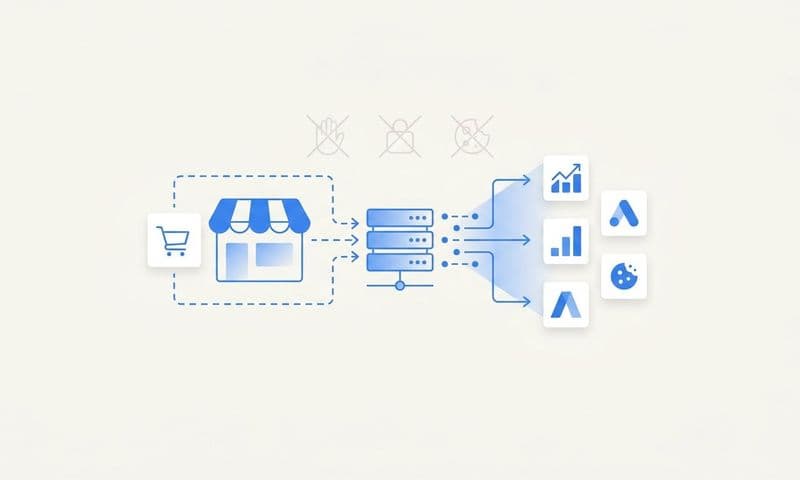
Here is the key distinction: a browser pixel fires from the user's device, which means it is subject to ATT restrictions, ad blockers, browser privacy settings, and cookie deprecation. A server-side tracking setup fires from your own web server or backend system, which means it is not affected by any of those client-side restrictions. The event data travels from your server directly to the ad platform's API, completely bypassing the browser layer.
How server-side tracking works in practice:
When a user completes a purchase on your website, your server captures that event directly. Instead of relying on a pixel in the user's browser to fire and report the conversion, your server sends the conversion data to the ad platform's API from your backend. The user's device settings are irrelevant to this transaction.
The key platforms and their server-side solutions:
Meta Conversions API (CAPI): Meta's official server-side solution that sends conversion events directly to Meta's servers. It captures events that the pixel misses and improves event match quality scores, which directly affects how well Meta can attribute conversions and optimize delivery.
Google Ads Enhanced Conversions: Google's approach to server-side conversion measurement that supplements tag-based tracking with hashed first-party data. It improves conversion accuracy, particularly for users who have opted out of third-party tracking.
TikTok Events API: TikTok's server-side solution that works alongside the TikTok Pixel to capture conversion events that client-side tracking misses.
Setting up a server-side endpoint requires connecting your website backend or CRM to each platform's API. For a detailed walkthrough of the technical process, refer to this server-side tracking setup guide. For most teams, this is a development task that takes anywhere from a few hours to a few days depending on your tech stack.
Cometly's server-side tracking is built to handle this entire layer for you. It captures every touchpoint from ad click to CRM event without relying on client-side cookies, giving your attribution system a complete, unbroken view of the customer journey even when iOS restrictions are in play. Rather than building and maintaining separate server-side connections for each platform, Cometly centralizes the data collection and routes it appropriately.
Once your server-side tracking is live, you should immediately see an improvement in the conversion data flowing into your ad platforms. Your modeled conversion ratio in Meta should decrease, and your reported conversion numbers should move closer to your CRM actuals.
Step 3: Configure Conversion APIs on Each Ad Platform
Server-side tracking captures the data. Conversion API configuration determines how well that data matches back to the users and campaigns in each ad platform. This step is where you close the loop between your server-side events and the optimization engines inside Meta, Google, and other platforms.
Event matching parameters are the foundation. When you send a conversion event to Meta CAPI or Google Enhanced Conversions, you can include identifiers that help the platform match the conversion to a specific user and their ad interactions. The more identifiers you include, the higher your event match quality score, and the more conversions the platform can confidently attribute.
The key parameters to pass with each event include:
Email address (hashed): The most powerful matching signal. If a user signed up with an email address that Meta or Google has on file, this creates a strong match. Always hash email addresses using SHA-256 before sending.
Phone number (hashed): A strong secondary identifier, particularly valuable for users who signed up via phone rather than email.
Click ID (fbclid or gclid): The click identifier appended to URLs when users click your ads. Capturing and passing this back with conversion events creates a direct link between the conversion and the specific ad click, bypassing the need for device-level tracking entirely.
IP address and user agent: Contextual signals that help platforms make probabilistic matches when direct identifiers are not available.
Deduplication is non-negotiable. If you are running both a browser pixel and a server-side API simultaneously (which is the recommended approach for maximum coverage), you must implement deduplication to prevent double-counting conversions. Both Meta CAPI and Google Enhanced Conversions have built-in deduplication mechanisms, but they require you to send a consistent event ID with both the pixel event and the server event. When the platform sees the same event ID from two sources, it counts it once.
To configure Meta CAPI, you will work through Meta's Events Manager, where you can connect your server-side data source, verify your domain, and test event receipt. If you are running Meta campaigns, understanding the full landscape of Facebook tracking software options can help you evaluate the best approach for your setup.
Cometly's Conversion Sync automates this entire process. Rather than manually configuring API connections and deduplication logic for each platform, Conversion Sync feeds enriched, conversion-ready events back to Meta, Google, and other platforms automatically. It handles the hashing, the event matching parameters, and the deduplication, so your ad platforms receive the highest-quality conversion signals possible without your team managing it manually.
After configuring your conversion APIs, monitor your event match quality scores in Meta Events Manager and your conversion tracking status in Google Ads. Improving these scores is a direct indicator that your attribution accuracy is recovering.
Step 4: Build a First-Party Data Collection Strategy
Server-side tracking and conversion APIs solve the data transmission problem. First-party data strategy solves the data ownership problem. When you own the data that drives your attribution, you are no longer dependent on what ad platforms can observe from the outside.
First-party data is information your users voluntarily share with you directly: email addresses from signups, phone numbers from checkout forms, account registrations, purchase histories, and engagement events on your own properties. Unlike third-party cookies or platform pixels, this data is not subject to ATT restrictions because it comes from direct relationships with your customers.
UTM parameters and click ID passthrough are your attribution backbone. Every ad you run should include UTM parameters (utm_source, utm_medium, utm_campaign, utm_content, utm_term) that identify the traffic source. When a user clicks your ad, these parameters should be captured and stored in your CRM or database alongside the user's profile. For a deeper dive into how this works, read about UTM tracking and how it helps your marketing.
Click ID passthrough takes this further. When Meta appends an fbclid or Google appends a gclid to your landing page URL, capture that value immediately and store it in a first-party cookie or your database. This creates a durable link between the ad click and any future conversion, independent of what the user's device allows the browser to share.
Connect your CRM and payment processor to your attribution system. Your CRM holds the ground truth about your customers: who converted, when, what they purchased, and what their lifetime value looks like. When this data flows back into your attribution system, you can match revenue outcomes to the marketing touchpoints that drove them, even when those touchpoints happened weeks earlier and across multiple devices.
Payment processors like Stripe capture purchase events with high reliability. Connecting these events to your attribution system through server-side integrations means that every confirmed purchase is recorded accurately, regardless of what happened at the browser level.
First-party data becomes the foundation for accurate multi-touch attribution in a post-ATT world. When iOS strips the platform pixels from earlier touchpoints in the customer journey, your own first-party records can fill those gaps, provided you have built the infrastructure to collect and connect that data systematically.
Step 5: Adopt Multi-Touch Attribution to See the Full Journey
Last-click attribution was already a flawed model before iOS 14.5. In a post-ATT environment, it becomes actively misleading. Here is why: when iOS restricts tracking on earlier touchpoints in the customer journey, those touchpoints become invisible to last-click models. The final click before conversion gets all the credit, even though the user may have engaged with your brand across multiple ads, channels, and sessions before making that decision.
The result is that your top-of-funnel campaigns look like they are not working, your retargeting campaigns look like they are doing everything, and you cut budget from the channels that were actually building the intent that drove the conversion. Implementing touchpoint attribution tracking corrects this distortion.
Understanding the main attribution models:
First-touch attribution: Assigns full credit to the first interaction. Useful for understanding which channels are best at generating awareness and bringing new prospects into your funnel. Tends to overvalue top-of-funnel channels.
Linear attribution: Distributes credit equally across all touchpoints. Gives a balanced view of the full journey but does not distinguish between high-impact and low-impact interactions.
Time-decay attribution: Gives more credit to touchpoints that occurred closer to the conversion. Works well for shorter sales cycles where recency is a meaningful signal of intent.
Data-driven attribution: Uses machine learning to assign credit based on which touchpoints actually influenced conversion outcomes, based on patterns across your historical data. The most accurate model when you have sufficient conversion volume, but it requires robust data to function well.
In a post-ATT world, the choice of attribution model matters less than the quality of the data feeding it. A data-driven model built on incomplete, pixel-only data will produce worse insights than a linear model built on comprehensive server-side and first-party data. Choosing the right revenue attribution tracking tools is critical to ensuring your data foundation is solid enough for any model to deliver value.
Cometly's multi-touch attribution connects ad platform data, website events, and CRM records to reveal which sources actually drive revenue across the full customer journey. Rather than seeing only the last click that your ad platforms can observe, you see every touchpoint that contributed to a conversion, including the ones that iOS tracking restrictions would otherwise erase. This gives you the confidence to allocate budget toward the channels and campaigns that are genuinely moving the needle.
Step 6: Feed Better Data Back to Ad Platform Algorithms
Here is a feedback loop that many marketers underestimate. Ad platform algorithms, the systems inside Meta, Google, and TikTok that decide who sees your ads and how much you pay, optimize based on the conversion signals they receive. When iOS opt-outs reduce the conversion data flowing back to those algorithms, the algorithms make worse decisions. They target the wrong people, set inefficient bids, and build lookalike audiences from incomplete data. The degraded targeting then produces worse results, which produces fewer conversions, which further starves the algorithm. It is a compounding problem.
The solution is to actively feed better data back into those systems. Every enriched server-side conversion event you send through the Conversions API is a signal that helps the algorithm recalibrate. Understanding why ad tracking is inaccurate helps you appreciate why this feedback loop is so essential to restoring performance.
Best practices for feeding data back to ad platforms:
Prioritize high-value conversion events. Do not send every micro-event back to the algorithm. Focus on the events that represent genuine intent and value: purchases, qualified leads, subscription activations. Platforms like Meta allow you to configure event prioritization through their Aggregated Event Measurement system, which is specifically designed for the post-ATT environment.
Include conversion values where possible. Sending revenue values with your conversion events enables value-based bidding strategies. Instead of optimizing for the number of conversions, the algorithm can optimize for the total value of conversions, which typically produces better ROAS outcomes.
Build lookalike audiences from server-side data. When you create lookalike audiences in Meta or Google, use customer lists built from your CRM data rather than pixel-based audiences. CRM-based lists are not affected by ATT restrictions and tend to produce higher-quality audience matches.
Monitor and improve event match quality scores continuously. Meta's Event Match Quality score in Events Manager is a direct indicator of how well your server-side events are matching to users in Meta's system. Higher scores mean more conversions are being attributed and more data is available for optimization. Aim for a score above 7 out of 10 as a baseline target.
Cometly feeds enriched conversion data back to Meta, Google, and other platforms automatically through its Conversion Sync feature. The AI-powered system ensures that the conversion signals reaching each platform are as complete and accurate as possible, which directly improves the performance of the platform's optimization algorithms. This is not just about measurement accuracy; it is about making your ad spend work harder by giving the algorithms the fuel they need to find your best customers.
Putting It All Together: Your iOS Tracking Recovery Checklist
You now have a complete framework for recovering from iOS tracking limitations. Here is a quick-reference checklist to guide your implementation and keep you on track.
Step 1: Audit your tracking gaps. Compare ad platform reported conversions against CRM actuals. Document the gap by platform, campaign type, and audience. Establish your baseline metrics.
Step 2: Implement server-side tracking. Set up server-side event capture that bypasses browser-level restrictions. Connect your backend to Meta CAPI, Google Enhanced Conversions, and TikTok Events API.
Step 3: Configure conversion APIs. Pass event matching parameters (hashed email, phone, click IDs) with every conversion event. Implement deduplication between pixel and server events. Monitor event match quality scores.
Step 4: Build first-party data infrastructure. Implement UTM parameter capture and click ID passthrough. Connect your CRM and payment processor to your attribution system. Stop depending on third-party signals you do not control.
Step 5: Adopt multi-touch attribution. Move beyond last-click models that distort your view of the customer journey. Use an attribution model appropriate to your sales cycle and data volume.
Step 6: Feed enriched data back to ad platforms. Send high-quality server-side conversion events with values to improve algorithm performance. Build lookalike audiences from CRM data.
Key metrics to monitor after implementation: conversion match rate in Meta Events Manager, reported conversions versus CRM actuals (your tracking gap), ROAS accuracy across platforms, and event match quality scores.
It is worth emphasizing: every strategy in this guide works within Apple's privacy framework. You are not circumventing ATT. You are building infrastructure that does not depend on the cross-app tracking that ATT restricts. That is an important distinction, both ethically and practically.
If you want a single platform that handles server-side tracking, multi-touch attribution, conversion sync, and AI-powered optimization together, Cometly is built for exactly this. It connects your ad platforms, CRM, and website to give you a complete, accurate view of every customer journey, and it feeds that data back to the platforms that need it most. Get your free demo today and start capturing every touchpoint to maximize your conversions.