Third-party cookies have been the backbone of digital advertising tracking for over two decades. But the landscape is shifting fast, and for many marketers, the shift is already here.
Browsers like Safari and Firefox have blocked third-party cookies by default for years. Google Chrome has been moving toward deprecation through its Privacy Sandbox initiative, and regardless of where that timeline lands, a large and growing share of web traffic already blocks third-party cookies entirely. The result? Campaigns that once showed clear ROI are now filled with gaps, blind spots, and misattributed conversions.
If you have noticed your attribution data looking thinner than it used to, or your reported cost per acquisition drifting further from reality, cookie degradation is likely a contributing factor.
The good news is that implementing cookieless tracking is not just a workaround. It is a better, more accurate, and more privacy-forward way to understand your customer journey. Instead of relying on fragile browser cookies that get blocked, deleted, or restricted, cookieless methods use server-side data collection, first-party identifiers, and deterministic matching to connect ad clicks to actual revenue.
This guide walks you through the exact steps to implement cookieless tracking across your marketing stack. Whether you are running paid campaigns on Meta, Google, TikTok, or LinkedIn, you will learn how to maintain full-funnel visibility without depending on third-party cookies.
By the end, you will have a clear roadmap to protect your attribution accuracy, feed better data back to ad platform algorithms, and make confident budget decisions rooted in real performance data. Let's get into it.
Step 1: Audit Your Current Tracking Setup and Identify Cookie Dependencies
Before you can fix your tracking, you need to understand exactly what you are working with. Most marketing teams have accumulated a complex web of pixels, tags, and scripts over the years, and many of those scripts depend on third-party cookies in ways that are not immediately obvious.
Start by mapping every tracking tag and script currently running on your site. Open your tag management system (Google Tag Manager is the most common) and document every tag that fires on key pages: your homepage, landing pages, thank-you pages, and checkout confirmation pages. Note what each tag does, which ad platform it belongs to, and when it fires.
Identify browser-pixel-dependent tags: Tags like the Meta Pixel, standard Google Ads conversion tag, and TikTok Pixel all rely on browser-level cookies to track users across sessions. These are your highest-risk items. When third-party cookies are blocked, these pixels either fail silently or report incomplete data. Understanding ad tracking data discrepancy causes can help you pinpoint where signal loss is occurring.
Check for first-party cookie usage: Some tags use first-party cookies, which are set by your own domain and are far less affected by browser restrictions. These are safer but still not immune to user-level privacy settings or browser updates.
Use browser developer tools to inspect scripts: In Chrome DevTools, navigate to the Application tab and review the Cookies section. Look for cookies set by third-party domains. You can also use tools like Ghostery or the uBlock Origin browser extension to surface third-party trackers that may not be visible in your tag manager.
Document your conversion events: For each conversion event you track (form submissions, purchases, demo bookings, phone calls), identify whether the event fires via a browser pixel, a server-side call, or both. This tells you exactly which conversion data is at risk as cookie support erodes.
Once you have completed this audit, organize your findings into a simple spreadsheet: tag name, platform, cookie type (first-party or third-party), conversion events tracked, and risk level. This document becomes your implementation roadmap for the steps that follow.
Success indicator: You have a complete inventory showing every tracking dependency, which ones rely on third-party cookies, and which conversion events are most vulnerable to data loss.
Step 2: Shift to Server-Side Tracking as Your Data Foundation
This is the most important technical step in implementing cookieless tracking, and it is the one that delivers the biggest immediate impact on data accuracy.
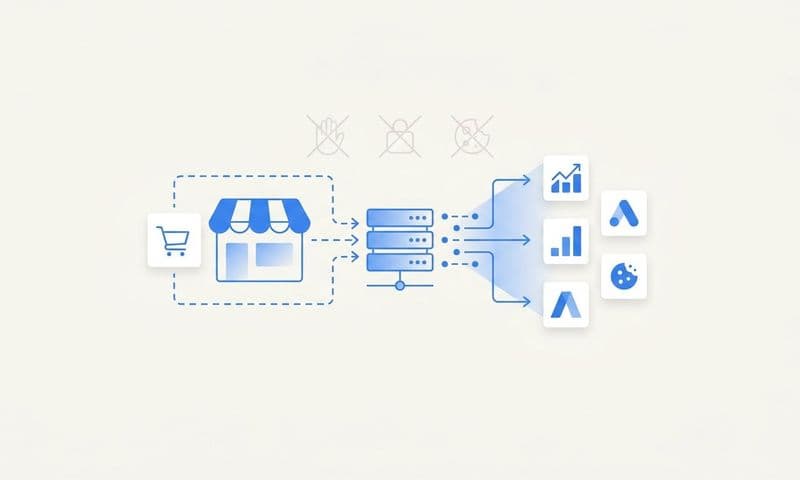
Server-side tracking works differently from browser-based pixels. Instead of a snippet of JavaScript firing in a user's browser (where it can be blocked, restricted, or degraded by browser settings), server-side tracking sends conversion data directly from your server to the ad platform's API. The browser never has to cooperate. Cookie restrictions become irrelevant. For a deeper dive into this approach, read our guide on why server-side tracking is more accurate.
Think of it this way: browser pixels are like passing a note through a crowded room where anyone can intercept or block it. Server-side tracking is a direct phone call between your server and the ad platform. Much harder to interrupt.
The major platforms that support server-side integrations include:
Meta Conversions API (CAPI): Sends web events, app events, and offline events directly from your server to Meta. It works alongside or as a replacement for the Meta Pixel and is designed specifically to address signal loss from browser restrictions.
Google Ads Enhanced Conversions: Sends hashed first-party data (like email addresses) from your server to Google, allowing Google to match conversions to signed-in users even without cookies.
TikTok Events API: Functions similarly to Meta's CAPI, allowing server-to-server event transmission that bypasses browser limitations.
To set up server-side tracking, you need a way to capture events on your server when key actions happen (a form submission, a purchase, a demo booking) and then transmit those events to each ad platform's API with the required parameters. This typically involves setting up a server-side container in Google Tag Manager, building direct API integrations, or using a dedicated attribution platform that handles this infrastructure for you. Our implementing server-side tracking guide covers the technical details in depth.
Cometly's server-side tracking is built specifically for this use case. It captures every touchpoint from the initial ad click through to CRM events, without relying on browser cookies at any stage. This gives you a complete, enriched view of the customer journey that browser pixels simply cannot provide.
Critical pitfall to avoid: If you run both a browser pixel and a server-side integration simultaneously (which is recommended during the transition period), you must deduplicate events. Without deduplication, the same conversion gets counted twice: once from the browser pixel and once from the server-side send. Every major ad platform provides a deduplication mechanism using event IDs. Implement it from day one.
Success indicator: Your server-side events are appearing in your ad platform event managers with high match rates, and your deduplication logic is confirmed working by comparing event counts before and after implementation.
Step 3: Build a First-Party Data Strategy That Powers Attribution
Server-side tracking solves the transmission problem. First-party data solves the identity problem. Together, they form the complete foundation of cookieless attribution.
First-party data, in this context, means information that your visitors and customers voluntarily share with you directly: email addresses, phone numbers, account IDs, and on-site behavioral signals collected from your own domain. Unlike third-party cookies, this data is not subject to browser restrictions because you own it and collect it with explicit user consent. To learn more about leveraging this approach, explore our article on first-party data tracking for ads.
The key is collecting first-party identifiers at the right moments in your funnel and passing them into your tracking system so they can be used for attribution.
Identify your first-party data collection moments: Form fills, account creation, checkout, demo bookings, and newsletter signups are all natural points where users share identifying information. Each of these moments is an opportunity to capture a persistent identifier that can follow the customer journey across sessions and devices.
Implement deterministic matching: Deterministic matching means connecting a known user identity (like a hashed email address) across multiple touchpoints, rather than inferring connections through probabilistic modeling. When a user fills out a form on your site, that hashed email can be matched to the same user who clicked your Meta ad three days earlier, even if no cookie exists to connect those sessions. This is how platforms like Meta's CAPI and Google's Enhanced Conversions achieve high match rates.
Structure your UTM parameters and click IDs correctly: UTM parameters (utm_source, utm_medium, utm_campaign, utm_content, utm_term) are URL-based, not cookie-based. They survive in a cookieless environment as long as you capture and store them at the session level when a user first arrives. Platform-specific click identifiers like Meta's fbclid and Google's gclid work the same way. Capture these values when a user lands on your site and associate them with any subsequent conversion events that user completes.
Store attribution data server-side: Rather than relying on browser cookies to persist UTM and click ID data across a session, store this information in your own database or CRM record when a user converts. This way, even if the browser session ends or cookies are cleared, the attribution context is preserved in your system.
Success indicator: You can trace a specific conversion back to a specific ad click using only first-party data and URL parameters, with no reliance on third-party cookies at any point in the chain.
Step 4: Connect Your Ad Platforms, CRM, and Attribution System
Here is where many cookieless tracking implementations fall short: the data exists, but it lives in silos. Your Meta account shows one set of conversions. Your Google Ads account shows another. Your CRM has the actual revenue data. And none of these systems talk to each other in a meaningful way.
Siloed data is the biggest threat to cookieless attribution tracking accuracy. Without a unified view, you cannot understand which ads are actually driving revenue, you cannot optimize budgets intelligently, and you cannot trust the numbers you are reporting.
The solution is to connect all your data sources to a central attribution platform that can stitch together the full customer journey.
Connect your ad accounts: Link your Meta, Google Ads, TikTok, and LinkedIn accounts to your attribution platform. This pulls in spend data, impression data, click data, and any conversion events those platforms have already recorded. The goal is to have all channel data visible in one place so you can compare performance across platforms using consistent attribution logic.
Integrate your CRM: This step is often skipped, and it is a significant mistake. Your CRM (HubSpot, Salesforce, or similar) holds the downstream revenue data that tells you whether a lead actually became a customer. By integrating your CRM with your attribution platform, you can see not just which ads drove form fills, but which ads drove closed deals, recurring revenue, and high-value customers. Our guide on attribution tracking for lead generation explains how to close this gap effectively.
Map your conversion events consistently: When you connect multiple platforms, you need to ensure that the same conversion event is named and valued consistently across all of them. A "demo booked" event in your CRM should map to the same event in your attribution platform and in your ad platform event managers. Inconsistent event mapping is one of the most common sources of discrepancy in attribution reporting.
Cometly is built specifically for this kind of unified data connection. It connects your ad platforms, CRM, and website data to track the entire customer journey in real time, showing which ads and channels are actually driving leads and revenue, not just clicks. This is the operational foundation that makes cookieless attribution work at scale.
Success indicator: You can open a single dashboard, see spend and conversion data from every ad platform, and trace individual conversions back through your CRM to actual revenue, all within one unified view.
Step 5: Configure Conversion Sync to Feed Better Data Back to Ad Platforms
Implementing cookieless tracking is not just about improving your own visibility. It also directly impacts how well ad platform algorithms perform on your behalf.
Here is the feedback loop that most marketers underestimate: ad platforms like Meta and Google use the conversion signals you send them to optimize targeting, bidding, and delivery. When your conversion data is incomplete or delayed because of cookie blocking, the algorithm is working with degraded information. It makes suboptimal decisions. Your CPAs rise, your ROAS drops, and you cannot figure out why.
When you implement server-side tracking and first-party data matching, you have the opportunity to send richer, more accurate conversion signals back to these platforms, and that is where Conversion Sync becomes a competitive advantage. Learning how ad tracking tools can help you scale ads using accurate data illustrates this principle in action.
Send enriched events, not just basic signals: A basic conversion event tells the ad platform "a purchase happened." An enriched conversion event tells the platform "a purchase happened, the order value was $X, the customer segment is Y, and the attribution path included these touchpoints." The richer the signal, the better the algorithm can optimize toward your most valuable customers.
Include revenue values and customer data: When sending conversion events back to Meta via CAPI or to Google via Enhanced Conversions, include revenue values, hashed customer identifiers, and any segmentation data you have available. This allows the platform's machine learning models to identify patterns among your highest-value converters and find more users who match that profile.
Timing matters: Send conversion events as close to real-time as possible. Delayed signals (sending yesterday's conversions today) reduce the algorithm's ability to optimize active campaigns. Server-side integrations make real-time sending much more reliable than browser pixels, which depend on the user's session being active.
Cometly's Conversion Sync is designed for exactly this purpose. It feeds enriched, conversion-ready events back to Meta, Google, and other platforms automatically, improving the quality of the signals those algorithms receive and directly improving your targeting efficiency and ad ROI over time.
Success indicator: You see improved event match rates and signal quality scores in your Meta Events Manager and Google Ads conversion tracking dashboard. These scores are direct indicators that the platform is receiving higher-quality data from your server-side integration.
Step 6: Validate Your Cookieless Setup and Compare Against Legacy Tracking
Before you turn off your old cookie-based tracking, you need to validate that your new cookieless setup is capturing data accurately. The best way to do this is to run both systems in parallel for a defined testing period and compare the results.
Set up a parallel tracking period: Keep your existing browser pixels active while your server-side and first-party data systems are running. This gives you a side-by-side comparison of what each system reports. Run this parallel period for at least two to four weeks to account for natural variation in campaign performance and conversion cycles. Following attribution tracking best practices during this phase ensures you get reliable comparison data.
Key metrics to compare:
Conversion counts: Are your server-side events capturing more, fewer, or the same number of conversions as your browser pixels? In most cases, server-side tracking captures more conversions because it is not subject to ad blockers or browser restrictions. A significant increase is expected and is a sign the new system is working correctly.
Attributed revenue per channel: Compare how each channel's attributed revenue looks under your old last-click cookie model versus your new multi-touch cookieless model. You will likely see shifts in how credit is distributed across channels, which is a more accurate reflection of how your customer journeys actually unfold.
Cost per acquisition and ROAS: As your new conversion data feeds back into ad platform algorithms, you should begin to see gradual improvements in CPA and ROAS as the algorithms optimize based on better signals.
Troubleshoot common discrepancies: If you see duplicate conversions, check your event deduplication logic. If you see missing events, verify that your server-side triggers are firing correctly for all conversion scenarios (mobile users, users with JavaScript disabled, users who navigate directly to the thank-you page). If revenue figures do not match your CRM, check your event mapping and make sure revenue values are being passed correctly.
When to sunset legacy tracking: Once your cookieless system has been running for a full testing period, your conversion counts are stable and higher than before, your event match rates are strong, and your CRM data aligns with your attribution platform, you are ready to phase out your cookie-dependent browser pixels as your primary measurement source. Keep them as secondary signals if needed, but your cookieless setup should become the authoritative source of truth. For a broader look at the tools available, see our comparison of cookieless tracking platforms.
Success indicator: Your cookieless system consistently reports equal or higher conversion counts than legacy tracking, your attributed revenue aligns with CRM records, and you have identified and resolved any duplicate or missing event issues.
Putting It All Together: Your Cookieless Tracking Checklist
Implementing cookieless tracking is a multi-step process, but each step builds logically on the last. Here is a quick-reference checklist to keep your implementation on track:
1. Complete a full tracking audit and document every cookie-dependent tag, pixel, and script on your site.
2. Implement server-side tracking using Meta Conversions API, Google Enhanced Conversions, TikTok Events API, or a platform like Cometly that handles server-side infrastructure across all channels.
3. Build your first-party data collection strategy by capturing email addresses, phone numbers, and click IDs at key funnel moments and storing attribution context server-side.
4. Connect your ad platforms, CRM, and attribution system to create a unified view of the full customer journey from ad click to closed revenue.
5. Configure Conversion Sync to send enriched, server-side conversion events back to ad platforms, improving their optimization algorithms and your ad ROI.
6. Validate your cookieless setup by running parallel tracking, comparing key metrics, and troubleshooting discrepancies before sunsetting legacy cookie-based tracking.
It is worth emphasizing: implementing cookieless tracking is not just a compliance move or a defensive response to browser changes. It is a path to more accurate, reliable attribution data than most marketing teams have ever had. Cookie-based tracking was always a workaround, a clever hack that the industry built its measurement infrastructure on. First-party data and server-side collection are genuinely better foundations.
The marketers who make this transition now will have a real competitive advantage: cleaner data, better-optimized ad platforms, and the confidence to make budget decisions based on what is actually working.
Ready to elevate your marketing game with precision and confidence? Discover how Cometly's AI-driven recommendations can transform your ad strategy. Get your free demo today and start capturing every touchpoint to maximize your conversions.