You've been running ads across Meta, Google, and maybe TikTok. Your CRM is filling up with leads. But here's the question that keeps you up at night: which marketing channel is actually driving revenue?
Without attribution software, you're flying blind. You might see conversions in your ad platforms, but those numbers don't tell the whole story. Did that customer click a Facebook ad three weeks ago before converting through a Google search? Did they interact with five different touchpoints before finally purchasing? You have no idea.
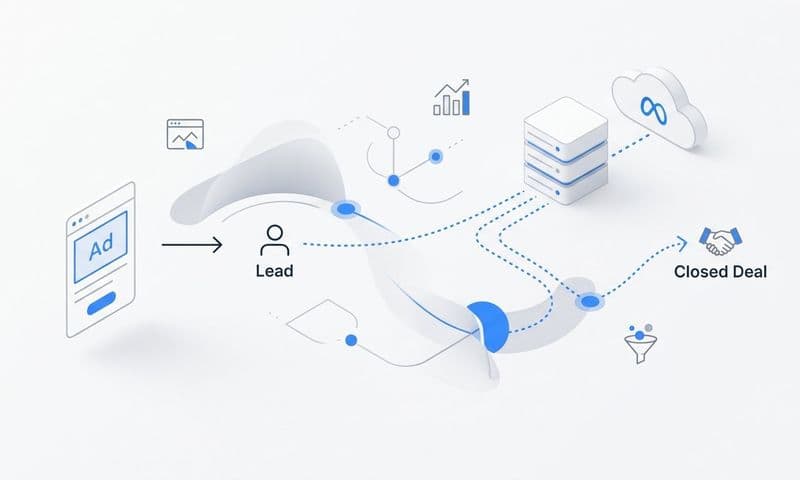
That's where attribution software changes everything. It connects your ad platforms, CRM, and website to track the complete customer journey in real time. You finally see which ads and channels deserve more budget and which ones are wasting money.
But signing up for attribution software isn't as simple as entering your email and clicking "start." You need to connect multiple platforms, configure tracking correctly, and set up attribution models that match your business. Miss a step, and your data will be incomplete or inaccurate from day one.
This guide walks you through the entire process. You'll learn how to assess your needs, gather the right credentials, navigate sign-up, connect your data sources, configure settings, and verify everything works. Whether you're a solo marketer managing a modest budget or part of a team overseeing multi-platform campaigns, you'll have a clear roadmap to get attribution software up and running correctly.
Let's get started.
Step 1: Assess Your Attribution Needs and Goals
Before you sign up for anything, you need to understand what you're trying to solve. Attribution software isn't one-size-fits-all, and choosing the wrong platform or plan wastes time and money.
Start by listing every ad platform you're currently running. Meta? Google Ads? TikTok? LinkedIn? Microsoft Ads? Write them all down. This determines which integrations you'll need during setup.
If you're only running Google Ads, your needs differ drastically from someone managing campaigns across five platforms. Multi-platform marketers need attribution software that can unify data from all sources into one dashboard. Otherwise, you're still jumping between platforms trying to piece together the customer journey.
Next, identify your current tracking pain points. Be specific. Are iOS privacy updates causing your Facebook pixel to underreport conversions? Are you struggling to connect ad clicks to actual revenue in your CRM? Do you have no idea which touchpoint deserves credit when a customer interacts with multiple ads before converting?
These pain points guide your feature requirements. If iOS tracking is your biggest challenge, you need server-side tracking capabilities. If you can't connect ads to revenue, you need deep CRM integration. If multi-touch attribution confuses you, you need software that offers multiple attribution models and makes them easy to understand.
Now define what success looks like. Do you need real-time data to make daily budget adjustments? Do you want to see how organic search, paid ads, and email marketing work together? Do you need to prove ROI to stakeholders who question your marketing spend?
Your success criteria shape which features matter most. Real-time tracking, multi-touch attribution, CRM integration, conversion sync capabilities, AI-powered recommendations—these aren't just buzzwords. They're specific features that solve specific problems. Understanding the differences between marketing attribution software vs traditional analytics helps clarify what you actually need.
Finally, consider your team structure. Are you a solo marketer who needs straightforward dashboards? Or do you have a team of five people who all need different access levels? Understanding who needs to see attribution data affects which plan tier you'll choose and how you'll structure account permissions.
Take 20 minutes to document all of this before moving forward. This clarity prevents you from signing up for software that doesn't match your actual needs.
Step 2: Gather Your Account Information and Access Credentials
Attribution software works by connecting to your existing marketing tools. That means you need proper access to everything before you start the sign-up process. Nothing kills momentum faster than realizing mid-setup that you don't have admin access to your Facebook Ads account.
Start with your ad platforms. You'll need login credentials for every platform you want to track. But more importantly, you need the right permission level. Most attribution software requires admin access to pull data and send conversion events back to the platform.
If you're not the admin on your Meta Business Manager or Google Ads account, reach out to whoever is. Explain that you're implementing attribution software and need admin access temporarily to complete the integration. Don't skip this step—without proper permissions, the connection will fail or provide incomplete data.
Next, verify your CRM access. Whether you use HubSpot, Salesforce, Pipedrive, or another system, you'll need admin-level permissions to create API connections. Attribution software needs to read your CRM data to track leads through the entire customer journey from first click to closed deal.
If your company has a dedicated CRM administrator, loop them in now. Some organizations have security policies that require IT approval before connecting third-party tools. Getting that approval before you start sign-up saves you from frustrating delays later.
Website access is equally critical. You'll need to install tracking pixels or implement server-side tracking, which requires access to your website's code or tag manager. If you use Google Tag Manager, make sure you have publishing permissions. If changes require a developer, schedule time with them now.
Don't forget about billing information. Have a company credit card ready, or know the process for getting new software expenses approved. Some attribution platforms offer free trials, but they still require payment information upfront. Others have different pricing tiers based on your tracked ad spend or event volume. If budget is a concern, explore affordable marketing attribution software options that fit your needs.
Identify who should be the account owner. This person receives important notifications, manages billing, and controls access for other team members. Choose someone who won't leave the company next month, because transferring account ownership later can be unnecessarily complicated.
Create a simple checklist: ad platform credentials with admin access, CRM login with API permissions, website access for pixel installation, billing information, designated account owner. Having everything ready before you click "sign up" makes the entire process smoother and faster.
Step 3: Navigate the Sign-Up Process
Now comes the actual sign-up. This seems straightforward, but small decisions during account creation affect how smoothly everything runs later.
Use your business email address, not a personal Gmail account. Attribution software is a business tool, and using your company email makes account management cleaner. It also prevents access issues if you eventually leave the company or need to transfer ownership.
When creating your password, make it strong but memorable. You'll be logging in frequently, and password reset emails get annoying fast. Consider using a password manager if your team doesn't already have one.
Most attribution platforms ask for basic business information during sign-up: company name, website URL, industry, team size. Answer accurately. This information often determines which features get recommended and which support resources you'll see.
Pay attention to the plan selection page. Attribution software typically offers tiered pricing based on factors like monthly ad spend, number of tracked conversions, or team members. Don't automatically choose the cheapest plan if it limits the integrations you need.
Look specifically for these features in your chosen plan: the number of ad platforms you can connect, whether multi-touch attribution is included, CRM integration capabilities, server-side tracking availability, and conversion sync functionality. Some platforms lock advanced features behind higher tiers, so verify your must-haves are included before proceeding. A thorough comparison of marketing attribution software features can help you make the right choice.
Many platforms offer free trials. Take advantage of these, but read the fine print. Some trials include full functionality for 14 days. Others limit features or data history. Understanding trial limitations helps you plan your testing period effectively. Consider requesting an attribution software free trial before committing.
Enable two-factor authentication immediately. Attribution software connects to your ad accounts and financial data. If someone gains unauthorized access, they could see sensitive business information or even modify your ad campaigns. Two-factor authentication adds a critical security layer.
Some platforms require business verification before full account activation. This might involve confirming your email, verifying your website ownership, or even submitting business documentation. Don't be surprised if full access takes a few hours rather than being instant.
During sign-up, you might encounter questions about your attribution goals or primary use case. Answer these thoughtfully rather than rushing through. The software often uses these responses to customize your dashboard and recommend relevant features.
Once you complete the sign-up form and payment information, you'll typically land on a welcome screen or setup wizard. Don't skip the guided setup if offered. These wizards walk you through critical configuration steps in the right order, preventing common mistakes that cause tracking issues later.
Take a moment to explore your new dashboard before diving into integrations. Familiarize yourself with the layout, find where reports live, and locate the settings menu. Understanding the interface now makes the next steps more intuitive.
Step 4: Connect Your Ad Platforms and Data Sources
This is where attribution software transforms from an empty shell into a powerful tracking system. Connecting your ad platforms and data sources correctly determines whether you get accurate attribution or garbage data.
Start with your primary ad platform—usually Meta or Google Ads for most marketers. Look for the integrations or connections section in your attribution software dashboard. You'll see a list of available platforms with "Connect" buttons next to each one.
When you click to connect Meta, you'll be redirected to Facebook's authorization page. This asks you to grant specific permissions: read ad performance data, access conversion events, and often write permissions to send conversion data back. Review these permissions carefully, then authorize the connection.
The software needs write permissions for conversion sync functionality. This feature sends enriched conversion data from your attribution system back to Meta, improving the platform's machine learning algorithms for better ad targeting. If you deny write permissions, you lose this capability.
After authorizing Meta, select which ad accounts to track. If you manage multiple clients or business units, you might have several ad accounts under one Business Manager. Choose the relevant accounts for this attribution setup.
Repeat this process for Google Ads, TikTok, LinkedIn, and any other platforms you're running. Each platform has slightly different authorization flows, but the concept remains the same: you're granting the attribution software permission to read your ad data and send conversion information back. For businesses running ads across multiple networks, cross channel marketing attribution software becomes essential.
Now tackle your CRM integration. This connection is crucial because it links ad clicks to actual revenue. Without CRM integration, you only see which ads generated clicks or leads, not which ones produced paying customers.
CRM integration typically requires API credentials or OAuth authorization. For HubSpot, you'll authorize through their app marketplace. For Salesforce, you'll need to generate API tokens and enter them into your attribution software. Follow the specific instructions provided for your CRM.
Once connected, the attribution software can track the complete journey: someone clicks your ad, fills out a form on your website, enters your CRM as a lead, moves through your sales pipeline, and eventually converts to a customer. Every touchpoint gets captured and attributed correctly. This is where lead attribution software for marketing proves its value.
Website tracking comes next. You'll need to install a tracking pixel or implement server-side tracking. The pixel is a small piece of JavaScript code that fires when someone visits your website, tracking their behavior and connecting it to ad interactions.
Most attribution platforms provide clear pixel installation instructions. If you use Google Tag Manager, you'll typically create a new custom HTML tag, paste the pixel code, and set it to fire on all pages. If you're adding the pixel directly to your website, place it in the header section of every page.
Server-side tracking offers more accuracy than browser-based pixels, especially for iOS users. It sends conversion data directly from your server to the attribution platform, bypassing browser limitations and ad blockers. Setup is more technical but worth it for accurate tracking.
After connecting everything, verify each integration shows as "active" or "connected" in your dashboard. Most platforms display connection status with green checkmarks or similar indicators. If something shows as disconnected or pending, troubleshoot it immediately rather than assuming it will resolve itself.
Check that data is flowing correctly. Within a few minutes of connecting ad platforms, you should see impressions, clicks, and spend populating in your attribution dashboard. If data isn't appearing, double-check your permissions and authorization settings.
Step 5: Configure Your Attribution Settings
Your data sources are connected, but attribution software needs to know how to analyze that data. This is where you configure attribution models, conversion events, and other settings that determine what insights you'll see.
Start by selecting your attribution model. This defines how credit gets distributed across the customer journey. First-touch attribution gives all credit to the first interaction. Last-touch attribution credits the final touchpoint before conversion. Multi-touch attribution distributes credit across all interactions.
For most businesses running multi-platform campaigns, multi-touch attribution provides the most accurate picture. Customers rarely convert after seeing a single ad. They might click a Facebook ad, then see a Google retargeting ad, then search your brand name before purchasing. Multi-touch attribution software shows the value of each step.
Some attribution platforms offer multiple models simultaneously. You might view data through a first-touch lens to understand acquisition channels, then switch to multi-touch to see the full journey, then check last-touch to identify closing channels. Having multiple perspectives reveals different insights.
Next, define your conversion events. These are the actions that matter to your business: form submissions, purchases, trial sign-ups, demo bookings, or qualified leads. Be specific about what constitutes a conversion.
Most attribution software lets you set up multiple conversion events with different values. A newsletter sign-up might be worth five dollars, while a product purchase is worth fifty. Assigning values helps the software calculate true ROI for each marketing channel. Understanding marketing revenue attribution principles helps you set these values correctly.
Configure your conversion sync settings if available. This feature sends conversion data back to your ad platforms, feeding their algorithms with better information. When Meta or Google knows which clicks led to actual conversions, their machine learning improves targeting and finds more high-quality prospects.
Conversion sync typically requires mapping your attribution software's conversion events to specific events in each ad platform. You might map "purchase" in your attribution system to the "purchase" event in Meta and the "conversion" event in Google Ads. Follow the platform's mapping instructions carefully.
Set your attribution window based on your sales cycle. The attribution window determines how long after an ad interaction the software will credit that touchpoint for a conversion. If someone clicks your ad today but converts 30 days later, will that ad get credit?
For e-commerce with short sales cycles, a seven to fourteen-day window often works well. For B2B companies with longer sales cycles, you might need 30, 60, or even 90-day windows. Consider your typical time from first touch to closed deal when setting this parameter.
Some platforms let you set different windows for different conversion events. You might use a seven-day window for newsletter sign-ups but a 60-day window for demo bookings that lead to sales. This flexibility provides more accurate attribution for businesses with varied conversion paths. Explore marketing attribution modeling software to understand how different models affect your data.
Review your dashboard preferences and report settings. Customize which metrics appear by default, set up any automated reports you want emailed regularly, and configure alerts for significant changes in performance. These settings save time once you're using the platform daily.
Step 6: Verify Your Setup and Run Initial Tests
Configuration is complete, but don't assume everything works correctly. Verification testing catches issues before they corrupt your data or cause you to make decisions based on inaccurate information.
Start with a test conversion. Visit your website from a different browser or device, click through as if you're a real customer, and complete a conversion action. This might mean filling out a form, making a test purchase, or booking a demo.
Now check your attribution dashboard. Within a few minutes, you should see this test conversion appear. Verify that all touchpoints were captured. If you clicked an ad before visiting the site, that ad click should show in the customer journey. If you visited multiple pages, those pageviews should be tracked.
If the test conversion doesn't appear, something is wrong. Check your pixel installation first. Use browser developer tools to verify the tracking pixel is firing on your website. Look for network requests to your attribution software's domain when pages load.
Common pixel issues include: code placed in the wrong location, tag manager configurations that don't fire on all pages, ad blockers preventing the pixel from loading, or conflicts with other scripts on your website. Methodically troubleshoot each possibility. Following proper attribution software implementation guidelines prevents most of these issues.
Test your CRM integration separately. Create a test lead in your CRM and verify it appears in your attribution dashboard. This confirms the two-way data flow is working. If leads aren't syncing, check API credentials, review permission settings, and ensure field mapping is configured correctly.
Verify that ad platform data is populating accurately. Compare the spend, impressions, and clicks in your attribution dashboard to the numbers in your actual ad platforms. They should match closely. Significant discrepancies indicate connection issues or data syncing problems.
Some platforms experience initial sync delays. When you first connect ad accounts, it might take several hours to backfill historical data. Don't panic if yesterday's campaigns aren't showing immediately. Check the platform's documentation for expected sync timelines.
Test conversion sync functionality if you configured it. After your test conversion appears in the attribution dashboard, check whether it was sent back to your ad platforms. Log into Meta or Google Ads and look for the conversion event in their reporting. This confirms the feedback loop is working.
Common conversion sync issues include: incorrect event mapping, missing write permissions during authorization, or conversion events that don't meet the ad platform's requirements. Each platform has specific rules about which events they'll accept, so review their documentation if sync isn't working.
Run multiple test conversions from different sources. Click a Facebook ad and convert. Then visit through organic search and convert. Then type your URL directly and convert. Each scenario should be tracked and attributed correctly. This comprehensive testing reveals edge cases that might not work as expected.
If you encounter issues, don't guess at solutions. Most attribution platforms offer detailed troubleshooting guides and support documentation. Common problems usually have documented fixes. Check their knowledge base before spending hours trying random solutions.
Once all tests pass successfully, let the system run for a few days before making major decisions based on the data. Attribution software needs time to accumulate enough information to show meaningful patterns. Making budget changes based on two days of data leads to poor decisions.
Your Attribution System Is Live
You've successfully signed up for attribution software and completed the setup process. Let's recap what you accomplished:
✓ Assessed your attribution needs and defined clear goals for what you want to track
✓ Gathered all necessary account credentials and verified admin access to platforms
✓ Completed sign-up with secure authentication and selected the right plan
✓ Connected your ad platforms, CRM, and website tracking
✓ Configured attribution models, conversion events, and conversion sync
✓ Verified tracking accuracy with comprehensive tests
Your attribution software is now capturing every touchpoint across your marketing channels. Over the next few days, data will accumulate and patterns will emerge. You'll start seeing which ads drive the most valuable customers, which channels assist conversions even if they don't get the final click, and where your budget delivers the strongest ROI.
This visibility changes how you market. Instead of guessing which campaigns work, you'll know. Instead of spreading budget evenly across channels, you'll invest more in what drives results. Instead of arguing about marketing effectiveness, you'll have data that proves value.
Start by exploring your dashboard daily. Get comfortable with the interface and learn where different reports live. Watch how your customer journeys unfold across multiple touchpoints. Notice which attribution model provides the most useful insights for your decision-making.
As you gain confidence with the platform, dig deeper into advanced features. Set up custom reports, create audience segments based on attribution data, and use AI-powered recommendations to identify optimization opportunities. The software becomes more valuable as you learn to extract more sophisticated insights.
Remember that attribution isn't perfect. No software can track every single interaction with 100% accuracy. But even imperfect attribution data is exponentially better than no attribution data. You're making decisions based on evidence rather than intuition.
Ready to elevate your marketing game with precision and confidence? Discover how Cometly's AI-driven recommendations can transform your ad strategy—Get your free demo today and start capturing every touchpoint to maximize your conversions.