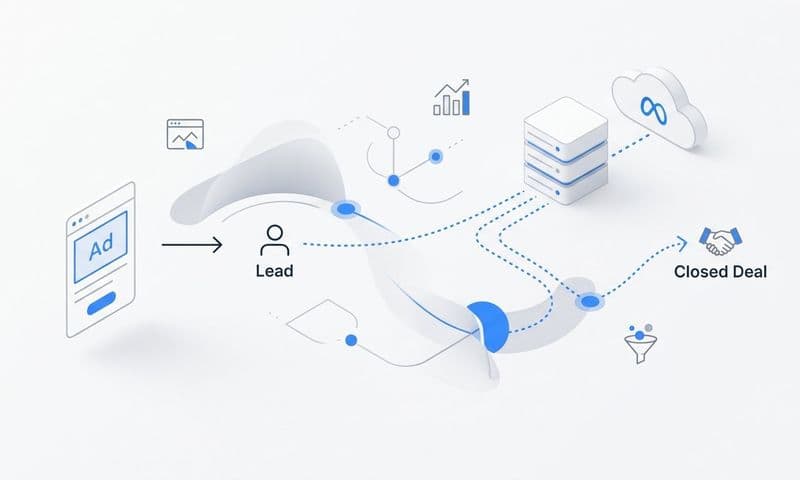
Marketing teams invest heavily across multiple channels, yet many struggle to connect their ad spend to actual revenue. Attribution blind spots occur when touchpoints go untracked, data silos prevent full visibility, or tracking limitations create gaps in the customer journey. These blind spots lead to misallocated budgets, inaccurate performance reporting, and missed optimization opportunities.
This guide covers seven actionable strategies that help marketers capture complete journey data, connect disparate systems, and make confident decisions based on accurate attribution. Whether you're dealing with cross-device tracking challenges, offline conversions, or fragmented data sources, these approaches will help you see the full picture of what's actually driving results.
1. Implement Server-Side Tracking to Bypass Browser Limitations
The Challenge It Solves
Browser-based tracking has become increasingly unreliable. Safari's Intelligent Tracking Prevention and Firefox's Enhanced Tracking Protection have drastically reduced cookie lifespans. Ad blockers prevent tracking scripts from loading on a significant portion of user sessions. iOS 14.5's App Tracking Transparency requires explicit user opt-in for tracking, and most users decline.
These browser restrictions create massive gaps in your attribution data. You're making budget decisions based on incomplete information about which campaigns actually drive conversions.
The Strategy Explained
Server-side tracking captures conversion data directly from your servers rather than relying on browser-based JavaScript. When a user completes an action, your server sends the conversion event directly to your analytics platform and ad networks. This approach operates independently of browser restrictions, ad blockers, and cookie limitations.
Think of it like this: browser-based tracking is like asking customers to carry a tracking device through your store. Server-side tracking is like having security cameras that capture everything regardless of what customers do. One depends on cooperation, the other guarantees visibility.
The result is more accurate data about which campaigns drive real results, especially on iOS devices and privacy-focused browsers where traditional tracking fails. Understanding how to address attribution data loss from privacy updates is essential for modern marketers.
Implementation Steps
1. Set up a server-side tracking container using Google Tag Manager Server-Side or a similar platform that processes events on your server infrastructure.
2. Configure your conversion events to send data from your backend systems directly to your analytics platform, ensuring critical actions like purchases and form submissions are captured server-side.
3. Implement user identification methods such as hashed email addresses or customer IDs to maintain journey continuity across sessions without relying on third-party cookies.
4. Test your server-side implementation thoroughly by comparing conversion counts against your source of truth (like your CRM or order database) to verify accuracy.
Pro Tips
Start with your highest-value conversion events first. Server-side tracking requires more technical setup than browser-based methods, so prioritize the conversions that matter most to your business. Also, maintain hybrid tracking during transition periods by running both client-side and server-side tracking simultaneously to identify discrepancies and ensure nothing falls through the cracks.
2. Unify Your Data Sources with CRM Integration
The Challenge It Solves
Marketing platforms show you clicks, impressions, and website conversions. Your CRM shows you leads, opportunities, and closed revenue. The problem? These systems rarely talk to each other, creating a massive attribution blind spot between marketing activity and actual business outcomes.
Without CRM integration, you're optimizing for vanity metrics instead of revenue. You might be scaling campaigns that generate leads that never close, while underfunding campaigns that drive your most valuable customers.
The Strategy Explained
CRM integration connects your marketing touchpoints to sales outcomes by syncing data bidirectionally. When a lead enters your CRM, the system matches it back to the original marketing source. As that lead progresses through your sales pipeline, every stage update flows back to your attribution platform.
This creates a complete view of marketing performance tied to revenue, not just surface-level engagement. You can see which campaigns generate leads that actually close, which channels drive the highest customer lifetime value, and where your marketing dollars create real business impact. Implementing lead generation attribution tracking ensures you capture this critical data.
For B2B companies with longer sales cycles, this integration is absolutely critical. It can take weeks or months between initial touchpoint and closed deal, and without CRM integration, you're flying blind during that entire period.
Implementation Steps
1. Choose an attribution platform that offers native CRM integrations with your specific system (Salesforce, HubSpot, Pipedrive, or whichever CRM you use).
2. Map your CRM lifecycle stages to your attribution model so you can track progression from lead to opportunity to customer and assign appropriate value at each stage.
3. Set up automated data syncing to ensure new leads, stage changes, and revenue data flow continuously between systems without manual exports.
4. Create revenue-based reports that show marketing performance by actual closed deals and customer value, not just lead volume.
Pro Tips
Pay special attention to lead matching logic. Your attribution platform needs to reliably connect website visitors to CRM records using email addresses, phone numbers, or other identifiers. Test your matching rate and investigate any significant gaps. Also, establish clear definitions for what constitutes a marketing-qualified lead versus a sales-qualified lead so both teams are aligned on attribution credit.
3. Deploy Multi-Touch Attribution Models for Complete Journey Visibility
The Challenge It Solves
Single-touch attribution models create blind spots by design. Last-click attribution ignores every touchpoint before the final one. First-click attribution credits only the initial interaction. Both approaches fundamentally misrepresent how customers actually make decisions.
In reality, most customers interact with your brand multiple times across different channels before converting. They might discover you through a Facebook ad, research on Google, read reviews, visit your website directly, and finally convert through a retargeting campaign. Single-touch models give all the credit to one touchpoint and completely ignore the others.
The Strategy Explained
Multi-touch attribution distributes credit across all touchpoints in the customer journey. Different models weight touchpoints differently based on their role in the conversion path. Linear attribution splits credit evenly across all interactions. Time-decay gives more weight to recent touchpoints. Position-based models emphasize both the first and last touch while acknowledging middle interactions.
This approach reveals the true contribution of each channel and campaign. You might discover that your branded search campaigns get last-click credit but are actually just capturing demand created by your content marketing and social ads. Understanding the difference between single source attribution and multi-touch attribution models is crucial for accurate reporting.
The key is choosing a model that aligns with your actual customer journey. B2B companies with long sales cycles often benefit from position-based models. E-commerce brands with shorter journeys might prefer time-decay attribution.
Implementation Steps
1. Audit your current customer journeys to understand how many touchpoints typically occur before conversion and which channels appear most frequently at different stages.
2. Select an attribution model that matches your business reality, starting with standard models like linear or time-decay before considering more complex custom approaches.
3. Implement the model in your analytics platform and run it alongside your current single-touch attribution for comparison to understand how the shift changes your channel performance view.
4. Adjust your budget allocation based on multi-touch insights, recognizing that channels creating awareness deserve credit even if they don't get the final click.
Pro Tips
Don't get paralyzed trying to find the "perfect" attribution model. The goal is not absolute precision but rather better information than single-touch models provide. Start with a standard multi-touch model and refine over time as you learn more about your customer journey patterns. Also, compare multiple attribution models side by side to understand how different approaches change your performance view.
4. Track Cross-Device Journeys with Unified User Identification
The Challenge It Solves
Customers routinely switch between devices during their buying journey. They research products on their phone during lunch, compare options on their tablet in the evening, and complete the purchase on their desktop at work. Traditional cookie-based tracking treats these as three separate users, creating massive attribution blind spots.
This cross-device fragmentation makes your mobile campaigns appear less effective than they actually are. Mobile often plays a crucial role in awareness and research, but conversions happen on desktop. Without unified tracking, you might cut mobile budgets based on incomplete data.
The Strategy Explained
Unified user identification connects the same person across multiple devices and sessions using first-party data. When users log in, provide their email address, or otherwise identify themselves, your tracking system creates a persistent user ID that follows them across all their devices.
This creates a single, continuous journey view instead of fragmented sessions. Implementing cross-device attribution tracking allows you to see that the same person clicked your Instagram ad on mobile, searched your brand on desktop, and converted on tablet. Each touchpoint gets proper attribution credit because they're all connected to the same user.
The approach requires collecting first-party identifiers, but it provides far more accurate attribution than device-based tracking alone. It also future-proofs your attribution as third-party cookies continue to phase out.
Implementation Steps
1. Implement user authentication or email capture early in the customer journey to establish identity before users switch devices.
2. Use hashed email addresses or customer IDs as your primary user identifier across all tracking systems to maintain privacy while enabling cross-device matching.
3. Configure your attribution platform to recognize and merge sessions from the same user across different devices into a single unified journey.
4. Analyze cross-device journey patterns to understand how customers actually move between devices and which channels initiate journeys that complete on different devices.
Pro Tips
Focus on high-intent pages for email capture. Offering a discount code, downloadable resource, or account creation at strategic points increases the likelihood users will identify themselves. Also, be transparent about why you're collecting emails and how you'll use the data to build trust and improve capture rates.
5. Feed Enriched Conversion Data Back to Ad Platforms
The Challenge It Solves
Ad platforms like Meta and Google rely on conversion signals to optimize their algorithms. When your tracking has blind spots, you're sending incomplete or inaccurate conversion data back to these platforms. Their algorithms then optimize based on partial information, targeting the wrong audiences and missing opportunities.
This creates a vicious cycle. Poor conversion data leads to poor targeting, which leads to worse results, which reinforces the poor data. Your campaigns underperform not because the platforms don't work, but because they're optimizing based on incomplete signals. Addressing inaccurate ad attribution data is critical to breaking this cycle.
The Strategy Explained
Conversion sync sends enriched, accurate conversion data from your attribution platform back to your ad platforms. Instead of relying on browser-based pixels that miss conversions due to tracking limitations, you send server-side conversion events that include the full context of each sale.
This approach feeds ad platform algorithms better data. They receive conversions that browser tracking missed, along with additional context like revenue value, customer type, and lifetime value predictions. The algorithms use this enriched data to find similar high-value customers and optimize bidding strategies.
The result is better targeting, improved return on ad spend, and campaigns that actually learn from your best customers instead of incomplete data.
Implementation Steps
1. Set up Conversions API for Meta and enhanced conversions for Google Ads to send server-side conversion events directly from your attribution platform.
2. Include revenue values and other meaningful parameters with each conversion event so ad platforms can optimize for value, not just volume.
3. Send conversion events for the full customer journey including post-purchase actions like repeat purchases or subscription renewals to help algorithms identify high-lifetime-value customers.
4. Monitor your ad platform reporting to verify that conversion sync is working and that you're seeing improved match rates and attribution accuracy.
Pro Tips
Deduplicate conversions carefully when running both pixel-based and server-side tracking. Ad platforms need to know which events are the same conversion reported through different methods. Use event IDs or order numbers to ensure each conversion is counted only once. Also, start with your highest-value conversion events and expand from there as you validate the process.
6. Capture UTM Parameters Consistently Across All Channels
The Challenge It Solves
Inconsistent or missing UTM parameters create attribution chaos. When some team members use "utm_campaign=spring_sale" while others use "utm_campaign=Spring-Sale" or skip UTM tagging entirely, your analytics platform can't accurately group campaign performance. Traffic gets misattributed to "direct" or "none," creating blind spots in your channel reporting.
This inconsistency compounds over time as different people create campaigns without following a standard convention. You end up with fragmented data that makes it impossible to see true campaign performance or make informed optimization decisions.
The Strategy Explained
Standardized UTM conventions establish clear rules for how every campaign URL should be tagged. You define specific formats for campaign names, source identifiers, medium types, and content variations. Everyone on your team follows the same convention every time they create a trackable link.
This consistency enables accurate cross-channel attribution tracking and reporting. You can reliably compare performance across channels, identify which campaign types work best, and trace conversions back to their true source. No more mystery traffic showing up as "direct" when it actually came from a specific email or social post.
The approach requires discipline and tools to enforce standards, but it eliminates one of the most common sources of attribution blind spots.
Implementation Steps
1. Document your UTM naming conventions in a shared guide that specifies exactly how to format campaign names, sources, mediums, terms, and content parameters.
2. Create a UTM builder tool or spreadsheet that automatically formats parameters according to your standards and prevents manual errors.
3. Implement a review process where campaign URLs are validated before launch to catch inconsistencies before they create tracking problems.
4. Audit your existing campaigns to identify and fix inconsistent UTM parameters, then redirect old URLs to properly tagged versions where possible.
Pro Tips
Use lowercase for all UTM parameters to avoid case-sensitivity issues in reporting. "Spring-Sale" and "spring-sale" will appear as separate campaigns in most analytics platforms. Also, avoid special characters and spaces in UTM values. Stick to lowercase letters, numbers, hyphens, and underscores for maximum compatibility across all analytics tools.
7. Use Real-Time Analytics to Identify and Fix Tracking Gaps
The Challenge It Solves
Tracking issues don't announce themselves. A broken pixel, misconfigured integration, or failed server connection can silently create attribution blind spots for days or weeks before anyone notices. By the time you discover the problem, you've already made budget decisions based on incomplete data.
Delayed discovery means delayed fixes and compounded problems. You might have scaled a campaign that wasn't actually performing, cut a channel that was driving conversions you couldn't see, or missed optimization opportunities because critical data wasn't flowing.
The Strategy Explained
Real-time monitoring creates visibility into your attribution data as it happens. You set up dashboards that show conversion flows, tracking health, and data quality metrics updated continuously throughout the day. Automated alerts notify you immediately when conversion volumes drop unexpectedly or tracking patterns change.
This approach catches problems fast. If your server-side tracking stops sending events, you know within hours instead of weeks. If a campaign launches without proper UTM parameters, you can fix it before significant budget is spent. Learning how to fix attribution data gaps quickly prevents compounding errors in your reporting.
Think of it as a health monitoring system for your attribution infrastructure. Just as you'd want to know immediately if your website went down, you need to know immediately if your tracking breaks.
Implementation Steps
1. Build a real-time attribution dashboard that displays current conversion volumes, channel performance, and tracking status updated every few minutes.
2. Set up automated alerts that trigger when conversion volumes drop below expected thresholds or when critical tracking endpoints stop receiving data.
3. Create a regular audit schedule to review attribution data quality, checking for unexpected changes in traffic sources, conversion patterns, or data completeness.
4. Document your tracking infrastructure and create runbooks for common issues so anyone on your team can quickly diagnose and fix problems when alerts fire.
Pro Tips
Compare your attribution platform conversion counts against your source of truth daily. Your attribution platform should match your order database, CRM, or payment processor within an acceptable margin. Significant discrepancies indicate tracking problems that need immediate investigation. Also, test your tracking after any website changes, platform updates, or integration modifications to catch issues before they impact production data.
Your Path to Complete Attribution Visibility
Eliminating attribution blind spots requires a systematic approach that addresses tracking limitations, data fragmentation, and journey complexity. Start by implementing server-side tracking to capture data that browser-based methods miss. This foundation ensures you're collecting accurate conversion data regardless of browser restrictions or user privacy settings.
Then focus on CRM integration to connect marketing touchpoints to revenue outcomes. This step transforms your attribution from vanity metrics to business impact, showing which campaigns actually drive closed deals and customer value.
As you build this foundation, layer in multi-touch attribution models and cross-device tracking to see the complete customer journey. These strategies reveal how channels work together and how customers actually move between devices before converting.
Finally, close the loop by feeding enriched data back to your ad platforms and monitoring everything in real time. This ensures ad algorithms optimize based on complete information while you catch and fix tracking issues before they create blind spots.
Prioritize these strategies based on your biggest current gaps. If you're struggling with iOS tracking, start with server-side implementation. If you can't connect marketing to revenue, prioritize CRM integration. If your single-touch attribution is misleading, deploy multi-touch models first.
The goal is not perfection but continuous improvement. Each strategy you implement reveals more of the picture and enables better decisions. Over time, you'll transform fragmented data into clear, actionable insights that drive better marketing performance.
Ready to elevate your marketing game with precision and confidence? Discover how Cometly's AI-driven recommendations can transform your ad strategy. Get your free demo today and start capturing every touchpoint to maximize your conversions.