Running ads across Meta, Google, TikTok, LinkedIn, and other platforms creates a complex web of touchpoints. Every click, view, and conversion happens in a different ecosystem with different tracking methods, different attribution windows, and different definitions of success.
The result? Most marketing teams end up with fragmented data that makes it nearly impossible to understand which channels actually drive revenue. Each platform reports its own wins, budgets get allocated based on incomplete information, and the real drivers of growth stay hidden.
This guide walks you through a practical, step-by-step process for how to track multi-channel campaigns so you can see the full customer journey, allocate budget with confidence, and stop relying on each platform's self-reported numbers. Whether you are managing campaigns for a SaaS company, an ecommerce brand, or an agency handling multiple clients, these steps will help you build a tracking system that connects every ad click to real business outcomes.
The challenge is not just technical. It is also structural. Most teams use a mix of native platform dashboards, Google Analytics, and the occasional spreadsheet to piece together performance. That approach works fine when you are running one or two channels. But as your media mix grows, the gaps in your data grow with it.
Here is what this guide covers: defining your conversion events, building a consistent UTM system, implementing server-side tracking, centralizing your data, choosing the right attribution models, syncing conversion data back to ad platforms, and using AI-driven insights to optimize and scale. By the end, you will have a clear framework for unifying your campaign data and making optimization decisions based on accurate, cross-channel insights.
Let's get into it.
Step 1: Define Your Conversion Events and Tracking Goals
Before you set up a single pixel or UTM parameter, you need to get crystal clear on what you are actually trying to measure. This sounds obvious, but it is the step most teams rush past, and it is the foundation everything else depends on.
Start by mapping out every meaningful action in your funnel. Think about the full journey from first ad impression to closed deal or completed purchase. For most businesses, that journey includes touchpoints like an ad click, a landing page visit, a lead form submission, a demo booking, a free trial signup, a purchase, and any post-purchase events like upsells or renewals.
Once you have that map, separate your events into two categories: micro-conversions and macro-conversions.
Micro-conversions are early-stage signals of interest. These include actions like an email signup, a content download, an add-to-cart event, or a video view past a certain threshold. They tell you that someone is engaging with your brand, but they are not yet buying.
Macro-conversions are the actions that directly tie to revenue. A completed purchase, a closed deal in your CRM, a paid subscription activation. These are the events you ultimately want to optimize for, and they are the ones that should connect directly to your business's bottom line.
The reason this distinction matters is that different channels often excel at different stages. An awareness channel like TikTok might drive a high volume of micro-conversions but fewer direct purchases. A retargeting campaign on Google might close deals that were started elsewhere. If you only track macro-conversions, you miss the contribution of upper-funnel channels entirely. Learning how to track multi-step conversion funnels helps you capture value at every stage.
Here is a critical step that many teams overlook: align your conversion events with your CRM pipeline stages. If your CRM tracks leads as they move from Marketing Qualified Lead to Sales Qualified Lead to Closed Won, your tracking should reflect those same stages. This alignment is what allows you to connect ad clicks to actual revenue, not just form fills that may or may not turn into customers.
Watch out for this common pitfall: tracking too many vanity metrics while missing the events that actually indicate buying intent. Page views, bounce rates, and time on site are interesting context, but they should not be the primary signals you optimize your campaigns around. Keep your core conversion events focused on actions that have a real relationship with revenue.
When you finish this step, you should have a documented list of conversion events, each labeled as micro or macro, with a clear connection to your CRM pipeline stages. That document becomes the reference point for every tracking decision that follows.
Step 2: Build a Consistent UTM and Naming Convention System
If conversion event mapping is the foundation of your tracking system, UTM parameters are the connective tissue. They are how you tell your analytics tools where traffic came from, what campaign it belonged to, and which specific ad or piece of content drove the click.
The problem is that UTMs are only useful when they are consistent. And in most marketing teams, they are anything but. One person uses "facebook" as the source, another uses "meta," another uses "fb-ads." One campaign is named "spring-promo-2026" and another is "Spring Promotion Q2." These inconsistencies fragment your data and make cross-channel reporting unreliable.
Here is how to build a UTM taxonomy that holds up across your entire team and every platform you run. For a deeper dive into the fundamentals, check out our guide on UTM tracking and how it helps your marketing.
UTM Source: The platform where the ad appears. Keep these standardized and lowercase. Examples: meta, google, tiktok, linkedin, email.
UTM Medium: The type of marketing activity. Examples: cpc, paid-social, organic, email, display.
UTM Campaign: The name of the specific campaign. This should follow a consistent naming structure. A useful format is: channel-funnel-stage-campaign-name. For example: meta-tofu-brand-awareness-q2-2026.
UTM Content: The specific ad or creative variant. This is especially useful for A/B testing. Example: video-testimonial-v1 or static-offer-banner.
UTM Term: Typically used for paid search to capture the keyword. Example: marketing-attribution-software.
The most practical way to enforce consistency is to build a shared UTM builder in a spreadsheet that every team member and agency partner uses. Include a dropdown menu for source and medium values so no one can freestyle those fields. Make the campaign naming convention explicit with an example in the sheet.
Beyond UTMs, apply the same naming discipline to your campaigns, ad sets, and ads inside each platform. When your Meta campaign names, Google campaign names, and TikTok campaign names follow the same structure, filtering and comparing data across platforms becomes straightforward instead of painful.
Pro tip: Include three pieces of information in every campaign name: the channel, the funnel stage (top, middle, or bottom of funnel), and the creative type or offer. This makes it easy to filter your attribution dashboard later and see, for example, all top-of-funnel video campaigns across every platform at once.
Inconsistent UTMs are one of the most common reasons multi-channel reporting breaks down. Getting this right before you launch a campaign is far easier than trying to retroactively fix months of messy data. Treat this step as non-negotiable infrastructure, not an optional extra.
Step 3: Implement Server-Side Tracking to Capture Accurate Data
Here is where many tracking setups start to fall apart, even when conversion events are defined and UTMs are clean. The issue is the tracking method itself.
Traditional pixel-based tracking relies on a small piece of JavaScript code that fires in the user's browser when they take an action on your site. For years, this worked well enough. But the landscape has shifted significantly. iOS privacy changes, widespread ad blocker adoption, and third-party cookie restrictions in major browsers have made browser-based (client-side) tracking increasingly unreliable.
The practical result is that a meaningful portion of your conversions are simply not being recorded. A user converts on your site, but their browser blocks the pixel from firing, and that conversion disappears from your data. You are making budget decisions based on an incomplete picture. These are among the most frustrating multi-channel tracking problems marketers face today.
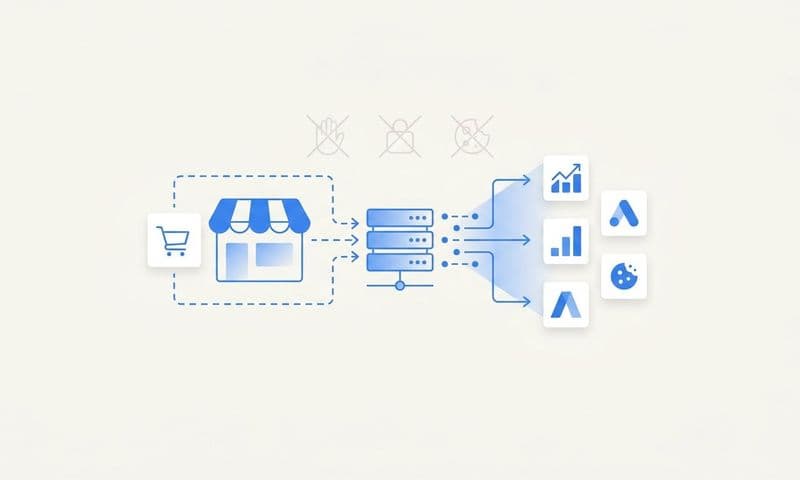
Server-side tracking solves this by changing where the conversion data originates. Instead of relying on a browser to fire a pixel, server-side tracking sends conversion data directly from your server to your ad platforms and attribution tool. The browser's privacy settings are irrelevant because the data never passes through the browser at all.
Think of it this way: client-side tracking is like sending a letter through a postal service that might lose it. Server-side tracking is like handing the letter directly to the recipient. The data gets there regardless of what happens in the browser.
Server-side tracking captures touchpoints that client-side pixels miss entirely: conversions from users with ad blockers enabled, conversions on iOS devices where tracking permissions are restricted, and conversions where the page loads slowly enough that the pixel script never fires. These are not edge cases. They represent a significant share of real customer activity that would otherwise go untracked.
Cometly's server-side tracking is built specifically to address this challenge. It connects your website, ad platforms, and CRM to capture every touchpoint without relying on third-party cookies or browser-based scripts. The data flows directly from your server to Cometly's attribution engine, giving you a complete and accurate view of the customer journey.
Setting up server-side tracking requires a bit more technical configuration than dropping a pixel on your site, but the payoff is substantial. You will typically see a noticeable increase in tracked conversions compared to pixel-only setups. That is not because more conversions are happening. It is because you are finally capturing the ones that were already happening but going unrecorded.
Success indicator: After implementing server-side tracking, compare your tracked conversion volume to your previous pixel-only baseline. If you see a meaningful increase in recorded events, your setup is working correctly. That increase represents real customer activity you were previously flying blind on.
Step 4: Connect All Your Ad Platforms and CRM in One Dashboard
Once your tracking infrastructure is solid, the next challenge is the data fragmentation problem. Right now, Meta reports its conversions, Google reports its conversions, TikTok reports its conversions, and LinkedIn reports its conversions. Each platform only sees its own slice of the customer journey, and each claims credit for conversions that the others also claim.
This is the double-counting problem, and it is endemic to multi-channel advertising. A customer clicks a Facebook ad, then later searches Google and clicks a search ad, then converts. Meta counts that as a Facebook conversion. Google counts it as a Google conversion. Your actual revenue? One deal. Your reported conversions? Two, across two platforms, each with inflated ROAS numbers that look great in isolation but do not reflect reality.
The solution is a centralized attribution platform that sits above all your ad channels and sees the full picture. Using a marketing dashboard for multiple campaigns is the most effective way to eliminate these discrepancies. Here is how to connect everything properly.
Connect your ad platforms: Link Meta Ads, Google Ads, TikTok Ads, LinkedIn Ads, and any other paid channels to your attribution platform. This pulls spend data, impression data, and click data from each channel into a single view.
Integrate your CRM: This is the step that separates surface-level reporting from revenue-level reporting. By connecting HubSpot, Salesforce, or whichever CRM you use, you can tie ad clicks to actual pipeline stages and closed revenue. Instead of optimizing for form fills, you can optimize for deals that actually close.
Unify your analytics: With all channels and your CRM connected, you can see the full customer journey in one place: which ad introduced the customer, which touchpoints they engaged with along the way, and which channel was present at the moment of conversion. For a comprehensive walkthrough, see our guide on how to track customer journey across channels.
Cometly's integrations are designed to pull data from all your ad platforms and CRM into a single analytics dashboard. Instead of toggling between five different platform dashboards and trying to reconcile conflicting numbers in a spreadsheet, you get one source of truth that reflects actual customer behavior rather than each platform's self-interested reporting.
A common mistake to avoid: relying on Google Analytics as your primary multi-channel attribution tool. Google Analytics is a powerful web analytics platform, but it uses last-click attribution by default. That means it gives 100% of the conversion credit to the last channel a user clicked before converting. Every awareness and consideration touchpoint that influenced the decision gets zero credit. For multi-channel analysis, that is a significant blind spot.
Success indicator: When your centralized dashboard is set up correctly, you should be able to see a single customer journey that spans multiple channels, with each touchpoint logged in sequence. If you are seeing clean, connected journeys rather than isolated channel-level events, your integrations are working.
Step 5: Choose and Compare Multi-Touch Attribution Models
Now that your data is centralized, you need to decide how to assign credit across the touchpoints in each customer journey. This is where attribution models come in, and it is one of the most consequential decisions in your tracking setup.
There is no single "correct" attribution model. Each model tells a different story about your funnel, and the most useful approach is to compare multiple models side by side to understand what each one reveals. Our deep dive into attribution modeling for multi-channel campaigns covers this topic in greater detail.
Here is a quick breakdown of the main models you will encounter.
First-touch attribution gives 100% of the credit to the first channel or ad a customer interacted with. This model is useful for understanding which channels are most effective at generating initial awareness and bringing new prospects into your funnel.
Last-touch attribution gives 100% of the credit to the final touchpoint before conversion. This is the default in many tools and tends to over-credit bottom-of-funnel channels like branded search or retargeting while ignoring everything that happened earlier.
Linear attribution distributes credit equally across every touchpoint in the customer journey. If a customer had five touchpoints before converting, each gets 20% of the credit. This model gives a balanced view but does not account for the fact that some touchpoints are more influential than others.
Time-decay attribution gives more credit to touchpoints that occurred closer to the conversion. The logic is that recent interactions had more influence on the final decision. This model tends to favor retargeting and bottom-of-funnel channels.
U-shaped (position-based) attribution gives the most credit to the first and last touchpoints, with the remaining credit distributed across the middle. This acknowledges the importance of both the initial introduction and the closing interaction while still recognizing the journey in between.
Data-driven attribution uses machine learning to assign credit based on the actual patterns in your conversion data. It is the most sophisticated model, but it requires a sufficient volume of conversion data to produce reliable results.
The practical approach is to use attribution models as lenses rather than verdicts. Use first-touch to understand which channels are best at generating awareness. Use last-touch to understand which channels are best at closing. Use linear or U-shaped models to see the full multi-touch journey and understand how channels work together.
Cometly lets you compare attribution models side by side so you can see how credit shifts between channels under different frameworks. That comparison often reveals surprising insights: a channel that looks underperforming in last-touch attribution might be responsible for a large share of first-touch introductions that eventually convert through other channels.
Success indicator: You can clearly articulate which channels drive awareness and which channels drive conversions in your specific funnel. That understanding is the basis for confident, data-driven budget allocation.
Step 6: Sync Enriched Conversion Data Back to Ad Platforms
Most marketers focus on getting data out of ad platforms for analysis. This step is about sending better data back in, and it is one of the highest-leverage actions you can take to improve campaign performance.
Here is why this matters. Ad platforms like Meta and Google use machine learning algorithms to optimize your campaigns. These algorithms learn from the conversion signals you send them. If those signals are incomplete, delayed, or inaccurate, the algorithm learns from bad data and optimizes toward the wrong outcomes.
Think about what typically happens with pixel-only tracking: the pixel misses a portion of conversions due to browser restrictions, the data that does get through is often delayed, and there is no connection to downstream revenue events like a deal closing in your CRM weeks after the initial ad click. The algorithm is working with a fraction of the real picture.
Conversion sync solves this by sending verified, enriched conversion events from your attribution tool back to each ad platform's optimization engine. Instead of the platform only seeing the conversions its pixel captured, it now receives a complete, accurate set of conversion signals that includes events it would have otherwise missed. Understanding how to attribute revenue to specific campaigns is essential for making this feedback loop work.
The result is a feedback loop that compounds over time. Better conversion data leads to better algorithmic targeting. Better targeting leads to more qualified traffic. More qualified traffic leads to better conversion rates and lower acquisition costs. The improvement builds on itself as the algorithm continuously refines its understanding of your best customers.
Cometly's Conversion Sync feature automates this process. It takes the enriched conversion data captured through server-side tracking and your CRM integration and sends it back to Meta, Google, and other ad platforms in real time. The platforms receive a more complete picture of which users convert and what actions they take downstream, which directly improves their ability to find similar high-value customers.
Watch out for this common pitfall: optimizing ad platforms on incomplete or inaccurate pixel data. If you are running Meta campaigns optimized for "Purchase" events but your pixel is only capturing a portion of actual purchases, Meta's algorithm is being trained on a biased sample. It will optimize toward the users who happened to convert in a way the pixel could detect, not necessarily your actual best customers. Conversion sync corrects that bias.
Step 7: Analyze, Optimize, and Scale With AI-Driven Insights
You have defined your conversion events, standardized your UTMs, implemented server-side tracking, centralized your data, chosen your attribution models, and synced enriched conversions back to your ad platforms. Now comes the part that actually moves the needle: using all of that data to make better decisions.
Start by reading your unified multi-channel dashboard with a clear purpose. You are looking for three things: which campaigns and ad sets are driving real revenue (not just platform-reported conversions), which channels are contributing to the journey even if they are not the last touch, and where your budget is being wasted on channels or creatives that look good in siloed reports but do not actually convert.
Here is a practical review cadence that works for most teams.
Weekly reviews should focus on campaign-level performance. Look at spend, conversion volume, cost per acquisition, and any significant changes in performance trends. This is where you make tactical decisions: pause underperforming ad sets, increase budget on creatives that are working, and flag anomalies for investigation.
Monthly reviews should focus on channel-level strategy. Compare attribution model outputs across channels to see how the credit distribution has shifted. Assess whether your budget allocation reflects the actual contribution of each channel to revenue. For a structured approach, explore how to optimize ad spend across multiple channels to make the most of these strategic reviews.
AI-powered recommendations accelerate this process significantly. Instead of manually scanning rows of data to find opportunities, AI can surface the insights that matter most: which campaigns have the highest potential for scaling, which ad sets are showing early signs of fatigue, and where reallocating budget would have the greatest impact on revenue.
Cometly's AI Ads Manager analyzes your cross-channel performance data and generates actionable recommendations based on what is actually driving results in your account. The AI Chat feature takes this further by letting you query your data in natural language. Instead of building custom reports, you can ask questions like "Which campaigns drove the most revenue last month?" or "Which channel has the lowest cost per closed deal?" and get direct answers from your data.
This is not about replacing your judgment as a marketer. It is about removing the time-consuming manual work of data analysis so you can spend more of your energy on the decisions that require strategic thinking. Learning how to measure cross-channel marketing performance effectively is what separates good marketers from great ones.
Success indicator: You can confidently increase spend on channels that drive real, attributed revenue and cut spend on channels that only appear to perform well in their own platform dashboards. That confidence comes from having a unified, accurate view of the full customer journey rather than a collection of competing, platform-specific reports.
Your Multi-Channel Tracking Checklist
Tracking multi-channel campaigns accurately is not about adding more pixels or checking more dashboards. It is about building a unified system that connects every touchpoint to real revenue. Here is a quick checklist to confirm you are set up for success.
1. Conversion events are defined and mapped to CRM pipeline stages.
2. UTM parameters and naming conventions are standardized across all platforms.
3. Server-side tracking is capturing data that browser pixels miss.
4. All ad platforms and your CRM feed into one centralized dashboard.
5. You are comparing multiple attribution models to understand the full journey.
6. Enriched conversion data is syncing back to ad platforms to improve their algorithms.
7. You are using AI-driven insights to optimize and scale with confidence.
Each of these steps builds on the one before it. A clean UTM system only matters if you have clear conversion events to track. Server-side tracking only adds value if your centralized dashboard is ready to receive the data. Attribution model analysis only drives decisions if your data is accurate and complete in the first place.
The good news is that once this system is in place, it runs continuously in the background, giving you a clearer and more accurate picture of your marketing performance every single day.
If you are ready to bring all of this together in one platform, Cometly can help you track every touchpoint, attribute revenue accurately, and make smarter budget decisions across every channel. Get your free demo today and start capturing every touchpoint to maximize your conversions.