Most marketing teams run two types of tools side by side without fully understanding what each one does best. Web analytics platforms tell you how visitors behave on your site. Marketing attribution platforms tell you which channels, ads, and touchpoints actually drive revenue. These are not the same thing, and confusing them leads to misallocated budgets, misleading reports, and decisions based on incomplete data.
For B2B SaaS companies especially, where sales cycles are long and customer journeys span multiple touchpoints across weeks or months, relying on web analytics alone leaves serious gaps in your understanding of what is working. A prospect might visit your pricing page three times, read two blog posts, click a retargeting ad, and then convert through a direct visit. Web analytics captures the last visit. Attribution captures the whole story.
This article breaks down seven strategies for using marketing attribution and web analytics together, so your team stops treating them as competitors and starts using each for what it does best. Whether you are trying to justify ad spend, optimize campaign performance, or connect pipeline to revenue, understanding the difference and the relationship between these two data layers is foundational to making smarter marketing decisions.
1. Separate Behavioral Data from Revenue Data
The Challenge It Solves
When teams pull conversion reports from web analytics tools, they often assume they are looking at revenue data. They are not. Web analytics platforms measure on-site behavior: sessions, pageviews, bounce rate, time on site, and goal completions. These are behavioral signals, not revenue outcomes. Conflating the two leads to reports that look complete but are missing the most important question: what actually drove a customer to pay?
The Strategy Explained
Think of web analytics as your site's activity log and attribution as your revenue ledger. Web analytics answers "what happened on our site." Attribution answers "what caused a customer to convert and generate revenue." These are fundamentally different questions that require different data models.
Web analytics tools are session-based and cookie-dependent. They measure what users do during a visit. Marketing attribution platforms integrate with ad platforms, CRMs, and billing tools to assign credit across multiple touchpoints over time. When you treat them as interchangeable, you end up optimizing for the wrong signals.
Implementation Steps
1. Audit every report your team currently uses and label each one as either behavioral data or revenue data.
2. Identify which reports are pulling from web analytics and which are pulling from your attribution platform. If you only have one source, document where the gaps are.
3. Establish a shared language across your marketing and growth teams: web analytics for on-site diagnostics, attribution for budget and revenue decisions.
Pro Tips
Create a simple two-column reference document your team can use when building reports. Left column: questions answered by web analytics. Right column: questions answered by attribution. This eliminates confusion before it starts and keeps everyone aligned on which tool to open for which decision.
2. Map Your Attribution Model to Your Sales Cycle Length
The Challenge It Solves
Last-click attribution is the default in many web analytics tools, and it creates a systematic blind spot for B2B SaaS companies. When a customer takes twelve weeks and eight touchpoints to convert, assigning 100% of the credit to the final click before conversion completely ignores everything that built awareness, created intent, and moved the deal forward. Top-of-funnel and mid-funnel channels get undervalued, and budget shifts away from what is actually working.
The Strategy Explained
The length and complexity of your sales cycle should directly inform which attribution model you use. For B2B SaaS companies with longer cycles and multiple decision-makers involved, multi-touch attribution models are far more accurate than last-click defaults.
Linear attribution distributes credit equally across all touchpoints. Time-decay attribution gives more credit to touchpoints closer to conversion. Data-driven attribution uses machine learning to assign credit based on actual conversion patterns in your data. Each model tells a different story, and the right choice depends on how your customers actually buy. The key is to move beyond the default and deliberately choose a model that reflects your real customer journey.
Implementation Steps
1. Map out a typical customer journey from first touch to closed-won, including all channels involved: paid search, organic, social, email, direct, and referral.
2. Estimate the average number of touchpoints and the average time from first touch to conversion for your product.
3. Select an attribution model that distributes credit across that journey. Start with linear or time-decay if you are new to multi-touch, and move toward data-driven as your dataset grows.
Pro Tips
Run two attribution models in parallel for a quarter before committing to one. Comparing how credit is distributed across channels under different models will reveal which channels are being systematically over- or under-credited in your current reporting. This comparison alone often changes budget decisions significantly.
3. Use Web Analytics for Funnel Diagnostics, Attribution for Budget Allocation
The Challenge It Solves
Without clear job assignments for each tool, teams end up using web analytics to make budget decisions and attribution data to diagnose UX problems. Both are the wrong tool for the job. The result is budget allocated based on traffic volume rather than revenue impact, and UX fixes prioritized based on attribution credit rather than actual drop-off points.
The Strategy Explained
Give each tool a defined role and stick to it. Web analytics is your funnel diagnostic tool. It tells you where prospects enter, where they drop off, which pages hold attention, and which paths lead toward conversion. Use it to identify friction points, optimize landing pages, and improve the on-site experience.
Attribution is your budget allocation tool. It tells you which channels, campaigns, and ads are generating pipeline and revenue. Use it to decide where to increase spend, where to cut, and which campaigns deserve more investment. When these roles are clearly defined, your team stops second-guessing which number to trust.
Implementation Steps
1. Create two separate reporting cadences: a weekly web analytics review focused on funnel health and on-site performance, and a monthly attribution review focused on channel ROI and budget decisions.
2. Assign ownership for each review to the appropriate team member: web analytics to your content or conversion optimization team, attribution to your paid media or growth team.
3. Document the specific questions each review is designed to answer so meetings stay focused and actionable.
Pro Tips
When a budget conversation comes up in a web analytics review, pause and redirect it to the attribution data. Building this discipline into your team's workflow prevents the common mistake of optimizing paid spend based on traffic metrics that have no direct connection to revenue.
4. Connect CRM Data to Close the Attribution Loop
The Challenge It Solves
Most attribution setups stop at the lead level. A form fill or a demo request gets counted as a conversion, and that is where the data trail ends. But in B2B SaaS, a lead is not revenue. A closed-won deal is revenue. Without connecting your CRM to your attribution platform, you are making budget decisions based on lead volume rather than actual business outcomes, which can lead to scaling campaigns that generate plenty of leads but very few paying customers.
The Strategy Explained
Revenue attribution, sometimes called pipeline attribution, extends the attribution model all the way from the first ad click to a closed-won deal in your CRM. When your attribution platform receives CRM data, it can trace which campaigns generated not just leads but qualified pipeline and ultimately revenue.
This is particularly valuable for B2B SaaS companies with complex, multi-stakeholder sales processes where the quality of a lead matters as much as the quantity. A channel that generates fewer leads but higher-quality pipeline is worth more than a channel flooding your CRM with unqualified contacts. You cannot see that difference without closing the attribution loop through your CRM.
Platforms like Cometly are built specifically to connect ad spend data with CRM pipeline and closed-won revenue, giving B2B SaaS teams a complete picture of what their marketing dollars are actually producing.
Implementation Steps
1. Identify which CRM events matter most for your business: demo booked, opportunity created, deal closed, and revenue recognized.
2. Connect your CRM to your attribution platform so these events are passed back and associated with the original marketing touchpoints.
3. Build revenue-based attribution reports that show cost per closed deal and pipeline influenced by channel, not just cost per lead.
Pro Tips
Start by connecting just one CRM event, such as closed-won, before mapping the entire pipeline. Even a single revenue signal dramatically improves the quality of your attribution data and immediately changes which channels look valuable in your reports.
5. Implement Server-Side Tracking to Protect Data Accuracy
The Challenge It Solves
Browser-based tracking is increasingly unreliable. Ad blockers, browser privacy restrictions, and iOS privacy changes have created significant data loss across standard pixel-based tracking setups. When your attribution data is missing a meaningful portion of conversions, every decision you make based on that data is built on an incomplete foundation. You may be cutting campaigns that are actually working or scaling ones that look better than they are simply because the tracking is broken.
The Strategy Explained
Server-side tracking sends first-party event data directly from your server to ad platforms, bypassing browser-level limitations entirely. Conversion APIs like Meta's Conversion API (CAPI) and Google's Enhanced Conversions work alongside or in place of browser pixels to ensure conversion events are captured even when a user's browser would have blocked the standard pixel.
This approach is especially important as third-party cookie deprecation continues across major browsers. First-party data collected server-side is more accurate, more durable, and more privacy-compliant than browser-based tracking. For attribution to be reliable, the underlying event data needs to be as complete as possible.
Cometly's server-side tracking and Conversion API integration is designed to handle this automatically, sending enriched, accurate conversion data back to ad platforms without requiring manual engineering work from your team.
Implementation Steps
1. Audit your current tracking setup to identify how much data loss you are experiencing. Compare server-side event counts against browser pixel event counts to see the gap.
2. Implement server-side tracking for your highest-value conversion events first: demo requests, trial sign-ups, and purchase completions.
3. Connect Conversion APIs for each ad platform you run: Meta CAPI, Google Enhanced Conversions, and any others relevant to your media mix.
Pro Tips
Do not wait until your pixel data looks obviously broken to act. Data loss from browser restrictions is often gradual and invisible until you compare it against server-side data. Running both in parallel for a few weeks will show you exactly how much you have been missing.
6. Build a Unified Dashboard That Combines Both Data Sources
The Challenge It Solves
When web analytics data lives in one tool and attribution data lives in another, teams spend time toggling between platforms, manually reconciling numbers, and debating which source is correct. This fragmentation slows down decision-making and creates inconsistent reporting across teams. Growth leaders need a single view that answers both behavioral and revenue questions without requiring a data archaeology project every time a question comes up.
The Strategy Explained
A unified dashboard brings together on-site behavioral metrics from your web analytics platform and revenue attribution metrics from your attribution platform into a single reporting view. The goal is not to merge the tools but to surface the right metrics from each in one place, organized around the decisions your team needs to make.
Think of it as a command center. At a glance, your team can see which channels are driving traffic, how that traffic is converting on-site, and which of those conversions are turning into pipeline and revenue. When these data points are visible together, patterns emerge that would be invisible when viewing each tool in isolation. The best marketing analytics dashboard solutions are designed specifically to surface these cross-tool insights.
Cometly is built to serve as this unified layer for B2B SaaS marketing teams, connecting ad platform data, website events, and CRM outcomes into a single attribution view that eliminates the need to reconcile numbers across multiple tools.
Implementation Steps
1. Define the core metrics your growth team reviews weekly and monthly. Separate them into behavioral metrics (from web analytics) and revenue metrics (from attribution).
2. Build a dashboard that displays both sets of metrics side by side, organized by channel or campaign so comparisons are immediate.
3. Establish a single source of truth policy: when a number appears in the unified dashboard, that is the number used in all reporting conversations. No more debating between tools.
Pro Tips
Keep your unified dashboard focused on decisions, not data. Every metric on the dashboard should answer a specific question your team acts on. If a metric is interesting but does not drive a decision, move it to a secondary report to keep the primary view clean and actionable.
7. Use Attribution Insights to Feed Ad Platform AI
The Challenge It Solves
Ad platforms like Meta and Google use machine learning to optimize campaign delivery, but that optimization is only as good as the conversion signals you send back. If you are only sending top-of-funnel signals like page views or form fills, the platform's AI optimizes for the type of user who fills out forms, not the type of user who becomes a paying customer. This misalignment between your optimization signal and your actual business goal is one of the most common and costly mistakes in paid media management for B2B SaaS.
The Strategy Explained
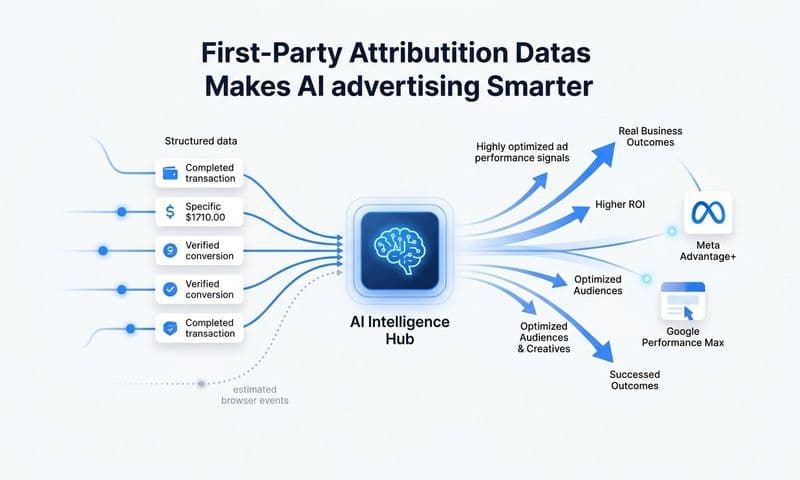
When your attribution platform captures revenue-connected conversion events and sends them back to ad platforms, the platform's machine learning has a much richer signal to work with. Instead of optimizing for lead volume, it can optimize for the characteristics of users who convert to paying customers, renew, or expand their accounts.
This is where attribution and ad platform AI create a compounding advantage. Better conversion signals lead to better audience targeting, which leads to higher-quality traffic, which leads to better attribution data, which leads to even better signals. The loop reinforces itself over time.
Cometly is designed to close this loop automatically, sending enriched, revenue-connected conversion events back to Meta, Google, and other ad platforms so their optimization engines are working from the most accurate and complete data available.
Implementation Steps
1. Identify the conversion events that best represent high-value customers for your business: closed-won deals, high-LTV cohorts, or customers who reach a specific product milestone.
2. Configure your attribution platform to pass these events back to each ad platform via server-side Conversion APIs, enriched with first-party data where possible.
3. Monitor campaign performance over four to six weeks after implementing enriched signals. Look for improvements in lead quality, cost per qualified opportunity, and return on ad spend.
Pro Tips
Avoid sending too many conversion events back to ad platforms at once. Start with one high-quality signal, such as closed-won revenue, and let the platform's algorithm learn from it before layering in additional events. A focused, high-quality signal outperforms a noisy mix of low-quality events every time.
Putting It All Together
Marketing attribution and web analytics serve different but complementary roles in a modern B2B SaaS marketing stack. Web analytics helps you understand on-site behavior and funnel performance. Attribution connects that behavior to real business outcomes: leads, pipeline, and revenue.
The teams that get the most value from their data are the ones who stop asking which tool is better and start asking which tool answers which question. That shift in framing changes everything about how you build reports, allocate budget, and evaluate campaign performance.
Start by auditing how your team currently uses each tool and where data gaps exist. Then layer in server-side tracking to protect accuracy, connect your CRM to close the attribution loop, and build a unified dashboard your entire team can rely on. As your data foundation improves, use those enriched signals to feed ad platform AI and compound the returns on every dollar you spend.
Platforms like Cometly are built specifically to handle this for B2B SaaS companies, connecting ad platforms, CRM data, and website events into a single attribution layer so you always know what is driving revenue. When your attribution and analytics data work together, every budget decision becomes clearer and every campaign optimization becomes more precise.
Ready to elevate your marketing game with precision and confidence? Discover how Cometly's AI-driven recommendations can transform your ad strategy. Get your free demo today and start capturing every touchpoint to maximize your conversions.