Traditional tracking pixels are losing the battle against modern privacy controls. Browser restrictions, cookie deprecation, iOS consent requirements, and the growing adoption of ad blockers have quietly eroded the data that marketers once relied on to measure campaign performance. If your attribution strategy still depends primarily on client-side pixels firing in the user's browser, you are almost certainly working with incomplete data.
The practical consequences are significant. Underreported conversions lead ad platforms to make poor optimization decisions. Budget flows toward channels that appear to underperform simply because their conversions are not being tracked accurately. And without a clear view of the full customer journey, scaling campaigns becomes guesswork rather than strategy.
The good news is that the marketing industry has responded with a range of proven alternatives and complementary approaches that restore visibility without depending on fragile browser-based tracking. Platforms like Cometly exist specifically to address these data gaps by combining several of these methods into a unified attribution solution. But whether you are building your own stack or choosing an integrated platform, understanding each strategy is the first step.
This article walks through seven actionable alternatives to traditional tracking pixels, complete with implementation steps your team can act on immediately. Each approach addresses a different weakness in pixel-based measurement, and together they form a resilient, privacy-ready tracking foundation.
1. Server-Side Tracking
The Challenge It Solves
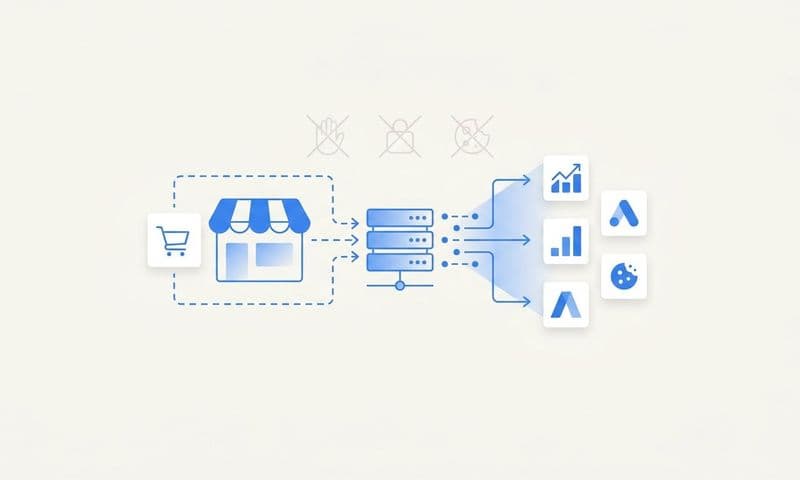
Client-side pixels are vulnerable by design. They rely on JavaScript executing successfully in the user's browser, which means any ad blocker, browser privacy setting, or network restriction can prevent them from firing. When the pixel does not load, the conversion is never recorded. Server-side tracking removes the browser from the equation entirely by moving data collection to your web server, where ad blockers and cookie restrictions have no reach.
The Strategy Explained
Instead of sending conversion data from the browser to an ad platform, server-side tracking routes that data through your own server first. When a user completes a purchase or submits a form, your server captures the event and forwards it directly to the ad platform's endpoint. Because this happens at the server level, it bypasses all client-side limitations including iOS privacy restrictions, Safari's Intelligent Tracking Prevention, and browser-based ad blockers.
The result is a more complete and accurate data stream. Conversions that would have been invisible to a client-side pixel are now captured and attributed correctly. Ad platforms receive better signals, which improves their ability to optimize campaigns toward real outcomes.
Implementation Steps
1. Set up a server-side tagging container using a solution like Google Tag Manager Server-Side or a custom implementation on your infrastructure.
2. Configure your website or app to send raw event data to your server endpoint rather than directly to ad platforms.
3. Map your server-side events to the required fields for each ad platform (Meta, Google, TikTok, etc.) and forward them using the platform's API.
4. Test event delivery using each platform's diagnostics tools to confirm data is arriving accurately and without duplication.
Pro Tips
Run server-side and client-side tracking in parallel during your transition period to compare data and identify gaps. Use deduplication keys so ad platforms do not count the same conversion twice when both signals arrive. Cometly's server-side tracking is built to handle this complexity, ensuring your conversion data reaches ad platforms cleanly and reliably.
2. Conversions API Integration
The Challenge It Solves
Even when server-side tracking is in place, each ad platform needs conversion data in its own specific format to power its optimization algorithms. Meta's pixel signal loss from iOS changes has been well-documented, and similar gaps exist across Google, TikTok, and LinkedIn. Conversions APIs give you a direct, authenticated channel to send first-party event data straight to each platform's machine learning systems, restoring the signal quality that browser-based pixels can no longer guarantee.
The Strategy Explained
Meta launched its Conversions API (CAPI) specifically to address the signal loss caused by iOS 14.5 and subsequent privacy updates. Google offers Enhanced Conversions and the Google Ads API for the same purpose. TikTok, LinkedIn, Pinterest, and other platforms have followed with their own server-side event APIs. Each API accepts first-party data including hashed customer identifiers, purchase values, and custom events, then uses that data to improve audience matching and campaign optimization.
When you integrate these APIs properly, you are essentially giving each platform's algorithm a cleaner, more complete picture of who is converting and why. This translates directly into better automated bidding, more accurate lookalike audiences, and lower cost per acquisition over time.
Implementation Steps
1. Access each platform's developer documentation to obtain API credentials and understand the required event schema (Meta Business Manager, Google Ads API Center, TikTok for Business API portal).
2. Configure your server or data pipeline to format conversion events with required fields such as event name, event time, hashed email, phone, and purchase value.
3. Implement deduplication by sending a matching event ID from both your browser pixel (if still active) and the API, so platforms can reconcile without double-counting.
4. Monitor event match quality scores in each platform's diagnostics dashboard and iterate on data enrichment to improve matching rates.
Pro Tips
The more customer data you can include in each API event, the higher your match rate will be. Hashed email addresses, phone numbers, and external IDs all contribute to stronger signal quality. Understanding pixel tracking problems on iOS helps explain why these API integrations are essential. Cometly's Conversion Sync automates this process, feeding enriched, conversion-ready events back to Meta, Google, and other platforms without requiring custom API development for each one.
3. First-Party Data Collection
The Challenge It Solves
Third-party cookies and browser-based pixels depend on infrastructure you do not own. When browsers change their policies or users opt out of tracking, your data disappears with it. First-party data is different because it comes directly from your audience through interactions they choose to have with your brand. It does not expire when a browser update rolls out, and it does not vanish when someone enables an ad blocker.
The Strategy Explained
First-party data includes any information collected directly from your users: email addresses captured through forms, purchase history stored in your CRM, behavioral data from logged-in sessions, and UTM-attributed source information tied to specific contacts. Marketers who invest in understanding first-party data tracking build a durable foundation because they own it and control how it is used.
The key is connecting first-party data to your marketing measurement. When a lead fills out a form, you should be capturing not just their contact information but also the UTM parameters from their session, the ad they clicked, and the page they converted on. That enriched record becomes the basis for attribution that works independently of browser-based tracking.
Implementation Steps
1. Audit every form, checkout flow, and lead capture mechanism on your website to ensure you are collecting email addresses and storing them in your CRM with source attribution.
2. Append UTM parameters to every form submission so each CRM record includes the campaign, source, medium, and ad that drove the conversion.
3. Use progressive profiling and gated content to enrich existing records over time with additional first-party signals.
4. Connect your CRM data to your attribution platform so first-party records can be matched to ad platform events for accurate cross-channel measurement.
Pro Tips
Treat your email list as a tracking asset, not just a communication channel. Hashed email addresses can be used as matching keys across Meta CAPI, Google Enhanced Conversions, and other platform APIs, extending the reach of your first-party data well beyond your own website. Connecting your CRM to Cometly allows every customer touchpoint to be tied back to the original acquisition source.
4. Multi-Touch Attribution Platforms
The Challenge It Solves
Last-click attribution was always a simplification, but it was tolerable when most customer journeys were short and single-channel. Today's buyers interact with multiple ads, organic content, email campaigns, and retargeting sequences before converting. Crediting only the final touchpoint ignores all the upstream activity that built awareness and intent. A single pixel fire at checkout cannot tell you which combination of channels actually drove the sale.
The Strategy Explained
Multi-touch attribution distributes conversion credit across every touchpoint in the customer journey, from the first ad impression to the final click before purchase. Different attribution models weight touchpoints differently: linear models split credit equally, time-decay models give more weight to recent interactions, and data-driven models use machine learning to assign credit based on actual conversion patterns.
The practical value is that you can see which channels initiate journeys, which ones assist conversions, and which ones close them. Leveraging touchpoint attribution tracking allows you to allocate budget toward the full funnel rather than over-investing in bottom-of-funnel tactics that appear to drive conversions in last-click models but actually depend on earlier touchpoints to generate demand.
Implementation Steps
1. Map out the typical customer journey for your highest-value conversions by reviewing CRM records and session data to identify common touchpoint sequences.
2. Select an attribution model that fits your sales cycle: shorter cycles often work well with linear or time-decay models, while longer B2B cycles may benefit from data-driven or custom models.
3. Implement a platform that captures every touchpoint across paid, organic, email, and direct channels, connecting them to individual user records rather than anonymous sessions.
4. Use attribution insights to adjust budget allocation, shifting spend toward channels that initiate or assist conversions rather than only those that close them.
Pro Tips
Compare multiple attribution models side by side before making budget decisions. A channel that looks weak in last-click attribution may be a strong initiator in a linear or first-touch model. Cometly's multi-touch attribution connects every touchpoint from first ad interaction to final conversion, giving you the complete picture that single-pixel measurement simply cannot provide.
5. UTM Parameters and URL-Based Tracking
The Challenge It Solves
Cookies and pixels can fail silently. A user clicks your ad, their browser blocks the tracking script, and the conversion is recorded with no source attribution. UTM parameters solve a different layer of this problem by embedding campaign data directly into the URL itself. The source information travels with the user from the moment they click, regardless of what happens in their browser environment.
The Strategy Explained
UTM parameters are simple query string tags appended to your destination URLs. When a user clicks a link containing UTM parameters, your analytics platform reads those tags and records the traffic source, medium, campaign name, and ad content. Because this data lives in the URL rather than a cookie or pixel, it is immune to ad blockers and browser privacy restrictions.
When combined with first-party data collection, UTMs become even more powerful. If a user clicks a UTM-tagged ad and then submits a form, you can store their UTM data alongside their contact record in your CRM. Following UTM parameter tracking best practices ensures that connection persists even if the user returns days later in a different browser session, giving you durable source attribution that does not depend on cookie persistence.
Implementation Steps
1. Establish a consistent UTM naming convention across your team covering source, medium, campaign, content, and term parameters, and document it in a shared reference guide.
2. Use a UTM builder tool to generate tagged URLs for every paid campaign, email, social post, and partner link before publishing.
3. Configure your forms and landing pages to capture UTM parameters from the URL and pass them as hidden fields into your CRM on form submission.
4. Regularly audit UTM usage in your analytics platform to identify untagged traffic sources and enforce consistent tagging across your team.
Pro Tips
Auto-tagging from platforms like Google Ads uses its own parameter (gclid) that can be lost when users navigate across domains. Supplement auto-tagging with manual UTM parameters for cross-domain journeys and any traffic sources that do not support auto-tagging natively. Consistent UTM data flowing into your CRM also enriches the first-party records you send through Conversions APIs, improving match quality.
6. AI-Powered Ad Optimization
The Challenge It Solves
Even with better tracking infrastructure in place, the volume of cross-channel performance data can be overwhelming to analyze manually. Marketers managing campaigns across Meta, Google, TikTok, and other platforms are dealing with thousands of ad variations, audience segments, and bidding configurations simultaneously. When pixel data is incomplete, making confident optimization decisions becomes even harder. AI changes the equation by identifying patterns across imperfect data sets and surfacing actionable recommendations that human analysis would miss.
The Strategy Explained
AI-powered optimization works by analyzing performance signals across all your campaigns and identifying which combinations of creative, audience, placement, and budget are driving the strongest outcomes. Unlike manual analysis, machine learning can process patterns across large data sets quickly, weight signals from multiple sources, and generate specific recommendations rather than just surface-level reports.
This matters particularly in a privacy-constrained environment because AI can extract meaningful optimization signals even when individual conversion events are incomplete. Understanding why conversion tracking numbers are wrong helps explain why combining server-side data, first-party signals, and cross-channel performance metrics through AI models can identify high-performing patterns with a level of confidence that pixel-only data cannot support.
Implementation Steps
1. Consolidate your cross-channel ad performance data into a single platform so AI analysis can operate across all campaigns rather than within individual platform silos.
2. Ensure your attribution data is feeding into the AI layer: the quality of AI recommendations is directly proportional to the quality and completeness of the underlying data.
3. Review AI-generated recommendations regularly and test high-priority suggestions as controlled experiments before scaling changes across campaigns.
4. Use AI insights to inform creative testing priorities, identifying which ad formats, messages, and audiences are trending toward stronger performance.
Pro Tips
AI optimization is only as good as the data it receives. Investing in server-side tracking and Conversions API integration first creates the enriched data foundation that makes AI recommendations genuinely useful rather than based on the same incomplete pixel data you are trying to replace. Cometly's AI Ads Manager is built on this principle, using complete attribution data to surface recommendations you can act on with confidence across every ad channel.
7. Offline Conversion Tracking
The Challenge It Solves
For many businesses, the most valuable conversions never happen online. Phone calls, in-person consultations, sales-team-closed deals, and CRM pipeline progressions represent real revenue that no browser pixel can capture. When these offline conversions are not connected back to the ads that drove them, ad platforms optimize toward weaker online signals and the campaigns that generate your best customers look like underperformers.
The Strategy Explained
Offline conversion tracking closes this loop by importing sales and CRM data back into ad platforms after the fact. When a lead generated by a Google ad eventually closes as a deal in your CRM, you can upload that conversion event to Google Ads with the original click ID attached. Businesses focused on tracking attribution for lead generation find this approach essential for crediting revenue to the correct campaign, ad group, and keyword, giving bidding algorithms accurate signals about which campaigns are actually generating business outcomes.
Meta, Google, and other platforms all support offline conversion imports. The key is maintaining the connection between the original ad click identifier and the eventual CRM record throughout your sales process, which requires capturing click IDs at the lead stage and preserving them through your pipeline.
Implementation Steps
1. Configure your landing pages and forms to capture the platform-specific click ID (gclid for Google, fbclid for Meta) alongside UTM parameters and store it in your CRM at lead creation.
2. Define the offline conversion events you want to import, such as qualified lead, opportunity created, or deal closed, and map them to stages in your CRM pipeline.
3. Set up automated or scheduled uploads from your CRM to each ad platform using their offline conversion import tools or API endpoints.
4. Validate import success in each platform's conversion diagnostics and check that offline events are appearing in campaign performance reports.
Pro Tips
The time lag between ad click and offline conversion can range from days to months depending on your sales cycle. Configure your import schedule to account for this delay, and ensure your CRM is capturing conversion timestamps accurately so ad platforms can attribute events within their lookback windows. Connecting your CRM directly to Cometly allows offline revenue data to flow back into your attribution model automatically, completing the picture of which ads are driving real business results.
Putting It All Together: Your Tracking Resilience Roadmap
No single strategy on this list replaces tracking pixels on its own. The marketers who will navigate the privacy-first era most successfully are those who layer these approaches into a cohesive system where each method compensates for the limitations of the others.
Think of it this way: server-side tracking gives you reliability where client-side pixels fail. Conversions APIs feed better signals to ad platform algorithms. First-party data creates a durable foundation that does not depend on third-party infrastructure. Multi-touch attribution connects the full customer journey instead of crediting only the last click. UTM parameters ensure source data travels with every user regardless of browser behavior. AI-powered optimization extracts actionable insights from the combined data set. And offline conversion tracking closes the loop on revenue that never touches your website.
The place to start is an honest audit of your current setup. Where are your biggest data gaps? Are conversions being underreported in your ad platforms? Are your CRM records missing source attribution? Is your attribution model crediting only the final touchpoint in a multi-step journey? Identifying the largest gaps tells you which strategies to prioritize first.
Cometly is built to bring many of these strategies together in a single platform. It combines server-side tracking, multi-touch attribution, Conversion Sync for ad platforms, and AI-powered recommendations so you can capture every touchpoint, understand what is really driving revenue, and feed better data to the algorithms managing your ad spend. Instead of stitching together multiple tools and hoping the data connects, you get a unified view of your entire customer journey with the accuracy that modern marketing measurement demands.
If you are ready to move beyond fragile pixel-based tracking and build a measurement foundation that holds up in a privacy-first world, Get your free demo and see how Cometly can help you capture every touchpoint and maximize your conversions with confidence.