If you are running paid ads and relying on platform-reported data alone, you are likely making budget decisions based on incomplete information. Ad campaign performance tracking has become more complex as buyer journeys span multiple touchpoints, privacy changes limit cookie-based measurement, and teams are held accountable for pipeline and revenue, not just clicks and impressions.
For B2B SaaS companies especially, the gap between ad spend and closed revenue can stretch weeks or months. That gap makes it easy to misattribute success or cut campaigns that were actually working. A campaign driving top-of-funnel awareness may look underperforming in your ad platform while quietly influencing deals that close 60 days later.
This article covers seven practical strategies for improving ad campaign performance tracking. From fixing foundational data gaps to implementing multi-touch attribution and feeding better conversion signals back to ad platforms, each strategy addresses a specific blind spot that causes marketing teams to misread performance and misallocate budget.
Whether you are a marketing manager trying to justify budget or a growth leader scaling campaigns across channels, these strategies will help you build a more accurate, actionable tracking foundation.
1. Implement Server-Side Tracking to Close Data Gaps
The Challenge It Solves
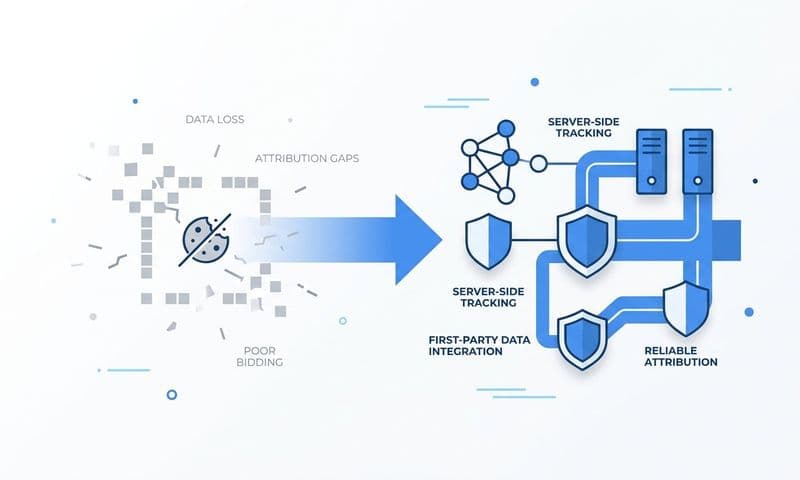
Browser-based pixels are increasingly unreliable. Ad blockers, iOS privacy updates, and the ongoing deprecation of third-party cookies all reduce the volume and accuracy of conversion events your ad platforms receive. When fewer events get reported, platform algorithms have less signal to work with, and your optimization suffers as a result. You end up bidding on the wrong audiences and misreading which campaigns are actually converting.
The Strategy Explained
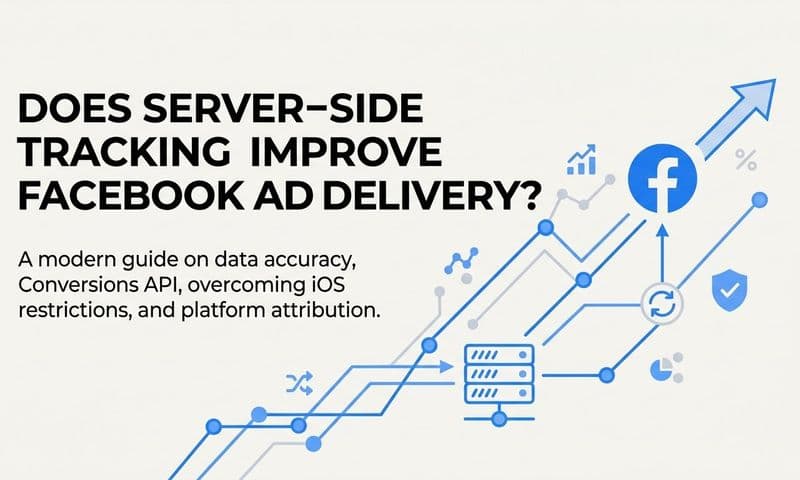
Server-side tracking sends conversion events directly from your server to ad platforms like Meta and Google, bypassing browser restrictions entirely. This is done through integrations like Meta's Conversion API (CAPI) and Google's Enhanced Conversions. Instead of relying on a browser pixel to fire after a page load, your server sends the event data directly, meaning ad blockers and cookie restrictions cannot interfere.
The additional benefit is first-party data enrichment. When you include identifiers like hashed email addresses, phone numbers, or user IDs with your events, the platform's matching algorithms can connect those events to real user profiles with much higher confidence. Better match quality means better optimization, better lookalike audiences, and more accurate conversion reporting.
Implementation Steps
1. Audit your current pixel-based setup to identify which conversion events are being lost or underreported due to browser restrictions.
2. Set up Meta's Conversion API and Google's Enhanced Conversions through your server or a platform like Cometly that handles the integration natively.
3. Enable first-party data enrichment by passing hashed customer identifiers alongside your conversion events to improve event match quality.
4. Run both browser pixels and server-side tracking in parallel initially to compare event volumes and validate data accuracy before fully transitioning.
Pro Tips
Do not turn off your browser pixel immediately. Running both in parallel lets you benchmark the improvement in event match quality and gives you a safety net during the transition. Once server-side data is stable and match rates are healthy, you can reduce reliance on the pixel without losing visibility. For a deeper look at why this approach outperforms traditional methods, see why server-side tracking is more accurate for modern attribution.
2. Align Your Attribution Model to Your Sales Cycle
The Challenge It Solves
Last-click attribution is the default in most ad platforms, and it systematically undervalues the campaigns that start the journey. For B2B SaaS companies with sales cycles that often run 30 to 90 days or longer, a single last-click model tells you who closed the deal, not who opened the door. Top-of-funnel channels that generate awareness and intent get starved of budget because they never show up as the final conversion source.
The Strategy Explained
Multi-touch attribution distributes conversion credit across multiple touchpoints in the buyer journey rather than awarding it all to the last interaction. Different models serve different purposes. Linear attribution spreads credit evenly across all touchpoints. Time-decay models weight recent interactions more heavily. Data-driven models use algorithmic analysis to assign credit based on actual conversion patterns in your data.
For B2B SaaS, the right model depends on your sales cycle length and how buyers typically research your category. The goal is not to find a perfect model but to find one that more accurately reflects how your customers actually buy. This shifts budget decisions from gut feel to evidence. You can explore the 5 most common ad attribution models to compare your options in detail.
Implementation Steps
1. Map your typical buyer journey by reviewing CRM data to understand how many touchpoints occur before a deal closes and which channels appear most frequently at each stage.
2. Select an attribution model that reflects your sales cycle, starting with linear or time-decay if you do not yet have enough data for a data-driven model.
3. Compare performance reports under different attribution models to identify which campaigns are undervalued by last-click and which may be overvalued.
4. Use those insights to reallocate budget toward channels that consistently influence deals even when they are not the final touchpoint.
Pro Tips
Run multiple attribution models simultaneously rather than committing to just one. Seeing the same campaign through different attribution lenses gives you a more complete picture of its true contribution. Most sophisticated attribution model selection for ad campaigns involves comparing models side by side without having to rebuild your entire reporting setup.
3. Track the Full Customer Journey, Not Just the Last Click
The Challenge It Solves
Most ad platforms show you what happened after someone clicked your ad. They do not show you what happened to that person over the next 60 days inside your CRM. This creates a fundamental disconnect: you can see which campaigns generate form fills, but you cannot see which ones generate pipeline, opportunities, or closed-won revenue. Optimizing for form fills alone often means optimizing for lead volume rather than lead quality.
The Strategy Explained
Full customer journey tracking connects ad click data to every downstream CRM event, from lead creation to opportunity stage to closed-won. When a deal closes in your CRM, you want to be able to trace it back to the original ad that started the journey, as well as every touchpoint along the way.
This requires connecting your ad platforms, your website, and your CRM into a unified data layer. Platforms like Cometly do this by linking ad click data to CRM pipeline stages and revenue outcomes, including Stripe integration for SaaS billing data. The result is a clear view of which campaigns actually influence closed deals, not just which ones generate the most form submissions. For deeper context, see how the B2B customer journey shapes attribution strategy and how SaaS growth teams attribute revenue to marketing efforts.
Implementation Steps
1. Ensure every ad click is tagged with UTM parameters and that those parameters are captured in your CRM when a lead is created.
2. Connect your CRM pipeline stages to your attribution platform so that deal progression events are tracked alongside the original ad source data.
3. Integrate revenue data from your billing system so that closed-won deals are tied back to the ad campaigns that influenced them.
4. Build reports that show cost-per-pipeline and cost-per-revenue by campaign, not just cost-per-lead.
Pro Tips
Pay attention to which campaigns generate deals that actually close versus those that generate leads that stall in the pipeline. A campaign with a high lead volume but a low pipeline conversion rate is a budget drain. Full journey tracking makes that pattern visible before it becomes a budget problem.
4. Standardize UTM Parameters and Naming Conventions
The Challenge It Solves
Inconsistent or missing UTM tags break attribution chains. When one campaign uses "utm_source=facebook" and another uses "utm_source=meta" and a third has no UTM tag at all, your analytics platform cannot reliably group that traffic. The result is fragmented reporting, inflated direct traffic numbers, and an inability to compare performance across campaigns or channels with any confidence.
The Strategy Explained
A standardized UTM framework defines exactly how every campaign URL should be tagged across every channel and team member. This means agreeing on consistent values for source, medium, campaign, content, and term, and documenting those conventions so anyone building a campaign follows the same rules. Understanding what UTM tracking is and how it helps marketing is the foundation for building this system correctly.
Beyond UTM tags, ad naming conventions within your ad platforms matter just as much. When your campaigns, ad sets, and ads follow a predictable naming structure, you can filter and analyze creative performance across campaigns without building complex custom reports. This is especially important for creative testing, where you want to understand which ad formats, messaging angles, or visuals are driving results. Learn more about how to use naming conventions for ad creative insights to build a system that scales.
Implementation Steps
1. Define your UTM taxonomy by documenting approved values for each parameter, including a master list of source and medium values that apply across all channels.
2. Build a UTM builder tool or spreadsheet that generates properly formatted URLs automatically to reduce human error when campaigns are launched.
3. Establish ad naming conventions that encode key information like channel, campaign type, audience, and creative format directly into the campaign name.
4. Audit existing campaigns for UTM consistency and retroactively fix tags where possible to improve historical data quality.
Pro Tips
Treat your UTM taxonomy as a living document. As you add new channels or campaign types, update the master list and communicate changes to your team. A small investment in documentation upfront saves hours of data cleanup and reporting confusion later. Consistency compounds over time.
5. Build a Centralized Marketing Dashboard for Cross-Channel Visibility
The Challenge It Solves
When your team pulls data from Meta Ads Manager, Google Ads, and LinkedIn Campaign Manager separately, you are looking at three different versions of performance, each optimized to make that platform look good. Platform-attributed conversions often overlap, meaning the same conversion gets claimed by multiple channels. Without a unified view, your total reported performance is almost certainly inflated and your channel comparison is unreliable.
The Strategy Explained
A centralized marketing dashboard pulls data from all your ad platforms into a single interface, normalizes the metrics, and presents a de-duplicated view of performance. Instead of toggling between platform dashboards with different definitions of "conversion" and different attribution windows, you have one consistent source of truth for budget decisions. Choosing the right marketing campaign tracking software is often the first step toward achieving that unified visibility.
This matters most when you are making cross-channel budget allocation decisions. If you are choosing between increasing LinkedIn spend or shifting budget to Google, you need to compare them on the same terms using the same attribution model and the same conversion definition. Siloed platform reporting cannot give you that. Staying current with marketing analytics trends can also help you understand how centralized reporting is evolving across the industry.
Implementation Steps
1. Identify all the ad platforms and data sources that need to be included in your unified dashboard, including your CRM and any revenue data sources.
2. Select an attribution platform that connects to all your sources natively, rather than building a manual data pipeline that requires constant maintenance.
3. Define a consistent set of metrics and conversion definitions that will apply across all channels in your unified view.
4. Set up regular reporting cadences using the unified dashboard so that budget decisions are always made from the same data source rather than individual platform reports.
Pro Tips
Once you have a centralized dashboard, resist the temptation to also check individual platform dashboards for "validation." The whole point of a unified view is to replace siloed reporting, not supplement it. Trust the unified data and use it consistently. Over time, your team will build shared confidence in the numbers.
6. Use AI-Driven Insights to Identify High-Performing Campaigns Faster
The Challenge It Solves
Campaign data accumulates faster than most marketing teams can analyze it manually. By the time you have reviewed performance across campaigns, ad sets, creatives, and audiences, the window for acting on that data has often passed. Creative fatigue sets in, budgets continue flowing to underperformers, and winning patterns go unnoticed until they are no longer relevant. Manual analysis at scale is simply too slow.
The Strategy Explained
AI-driven insights process large volumes of campaign data continuously and surface the patterns that matter most: which creatives are showing signs of fatigue, which audience segments are converting at higher rates, which channels are trending up or down in efficiency. Instead of spending hours building pivot tables, your team gets prioritized recommendations they can act on immediately. Understanding the right campaign performance metrics to monitor is essential for making AI-driven analysis actionable.
Beyond surfacing insights, AI also plays a role in feeding better data back to ad platform algorithms. When you send enriched conversion events to Meta and Google that include pipeline and revenue signals rather than just form fills, the platform's own AI optimizes toward higher-quality outcomes. Cometly's AI ads manager and enriched event sending capabilities are built specifically for this: helping growth teams scale winning campaigns faster while continuously improving the quality of signals sent back to ad platforms.
Implementation Steps
1. Ensure your conversion events are enriched with first-party data before sending them back to ad platforms, so the platform's algorithm is optimizing toward quality signals.
2. Set up AI-driven performance monitoring that flags creative fatigue, audience saturation, or efficiency drops before they become significant budget problems.
3. Use AI recommendations to prioritize which campaigns to scale, pause, or test rather than relying solely on manual data review.
4. Review AI insights on a regular cadence and build a feedback loop where acting on recommendations and tracking outcomes improves future suggestions.
Pro Tips
The quality of AI insights depends entirely on the quality of data you feed into the system. If your conversion events are incomplete, your UTM tags are inconsistent, or your CRM data is fragmented, AI will surface patterns based on noisy data. Fix your data foundation first, then layer AI on top of it for maximum impact.
7. Track Lead Quality and Revenue Attribution, Not Just Conversion Volume
The Challenge It Solves
Optimizing for cost-per-lead is one of the most common ways marketing teams misallocate budget. A channel that generates a high volume of cheap leads may look like a winner in your ad platform while producing leads that rarely convert to pipeline or revenue. Meanwhile, a channel with a higher cost-per-lead may be consistently generating the deals that actually close. Without revenue attribution, you cannot tell the difference.
The Strategy Explained
Revenue attribution connects ad spend directly to closed-won deals, giving you a true cost-per-revenue metric by channel and campaign. This fundamentally changes how you evaluate performance. A campaign that looks expensive on a cost-per-lead basis may have the best cost-per-revenue in your portfolio. A campaign generating hundreds of leads may have a cost-per-revenue that makes it economically unsustainable.
This shift in optimization focus is especially important for B2B SaaS companies where customer acquisition cost and lifetime value are the metrics that determine growth sustainability. Connecting your ad data to lead attribution frameworks, B2B revenue attribution software, and revenue attribution models gives your team the infrastructure to make budget decisions based on outcomes that actually matter.
Implementation Steps
1. Connect your ad platforms to your CRM so that every lead is tagged with its original ad source from the moment it enters the pipeline.
2. Track pipeline progression by ad source to identify which channels generate leads that advance through the funnel versus those that stall at the lead stage.
3. Connect closed-won revenue data to your attribution layer so you can calculate cost-per-revenue by channel, campaign, and even individual ad creative.
4. Shift your primary optimization metric from cost-per-lead to cost-per-pipeline or cost-per-revenue, and update your reporting dashboards to reflect that change.
Pro Tips
When you first make this shift, expect some surprises. Channels you have been investing heavily in based on CPL may look very different when evaluated on cost-per-revenue. Use that data as an opportunity rather than a setback. Reallocating budget toward channels with better revenue efficiency is exactly the kind of decision that compounds into meaningful growth over time.
Putting It All Together
Improving ad campaign performance tracking is not a one-time fix. It is a system you build layer by layer, starting with clean data collection, then adding attribution logic, cross-channel visibility, and revenue connection. Each strategy in this list addresses a specific gap that, left unresolved, causes marketing teams to misread performance and misallocate budget.
The most impactful place to start is wherever your current blind spots are largest. If you are losing conversion signal due to browser restrictions, start with server-side tracking. If you cannot connect ad spend to closed revenue, start with pipeline and revenue attribution. If your cross-channel data is fragmented and siloed, build the centralized dashboard first.
These strategies are designed to build on each other. Better data collection improves attribution accuracy. Better attribution improves budget decisions. Better budget decisions improve campaign outcomes. And better campaign outcomes give you the confidence to scale.
Cometly is built to help B2B SaaS teams do exactly this. It connects your ad platforms, CRM, and website into a single attribution layer so you can see which campaigns drive real revenue, not just clicks. From multi-touch attribution to AI-powered insights, Conversion API integration, and revenue attribution across the full funnel, Cometly gives growth teams the data infrastructure to make confident, scalable decisions.
Ready to elevate your marketing game with precision and confidence? Discover how Cometly's AI-driven recommendations can transform your ad strategy. Get your free demo today and start capturing every touchpoint to maximize your conversions.