In house marketing teams at B2B SaaS companies are under more pressure than ever to prove their impact. Budget conversations happen faster, leadership wants answers tied to revenue, and the days of reporting on impressions and click-through rates are over. The shift toward in house marketing team analytics is not just a trend. It is a strategic necessity for teams that want to scale with confidence and allocate spend where it actually drives pipeline.
The challenge is that most in house teams inherit fragmented data. Ad platforms report in silos. CRMs hold one version of the truth. Website analytics tools hold another. And somewhere between a lead filling out a form and a deal closing, the attribution story gets lost. The result is a team that is busy but unable to clearly answer the most important question: what is actually working?
This guide covers seven practical strategies to help in house marketing teams build a reliable analytics practice. Each strategy addresses a specific gap that shows up repeatedly in B2B SaaS marketing operations, from setting up proper conversion tracking to connecting ad spend directly to closed revenue. Whether you are just starting to formalize your analytics approach or looking to sharpen what you already have, these strategies will give you a clear path forward.
1. Define the Metrics That Connect Marketing to Revenue
The Challenge It Solves
Most in house marketing teams track activity. They measure impressions, clicks, form fills, and cost per lead. These numbers are easy to pull but rarely tell leadership what they actually need to know. When budget decisions get made, activity metrics do not hold up in the room. What leadership wants to see is pipeline generated, revenue influenced, and cost per acquisition tied to closed deals.
Without a shared metrics framework, different team members report different numbers, and no one is fully aligned on what success looks like.
The Strategy Explained
The first step is agreeing on a small set of metrics that connect marketing activity to business outcomes. Think of this as building a hierarchy. At the top are revenue metrics: closed-won revenue attributed to marketing, pipeline generated, and customer acquisition cost. Below that are leading indicators: qualified leads, SQL conversion rate, and opportunity creation rate. At the bottom are efficiency metrics: cost per lead by channel and landing page conversion rate.
The goal is not to stop tracking activity. It is to ensure that activity metrics always ladder up to something that matters to revenue. This framework also makes it easier to have honest conversations about which channels are worth investing in and which ones are burning budget without producing results.
Implementation Steps
1. Schedule a working session with marketing, sales, and leadership to agree on the top five to seven metrics that define marketing success at your company.
2. Map each metric to a data source: which tool or system is the single source of truth for that number.
3. Document the definitions clearly. For example, define exactly what qualifies as a marketing-sourced opportunity versus a sales-sourced one to avoid disagreements later.
4. Remove vanity metrics from your regular reporting templates so attention stays focused on what drives decisions.
Pro Tips
Keep your core metrics list short enough to fit on one page. If you cannot explain why a metric is on the list in one sentence, it probably does not belong there. Revisit the framework quarterly as your business model and growth stage evolve, because the metrics that matter at Series A are not always the same ones that matter at Series C.
2. Implement Multi-Touch Attribution Across Every Channel
The Challenge It Solves
B2B SaaS buying cycles are rarely linear. A prospect might see a LinkedIn ad, read a blog post, attend a webinar, and then convert through a Google search weeks later. If you are only tracking the last click, you will systematically undervalue every channel that contributed to the journey except the final one. First-click models have the opposite problem, giving all credit to awareness while ignoring the nurture that actually moved the deal forward.
The Strategy Explained
Multi-touch attribution distributes credit across all the touchpoints in a buyer's journey. There are several models to choose from: linear attribution splits credit evenly, time-decay gives more credit to touchpoints closer to conversion, and data-driven models use historical patterns to assign credit algorithmically. For most B2B SaaS teams, starting with a linear or time-decay model gives a more honest picture than either single-touch extreme.
The real power of multi-touch attribution is that it reveals which channels are genuinely contributing to pipeline versus which ones only look good in last-click reports. This is critical when you are making decisions about where to invest the next dollar of budget.
Platforms like Cometly are built specifically to handle multi-touch attribution for B2B SaaS teams, connecting touchpoints across paid channels, organic, and direct traffic into a single attribution view that maps to pipeline and revenue.
Implementation Steps
1. Audit your current attribution setup and identify which model you are using by default in each ad platform and your CRM.
2. Choose a primary attribution model that fits your sales cycle length. Longer cycles typically benefit from time-decay or data-driven models.
3. Implement consistent UTM tagging across every paid and organic channel so touchpoints can be tracked and attributed accurately.
4. Use a dedicated attribution platform that can stitch together touchpoints from multiple sources rather than relying on any single ad platform's native attribution, which is inherently biased toward that platform.
Pro Tips
Do not try to run a single attribution model forever. Run two models in parallel for a quarter and compare the results. The differences between models will surface insights about which channels are being over or undervalued in your current reporting. Use those insights to have a more informed conversation about budget allocation.
3. Set Up Server-Side Conversion Tracking for Accurate Data
The Challenge It Solves
Browser-based pixel tracking has become increasingly unreliable. Ad blockers prevent pixels from firing. iOS privacy changes limit the data that passes between browsers and ad platforms. Cookie restrictions reduce the window for tracking returning visitors. The result is that many in house teams are making budget decisions based on conversion data that is significantly undercounted, which means they may be undervaluing channels that are actually performing well.
The Strategy Explained
Server-side conversion tracking sends conversion events directly from your server to ad platforms like Meta and Google, bypassing the browser entirely. This approach uses tools like Meta's Conversions API and Google's Enhanced Conversions to restore the signal accuracy that browser limitations have eroded.
Instead of relying on a pixel that fires in the user's browser, your server captures the conversion event and sends it directly to the ad platform with hashed user data for matching. This means more conversions get attributed correctly, your ad platform's optimization algorithms have better data to work with, and your reporting reflects what is actually happening rather than a degraded version of it.
Server-side tracking is now considered a foundational best practice for any team running paid advertising at scale. Cometly's Conversion API integration makes this setup accessible for B2B SaaS teams without requiring heavy engineering resources.
Implementation Steps
1. Audit your current pixel coverage and identify where conversion events are being lost due to browser limitations or ad blockers.
2. Set up Meta Conversions API and Google Enhanced Conversions for your primary paid channels.
3. Use event deduplication to ensure that conversions tracked server-side and browser-side are not counted twice in your reporting.
4. Validate your setup by comparing server-side event counts against browser-side counts over a two-week period and monitoring for improvements in match rates.
Pro Tips
Pay close attention to your event match quality scores inside Meta Events Manager and Google's diagnostics tools. These scores tell you how well your server-side events are being matched to user profiles, which directly affects how well the ad platform can optimize your campaigns. Higher match quality means better algorithmic performance downstream.
4. Build a Centralized Marketing Dashboard for Real-Time Visibility
The Challenge It Solves
When data lives in separate tools, every decision requires manual effort. Someone has to pull numbers from Meta Ads Manager, export from Google Ads, check HubSpot for lead counts, and cross-reference everything in a spreadsheet. By the time the data is assembled, it is already a day or two old. Campaigns that should have been paused keep running. Budget that should have shifted stays in the wrong place. Speed is lost at exactly the moment it matters most.
The Strategy Explained
A centralized marketing dashboard pulls data from every source into a single view so your team can see performance across all channels in real time without switching between tools. The goal is not just convenience. It is speed of decision-making. When a campaign starts underperforming, you want to know within hours, not after a weekly report gets assembled.
The most effective centralized dashboards for in house B2B SaaS teams include ad performance data by channel and campaign, lead volume and quality metrics from the CRM, pipeline and revenue attribution, and cost per acquisition by source. This gives both the marketing team and leadership a shared view of what is happening and why.
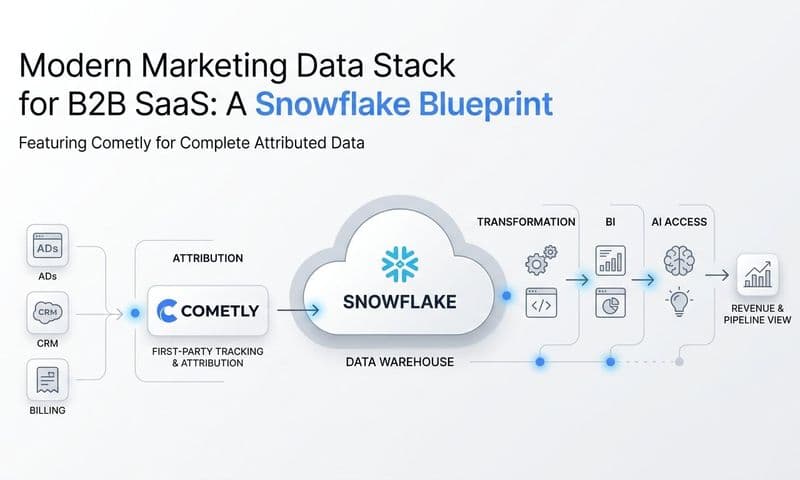
Cometly serves as this centralized hub for many in house teams, integrating with over 70 native platforms to bring ad data, CRM data, and revenue data into one place with real-time updates.
Implementation Steps
1. List every tool your team currently uses to track marketing performance and identify the key metric from each one that belongs in your central view.
2. Choose a platform that supports native integrations with your ad channels, CRM, and website analytics rather than relying on manual exports.
3. Design your dashboard around decisions, not just data. Ask: what would a team member need to see each morning to know where to focus their attention today?
4. Set up automated alerts for significant changes in key metrics, such as a spike in cost per lead or a drop in conversion rate, so your team can respond quickly without having to check the dashboard constantly.
Pro Tips
Build separate dashboard views for different audiences. Your paid media manager needs campaign-level detail. Your VP of Marketing needs channel-level trends. Your CEO needs pipeline and revenue attribution. One tool can serve all three needs with different views, which eliminates the need for multiple reporting layers and keeps everyone working from the same underlying data.
5. Track the Full Customer Journey From First Click to Closed Revenue
The Challenge It Solves
Many in house teams track leads well but lose visibility the moment a prospect enters the sales process. Marketing can report on how many MQLs were generated, but cannot say with confidence how many of those became customers or what revenue they generated. This creates a credibility gap in budget conversations and makes it impossible to calculate true return on ad spend at the campaign level.
The Strategy Explained
Full customer journey tracking means connecting the data that exists in your ad platforms with the data that exists in your CRM and your revenue system. The goal is to be able to trace a closed deal back to the specific campaign, ad, and keyword that first introduced that customer to your product.
This requires passing a consistent identifier, often a UTM parameter or a unique lead ID, from the first ad click through the form submission, into the CRM record, and eventually linking it to the closed-won opportunity. When this chain is intact, you can calculate marketing-sourced revenue by channel, by campaign, and by individual ad.
Integrating tools like Stripe with your attribution platform adds another layer of precision. Rather than relying on CRM stage data alone, you can tie actual subscription revenue back to the marketing touchpoints that drove acquisition. Cometly's Stripe revenue integration is designed specifically for this use case, giving B2B SaaS teams a direct line from ad spend to closed revenue.
Implementation Steps
1. Implement UTM tracking consistently across all paid and organic channels, and verify that UTM parameters are being captured and stored in your CRM at the lead level.
2. Work with your sales team to ensure that lead source data is not being overwritten as records progress through the pipeline.
3. Connect your CRM to your attribution platform so that opportunity and closed-won data flows back to the marketing layer.
4. If your business runs on a subscription model, integrate your payment processor with your attribution data to connect recurring revenue to acquisition source.
Pro Tips
The weakest link in most customer journey tracking setups is the handoff between marketing and sales. Leads often get manually re-entered or re-assigned in the CRM, which breaks the attribution chain. Audit this handoff process specifically and document exactly how lead source data should be handled to preserve the tracking integrity your team worked hard to set up.
6. Use Attribution Data to Optimize Ad Spend Across Channels
The Challenge It Solves
Without attribution data, budget decisions default to gut feel or last-click metrics. Teams end up doubling down on channels that look good in platform-native reports but are not actually driving revenue. Meanwhile, channels that play a critical role in the buyer journey but rarely get the final click are chronically underfunded. The result is a budget allocation that feels reasonable but is quietly leaving pipeline on the table.
The Strategy Explained
Attribution data gives you a factual basis for budget decisions. When you can see which campaigns and channels are generating pipeline and closing revenue, you can shift spend toward what is working and away from what is not. This is not a one-time exercise. It is an ongoing optimization loop that gets sharper as your data accumulates.
There are two dimensions to this optimization. The first is internal: using your attribution reports to reallocate budget across channels and campaigns based on revenue contribution rather than surface metrics. The second is external: feeding enriched conversion data back to ad platforms so their machine learning algorithms can optimize delivery toward the audience segments most likely to convert into actual customers.
This second dimension is particularly powerful. When you send server-side conversion events that include downstream signals like opportunity creation or closed-won revenue, ad platforms can use that data to find more prospects who look like your best customers rather than just optimizing for form fills.
Implementation Steps
1. Pull a channel-level attribution report that shows pipeline and revenue contribution, not just lead volume, for the past 90 days.
2. Identify channels or campaigns where cost per pipeline opportunity is significantly higher than average and investigate whether the quality of leads from those sources justifies the spend.
3. Set up custom conversion events in Meta and Google that fire on high-intent actions deeper in the funnel, such as demo bookings or trial activations, rather than just top-of-funnel form fills.
4. Use Cometly's AI ads manager to surface recommendations on which campaigns to scale, pause, or adjust based on attribution performance data across all channels.
Pro Tips
Be careful about making budget shifts based on a single week of data. Attribution patterns in B2B SaaS can be noisy because sales cycles are long. Look at 60 to 90 day windows when evaluating channel performance, and make incremental budget changes rather than dramatic shifts so you can measure the impact of each adjustment clearly.
7. Build a Regular Analytics Review Cadence for Continuous Improvement
The Challenge It Solves
Even teams with excellent data infrastructure often fail to act on what the data is telling them. This happens when analytics review is treated as an ad hoc activity rather than a structured rhythm. Without a regular cadence, insights get buried in dashboards, trends are noticed too late, and the connection between marketing activity and business outcomes gets fuzzy over time.
The Strategy Explained
A structured analytics review cadence creates accountability and keeps the team oriented around outcomes rather than activity. Think of it as three nested review loops operating at different timescales.
Weekly reviews focus on campaign performance. The goal is to catch underperforming campaigns early, identify any tracking issues, and make tactical adjustments to bids, budgets, or creative. These should be short, focused sessions lasting no more than 30 to 45 minutes.
Monthly reviews zoom out to the channel level. The goal is to assess trends in pipeline contribution by source, review cost per acquisition by channel, and identify any shifts in lead quality or conversion rates that need to be addressed.
Quarterly reviews are strategic. This is where you evaluate your overall budget allocation, assess whether your current channel mix is aligned with your pipeline goals, and make decisions about testing new channels or scaling proven ones. A strong marketing analytics strategy ensures these reviews drive meaningful action rather than just producing reports.
Implementation Steps
1. Put all three review types on the calendar as recurring meetings and treat them as non-negotiable. Analytics reviews that only happen when someone has time rarely happen consistently.
2. Define a standard agenda and a standard set of metrics for each review type so preparation time is minimal and discussion stays focused.
3. Assign ownership: one person should be responsible for pulling and presenting the data at each review, with clear accountability for following up on action items.
4. Document decisions and rationale after each review. Over time, this creates a decision log that helps new team members get up to speed and helps the team learn from past calls.
Pro Tips
The most valuable part of any analytics review is not the reporting itself. It is the conversation about what to do differently. Structure your agendas so that at least half of the time is spent on decisions and actions rather than presenting numbers. If everyone is just reading from the dashboard, you are not getting the full value of the review.
Putting It All Together
Building a strong in house marketing team analytics practice is not about collecting more data. It is about collecting the right data, connecting it across systems, and reviewing it consistently enough to make smarter decisions faster.
The seven strategies covered here form a practical foundation. Start by aligning on the metrics that matter to revenue, then layer in proper attribution tracking and server-side data collection. Build a dashboard that gives your team daily visibility, and establish a review cadence that keeps everyone accountable.
If you are prioritizing where to start, focus first on your metrics framework and your conversion tracking setup. These two foundations determine the quality of everything that comes after them. Once your data is reliable and your team agrees on what success looks like, the attribution models, dashboards, and review cadences all become significantly more powerful.
The teams that win at in house marketing analytics are not necessarily the ones with the biggest budgets or the most sophisticated tech stacks. They are the ones that can answer clearly: which channels drove pipeline this quarter, which campaigns converted to revenue, and where the next dollar of ad spend should go.
Cometly is built to help in house B2B SaaS marketing teams get there. From multi-touch attribution and server-side tracking to AI-powered ad insights and revenue attribution, it connects every part of your marketing data into one place so your team can stop guessing and start scaling.
Ready to elevate your marketing game with precision and confidence? Discover how Cometly's AI-driven recommendations can transform your ad strategy. Get your free demo today and start capturing every touchpoint to maximize your conversions.