Influencer marketing has become a serious growth channel for B2B SaaS companies, but most teams still struggle to connect influencer activity to pipeline and revenue. Likes, views, and follower counts are easy to collect. Knowing whether an influencer actually drove a trial signup, a demo request, or a closed deal is a different challenge entirely.
Without proper tracking for influencer marketing campaigns, you are left guessing which partnerships are worth renewing and which ones are quietly draining your budget. That guesswork gets expensive fast, especially when influencer fees are climbing and every dollar of marketing spend needs to justify itself.
This guide walks you through a practical, step-by-step process to set up attribution for your influencer campaigns from the ground up. You will learn how to define the right conversion events, create trackable links, connect influencer traffic to your CRM data, and build a reporting framework that ties influencer spend directly to revenue.
Whether you are running your first influencer campaign or trying to bring more rigor to an existing program, these steps will give you a clear system that scales. By the end, you will have a repeatable process that removes the guesswork and gives your team the data it needs to make confident investment decisions.
Step 1: Define Your Conversion Goals Before the Campaign Launches
This step sounds obvious, but it is where most influencer campaigns go wrong. Teams get excited about a creator partnership, agree on deliverables, and launch before anyone has clearly defined what success looks like in measurable terms. Then the campaign ends and nobody can agree on whether it worked.
Start by identifying the specific actions that count as a conversion for your campaign. For B2B SaaS companies, those typically include demo requests, free trial signups, paid plan upgrades, or qualified lead form fills. Pick the ones that align with your current growth priorities and be specific.
Next, map each conversion goal to a stage in your marketing funnel. A podcast mention driving brand awareness has a different success metric than a YouTube review targeting bottom-of-funnel prospects who are already evaluating tools. Knowing what stage you are targeting shapes how you measure and interpret results.
Assign a monetary value or pipeline weight to each conversion event. If a demo request converts to a closed deal at a certain rate with a known average contract value, you can work backward to calculate what a demo request is worth. This is the foundation of ROI calculation later. Understanding how to evaluate marketing performance metrics before a campaign launches will sharpen how you define these benchmarks.
Avoid vanity metrics as primary KPIs: Reach, impressions, and engagement rate are easy numbers to report, but they do not connect to revenue. They can serve as secondary context, but they should never be the headline metric in your influencer program.
Document everything in a shared brief: Write your conversion goals, funnel stage targets, and success benchmarks into a campaign brief that every influencer and internal stakeholder receives before anything launches. This keeps everyone aligned and creates a reference point for post-campaign analysis.
The most common pitfall here is setting goals after the campaign launches. If you do not define what you are tracking before traffic starts flowing, you cannot retroactively attribute conversions accurately. The data exists, but the structure to interpret it does not. Get your goals locked in first.
Step 2: Build Unique Tracking Links for Every Influencer and Channel
Once your goals are defined, the next step is making sure every influencer has their own unique tracking link. This is the mechanism that isolates one influencer's traffic from another's and makes individual attribution possible.
Create a UTM-tagged URL for each influencer using a consistent naming convention. If you are new to parameter-based tracking, a deeper look at what UTM tracking is and how it helps marketing will give you the foundational context before you start building links. The standard structure looks like this:
utm_source: The influencer's name or identifier (for example, "john-smith" or "techreviewer-jane"). This tells you who sent the traffic.
utm_medium: The channel where the content lives (for example, "youtube", "instagram", "podcast", "newsletter"). This tells you where the traffic came from.
utm_campaign: The campaign name (for example, "q3-saas-launch" or "summer-trial-push"). This groups all influencer activity under a single campaign umbrella for aggregate reporting.
You can also use utm_content to distinguish between specific posts, episodes, or content formats from the same influencer. This is useful when one creator is producing multiple pieces of content for a single campaign.
For influencers on platforms where clickable links are not available in the content itself, such as Instagram feed posts or podcast audio, create unique promo codes as a secondary tracking layer. When a viewer enters a promo code at signup or checkout, it maps back to the specific influencer who promoted it. This gives you attribution even when the standard click-based path is not available.
Use a link shortener or redirect tool to keep URLs clean and readable for social posts while preserving all UTM parameters in the background. Long UTM strings look messy in captions and bios, and some platforms truncate them.
Store every tracking link and promo code in a marketing campaign tracking spreadsheet shared with your team and each influencer. Include the full UTM URL, the shortened version, the promo code if applicable, and the influencer's contact details. This single document becomes your campaign's source of truth for link management.
Before you share any link with an influencer, test it yourself. Click the link, complete a test conversion, and verify that the UTM parameters appear correctly in your analytics platform. A broken link on launch day means lost attribution data you cannot recover.
The critical pitfall to avoid: never reuse the same UTM link across multiple influencers. When two creators share the same link, their traffic merges into one bucket and individual attribution becomes impossible. Every influencer gets their own unique link, no exceptions.
Step 3: Set Up Server-Side Conversion Tracking to Capture Accurate Data
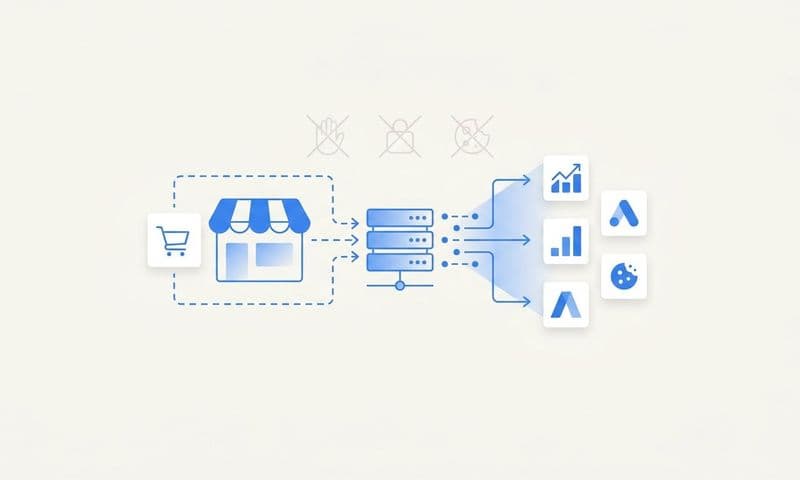
Here is a reality that many marketing teams have not fully internalized yet. Browser-based pixel tracking alone misses a meaningful share of conversions. Ad blockers, iOS privacy updates, and increasingly strict browser cookie policies all chip away at the accuracy of client-side tracking. If you are running an influencer program and relying only on a pixel, you are working with incomplete data.
Server-side tracking solves this by sending conversion events directly from your server to your analytics or attribution platform, completely bypassing the browser. When a user completes a form or activates a trial, your server fires the event rather than waiting for a browser script to do it. The result is a more complete, more accurate picture of what is actually happening.
To set this up, you need to configure your key conversion events at the server level. For most B2B SaaS companies, those events include form submissions, trial activations, demo bookings, and subscription purchase events. Each event should carry the relevant data: the event type, a timestamp, and any first-party lead information you have collected.
First-party data enrichment matters here: When you attach lead information such as email address, company name, and UTM source to each server-side event, you create a rich data record that connects the conversion back to the specific influencer who drove it. This is the data that powers meaningful attribution analysis.
Set up deduplication rules: If you are running both client-side and server-side tracking simultaneously, the same conversion can be counted twice without deduplication logic in place. Pass a unique event ID with both the client-side and server-side versions of each event. Your attribution platform uses that ID to recognize and discard the duplicate, keeping your conversion counts accurate.
Platforms like Cometly support server-side conversion tracking and Conversion API integration, which ensures influencer-driven conversions are captured even when cookies are blocked or a user's browser restricts pixel firing. This is particularly important for B2B audiences, who tend to be more technically sophisticated and more likely to use privacy tools.
Your success indicator for this step: after setup, your server-side event volume should closely match or exceed your pixel-based event volume. If there is a large gap where server-side volume is significantly lower, something in the configuration needs attention. If server-side volume is higher, that gap represents conversions your pixel was previously missing.
Step 4: Connect Influencer Traffic to Your CRM and Revenue Data
Capturing clicks and conversions in your analytics platform is a solid start. But for B2B SaaS companies, the real question is not how many leads an influencer drove. It is how many of those leads became paying customers. Answering that question requires connecting your influencer tracking data all the way through to your CRM and revenue systems.
The key mechanism is passing UTM parameters through your lead capture forms into your CRM as hidden fields. Here is how it works: when a visitor lands on your website through an influencer link, their UTM parameters are stored in the browser session. When they fill out a demo request or trial signup form, hidden fields in that form automatically capture the UTM values and submit them alongside the lead's contact information. The result is a CRM record that includes not just the lead's name and email, but also which influencer sent them.
Once UTM data is in your CRM, map those fields to a custom source field so you can filter and segment by influencer across your entire lead database. This makes it straightforward to pull reports showing pipeline generated per influencer, deal stage by source, and conversion rates from influencer-sourced leads compared to other channels. Teams that invest in marketing attribution tools built for B2B SaaS will find this CRM integration significantly easier to configure and maintain.
For B2B SaaS companies using subscription billing, take this one step further by connecting your payment processor data to your attribution platform. When a lead sourced from a specific influencer eventually converts to a paying customer, that revenue event should flow back into your attribution reporting so you can calculate true return on influencer spend.
Cometly integrates with Stripe and CRM platforms to create a direct line from influencer click to closed-won revenue. This gives you a single source of truth where influencer spend and revenue are visible in the same view, rather than scattered across disconnected tools.
The pitfall that breaks the attribution chain: UTM parameters can be stripped during redirects, form submissions, or certain CRM integrations. When this happens, all those conversions fall into direct traffic with no source attribution. Test the full flow from click to CRM record before your campaign goes live. Click your influencer test link, fill out a test form, and verify that the UTM data appears correctly on the resulting CRM record. Fix any gaps before traffic starts flowing.
Step 5: Choose an Attribution Model That Fits Your Campaign Goals
Not all attribution models tell the same story, and in B2B SaaS influencer marketing, the model you choose can dramatically change how you evaluate which influencers are performing. Understanding your options is important before you start reporting results.
First-touch attribution gives full credit to the influencer if they were the first touchpoint in a customer's journey. This model is useful when your campaign goal is awareness and you want to measure how effectively influencers are introducing your brand to new audiences. The limitation is that it ignores everything that happened after that first interaction.
Last-click attribution gives full credit to the final touchpoint before a conversion. This model tends to favor retargeting ads and direct traffic while systematically undervaluing influencers who drive early discovery. If you use last-click as your primary model for influencer evaluation, you will likely underestimate their contribution to revenue.
Multi-touch attribution distributes credit across all touchpoints in the customer journey. A prospect might discover your product through an influencer's YouTube video, then click a retargeting ad two weeks later, then search your brand name and convert through organic search. Multi-touch attribution gives each of those touchpoints a share of credit, which produces a more accurate picture of how influencer content contributes alongside your other channels.
For B2B SaaS companies with longer sales cycles, multi-touch or time-decay attribution models typically reflect reality more accurately than single-touch models. When a deal takes weeks or months to close and involves multiple interactions, collapsing all that credit onto a single touchpoint distorts your understanding of what is actually driving revenue.
The practical recommendation is to use an attribution platform that lets you compare models side by side. This allows you to see how influencer credit shifts depending on the model applied, which builds a more nuanced understanding of your influencer program's contribution. The Cometly blog covers the five most common ad attribution models in detail if you want a deeper breakdown of each approach and when to apply them.
Step 6: Build a Reporting Dashboard to Monitor Campaign Performance in Real Time
All the tracking infrastructure you have built in the previous steps is only valuable if it feeds into a reporting view that your team can actually use to make decisions. A well-structured dashboard turns raw attribution data into actionable intelligence.
Create a dedicated dashboard that surfaces influencer-specific metrics: clicks by influencer, conversion rate by influencer, cost per lead, pipeline generated, and revenue attributed. These are the numbers that tell you whether your influencer spend is working, not engagement rate or reach. Reviewing digital marketing performance metrics that matter most will help you decide exactly which data points belong in your dashboard view.
Segment your dashboard by influencer, channel, and campaign so you can compare performance across your entire influencer roster at a glance. You want to be able to answer questions like: which influencer is generating the lowest cost per qualified lead? Which channel is driving the highest trial activation rate? Which campaign is producing the most pipeline?
Set up automated alerts: Configure notifications for significant conversion spikes or drops during an active campaign. If an influencer's content suddenly drives a surge in trial signups, you want to know immediately so you can amplify it through paid promotion or share it more broadly. If a campaign goes live and shows zero conversions after 48 hours, you want to catch that quickly and investigate.
Include a customer journey view: A good attribution dashboard does not just show the last click. It shows the full path from influencer touchpoint to closed deal, including every interaction in between. This view helps you understand how influencer content fits into the broader customer journey and where it is most influential.
Track pipeline velocity separately for influencer-sourced leads. Do prospects who come in through influencer channels move through your funnel faster or slower than leads from paid ads or organic search? This metric reveals the quality of influencer-driven leads beyond just the volume.
Cometly provides real-time analytics and AI-driven recommendations that help you identify which influencer campaigns are performing and which need to be adjusted or cut. Rather than waiting until a campaign ends to evaluate results, you can make informed adjustments while the campaign is still running.
Step 7: Analyze Results and Build a Repeatable Optimization Framework
Running a well-tracked influencer campaign is valuable. Building a system that gets smarter with every campaign is where the real competitive advantage comes from. This final step is about turning your post-campaign data into a framework that continuously improves your influencer program.
After each campaign, run a structured post-campaign analysis comparing actual revenue attribution against the conversion goals you defined in Step 1. Did the influencer-sourced leads convert at the rate you expected? Did the pipeline generated justify the spend? Where did the model break down?
Rank your influencers by cost per acquisition and revenue attributed, not by engagement rate or follower count. An influencer with a modest following who consistently drives qualified trials is more valuable than a creator with massive reach and low conversion rates. Your attribution data makes this comparison objective rather than subjective.
Analyze content format performance: Look at which formats drove the highest conversion rates across your influencer roster. Long-form video reviews, short social posts, podcast mentions, and newsletter features all perform differently depending on your audience and product. Let the data guide your content brief for the next campaign.
Feed performance data back into your selection criteria: Use what you learn from attribution data to refine how you evaluate and select influencers for future campaigns. Build a scoring model based on historical attribution data so you can prioritize budget toward proven performers and reduce spend on creators who generate traffic without conversions. Applying data analytics for marketing decisions at this stage transforms your influencer program from a series of one-off experiments into a compounding growth system.
Use AI-powered insights from your attribution platform to surface patterns across campaigns that are not obvious from manual analysis. Patterns in audience behavior, content timing, channel mix, and conversion path length can inform smarter campaign design at scale.
Finally, document your entire tracking setup: UTM naming conventions, server-side event configurations, CRM field mappings, reporting templates, and post-campaign analysis process. This documentation ensures that any team member can replicate the system for the next campaign without starting from scratch. The goal is a process that scales with your program, not one that lives only in one person's head.
Putting It All Together
Tracking for influencer marketing campaigns does not have to be a guessing game. When you define clear conversion goals, build unique tracking links, implement server-side tracking, connect your CRM data, choose the right attribution model, and report in real time, you have a system that produces reliable, actionable data every campaign.
Use this quick-start checklist to confirm your setup is complete before any campaign goes live:
1. Conversion goals defined, documented, and shared with all stakeholders
2. Unique UTM links and promo codes created for each influencer
3. Server-side tracking configured, tested, and deduplication rules in place
4. CRM passing UTM data to lead records and verified through a test submission
5. Attribution model selected and rationale documented
6. Reporting dashboard live with real-time alerts configured
7. Post-campaign analysis scheduled before the campaign launches
Each step in this framework builds on the last. The more campaigns you run through this system, the richer your historical data becomes and the sharper your influencer investment decisions get.
Cometly is built to support exactly this kind of data-driven influencer tracking. It captures every touchpoint from first click to closed revenue, connects your ad platforms and CRM into a single source of truth, and uses AI to surface which channels and campaigns are actually driving growth. You get the infrastructure to run a serious influencer program without stitching together five different tools to see the full picture.
If you are ready to bring real attribution to your influencer program, Get your free demo today and start capturing every touchpoint from influencer click to closed revenue.