Marketing teams at B2B SaaS companies face a persistent challenge: budgets are finite, channels are multiplying, and the pressure to prove ROI has never been higher. Manual budget allocation, built on gut instinct and lagging reports, leaves money on the table and slows growth.
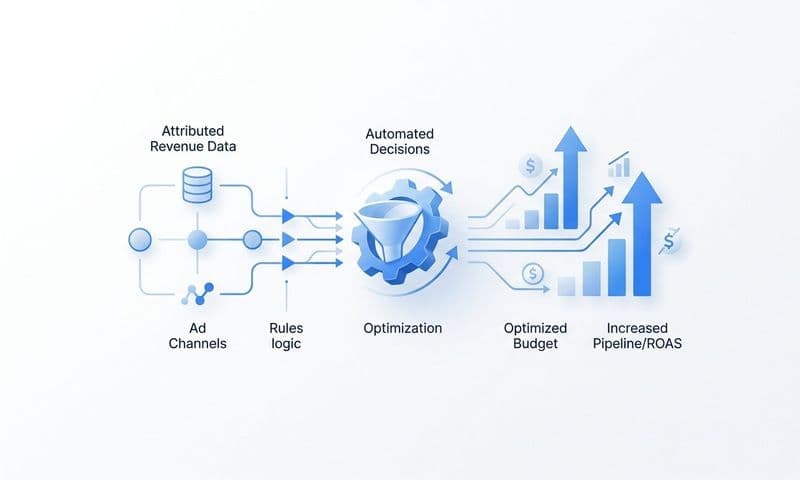
Automated marketing budget optimization changes that equation entirely. By combining real-time attribution data, AI-driven recommendations, and cross-channel performance signals, marketing teams can shift spend dynamically toward what is actually driving pipeline and revenue.
This article outlines seven practical strategies to help growth teams implement automated budget optimization, from building a reliable attribution foundation to using AI to scale winning campaigns. Whether you are managing a six-figure ad budget or scaling into the millions, these strategies will help you stop guessing and start allocating with confidence.
1. Build an Attribution Foundation Before Automating Anything
The Challenge It Solves
Automation amplifies whatever data it runs on. If your attribution layer is broken, incomplete, or built on siloed channel data, automated budget decisions will systematically move money in the wrong direction. The problem is not the automation itself. It is the foundation beneath it.
Many B2B SaaS teams discover this the hard way: they implement automated rules, watch spend shift, and then realize conversions are being double-counted or entire touchpoints are missing from the picture entirely.
The Strategy Explained
Before touching any automation settings, connect your ad platforms, CRM, and website behavior into a single, deduplicated data source. This means every touchpoint in the buyer journey, from the first paid click to the closed-won deal in your CRM, should flow into one unified system.
Think of it like building a house. You would not start with the roof. Attribution is the foundation, and everything you automate later sits on top of it. A platform like Cometly is designed specifically for this purpose, connecting ad platforms, CRM data, and website events into a single source of truth for B2B SaaS teams.
Implementation Steps
1. Audit your current tracking setup and identify gaps between ad platform data, CRM data, and website analytics.
2. Implement a unified attribution platform that ingests data from every channel and deduplicates conversion events across sources.
3. Connect your CRM so that lead quality, pipeline stage, and closed-won revenue feed back into your attribution data.
4. Validate the data by comparing attribution reports against CRM records before activating any automation rules.
Pro Tips
Do not assume your ad platform data and CRM data agree with each other. They rarely do. Run a reconciliation check before you automate anything. Even a small discrepancy in conversion counts can send automated budget rules in the wrong direction at scale. Understanding how marketing attribution software improves digital marketing can help you choose the right foundation for your team.
2. Use Multi-Touch Attribution Models to Score Channel Performance
The Challenge It Solves
Last-click attribution is particularly misleading in B2B SaaS, where sales cycles can span weeks or months. When you optimize purely on last-click data, you systematically underfund the channels that start conversations and nurture prospects, rewarding only the final touchpoint before conversion.
The result is a distorted picture of channel value that pushes budget away from high-impact awareness and consideration channels toward whatever happens to be the last touch before a form fill.
The Strategy Explained
Multi-touch attribution models distribute credit across every touchpoint in the customer journey. Linear models spread credit evenly. Time-decay models give more weight to recent touches. Data-driven models use historical patterns to assign credit algorithmically.
Comparing these models side by side reveals which channels are genuinely contributing to pipeline and which are just getting credit for the final click. This comparison becomes the basis for smarter automated budget allocation, because you are scoring channels on their actual contribution rather than their proximity to conversion.
Cometly's multi-touch attribution capabilities allow teams to compare models in real time, giving you the flexibility to choose the right model for your specific sales cycle.
Implementation Steps
1. Run your current performance data through at least three attribution models: last-click, linear, and time-decay.
2. Identify channels that look strong under last-click but weak under multi-touch models, and vice versa.
3. Choose a primary attribution model that reflects your typical sales cycle length and buyer journey complexity.
4. Use multi-touch scores as the performance input for your automated budget allocation rules.
Pro Tips
There is no universally correct attribution model. The right model depends on your sales cycle, your channel mix, and how your buyers research before purchasing. Test multiple models before committing one to your automation logic, and revisit your model selection as your channel mix evolves. Reviewing the top attribution marketing tools available can help you find the right fit for your specific needs.
3. Automate Spend Reallocation Based on Pipeline and Revenue Signals
The Challenge It Solves
Cost-per-lead is a tempting optimization target because it is easy to measure. But in B2B SaaS, a low CPL often means you are generating leads that never convert to revenue. Optimizing for lead volume without connecting to pipeline and closed-won data means you could be scaling campaigns that look great on paper and perform poorly in practice.
The Strategy Explained
The shift from lead-based to revenue-based optimization is one of the most impactful changes a B2B SaaS marketing team can make. When you connect Stripe revenue data or CRM closed-won records to your ad spend, you can build automation rules that move budget toward campaigns and channels that are actually generating revenue, not just form fills. Exploring marketing spend optimization strategies can give your team a structured framework for making this transition effectively.
This approach requires a tight integration between your ad platforms and your revenue data. Cometly's pipeline and revenue attribution connects ad spend directly to closed-won deals, giving you the signal quality needed to automate budget decisions based on what actually matters.
Implementation Steps
1. Connect your Stripe or CRM data to your attribution platform so closed-won revenue is tied back to specific campaigns and channels.
2. Calculate revenue-per-campaign and cost-per-acquired-customer alongside your standard CPL metrics.
3. Build automated reallocation rules that increase budget for campaigns exceeding your target revenue contribution and reduce budget for campaigns that generate leads but not revenue.
4. Set a review cadence to validate that automated reallocations are producing the expected revenue outcomes.
Pro Tips
Account for sales cycle lag when building revenue-based automation rules. If your average deal closes in 60 days, your automation logic needs to account for the delay between ad spend and closed-won attribution. Using pipeline stage progression as an intermediate signal can help bridge that gap.
4. Implement Server-Side Tracking to Eliminate Data Gaps
The Challenge It Solves
Browser-based pixels miss a meaningful portion of conversion events. Ad blockers, iOS privacy restrictions, and cookie limitations have made client-side tracking increasingly unreliable. When your automation logic is built on incomplete data, it makes decisions based on a partial view of campaign performance, systematically undervaluing campaigns that drive conversions from privacy-conscious users.
The Strategy Explained
Server-side tracking routes conversion data directly from your server to ad platforms via Conversion API integrations, bypassing the browser entirely. This approach captures events that browser pixels miss, giving your automation logic a more complete and accurate picture of what is actually happening after an ad click.
The practical impact is significant. When ad platforms receive more complete conversion signals, their native AI optimization algorithms, including Meta Advantage+ and Google Smart Bidding, perform better. You are not just improving your internal reporting. You are improving the quality of the signal that ad platform AI uses to find your next best customer.
Cometly's server-side tracking and Conversion API integration ensures that enriched, first-party conversion data reaches ad platforms with the completeness needed to power effective automated optimization.
Implementation Steps
1. Audit your current pixel-based tracking to identify the estimated gap between recorded conversions and actual conversions in your CRM.
2. Implement server-side tracking via Conversion API for your primary ad platforms, starting with Meta and Google.
3. Enrich server-side events with first-party data such as email, phone, and CRM identifiers to improve match rates.
4. Compare conversion volumes before and after implementation to quantify the data gap you have closed.
Pro Tips
Server-side tracking is not a one-time setup. As you add new campaigns, landing pages, or conversion events, verify that each is captured server-side. A regular tracking audit, at least quarterly, prevents new data gaps from forming as your campaigns evolve. Learning how to track marketing campaigns comprehensively will help you build a more resilient measurement system over time.
5. Leverage AI Recommendations to Scale High-Performing Campaigns
The Challenge It Solves
Human analysts can only review so many campaigns, ad variations, and audience segments at once. As your campaign portfolio grows, manual analysis becomes a bottleneck. Patterns that would unlock meaningful budget efficiencies go unnoticed simply because there is not enough time to find them.
The Strategy Explained
AI can process performance signals across hundreds of ad variations and audience segments simultaneously, surfacing patterns that manual analysis would miss. When combined with enriched first-party conversion data, AI recommendations become a reliable engine for identifying where to increase budget and where to pull back.
The key distinction here is data quality. AI recommendations are only as good as the conversion signals they are trained on. If your AI is working from incomplete browser-pixel data, its recommendations will reflect that limitation. Feed it clean, enriched, server-side data connected to real revenue outcomes, and the recommendations become meaningfully more accurate. Understanding AI ads optimization in depth can help your team get the most out of these capabilities.
Cometly's AI ads manager analyzes performance across every ad channel, identifying high-performing campaigns and surfacing actionable recommendations so your team can scale with confidence rather than guesswork.
Implementation Steps
1. Ensure your AI optimization tool is connected to enriched, first-party conversion data rather than relying solely on platform-reported metrics.
2. Define what "high-performing" means for your business: revenue contribution, pipeline velocity, cost-per-acquisition, or a combination.
3. Review AI recommendations weekly and implement budget increases for campaigns flagged as scaling opportunities.
4. Track the outcomes of AI-recommended budget changes to validate recommendation accuracy over time.
Pro Tips
Treat AI recommendations as a starting point, not a final answer. Use them to prioritize where your team focuses analytical attention, then apply human judgment to confirm the recommendation makes sense given your business context. The best results come from AI and human expertise working together.
6. Set Performance Thresholds and Automated Budget Rules
The Challenge It Solves
Budget decisions made under pressure, at the end of the month or during a slow week, tend to be emotional rather than analytical. Without predefined rules, teams either react too slowly to underperformance or pull budget from campaigns that just needed more time. Both errors are costly.
The Strategy Explained
Defining clear performance thresholds and translating them into automated rules removes emotion and delay from budget decisions. Think of it as building guardrails for your campaigns: if a campaign falls below a ROAS floor, budget is automatically reduced or paused. If a campaign exceeds a pipeline contribution threshold, budget is increased without waiting for a manual review cycle.
This approach works best when thresholds are grounded in real revenue data rather than vanity metrics. A ROAS floor based on actual closed-won revenue is a fundamentally stronger guardrail than one based on reported conversions from a browser pixel. Reviewing marketing budget allocation best practices can help you set thresholds that reflect realistic performance benchmarks for your market.
Implementation Steps
1. Define your core performance thresholds: minimum ROAS, maximum CPL, minimum pipeline contribution per campaign, and any other metrics that reflect business value.
2. Translate each threshold into a specific automated rule within your attribution platform or ad platform.
3. Set escalation rules that notify your team when automated actions are triggered, so you maintain visibility without requiring manual intervention for every decision.
4. Review automated rule performance monthly to adjust thresholds as market conditions and campaign benchmarks evolve.
Pro Tips
Start with conservative thresholds and widen them as you build confidence in your data. Aggressive automation rules applied to incomplete data can quickly drain budget from campaigns that are actually performing well but appear weak due to tracking gaps. Validate your data foundation before tightening your automation guardrails.
7. Use Cross-Channel Analytics Dashboards to Monitor and Adjust in Real Time
The Challenge It Solves
Optimizing each channel in isolation creates blind spots. A paid search campaign might look efficient on its own, but when you factor in how it interacts with paid social and organic content, you might discover that you are paying for clicks from users who would have converted anyway through another channel. Channel-level optimization without cross-channel visibility leads to duplicated spend and missed synergies.
The Strategy Explained
A unified cross-channel analytics dashboard surfaces how channels interact, where budget is being duplicated, and which combinations of touchpoints are driving the highest-value conversions. Instead of managing five separate channel dashboards, you see the full picture in one place and make budget decisions based on the complete customer journey. Exploring the right marketing analytics solution for your team is a critical step toward achieving this level of unified visibility.
Real-time visibility is particularly valuable here. Marketing conditions change quickly. A campaign that is performing well on Monday may be underperforming by Thursday due to audience saturation, competitive pressure, or seasonal shifts. Real-time dashboards allow your team to catch these changes and adjust before significant budget is wasted.
Cometly's customer journey analytics and cross-channel reporting give marketing teams a single view of how every channel and touchpoint contributes to pipeline and revenue, enabling faster and more confident budget decisions.
Implementation Steps
1. Consolidate your channel reporting into a single dashboard that pulls data from all active ad platforms, your CRM, and your website analytics.
2. Build views that show cross-channel touchpoint sequences for your highest-value conversions to identify which channel combinations drive the best outcomes.
3. Set up real-time alerts for significant performance changes across any channel so your team can respond quickly without constant manual monitoring.
4. Use cross-channel insights to inform your automated budget rules, adjusting thresholds based on how channels are interacting rather than treating each in isolation.
Pro Tips
Pay particular attention to overlap between paid channels. When two channels are consistently appearing together in the same conversion paths, investigate whether both are necessary or whether one is cannibalizing the other. Cross-channel dashboards make these patterns visible in a way that single-channel reporting never will.
Putting It All Together
Automated marketing budget optimization is not a single tool or tactic. It is a system built on accurate attribution data, real-time performance signals, and AI-driven decision-making. Each strategy in this list reinforces the others.
Here is the order that works best for most B2B SaaS teams:
Start with your attribution foundation and server-side tracking. These are non-negotiable prerequisites. Without clean, complete data, everything else is built on sand.
Next, implement multi-touch attribution and connect your revenue data. This gives your automation logic the right signals to work from, scoring channels on their actual contribution to pipeline and closed-won revenue rather than surface-level metrics.
Then layer in AI recommendations, automated budget rules, and cross-channel dashboards. These are the tools that turn good data into faster, smarter decisions at scale.
Teams that implement these strategies systematically stop reacting to last month's data and start optimizing in real time. The competitive advantage is meaningful: while others wait for weekly reports to make budget decisions, you are reallocating spend based on what happened yesterday.
Cometly brings all of these capabilities together in one platform, connecting your ad platforms, CRM, and website to give you a single source of truth for every budget decision. Ready to elevate your marketing game with precision and confidence? Get your free demo today and start capturing every touchpoint to maximize your conversions.