Most B2B SaaS marketing teams are making budget decisions based on incomplete data. Last-click attribution tells you who converted last, not what actually drove the decision. First-touch attribution gives credit to awareness channels while ignoring everything that happened after. Neither approach reflects how modern buyers actually behave across multiple touchpoints before signing up or booking a demo.
Data driven attribution changes this by distributing credit across every touchpoint based on actual contribution to conversion. Instead of applying a fixed rule, it analyzes patterns across your entire conversion data set to determine which channels, campaigns, and ads are genuinely moving prospects toward a decision.
For B2B SaaS companies with longer sales cycles and multi-channel acquisition strategies, this distinction matters enormously. You could be scaling a channel that looks strong under last-click but is actually redundant, while underinvesting in the mid-funnel touchpoints that are doing the real work.
This guide walks you through the exact steps to set up data driven attribution for your B2B SaaS marketing operation. You will learn how to audit your current tracking foundation, configure the right tools, connect your ad platforms and CRM, validate your data, and interpret the outputs to make smarter budget decisions. Whether you are building this from scratch or fixing a broken setup, each step is designed to be practical and actionable.
Step 1: Audit Your Current Tracking Foundation
Before you can build a reliable attribution model, you need an honest picture of what you are actually measuring today. Most teams assume their tracking is working until they look closely and find significant gaps.
Start by identifying every active tracking method in your stack. This includes browser-based pixels, UTM parameters on paid links, server-side event integrations, and any CRM-to-ad-platform connections you have configured. Document all of them in one place so you can see the full picture.
Next, map your customer journey and check for touchpoints that are being missed or dropped. Think about every stage a prospect moves through: first ad click, landing page visit, content engagement, return visits, form submission, trial signup, demo booking, and eventual purchase. Where does your tracking break down? Are mid-funnel touchpoints being captured at all?
Verify that your conversion events are firing correctly across the actions that matter most. For B2B SaaS, these typically include form submissions, trial signups, demo bookings, and purchase events. Use your ad platform event managers and tag debugging tools to confirm that each event is triggering as expected and passing the right data.
Document which ad platforms are currently receiving conversion data and how that data is being sent. Is it coming from a browser pixel only? A server-side integration? Both? This matters because the method of delivery affects data quality and completeness.
Finally, check for duplicate tracking or event deduplication issues. If you are running both a browser pixel and a server-side event for the same action without proper deduplication logic, you may be inflating conversion counts. This will distort any attribution model you layer on top.
Common pitfall: Many teams discover during this audit that their pixel-based tracking is missing a meaningful portion of conversions. Browser privacy changes and ad blockers have significantly reduced the reliability of client-side tracking. This is precisely why server-side tracking is a foundational requirement before you layer on attribution modeling. If your inputs are broken, your model outputs will be too. Understanding how to build a proper attribution tracking setup from the ground up will help you avoid the most common structural mistakes.
Success indicator: You have a complete inventory of your tracking methods, you know exactly which conversion events are firing and where they are sending data, and you have identified any gaps or duplication issues that need to be resolved before moving forward.
Step 2: Implement Server-Side Tracking and First-Party Data Collection
Once you understand where your tracking gaps are, the next step is to address the most significant one: the gap created by browser-based pixel tracking. Client-side pixels are increasingly unreliable because they depend on the user's browser environment, which is now shaped by privacy restrictions, intelligent tracking prevention, and ad blockers.
Server-side tracking solves this by sending conversion data directly from your server to ad platforms, completely bypassing client-side limitations. The data travels from your backend to the platform's API, so it does not depend on a pixel loading in someone's browser.
The two most important server-side integrations to implement are Meta Conversion API and Google Enhanced Conversions. Both allow you to send enriched, first-party conversion data directly to the respective ad platforms. Setting these up requires passing hashed first-party identifiers at the point of conversion, including email address, phone number, and user ID. These identifiers allow the platforms to match your conversion events to actual users in their systems, which improves event match quality scores and attribution accuracy.
When you implement server-side tracking alongside your existing browser pixel, you must also implement event deduplication. Without it, the same conversion will be counted twice: once from the browser pixel and once from the server event. Most platforms handle this through a shared event ID that you pass with both the browser and server versions of the same event. The platform uses this ID to recognize and discard the duplicate.
After your server-side integrations are live, check your event quality scores in Meta Events Manager and Google Ads. These scores reflect how well your events are being matched to real users. A higher match quality score means the platform has more confidence in your conversion data, which directly improves the quality of signals available to the platform's optimization algorithms.
Why this matters for data driven attribution: Attribution models are only as reliable as the data they are built on. If your conversion events are incomplete or low quality, the model will distribute credit based on a distorted picture of your customer journey. A strong server-side foundation ensures the model has accurate inputs to work with. For more context on how ad tracking management software supports this kind of infrastructure, it is worth understanding the full scope of what reliable tracking enables.
Success indicator: Your event match quality scores improve after implementing server-side tracking, and you see a reduction in unattributed conversions in your reporting. The gap between conversions your ad platforms report and conversions you can verify in your product database should narrow significantly.
Step 3: Configure UTM Parameters and Cross-Channel Tracking
Server-side tracking ensures your conversion events are being captured accurately. UTM parameters ensure you know which campaigns and channels deserve credit for driving those conversions. Without a consistent UTM structure, your attribution data will be fragmented and unreliable regardless of how good your event tracking is.
Start by standardizing your UTM parameter structure across every paid channel. Every link should carry five parameters: source, medium, campaign, content, and term. Define what each parameter means in your context and document the naming conventions your team will use. Consistency here is critical because a single naming inconsistency, such as "google" versus "Google" in the source field, will split what should be one channel into two separate entries in your reporting.
Apply UTMs to every paid ad, email campaign, and partner link so that every traffic source is identifiable. There should be no paid traffic arriving at your site without a UTM tag. If it does not have a tag, it cannot be attributed.
For Google Ads, enable auto-tagging and verify that GCLID parameters are being captured and stored in your CRM. The GCLID is Google's click identifier and carries detailed information about the specific ad and keyword that generated the click. Storing it in your CRM allows you to connect ad-level data to lead-level outcomes later in the funnel.
For LinkedIn, Meta, and TikTok, ensure that platform-specific click IDs are being passed through landing pages and stored alongside lead data in your CRM. These click IDs are what allow cross-platform attribution to function at the individual lead level, not just the aggregate channel level.
The most important part of this step is connecting your CRM so that UTM data captured at the first touchpoint follows the lead through the entire pipeline. Many teams capture UTM data at the form submission stage but never connect it to the downstream CRM record. When that happens, you lose the ability to attribute closed-won revenue back to the original acquisition source. That connection is what separates surface-level reporting from real lead attribution.
Common pitfall: UTM parameters break when landing pages redirect without preserving query strings. This is more common than it sounds, especially when using URL shorteners, redirect rules, or multi-step landing page flows. Test every key landing page by clicking through from a tagged URL and confirming the parameters appear in the destination URL and are captured in your CRM.
Success indicator: Every lead in your CRM has a trackable source, and that source data is consistent with what your ad platforms report at the campaign level.
Step 4: Connect Your Ad Platforms, CRM, and Revenue Data
The previous steps ensure your tracking is accurate and your data is flowing cleanly. This step is where you bring everything together into a unified attribution view. Connecting your ad platforms, CRM, and revenue data is what transforms attribution from a conversion counting exercise into a full-funnel revenue measurement system.
Start by integrating your primary ad platforms with your attribution platform. Google Ads, Meta, and LinkedIn should all be connected so that spend, impression, click, and conversion data flows into a single location. When this is done correctly, you can see cost and performance data from every channel in one place without manually pulling reports from each platform.
Next, connect your CRM to pull pipeline stage data, lead status, and deal values. This connection is what allows attribution to be tied to revenue outcomes rather than just form fills. A lead that became a marketing qualified lead, then a sales qualified lead, then a closed deal carries very different value than a lead that never progressed past the first stage. Your attribution model needs to understand that difference.
If you use Stripe or another billing platform, integrate it so that subscription revenue and MRR can be attributed back to the original acquisition source. This is the step that most teams skip, and it is also the step that produces the most valuable insight. Understanding which campaigns generate paying customers, not just trials or demos, fundamentally changes how you allocate budget. For a deeper look at how this works in practice, the guide on how SaaS growth teams attribute revenue to marketing efforts is a useful reference.
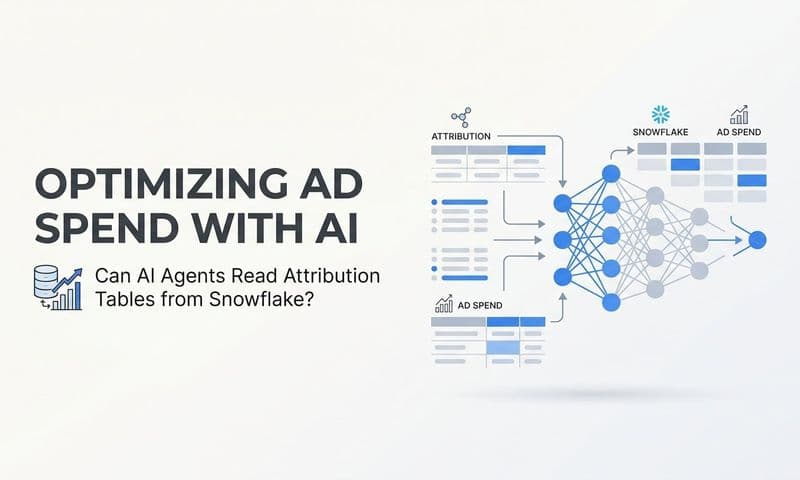
Map your CRM pipeline stages to attribution events so the model understands the full conversion hierarchy. Define which stage represents a marketing qualified lead, which represents a sales qualified lead, and which represents a closed deal. This mapping allows your attribution platform to weight touchpoints appropriately based on where they appear in the journey toward revenue. Teams looking to centralize this data often benefit from understanding how an attribution data warehouse can serve as the connective layer between all these sources.
Verify that data from each connected source is syncing in real time or near real time. Stale data in your attribution model means you are making decisions based on yesterday's picture of your pipeline, not today's.
Success indicator: You can trace a closed-won deal in your CRM back to the specific ad campaign and touchpoints that influenced it. If you can do this for a sample of recent deals, your integration is working correctly.
Step 5: Select and Configure Your Attribution Model
With your tracking foundation in place and your data sources connected, you are ready to configure the attribution model itself. This is where the setup becomes strategic rather than purely technical.
It helps to understand the landscape of available models before choosing one. Rule-based models like first touch, last click, linear, and time decay each apply a fixed formula to distribute credit. They are simple, interpretable, and do not require large data volumes to function. Data driven attribution is different: it uses statistical analysis of your actual conversion path data to determine which touchpoints have the most influence on conversion outcomes. The credit assignments are derived from patterns in your data, not from a predetermined rule. You can explore the differences between these approaches in more detail through this overview of common ad attribution models.
Data driven attribution requires sufficient conversion volume to produce statistically reliable outputs. Most platforms recommend a minimum threshold of conversions per time period before the model becomes stable. If your conversion volume is below that threshold, the model will produce outputs that shift unpredictably with small changes in data, which makes them difficult to act on. In that situation, a linear or time decay model is often more stable and interpretable while you scale toward the volume needed for data driven modeling. A closer look at multi-touch attribution models can help you evaluate which intermediate approach fits your current data reality.
Configure your attribution window to match your typical sales cycle length. A 30-day window may work well for product-led growth motions where the trial-to-paid cycle is short. Sales-led B2B motions with longer evaluation periods typically require 60 to 90 day windows to capture the full influence of early touchpoints on a conversion that happens weeks later.
Set up multiple attribution views so you can compare data driven outputs against simpler models. Seeing how credit shifts between models helps you understand which channels are being undervalued or overvalued under your current approach, which is itself a valuable insight.
Define which conversion events carry the most weight for modeling purposes. For B2B SaaS, closed-won revenue or activated trials are typically more meaningful signals than top-of-funnel form submissions. The model should be optimizing toward the outcomes that matter to your business, not just any trackable action.
Common pitfall: Applying a data driven model to low-volume conversion data produces unreliable results that can lead to poor budget decisions. Be honest about your conversion volume and choose a model that matches your current data reality.
Success indicator: Your attribution model is producing consistent credit distributions that shift meaningfully when you change campaign spend, not just when you change conversion definitions or tracking configurations.
Step 6: Validate Your Data Before Acting on It
Attribution data is only useful if you can trust it. Before you make any budget decisions based on your new setup, you need to validate that the outputs are accurate and that your model is working as intended.
Start by cross-referencing conversion counts between your attribution platform, ad platforms, and CRM. Some variance is normal because different systems use different attribution windows and counting methods. But large discrepancies, such as your attribution platform showing significantly more conversions than your CRM has records for, are a signal that something is wrong. Knowing how to systematically fix attribution discrepancies in data will save you significant time during this validation phase.
Check that total attributed conversions roughly align with actual business outcomes. If your attribution platform shows 200 trial signups in a given month but your product database shows 150, investigate the gap before acting on the data. The gap might be explained by test accounts, spam submissions, or tracking errors. You need to know which before you trust the numbers.
Run a channel-level sanity check. Do the relative contributions from each channel match your general understanding of your acquisition mix? If a channel that has been a minor part of your strategy suddenly appears to be driving the majority of your conversions under the new model, that is worth investigating. Large unexpected shifts are more likely to indicate a tracking issue than a genuine performance change.
Test the end-to-end tracking flow by submitting a test conversion and confirming it appears correctly in every connected system: your attribution platform, your CRM, your ad platforms, and your billing system if applicable. This end-to-end test confirms that your integration is working as designed.
Review your data for signs of attribution inflation. Overlapping attribution windows, double-counted events, or mismatched click IDs can all cause a model to overcredit certain channels. If a channel appears to be performing significantly better under your new model than it did under the old one, verify that the improvement is real and not an artifact of how the data is being counted.
Success indicator: Your attributed conversion data is within an acceptable variance of your source-of-truth systems, and you can explain any remaining gaps. When you can account for the discrepancies that exist, you have enough confidence to act on the data.
Step 7: Use Attribution Insights to Optimize Spend and Scale
This is the step where the investment in your attribution infrastructure starts to generate returns. With validated data flowing through a properly configured model, you now have a basis for making smarter decisions about where to put your budget.
Start by analyzing which channels are receiving more credit under data driven attribution compared to your previous model. Channels that gain credit when you switch from last-click to data driven are likely being undervalued in your current budget allocation. They are contributing to conversions but not getting recognized for it under a simpler model.
Look at touchpoint frequency and position across your highest-value conversion paths. If a specific channel consistently appears in the middle of journeys that end in closed-won revenue, it deserves investment even if it rarely gets last-click credit. Understanding the B2B customer journey at this level of detail is what separates teams that allocate budget strategically from those that follow surface-level metrics.
Use attribution data to identify channels that look strong on last-click but are not appearing frequently in multi-touch paths leading to high-value outcomes. These channels may be capturing demand created by other channels rather than generating it. They deserve scrutiny before you increase investment.
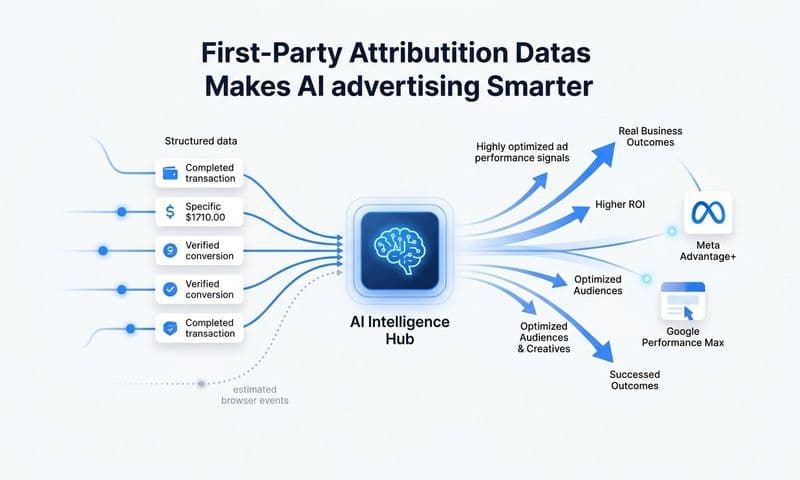
Feed enriched conversion data back to your ad platforms through server-side integrations. When Meta, Google, and LinkedIn receive high-quality, enriched conversion signals, their machine learning algorithms can optimize toward your highest-value customers rather than just any user who completes a form. This creates a feedback loop: better attribution data leads to better ad platform optimization, which leads to higher quality conversions, which leads to better attribution data.
Set up a regular attribution review cadence, monthly at minimum. Credit distribution shifts as you adjust spend and test new channels. A monthly review ensures you are acting on current data rather than decisions made based on a snapshot from three months ago. For a structured approach to this kind of ongoing measurement, building a B2B marketing dashboard that surfaces attribution data alongside pipeline and revenue metrics makes the review process much more efficient.
Connect attribution outputs to your pipeline and revenue reporting so that marketing can demonstrate its contribution to business outcomes in terms that finance and leadership understand. Showing cost per acquisition by channel is useful. Showing attributed revenue per channel, alongside pipeline contribution and deal velocity, is what earns marketing a seat at the budget table.
Success indicator: You are making budget reallocation decisions based on attributed revenue contribution, and those decisions are producing measurable improvements in cost per acquisition and pipeline quality over time.
Putting It All Together
Setting up data driven attribution is not a one-afternoon project, but each step in this guide builds on the last in a logical sequence. Start with a solid tracking foundation, move to server-side data collection, standardize your UTM structure, connect your revenue systems, configure the model with appropriate settings, validate before acting, and then use the outputs to drive real budget decisions.
The payoff is significant. Instead of guessing which channels deserve more investment, you have a model that reflects how your actual buyers behave across a multi-touch journey. You can scale what is working, cut what is not, and send better conversion data back to ad platforms so their algorithms optimize toward your best customers.
For teams that want to go deeper on the measurement side, exploring B2B revenue attribution software options and understanding SaaS marketing metrics that connect to attribution will help you build a more complete measurement system over time.
Cometly is built specifically for this workflow. It connects your ad platforms, CRM, and revenue data into a single attribution view, supports multi-touch and data driven models, and sends enriched conversion events back to Meta, Google, and other platforms through server-side integrations. Every touchpoint gets captured, your AI gets a complete view of the customer journey, and you get the clarity to make confident budget decisions.
If you are ready to move beyond last-click guesswork and build a measurement system that connects ad spend to closed revenue, Get your free demo and see how Cometly gives you the infrastructure to do it.