You run the numbers at the end of the month, and something feels off. Google Analytics shows one revenue figure. Your payment processor shows another. Your CRM shows a third. And somehow, your actual bank account tells a completely different story. If you have been in this situation, you are not alone, and more importantly, it is not your fault.
Google Analytics underreporting sales is not a rare glitch that only affects poorly configured setups. It is a structural limitation baked into how browser-based tracking works, and it quietly distorts the data that marketers use to make budget decisions every single day. The gap between what GA4 shows and what actually happened is real, and it is costing businesses money in ways that are easy to miss until it is too late.
The danger here is not just that the numbers look wrong. The real threat is that marketers take action on those wrong numbers. Campaigns get paused because they appear to underperform. Budgets shift toward channels that only look better because their tracking is more reliable. Ad algorithms get fed incomplete signals and start optimizing for the wrong outcomes. The compounding effect of these decisions over months can quietly erode your return on ad spend.
This article breaks down exactly why Google Analytics misses conversions, how attribution model blind spots make the problem worse, and what you can do to get accurate sales data you can actually trust. Whether you are managing paid search, paid social, or a full multi-channel mix, understanding this issue is foundational to making smarter marketing decisions.
The Gap Between Your Analytics and Your Actual Revenue
Picture this: your payment processor recorded 200 completed purchases last week. Your GA4 dashboard shows 140 conversion events. Your Meta Ads Manager claims credit for 90 of those sales. Your Google Ads account claims another 60. Add those up and the platform-reported numbers exceed your actual orders. Meanwhile, GA4 is showing fewer conversions than any single platform claims. Which number do you trust?
This is the reality that many marketers face when they start digging into their attribution data. The discrepancy between GA4 conversion counts and actual sales records is not a sign that someone configured the tracking wrong. In most cases, it reflects a fundamental limitation of how client-side JavaScript tracking works. The GA4 tag is a piece of code that runs in the user's browser. If anything interferes with that code firing, the conversion event simply never gets recorded. No error message. No alert. Just a silent gap in your data.
The problem is widespread enough that it affects virtually every business running paid advertising. The gap tends to be larger for businesses with significant mobile traffic, a high proportion of Apple device users, or audiences that skew toward privacy-conscious demographics who use ad blockers or privacy-focused browsers. But even businesses without those audience characteristics are affected, because the technical failure points are embedded in the tracking infrastructure itself, not in any particular user behavior.
What makes this issue genuinely dangerous is the downstream effect on decision-making. When a marketer looks at GA4 and sees that a particular campaign drove 50 conversions at a $40 cost per acquisition, they are working with an incomplete picture. If that campaign actually drove 70 conversions, the real CPA is closer to $29. The difference between those two numbers is the difference between scaling a campaign and pausing it. Multiply that across every campaign in your account, and the cumulative impact on budget allocation becomes significant.
Decisions made on underreported data do not just lead to missed opportunities. They actively misdirect resources. Campaigns that are genuinely driving revenue get defunded. Channels that appear to perform well only because their tracking is more robust receive disproportionate budget. Over time, this creates a feedback loop where your marketing mix drifts away from what actually works and toward what is easiest to measure.
Why Google Analytics Misses Conversions in the First Place
To understand the problem, you need to understand how GA4 collects data. The entire system depends on a JavaScript tag, specifically gtag.js, loading and executing in the user's browser when they visit your site. When that tag fires successfully on a conversion page, GA4 records the event. When it does not fire, nothing gets recorded. There is no fallback, no retry mechanism, and no way to recover that data after the fact.
Several well-documented technical realities prevent that tag from firing consistently.
Ad blockers and browser-level tracking prevention: A large and growing share of web users actively blocks tracking scripts. Browsers like Firefox and Brave have built-in tracking protection enabled by default, which blocks the GA script from loading entirely. Users who install browser extensions like uBlock Origin or Privacy Badger achieve a similar result. For these users, GA4 collects nothing. No pageviews, no session data, and no conversion events, even when a purchase is completed.
Safari's Intelligent Tracking Prevention and Apple's privacy framework: Apple has made user privacy a core product differentiator, and the technical implementation of that commitment has significant consequences for web analytics. Safari's Intelligent Tracking Prevention, known as ITP, limits the lifespan of first-party cookies and restricts certain tracking mechanisms that GA4 relies on for session continuity and attribution. Apple's App Tracking Transparency framework, introduced with iOS 14.5, requires explicit user opt-in for cross-app tracking, which dramatically reduced the signal available for mobile attribution. Businesses running paid social campaigns, particularly on Meta, felt this acutely because a large share of Facebook and Instagram users access those platforms on iOS devices.
JavaScript execution failures and checkout timing issues: Even when a user has no privacy tools installed and is not on an Apple device, the GA tag can still fail to fire. If a user completes a purchase quickly and navigates away from the confirmation page before the page fully loads, the tag never executes. If there is a JavaScript error elsewhere on the confirmation page, it can interrupt the GA script before it fires. Slow page load times on mobile connections create the same problem. These are not edge cases. On high-traffic sites, even a small percentage of failed tag fires adds up to a meaningful number of unrecorded conversions.
The cumulative effect of these failure points is that GA4 is working with a subset of your actual conversion data from the moment it starts collecting. The size of that subset varies by audience, device mix, and site performance, but the gap is almost always present. And because GA4 has no visibility into what it is not capturing, it reports confidently on incomplete information without any indication that the data is partial.
Attribution Model Blind Spots That Distort Your Sales Data
Even when GA4 successfully captures a conversion event, how it assigns credit for that conversion introduces a second layer of distortion. Attribution is not just about whether a conversion gets recorded. It is about which channel, campaign, or ad receives credit for it. And GA4's approach to attribution creates systematic blind spots that make certain channels look less effective than they actually are.
GA4 shifted its default attribution model to data-driven attribution, which sounds sophisticated but operates entirely within the GA ecosystem. It does not integrate natively with your CRM data, your offline conversion records, or the attribution logic used by ad platforms like Meta Ads Manager or Google Ads. This means that the same sale can be counted and attributed completely differently depending on which tool you are looking at. Meta might attribute a sale to a Facebook video ad. Google Ads might claim it via a search retargeting campaign. GA4 might attribute it to organic search. All three tools are looking at the same customer and the same purchase through completely different lenses.
Cross-device journeys create invisible attribution gaps: Modern customer journeys rarely happen on a single device. A user might click a Facebook ad on their phone during their commute, visit your site a few times over the next week on their laptop, and then complete a purchase on their desktop. GA4 tracks sessions using cookies, and cookies are device-specific. Without a logged-in user identifier, GA4 has no way to connect those sessions into a single journey. The result is that the final desktop session often gets attributed to direct or organic traffic, completely stripping credit from the paid social ad that initiated the entire journey.
GA4 does offer cross-device tracking through User-ID and Google Signals, but both require conditions that limit their practical coverage. User-ID only works when users are logged into an account on your site. Google Signals requires users to be signed into a Google account and have ads personalization enabled. For most businesses, a significant portion of customers never meet either condition, leaving cross-device attribution largely invisible.
Top-of-funnel channels get systematically undercredited: Even within a single-device session, attribution model choices shape which channels appear to drive results. Last-click attribution, which remains common in many reporting setups, assigns all credit to the final touchpoint before conversion. This means that awareness campaigns, prospecting ads, and first-touch paid channels receive zero credit for the customer journeys they initiate. A marketer looking at last-click data might see their prospecting campaigns generating no conversions and conclude they are not working, when in reality those campaigns are starting most of the journeys that eventually convert through retargeting or branded search.
The combination of missing conversion events and flawed credit assignment creates a distorted picture of channel performance that compounds over time, especially as budget decisions are made on that distorted data.
The Real Cost of Trusting Incomplete Conversion Data
Data quality problems in analytics feel abstract until you trace them to their practical consequences. When conversion data is incomplete, the impact does not stay contained to a reporting dashboard. It flows directly into campaign optimization decisions, budget allocation, and the machine learning systems that power modern ad platforms.
Ad platform algorithms, whether on Meta, Google, or TikTok, use conversion events as training signals. When you optimize a campaign for purchases, the algorithm looks at which users converted and uses that data to find more users who look like them. If your conversion events are missing a significant portion of actual purchases, the algorithm is building its targeting model on an incomplete and potentially skewed dataset. It may be learning from only the conversions that happened to be tracked successfully, which may not be representative of your actual customer base. Over time, this leads to increasingly suboptimal targeting decisions that are difficult to diagnose because the root cause is invisible within the platform's reporting.
Budget decisions compound the problem: When a marketer sees that Campaign A drove 30 conversions and Campaign B drove 50 conversions, the natural response is to shift budget toward Campaign B. But if Campaign A's conversions are being systematically undercounted because it reaches a more privacy-conscious audience or drives more cross-device journeys, the budget decision is based on a false comparison. Campaign A might actually be the stronger performer. The reallocation does not just miss an opportunity. It actively defunds a working campaign and redirects money toward one that only appears to perform better because its tracking is more reliable.
Teams that take the time to reconcile GA4 data against their payment processor records or CRM data often discover a gap that is larger than expected. That gap represents real revenue from customers who converted but were never captured in the analytics. When those unconverted customers were used as the basis for pausing campaigns or reducing bids, the business made decisions that worked against its own interests without any way of knowing it at the time.
The longer this problem goes unaddressed, the more entrenched the misallocation becomes. Budgets drift toward what is measurable rather than what is effective, and the feedback loop between incomplete data and poor decisions tightens with every optimization cycle.
How Server-Side Tracking and Multi-Touch Attribution Close the Gap
The root cause of most GA4 underreporting is that data collection happens in the browser, where it is subject to interference from ad blockers, privacy settings, slow connections, and JavaScript failures. The most direct solution to a browser-side problem is to move data collection off the browser entirely.
Server-side tracking does exactly that. Instead of relying on a JavaScript tag in the user's browser to fire a conversion event, server-side tracking sends conversion data directly from your server to your analytics and ad platforms. When a purchase is completed, your server records the transaction and sends the event data through a secure server-to-server connection. Ad blockers cannot block it. Safari's ITP cannot restrict it. A slow page load cannot interrupt it. The conversion gets recorded regardless of what is happening in the user's browser.
Google Tag Manager's server-side container feature supports this approach, and ad platforms have built their own server-side solutions specifically to recover lost signal. Meta's Conversions API, commonly called CAPI, and Google's Enhanced Conversions both allow businesses to send conversion data directly from their servers, bypassing the browser entirely. These tools were built precisely because the industry recognized that client-side tracking was becoming increasingly unreliable.
Multi-touch attribution maps the full customer journey: Server-side tracking solves the problem of missing conversion events, but it does not by itself solve the attribution problem. For that, you need a multi-touch attribution model that can map every touchpoint in the customer journey and assign credit accurately across all of them.
Multi-touch attribution moves beyond the single-interaction view of last-click models and builds a complete picture of how customers move from first awareness to final purchase. When a customer clicks a Facebook ad, then a Google search ad, then a retargeting ad, and then converts through a direct visit, a multi-touch model distributes credit across all four interactions based on their contribution to the outcome. This gives marketers an accurate view of which channels and campaigns are actually driving revenue across the full funnel, not just which one happened to be the last touchpoint.
Feeding better data back to ad platforms closes the loop: The third piece of the solution is using the enriched, server-side conversion data to improve the signals you send back to ad platforms. When you feed complete, accurate conversion events to Meta and Google through their respective APIs, you are giving their algorithms better training data. Better training data means better audience targeting, more efficient bidding, and improved campaign performance over time. The benefit compounds: more accurate tracking leads to better algorithmic decisions, which leads to better campaign results, which generates more conversion data to work with.
Getting Accurate Sales Data with a Dedicated Attribution Platform
Understanding the technical solutions to GA4 underreporting is one thing. Implementing them across a multi-channel marketing operation is another. Server-side tracking, multi-touch attribution, and conversion API integrations each require technical setup, ongoing maintenance, and a way to bring all the resulting data together into a coherent view. This is where a dedicated attribution platform changes the equation.
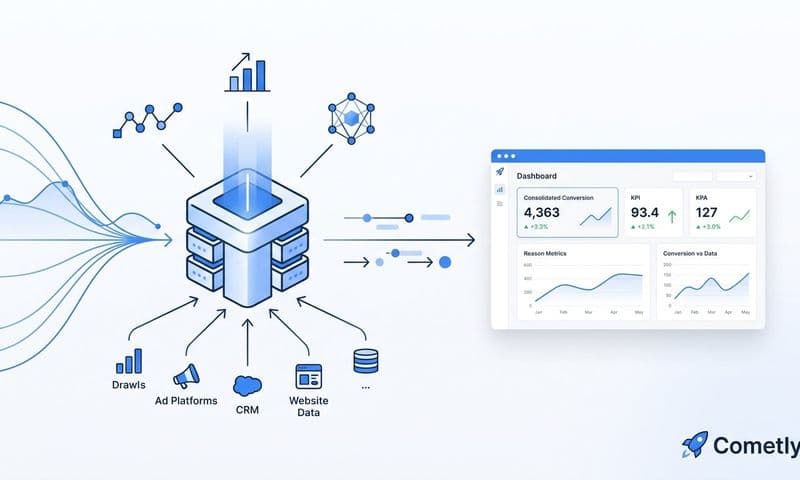
Cometly connects your ad platforms, CRM data, and website events into a single source of truth. Instead of manually reconciling numbers from GA4, Meta Ads Manager, Google Ads, and your payment processor, you get one unified view of what is actually driving conversions. The platform captures every touchpoint from ad click to CRM event, giving its AI a complete and enriched view of every customer journey rather than the partial picture that browser-based tracking provides.
AI-powered analysis surfaces what GA4 misses: One of the practical challenges with underreported data is that you do not always know which campaigns are being undercounted. A campaign targeting a privacy-conscious audience might be systematically undercounted in GA4 while appearing to underperform relative to other campaigns. Cometly's AI-powered analysis identifies which specific ads and campaigns are actually driving conversions, including the ones that GA4 misses entirely. This gives marketers the confidence to scale winning campaigns and cut underperformers based on real performance data rather than tracking artifacts.
The complete attribution workflow in practice: The practical workflow Cometly enables connects three critical functions. First, server-side tracking captures every conversion event regardless of browser conditions, ad blockers, or device type. Second, multi-touch attribution models assign credit accurately across every channel and touchpoint in the customer journey, eliminating the cross-device blind spots and top-of-funnel undercounting that distort GA4 data. Third, conversion sync sends clean, enriched conversion data back to Meta, Google, and other ad platforms, improving the quality of the signals their algorithms use for targeting and optimization.
The result is a closed loop where accurate data collection feeds better attribution, better attribution informs smarter budget decisions, and cleaner conversion signals improve ad platform performance. Each component reinforces the others, and the compounding benefit over time is the opposite of what happens when you run campaigns on incomplete data.
For marketers and agencies managing significant ad spend across multiple channels, this is not a nice-to-have. It is the foundation of making decisions you can actually trust. When you know which campaigns are driving revenue with confidence, scaling becomes straightforward and cutting waste becomes precise rather than guesswork.
Putting It All Together
Google Analytics underreporting sales is not a minor data discrepancy you can round up and move on from. It is a structural problem that affects every budget decision you make, every campaign you optimize, and every signal you send to the ad platform algorithms managing your spend. The root causes are well-documented: browser-based tracking is vulnerable to ad blockers, iOS privacy restrictions, JavaScript failures, and the fundamental invisibility of cross-device journeys.
The fix requires moving beyond client-side tracking toward server-side data collection that captures conversions regardless of browser conditions. It requires multi-touch attribution models that map the full customer journey rather than crediting only the last click. And it requires feeding that enriched data back to ad platforms so their algorithms can optimize on accurate signals rather than incomplete ones.
Each of these solutions is technically achievable, but implementing them in isolation and stitching together the results manually creates its own set of challenges. A dedicated attribution platform brings all of it together: accurate tracking, intelligent attribution, and conversion sync that improves your ad platform performance over time.
If your GA4 data and your actual revenue numbers have never quite matched up, that gap is worth investigating seriously. The decisions you make based on that data are only as good as the data itself.
Ready to replace incomplete analytics with a complete picture of what is actually driving your revenue? Get your free demo and see how Cometly captures every touchpoint, attributes every conversion accurately, and gives you the confidence to scale the campaigns that are genuinely working.