Running paid ads across multiple domains creates a tracking problem that most marketers seriously underestimate. Picture this: a user clicks your ad, lands on your marketing site, gets redirected to a separate checkout domain, and converts. Standard attribution tools? They lose the thread completely the moment that user crosses the first domain boundary.
The result is fragmented data, misattributed conversions, and budget decisions built on a foundation of incomplete information. You end up crediting the wrong channels, defunding campaigns that actually work, and scaling ones that look good on paper but contribute little to real revenue.
This guide walks you through exactly how to set up marketing attribution for multiple domains so every touchpoint gets captured, every conversion gets credited correctly, and your ad spend decisions are backed by accurate data. Whether you manage a brand portfolio, run a multi-step funnel across separate domains, or operate as an agency handling multiple client properties, this process applies directly to your situation.
By the end, you will have a working attribution setup that tracks users across domain boundaries, feeds clean conversion data back to your ad platforms, and gives you a unified view of what is actually driving revenue. Let's get into it.
Step 1: Map Your Domain Ecosystem and Customer Journey
Before you configure a single tracking parameter, you need a clear picture of every domain involved in your funnel. This sounds obvious, but most teams skip it and end up troubleshooting gaps they could have anticipated from the start.
Start by listing every domain and subdomain that plays a role in your marketing funnel. This includes your main marketing site, dedicated landing pages, separate checkout or payment domains, confirmation pages, and any third-party tools that live on their own domains (think webinar platforms, scheduling tools, or form builders). If a user can land on it or pass through it on the way to a conversion, it belongs on your list.
Next, map the actual customer journey. Identify where users typically enter the funnel, where they transition between domains, and where conversions happen. In many B2B SaaS setups, for example, users arrive on the marketing site, click through to a separate app subdomain to start a trial, and the conversion fires on a third domain entirely. Each of those transitions is a potential tracking break point.
For each domain, document the specific touchpoints that matter:
Ad click landing: Where does traffic from paid campaigns first arrive? Is this consistent across all campaigns, or do different ad sets point to different domains?
Lead capture: Where do form submissions or email signups happen? Is the form hosted on your domain or a third-party tool?
Product or pricing pages: Do these live on the same domain as your landing pages, or are they separate?
Checkout or trial activation: This is where many funnels introduce a domain change, especially when using platforms like Shopify, Stripe, or a separate app environment.
Confirmation or thank-you pages: Where does the conversion event fire? If this is on a different domain than where the user started, your attribution setup must account for that handoff.
Once you have this documented, flag every cross-domain handoff point explicitly. These are the moments where tracking is most likely to break. A user moving from yoursite.com to checkout.yoursite.com to app.yoursite.com hits three separate cookie scopes. Without deliberate configuration, each transition looks like a new session with no referral context.
Finally, define your conversion events at each domain level. Not just the final purchase or signup, but every meaningful action: a lead form submission on domain one, a pricing page view on domain two, a checkout initiation on domain three. Defining these upfront ensures nothing gets missed when you move into the technical setup steps.
Step 2: Choose the Right Attribution Model for Multi-Domain Funnels
Once you know your domain ecosystem, the next decision is how to distribute credit across the touchpoints within it. This is where attribution model selection becomes critical, and where most multi-domain setups go wrong by defaulting to last-click.
Here is the core problem with last-click attribution in a multi-domain funnel: it assigns all conversion credit to the final touchpoint before the conversion fires. In a setup where the conversion happens on a checkout domain, last-click will credit whatever channel drove the user to that checkout domain, regardless of how many prior touchpoints across other domains contributed to the decision. An ad campaign that drove the initial awareness click gets zero credit. A retargeting campaign that nurtured the user across two domains gets zero credit. The checkout confirmation page gets everything.
This distorts your budget decisions significantly. Channels that do the heavy lifting early in the funnel look underperforming, while channels that show up at the end look like stars. You end up cutting spend on campaigns that actually drive pipeline and doubling down on ones that just happen to be present at the moment of conversion.
For multi-domain funnels, multi-touch attribution models are far more appropriate. Here is how the main options compare:
Linear attribution: Distributes credit equally across every touchpoint in the journey. If a user touched five campaigns across three domains before converting, each gets 20% of the credit. This is a solid starting point for teams new to multi-touch attribution because it is easy to understand and immediately surfaces the full range of contributing channels.
Time-decay attribution: Gives more credit to touchpoints closer to the conversion. This works well for shorter sales cycles where recent interactions are genuinely more influential. In longer B2B funnels, however, it can still undervalue early-funnel touchpoints that drove initial awareness.
Data-driven attribution: Uses algorithmic weighting based on actual conversion path patterns in your data. This is the most accurate model when you have sufficient conversion volume, because it learns which touchpoints actually correlate with conversion rather than applying a fixed rule. Google Ads and Meta both offer versions of this within their platforms, though these are limited to their own ecosystems.
For most multi-domain setups, a platform-level multi-touch model that captures the entire cross-domain journey will outperform anything that only looks within a single channel or domain. The goal is to see the full path, not just the last step.
Your model choice also directly affects downstream budget decisions. If your attribution model says paid social contributed to 60% of conversions across the funnel but last-click only shows 15%, your budget allocation should reflect the multi-touch reality. Getting this right at the model selection stage means every optimization decision downstream is grounded in accurate data.
Step 3: Implement Cross-Domain Tracking Parameters
With your domain map and attribution model in place, it is time to configure the technical layer that keeps tracking intact as users move between domains. This is where most setups either hold together or fall apart.
The foundation is consistent UTM parameters across all domains. Every paid campaign should use a standardized UTM naming convention that carries through every stage of the funnel. If your UTM structure changes between domains or gets dropped at a redirect, you lose campaign-level attribution at that point in the journey. Establish a naming convention document and enforce it across every team and platform that launches campaigns.
Beyond UTMs, you need to configure cross-domain tracking at the analytics level. Standard first-party cookies are scoped to a single domain. When a user moves from domain A to domain B, the cookie from domain A does not transfer, and the session on domain B looks like a new, direct visit with no attribution context. To prevent this, you need to explicitly tell your analytics setup to recognize both domains as part of the same session.
In Google Analytics 4, this involves configuring cross-domain measurement in your data stream settings, listing all domains that should be treated as part of the same session. When a user navigates between listed domains, GA4 appends a linker parameter to the URL that carries the session identifier across the domain boundary.
For ad platform tracking, you need to pass click IDs across domain transitions. When a user clicks a Meta or Google ad, a click ID (fbclid or gclid) is appended to the landing page URL. If that user then moves to a different domain, that click ID needs to travel with them via URL parameter so the conversion on the second domain can still be attributed to the original ad click. This requires deliberate configuration at each handoff point in your funnel.
Common pitfalls to watch for:
Missing referral exclusions: If you do not add your own domains to the referral exclusion list, traffic moving from one of your domains to another will be recorded as a referral visit, breaking attribution and inflating referral traffic numbers.
Parameter loss on redirects: URL redirects frequently strip UTM parameters and click IDs if not configured to preserve them. Test every redirect in your funnel and confirm parameters survive the transition.
Inconsistent UTM naming: If one team uses "paid-social" and another uses "paid_social" as the UTM source value, your attribution data will be split across two entries. Standardize naming and audit regularly.
Third-party domain handoffs: If any step in your funnel passes through a tool on a third-party domain (a scheduling tool, a payment processor, a webinar platform), you need to verify whether that tool supports parameter passthrough or provides a redirect URL you can customize.
Step 4: Deploy Server-Side Tracking Across All Domains
Cross-domain parameter passing is necessary, but it is not sufficient on its own. Browser-based tracking has become increasingly unreliable, and if your attribution setup depends entirely on client-side scripts and cookies, you are already losing data.
Here is why. Browser privacy updates, ad blockers, and iOS privacy changes have significantly reduced the reliability of client-side tracking. Safari's Intelligent Tracking Prevention limits the lifespan of third-party cookies and even some first-party cookies set via JavaScript. Ad blockers prevent tracking pixels from firing entirely. The result is a growing gap between the conversions that actually happen and the ones your attribution platform can see.
In a multi-domain setup, these gaps compound. Each domain transition is another opportunity for a browser restriction to break the tracking chain. A user who moves through three domains before converting might lose their attribution context at any one of those transitions if you are relying solely on browser-based tracking.
Server-side tracking addresses this by capturing conversion events directly from your server rather than from the user's browser. Instead of relying on a JavaScript pixel that may or may not fire depending on the user's browser settings, server-side tracking sends event data directly from your server to the attribution platform. Browser restrictions cannot block it because it never touches the browser.
To deploy server-side tracking across a multi-domain funnel, you need to instrument each domain at the server level. When a conversion event occurs on any domain, your server captures the relevant data (user identifiers, event type, value, timestamp) and sends it to your attribution platform and to your ad platforms via their server-side APIs.
Meta's Conversions API (CAPI) and Google's Enhanced Conversions are the primary server-side solutions for feeding conversion data back to ad platforms. Both are designed to improve signal quality by supplementing or replacing browser-based pixel data with server-sourced events. When your server sends a conversion event directly to Meta or Google, it arrives with higher reliability and richer data than a browser pixel could provide.
This is where Cometly's server-side tracking capability becomes particularly valuable in a multi-domain setup. Rather than deploying and managing separate server-side integrations for each domain and each ad platform, Cometly handles the data collection and routing centrally. It maintains data continuity across domain transitions by stitching together user journeys at the server level, ensuring that a conversion on domain three is correctly attributed to the ad click that happened on domain one.
The practical result is a more complete picture of your funnel. Conversions that would have been lost to browser restrictions or cookie expiration get captured and attributed correctly, giving your attribution model the full data set it needs to work accurately.
Step 5: Unify Your Conversion Data Into a Single Attribution Dashboard
You have mapped your domains, selected your attribution model, configured cross-domain parameters, and deployed server-side tracking. Now you need to bring all of that data together in one place. Siloed data by domain or by platform is one of the most common reasons multi-domain attribution fails in practice, even when the technical tracking is set up correctly.
The goal is a single attribution view that shows the complete customer journey across every domain, every channel, and every campaign. This means connecting all of your domains to one attribution platform rather than analyzing each domain's data separately. When data lives in separate analytics properties or separate ad platform dashboards, you cannot see the cross-domain journey. You can only see fragments of it.
Start by connecting each domain as a data source within your attribution platform. Map the conversion events from each domain to a unified customer journey schema. A lead form submission on domain one, a pricing page engagement on domain two, and a checkout completion on domain three should all appear as sequential touchpoints on a single user's journey, not as three unrelated events in three separate reports.
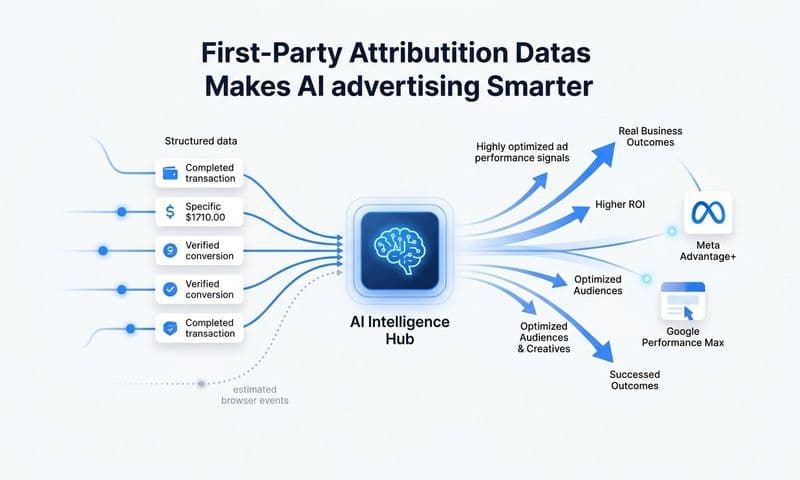
Next, configure conversion sync to push enriched event data back to your ad platforms. When Meta and Google receive complete, server-side conversion data from your entire funnel rather than partial browser-based signals, their algorithms can optimize bidding and targeting more effectively. This is not just about your attribution accuracy. It directly improves ad platform performance because the algorithms have better data to work with.
Cometly's analytics dashboard serves as exactly this kind of central hub for cross-domain attribution data. It connects your ad platforms, CRM, and web properties into one unified view, showing which channels and campaigns contributed to conversions across the full funnel in real time. Instead of toggling between GA4, Meta Ads Manager, Google Ads, and your CRM to piece together a picture, you see the complete story in one place.
With a unified dashboard in place, you can answer questions that were previously impossible: Which campaign drove the first touch that eventually converted three weeks later across two other domains? Which channel has the highest contribution rate across multi-step journeys? Where in the multi-domain funnel are users dropping off before converting? These are the insights that drive meaningful optimization decisions.
Step 6: Validate Your Attribution Setup and Audit for Data Gaps
A tracking setup that looks correct in theory can still have gaps in practice. Before you trust your attribution data to inform budget decisions, you need to validate that every piece of the setup is working as intended.
Start with test conversions. Walk through your entire funnel manually, simulating the path of a real user across each domain transition. Use UTM parameters in your test URLs and confirm they persist at every handoff point. Check that the conversion event fires on the correct domain and appears in your attribution platform with the correct campaign attribution attached. If a test conversion shows up as direct or unattributed, you have found a gap that needs fixing before you go live.
Next, verify that server-side events are being received correctly by your ad platforms. Both Meta's Events Manager and Google's Tag diagnostics tools show you whether server events are arriving and whether they are being matched to users successfully. Low match rates indicate that the user identifiers being passed with your server events are incomplete or inconsistent.
Compare attributed conversions against actual revenue figures. If your attribution platform shows 100 conversions but your CRM or payment processor shows 150, you have a 33% gap that needs to be explained. This kind of discrepancy often points to a specific domain in the funnel where tracking is not firing correctly.
Look specifically for unattributed or direct traffic spikes. A sudden increase in direct traffic from a domain that previously showed referral or campaign traffic is almost always a sign that parameter passing broke at that domain transition. Direct traffic is often the symptom that reveals a tracking gap in your attribution reporting.
Set a recurring audit schedule. Attribution setups degrade over time as domains are added, funnels change, and third-party tools update their redirect behavior. A monthly or quarterly audit that re-runs your test conversions and checks for data discrepancies is essential for maintaining accuracy. What works today may not work after a platform update or a funnel redesign next quarter.
Step 7: Use Attribution Data to Optimize Ad Spend Across Domains
Accurate cross-domain attribution is not just a reporting exercise. It is the foundation for making smarter decisions about where to put your budget. Once your setup is validated and your data is trustworthy, the real value begins.
The first thing accurate attribution changes is budget allocation. When you can see which campaigns contributed to conversions across the entire multi-domain funnel rather than just at the last click, you often find that your current budget distribution does not reflect where value is actually being created. Campaigns driving strong first-touch or mid-funnel engagement across domains may be significantly underfunded relative to their contribution to revenue.
Use AI-powered recommendations to identify which campaigns and channels are performing best across the full journey. Cometly's AI Ads Manager analyzes cross-channel performance data and surfaces specific recommendations about where to increase spend, where to pull back, and which ad creative or targeting combinations are driving the most efficient conversions across your entire funnel. Instead of making gut-feel budget decisions, you are acting on data that reflects the complete picture.
Feed enriched conversion data back to your ad platform algorithms. This is one of the highest-leverage actions you can take after setting up cross-domain attribution. When Meta and Google receive complete, server-side conversion signals from your entire funnel, their bidding algorithms can optimize toward users who are more likely to convert at the end of your multi-domain journey, not just users who are likely to click. Better signals mean better targeting, and better targeting means more efficient spend.
Use your attribution data to identify underperforming touchpoints at specific domains. If users consistently drop off after reaching domain two without progressing to domain three, that is a conversion rate problem at a specific stage of the funnel. Attribution data tells you where the problem is. Testing and optimization tell you how to fix it.
Finally, connect attribution insights to scaling decisions. When a channel shows consistent, high contribution across multiple touchpoints in your multi-domain funnel, that is a signal to increase investment. When a channel appears frequently in the journey but correlates poorly with eventual conversion, that warrants a closer look before scaling. Accurate attribution gives you the confidence to make these calls based on evidence rather than assumption.
Putting It All Together: Your Multi-Domain Attribution Checklist
Setting up marketing attribution for multiple domains is not a one-time task. It is an ongoing system that keeps your data accurate, your ad platforms well-fed, and your budget decisions grounded in reality.
Use this checklist to confirm your setup is complete:
Domain ecosystem mapped: Every domain, subdomain, and third-party tool in your funnel is documented, with cross-domain handoff points flagged.
Attribution model selected: You have chosen a multi-touch model appropriate for your funnel length and number of touchpoints, and you understand how it will affect budget decisions.
Cross-domain tracking parameters deployed: UTM naming conventions are standardized, cross-domain linker settings are configured, click IDs are passed at every handoff, and referral exclusions are in place.
Server-side tracking live on all domains: Server-side events are firing from each domain, bypassing browser restrictions, and sending enriched conversion data to your attribution platform and ad platforms.
Conversion data unified in a single dashboard: All domains are connected to one attribution platform, conversion events are mapped to a unified customer journey, and conversion sync is pushing data back to Meta, Google, and other ad platforms.
Setup validated with test conversions: You have walked through the full funnel, confirmed parameters persist at every domain transition, and verified attributed conversions align with actual revenue data.
Attribution data actively informing spend decisions: Budget allocation, scaling decisions, and optimization priorities are driven by multi-touch attribution insights rather than last-click data or platform-reported conversions.
When every step is in place, you stop guessing which domain or channel drove a conversion and start making decisions with confidence. Cometly is built to handle exactly this kind of complexity, connecting your ad platforms, CRM, and multiple web properties into one clear attribution view. If you are ready to get accurate data across every domain in your funnel, Get your free demo today and start capturing every touchpoint to maximize your conversions.