For years, third-party cookies were the backbone of digital advertising measurement. They told marketers which ads drove clicks, which campaigns generated leads, and where conversions came from. But that era is ending. Browser restrictions, privacy regulations, and user opt-outs have steadily eroded cookie-based tracking to the point where many B2B SaaS marketing teams are flying blind on a significant portion of their pipeline.
The problem is not just data loss. It is decision-making based on incomplete information. When your attribution data is missing touchpoints, you misallocate budget, undervalue high-performing channels, and struggle to prove ROI to leadership.
The good news is that modern tracking infrastructure has evolved well beyond cookies. Server-side tracking, first-party data strategies, Conversion APIs, and AI-powered attribution models now give marketers more accurate, durable, and privacy-resilient ways to measure what actually drives revenue.
This guide covers seven strategies that forward-thinking B2B SaaS marketing teams are using to build conversion tracking systems that do not depend on third-party cookies. Each strategy is actionable, scalable, and designed to give you a clearer picture of your customer journey from first ad click to closed-won revenue.
1. Implement Server-Side Conversion Tracking
The Challenge It Solves
Browser-based pixels are increasingly unreliable. Safari's Intelligent Tracking Prevention, Firefox's Enhanced Tracking Protection, and widespread ad blocker usage all intercept or discard the client-side signals your pixel fires. The result is a growing gap between the conversions your campaigns actually drive and the ones your ad platforms can see and optimize against.
The Strategy Explained
Server-side tracking moves event collection from the user's browser to your own server. Instead of relying on a pixel to fire in a browser environment that may block it, your server receives the conversion event first and then forwards it to ad platforms through a first-party endpoint. This approach bypasses browser-level restrictions entirely.
Because the data travels server-to-server rather than browser-to-platform, it is not subject to cookie blocking, ITP restrictions, or ad blocker interference. The result is more complete event data reaching your ad platforms, which means better match rates, more accurate reporting, and stronger optimization signals for your campaigns. To understand why this approach outperforms traditional methods, see this guide on why server-side tracking is more accurate.
Implementation Steps
1. Set up a server-side tag management container using a platform like Google Tag Manager Server-Side or a custom endpoint on your own infrastructure.
2. Configure your website to send raw event data to your first-party server rather than directly to ad platforms.
3. Route processed events from your server to each ad platform using their respective server-to-server APIs, including Meta's Conversion API and Google's Enhanced Conversions.
4. Validate event match rates in each ad platform's diagnostics dashboard and compare them to your previous pixel-only baseline.
Pro Tips
Do not remove your browser pixel immediately. Running server-side tracking alongside your existing pixel with proper deduplication logic gives you the best of both approaches during the transition period. Deduplication prevents double-counting when both the pixel and the server fire for the same event.
2. Deploy the Meta Conversion API and Google Enhanced Conversions
The Challenge It Solves
Ad platform algorithms depend on conversion signals to optimize targeting, bidding, and delivery. When pixel data is incomplete due to browser restrictions or user opt-outs, the algorithm is making decisions based on a fraction of your actual conversion activity. This leads to inefficient spend and campaigns that underperform relative to their true potential.
The Strategy Explained
Meta's Conversion API (CAPI) and Google's Enhanced Conversions are platform-native solutions that let you send first-party event data directly from your server to each ad platform. Instead of relying on a browser pixel to capture and transmit conversion data, you send it yourself from a trusted, controlled environment.
Meta CAPI accepts web events, app events, and offline events, and matches them to Meta users using hashed first-party identifiers like email addresses. Google Enhanced Conversions work similarly, using hashed customer data to match conversions to Google accounts with greater accuracy than cookie-based attribution alone.
Both systems are designed to supplement pixel data rather than replace it entirely. When implemented together, they create a more complete and redundant signal that feeds the ad platform's machine learning with richer, more accurate conversion information. For a step-by-step walkthrough of the setup process, this Conversion API implementation tutorial covers the full configuration in detail.
Implementation Steps
1. Enable Meta CAPI through your server-side tag management setup or directly via Meta's API, sending web events with hashed email and other available customer identifiers.
2. Configure Google Enhanced Conversions in your Google Ads account and implement the required first-party data fields in your conversion tags.
3. Set up event deduplication using event IDs so that when both the pixel and the server fire for the same conversion, only one instance is counted.
4. Monitor Event Match Quality scores in Meta's Events Manager and conversion diagnostics in Google Ads to track improvement over time.
Pro Tips
The quality of your first-party identifiers directly affects match rates. Passing hashed email addresses alongside events significantly improves the platform's ability to match conversions to users, especially in B2B contexts where purchase cycles span multiple sessions and devices.
3. Build a First-Party Data Infrastructure
The Challenge It Solves
Third-party cookies were always borrowed infrastructure. You were tracking users across the web using identifiers you did not own, on terms set by browser vendors and data brokers. As that infrastructure collapses, marketers who never built their own data foundation are left with nothing to fall back on.
The Strategy Explained
First-party data is information you collect directly from your own users with their knowledge and consent. In B2B SaaS, this includes CRM records, demo request form submissions, trial signup data, product usage events, email engagement, and sales interactions. Unlike third-party cookie data, first-party data is browser-agnostic, consent-based, and entirely controlled by your business.
Building a first-party data infrastructure means creating systematic processes for collecting, storing, and activating this data across your marketing and sales stack. When your CRM, marketing automation platform, and ad platforms are all drawing from the same clean, first-party data layer, your attribution becomes far more accurate and far more durable. Teams looking to evaluate the right tools for this foundation will find this comparison of top conversion tracking platforms a useful reference.
For B2B SaaS teams specifically, first-party data is particularly powerful because it captures the full depth of the customer relationship, not just anonymous click behavior. A trial signup, a product activation event, or a sales call note all carry signal that no third-party cookie could ever provide.
Implementation Steps
1. Audit your existing data collection points across your website, product, CRM, and marketing tools to identify what first-party data you already have and where gaps exist.
2. Standardize your data schema so that customer identifiers like email address are consistently captured and passed across all systems.
3. Implement event tracking in your product to capture key behavioral signals such as feature usage, activation milestones, and engagement patterns.
4. Connect your first-party data layer to your ad platforms using customer match audiences and conversion imports so that your campaigns benefit from the full richness of your customer data.
Pro Tips
Treat your CRM as the source of truth for your first-party data strategy. Every touchpoint that flows into your CRM, from form fills to sales activities, becomes a trackable signal you can use for attribution, audience building, and campaign optimization without any dependency on third-party cookies.
4. Use Multi-Touch Attribution to Map the Full Customer Journey
The Challenge It Solves
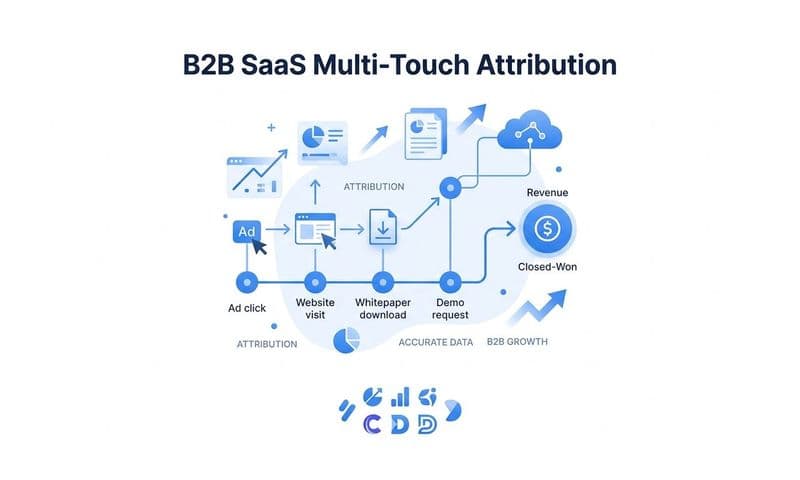
B2B SaaS sales cycles are long. A prospect might engage with a LinkedIn ad, read three blog posts, attend a webinar, and respond to a sales email before requesting a demo. Last-click attribution credits only that final touchpoint, making every channel that contributed to the journey look underperforming. Teams that rely on last-click models routinely cut the top-of-funnel spend that was actually driving their best deals.
The Strategy Explained
Multi-touch attribution distributes conversion credit across every tracked touchpoint in the customer journey rather than assigning it all to the last interaction. This gives you a more accurate picture of which channels and campaigns are contributing to pipeline and revenue across the full length of your sales cycle.
There are several multi-touch models to choose from, including linear attribution, which splits credit equally across all touchpoints; time decay, which gives more credit to touchpoints closer to conversion; and position-based models, which weight the first and last touches most heavily. Data-driven attribution goes further by using machine learning to assign credit based on actual path-to-conversion patterns in your data.
For a deeper look at how different attribution models compare and which might fit your business, the guide on the five most common ad attribution models is a useful starting point.
Implementation Steps
1. Map your typical customer journey by identifying the most common touchpoint sequences that lead to closed deals in your CRM.
2. Select a multi-touch attribution model that aligns with your sales cycle length and the number of touchpoints typically involved before conversion.
3. Implement a tracking system that captures all touchpoints consistently, including paid ads, organic search, email, and direct traffic, and connects them to individual contacts in your CRM.
4. Compare performance data across channels under your new multi-touch model versus your previous last-click view to identify channels that were being systematically undervalued.
Pro Tips
Do not lock in one model permanently. As your sales cycle evolves and your data volume grows, the optimal attribution model for your business may shift. Platforms like Cometly let you compare multiple attribution models side by side so you can make decisions based on the full picture rather than committing to a single fixed view.
5. Leverage UTM Parameters and Source Tracking Consistently
The Challenge It Solves
Even with server-side tracking and Conversion APIs in place, many B2B SaaS teams still struggle to connect ad spend to pipeline because their campaign tagging is inconsistent. When UTM parameters are missing, misspelled, or applied differently across channels, the data that reaches your CRM is fragmented and unreliable, making it impossible to accurately attribute deals to their originating campaigns.
The Strategy Explained
UTM parameters are URL tags appended to your campaign links that pass source, medium, campaign name, and other dimensions into your analytics and CRM systems. They are a first-party tracking mechanism that does not rely on cookies and works consistently across all browsers and devices. If you are new to this approach or want a deeper understanding of how UTMs function, this resource on what UTM tracking is and how it helps your marketing covers the fundamentals clearly.
When UTM data flows from ad click to landing page to form submission to CRM record, you create a persistent, cookie-independent thread that connects every deal back to the campaign that generated it. This is one of the most straightforward and durable tracking layers you can build, and it requires no complex technical infrastructure to implement.
Consistency is the critical variable. A UTM naming convention that varies across campaigns, teams, or channels produces data that cannot be reliably aggregated or compared. Standardizing your UTM structure across all paid and organic campaigns is what transforms this from a partial signal into a complete attribution layer. For more context on how consistent source tracking fits into a broader lead tracking process, see this guide on improving your lead tracking process.
Implementation Steps
1. Define a standardized UTM naming convention covering source, medium, campaign, content, and term fields, and document it in a shared reference your entire team uses.
2. Build a UTM builder tool or spreadsheet that generates properly formatted UTM links automatically to reduce human error.
3. Configure your CRM to capture UTM parameters from form submissions and store them at the contact and deal level so they persist throughout the sales cycle.
4. Audit existing campaigns to identify and correct missing or inconsistent UTM tagging before it compounds into larger data quality issues.
Pro Tips
Capture UTMs at the first touch and store them throughout the entire customer lifecycle in your CRM. Many teams only capture the most recent UTM, which recreates the same last-touch bias problem you are trying to solve with multi-touch attribution. First-touch UTM data is especially valuable for understanding which campaigns are generating your highest-value customers.
6. Integrate Offline Conversion Data Into Your Attribution Model
The Challenge It Solves
In B2B SaaS, the most valuable conversions rarely happen in a browser. A lead becomes a qualified opportunity on a discovery call. A deal closes in a contract signed over email. When your attribution model only tracks online events like form fills and page views, it measures activity at the top of the funnel while remaining blind to the revenue outcomes that actually matter to your business.
The Strategy Explained
Offline conversion tracking connects the dots between your ad spend and your actual revenue by passing CRM pipeline data back to ad platforms as conversion events. When a lead progresses to a qualified opportunity, becomes a closed-won deal, or reaches any other meaningful pipeline milestone, that event can be sent back to Google Ads or Meta as an offline conversion tied to the original ad click that generated the lead. For a comprehensive overview of how this process works end to end, this guide on offline conversion tracking is an excellent resource.
This transforms your ad platform's optimization target from "leads generated" to "revenue generated." Instead of bidding to maximize form fills, your campaigns can optimize toward the signals that predict high-value customers, which often looks very different from signals that predict high lead volume. For B2B SaaS teams managing long sales cycles, this shift in optimization target can dramatically improve the quality of pipeline generated by paid campaigns. You can explore how this works in more depth in this resource on B2B revenue attribution software.
Implementation Steps
1. Identify the CRM pipeline stages that represent meaningful conversion milestones for your business, such as marketing qualified lead, sales accepted opportunity, and closed-won.
2. Set up an automated process to export these pipeline events from your CRM and format them for import into Google Ads and Meta as offline conversions, including the original click ID that tied the lead to a specific ad.
3. Assign deal values to offline conversion events so that ad platforms can optimize toward revenue rather than just conversion volume.
4. Monitor campaign performance shifts after enabling offline conversions, as the algorithm may begin favoring different audience segments or placements once it has revenue-level signal to optimize against.
Pro Tips
The click ID is the critical link between an ad click and an offline conversion. Make sure your CRM captures the Google Click ID (GCLID) or Meta Click ID (FBCLID) at the moment of lead creation, before the cookie that stores it expires. Platforms like Cometly handle this automatically, storing click IDs at the server level so they persist throughout the full sales cycle regardless of browser behavior.
7. Use AI-Powered Analytics to Fill Measurement Gaps
The Challenge It Solves
Even with server-side tracking, Conversion APIs, and first-party data infrastructure in place, no attribution system captures every single touchpoint perfectly. Users switch devices, browse in private mode, or interact with your brand through channels that are inherently difficult to track. These gaps do not disappear; they just need to be handled intelligently rather than ignored.
The Strategy Explained
AI-powered analytics and data-driven attribution models use machine learning to interpret incomplete tracking signals and model conversion paths with greater accuracy than rule-based systems. Instead of applying a fixed formula to distribute credit, a data-driven model analyzes the actual patterns in your conversion data to determine which touchpoints have the highest predictive value for conversion.
AI can also surface insights that manual analysis would miss. By processing large volumes of campaign performance data across channels simultaneously, AI-powered platforms can identify which ad creative, audience segment, or channel combination is driving the highest-quality pipeline, and surface those insights as actionable recommendations rather than raw data tables you have to interpret yourself. Teams evaluating tools for this purpose will find this roundup of best software for tracking marketing attribution a helpful comparison.
Cometly's AI ads manager does exactly this, analyzing performance across every connected ad channel and identifying high-performing campaigns with recommendations for scaling. Combined with Cometly's server-side tracking and multi-touch attribution infrastructure, the AI layer turns complete, accurate data into decisions you can act on immediately.
Implementation Steps
1. Ensure your underlying data foundation is as complete as possible before relying on AI modeling. AI fills gaps more accurately when the gaps are smaller, so server-side tracking and CAPI implementation should come first.
2. Connect all your ad platforms, CRM, and website data into a single analytics environment so the AI has a complete cross-channel view rather than siloed platform-level data.
3. Enable data-driven attribution in your analytics platform and compare its credit distribution to your current rule-based model to identify channels that are being systematically over or undervalued.
4. Act on AI recommendations systematically: test the suggested scaling decisions, document results, and refine your optimization strategy based on observed outcomes rather than platform-reported metrics alone.
Pro Tips
AI-powered attribution is most valuable when it is connected to revenue data, not just lead data. When your AI model can see which campaigns generated closed-won deals rather than just form fills, its recommendations shift from optimizing for volume to optimizing for revenue quality, which is the metric that actually matters for B2B SaaS growth.
Putting It All Together: Your Implementation Roadmap
Cookie-based tracking was never a perfect system, and its decline is an opportunity to build something better. The strategies covered in this guide, from server-side tracking and Conversion APIs to multi-touch attribution and AI-powered analytics, give B2B SaaS marketing teams the tools to measure conversions with greater accuracy and durability than cookies ever provided.
The key is not to implement all seven strategies at once. Start with the gaps causing the most damage to your data. If your pixel match rates are low, prioritize server-side tracking and CAPI. If your attribution model is missing pipeline context, focus on offline conversion imports and revenue attribution. If your campaign tagging is inconsistent, fix your UTM infrastructure before investing in more sophisticated modeling.
Each strategy builds on the others. Server-side tracking improves the data that feeds Conversion APIs. First-party data strengthens your offline conversion imports. Consistent UTM tagging makes multi-touch attribution more accurate. And AI-powered analytics becomes more powerful as your underlying data becomes more complete.
Cometly is built specifically for this kind of measurement challenge. It connects your ad platforms, CRM, and website into a single attribution system that tracks every touchpoint from first ad click to closed-won revenue without depending on third-party cookies. If your team is ready to get accurate, complete conversion data that actually drives better decisions, Get your free demo today and start capturing every touchpoint to maximize your conversions.