You pull up Google Analytics, and the numbers look decent. Traffic is up, conversions are registering, and the dashboard looks clean. Then you open your CRM or Stripe account, and the story is completely different. The revenue figures don't match. Deals that closed last month aren't reflected in your attribution data. Campaigns you thought were underperforming were actually driving pipeline all along.
This disconnect is one of the most frustrating problems in B2B SaaS marketing, and it's more common than most teams realize. When Google Analytics is missing sales data, the consequences go far beyond a reporting headache. Marketing teams cut budgets on channels that are quietly driving revenue. They double down on campaigns that look good in GA4 but don't actually close deals. And they walk into quarterly reviews armed with data that doesn't tell the real story.
The root cause isn't always a broken tag or a misconfigured event. Often, it's something more fundamental: Google Analytics was built to track website behavior, not revenue. Understanding that distinction is the first step toward fixing it. In this article, we'll break down exactly why sales data goes missing in GA4, why attribution models compound the problem, and what a complete revenue attribution setup actually looks like for a B2B SaaS company that needs to make confident budget decisions.
The Gap Between Traffic Data and Actual Revenue
Google Analytics is a powerful tool for understanding what happens on your website. It tracks sessions, page views, scroll depth, form interactions, and goal completions with impressive granularity. But here's the thing: it was designed to answer questions about website behavior, not to serve as a full-funnel revenue attribution platform. That distinction matters enormously for B2B SaaS companies.
Think of it this way. A session-based analytics tool measures what happens during a visit. It captures the source of that visit, what the user did, and whether they completed a defined conversion action before leaving. That works reasonably well for e-commerce, where the purchase happens on the website in the same session. For B2B SaaS, the model breaks down almost immediately.
In a typical B2B SaaS buying journey, a prospect might click a LinkedIn ad on their phone during lunch, browse your pricing page, and then leave without converting. Three weeks later, they return through a Google search on their work laptop, download a whitepaper, and book a demo. A sales rep follows up, runs a discovery call, and the deal closes six weeks after that. From Google Analytics' perspective, these are disconnected events spread across different sessions, different devices, and potentially different browsers. The original LinkedIn ad that started the journey gets no credit. The closed revenue never shows up in your attribution data at all.
This is the structural gap at the heart of the problem. B2B sales cycles routinely span weeks or months, and the longer the cycle, the more attribution data degrades in a session-based tool. Every handoff between devices, every gap between sessions, and every touchpoint that happens outside the browser creates an opportunity for the attribution chain to break.
Offline conversions make this even worse. When a demo request is handled by a sales rep, when a deal is logged in your CRM, or when a contract is signed through DocuSign, none of that activity is visible to Google Analytics by default. The tool simply has no mechanism to connect those downstream revenue events back to the marketing touchpoints that drove them. You end up with a traffic and conversion picture that looks complete but is missing everything that actually matters: which campaigns generated pipeline, which channels influenced deals, and which spend is producing real revenue.
For growth leaders trying to allocate budgets and justify spend, this isn't a minor inconvenience. It's a fundamental blind spot that leads to systematically wrong decisions. Understanding how sales and marketing analytics should work together is essential before attempting any fix.
Seven Common Reasons Your Sales Data Is Incomplete in GA4
Understanding why Google Analytics is missing sales data requires looking at several compounding issues that affect most B2B SaaS setups. These aren't rare edge cases. They're the default state for most teams using GA4 without additional infrastructure in place.
Cross-device and cross-browser fragmentation: A user clicks your ad on mobile but converts on desktop. GA4 sees two separate sessions with no shared identity, and the revenue event on desktop has no connection to the ad click on mobile. The original source attribution is lost entirely.
Missing or misconfigured conversion events: If your purchase event, demo-booked event, or deal-closed event is never fired, or fires inconsistently due to tag manager errors or page load timing issues, entire categories of revenue disappear from your reports. Many teams discover their conversion tracking has been broken for months without realizing it.
Ad blocker and browser privacy restrictions: GA4 relies primarily on a client-side JavaScript pixel to collect data. Ad blockers, which are widely used among the technical and professional audiences that B2B SaaS companies often target, prevent this pixel from loading entirely. When a user's browser blocks the GA4 tag, that session and any conversion events within it are simply never recorded.
iOS privacy changes: Apple's App Tracking Transparency framework and Intelligent Tracking Prevention features in Safari significantly limit the ability of client-side pixels to identify users and track behavior across sessions. For B2B SaaS companies with significant mobile or Safari traffic, this creates meaningful data gaps that compound over time.
Cookie consent and opt-outs: As privacy regulations have expanded and consent banners have become standard, a growing portion of users opt out of analytics tracking entirely. These users' sessions and conversions are invisible to GA4, creating a systematic undercount that skews your attribution data toward users who accept tracking.
Long attribution windows and session expiration: GA4's default session timeout is 30 minutes, and its attribution lookback windows have limits. For B2B buyers who research over weeks or months, these windows often expire before the conversion happens, meaning the original traffic source gets dropped and the conversion is attributed to direct traffic or not attributed at all.
CRM and offline revenue data never connected: Even when GA4 captures a form submission or demo request accurately, what happens next in the sales process is completely invisible. Whether that lead became a qualified opportunity, progressed through pipeline stages, or closed as a paying customer is data that lives in your CRM, not in Google Analytics. Without an explicit integration, those two worlds never meet.
Each of these issues removes a layer of visibility. Together, they mean that the sales data picture in GA4 is often substantially incomplete, sometimes dramatically so, even when teams believe their tracking is working correctly.
Why Attribution Models Make the Problem Worse
Even when GA4 is capturing data reasonably well, the attribution models it applies to that data can create a distorted picture of what's actually driving revenue. This is a layer of the problem that often gets overlooked, because teams assume that if the tracking is working, the attribution must be accurate. That assumption doesn't hold up.
GA4 uses a data-driven attribution model as its default, which sounds sophisticated. The important caveat is that this model is primarily designed to work within Google's own ecosystem. It draws on signals from Google Ads, Google Search, and YouTube to assign credit across touchpoints. Channels outside that ecosystem, including paid social on Meta or LinkedIn, organic content, email campaigns, and partner referrals, are not weighted with the same richness of signal. The result is a model that tends to favor Google-owned channels in ways that may not reflect reality.
Before data-driven attribution was the default, last-click attribution was the standard, and many teams still encounter it in legacy setups or specific report views. Last-click attribution systematically undervalues top-of-funnel channels. If a prospect first discovered your product through a LinkedIn ad, engaged with a blog post, attended a webinar, and then clicked a branded search ad before booking a demo, last-click gives all the credit to the branded search. The LinkedIn campaign that started the entire journey gets nothing. Teams using this model routinely underinvest in awareness channels that are quietly driving significant pipeline.
The multi-platform inconsistency problem is equally damaging. When you look at the same conversion in GA4, Google Ads, Meta Ads Manager, and your CRM, you will often see it attributed to a different source in each platform. Every ad platform applies its own attribution model with its own lookback windows and its own definition of what counts as a touchpoint. GA4 applies yet another model. Your CRM may attribute the deal to the sales rep who closed it. The result is four different answers to the question "where did this customer come from," and no clear way to reconcile them.
For B2B SaaS companies with multi-stakeholder buying journeys, this gets even more complex. A typical enterprise deal might involve a marketing manager who first finds your product, a technical evaluator who runs a trial, and a VP who ultimately signs the contract. Each of these stakeholders is engaging through different touchpoints, different devices, and different sessions. GA4 has no mechanism to stitch these interactions into a single buying journey. Each person's activity is tracked independently, and the attribution picture that emerges reflects none of the actual collaborative buying process. Understanding the differences between GA4 and a dedicated attribution platform makes this limitation much clearer.
The practical consequence is that attribution model confusion leads to budget misallocation. Channels that appear to underperform in GA4 get cut, while channels that look strong in last-click or Google-ecosystem models get more investment, regardless of whether they're actually closing deals.
What Complete Sales Attribution Actually Requires
If GA4 can't deliver complete sales attribution on its own, what does a complete setup actually look like? The answer involves connecting several layers of data that GA4 was never designed to unify.
True revenue attribution requires a single view that connects ad platform spend and click data, website behavior and conversion events, CRM pipeline stages and deal progression, and closed-won revenue. These four layers each live in different systems by default, and stitching them together is the core challenge of B2B marketing analytics data. GA4 can capture the middle layer reasonably well. It cannot reliably connect to the first layer without manual UTM discipline, and it has no native connection to the third and fourth layers at all.
Server-side tracking is one of the most important infrastructure investments a B2B SaaS marketing team can make right now. Rather than relying on a client-side pixel that can be blocked by ad blockers, Safari's privacy features, or consent opt-outs, server-side tracking captures conversion events at the server level before they ever reach the user's browser. This means the data is captured regardless of what privacy tools the user has installed. For teams that have been operating with client-side-only tracking, implementing server-side tracking often reveals a meaningful volume of conversions that were previously going unrecorded.
Conversion API integrations, specifically Meta's Conversion API and Google's Enhanced Conversions, extend this server-side approach to the ad platforms themselves. Instead of relying on browser-based pixel fires to tell Meta or Google that a conversion happened, you're sending that signal directly from your server. This improves the match rate between conversion events and ad interactions, which directly improves the quality of attribution data and the performance of automated bidding algorithms that rely on that data.
First-party data enrichment is the final piece. This is the process of taking lead and deal data from your CRM, matching it back to the original ad interactions that drove those leads, and using that enriched data to understand which campaigns are actually generating closed revenue. This is the only reliable way to close the loop between marketing spend and actual revenue in a B2B sales cycle where months can pass between first touch and closed deal. It requires intentional data architecture, but it's what separates teams that know their true marketing attribution analytics from teams that are guessing.
How Purpose-Built Attribution Platforms Close the Data Gap
Here's where the conversation shifts from diagnosing the problem to actually solving it. For B2B SaaS teams that need reliable revenue attribution, purpose-built marketing attribution platforms offer capabilities that GA4 simply wasn't designed to provide.
The fundamental difference is architecture. GA4 is a web analytics tool that can be extended with some attribution functionality. A dedicated attribution platform is built from the ground up to connect ad spend, website behavior, CRM data, and revenue into a unified view. That architectural difference shows up in every aspect of how the data is collected, matched, and reported.
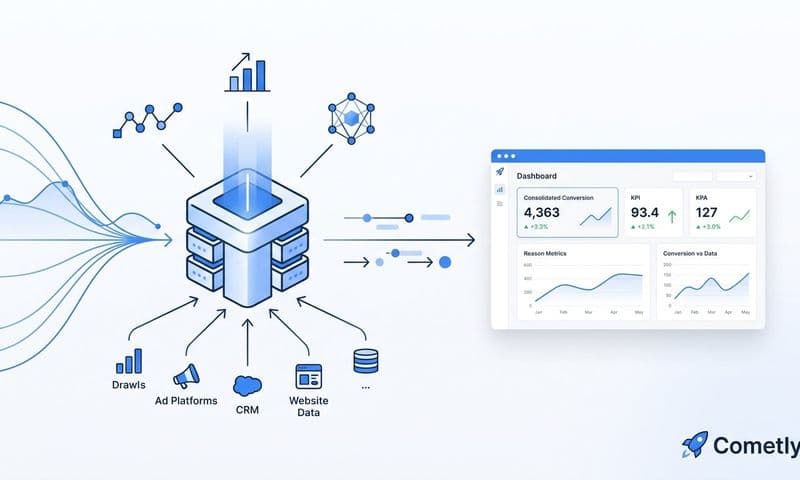
Platforms like Cometly are built specifically for this use case. Rather than treating the website as the center of the universe and trying to infer revenue from on-site events, Cometly connects directly to your ad platforms, your CRM, and your revenue data to track the complete customer journey from first ad click through to closed-won revenue. Every touchpoint along the way is captured and attributed, giving growth teams a single source of truth instead of four disconnected dashboards that each tell a different story.
The native integrations matter here. Cometly connects to the ad platforms where your spend actually lives, including Meta, Google, LinkedIn, and others, along with CRM tools and revenue platforms like Stripe. This means you're not manually reconciling data exports or building custom integrations. The connections are built in, and the data flows automatically.
Server-side tracking and Conversion API support are core to how Cometly captures data, not optional add-ons. This means the conversion signals being fed back to Meta and Google are richer and more accurate than what client-side pixels can deliver. Better conversion data means better algorithmic optimization from the ad platforms, which compounds over time into meaningfully better campaign performance.
The AI-driven analysis layer is what turns that complete data set into actionable decisions. Rather than manually comparing performance across channels and trying to reconcile attribution models, Cometly's AI surfaces which campaigns and channels are genuinely driving pipeline and revenue. Growth leaders can see at a glance which spend is working, where to scale, and where to pull back, based on actual revenue outcomes rather than proxy metrics that may or may not correlate with deals closed.
For B2B SaaS teams that have been making budget decisions based on incomplete GA4 data, this shift in visibility often reveals surprises. Channels that looked weak in GA4 turn out to be driving significant pipeline. Campaigns that appeared to be top performers based on last-click attribution turn out to have little influence on actual revenue. The clarity that comes from complete attribution data changes how teams allocate spend, and it changes those decisions for the better. Reviewing the full sales funnel analytics picture is often where teams first realize how much revenue their current setup has been obscuring.
Practical Steps to Stop Losing Sales Data Today
Knowing the problem exists is the first step. Taking action to fix it is where most teams stall, usually because the scope feels overwhelming. Breaking it into concrete steps makes it manageable.
Start with a GA4 audit: Before adding new tools or infrastructure, understand the current state of your tracking. Look for conversion events that aren't firing, sessions with no source attribution, and gaps between the conversions GA4 is recording and the leads or deals your CRM is logging. A thorough Google Analytics audit gives you a clear baseline for improvement, and these gaps are often larger than teams expect.
Fix your UTM discipline: Every paid campaign, every email link, and every partner referral should have consistent UTM parameters that allow GA4 and any other analytics tool to accurately attribute the source. Inconsistent or missing UTMs are one of the most common reasons sessions get attributed to "direct" when they should be attributed to a specific campaign. This is a quick win that improves data quality immediately.
Implement server-side tracking: If you're currently relying entirely on a client-side GA4 tag, moving to server-side tracking will recover a portion of conversions that are currently being lost to ad blockers and privacy restrictions. This requires more technical setup than a standard tag manager deployment, but the data quality improvement is significant and durable.
Connect Conversion APIs to your ad platforms: Set up Meta's Conversion API and Google's Enhanced Conversions to send server-side conversion signals directly to the ad platforms. This improves attribution accuracy within those platforms and feeds better data into their automated bidding algorithms, which improves campaign performance over time.
Evaluate whether GA4 alone is sufficient for your needs: For B2B SaaS teams with meaningful sales cycles, multiple stakeholders, and real budget decisions riding on attribution data, the honest answer is usually no. GA4 provides useful web analytics data, but it cannot deliver the full-funnel revenue attribution that growth teams need. Evaluating a dedicated attribution platform that integrates your ad spend, CRM pipeline, and closed revenue is worth the investment if you're serious about understanding your true marketing ROI.
The Bottom Line on Revenue Attribution for B2B SaaS
Google Analytics missing sales data isn't a bug you can fix with a single configuration change. It's a reflection of what GA4 was built to do and what it wasn't. For B2B SaaS teams with complex buying journeys, multiple stakeholders, and extended sales cycles, a web analytics tool will always leave meaningful gaps in the revenue attribution picture.
The cost of those gaps isn't abstract. It shows up in budgets allocated to the wrong channels, campaigns cut before they've had a chance to prove their impact on pipeline, and growth decisions made on data that only tells part of the story. In a competitive market where every point of efficiency matters, incomplete attribution is a real disadvantage.
The path forward is clear: close the loop between your ad platforms, your website, your CRM, and your revenue data. Implement server-side tracking to capture what client-side pixels miss. Use Conversion API integrations to feed richer signals back to the ad platforms. And consider whether a purpose-built attribution platform gives your team the single source of truth it needs to make confident decisions.
Cometly is built specifically for this challenge. It connects every touchpoint from first ad click to closed-won revenue, integrates natively with your ad platforms and CRM, and uses AI to surface which campaigns are actually driving growth. If you're ready to move beyond fractured dashboards and start making budget decisions based on complete data, Get your free demo today and see what full-funnel attribution actually looks like in practice.