A growing share of your website visitors are browsing with ad blockers enabled, and every single one of them is creating a gap in your tracking data. This isn't a fringe concern. Between dedicated browser extensions, privacy-first browsers like Brave, and built-in protections in Safari and Firefox, a meaningful portion of your audience is effectively invisible to your standard tracking setup.
Here's why that matters beyond the technical inconvenience: if a conversion isn't recorded, it can't be credited to the channel that drove it. And if the wrong channels get credit, or no channel gets credit at all, your budget decisions are built on incomplete information. You might be cutting spend on a campaign that's genuinely working, while doubling down on one that only looks strong because it happens to capture the trackable fraction of your audience.
This guide breaks down exactly what data is being lost to ad blockers, what that loss costs you in attribution accuracy and ad performance, and what modern marketers can do to close the gap. We'll cover how to measure the size of your data problem, why server-side tracking is the right technical solution, and how a complete attribution strategy protects your budget decisions even as browser privacy restrictions continue to tighten.
What Ad Blockers Actually Block (It's More Than Just Ads)
Most marketers assume ad blockers do exactly what the name suggests: they hide banner ads. That assumption is costing them more than they realize.
Modern ad blockers operate using filter lists that flag and block any request to known tracking domains and analytics endpoints. This means they don't just strip out display ads. They actively intercept and block the Meta Pixel, Google Tag Manager containers, Google Analytics scripts, TikTok's tracking snippet, LinkedIn's Insight Tag, and virtually every other third-party conversion tracking tool you're likely running.
When a visitor with an ad blocker lands on your site, those scripts never fire. The page loads, the visitor browses, they might even complete a purchase, and your analytics platform and ad dashboards record nothing. No session. No event. No conversion. It's a silent gap, which makes it particularly dangerous because there's no error message telling you something went wrong.
The problem extends well beyond users who deliberately install browser extensions. Browser-level privacy features have brought ad-blocker-like behavior to a much wider audience:
Safari's Intelligent Tracking Prevention (ITP): Apple's ITP aggressively restricts cross-site tracking by limiting cookie lifespans and blocking certain third-party scripts. On iOS devices, this applies to every browser, not just Safari, because Apple requires all browsers on iOS to use its WebKit engine.
Firefox's Enhanced Tracking Protection: Firefox ships with tracking protection enabled by default, blocking known tracking scripts and social media trackers without users needing to install anything additional.
Brave Browser: Brave blocks ads and trackers at the browser level by default, with no extensions required. Users who choose Brave have opted into near-total ad and tracking suppression.
The compounding effect is significant. You're not just dealing with the subset of users who actively sought out an ad blocker extension. You're dealing with every iPhone user running Safari, a large portion of Firefox users, and the growing Brave user base, all of whom have varying degrees of tracking protection active without necessarily thinking of themselves as "ad blocker users."
The result is a data gap that's almost certainly larger than your team realizes. Because it's silent, it doesn't trigger alerts or show up as an error in your dashboards. Your analytics platform simply reports on the visitors it can see, and the ones it can't see are quietly excluded from every report, every attribution model, and every optimization decision you make.
Understanding the full scope of what gets blocked is the first step toward fixing it. The solution isn't to work around privacy tools or fight your visitors' browser choices. It's to move your data collection to a layer that those tools can't reach.
The Real Cost to Your Attribution Data
Losing conversion data isn't just an analytics problem. It's a budget problem, a strategy problem, and over time, a compounding performance problem that gets harder to diagnose the longer it goes unaddressed.
Here's the core issue with attribution: when a portion of your conversions go unrecorded, any attribution model you apply is working from a skewed sample. It's not a random sample either. The conversions you're missing are systematically biased toward certain browsers, devices, and audience segments, specifically those with stronger privacy preferences. That skew distorts every conclusion you draw from the data.
Last-click attribution is particularly vulnerable to this distortion. The final touchpoint before a conversion is often a direct visit or a branded search, and these tend to happen in the same browser session where the user is most engaged. But the earlier touchpoints in the journey, the paid social ad that introduced your brand, the display retargeting that brought them back, often fire in different sessions or on different devices where tracking is less reliable. The result is that last-click models systematically over-credit the bottom of the funnel and under-credit the channels that actually built intent.
The downstream effect on budget allocation is direct: channels that drove real results appear to underperform, while channels that happen to capture the trackable fraction of conversions look stronger than they actually are. Budget flows toward the wrong places, and the channels doing the real work get starved of investment.
The problem doesn't stop at your internal reporting. Ad platform algorithms are directly affected by signal loss, and this is where the damage becomes self-reinforcing.
Meta's automated bidding, Google's Smart Bidding, and TikTok's optimization engine all rely on conversion signals to learn who to target and how much to bid. These systems need a steady volume of high-quality conversion events to function effectively. When ad blockers reduce the number of conversion signals reaching the platform, the algorithm has less data to work with. Targeting becomes less precise, bid strategies become less efficient, and campaign performance degrades.
Here's where it becomes a cycle. Degraded performance leads to lower reported ROAS. Lower reported ROAS triggers budget cuts on the affected campaigns. Fewer campaign impressions mean fewer conversions, which means even fewer signals reaching the algorithm. Each step makes the next step worse.
Performance marketers often describe this as "algorithm starvation," and it's a real operational concern. The fix isn't to increase budgets to compensate for inefficiency. It's to restore the signal quality that the algorithm needs to optimize effectively in the first place.
The broader context here matters too. Third-party cookies are continuing their slow deprecation, and privacy regulations are tightening across markets. The signal loss you're experiencing from ad blockers today is a preview of a more constrained tracking environment that's becoming the norm. Addressing it now, with server-side tracking and first-party data strategies, positions you ahead of a shift that every performance marketer will eventually have to make.
How to Measure the Size of Your Data Gap
Before you can fix the problem, you need to understand how large it actually is. The good news is that you can get a reasonable estimate of your data gap without any specialized tools, using data you likely already have access to.
Method 1: Compare ad platform conversions against your backend data. Pull the conversion volume reported in your ad platforms (Meta Ads Manager, Google Ads, etc.) for a given time period and compare it against the actual order or lead volume recorded in your CRM or backend system for the same period. The difference between what your ad platforms recorded and what actually happened gives you a rough floor estimate of unattributed conversions. Keep in mind this comparison has its own nuances, including attribution window differences and multi-platform overlap, but it surfaces the scale of the gap quickly.
Method 2: Segment by browser and device in your analytics platform. Look at conversion rates broken down by browser. Compare Firefox, Brave, and Safari on iOS against Chrome on desktop. If you see a significant drop in conversion rate on the privacy-first browsers that isn't explained by obvious differences in traffic quality or intent, that's a signal that tracking loss is inflating the gap rather than genuine behavioral differences between user segments. A visitor using Brave is not inherently less likely to convert. If your data suggests they are, the more likely explanation is that their conversions aren't being recorded.
Method 3: Check your platform diagnostics. Meta's Events Manager includes event match quality scores and coverage metrics that show you how well your pixel events are being matched to user profiles. Low match quality or coverage gaps are direct indicators of tracking failures. Google's Tag Diagnostics in Google Ads and Google Analytics surfaces similar issues, flagging where conversion tracking is firing inconsistently or missing entirely. These tools won't give you a complete picture of what's being lost to ad blockers, but they show you where pixel-based tracking is struggling before you even run the manual comparison.
Running all three checks together gives you a practical sense of both the scale of your data gap and where the biggest losses are occurring. For most advertisers running significant paid media budgets, the results are eye-opening. The gap is often larger than expected, and it's concentrated in the audience segments that tend to be most engaged and privacy-conscious.
Once you have a clear picture of the gap, you have the business case you need to prioritize the technical fix.
Server-Side Tracking: The Technical Fix That Closes the Gap
The reason ad blockers can intercept your tracking data is structural: client-side tracking fires in the visitor's browser, which is exactly where ad blockers and privacy tools operate. Every pixel, every JavaScript tag, every analytics script that runs in the browser is a potential target for interception.
Server-side tracking solves this by moving data collection out of the browser entirely. Instead of relying on a script firing in the visitor's environment, events are captured at your server level and forwarded directly to ad platforms via their APIs. The visitor's browser never needs to communicate with Meta's servers, Google's servers, or any other tracking endpoint. That communication happens server to server, completely outside the reach of any browser-based blocking tool.
This approach integrates directly with the platform-supported server-side APIs that Meta, Google, and TikTok have built specifically for this purpose:
Meta Conversions API (CAPI): Sends conversion events directly from your server to Meta, supplementing or replacing pixel-based tracking. Meta can match these events against user profiles using first-party identifiers like email addresses and phone numbers, which improves event match quality and attribution accuracy.
Google Enhanced Conversions: Google's server-side solution allows you to send hashed first-party customer data alongside conversion events, improving match rates and filling gaps left by browser-based tracking failures.
TikTok Events API: TikTok's equivalent mechanism for server-side event transmission, ensuring conversion signals reach TikTok's algorithm without depending on the browser-fired pixel.
LinkedIn's server-side options: LinkedIn also supports server-side event transmission for B2B advertisers who need reliable conversion tracking for lead generation campaigns.
The benefits of server-side tracking extend beyond just the ad blocker scenario. It captures conversions from users with JavaScript disabled, from slow connections where scripts time out before loading, and from cross-device journeys where cookies don't persist between sessions. It's a more reliable foundation for data collection across the board.
One important clarification: server-side tracking works best as a complement to client-side tracking, not a wholesale replacement. Running both in parallel, with deduplication logic to prevent double-counting, gives you the most complete and accurate event data. The server-side layer catches what the client-side layer misses, and together they produce a dataset that's far more representative of your actual conversion activity.
Setting up server-side tracking does require technical implementation, typically involving a server-side tag management container or a direct API integration. But the investment is increasingly standard practice rather than an advanced tactic, and the platforms themselves have built detailed documentation and support for these integrations because they want better data flowing into their algorithms too.
Building an Attribution Strategy That Doesn't Depend on Pixel Data Alone
Server-side tracking solves the data capture problem. But to get the full benefit of that recovered data, you need an attribution strategy built to use it effectively.
Pixel-dependent attribution models, particularly last-click, were designed for a tracking environment that no longer exists. They assume that every meaningful interaction leaves a traceable footprint in the browser, and they allocate credit based on that assumption. In a world where a significant portion of the customer journey happens outside the browser's trackable view, those models produce systematically distorted results.
Multi-touch attribution built on server-side events, CRM data, and first-party identifiers is far more resilient. Instead of relying solely on browser-fired events to reconstruct the customer journey, it pulls from multiple data sources: server-captured conversion events, CRM records of lead and deal activity, and first-party identifiers that persist across sessions. This gives you a more complete picture of every touchpoint from the first ad click to a closed deal, regardless of whether the visitor was running an ad blocker at any point along the way.
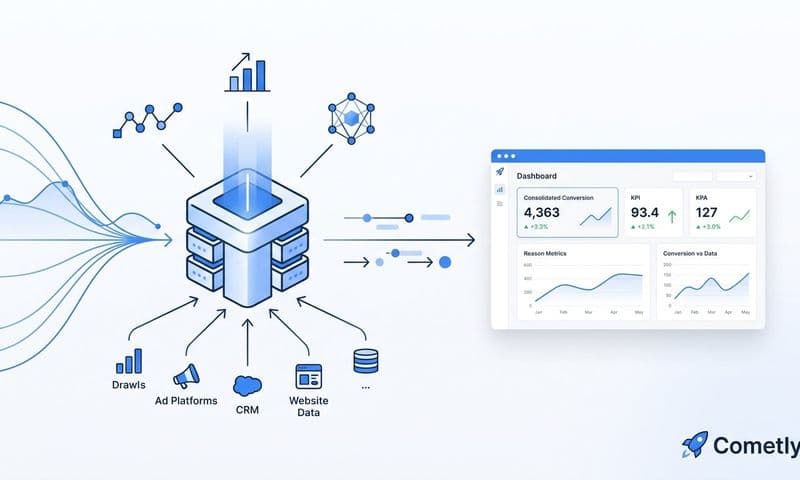
The practical architecture looks like this: your ad platforms, CRM, and website data feed into a centralized attribution layer that stitches together the full customer journey. When a visitor clicks a paid social ad, browses your site, converts via a form, and then gets followed up by your sales team, every one of those touchpoints is connected and credited appropriately. The attribution model isn't working from a partial dataset filtered through browser-based tracking. It's working from a complete dataset assembled from multiple reliable sources.
This is where AI-powered attribution tools add significant value. The enriched dataset that server-side tracking and CRM integration produces is too complex to analyze manually across thousands of customer journeys. AI can surface patterns across that data, identifying which campaigns and channels are genuinely driving revenue versus which ones only appeared to be performing based on the incomplete pixel data you were working with before.
Cometly is built specifically for this kind of attribution work. It connects your ad platforms, CRM, and website into a single view of the customer journey, uses server-side tracking to capture events that pixel-based tools miss, and applies AI to surface which touchpoints are actually driving conversions. Instead of guessing which channels to trust, you have a complete, accurate picture to make decisions from.
The shift from pixel-dependent to server-side, multi-touch attribution isn't just a technical upgrade. It's a strategic one. It means your budget decisions, your channel mix, and your creative investments are all based on what's actually working rather than what's visible through an increasingly limited tracking window.
Turning Recovered Data Into Better Ad Performance
Recovering your conversion data isn't the end goal. The goal is using that recovered data to make better decisions and drive better results. Here's how accurate, complete conversion data translates into measurable performance improvements.
Better algorithm training for every platform: When you send enriched conversion events back to Meta, Google, and TikTok through server-side integrations, you're giving each platform's algorithm higher-quality training data. More complete conversion signals mean better audience targeting, more accurate lookalike modeling, and smarter automated bid strategies. The algorithm can identify who actually converts and optimize toward them, rather than working from a partial signal set that may be systematically biased toward certain browser or device types.
Budget allocation you can actually trust: With accurate attribution restored, the channel-level ROAS numbers in your reporting reflect reality rather than the trackable fraction of reality. You can scale campaigns with confidence because you know the performance data behind the decision is complete. You can also pull back from channels that only looked strong because they happened to capture a higher share of trackable conversions, not because they were actually driving more revenue.
Reliable creative and A/B testing: Creative analysis and split testing depend on comparing performance across a consistent dataset. When your data has systematic gaps tied to audience segments that use privacy-first browsers, your test results are skewed. A creative that performs well among Brave users might look identical to one that doesn't, because neither group's conversions are being captured. Recovered data means your testing conclusions are drawn from a complete dataset, which makes them far more reliable and actionable.
Stronger audience segments and retargeting: Conversion events are the foundation of your retargeting audiences and customer match lists. When those events are incomplete, your retargeting pools are smaller and less representative than they should be. Recovering conversion data through server-side tracking expands and improves these audiences, making your retargeting campaigns more effective across every platform.
The cumulative effect of these improvements compounds over time. Better algorithm training leads to more efficient campaigns. More efficient campaigns generate more conversions. More conversions produce better training data. This is the inverse of the degradation cycle that signal loss creates, and it starts with recovering the data that ad blockers were silently taking away.
The Bottom Line on Data Loss and What to Do About It
Losing data from ad blockers isn't a minor tracking inconvenience that you can afford to deprioritize. It's a strategic problem that distorts your attribution models, starves your ad platform algorithms of the signals they need to optimize, and leads to budget decisions built on an incomplete picture of what's actually driving results.
The solution isn't to fight ad blockers or try to work around your visitors' privacy preferences. It's to move your data collection to a layer that browser-based blocking tools simply cannot reach. Server-side tracking, combined with multi-touch attribution that draws from CRM data and first-party identifiers, gives you a complete and accurate view of the customer journey regardless of what's happening in the visitor's browser.
This is the direction the entire industry is moving. As third-party cookies continue to deprecate and browser privacy protections become more sophisticated, server-side tracking and first-party data strategies are becoming the baseline for any serious performance marketing operation, not an advanced tactic reserved for enterprise teams.
Cometly's server-side tracking and multi-touch attribution are built to solve exactly this problem. By connecting your ad platforms, CRM, and website into a single attribution layer, Cometly captures every touchpoint and gives your AI a complete, enriched view of every customer journey. You get accurate attribution, better algorithm training data sent back to Meta and Google, and AI-powered recommendations that tell you which campaigns are genuinely driving revenue.
If you're ready to stop making budget decisions based on partial data, Get your free demo and see how Cometly can close the data gap for your campaigns.