Unreliable marketing data is one of the most costly problems facing digital marketers today. When your tracking is broken, your attribution is incomplete, or your ad platforms are reporting inflated numbers, every budget decision becomes a gamble. You might be pouring spend into campaigns that look profitable on paper but are actually draining your ROI. Or you might be cutting channels that are quietly driving conversions you cannot see.
The root causes are well-known: iOS privacy changes that block browser-based tracking, fragmented data across multiple ad platforms, inconsistent UTM tagging, and attribution models that credit the wrong touchpoints. The result is a marketing team flying blind, making decisions based on incomplete or misleading signals.
This guide breaks down seven actionable strategies to help you identify, address, and prevent unreliable marketing data. Whether you are running paid search, social ads, or multi-channel campaigns, these approaches will help you build a more accurate, trustworthy data foundation. Each strategy is practical and designed for marketing teams who want to move from gut-feel decisions to data-backed confidence. By the end, you will have a clear roadmap for cleaning up your tracking, aligning your attribution, and giving your ad platforms the quality signals they need to optimize effectively.
1. Audit Your Tracking Setup Before Trusting Any Number
The Challenge It Solves
Most marketing teams assume their tracking is working until something goes obviously wrong. The reality is that broken pixels, misfiring tags, and missing UTM parameters can silently corrupt your data for weeks or months before anyone notices. Decisions made on corrupted data compound over time, leading to misallocated budgets and missed optimization windows.
The Strategy Explained
A tracking audit is a systematic review of every layer in your measurement stack. This means checking pixel configurations on key pages, reviewing your tag manager container for conflicting triggers or outdated tags, verifying that conversion events fire correctly and only once, and confirming that UTM parameters are present on every paid link.
The goal is to catch duplicate conversion fires (which inflate your numbers), missing events (which deflate them), and broken tag triggers (which leave entire campaigns untracked). Browser developer tools and tag manager preview modes are your best friends here. Cross-referencing conversion counts between your analytics platform and each ad platform will quickly surface discrepancies that signal a deeper problem.
Implementation Steps
1. Open your tag manager container and audit every trigger for accuracy, looking for outdated rules, conflicting conditions, or tags firing on the wrong pages.
2. Use browser developer tools or a tag auditing extension to verify that each conversion event fires exactly once per intended action, with no duplicate fires on confirmation pages.
3. Pull a sample of 20 to 30 paid campaign URLs and confirm that UTM parameters are present, correctly formatted, and consistent across source, medium, and campaign fields.
4. Compare conversion totals between your analytics platform and each ad platform for the same date range, flagging any gaps greater than 10 to 15 percent for further investigation. These kinds of marketing analytics data inconsistencies are a reliable signal that your tracking setup needs attention.
Pro Tips
Schedule a tracking audit at least once per quarter, and always run one before and after any major website update or platform migration. Tracking breaks silently, and the cost of discovering a problem six months later is far greater than the hour it takes to verify your setup is intact.
2. Switch to Server-Side Tracking to Recover Lost Conversions
The Challenge It Solves
Browser-based tracking has become increasingly unreliable. Apple's App Tracking Transparency changes, widespread ad blocker usage, and tightening browser cookie restrictions mean that a meaningful portion of your conversions are simply not being recorded by client-side pixels. You are making budget decisions based on a fraction of your actual results.
The Strategy Explained
Server-side tracking moves the data collection process off the user's browser and onto your server. Instead of relying on a pixel in the browser to fire and send data to Meta or Google, your server sends conversion events directly to the ad platform via an API connection. This bypasses browser restrictions entirely.
On Meta, this is implemented through the Conversions API (CAPI). On Google, it is done through Enhanced Conversions. Both approaches allow you to send hashed customer data alongside conversion events, improving what Meta calls "Event Match Quality," which is a platform metric that measures how accurately your events are matched to real users in their system. Higher match quality means better audience targeting, more accurate reporting, and smarter algorithmic bidding.
Cometly's server-side tracking is built to handle this directly, connecting your conversion data to ad platforms without relying on browser-level signals that iOS changes and ad blockers can intercept. Using first-party data tracking for ads is the most reliable way to maintain conversion visibility as browser restrictions continue to tighten.
Implementation Steps
1. Audit your current client-side pixel setup to establish a baseline, noting which events are being tracked and what your current conversion volumes look like.
2. Implement a server-side connection via Meta's Conversions API or Google's Enhanced Conversions, ensuring that events sent server-side are deduplicated against any remaining client-side events to avoid double counting.
3. Monitor your Event Match Quality score in Meta's Events Manager and compare server-side conversion volumes against your previous client-side baseline to quantify recovered data.
Pro Tips
Deduplication is critical when running both client-side and server-side tracking simultaneously. Use a consistent event ID across both methods so platforms can identify and discard duplicate events. Skipping this step will inflate your reported conversions and mislead your optimization algorithms.
3. Standardize UTM Tagging Across Every Campaign and Channel
The Challenge It Solves
Inconsistent UTM naming is one of the most common and easily overlooked sources of unreliable marketing data. When one team member tags a campaign as "facebook" and another uses "Facebook" or "fb," your analytics platform treats these as three separate traffic sources. Channel-level reporting becomes fragmented, and any analysis built on that data is fundamentally flawed.
The Strategy Explained
UTM standardization means creating a shared taxonomy that defines exactly how every UTM parameter should be formatted across every campaign, channel, and team member. This includes defining consistent values for source (e.g., always "facebook," never "fb" or "Facebook"), medium (e.g., "cpc" for paid search, "paid-social" for social ads), and campaign naming conventions that include identifiers like date, objective, or audience segment.
The taxonomy should live in a shared document that every person who creates campaign links can access. Pair it with a URL builder tool that enforces the naming rules, reducing the chance of manual errors. When your UTM data is clean and consistent, channel-level attribution in your analytics platform becomes genuinely reliable. This is a core principle of any sound approach to tracking marketing campaigns across multiple channels.
Implementation Steps
1. Audit your existing UTM data in your analytics platform, identifying all variations of the same source or medium that should be unified under a single naming convention.
2. Create a UTM taxonomy document that defines approved values for source, medium, campaign, content, and term, with examples for each channel your team uses.
3. Build a shared URL builder spreadsheet or tool that auto-formats UTM parameters based on the taxonomy, reducing the risk of manual entry errors.
4. Establish a review process for new campaigns to verify UTM tagging before launch, making it a standard step in your campaign QA checklist.
Pro Tips
Always use lowercase for all UTM values. Analytics platforms are case-sensitive, and a single capital letter will split what should be unified data into separate rows. This is a small rule with a large impact on data cleanliness over time.
4. Stop Relying on a Single Attribution Model
The Challenge It Solves
Last-click attribution is still the default in many ad platforms, and it is systematically misleading. It assigns 100 percent of conversion credit to the final touchpoint before a purchase or lead, completely ignoring every ad, email, or piece of content that built awareness and intent along the way. Upper-funnel channels look ineffective on paper, get cut from budgets, and then conversion rates quietly drop.
The Strategy Explained
Multi-touch attribution distributes conversion credit across all the touchpoints that contributed to a conversion. Depending on the model you choose, credit can be spread equally across all touchpoints (linear), weighted toward more recent interactions (time-decay), or distributed with extra weight on the first and last touch (position-based).
The right model depends on your sales cycle. For short, impulse-driven purchases, a time-decay model often reflects reality well. For longer B2B sales cycles with multiple decision-maker touchpoints, a linear or data-driven model tends to be more accurate. The key is to stop viewing attribution as a single truth and start using it as a lens that reveals different aspects of your customer journey. A thorough understanding of digital marketing attribution measurement will help you choose the right model for your specific buying cycle.
Cometly's multi-touch attribution gives you the ability to compare models side by side, so you can see how credit shifts across channels when you move from last-click to a more complete view. That comparison alone often reveals which channels have been systematically undervalued.
Implementation Steps
1. Map your typical customer journey, noting the average number of touchpoints and the typical time from first interaction to conversion, to identify which attribution model best reflects your buying cycle.
2. Set up multi-touch attribution in your analytics platform or attribution tool, running it in parallel with your existing model before making any budget changes.
3. Compare channel performance across models, specifically looking for channels that receive significantly less credit under last-click but more under multi-touch, as these are likely undervalued in your current budget allocation.
Pro Tips
Do not switch attribution models and immediately reallocate budget. Run the new model for at least four to six weeks to build a reliable data set before drawing conclusions. Attribution model changes reveal patterns, not instant answers.
5. Align Your CRM and Ad Platform Data in One Place
The Challenge It Solves
Ad platforms report leads. Your CRM records qualified pipeline and closed revenue. These two data sets rarely agree, and the gap between them is where budget gets wasted. A campaign that generates 200 form fills looks like a winner in your ad dashboard, but if your CRM shows that only 10 of those leads were qualified and none closed, your actual ROAS is far from what the platform is reporting.
The Strategy Explained
Connecting your CRM to your ad attribution layer closes the loop between ad spend and actual revenue. Instead of measuring success by lead volume, you can measure it by pipeline value, opportunity stage, or closed revenue tied back to specific campaigns, ad sets, and even individual ads.
This is especially critical for B2B marketers and anyone selling higher-consideration products where the sales cycle extends well beyond the initial conversion event. When your CRM data flows into your attribution platform, you can see which campaigns are generating revenue, not just form fills, and allocate budget accordingly. Learning how to connect marketing data to revenue is what separates teams that optimize for vanity metrics from those that optimize for actual business outcomes.
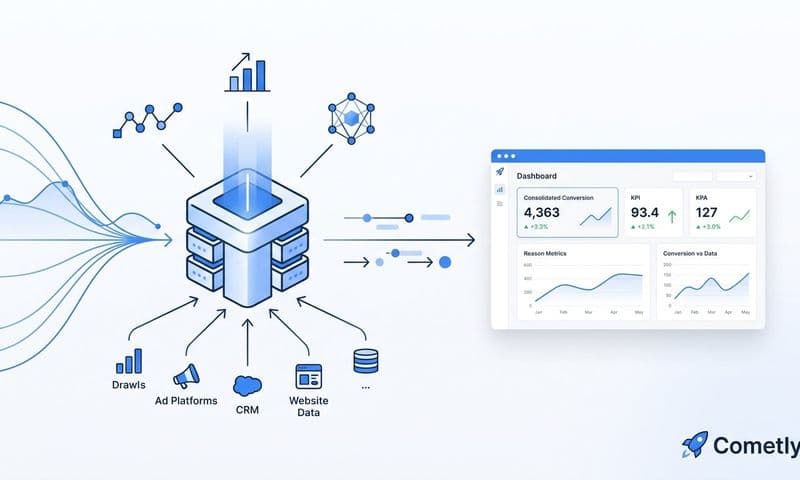
Cometly connects your CRM pipeline and revenue data with your ad platform reporting, giving you a unified view of the full customer journey from first ad click to closed deal. This is what true ROAS measurement looks like.
Implementation Steps
1. Identify the key CRM stages you want to tie back to ad performance, such as marketing qualified lead, sales qualified lead, and closed won, and confirm that these stages are consistently tracked in your CRM.
2. Connect your CRM to your attribution platform using a native integration or API connection, mapping CRM contact records back to the original ad touchpoints that sourced them.
3. Build a reporting view that shows ad spend alongside pipeline value and closed revenue by campaign, giving your team a revenue-based performance lens rather than a lead-count lens.
Pro Tips
Lead-to-close rates vary significantly by channel. Once your CRM and ad data are aligned, look for channels with lower lead volume but higher close rates. These are often your most efficient channels and the ones most likely to be underinvested when you are only optimizing for lead count.
6. Feed Better Conversion Signals Back to Ad Platform Algorithms
The Challenge It Solves
Ad platforms like Meta and Google use machine learning to optimize bidding, targeting, and delivery. But that machine learning is only as good as the conversion signals you feed it. When your conversion data is incomplete, delayed, or inaccurate due to browser tracking limitations, the algorithm optimizes toward the wrong outcomes, wasting budget on audiences and placements that do not convert.
The Strategy Explained
Conversion sync tools send enriched, accurate conversion events back to ad platforms after they have been validated and matched against your actual customer data. This means sending not just a conversion event, but also hashed identifiers like email addresses and phone numbers that help the platform match the conversion to a real user in their system.
Better signal quality leads to smarter automated bidding. The platform's algorithm learns faster which users are likely to convert, improves audience segmentation, and delivers ads more efficiently. Poor signal quality has the opposite effect: it leads to broader audience waste, degraded retargeting performance, and slower campaign learning phases. Understanding how ad tracking tools help you scale with accurate data makes it clear why signal quality is one of the highest-leverage improvements you can make.
Cometly's Conversion Sync feature handles this automatically, sending enriched, conversion-ready events back to Meta, Google, and other platforms to improve their targeting and optimization without requiring manual data exports or complex integrations.
Implementation Steps
1. Audit the quality of the conversion signals you are currently sending to each ad platform, checking Event Match Quality in Meta's Events Manager and conversion match rates in Google Ads.
2. Implement a conversion sync process that includes hashed customer identifiers alongside conversion events, ensuring the data is anonymized and formatted according to each platform's requirements.
3. Monitor algorithmic performance metrics after improving signal quality, looking for improvements in cost per result, audience match rates, and campaign learning phase duration.
Pro Tips
The value of better conversion signals compounds over time. Ad platform algorithms improve as they accumulate more accurate data, which means the longer you feed them high-quality signals, the more efficient your campaigns become. This is not a quick fix but a structural advantage that grows with your ad spend.
7. Use AI-Powered Analysis to Spot Data Anomalies and Optimization Gaps
The Challenge It Solves
Manual campaign analysis across multiple ad platforms is slow, prone to cognitive bias, and nearly impossible to do comprehensively when you are managing dozens of campaigns simultaneously. Confirmation bias leads analysts to validate what they already believe about channel performance, while genuine anomalies and underperforming segments go unnoticed until significant budget has already been wasted.
The Strategy Explained
AI-powered analysis tools can process large volumes of cross-platform performance data far faster than any manual review. More importantly, they surface patterns and anomalies that human analysts are likely to miss, whether that is a sudden drop in conversion rate on a specific ad set, a budget allocation imbalance across channels, or an emerging high-performer that deserves more spend.
The most practical application is anomaly detection combined with budget reallocation recommendations. When your AI layer flags that a campaign's cost per conversion has increased significantly over the past 72 hours, you can investigate and respond before the issue compounds. When it identifies that a specific audience segment is converting at twice the average rate, you can shift budget toward it immediately rather than discovering it in a weekly review. Knowing how to allocate marketing budget based on data rather than intuition is where AI-assisted analysis delivers its most immediate ROI.
Cometly's AI Ads Manager and AI Chat features are built for exactly this purpose. They analyze your cross-platform performance data in real time, surface anomalies, identify high-performing campaigns, and generate actionable recommendations so your team spends less time building reports and more time acting on insights.
Implementation Steps
1. Consolidate your cross-platform ad performance data into a single analytics environment so your AI tools have a complete, unified data set to analyze rather than siloed platform views.
2. Define the key performance thresholds that matter most to your campaigns, such as acceptable cost per lead ranges, minimum ROAS targets, and conversion rate benchmarks, so your AI layer can flag meaningful deviations.
3. Build a regular cadence for reviewing AI-generated recommendations, treating them as a starting point for human judgment rather than automatic actions, especially for significant budget changes.
Pro Tips
AI analysis is only as reliable as the data it processes. The strategies earlier in this guide, including server-side tracking, UTM standardization, and CRM alignment, directly improve the quality of data your AI tools work with. Accurate inputs produce accurate recommendations. Garbage in, garbage out applies here as much as anywhere in marketing analytics data practice.
Your Implementation Roadmap
Fixing unreliable marketing data is not a one-time project. It is an ongoing discipline that requires the right infrastructure, consistent processes, and tools that surface the truth rather than obscure it.
Start with the foundation: audit your current tracking setup to identify where data is leaking, then layer in server-side tracking to recover the conversions you are missing. Standardize your UTM conventions so every campaign is attributed correctly from day one. From there, move into multi-touch attribution, CRM alignment, and conversion sync to build a complete picture of what is actually driving revenue.
Each strategy in this guide addresses a specific layer of the data reliability problem. Together, they form a foundation that lets you make budget decisions with confidence rather than guesswork. Marketers who invest in data quality consistently outperform those who rely on platform-reported numbers alone, because they can see what is actually working and act on it faster.
Cometly is built to support every one of these strategies. From server-side tracking and multi-touch attribution to AI-powered recommendations and conversion sync, Cometly gives your team the accurate, unified marketing data you need to scale campaigns with clarity. If unreliable data is costing you budget and performance, it is time to build the infrastructure that fixes it for good.
Ready to elevate your marketing game with precision and confidence? Discover how Cometly's AI-driven recommendations can transform your ad strategy. Get your free demo today and start capturing every touchpoint to maximize your conversions.