If you're running ads across Google, Meta, LinkedIn, and other channels simultaneously, you already know the frustration: each platform reports different numbers, attribution overlaps, and you have no reliable way to know which campaigns actually drove revenue.
This isn't a minor inconvenience. It's a strategic blind spot that causes B2B SaaS marketing teams to misallocate budget, scale the wrong campaigns, and make decisions based on incomplete data.
The problem is structural. Each ad platform operates in its own silo, using its own attribution logic, its own conversion windows, and its own definition of a "conversion." When you try to stitch these together manually in a spreadsheet, you're not getting a unified view. You're getting five competing stories.
Think of it like asking five different referees to score the same game, each using different rules. Of course the numbers won't match.
There's also a technical layer making this worse. Browser-side pixel tracking has become increasingly unreliable due to privacy updates, iOS restrictions, and the gradual phaseout of third-party cookies. The signal your ad platforms depend on for optimization is degrading, and most teams haven't updated their infrastructure to compensate.
This guide walks you through a practical, step-by-step process to fix multi-platform campaign tracking. By the end, you'll have a unified system that connects ad clicks across every channel to actual pipeline and revenue, giving your team a single source of truth to make confident budget decisions.
Whether you're spending across two platforms or ten, these steps apply. No deep technical background required. Just a clear process and the right tools to execute it.
Step 1: Audit Your Current Tracking Setup Across Every Platform
Before you can fix anything, you need to know exactly what's broken. Most teams skip this step and jump straight to adding new tools, which usually makes the data problem worse, not better.
Start by listing every active ad platform where you're currently running campaigns. Google Ads, Meta, LinkedIn, TikTok, YouTube, programmatic networks, whatever applies. For each platform, document what conversion events it's currently tracking and how those events are being fired.
Check for pixel gaps: Open each ad platform's event manager or tag diagnostics tool. Look for missing pixels, broken event tags, or platforms where conversion tracking hasn't been set up at all. It's more common than you'd expect to find a LinkedIn campaign running with zero conversion events attached.
Identify attribution window mismatches: This is one of the biggest sources of inflated reporting. Google Ads might be using a 30-day click window. Meta might default to a 7-day click and 1-day view. LinkedIn might use a 30-day view. When all three platforms claim credit for the same conversion, your total reported conversions will far exceed your actual conversions. Document the attribution window each platform is using so you can account for this later.
Map your CRM and website analytics: Where does your CRM sit relative to your ad platforms? Is your website analytics tool (Google Analytics 4, for example) connected to your ad accounts? Are form submissions flowing into your CRM and being attributed to a traffic source? Document the handoffs, or lack thereof, between each system.
Flag cookie-dependent tracking: Any platform relying solely on browser-side pixels is vulnerable to signal loss. Note which platforms have no server-side or first-party data fallback in place. These are your highest-risk tracking gaps. Understanding the full scope of multiple ad platforms tracking problems before you start fixing them will save you significant time during remediation.
The output of this step is a complete tracking map: every platform, what it tracks, the attribution window it uses, and where the gaps are. This document becomes your reference point for every step that follows.
Success indicator: You have a written audit covering every active ad platform, its conversion events, its attribution window, and a clear list of gaps to address.
Step 2: Standardize Your UTM Parameter Framework
Inconsistent UTMs are one of the most common and most damaging causes of fragmented cross-channel data. If your Google Ads campaigns use "google" as the source and your Meta campaigns use "Facebook" or "fb" or "meta" depending on who built the ad, your analytics tool will treat these as completely separate channels. Cross-channel comparison becomes impossible.
The fix is straightforward but requires discipline: define a consistent UTM naming convention and enforce it across every platform, every campaign, and every team member who builds ads.
Define your five UTM parameters: Every ad URL should include utm_source (the platform), utm_medium (the channel type), utm_campaign (the campaign name), utm_content (the ad creative or variant), and utm_term (the keyword or audience, where applicable). None of these should be optional.
Build a UTM taxonomy: Your naming convention should be structured enough to let you filter and group data meaningfully. For example, your utm_campaign values might follow a format like [platform]-[funnel-stage]-[audience-type]-[date]. This lets you compare performance across platforms, funnel stages, and audience segments in a single analytics view.
Create a shared naming template: Build a UTM spreadsheet or use a UTM builder tool that every team member accesses before launching a campaign. The template should enforce lowercase naming (analytics tools are case-sensitive), consistent separators (hyphens, not spaces or underscores mixed together), and required fields. Many teams find that a marketing campaign tracking spreadsheet with locked naming conventions is the simplest way to enforce this discipline at scale.
Apply UTMs to every active ad URL: Go through your current campaigns across Google, Meta, LinkedIn, and every other active channel. Any ad URL missing a properly structured UTM string needs to be updated. This is tedious, but it's a one-time cleanup that pays dividends indefinitely.
A note on Google Ads auto-tagging: Google Ads uses its own auto-tagging system (the GCLID parameter) to pass data into Google Analytics. This should coexist with your manual UTMs, not replace them. Auto-tagging handles Google-specific data. Your UTMs handle cross-channel consistency. Both serve different purposes.
Success indicator: Every active ad URL across every platform contains a properly structured UTM string that maps to your defined taxonomy. No ad is running without UTM parameters.
Step 3: Implement Server-Side Conversion Tracking
Here's the reality most teams haven't fully reckoned with: browser-side pixels are no longer a reliable foundation for conversion tracking. iOS privacy updates have significantly reduced the signal available from Safari users. Browser-level ad blockers strip pixels before they fire. Third-party cookie restrictions limit cross-site tracking in ways that compound over time.
The result is systematic signal loss. Your ad platforms are seeing fewer conversions than actually occurred, which means their optimization algorithms are working with incomplete data. You're paying for performance that the platform can't fully see or learn from.
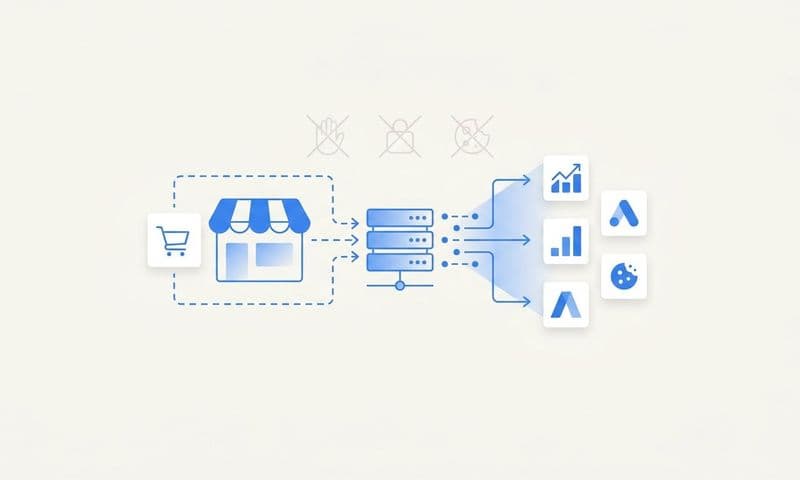
Server-side tracking solves this by moving the conversion event from the browser to your server. Instead of relying on a JavaScript pixel to fire in the user's browser, your server sends the conversion event directly to the ad platform's API. Browser restrictions don't apply. The signal is more complete and more reliable. Reviewing a comparison of top server-side tracking platforms can help you identify which solution best fits your existing tech stack.
Start with Meta's Conversion API (CAPI) and Google's Enhanced Conversions: These are the two highest-priority implementations for most B2B SaaS teams. Meta's CAPI sends conversion events from your server to Meta using first-party data like hashed email addresses and phone numbers to match conversions back to ad interactions. Google's Enhanced Conversions works similarly, using hashed customer data to improve match rates for Google Ads.
Connect your website and CRM events to a server-side pipeline: The events you want to track server-side typically include form submissions, demo requests, trial signups, and CRM stage changes. Each of these should trigger a server-side event that flows to the relevant ad platforms. This requires connecting your website backend or CRM to your server-side tracking layer, which platforms like Cometly handle natively.
Implement event deduplication: When you run both a browser pixel and a server-side event for the same conversion, you risk double-counting. Both Meta and Google have deduplication mechanisms (event ID matching) that prevent this when configured correctly. Make sure your implementation includes a consistent event ID that both the pixel and the server event share, so the platform knows they represent the same conversion.
Monitor match rates and event quality scores: Both Meta's Events Manager and Google's Tag diagnostics provide quality scores for your conversion events. After implementing server-side tracking, you should see these scores improve, indicating that more conversions are being matched back to ad interactions accurately.
Success indicator: Conversion events are firing server-side, event quality scores are improving in each platform's diagnostics, and you're seeing more complete conversion data flowing into your ad accounts.
Step 4: Connect Your CRM and Revenue Data to Your Ad Platforms
Lead volume is a vanity metric for B2B SaaS teams. A form fill is not a customer. A demo request is not revenue. If you're optimizing your campaigns based on lead count alone, you're almost certainly scaling campaigns that generate low-quality pipeline while underinvesting in the campaigns that actually close deals.
This is one of the most consequential gaps in B2B SaaS marketing attribution, and it's completely fixable. Teams that invest in tracking for B2B marketing campaigns at the revenue level consistently make better budget allocation decisions than those relying on lead-count metrics alone.
Map your CRM pipeline stages to your tracking layer: Your CRM likely has stages like MQL, SQL, Opportunity, and Closed Won. Each of these stage progressions is a meaningful conversion event that should be connected to your attribution system. When a lead moves from MQL to SQL, that event should be traceable back to the original ad touchpoint that started the journey.
Connect CRM deal data to ad touchpoints: This is where the real attribution work happens. When a deal closes, you want to know: which campaign first touched this account, which campaigns influenced them along the way, and what the total revenue value of that deal is. This requires your CRM to be integrated with your attribution layer so deal data flows back to the ad-level reporting.
Integrate your payment data: For SaaS companies billing through Stripe or similar platforms, connecting payment data to your attribution layer closes the loop entirely. You can see not just which campaigns generated pipeline, but which campaigns generated actual recurring revenue. This is the difference between lead attribution and revenue attribution.
Understand why this changes your budget decisions: Without CRM integration, you might see that LinkedIn generates fewer leads than Google at a higher cost per lead, and conclude that LinkedIn is underperforming. With CRM integration, you might discover that LinkedIn leads convert to Closed Won at three times the rate of Google leads, making LinkedIn your most efficient revenue channel despite the higher cost per lead.
Success indicator: You can see which specific campaigns and ad sets are generating pipeline and closed revenue, not just form fills. Your reporting includes cost per pipeline opportunity and revenue attributed by campaign.
Step 5: Choose and Configure a Cross-Channel Attribution Model
Once your tracking infrastructure is in place, you need to decide how credit gets assigned across the customer journey. This is where attribution models come in, and where most teams make a critical mistake: they rely on each platform's native attribution as their source of truth.
They shouldn't. Every ad platform's native attribution is designed to make that platform look good. Google will claim credit for conversions that Meta also claims. LinkedIn will claim credit for deals that were already in your pipeline. Native attribution is marketing, not measurement. This is the core of multiple ad platforms attribution confusion that plagues most marketing teams running cross-channel campaigns.
Understand the core attribution models: First-touch gives all credit to the first interaction a prospect had with your brand. This is useful for understanding awareness channels but ignores everything that happened between first touch and conversion. Last-touch gives all credit to the final interaction before conversion, which tends to overvalue bottom-of-funnel channels like branded search. Linear attribution distributes credit equally across all touchpoints in the journey. Data-driven attribution uses algorithmic weighting based on actual conversion path data to assign credit proportionally.
Match your model to your sales cycle: For B2B SaaS companies with longer, multi-touch buying journeys involving multiple stakeholders, first-touch and last-touch models will give you a distorted picture. Linear or data-driven models typically provide more accurate budget guidance because they account for the full journey rather than a single interaction.
Compare models side by side: Before committing to one model, run your data through multiple models and compare the results. You'll likely find that different models tell very different stories about which channels deserve budget. A thorough multi-touch attribution platforms comparison can help you identify which tool applies the most accurate weighting for your specific sales cycle.
Use a dedicated attribution platform as your neutral layer: A platform like Cometly sits above all your ad platforms and applies a consistent attribution model across every channel. It's not Google's version of attribution or Meta's version. It's a unified, neutral measurement layer that gives you one number to trust instead of five competing claims. This is what makes cross-channel budget decisions actually reliable.
Success indicator: You have a single attribution model applied consistently across all channels, with results visible in one dashboard that doesn't require reconciling platform-native reports.
Step 6: Build a Unified Cross-Platform Reporting Dashboard
All the infrastructure you've built in steps one through five means nothing if your team can't access the data quickly and act on it confidently. The final step is building a reporting view that brings everything together: spend, performance, pipeline, and revenue, across every channel, in one place.
Define what your unified dashboard must include: At minimum, your dashboard should show spend, impressions, clicks, and conversions by channel and campaign. But for B2B SaaS, it needs to go further: pipeline generated, opportunities created, revenue attributed, and ROAS calculated against actual closed deals, not just lead volume.
Connect all data sources into a single reporting layer: Your dashboard needs live connections to every ad platform, your CRM, and your payment data. Manual exports and spreadsheet updates introduce lag and error. The goal is a dashboard that refreshes automatically so your team is always working from current data. Purpose-built multi-platform ad analytics tools are designed specifically to maintain these live connections without manual reconciliation.
Set up channel-level and campaign-level comparisons: Your reporting should let you compare Google vs. Meta vs. LinkedIn at the channel level, and then drill down to individual campaigns and ad sets. This is how you identify which specific creative, audience, or offer is driving the best pipeline quality, not just the most clicks.
Track the metrics that matter for B2B SaaS: The key metrics to prioritize are cost per pipeline opportunity (how much you're spending to generate a qualified deal), revenue attribution by channel (which channels are generating the most closed revenue), and multi-touch ROAS (revenue generated per dollar spent, measured across the full customer journey rather than the last click).
Use AI-driven insights to surface what matters: A well-configured attribution platform doesn't just display data. It surfaces insights. Cometly's AI layer can identify which campaigns are underperforming relative to their spend, which ad sets are showing early signals of high pipeline quality, and where budget reallocation would have the greatest impact on revenue. This turns your dashboard from a reporting tool into a decision engine.
Remember: the dashboard reflects the quality of your data infrastructure. If steps one through five aren't complete, your dashboard will surface clean-looking numbers built on unreliable foundations. Get the infrastructure right first, then build the reporting layer on top of it.
Success indicator: Your team can answer "which channel drove the most revenue this month" in under 60 seconds, without pulling data from multiple platforms or reconciling conflicting numbers.
Your Multi-Platform Tracking Checklist
Here's a quick-reference summary of the six steps covered in this guide:
1. Audit your tracking setup: Map every platform, its conversion events, attribution windows, and gaps.
2. Standardize UTM parameters: Define a consistent naming taxonomy and apply it to every active ad URL.
3. Implement server-side tracking: Set up CAPI for Meta and Enhanced Conversions for Google with proper deduplication.
4. Connect CRM and revenue data: Map pipeline stages and closed revenue back to original ad touchpoints.
5. Configure a cross-channel attribution model: Apply a single, neutral model across all channels using a dedicated attribution platform.
6. Build a unified reporting dashboard: Connect all data sources into one view with the metrics that drive budget decisions.
The most common mistake teams make: Skipping CRM integration and relying on platform-native attribution. This leads to optimizing for lead volume rather than revenue, and trusting numbers that each platform has every incentive to inflate.
Also worth noting: tracking is not a one-time setup. Attribution windows shift, platforms update their APIs, campaigns launch with missing UTMs, and CRM integrations drift. Build a quarterly audit into your process to catch these issues before they corrupt your data.
Cometly handles steps three through six natively: server-side conversion tracking, CRM and revenue integration, multi-touch attribution across every channel, and unified cross-platform reporting powered by AI. If you're ready to stop guessing and start making budget decisions backed by real revenue data, Get your free demo and see how Cometly brings your entire attribution stack together in one place.