B2B SaaS companies pour significant budget into paid media, content, and demand generation. But when a prospect finally picks up the phone or opens a live chat window, that moment often disappears from the data entirely. The contact center customer journey is one of the most critical layers of the modern B2B buying experience, and for most marketing teams, it is completely invisible inside their attribution stack.
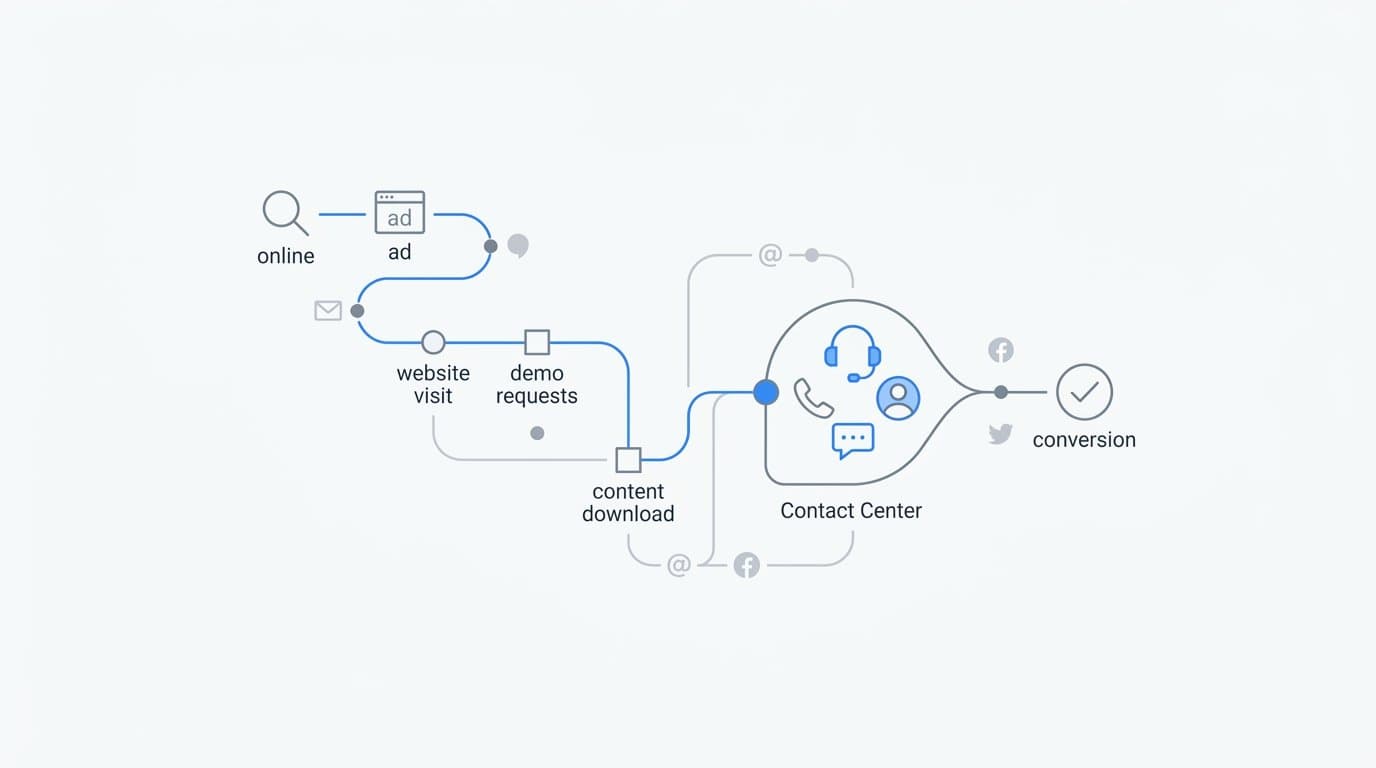
Think about what that means in practice. A prospect clicks a LinkedIn ad, reads a pricing page, downloads a comparison guide, and then calls your sales team. The call goes well. They sign up. But your attribution model credits the LinkedIn click and the content download, with zero visibility into the agent conversation that actually closed the deal. Your optimization decisions flow from incomplete data, and over time, that compounds into real misallocation of budget.
This article breaks down what the contact center customer journey actually looks like across a B2B SaaS sales cycle, why it creates such a persistent attribution gap, and how connecting those touchpoints to your ad and CRM data changes the quality of every growth decision you make. If you are responsible for proving ROI on campaigns that drive inbound calls, chat inquiries, or agent-assisted conversions, this is the framework you need.
The Stages Every Contact Center Customer Journey Passes Through
The contact center customer journey is the sequence of interactions a prospect or customer has with your organization through phone, live chat, email support, or messaging channels. It is not a single event. It is a series of touchpoints that span the entire lifecycle from first inquiry to post-sale support, and in B2B SaaS, those touchpoints often occur at the highest-stakes moments in the buying process.
Breaking it down by stage helps clarify what is actually happening and where the data gaps tend to form.
Awareness and first contact: This is the moment a prospect reaches out for the first time, typically triggered by an ad, a search result, or a referral. They may call a listed number, initiate a live chat on a pricing page, or submit a request for a demo. This stage is where UTM data and session identifiers are most critical to capture.
Qualification and discovery conversations: Early-stage calls and chats where sales development reps or automated chat flows assess fit. These conversations generate rich intent signals, but they rarely get logged in a format that marketing attribution tools can consume.
Nurture touchpoints: For longer sales cycles, prospects may have multiple contact center interactions spread across weeks. A follow-up call here, a product question via chat there. Each of these is a data point that reflects where the prospect is in their decision process.
Purchase decision support: The late-stage conversations where pricing, terms, and implementation details get worked through. This is often the actual conversion moment, the interaction that tips a prospect from evaluating to buying. And it is frequently the least visible touchpoint in a marketing attribution model.
Onboarding calls and post-sale support: After the deal closes, contact center interactions shift to customer success. These touchpoints influence retention, expansion, and upsell, which matters enormously for revenue attribution in a subscription business.
The challenge is that each of these stages involves different teams. Marketing owns the top of the funnel. Sales handles qualification and closing. Customer success manages onboarding and retention. This multi-team structure means contact center data is often siloed across different systems, making it difficult to construct a complete picture of the journey. That fragmentation is exactly where attribution blind spots are born.
Why Contact Center Touchpoints Are a Hidden Attribution Gap
Most attribution models are built around browser-based events. Ad clicks, form fills, page views, session data. These are the signals that digital analytics tools were designed to capture, and they work well as long as the conversion happens in the browser. The problem is that in B2B SaaS, it often does not.
When a prospect clicks a Google ad, visits your pricing page, and then calls your sales team, two of those three touchpoints are captured. The call is not. From your attribution model's perspective, that prospect simply disappeared after the pricing page visit. If they eventually convert, the credit flows back to the ad click and the page view. The agent conversation that answered their objections and moved them to a decision gets no credit at all.
This creates a downstream distortion that compounds over time. Marketing teams optimize toward the channels and creatives that appear to drive conversions based on the data they have. But if contact center interactions are the actual conversion moments, and they frequently are in B2B SaaS, then the channels driving the highest-quality inbound calls may be systematically undervalued. Budget flows toward what looks good in the dashboard, not toward what is actually closing deals.
The concept of offline conversion data addresses this directly. Both Meta and Google provide mechanisms to send offline conversion events back to their platforms after they occur. Meta's Conversions API and Google's offline conversion tools allow businesses to take a CRM event, such as a completed sales call with a positive outcome, and send it back to the ad platform tied to the original click that started the journey. When this works correctly, the ad algorithm learns from real outcomes rather than just browser signals.
But there is a prerequisite. The contact center interaction has to be logged in a structured way that preserves the connection to the originating ad touchpoint. If your CRM does not capture which campaign or channel drove the inbound call, you cannot close the loop. The offline conversion data has nowhere to anchor.
This is the core of the attribution gap: it is not just that contact center data is missing from attribution models. It is that most organizations have not built the data infrastructure to connect contact center events back to their ad sources in the first place. Fixing the attribution problem requires fixing the data capture problem upstream.
Mapping the Contact Center Journey to Your Marketing Funnel
Understanding where contact center interactions fit within the marketing funnel changes how you think about campaign performance. Each funnel stage tends to produce a different type of contact center interaction, and each requires a different approach to tracking and attribution.
At the top of the funnel, awareness-stage ads drive inbound inquiries. A prospect sees a display ad or a paid search result, clicks through to a landing page, and initiates a live chat or calls a number listed on the page. This is a high-intent signal. The prospect is actively exploring, and the contact center interaction is the first human touchpoint in what may become a long sales cycle. Capturing the UTM parameters from that original click and passing them through to the CRM at the point of contact is essential here.
In the middle of the funnel, nurture sequences and retargeting campaigns often prompt prospects to re-engage. They may have visited your site before, downloaded content, or attended a webinar. A well-timed retargeting ad brings them back, and they open a chat window to ask a specific question about a feature or integration. This interaction is a mid-funnel conversion signal, and it deserves to be logged as such in your attribution model.
At the bottom of the funnel, sales calls and closing conversations are the contact center interactions with the most direct connection to revenue. These are the moments where objections get resolved and decisions get made. Logging these as conversion events, with timestamps, outcome data, and deal values, creates the foundation for revenue attribution that includes contact center touchpoints.
The practical mechanism for connecting these stages is UTM parameters combined with session identifiers. When a prospect clicks an ad, the UTM data should travel with them through the session. If they fill out a form, the UTM data should be captured in the CRM record. If they call instead of filling out a form, call tracking tools can associate the inbound call with the session and preserve the UTM data in the CRM log.
From there, CRM data from contact center logs, call metadata, and chat transcripts can be structured as conversion events. Each event carries the identifiers needed to connect it back to the originating ad source. Those events can then be fed into attribution platforms and sent back to ad platforms as conversion signals, completing the loop between the first ad click and the contact center interaction that followed.
Attribution Models That Work for Contact Center Journeys
Not all attribution models handle contact center data equally well. Understanding the tradeoffs helps you choose the right model for how your buyers actually move through the funnel.
First-touch attribution credits the original touchpoint that brought the prospect into the funnel. For contact center journeys, this means the ad or channel that drove the initial inbound call or chat gets all the credit. The problem is obvious: if a prospect calls three times over six weeks before signing, first-touch attribution ignores everything that happened after the first contact. The agent conversations that built trust and resolved objections are invisible.
Last-touch attribution swings to the opposite extreme. It credits the final touchpoint before conversion. In a contact center journey, this often means the closing call gets all the credit, which may cause the marketing team to undervalue the ad campaign that started the journey. If the last-touch model is driving budget decisions, you risk defunding the channels that are actually filling the top of the funnel.
Multi-touch attribution distributes credit across all touchpoints in the journey, which makes it the most accurate model for B2B SaaS companies with complex, multi-channel sales cycles. When contact center events are properly logged and connected to the attribution model, multi-touch attribution can assign fractional credit to the initial ad click, the mid-funnel nurture touchpoints, the sales call, and the closing conversation. This gives marketing, sales, and customer success a shared view of what is actually driving revenue.
Data-driven attribution takes this further by using conversion path patterns across your entire dataset to assign credit algorithmically. Instead of applying a fixed rule like equal weighting or time decay, data-driven attribution looks at which touchpoints and sequences are most correlated with conversions and assigns credit accordingly. For this model to work well with contact center data, the volume of logged contact center events needs to be sufficient for the algorithm to identify patterns. The richer and more complete your data, the more accurate the model becomes.
The practical implication is clear: if your attribution model does not include contact center events, you are working with a partial dataset regardless of which model you use. The model choice matters less than the completeness of the data going into it.
How Server-Side Tracking Connects Contact Center Data to Ad Platforms
Browser-based tracking has real limitations. Ad blockers, browser privacy settings, and the decline of third-party cookies all reduce the reliability of pixel-based conversion signals. For contact center data specifically, browser tracking is not even the right tool. A phone call does not fire a pixel. A chat session that starts on mobile and continues on a different device creates fragmented data. Server-side tracking is the infrastructure that makes contact center attribution work at scale.
Server-side tracking and Conversion APIs allow businesses to send conversion events directly from their servers to ad platforms, bypassing browser limitations entirely. The technical flow for contact center data looks like this: a prospect calls your sales team, the call is logged in the CRM with outcome data and identifiers, the CRM event is enriched with first-party signals such as email address or phone number, and that enriched event is sent as a conversion signal to Meta via the Conversions API or to Google via the offline conversions API.
The ad platform receives a conversion event tied to a real outcome, a completed sales call, a qualified opportunity, or a closed deal, and uses it to update its understanding of which audiences and creatives are driving high-value interactions. Over time, this improves the quality of ad delivery because the algorithm is optimizing toward real conversion signals rather than proxy events like form fills or page views.
The key to making this work is the identifier chain. When a prospect first clicks an ad, a unique identifier is assigned to that session. That identifier travels through the UTM parameters, gets captured in the CRM when the prospect makes contact, and is preserved in the contact center log. When the CRM event is sent back to the ad platform, the identifier allows the platform to match the conversion back to the original ad click, even if weeks have passed between the two events.
This approach also improves the quality of data going into ad platform AI systems. Meta and Google both use machine learning to optimize ad delivery. When the conversion signals they receive are limited to browser-based events, the algorithm has an incomplete picture of what a high-value conversion actually looks like. Sending enriched contact center conversion events, with outcome data and deal context, gives the algorithm better training data. The result is more accurate targeting, better audience optimization, and improved return on ad spend over time.
Platforms like Cometly are built to facilitate exactly this kind of server-side integration, connecting CRM events and contact center data to ad platforms through a single attribution layer that preserves the full customer journey from first click to closed revenue.
Turning Contact Center Journey Data Into Smarter Marketing Decisions
Once contact center touchpoints are properly tracked and connected to your attribution model, the quality of your marketing decisions changes fundamentally. You move from optimizing toward what looks good in the dashboard to optimizing toward what actually drives revenue.
The most immediate benefit is the ability to distinguish between campaigns that drive high-quality inbound calls and those that drive low-intent inquiries. Without contact center data in your attribution model, all inbound calls look the same from a marketing perspective. With it, you can see that one campaign is generating calls that convert to qualified opportunities at a high rate, while another is driving high call volume with poor outcomes. That distinction is worth significant budget reallocation.
Pipeline and revenue attribution that includes contact center events also changes how growth teams justify ad budgets. Instead of reporting on cost per lead or cost per click, you can report on cost per qualified opportunity and cost per closed deal, with full visibility into which campaigns and channels contributed to each stage of the journey. This is the kind of reporting that earns credibility with finance and leadership, because it connects marketing spend directly to business outcomes.
AI-driven recommendations become more powerful when the underlying data is complete. When attribution data includes contact center touchpoints alongside ad clicks, page views, and form fills, AI systems can surface patterns that manual analysis would miss. For example, a pattern might emerge showing that a specific ad creative consistently drives inbound calls that convert at a higher rate than calls driven by other creatives. Without contact center data in the attribution model, that pattern is invisible. With it, you can act on it: scale the high-performing creative, pause the underperformers, and redirect budget toward the channels that are actually closing deals.
Cometly is designed to bring this full picture together. By connecting your ad platforms, CRM, and website data into a single attribution view, it captures every touchpoint across the contact center customer journey and surfaces the insights that drive smarter spend decisions. The AI recommendations layer identifies high-performing campaigns and channels based on complete conversion data, including the contact center events that most attribution tools leave out.
The result is a marketing operation that can scale with confidence because the data it is optimizing toward reflects what is actually happening in the business, not just what is visible in the browser.
Putting It All Together
The contact center customer journey is not a separate process that happens outside of marketing. It is part of the funnel. Every call, chat, and agent interaction is a data point that connects back to the ad or channel that started the journey, and treating it as anything less means making growth decisions on incomplete information.
The key insight is straightforward: when contact center touchpoints are captured, structured, and connected to your attribution model, the entire picture of campaign performance changes. You can see which channels drive high-quality conversations, which creatives produce agent-assisted conversions, and which campaigns are actually contributing to closed revenue rather than just surface-level engagement metrics.
Start by auditing your current attribution setup. Are your inbound calls being logged with the UTM data from the originating ad? Are contact center outcomes being sent back to Meta and Google as conversion events? Are your CRM records structured in a way that connects agent interactions to the marketing touchpoints that preceded them? If the answer to any of these is no, you have a gap that is distorting your optimization decisions.
Closing that gap is what Cometly is built for. From first ad click to closed-won revenue, Cometly connects every touchpoint into a single source of truth so your team can make faster, more confident decisions about where to invest and where to pull back. Get your free demo today and start capturing every touchpoint to maximize your conversions.