If you run a marketing agency managing paid ad campaigns for multiple clients, browser-based pixel tracking is no longer enough. Ad blockers, iOS privacy changes, and cookie restrictions have quietly eroded the accuracy of the data your clients depend on to make budget decisions. And the problem compounds: when ad platforms receive incomplete conversion signals, their algorithms optimize toward the wrong audiences, waste spend, and deliver weaker results.
Conversion API (CAPI) solves this by sending conversion events directly from a server to ad platforms like Meta and Google, bypassing the browser entirely. The result is more complete, more accurate conversion data that feeds ad platform algorithms with better signals and improves campaign performance over time.
For agencies, setting up CAPI correctly across client accounts is now a foundational skill. Done right, it means your clients see more attributed conversions, their ad platforms optimize more effectively, and you become indispensable as the team that actually fixes tracking. That is a competitive advantage worth building.
This guide walks you through every step of a professional CAPI setup for agency use, from scoping the client environment to validating event quality and reporting on results. Whether you are setting up Meta Conversion API, Google Enhanced Conversions, or a multi-platform server-side tracking stack, these steps apply across the board.
You will also learn how a platform like Cometly can simplify the process by acting as a central hub that connects client ad platforms, CRMs, and websites. Instead of juggling multiple native integrations per client, you manage everything in one place and spend more time on strategy rather than configuration.
Let's get into it.
Step 1: Audit the Client's Current Tracking Setup
Before you touch a single line of server-side code, you need a clear picture of what is already in place. Skipping this step is how agencies end up with duplicate events, inflated conversion counts, and frustrated clients wondering why their numbers suddenly changed.
Start by identifying every active pixel, tag, and tracking script running on the client's website. Use a browser extension like Tag Assistant or a tool like Google Tag Manager's preview mode to surface all active tags. Document what you find: Meta Pixel, Google Ads conversion tags, LinkedIn Insight Tag, and any other platform-specific scripts.
Next, map which conversion events are currently being tracked via browser pixel and which are missing or underreported. Common gaps include form submissions that fire inconsistently, checkout completions that get blocked by ad blockers, and post-purchase events that never make it back to the ad platform because the confirmation page loads too slowly.
Document the client's full tech stack. You need to know their website platform (WordPress, Webflow, custom build), their CRM (Salesforce, HubSpot, Pipedrive), their payment processor if relevant, and any existing event tracking they have configured. This shapes every decision you make in the steps that follow.
Check carefully for any existing CAPI or server-side tracking attempts. Some clients have partial implementations from a previous agency or a developer who set something up and never finished it. Undetected partial implementations are a leading cause of conversion tracking gaps, where the same conversion gets counted twice and inflates reported results.
Finally, flag gaps in first-party data collection. CAPI relies on customer identifiers like hashed email addresses, phone numbers, and external IDs to match server events back to real users. If the client's forms are not capturing email addresses, or their CRM is not storing customer IDs consistently, your match rates will suffer before you even send the first server event.
Use this audit to prioritize which events to send server-side first. Focus on the highest-value conversions: lead form submissions, demo requests, trial signups, and for B2B SaaS clients, CRM pipeline events like opportunity created or closed-won deal. These are the signals that actually move the needle for ad platform optimization.
Step 2: Choose Your CAPI Architecture and Integration Method
Once you know what the client has and what they need, the next decision is how you are going to send server-side events. There are three main approaches, and the right one depends on the client's tech stack, developer resources, and how many ad platforms you are managing for them.
Native Platform Integrations: Meta Business Manager offers a direct CAPI setup through its Events Manager, and Google Ads has Enhanced Conversions built into the platform interface. These native integrations work reasonably well for single-platform setups where you only need to send events to one destination. The downside is that they require separate configuration for each platform, and when you are managing five clients across Meta, Google, and LinkedIn simultaneously, the complexity multiplies fast.
Gateway or Middleware Tools: These sit between the client's server and the ad platform, giving you more control over event routing, transformation, and deduplication. Some website platforms have server-side tag management options that function in this way. The trade-off is that they still require meaningful technical configuration and often need developer involvement to implement correctly.
Dedicated Attribution Platforms like Cometly: This approach gives agencies a unified layer that connects ad platforms, CRM events, and website data in one place. Rather than building and maintaining separate native integrations for each client and each ad platform, you configure the connection once through Cometly's interface and let the platform handle server-to-server event transmission. For agencies managing multiple accounts, this dramatically reduces setup time and ongoing maintenance overhead.
When evaluating your options, consider the client's developer resources honestly. Some CAPI integration methods require backend code changes, API authentication, and ongoing maintenance. Others use no-code connectors that a marketer can configure without engineering support. For most agency clients, minimizing the dependency on developer time is a significant practical advantage.
The other critical architectural decision is deduplication. When you run both a browser pixel and server-side CAPI simultaneously (which is the recommended approach, since each catches events the other might miss), you must prevent the same conversion from being counted twice. Both Meta and Google support deduplication via a unique event_id field. The same event_id must be passed in both the browser event and the server event, and the platform will collapse them into a single conversion. Plan your deduplication strategy before you configure anything else.
Step 3: Configure Server-Side Event Sending
This is where the technical implementation happens. The specific steps vary by platform, but the underlying logic is consistent: you are configuring a server to send structured event data to an ad platform's API endpoint whenever a conversion occurs.
For Meta CAPI, start by generating an access token in Meta Business Manager under Events Manager. This token authenticates your server's requests to the Meta Graph API. You will then configure your server, middleware, or attribution platform to send POST requests to the Meta Graph API endpoint, including the required event parameters with each request.
The required parameters for Meta server events include event_name (such as Lead, Purchase, or CompleteRegistration), event_time (Unix timestamp), user_data (customer identifiers), and custom_data (order value, currency, content IDs). Getting these parameters right is essential. Missing or malformed parameters directly reduce your match quality score.
For Google Enhanced Conversions, enable the feature in your Google Ads account under the conversion action settings. You will then configure your server to send hashed first-party customer data alongside conversion events. Google uses this data to match conversions to signed-in Google accounts, which significantly improves attribution accuracy, particularly for campaigns running across multiple devices.
Regardless of platform, include as many customer information parameters as possible with each event. For Meta, this means hashed email, hashed phone number, first name, last name, city, state, zip code, country, external ID, client IP address, and user agent. More identifiers generally correlate with higher match quality scores, which translates directly into more attributed conversions.
Set up event deduplication by passing a unique event_id with every event. This ID should be generated at the moment the conversion occurs and passed identically in both your browser pixel event and your server event. A common approach is to use a UUID generated on the client side and stored temporarily until the server event fires.
If you are using Cometly, connect the client's data sources through the platform's native integrations. Cometly handles the server-to-server event transmission automatically, including proper parameter formatting, hashing, and deduplication logic. This removes a significant amount of manual configuration work, especially when you are setting up CAPI across multiple clients simultaneously.
Always test your server event configuration in a staging environment before pushing to production. A misconfigured server event that fires on every page load rather than only on conversions can corrupt a client's attribution data quickly and is difficult to clean up retroactively.
Step 4: Enrich Events with First-Party Data
Sending server events is only half the equation. The quality of the data inside those events determines how effectively ad platforms can match them to real users and use them as optimization signals. This is where first-party data enrichment becomes critical.
CAPI match rates depend heavily on the customer identifiers you send with each event. A server event that arrives with only an IP address and user agent will match at a much lower rate than one that includes a hashed email, hashed phone number, and external customer ID. Understanding what CAPI match rate means and how to improve it is essential before you go live with any implementation.
Connect your CRM to the server-side tracking layer so that lead data, deal stage changes, and closed-won events can be sent as conversion signals. This is especially valuable for B2B SaaS clients, where the most meaningful conversions happen inside the CRM rather than on the website. A form submission is a weak signal. A closed-won deal is a strong one. Sending both gives ad platforms a much richer picture of which campaigns are actually driving revenue.
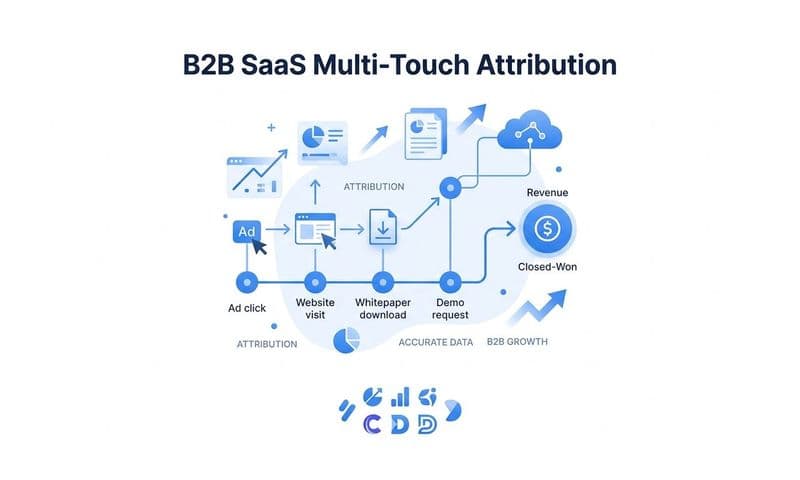
For B2B SaaS clients specifically, map CRM pipeline stages to specific conversion events. When a lead moves from Marketing Qualified Lead to Sales Qualified Lead, that is a conversion worth sending. When a demo is scheduled, when an opportunity is created, when a deal closes: each of these is a signal that ad platforms can use to find more buyers who look like your best customers.
Cometly's data enrichment capabilities handle this automatically by attaching CRM data to ad click events. When a lead comes in from a Meta ad, Cometly ties that lead's journey through the CRM back to the original ad click, so when they eventually become a customer, that closed-won event gets attributed to the right campaign. This removes the manual data wrangling that typically makes CRM-to-ad-platform connections difficult to maintain.
One non-negotiable rule: never send personally identifiable information in plain text. Always hash email and phone fields using SHA-256 before transmission. Both Meta and Google require this, and it is also the right practice for protecting your clients' customer data. Most CAPI implementations handle hashing automatically, but verify this in your configuration before going live.
Step 5: Validate Events and Match Rates in Platform Diagnostics
Sending events is not the same as sending events correctly. Before you declare a CAPI implementation complete, you need to verify that events are arriving with the right data, that deduplication is working, and that match quality is at an acceptable level.
In Meta Events Manager, navigate to the Events Received panel and confirm that your server events are arriving with the correct event names and parameters. You should see both browser events and server events listed, and the platform should indicate that deduplication is occurring. If you see server events arriving without any browser event counterparts, your pixel may not be firing correctly. If you see both but no deduplication, your event_id values are likely not matching.
Check the Event Match Quality score for each server event. Meta displays this score in Events Manager, and it reflects how well the customer data you are sending matches back to Meta users. A score above 6 out of 10 is generally considered strong for server events. Scores below 4 suggest that key customer identifiers are missing or improperly formatted.
When match quality is low, trace back through your event parameters systematically. Common causes include email addresses that are not being lowercased before hashing, phone numbers that include formatting characters instead of digits only, or external IDs that are inconsistent between your CRM and your event payload. Each of these is fixable once you identify it.
In Google Ads, use the Enhanced Conversions diagnostics report to confirm that hashed data is being received and matched correctly. Google will flag specific issues if your implementation has problems, which makes troubleshooting more straightforward than with some other platforms.
Run a test conversion through the actual client funnel. Fill out the lead form, complete the checkout, or trigger whatever conversion event you have configured, and then verify that it appears in both the ad platform's event log and your attribution dashboard within the expected time window. This end-to-end test catches issues that unit testing individual components can miss.
Set a reminder to check match quality scores and event volume again after two weeks. It is common for implementations to drift as website changes, CRM updates, or platform API changes affect event delivery. Catching these issues early prevents gaps in tracking conversions accurately from compounding over time.
Step 6: Set Up Attribution Reporting Across Client Accounts
With server-side events flowing and validated, the final configuration step is building the attribution reporting layer that turns raw event data into insights your clients can act on.
Start by choosing an attribution model that reflects how the client's buyers actually make decisions. For B2B SaaS clients with longer sales cycles, last-click attribution systematically undervalues upper-funnel channels. A buyer who discovers your client through a LinkedIn ad, researches them via a Google search, and converts through a retargeting campaign three weeks later is not a last-click Google conversion. Understanding conversion window attribution and how linear or time-decay models work tends to provide a more accurate picture of channel contribution in these contexts.
Use Cometly to connect ad spend data from Meta, Google, and other platforms directly to pipeline and revenue data from the CRM. This creates a single source of truth where you can see cost per lead, cost per opportunity, and cost per closed-won deal by channel, campaign, and even individual ad creative. That level of granularity is what separates agencies that prove ROI from agencies that report on impressions and hope for the best.
Build client-facing dashboards that tell a clear story. Your clients are not marketers: they are business owners and finance leaders who want to know if their ad spend is generating revenue. Show them the numbers that connect to their business outcomes. Cost per closed-won deal by channel is more compelling than cost per click, and it is the kind of marketing agency reporting that makes budget conversations straightforward.
Set up automated alerts for significant changes in conversion volume or match quality. A sudden drop in server event volume could indicate a website change that broke your implementation. A spike in duplicate events might mean a pixel was accidentally re-added. Catching these issues proactively, before they affect a client's campaign decisions, is a core part of what makes agency CAPI management valuable.
Document the attribution methodology you are using for each client. When clients ask why their numbers look different from what they see in Meta Ads Manager, you need a clear, consistent explanation of how your attribution model works and why it provides a more accurate picture. This documentation also protects you when there are discrepancies between platforms, which is inevitable when running multi-touch attribution across multiple channels.
Putting It All Together: Your Agency CAPI Checklist
Here is the repeatable process you can use for every new client onboarding, distilled into a clear sequence of steps.
1. Audit the client's existing tracking setup, document their tech stack, and identify gaps in first-party data collection before touching any configuration.
2. Choose your CAPI architecture based on the number of ad platforms involved, the client's developer resources, and whether you need a unified multi-client management layer.
3. Configure server-side event sending with correct parameter mapping, hashed customer data, and a deduplication strategy using unique event_id values.
4. Enrich events with CRM data so that pipeline and revenue events, not just top-of-funnel form submissions, flow back to ad platforms as optimization signals.
5. Validate match quality scores, deduplication, and end-to-end event delivery in platform diagnostics before declaring the implementation complete.
6. Build attribution reporting that connects ad spend to pipeline and revenue, with client-facing dashboards and automated alerts for tracking issues.
The compounding benefit of getting this right is significant. Better data quality feeds ad platform AI with stronger signals, which improves targeting, reduces wasted spend, and delivers better campaign results over time. Your clients see it in their numbers, and they credit you for it.
Cometly is built specifically to handle the complexity of multi-client, multi-platform CAPI management in one place. Instead of configuring native integrations separately for each client and each ad platform, you get a unified attribution layer with built-in CAPI support, AI-driven insights, and dashboards that show exactly which ads are driving pipeline and revenue.
Ready to streamline your agency's CAPI setup and give every client a single source of truth for their marketing data? Get your free demo today and see how Cometly makes server-side tracking and attribution management faster for agencies managing multiple accounts.