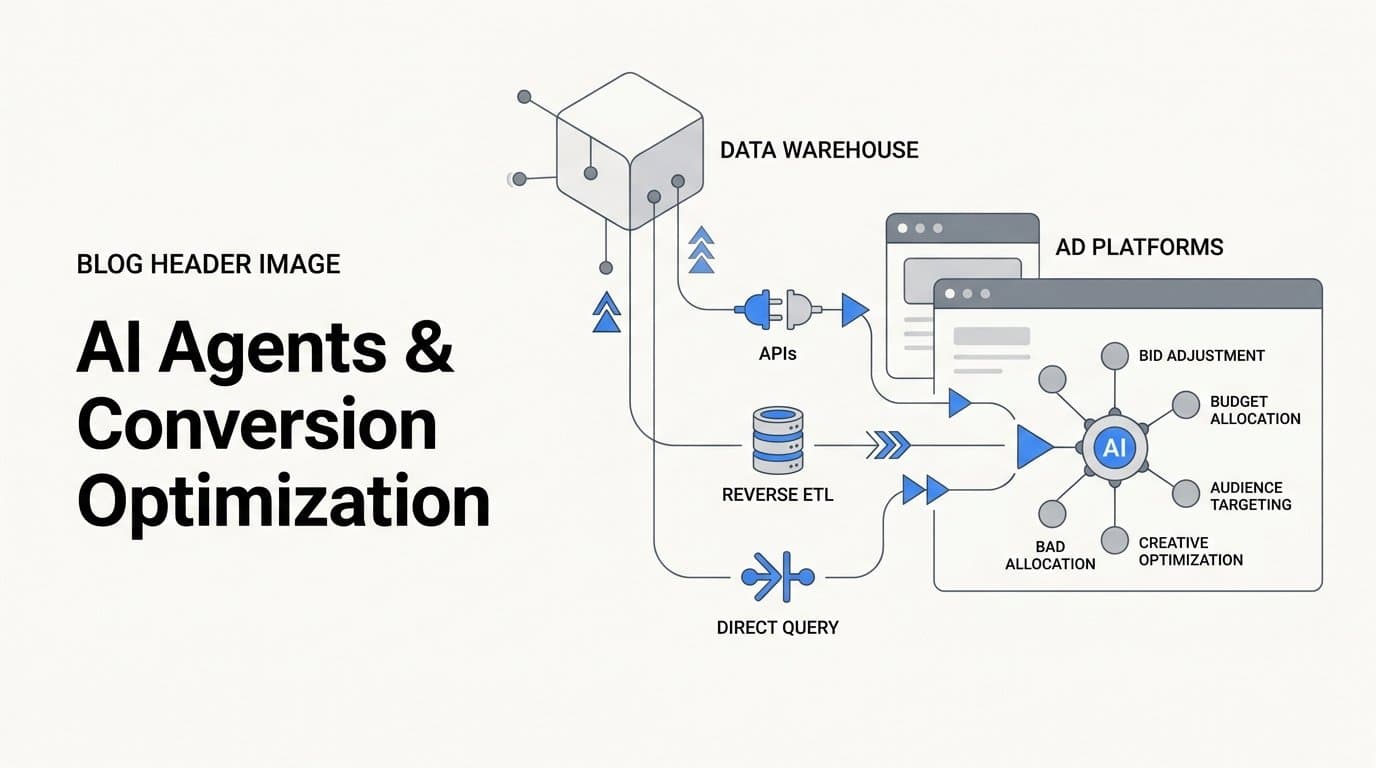
AI agents pull conversion data from a data warehouse by connecting to it through APIs, reverse ETL pipelines, or direct query interfaces, then using that data to adjust bids, budgets, audiences, and creatives in ad platforms automatically. The process runs continuously, so ad decisions reflect actual revenue and pipeline data rather than platform-reported conversions alone.
For B2B SaaS marketing teams, this matters because ad platforms like Meta and Google optimize against the signals you send them. If those signals are incomplete or delayed, the platform AI makes poor decisions. When you route enriched, warehouse-level conversion data back to ad platforms, you give their machine learning engines a clearer picture of what a valuable customer actually looks like.
Cometly is built specifically for this workflow. It connects your ad platforms, CRM, and website, then uses server-side tracking and Conversion API integrations to send enriched, conversion-ready events back to Meta, Google, and other channels. The result is a tighter feedback loop between your actual revenue data and the ad platforms spending your budget.
This article breaks down the specific strategies AI agents use to pull and apply warehouse conversion data, so you can evaluate which approach fits your stack and scale. Whether you are running a lean growth team or managing a complex multi-channel program, these strategies apply directly to how you should be thinking about conversion data infrastructure today.
1. Reverse ETL: Pushing Warehouse Data Back to Ad Platforms
The Challenge It Solves
Most marketing teams store their best conversion data in a warehouse, but that data never makes it back to the ad platforms spending their budget. The warehouse knows which leads became customers, which deals closed, and what revenue each campaign generated. Ad platforms, by default, only see what their pixels report, which is often incomplete and disconnected from downstream revenue outcomes.
The Strategy Explained
Reverse ETL is an established data engineering pattern where data flows from a warehouse back to operational tools, including ad platforms, CRMs, and marketing automation systems. AI agents use reverse ETL pipelines to query conversion data stored in the warehouse and route it back to Meta CAPI, Google Enhanced Conversions, and other ad platform endpoints on a defined schedule or event-based trigger.
Tools like Census and Hightouch are purpose-built for this workflow. They sit between your warehouse and your ad platforms, handling the query logic, data transformation, and API delivery. AI agents can layer on top of these pipelines to determine which segments to sync, when to trigger updates, and how to format conversion values for each destination platform.
Implementation Steps
1. Identify the conversion events stored in your warehouse that represent meaningful business outcomes, such as trial starts, qualified leads, opportunities created, and closed-won deals.
2. Set up a reverse ETL tool to query those events on a recurring schedule or trigger, and map the output fields to the format each ad platform requires for offline conversion imports.
3. Configure deduplication logic to prevent the same conversion event from being counted multiple times across browser pixel events and server-side imports.
4. Monitor match rates in Meta Events Manager and Google Ads conversion tracking to confirm that warehouse-sourced events are being attributed to the correct campaigns and users.
Pro Tips
Prioritize recency. Ad platform machine learning degrades when conversion signals arrive late. Aim to push warehouse conversion data back within 24 hours of the event occurring. For high-volume accounts, near-real-time syncs via streaming pipelines will outperform daily batch jobs in optimization quality.
2. Server-Side Conversion Tracking as the Data Foundation
The Challenge It Solves
Before AI agents can act on warehouse data, that data needs to be accurate and complete. Browser pixels are affected by ad blockers, iOS privacy changes, and fragmented cross-device journeys. If the events entering your warehouse are already missing a significant portion of actual conversions, every downstream optimization decision is built on a flawed foundation.
The Strategy Explained
Server-side tracking routes conversion events through your own server before sending them to ad platforms, capturing signals that browser pixels miss. Meta's Conversion API and Google's Enhanced Conversions are the official, documented implementations of this approach. When combined with browser-side tracking and proper deduplication, server-side tracking produces a more complete and reliable conversion dataset for warehouse storage.
Cometly's server-side tracking infrastructure is designed specifically for this use case. It captures conversion events at the server level, deduplicates them against browser pixel events, and stores enriched event data that can then be used to feed ad platform APIs with accurate, revenue-grade signals. This creates the reliable data foundation that every other strategy in this list depends on.
Implementation Steps
1. Audit your current pixel-based tracking setup to identify where events are being lost, specifically around iOS users, ad blocker traffic, and multi-device journeys.
2. Implement server-side event capture using Meta CAPI, Google Enhanced Conversions, or a platform like Cometly that handles the server-side infrastructure for you.
3. Set up deduplication using event IDs to ensure that the same conversion is not counted twice when both browser and server events fire for the same user action.
4. Route server-side event data into your warehouse as the authoritative conversion record, replacing or supplementing pixel-only data.
Pro Tips
Server-side tracking is the single highest-leverage investment in your conversion data infrastructure. Every other strategy in this list, from reverse ETL to audience syncing, produces better results when the underlying event data is complete. Fix the foundation before layering on automation.
3. Multi-Touch Attribution Models That Inform AI Bidding Signals
The Challenge It Solves
Last-click attribution is widely recognized as a poor signal for B2B SaaS, where sales cycles are long and multiple touchpoints influence a decision before a deal closes. When ad platforms optimize against last-click conversions, they systematically undervalue campaigns that generate early-stage awareness and mid-funnel engagement, skewing budget toward channels that close rather than channels that create demand.
The Strategy Explained
Multi-touch attribution models distribute conversion credit across all touchpoints in a customer journey. Common models include linear (equal credit to all touches), time-decay (more credit to recent touches), and data-driven (credit weighted by actual influence on conversion). AI agents apply these models in the warehouse, calculate weighted conversion values for each campaign and channel, and then export those values as conversion signals back to ad platforms.
The result is a bidding signal that reflects the true contribution of each campaign rather than just the last interaction before a form fill. Cometly's attribution engine supports multiple attribution models and connects them directly to the ad platform data, so you can compare how different models change your view of campaign performance before deciding which signals to send downstream.
Implementation Steps
1. Map your customer journey touchpoints in the warehouse, connecting ad click data, website behavior, and CRM events into a unified user-level timeline.
2. Select an attribution model that fits your sales cycle length and data volume. Data-driven attribution is Google's recommended model for accounts with sufficient conversion volume, but time-decay often works well for longer B2B cycles.
3. Calculate weighted conversion values for each campaign and touchpoint using the chosen model, then store those values in the warehouse as a separate attribution output table.
4. Export the weighted conversion values to ad platforms as custom conversion signals, using offline conversion imports or enhanced conversion uploads.
Pro Tips
Run your chosen attribution model alongside last-click for at least 30 days before switching your bidding signals. This lets you validate that the new model is producing conversion credit distributions that align with what your sales team is actually seeing in the CRM, before you let the ad platform AI optimize against it.
4. Enriching Conversion Events with CRM and Pipeline Data
The Challenge It Solves
Raw lead events are weak signals for B2B ad optimization. When ad platforms receive a form fill as a conversion, they optimize for more form fills, regardless of whether those leads ever become pipeline or revenue. In B2B SaaS, the gap between a submitted form and a closed deal can be enormous, and optimizing against the wrong signal drives budget toward high-volume, low-quality lead sources.
The Strategy Explained
AI agents join CRM data with ad click data in the warehouse to create enriched, revenue-grade conversion events before sending them to ad platforms. Instead of sending a generic lead event, you send a conversion event with a revenue value attached, reflecting the actual deal size, pipeline stage, or lifetime value associated with that customer. Both Meta and Google document offline conversion imports as an official mechanism for this workflow in their developer documentation.
Cometly connects your ad platforms, CRM, and revenue data in one place, making this enrichment process continuous rather than a manual export. The platform tracks the full customer journey from first ad click to closed-won revenue, so the conversion events it sends back to Meta and Google carry real pipeline and revenue context.
Implementation Steps
1. Sync your CRM data into your warehouse on a recurring basis, including deal stage, close date, revenue value, and lead source fields.
2. Join CRM records to ad click data using shared identifiers such as email address, phone number, or custom UTM parameters captured at form submission.
3. Define conversion event tiers that reflect your pipeline stages, for example, a marketing qualified lead event, a sales qualified lead event, and a closed-won event, each with an appropriate revenue value attached.
4. Send each tier as a separate offline conversion event to Meta and Google, allowing the platforms to optimize toward the conversion type that best predicts revenue for your business.
Pro Tips
Start with closed-won revenue as your highest-value conversion signal, even if it takes 60 to 90 days to accumulate. Platforms with sufficient volume will optimize toward that signal over time. Use earlier pipeline stages as supplementary signals to give the algorithm more frequent feedback while the closed-won data builds up.
5. Automated Audience Syncing from Warehouse Segments
The Challenge It Solves
Custom audiences and lookalike seeds in Meta and Google degrade over time when they are not refreshed. Manual audience exports are time-consuming and often happen on an inconsistent schedule, meaning retargeting lists include churned customers, exclude recent high-intent visitors, and use lookalike seeds that no longer reflect your current best-fit customer profile.
The Strategy Explained
AI agents use warehouse-defined audience segments to continuously update custom audiences in Meta and Google, keeping retargeting lists and lookalike seeds current without manual exports. Meta Custom Audiences and Google Customer Match both support API-based list uploads, and reverse ETL tools automate this process by syncing warehouse segments to ad platform audience lists on a defined cadence.
The warehouse is the right place to define audience logic because it has access to the full picture: CRM status, product usage data, billing events, and ad engagement history. AI agents can apply complex segmentation rules in the warehouse and then push the resulting user lists directly to ad platforms, ensuring that your targeting always reflects your current data.
Implementation Steps
1. Define your core audience segments in the warehouse using SQL or your data transformation tool, such as active trial users, churned customers, high-intent visitors who have not converted, and closed-won customers for exclusion lists.
2. Configure a reverse ETL tool or a platform like Cometly to sync each segment to the corresponding custom audience in Meta and Google on a daily or more frequent schedule.
3. Set up lookalike audience seeds using your highest-value customer segments, specifically closed-won customers with above-average revenue values, and keep these seeds updated automatically as new customers close.
4. Add exclusion lists to your active campaigns using warehouse segments that identify current customers or disqualified leads, preventing wasted spend on audiences that will never convert.
Pro Tips
Segment freshness matters more than segment size for lookalike performance. A smaller, recently refreshed seed audience of your best customers will generate a higher-quality lookalike than a large, stale list. Prioritize daily syncs for your lookalike seeds even if other audience lists sync less frequently.
6. Real-Time Bidding Adjustments Driven by Warehouse Signals
The Challenge It Solves
Ad platform machine learning requires timely conversion signals to maintain optimization quality. Both Meta and Google document recommended conversion windows and note that delayed signals reduce the effectiveness of their bidding algorithms. When conversion data sits in a warehouse for days before being exported, the ad platform AI is making bidding decisions based on outdated information, which degrades campaign performance over time.
The Strategy Explained
AI agents translate near-real-time warehouse conversion signals into bid modifier inputs or target CPA and ROAS adjustments, reducing the signal latency that degrades ad platform machine learning performance. Rather than waiting for a nightly batch job to export conversions, streaming pipelines push events from the warehouse to ad platforms within minutes or hours of the underlying business event occurring.
This approach is particularly valuable for B2B SaaS teams running performance-based bidding strategies like Target CPA or Target ROAS. The faster the ad platform receives accurate conversion signals, the faster its algorithm can adjust bids to reflect current performance reality. Cometly's real-time tracking infrastructure is designed to minimize this latency by capturing and routing conversion events as they happen rather than on a batch schedule.
Implementation Steps
1. Audit your current conversion signal latency by comparing the timestamp of actual conversion events in your CRM or product database against the timestamp of when those events reach your ad platforms.
2. Replace batch-based conversion exports with event-driven or streaming pipelines that push conversion data to ad platforms as soon as events are recorded in the warehouse.
3. Configure your ad platform bidding strategies to use the enriched, real-time conversion signals as the primary optimization target, rather than browser pixel events.
4. Monitor your ad platform's conversion signal health dashboards to track event match rates, signal freshness, and any gaps that indicate pipeline latency issues.
Pro Tips
For accounts running Target ROAS bidding, revenue value accuracy matters as much as signal speed. Make sure the revenue values attached to your real-time conversion events reflect actual deal values from your CRM rather than estimated or placeholder values. Inaccurate revenue data sent in real time is worse than delayed but accurate data.
7. Related Questions About AI Agents and Conversion Data
What is reverse ETL in marketing?
Reverse ETL is a data pipeline pattern where data flows from a central warehouse back to operational tools like ad platforms, CRMs, and marketing automation systems. Traditional ETL moves data into a warehouse for analysis; reverse ETL moves it back out so that marketing tools can act on it. In ad optimization, reverse ETL is the mechanism that allows warehouse-stored conversion data to reach Meta CAPI, Google Enhanced Conversions, and other ad platform endpoints automatically.
Can AI agents optimize ads using offline conversion data?
Yes, and both Meta and Google provide documented, official mechanisms for this. Meta's offline conversions API and Google's offline conversion imports allow marketers to send CRM events, pipeline updates, and closed-won revenue data back to ad platforms after the fact. AI agents automate the process of querying this data from a warehouse, formatting it correctly, and uploading it on a schedule that keeps ad platform bidding algorithms informed with revenue-grade signals.
How does server-side tracking differ from pixel tracking for ad optimization?
Browser pixels fire from the user's device and are subject to ad blockers, browser privacy settings, and iOS tracking restrictions, all of which cause event loss. Server-side tracking fires from your own server, bypassing these restrictions and capturing events that pixels miss. For ad optimization, server-side tracking produces a more complete conversion dataset, which means the signals sent to ad platforms are more accurate and the bidding algorithms have better data to work with.
How does a data warehouse connect to Meta CAPI?
A data warehouse connects to Meta's Conversions API either through a reverse ETL tool like Census or Hightouch, through a direct API integration built by your engineering team, or through a marketing attribution platform like Cometly that handles the connection natively. The warehouse queries the relevant conversion events, transforms them into the format Meta requires, and sends them to the CAPI endpoint with the necessary event parameters, including match keys like email and phone number for identity resolution.
Do you need a data warehouse to use AI ad optimization?
No, but a warehouse significantly improves the quality of the signals available for optimization. Without a warehouse, AI ad optimization relies on platform-reported conversions and browser pixel events, which are often incomplete, especially for B2B SaaS companies with long sales cycles. A warehouse allows you to join CRM data, product usage data, and revenue data with ad click data, creating enriched conversion signals that give ad platform AI a much clearer picture of what a high-value customer looks like.
Putting It All Together: Building a Warehouse-to-Ad-Platform Data Loop
The core pattern across all these strategies is the same: move conversion data from where it lives, your warehouse, CRM, or revenue system, to where ad platform AI can act on it. Each strategy in this list addresses a different layer of that pipeline, from how data is extracted and enriched to how it is timed and formatted for ad platform consumption.
For B2B SaaS teams, the highest-leverage starting point is usually server-side tracking combined with CRM enrichment. These two steps close the largest gaps in signal quality before you layer in reverse ETL or automated audience syncing. Once your conversion data is accurate and enriched, the automation strategies in this list compound on top of that foundation.
When evaluating your current stack, focus on three variables: event deduplication, attribution model flexibility, and data freshness. These three factors determine how useful your warehouse data actually is for ad optimization. A pipeline that scores well on all three will consistently outperform one that relies on browser pixels and last-click attribution.
Cometly is built for exactly this workflow. It connects your ad platforms, CRM, and website in one place, tracks the full customer journey from first ad click to closed-won revenue, and sends enriched conversion events back to Meta, Google, and other channels via native CAPI integrations. Teams that want a single source of truth for attribution and a direct path to better ad platform optimization can start at cometly.com.
If you are ready to stop optimizing against incomplete signals and start feeding your ad platforms the revenue-grade data they need to perform, Get your free demo today and see how Cometly captures every touchpoint to maximize your conversions.