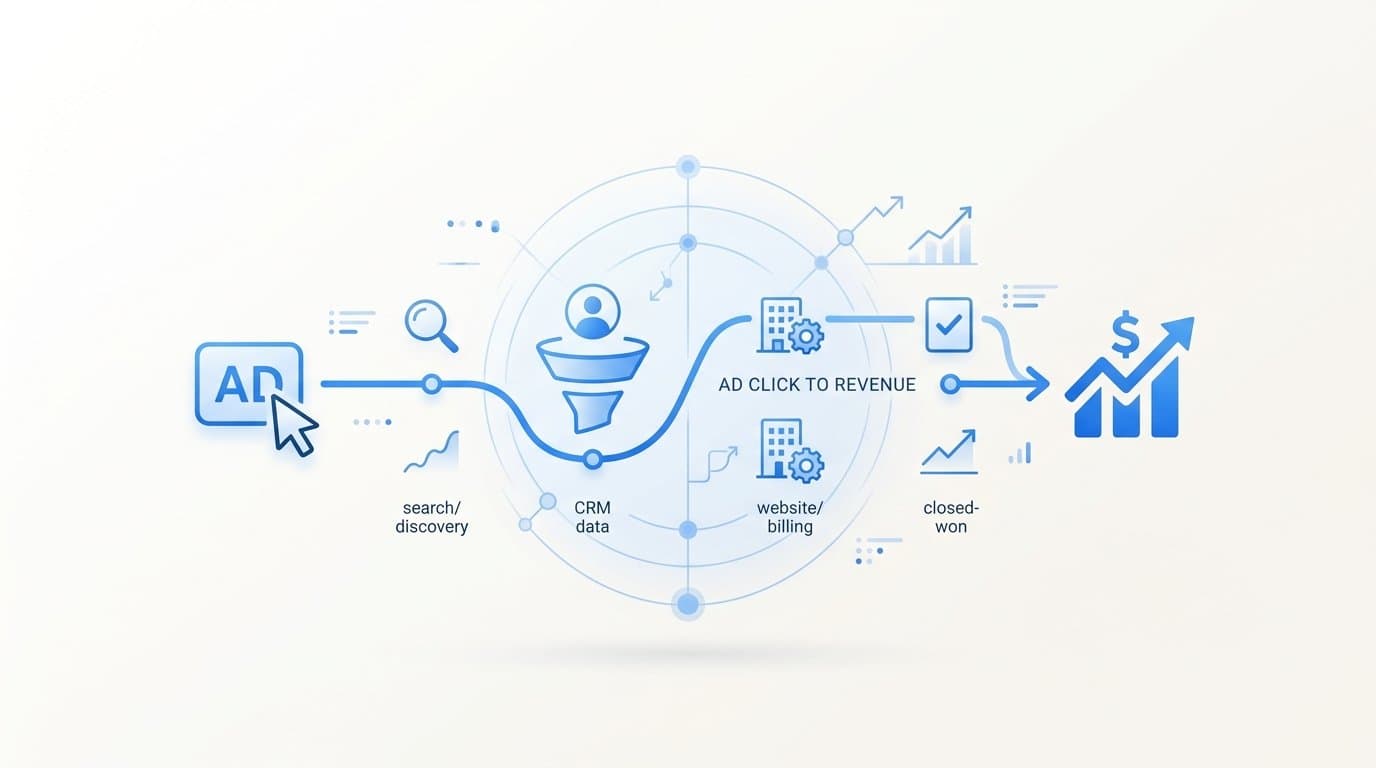
To track the full customer journey from ad click to revenue, you need a system that connects your ad platforms, website, CRM, and payment data into a single attribution pipeline. Most B2B SaaS teams are not missing ambition here; they are missing infrastructure. And without that infrastructure, every budget decision you make is built on incomplete information.
Here is the core problem: a lead that fills out your demo form today might not close for 60 to 90 days. By the time that deal hits closed-won in your CRM, most attribution tools have already forgotten which campaign started the conversation. You end up scaling campaigns that generate cheap leads that never convert, and cutting the ones that actually drive revenue because they look expensive on the surface.
Cometly is built specifically to solve this. It links every ad click to downstream pipeline and closed-won revenue, giving B2B SaaS teams a single source of truth across the entire funnel, from the first impression to the final payment. It connects your ad platforms, CRM, website, and billing data without requiring a dedicated data engineering team to hold it together.
This guide walks you through the exact steps to set that up. The process applies whether you are running paid search, paid social, or both. Capture the click, track the conversion, connect it to your CRM, tie it to revenue, pick the right attribution model, feed that data back to the platforms, and then act on what the reports tell you.
By the end of these steps, you will know which campaigns, ad sets, and creatives are actually generating revenue, not just leads. That is the difference between marketing that looks good in a dashboard and marketing that compounds over time.
Step 1: Tag Every Ad with UTM Parameters
UTM parameters are the foundation of any attribution system. Without them, no tool can tell you which campaign drove a specific visitor, lead, or deal. Think of UTMs as a barcode on every ad you run. When someone clicks, that barcode travels with them through your funnel.
The five parameters you need on every ad URL are: utm_source (the platform, such as google or meta), utm_medium (the channel, such as cpc or paid-social), utm_campaign (your campaign name), utm_content (the specific ad creative or copy variation), and utm_term (the keyword for search ads).
Consistency in naming is not optional. If one team member tags a campaign as "Facebook" and another uses "facebook" and a third uses "fb," your attribution tool will treat those as three separate sources. You will never get a clean aggregate view of what Meta is contributing to your pipeline.
Build a UTM taxonomy document in a shared spreadsheet and make it the single source of truth for your team. Define the exact spelling, casing, and structure for every parameter before anyone launches a campaign. Lowercase, hyphenated values work well and reduce the risk of formatting inconsistencies.
For Google Ads, enable auto-tagging to capture the gclid parameter alongside your UTMs. The gclid gives Google's systems more granular data for optimization, while your UTMs feed your own attribution tool. For Meta, add UTM parameters in the URL parameters field at the campaign or ad set level in Ads Manager, rather than appending them manually to each destination URL.
Pro tip: Use dynamic UTM values where the platform supports them. For example, in Google Ads, you can use {campaignid} and {adgroupid} as dynamic parameters that auto-populate with real values, reducing manual errors.
Success indicator: Before any ad goes live, open the destination URL and confirm the full UTM string is present and parseable. Every active ad should have a complete, readable UTM string. If you see a URL with no parameters, that ad is invisible to your attribution system.
Step 2: Install First-Party Tracking on Your Website
Once a visitor clicks your ad and lands on your site, you need to capture that UTM data immediately and store it reliably. This is where first-party tracking comes in.
Deploy a first-party tracking script on your website that reads the UTM parameters from the URL when a visitor arrives and stores them in a first-party cookie. First-party cookies are set by your own domain, which means they are far more durable than third-party cookies and are not affected by cross-site tracking restrictions.
Why does this matter? Browser privacy updates and iOS restrictions have significantly degraded the reliability of browser-based pixels. A visitor might block your Meta pixel, use Safari with Intelligent Tracking Prevention enabled, or browse in a private window. If your only tracking method is a client-side pixel, you are missing a meaningful portion of your conversion data.
Server-side tracking addresses this directly. The Conversion API for Meta (CAPI) and Enhanced Conversions for Google send events directly from your server to the ad platform's server, bypassing the browser entirely. This means ad blockers and browser privacy settings have no effect on these events.
Cometly's server-side tracking layer handles this automatically. It sends enriched conversion events from your server to Meta and Google, reducing data loss and giving the platforms a more complete picture of what is happening in your funnel.
Beyond the tracking method, you also need to define which events matter. For most B2B SaaS funnels, the key micro-events to track are: page views, form submissions, demo requests, trial signups, and any other action that indicates intent. Each of these events should fire both client-side (for speed) and server-side (for reliability), with deduplication logic in place to prevent double-counting.
Common pitfall: Many teams install a pixel and assume they are covered. They are not. If your pixel fire rate is lower than your actual conversion rate, you are feeding the ad platform's machine learning algorithm incomplete data, which degrades targeting over time.
Success indicator: Your attribution tool shows visitor sessions with source data attached. If you are seeing a high percentage of traffic labeled as "direct" or "unknown," your UTM capture or cookie storage is not working correctly. Most of that traffic has a real source; you just cannot see it yet.
Step 3: Connect Your CRM to Close the Lead-to-Opportunity Gap
Capturing UTMs on your website is only half the battle. The other half is making sure that source data travels with the lead when they submit a form and enter your CRM. If this handoff fails, the link between your ad spend and your pipeline is permanently broken for that contact.
The mechanism is straightforward: when a visitor submits a form, your website should read the UTM values stored in the first-party cookie and pass them as hidden fields in the form submission. Those values then write into the CRM contact record at the moment of creation. Some teams use a unique visitor ID instead of raw UTMs, which gives the attribution platform a way to look up the full session history for that contact.
This applies regardless of which CRM you use. Whether you are on HubSpot, Salesforce, Pipedrive, or another platform, the principle is the same: source data must be written into the contact record at lead creation, not retroactively applied later.
Once your CRM has source data at the contact level, the next step is mapping your pipeline stages to attribution events. This is what allows you to measure cost per SQL and cost per opportunity, not just cost per lead. Cost per lead is a surface metric. It tells you how efficiently you are generating form fills. Cost per SQL tells you whether those leads are actually worth anything to your sales team.
Cometly's native CRM integrations sync contact and deal data automatically, associating each deal with its originating ad touchpoints. When a deal moves from MQL to SQL to closed-won, Cometly updates the attribution record so you can see the full journey from ad click to revenue at every stage of the funnel.
Common pitfall: If your marketing team uses one set of campaign names and your CRM uses different stage labels, the mapping breaks down. Align your naming conventions across both systems before you connect them.
Success indicator: Open a sample of recent CRM contact records and check the source field. The majority of inbound leads should show a populated campaign source that matches the campaigns you are actively running. If most records show "unknown" or are blank, the UTM handoff is not working.
Step 4: Tie Closed Revenue Back to Ad Spend
This is the step that most teams skip, and it is the most important one. Connecting your billing system to your attribution platform is what transforms your reporting from "which campaigns generate leads" to "which campaigns generate revenue."
For B2B SaaS companies, this typically means connecting Stripe, Chargebee, or another subscription billing platform to your attribution tool. When a deal closes and a subscription is created, that payment event needs to be matched back to the original ad touchpoints using the shared visitor or contact ID that has traveled through your funnel.
Why does this matter beyond the obvious? Consider two campaigns running simultaneously. Campaign A generates 50 leads per month at a low cost per lead. Campaign B generates 20 leads per month at a higher cost per lead. Based on lead volume alone, Campaign A looks like the winner. But if Campaign B's leads close at a higher rate and convert to larger subscriptions, Campaign B may be generating three times the revenue per dollar spent. Without revenue attribution, you would make the wrong budget decision.
Cometly's Stripe integration pulls subscription and payment data directly into the attribution dashboard, linking MRR and ARR to specific campaigns, ad sets, and individual creatives. This gives you true ROAS calculated from actual closed revenue, not estimated or proxy values like lead value assumptions.
For companies with longer sales cycles, configure delayed attribution windows in your platform. If your average deal closes in 60 days, a campaign that ran six weeks ago may be responsible for deals closing this week. Set your attribution window to match your actual sales cycle length, typically 30, 60, or 90 days, so the data reflects reality.
Success indicator: Your attribution dashboard shows revenue and ROAS figures that reconcile with what your finance team sees in your billing system. If the numbers are significantly different, there is a matching or integration issue to resolve before you trust the attribution data for budget decisions.
Step 5: Choose the Right Attribution Model for Your Sales Cycle
Attribution models determine how credit for a conversion is distributed across the multiple touchpoints in a customer journey. Choosing the wrong model does not mean your tracking is broken; it means you are looking at the right data through the wrong lens.
Here are the core models and when each one is useful:
First-touch attribution gives 100% of the credit to the first ad interaction. This is useful for understanding which channels and campaigns create awareness and bring new audiences into your funnel. It overstates the importance of top-of-funnel channels and ignores everything that happened afterward.
Last-touch attribution gives 100% of the credit to the final touchpoint before conversion. This is useful for understanding what closes deals. It ignores everything that happened earlier in the journey, which is a significant blind spot for B2B buyers who research over weeks or months.
Linear attribution distributes credit equally across every touchpoint in the journey. A prospect who saw four ads before converting would give 25% credit to each. This is a balanced starting point for B2B SaaS teams who want to acknowledge the full journey without overcomplicating the model.
Time-decay attribution gives more credit to touchpoints that occurred closer to the conversion event. This reflects the intuition that the content a prospect engaged with right before converting was more influential than something they saw three months ago.
Data-driven attribution uses algorithmic weighting based on actual conversion path data. It is the most accurate model when you have sufficient data volume, but it requires a meaningful number of conversions to produce reliable weights.
For most B2B SaaS companies with multi-touch, multi-stakeholder sales cycles, a linear or time-decay model gives a more accurate picture than either first-touch or last-touch alone.
Cometly lets you compare multiple attribution models side by side so you can see how credit shifts across campaigns depending on the model you apply. This is how you build a fuller picture of channel contribution rather than anchoring to a single model's output.
Success indicator: You can articulate why a specific campaign deserves budget based on its performance across at least two attribution models, not just one.
Step 6: Send Enriched Conversion Data Back to Ad Platforms
Once you have clean conversion data flowing through your attribution system, you can use it to improve the performance of your ad campaigns directly. This is the feedback loop that separates sophisticated marketing operations from basic tracking setups.
Meta's Conversion API and Google's Enhanced Conversions allow you to send server-side events back to the ad platforms with enriched data points. Instead of just sending a "lead submitted" event, you can send the contact's hashed email address, phone number, and the conversion value associated with the event. This gives the platform's machine learning algorithm much better signal to work with.
Why does this matter for performance? Ad platforms optimize toward the conversion events you tell them to optimize toward. If you only send form fill events, the platform will find people likely to fill out forms, which may or may not be the same people likely to become paying customers. If you send revenue events tied to actual closed deals, the platform can optimize toward the characteristics of people who actually buy.
Cometly automates this data feedback loop, sending conversion-ready events to Meta and Google with the enriched data the platforms need to improve their bidding and targeting algorithms. This reduces cost per acquisition over time as the platform's models get better signal about what a high-value customer looks like.
Event deduplication is a required configuration step here. When you run both a browser pixel and server-side events simultaneously, the same conversion action can fire twice: once from the pixel and once from the server. Without deduplication logic, both events register as separate conversions, inflating your reported numbers. Set up deduplication using a consistent event ID that matches between the pixel event and the server event for the same action.
Success indicator: Your Meta Events Manager or Google Ads conversion tracking shows server events arriving with strong match quality scores. In Meta, aim for a match quality score above 7 out of 10. Higher match quality means the platform can attribute more conversions to your ads and optimize more effectively.
Step 7: Read Your Attribution Reports and Act on the Data
All of the infrastructure you have built in the previous steps only creates value if you use the data to make better decisions. Attribution reports are not a vanity metric; they are an operational tool.
Review your attribution reports at least weekly. The metrics to focus on are: cost per lead, cost per SQL, cost per closed deal, and ROAS by campaign. These four metrics tell a complete story about where your budget is working and where it is not.
Cost per lead tells you about volume efficiency. Cost per SQL tells you about lead quality. Cost per closed deal tells you about revenue efficiency. ROAS tells you the return on every dollar spent. A campaign can look great on cost per lead and terrible on cost per closed deal, which is exactly the pattern you are trying to catch.
Use customer journey analytics to go beyond campaign-level data. Look at which touchpoint sequences produce the highest-value customers. You may find that prospects who engage with a specific piece of content before requesting a demo close at a meaningfully higher rate. That insight should influence both your ad creative strategy and your nurture sequences.
Cometly's AI ads manager surfaces recommendations for which ads to scale, pause, or test based on revenue attribution data. Instead of manually sorting through campaign reports, the AI identifies the patterns and flags the decisions that matter most. This is particularly useful when you are running campaigns across multiple platforms simultaneously and need to prioritize where to focus attention.
Share attribution reports with your sales team. When sales understands which channels bring in the leads most likely to close, they can prioritize their outreach accordingly. This alignment between marketing and sales is one of the highest-leverage outcomes of a well-functioning attribution system.
Success indicator: You make at least one budget reallocation decision per month based on revenue attribution data, not gut feel or platform-reported ROAS. If your reports are not changing any decisions, either the data is not trustworthy yet or it is not being reviewed by the right people.
What Tools Track the Customer Journey from Ad Click to Revenue?
Several platforms offer customer journey tracking, each with different strengths depending on your business model and tech stack.
Cometly is purpose-built for B2B SaaS companies. It connects ad platforms, CRM, website, and billing data (including Stripe) into a single attribution pipeline, with multi-touch attribution, server-side tracking, AI-driven recommendations, and 70+ native integrations. It is the strongest option for teams that need to track long sales cycles and connect ad spend directly to closed revenue.
HubSpot Attribution is built into the HubSpot CRM and works well for teams that are already fully invested in the HubSpot ecosystem. Its cross-channel visibility is more limited compared to dedicated attribution platforms.
Northbeam and Triple Whale are strong options for ecommerce and DTC brands but are not designed for B2B pipeline attribution with long sales cycles and CRM-dependent workflows.
Google Analytics 4 is free and provides solid web behavior data, but its out-of-the-box CRM and revenue integration capabilities are limited. It works well as a supplementary tool, not as a primary attribution system for B2B SaaS.
What Is the Difference Between First-Touch and Last-Touch Attribution?
First-touch attribution gives 100% of the conversion credit to the first ad or channel a prospect interacted with, while last-touch attribution gives 100% of the credit to the final touchpoint before the conversion event. First-touch is useful for measuring top-of-funnel channel performance and understanding what creates awareness. Last-touch is useful for understanding what closes deals. Neither model alone is sufficient for B2B SaaS companies with multi-touch journeys; using both together, or a multi-touch model, gives a more complete picture.
How Do I Track Conversions After iOS 14 and Browser Privacy Changes?
The answer is server-side tracking. Browser-based pixels are increasingly unreliable due to ad blockers, Safari's Intelligent Tracking Prevention, and the deprecation of third-party cookies. Server-side tracking via Meta's Conversion API and Google's Enhanced Conversions sends events directly from your server to the ad platform's server, bypassing browser restrictions entirely. This approach recovers a significant portion of the conversion signal that would otherwise be lost, and it improves the match quality of the data you send back to the platforms.
How Long Should My Attribution Window Be for B2B SaaS?
Your attribution window should match your actual average sales cycle length. For most B2B SaaS companies, this means setting attribution windows of 30 to 90 days. If your average deal closes in 60 days, a campaign running today may be responsible for deals that close two months from now. Using a 7-day or 28-day attribution window, which is common in ecommerce contexts, will cause you to undercount the revenue contribution of campaigns that target longer sales cycles. Review your CRM data to calculate your actual average time from first touch to closed-won, then set your attribution window accordingly.
What Data Do I Need to Calculate True ROAS?
True ROAS requires two inputs: actual ad spend at the campaign level and actual closed revenue tied to those specific campaigns. The revenue figure must come from your billing system, such as Stripe or Chargebee, not from estimated lead values or proxy metrics. When you connect your billing data to your attribution platform, every closed deal or subscription payment is matched back to the originating ad touchpoints, giving you a ROAS figure that reflects what actually happened in your business, not what the ad platform reported based on its own conversion tracking.
Putting It All Together
Tracking the full customer journey from ad click to revenue requires connecting four systems: your ad platforms, your website, your CRM, and your billing data. The seven steps above give you a repeatable process to do exactly that.
Start with clean UTM tagging on every active ad. Add server-side tracking to capture events that browser pixels miss. Pass source data into your CRM at the moment of lead creation. Connect your revenue data so you can calculate true ROAS. Choose an attribution model that fits your sales cycle length. Send enriched conversion data back to ad platforms to improve their targeting. Then review the reports weekly and act on what they tell you.
Cometly handles the technical infrastructure across all of these steps in one platform, built specifically for B2B SaaS teams who need accurate attribution without a dedicated data engineering team.
Before you go live, run through this quick checklist: UTMs on every active ad, first-party tracking script installed, CRM integration confirmed, revenue data connected, attribution model selected, CAPI or Enhanced Conversions active, and a weekly reporting cadence scheduled.
If you are ready to see which ads are actually driving revenue, Get your free demo and start connecting every touchpoint to closed-won revenue today.