You're running paid campaigns across Meta, Google, and maybe a few other channels. You've set up your pixels, your conversion events are firing, and your ad platform dashboard is showing a healthy return on ad spend. Then you pull your actual revenue data and the numbers don't add up. The conversions your ad platform is claiming credit for don't match what's actually coming through your CRM or payment processor.
This is one of the most frustrating realities in modern performance marketing. And it's not a reporting glitch. It's a structural problem with how conversion data gets collected and transmitted in the first place.
Browser-based pixels, the default tracking method for most ad platforms, were built for a different internet. One where cookies flowed freely, browsers didn't block third-party scripts, and Apple hadn't yet handed users the power to opt out of tracking entirely. That internet no longer exists. What's replaced it is a fragmented, privacy-first environment where your pixel is fighting an uphill battle every single time a conversion happens.
Server side event tracking is the modern answer to this problem. Instead of relying on a user's browser to send conversion data to Meta or Google, your own server handles that job directly. It's a fundamental shift in how attribution data flows, and for marketing teams serious about paid acquisition, it has moved from a nice-to-have to a genuine competitive necessity.
This article walks through exactly what server side event tracking is, how it works under the hood, why event match quality matters so much for ad performance, and how to think about implementation in a way that actually improves your marketing decisions. No developer degree required.
The Tracking Problem That's Quietly Draining Your Ad Budget
To understand why server side event tracking matters, you first need to understand how traditional pixel tracking works and where it breaks down.
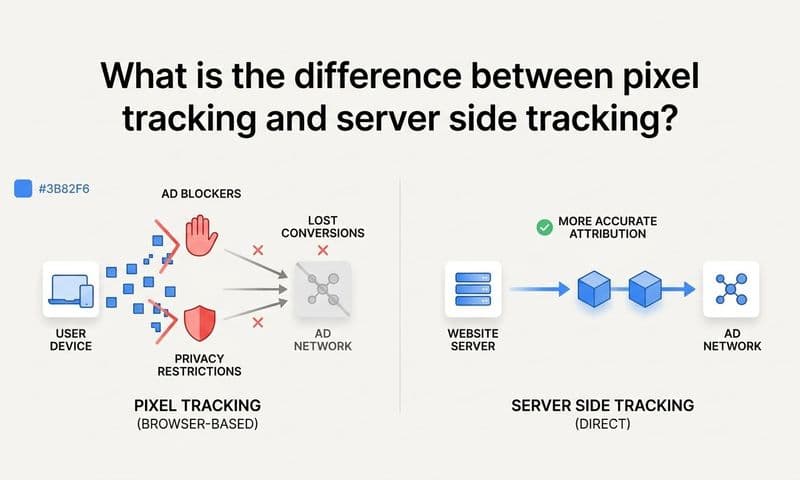
When you install a Meta Pixel or Google Ads conversion tag on your website, you're placing a small piece of JavaScript code in the user's browser. When a visitor completes a conversion event, like a purchase or a form submission, that JavaScript fires and sends the event data directly from their browser to the ad platform. Simple, fast, and for years, reliable enough.
The problem is that this entire process depends on the browser cooperating. And increasingly, browsers aren't cooperating.
iOS Privacy Changes: Apple's App Tracking Transparency framework, introduced with iOS 14, gave users the ability to opt out of cross-app tracking. The downstream effect on web tracking has been significant. Safari, which ships on every iPhone and iPad, aggressively limits third-party cookies and tracking parameters. When a user clicks an ad on their iPhone and lands on your website, a meaningful portion of that attribution signal is lost before it ever reaches your pixel.
Third-Party Cookie Deprecation: Safari and Firefox have blocked third-party cookies for years. Chrome has been moving in the same direction. These cookies were the backbone of cross-site tracking and attribution. Without them, browser-based pixels lose a critical mechanism for connecting ad clicks to downstream conversions.
Ad Blockers: Browser extensions like uBlock Origin and similar tools actively prevent pixel scripts from loading at all. For many audiences, particularly in tech-forward demographics, ad blocker adoption is high enough to create a genuine gap in your conversion data.
The cumulative effect of these three forces is that a significant portion of real conversions never get reported back to your ad platform. The platform sees fewer conversions than actually happened, which means it calculates a higher cost per acquisition than is accurate. It then makes budget and delivery decisions based on that incomplete picture, optimizing toward the wrong signals and potentially pulling budget from campaigns that are actually working.
For marketers, this isn't just a data quality issue. It's a budget allocation problem. When your ad platform's algorithm is learning from a distorted data set, every optimization decision it makes is built on a flawed foundation.
How Server Side Event Tracking Actually Works
The core idea behind server side event tracking is straightforward: remove the browser from the equation and let your server communicate directly with the ad platform.
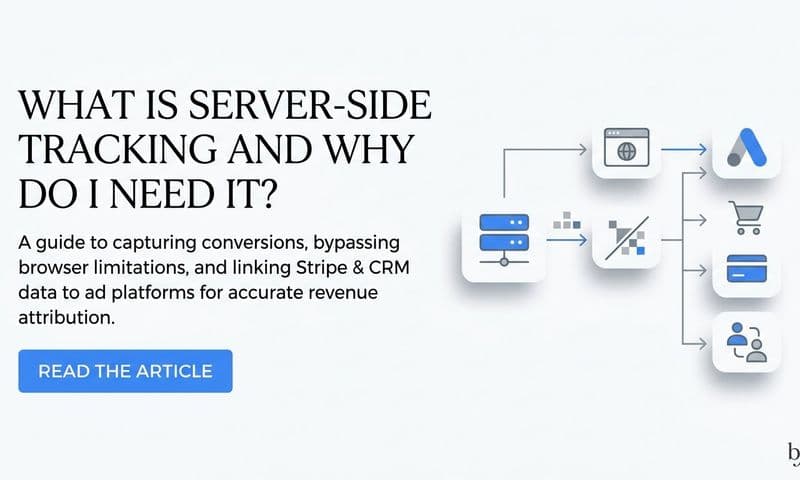
Instead of a JavaScript pixel firing in the user's browser and hoping nothing blocks it, your web server or application server captures the conversion event and sends it directly to the ad platform's API. Meta calls this the Conversions API (CAPI). Google has Enhanced Conversions. TikTok has its Events API. Each major ad platform now offers a server-to-server integration specifically because they know browser-based tracking has become unreliable.
Here's what that data flow looks like in practice:
1. A user clicks your ad and lands on your website or app.
2. They complete a conversion action, like submitting a lead form or completing a purchase.
3. Your server captures that event. Because this happens on your infrastructure, you have access to first-party data that a browser pixel never could: the user's email address from the form they just submitted, their phone number, their order ID, and other identifying information.
4. Your server hashes the personally identifiable information (hashing means converting it into an anonymized string that can't be reversed, which protects user privacy while still enabling matching) and sends the event package to the ad platform's API.
5. The ad platform receives the event, attempts to match it to a user profile in its system, and attributes the conversion accordingly.
One important clarification: server side tracking is not meant to replace your browser pixel in most setups. It's meant to work alongside it. The browser pixel captures certain user-level signals, particularly cookie values like Meta's fbp and fbc parameters, that are difficult to replicate server-side without a browser present. The server-side event captures everything else with greater reliability and richer data.
Think of it like having two independent witnesses to the same event. If one witness is blocked from testifying, the other still has the full story. Together, they give you the most complete picture possible. The ad platform uses both signals, deduplicating them to avoid double-counting, and ends up with far better conversion coverage than either method alone would provide.
This hybrid approach, browser pixel plus server side tracking running simultaneously, is the industry best practice for a reason. It maximizes both the richness of the data and the resilience of your tracking setup against the browser-level restrictions that continue to tighten over time. Understanding Meta browser events vs Meta server events is essential for configuring this hybrid model correctly.
Why Event Match Quality Is the Hidden Driver of Ad Performance
Here's where server side event tracking stops being just a data integrity story and becomes a genuine performance story.
Ad platforms like Meta don't just receive your conversion events and count them. They actively score them. Meta's Events Manager shows you an event match quality rating for each conversion event you send. This score reflects how successfully the platform can match your reported event to an actual Facebook or Instagram user profile.
Why does this matter? Because if Meta can't match your conversion event to a user profile, it can't use that conversion to inform its delivery algorithm. The conversion essentially disappears from the optimization loop. Higher match quality means more of your conversions are actually feeding the machine that decides who sees your ads next.
The signals that improve match quality include hashed email addresses, hashed phone numbers, browser cookies (the fbp and fbc values that track Facebook click IDs), IP addresses, and user agent strings. The more of these signals you can pass with each event, the higher your match quality score.
This is where server side tracking creates a real advantage over browser pixels alone. When a user submits a lead form on your website, your server captures their email address and phone number directly from the form submission. A browser pixel might capture the page URL and a cookie value, but it doesn't have access to the form data unless you've explicitly configured it to pull those fields. Your server has that data by default, because the form submission goes to your server first.
The downstream effect on campaign performance is meaningful. When Meta's algorithm receives richer, higher-quality conversion signals, it can build more accurate audience models. Lookalike audiences become more precise because they're built on a cleaner signal of who actually converted. Automatic bidding strategies optimize more effectively because the algorithm has a more complete picture of which ad impressions led to real outcomes.
Better data fed into the ad platform's AI produces better targeting decisions on your behalf. It's a compounding advantage: the more complete your conversion data, the smarter the algorithm gets, and the more efficient your spend becomes over time. Reviewing best practices for tracking conversions accurately can help you ensure you're capturing every signal that drives match quality higher.
The Full Range of Events You Can Track Server Side
One of the underappreciated advantages of server side event tracking is how much it expands what you can actually measure and send back to ad platforms.
Browser pixels are largely limited to what happens in a browser session: page views, button clicks, form submissions, and checkout completions. Anything that happens after the user leaves your website, or that occurs in your back-end systems, is invisible to a browser pixel.
Server side tracking removes that constraint entirely. Because your server is the one sending events, you can send any event your systems are aware of, regardless of where it happens.
E-commerce events: Purchases, refunds, subscription starts, add-to-cart actions, and checkout initiations can all be sent with enriched order data including revenue values and product details.
Lead generation events: Form submissions, demo requests, and trial signups can be sent with the actual contact information provided, dramatically improving match quality. Dedicated lead tracking software for marketers can help you manage and route these events reliably across platforms.
CRM stage events: This is particularly powerful for B2B and SaaS marketers. When a lead becomes a marketing qualified lead, books a demo, or closes as a customer in your CRM, that event can be sent back to the ad platform as a conversion signal. This connects your ad spend directly to pipeline and revenue, not just top-of-funnel clicks.
Offline conversions: For businesses where transactions happen offline or in person, server side tracking provides a clean path to import those conversions back to ad platforms and close the attribution loop.
For B2B teams especially, the ability to send CRM events back to ad platforms changes the optimization game entirely. If your sales cycle is three months long, a browser pixel can only tell the algorithm about the form fill. Server side tracking lets you tell the algorithm about the closed deal, even months after the original ad click. The platform can then optimize toward the signals that actually predict revenue, not just the signals that predict form submissions.
One technical point worth understanding here is deduplication. If you're running both a browser pixel and server side tracking simultaneously, both may fire for the same conversion event. Without deduplication, you'd be reporting the same conversion twice, which inflates your conversion counts and makes your reporting unreliable. Both Meta and Google handle this by requiring you to pass a unique event ID with each conversion. When the platform receives two events with the same event ID, it counts them as one. Setting up event IDs correctly is a critical step in any hybrid tracking implementation.
Server Side vs. Client Side Tracking: The Practical Trade-offs
If you're weighing whether to invest in server side event tracking, it helps to understand the concrete differences between the two approaches rather than treating this as an abstract technical debate.
Reliability: Client-side pixels are vulnerable to ad blockers, browser privacy settings, and iOS restrictions. Server side tracking bypasses all of these because the data travels from your server to the ad platform's API, never touching the user's browser for the transmission step. From a pure reliability standpoint, server side wins clearly.
Data richness: Server side tracking gives you access to first-party data stored in your systems: email addresses, phone numbers, CRM data, and transaction records. Browser pixels can only access what's visible in the browser session. For event match quality and attribution accuracy, server side data is substantially richer. Exploring the full range of server side tracking benefits makes clear why this data richness translates directly into better campaign performance.
Speed and user-level signals: Browser pixels fire instantly when a user takes an action and capture real-time browser signals like cookie values and user agent strings. These signals are valuable for matching and are harder to replicate purely server-side. This is the main reason the hybrid model is recommended rather than abandoning the browser pixel entirely.
Setup complexity: This is where client-side tracking has a practical advantage. Dropping a pixel tag into your tag manager takes minutes. Building a native server side integration with Meta's Conversions API or Google's Enhanced Conversions requires developer resources, API authentication, event schema configuration, and ongoing maintenance as the APIs evolve. For most marketing teams without dedicated engineering support, building this from scratch is a significant undertaking.
This is why purpose-built attribution platforms have become increasingly valuable in this landscape. Rather than asking your developers to build and maintain individual API integrations with every ad platform you run, a platform like Cometly handles the server-to-server routing, deduplication logic, and conversion sync across Meta, Google, and other channels from a single integration. The infrastructure complexity is abstracted away, and your marketing team gets the benefits of server side tracking without needing to become API engineers.
For most marketing teams, the right answer is not a choice between client-side and server-side tracking. It's a hybrid model that captures the strengths of both: browser pixels for speed and user-level signals, server side tracking for reliability and enriched first-party data, and a platform that manages the deduplication and routing automatically so your data stays clean. Reviewing the top server side tracking tools available today can help you evaluate which approach fits your team's technical resources and campaign goals.
From Implementation to Smarter Marketing Decisions
Understanding server side event tracking conceptually is one thing. Putting it into practice in a way that actually changes how you make decisions is another. Here's how to think about the implementation path practically.
Start with an audit of your current tracking gaps. Pull your ad platform conversion data alongside your actual CRM or payment processor data for the same time period. If there's a meaningful discrepancy, that gap represents real conversions your ad platform doesn't know about. That gap is also a proxy for how much your current optimization is working with incomplete information.
Next, identify which conversion events matter most for your campaigns. For an e-commerce brand, that's likely purchases and add-to-cart events. For a SaaS business, it might be trial signups at the top of the funnel and subscription starts or demo completions further down. For a B2B team, it could be CRM stage changes that signal pipeline progression. Prioritize getting those events flowing accurately through server side tracking first.
Then choose how you'll handle the infrastructure. If you have engineering resources and want full control, you can build direct integrations with each ad platform's API. If you want to move faster and manage everything from one place, an attribution tracking setup that supports server side event routing is the more practical path for most marketing teams.
This is where Cometly's server-side tracking becomes directly relevant. Cometly captures every touchpoint from the initial ad click through to CRM events, enriches that data with first-party signals, and routes conversion events back to Meta, Google, and other ad platforms via their APIs. The deduplication logic is handled automatically, so you're not double-counting conversions when your browser pixel and server side tracking both fire for the same event. And all of that attribution data flows into a single analytics dashboard where you can see what's actually driving revenue across every channel.
The practical outcome of getting this right is significant. When your attribution data is complete and accurate, you can trust your ROAS numbers. You can make confident budget allocation decisions based on what's actually working rather than what your ad platform thinks is working based on a partial data set. You stop second-guessing whether a campaign is performing or whether your tracking is just broken. That confidence is worth more than it might seem when you're managing meaningful ad spend across multiple channels.
The Bottom Line on Server Side Event Tracking
Every dollar you spend on paid advertising is only as well-spent as the data guiding those decisions. If your conversion tracking is leaking data due to browser restrictions, iOS privacy changes, or ad blockers, then every optimization your ad platform makes is working from an incomplete picture. That gap between what's actually happening and what your platform sees is where budget gets wasted.
Server side event tracking closes that gap. It's not a technical upgrade for its own sake. It's the infrastructure layer that makes attribution trustworthy, and trustworthy attribution is what allows you to scale what's working with confidence.
The biggest benefit isn't just cleaner reports, though that matters. It's that better conversion data fed into ad platform algorithms produces better targeting, better optimization, and better return on your spend over time. When Meta or Google's AI has a complete, accurate signal of who converted and what they did, it makes smarter decisions about who to show your ads to next. You benefit from that compounding improvement every day your tracking is running cleanly.
For teams running serious paid campaigns, server side event tracking has moved from an advanced tactic to a foundational requirement. The question isn't whether to implement it. It's how quickly you can get it in place and start feeding your ad platforms the data quality they need to work on your behalf.
Ready to see what accurate attribution actually looks like in practice? Get your free demo of Cometly today and explore how server-side tracking and AI-powered attribution can give you the complete, reliable data your campaigns need to perform at their best.