Most marketing teams are running campaigns across multiple channels at the same time. Paid search, social ads, email, organic content. The problem is not generating data. The problem is connecting that data into a coherent picture of what is actually driving revenue.
Without end-to-end campaign tracking, you are making budget decisions based on fragmented signals. You see clicks in one platform, leads in your CRM, and revenue in your billing tool, but you cannot connect the dots. You might be scaling a campaign that looks great in Meta Ads Manager while it quietly generates leads that never close. Or you might be cutting a channel that was responsible for warming up half your best customers before they converted somewhere else.
This guide walks you through exactly how to track marketing campaigns end to end, from the first ad impression to closed revenue. You will learn how to set up your tracking foundation, attribute conversions accurately across every touchpoint, and use that data to make confident decisions about where to scale and where to cut.
Whether you are running paid ads on Meta and Google, nurturing leads through email sequences, or managing multi-channel campaigns for clients, this process gives you a single source of truth for campaign performance. No more guessing. No more conflicting numbers across dashboards. Just clear, accurate data that reflects what is actually happening in your business.
By the end of this guide, you will have a clear, repeatable system for end-to-end campaign tracking that connects your ad platforms, website, CRM, and analytics into one unified view. Let's get into it.
Step 1: Define What You Are Actually Tracking
Before you touch a single tracking tool, you need to get clear on what you are measuring and why. This sounds obvious, but most tracking problems start here. Teams jump straight to installing pixels and setting up dashboards without first defining the full funnel they need to observe.
Start by mapping every meaningful conversion event across your customer journey. Think about the full path a prospect takes from first encountering your brand to becoming a paying customer. That path typically includes touchpoints like an ad click, a landing page visit, a lead form submission, a demo request, a trial signup, a sales call, and a closed deal. Each of these is a signal worth tracking.
Identify your primary conversion goal: This is the event that matters most to your business. For most teams, that is either a qualified lead, a trial signup, or a closed sale. Everything else feeds into this goal.
Define your micro-conversions: These are the smaller actions that indicate intent and progression through the funnel. Page visits, content downloads, email opens, and demo bookings all count. They help you understand where prospects are dropping off before they reach your primary goal.
Align tracking with business metrics: Your tracking plan should map directly to the metrics your business cares about. Cost per lead, cost per acquisition, revenue per channel, and customer lifetime value are the numbers that inform budget decisions. If your tracking cannot produce these numbers, it is not doing its job.
Map the journey by stage: Break your funnel into stages that reflect your actual sales process. For a B2B SaaS company, that might be awareness, consideration, trial, and conversion. For an e-commerce brand, it might be discovery, product view, add to cart, and purchase. The stages matter because different channels tend to perform differently at each stage, and your campaign tracking setup needs to capture that nuance.
Here is the common pitfall to avoid: tracking only the first or last touchpoint and missing everything in the middle. Many buying decisions are shaped by multiple interactions over days or weeks. If your tracking only captures the final click before conversion, you are crediting the closer and ignoring everyone who did the warming up. That leads to budget decisions that defund the channels doing the most important work.
Document your tracking plan before moving to the next step. Write down every event you need to capture, the funnel stage it belongs to, and the business metric it feeds. This document becomes your blueprint for everything that follows.
Step 2: Set Up Your Tracking Infrastructure
With your tracking plan documented, it is time to build the technical foundation. This is where many teams either over-engineer things or cut corners. The goal is a setup that is reliable, accurate, and capable of capturing the full funnel you defined in Step 1.
Install your base tracking pixel or tag: Every ad platform has its own pixel or tag that needs to be installed on your website. Meta Pixel, Google Tag, LinkedIn Insight Tag, and TikTok Pixel all work by firing JavaScript in the browser when a visitor takes an action. Start here, but do not stop here.
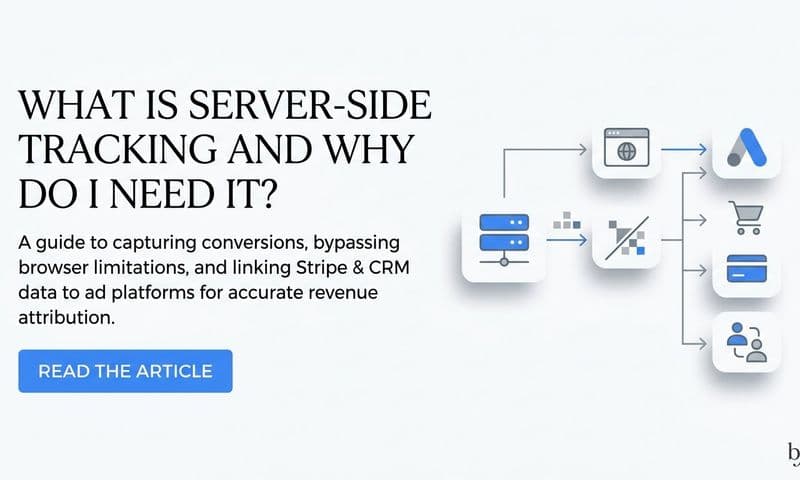
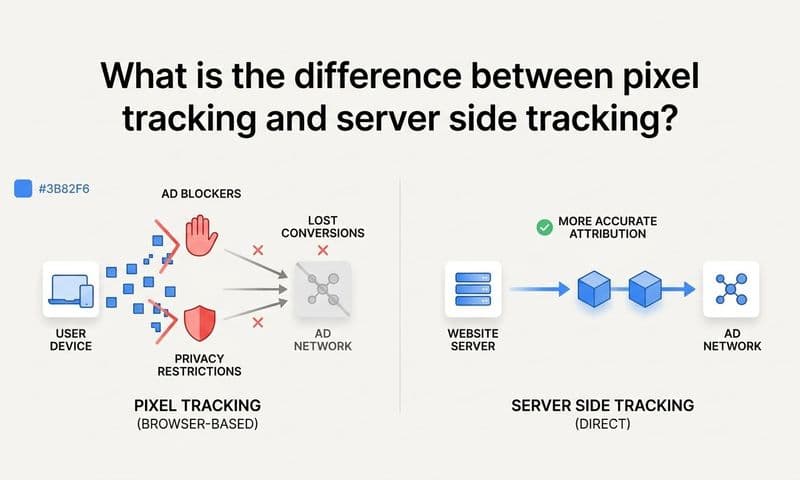
Implement server-side tracking: Browser-based pixels have a significant blind spot. Ad blockers, iOS privacy restrictions, and the ongoing reduction of third-party cookie support all degrade the accuracy of client-side tracking. Server-side tracking solves this by sending conversion events directly from your server to the ad platform, bypassing the browser entirely. This means conversions that would have been missed by a pixel are now captured and attributed correctly. For teams running paid campaigns at any meaningful scale, server-side tracking is no longer optional. It is the foundation of accurate data.
Use UTM parameters consistently: UTM parameters are the query strings you append to campaign URLs that tell your analytics system where a click came from. A properly structured UTM includes source (the platform), medium (the channel type), campaign name, ad set or ad group, and optionally the specific creative. The key word here is consistently. If some campaigns use UTMs and others do not, or if naming conventions vary across team members, your source attribution will break down. Build a UTM naming convention and enforce it across every campaign, every channel, every time.
Connect your ad platforms to your tracking system: Your tracking infrastructure should be the central hub that receives data from every ad platform you run. This means connecting Meta, Google, TikTok, LinkedIn, and any other platforms you use so that conversion data flows into one place rather than sitting in isolated platform dashboards.
Verify before you launch: Use your browser's developer tools or a dedicated tag auditing tool to confirm that your tracking is firing correctly on every key page. Check that events are being captured, that UTM parameters are being passed through, and that no duplicate events are firing. A tracking setup that has not been verified is a liability, not an asset.
The payoff for getting this right is significant. When your infrastructure is solid, every campaign you run from this point forward is generating clean, reliable data. When it is not, you are building optimization decisions on a shaky foundation.
Step 3: Connect Your Ad Platforms to Your CRM
Your tracking infrastructure captures what happens on your website. Your CRM captures what happens after that. The gap between these two systems is where most end-to-end tracking breaks down. Closing that gap is what separates teams that know their true cost per acquisition from teams that are guessing.
Integrate your ad platforms with your CRM: The goal is to make lead source data and revenue data visible in the same system. When a prospect fills out a form, that lead record in your CRM should include the campaign name, ad set, source, and medium that brought them there. This is what allows you to eventually connect ad spend to closed revenue rather than just lead volume.
Pass campaign data at the point of conversion: When a form is submitted or a signup occurs, your tracking system should capture the UTM parameters from that session and write them into the corresponding CRM fields. This sounds technical, but most modern CRM platforms support hidden form fields that auto-populate with UTM data. Set this up once and it runs automatically for every lead that comes in.
Enable bidirectional data flow: This is where the integration becomes genuinely powerful. Your CRM should not just receive data from your ad platforms. It should also send data back. When a lead progresses through your pipeline or closes as a customer, that event should be sent back to Meta, Google, and any other platform that contributed to acquiring that customer. This is called offline conversion tracking, and it fundamentally changes how platform algorithms optimize your campaigns.
Set up conversion sync for closed deals: When a deal closes in your CRM, that event should trigger an offline conversion signal that gets sent back to the ad platforms via their server-side APIs. Meta calls this the Conversions API. Google calls it Enhanced Conversions or offline conversion import. The effect is that you are teaching the platform's algorithm what a high-value customer actually looks like, which improves the quality of future targeting.
Here is the common pitfall: relying only on platform-reported conversions without syncing CRM data. Platform dashboards are designed to report favorably on their own performance. They count every form fill, every button click, every micro-event as a conversion if you let them. Without CRM sync, you might see strong ROAS numbers in your ad platform while your actual revenue tells a different story. Connecting the two systems gives you a reality check that platform dashboards alone cannot provide.
When this integration is working correctly, you can open your CRM, filter leads by campaign source, and see exactly which campaigns generated customers, not just leads. That is the data that should be driving your budget decisions.
Step 4: Choose and Apply the Right Attribution Model
Attribution is the question of which touchpoints deserve credit for a conversion. It sounds like an accounting problem, but it is actually a strategic one. The model you choose shapes how you evaluate channel performance, how you allocate budget, and ultimately which campaigns you scale or cut.
Understanding the main models gives you the vocabulary to make an informed choice.
First-touch attribution gives 100% of the credit to the first interaction a prospect had with your brand. It is useful for understanding which channels are generating awareness and bringing new prospects into your funnel. If you want to know what is driving top-of-funnel demand, first-touch tells you that story.
Last-touch attribution gives 100% of the credit to the final touchpoint before conversion. It shows you which channel closes deals, but it ignores every prior interaction that influenced the decision. For short sales cycles with a single dominant channel, this can be adequate. For anything more complex, it distorts the picture.
Linear attribution distributes credit equally across every touchpoint in the journey. If a customer touched five channels before converting, each gets 20% of the credit. It is simple and democratic, but it treats a brief retargeting ad impression the same as a high-intent search click.
Time-decay attribution gives more credit to touchpoints that happened closer to the conversion. The logic is that recent interactions had more influence on the final decision. This model tends to work well for shorter sales cycles where recency matters.
Multi-touch attribution in its more sophisticated forms, including position-based and data-driven models, distributes credit based on actual influence rather than arbitrary rules. Data-driven attribution uses your historical conversion data to calculate how much each touchpoint contributed to outcomes. This is the most accurate approach when you have sufficient data volume.
How do you choose? Match the model to your sales cycle. Shorter, lower-consideration purchases can often get by with last-touch. Longer B2B sales cycles with multiple meaningful touchpoints benefit from multi-touch models that reflect the full journey. The key is to not default to whatever your ad platform recommends, since those platforms tend to recommend models that credit themselves most favorably.
Use your attribution platform to compare models side by side. Seeing how credit shifts across channels depending on the model applied is one of the most revealing exercises in marketing analytics. It often surfaces channels that are doing significant influence work without getting credit in last-touch reports.
One important perspective: no single model is universally correct. Attribution is a lens, not a verdict. Use it to inform decisions, not to declare absolute winners.
Step 5: Build a Unified Campaign Analytics Dashboard
You now have tracking infrastructure in place, CRM integration running, and an attribution model selected. The next step is bringing all of that data together in a single view that your team can actually use to make decisions.
The problem with relying on native platform dashboards is that each platform reports using its own attribution logic. Meta Ads Manager credits Meta. Google Ads credits Google. When you add up the conversions from each platform's dashboard, you almost always get a number that exceeds your actual total conversions. This is double-counting, and it is endemic to teams that do not have a unified analytics view.
Centralize your data into one dashboard: Your unified dashboard should pull data from your ad platforms, your website tracking, and your CRM into a single normalized view. This means every channel is evaluated using the same attribution methodology, not each platform's self-reported numbers.
Include the full funnel in one view: A useful dashboard shows both top-of-funnel metrics and bottom-of-funnel outcomes side by side. On the top end, you want CPM, CTR, and CPC to understand how efficiently you are buying attention. On the bottom end, you want cost per lead, cost per acquisition, ROAS, and revenue by channel to understand what that attention is actually worth.
Build campaign-level views: You should be able to filter by campaign and see performance from impression all the way through to revenue. This is what makes campaign-level decisions possible. Without it, you are comparing channels at the platform level and missing the nuance of which specific campaigns within each channel are performing.
Identify lead quality, not just lead volume: One of the most valuable things a unified dashboard reveals is the difference between campaigns that generate high volumes of leads and campaigns that generate high-quality leads that actually convert to revenue. A campaign generating 200 leads per month at a low CPL might look great until you see that those leads close at a fraction of the rate of a campaign generating 50 leads at a higher CPL. Volume metrics lie. Revenue metrics tell the truth. Understanding how to properly measure marketing campaign effectiveness is what separates teams that scale intelligently from those that chase vanity numbers.
Cometly is built specifically for this kind of unified view. It connects your ad platforms, website tracking, and CRM data into a single attribution dashboard, normalizes conversion data across channels, and surfaces the metrics that actually matter for budget decisions.
Step 6: Analyze Performance and Identify Optimization Opportunities
A dashboard is only useful if you are actually using it to make decisions. This step is about building a regular analysis rhythm and knowing what to look for when you review your data.
Review campaign performance weekly: Set a standing time each week to go through your unified dashboard. The goal is to look for gaps between what your ad platforms are reporting and what your CRM is showing. If Meta is reporting strong conversion numbers but your CRM shows those leads are not progressing through the pipeline, that is a signal worth investigating immediately.
Prioritize revenue-based performance metrics: When evaluating which campaigns are working, start with revenue generated and work backward. Which campaigns are producing customers, not just leads? Which channels are contributing to pipeline at the highest rate? These are the campaigns worth scaling. Campaigns that look strong on click volume or platform-reported ROAS but show weak downstream CRM outcomes should be flagged for review or paused.
Look for patterns in creative, audience, and channel: Over time, your attribution data will reveal patterns. Certain ad creatives tend to attract higher-quality leads. Certain audience segments convert at higher rates downstream. Certain channels consistently contribute to the middle of the funnel even when they rarely get last-touch credit. These patterns are the insights that make experienced marketers effective at scaling. Identifying wasted ad spend on wrong channels is often the fastest way to free up budget for what is actually working.
Use AI-powered analysis to surface what manual review misses: When you are managing campaigns across multiple platforms with dozens of ad sets and hundreds of creatives, manual auditing becomes impractical. AI-powered tools like Cometly's AI Ads Manager can analyze campaign data at scale and surface optimization recommendations automatically. Instead of spending hours building pivot tables, you get actionable insights delivered directly, flagging underperforming ad sets, identifying scaling opportunities, and highlighting anomalies in your data.
The common pitfall here is optimizing toward platform-reported metrics without checking whether those conversions resulted in actual revenue. Ad platforms are incentivized to show you strong performance. Your job is to verify that performance against your CRM data and make decisions based on what is real, not what is reported.
Step 7: Feed Better Data Back to Ad Platforms and Scale
The final step in end-to-end campaign tracking is also the one that creates a compounding advantage over time. When you send enriched conversion data back to your ad platforms, you improve the quality of their algorithmic targeting, which improves campaign performance, which generates better attribution data, which enables smarter scaling decisions. This feedback loop is what separates teams that steadily improve their ad efficiency from teams that plateau.
Send enriched conversion events back to your platforms: Use Meta's Conversions API and Google's Enhanced Conversions to send server-side conversion events that include not just the fact that a conversion happened, but the value of that conversion and signals about customer quality. When you tell the algorithm that a specific conversion was worth a certain amount of revenue, it learns to find more customers like that one.
Include revenue value and quality signals: Not all conversions are equal. A lead that closes into a high-value customer is worth more to your business than a lead that churns after 30 days. When your conversion events include revenue value and customer quality data from your CRM, platform algorithms can optimize toward high-value customers rather than simply maximizing conversion volume. This is a meaningful shift in how your campaigns are optimized.
Reallocate budget based on attribution data: Use your attribution dashboard to identify which channels and campaigns are generating the highest revenue per dollar spent. Then move budget toward those campaigns with confidence. This is different from moving budget based on platform-reported ROAS, which is often inflated. You are making reallocation decisions based on actual revenue outcomes verified through your CRM. A structured approach to marketing spend optimization ensures every reallocation decision is grounded in real performance data rather than platform-reported estimates.
Scale winning campaigns with a data foundation: Before increasing spend on a campaign, use your attribution data to project expected return at higher spend levels. Look at historical cost per acquisition, average deal value, and conversion rates at each funnel stage. This gives you a rational basis for scaling decisions rather than gut feel.
Cometly's Conversion Sync feature is designed specifically for this step. It sends enriched, conversion-ready events back to Meta, Google, and other platforms automatically, feeding the platform algorithms the data they need to optimize toward your best customers. The result is better targeting, improved ad ROI, and a tracking system that gets more valuable the longer you run it.
Putting It All Together: Your End-to-End Tracking Checklist
End-to-end campaign tracking is not a one-time setup. It is an ongoing system that compounds in value the longer you run it. As you accumulate more conversion data, your attribution models become more accurate, your platform algorithms become better trained, and your optimization decisions become more grounded in reality.
Use this checklist to confirm your tracking system is fully operational:
1. Conversion events are defined across the full funnel, from ad click to closed revenue.
2. Server-side tracking is installed and verified alongside your client-side pixels.
3. UTM parameters are applied consistently across all campaign URLs using a standardized naming convention.
4. Ad platforms are connected to your CRM with bidirectional data flow enabled.
5. An attribution model is selected and applied in your analytics platform, and you have reviewed how credit shifts across models.
6. A unified dashboard is showing spend and revenue by channel using normalized attribution data, not platform-reported totals.
7. Enriched conversion events are syncing back to ad platforms with revenue value and customer quality signals included.
When this system is working, you stop guessing about which campaigns are driving growth and start making decisions based on complete, accurate data. You can see exactly which channels are generating your best customers, which campaigns are worth scaling, and where your budget is being wasted.
Cometly is built to power exactly this kind of end-to-end tracking. It connects your ad platforms, website, and CRM into a single attribution platform, uses AI to surface optimization opportunities across every channel, and syncs enriched conversion data back to Meta, Google, and more. Every piece of the system described in this guide is supported out of the box.
If you are ready to see exactly which campaigns are driving revenue, Get your free demo today and start capturing every touchpoint to maximize your conversions.