You're staring at your ad dashboard, and something feels wrong. The campaigns look active, the spend is real, but the conversion numbers either seem suspiciously low compared to what your CRM shows, or oddly high in ways that don't match your actual revenue. You're not imagining it. Your data probably is lying to you.
Inaccurate conversion data is one of the most common and costly problems in paid advertising today. It's not a fringe issue affecting a handful of accounts. It's a structural problem baked into how modern ad tracking works, made worse by privacy changes, browser restrictions, and the fact that every ad platform has a financial incentive to claim as much credit as possible.
The frustrating part is that bad conversion data doesn't announce itself. It just quietly distorts every decision you make: which campaigns to scale, where to cut budget, which audiences are actually converting. By the time you notice something is off, weeks of wasted spend may have already happened.
This guide is a diagnostic tool. We're going to walk through the real reasons your ad conversion data is inaccurate, from the technical tracking gaps that cause silent failures to the attribution model conflicts that inflate your numbers. Understanding the root causes is the first step toward fixing them and making the kind of confident, data-backed decisions that actually move the needle.
The Tracking Gap: How Conversions Get Lost Before They're Counted
Most ad platforms track conversions using a pixel, which is a small piece of JavaScript code that fires when a user lands on a confirmation page or completes a specific action on your site. It sounds straightforward, but this setup has a fundamental vulnerability: it depends entirely on the user's browser executing that code correctly, at the right moment, without any interference.
That's a lot of things that can go wrong.
Ad blockers are the most obvious culprit. Browser extensions like uBlock Origin and Privacy Badger actively block tracking pixels from firing. In certain industries and audiences, a meaningful portion of users have ad blockers installed, which means a consistent slice of your conversions simply never get recorded. The sale happens, the revenue hits your account, and your ad platform has no idea it occurred.
Slow page loads create another silent gap. If a user completes a purchase and closes the browser tab before the confirmation page fully loads, the pixel never fires. On mobile connections, this happens more than most marketers realize. The user converted. Your tracking didn't see it.
Cookie restrictions have added another layer of complexity. Browser-level privacy changes have dramatically shortened the window during which tracking cookies remain active. If a user clicks your ad, leaves, and comes back to convert two days later, that conversion may never be attributed back to the original click because the cookie that would have connected those two sessions has already expired or been blocked entirely.
Cross-device journeys are where things get particularly messy. A user sees your ad on their phone during their commute, does more research on their laptop at home, and converts on their work desktop three days later. Without a unified identity layer that can connect those three sessions to the same person, your tracking system treats them as three completely separate, unrelated events. The conversion gets recorded, but the credit goes nowhere useful, or gets misattributed entirely. Understanding attributed conversions is essential for diagnosing where this credit is actually landing.
The result is a conversion tracking setup that looks functional on the surface but has multiple points of failure running silently in the background. You're not seeing the full picture, and you may not even know how much you're missing.
What Apple's Privacy Changes Actually Did to Your Attribution
If you run ads on Meta, you've felt the impact of Apple's privacy changes even if you couldn't name the specific mechanism. Here's what actually happened.
Apple introduced App Tracking Transparency (ATT) with iOS 14.5, requiring apps to ask users for explicit permission before tracking them across other apps and websites. The majority of users opted out. At the same time, Apple's Intelligent Tracking Prevention (ITP) in Safari has progressively limited how long third-party cookies can persist, which affects web-based tracking across all platforms.
For Meta in particular, these changes created a significant problem. Meta's ad targeting and conversion measurement historically relied on its pixel reading third-party cookie data to connect ad clicks on Facebook or Instagram to purchases that happened on your website. When that cookie data became unavailable for a large portion of Safari and iOS users, Meta lost the ability to observe those conversions directly.
Meta's response was to introduce modeled conversions, which are statistical estimates of conversions that the platform believes occurred but cannot directly observe. This is documented in Meta's own help documentation. The number you see in your Meta Ads Manager is not always a count of real, observed events. For a portion of your reported conversions, it's a model's best guess.
This creates a specific and frustrating problem: a divergence between what your ad platform reports and what your CRM or analytics tool actually records. Your Meta dashboard might show 80 conversions for a campaign, while your CRM shows 55 new leads from the same period. Which number is right? The honest answer is that neither is perfectly accurate, but the gap itself tells you something important about how much signal you're losing.
The same dynamic plays out, to varying degrees, across other platforms. Any ad platform that relies on third-party cookie data to connect ad exposure to downstream conversion has been affected by these changes. The platforms adapted with modeling, but modeling introduces its own uncertainty, and that uncertainty compounds every budget decision you make downstream. Using dedicated tracking software for performance marketing can help you cut through that uncertainty with more reliable first-party data.
Attribution Model Conflicts: Why Every Platform Shows a Different Number
Here's a scenario that plays out in marketing teams constantly. You're running campaigns on both Meta and Google. You add up the conversions each platform reports, and the total is significantly higher than the number of actual conversions in your CRM. Both platforms are claiming credit for the same customers.
This is the attribution overlap problem, and it's built into how each platform measures performance by default.
Meta's default attribution window includes a 7-day click window and a 1-day view-through window. That means if someone sees your Meta ad without clicking, and then converts within 24 hours through any other channel, Meta claims credit. To understand exactly how this mechanism works, it helps to read up on view-through conversions and why platforms weight them differently. Google Ads has historically defaulted to last-click attribution with a 30-day lookback window, meaning it credits the final Google touchpoint before conversion regardless of what else happened in the journey.
When you run both simultaneously, as most advertisers do, the same conversion can be claimed by both platforms simultaneously. The user saw a Meta ad, clicked a Google search ad, and converted. Meta claims it via view-through. Google claims it via last-click. Your aggregate reported conversions are now higher than your actual conversions, and your blended ROAS looks better than it actually is.
This isn't a bug. It's the natural result of each platform using its own rules to evaluate its own performance. Think of it this way: you're letting each ad platform grade its own homework. Every platform has an incentive to use attribution rules that maximize the conversions it can claim, because those numbers justify your continued spend.
The problem extends beyond just double-counting. Different lookback windows mean that a conversion that happened 25 days after a click might be counted by one platform but not another, making it nearly impossible to compare performance across channels on an apples-to-apples basis.
Without a neutral, third-party attribution layer that evaluates all touchpoints using consistent rules, you're working with numbers that are fundamentally incompatible with each other. A proper marketing attribution software comparison can help you identify which tools offer the cross-channel consistency you need. Adding them up and calling it total performance is a recipe for misallocating budget at scale.
Server-Side Tracking vs. Browser Tracking: Why the Method Matters
Understanding why your conversions are inaccurate requires understanding a fundamental distinction in how tracking data gets sent: from the user's browser, or from your server.
Browser-based tracking, which is what traditional pixels do, sends conversion data from the user's device. The user's browser executes a JavaScript tag, which fires a request to the ad platform's servers. This method is vulnerable to every client-side obstacle we've already discussed: ad blockers, browser privacy restrictions, slow connections, and users who close tabs before pages finish loading.
Server-side tracking works differently. Instead of relying on the user's browser to send the data, your server sends the conversion event directly to the ad platform's API. The user's browser is no longer in the chain. Ad blockers can't intercept it. Browser privacy settings don't affect it. A slow mobile connection doesn't cause it to fail silently.
Meta's Conversions API (CAPI) and Google's Enhanced Conversions are the primary implementations of this approach for major ad platforms. Both are documented in their respective developer resources, and both exist specifically because the platforms recognized that browser-based pixel tracking was losing too much signal. If you run Google campaigns, understanding Enhanced Conversions in Google Ads is a critical step toward recovering that lost data.
Server-side tracking also unlocks something that browser pixels can't do: data enrichment before the event is sent. When your server sends a conversion event, you can attach first-party data to it, including customer IDs, email addresses (hashed for privacy), order values, and CRM attributes. This improves the match rate between your conversion events and the ad platform's user database, which means more of your conversions get properly attributed to the ads that drove them.
The practical result is that server-side setups typically recover a meaningful portion of conversions that pixel-based tracking was missing entirely. Ad platforms receive better data, their algorithms have higher-quality signals to optimize against, and marketers get a more accurate picture of what's actually working. It's one of the highest-leverage technical improvements an advertiser can make to their tracking infrastructure.
The Downstream Damage: What Bad Conversion Data Does to Your Campaigns
Bad conversion data isn't just an analytics problem. It's a performance problem that compounds over time.
Modern ad platforms, including Meta's Advantage+ campaigns and Google's Smart Bidding, use machine learning to decide who sees your ads and how much to bid for each impression. These algorithms are trained on your conversion signals. They look at who converted, what those people had in common, and use that pattern to find more people like them.
When your conversion data is incomplete or inaccurate, the algorithm is training on bad data. It's optimizing toward an audience that doesn't fully represent your actual customers. Over time, this degrades campaign performance in ways that are genuinely difficult to diagnose because the algorithm's decisions aren't transparent. You just notice that results seem to be slipping, and you can't figure out why.
Budget decisions made on inaccurate data create a second layer of damage. If a campaign appears to be underperforming because its conversions aren't being tracked correctly, you might cut it, only to see overall revenue drop without understanding why. Conversely, if a campaign looks like a star performer because it's benefiting from attribution overlap and modeled conversions, you might scale it aggressively and discover the returns don't materialize the way the data suggested they would. This is precisely why following best practices for tracking conversions accurately matters so much before making any scaling decisions.
There's also a human cost that often goes undiscussed. Teams that repeatedly encounter data they can't trust stop trusting their data altogether. Analysis paralysis sets in. Decisions get made on gut feel or internal politics rather than evidence. The entire value proposition of running data-driven paid advertising erodes, and with it, the competitive advantage that good measurement is supposed to provide.
Inaccurate conversion data is not a minor inconvenience to be explained away in a weekly report. It is a strategic liability that affects every layer of how your campaigns perform and how your team operates.
How to Actually Fix Inaccurate Ad Conversion Tracking
Now that you understand why your conversion data is inaccurate, here's how to address it systematically.
Implement server-side tracking as the foundation: Start by setting up server-side integrations for your primary ad platforms. Meta's Conversions API and Google's Enhanced Conversions are the most impactful starting points for most advertisers. These integrations send conversion data from your server rather than the user's browser, bypassing the client-side obstacles that cause silent tracking failures. This is not a replacement for your pixel entirely, but rather a complementary layer that fills the gaps your pixel misses.
Use a third-party attribution platform to eliminate double-counting: Native ad platform reporting will always be biased toward that platform's own performance. A neutral, ad tracking management software evaluates all your touchpoints using consistent rules and a single lookback window, which eliminates the overlap problem that inflates your aggregate reported conversions. This gives you a single source of truth that you can actually use to make budget allocation decisions with confidence.
Audit your conversion events regularly: Set a recurring process to compare your ad platform conversion numbers against your CRM and analytics data. If Meta reports 90 conversions and your CRM shows 60 new customers from paid social, that gap is telling you something specific about where your tracking is failing. Persistent gaps signal a configuration problem that needs to be resolved at the source, not rationalized in a slide deck.
Enrich your conversion events with first-party data: When you send conversion events to ad platforms, include as much first-party data as you can: hashed emails, customer IDs, order values, and lifetime value signals. This improves match rates between your events and the platform's user graph, which means more of your conversions get attributed correctly and the platform's algorithm has better data to optimize against.
Align your team on a single attribution model: Decide which attribution model and lookback window your team will use as the official standard for evaluating performance. Make sure everyone is pulling from the same source when reporting results. Inconsistency in how different team members measure performance creates confusion and erodes trust in the data even when the underlying tracking is solid.
These are not one-time fixes. Tracking infrastructure requires ongoing maintenance as platforms change their APIs, browsers update their privacy policies, and your campaign structure evolves. Treat it as a core operational discipline, not a setup-and-forget task.
Putting It All Together: Your Path to Trustworthy Conversion Data
Inaccurate conversion data is not a minor reporting quirk. It is a strategic liability that affects every budget decision, every campaign optimization, and every growth projection your team makes. The causes are real, they are structural, and they are solvable.
The core problems we've covered here work together to distort your picture of performance. Tracking gaps caused by ad blockers, browser restrictions, and cross-device journeys mean that a portion of your real conversions are never recorded. iOS privacy changes introduced modeled estimates into ad platform dashboards, blurring the line between observed and inferred data. Attribution model conflicts across platforms create double-counting that inflates your aggregate numbers. And browser-based pixel tracking, by its very nature, is fragile in ways that server-side tracking is not.
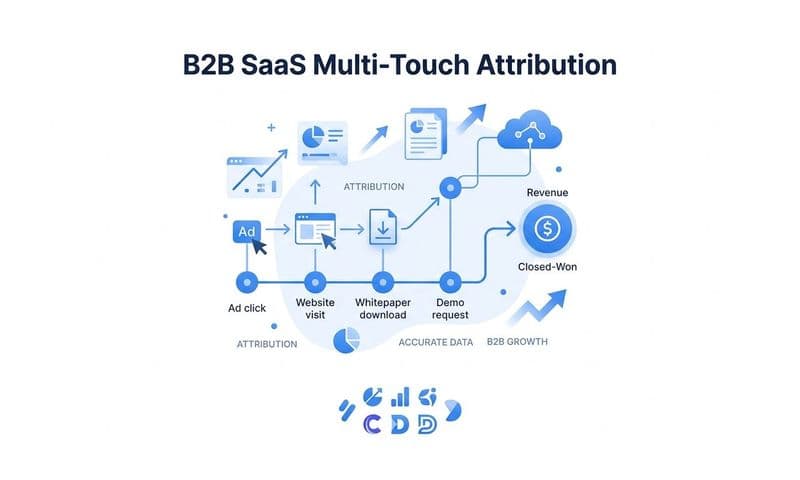
Cometly is built to address every one of these layers. It captures every touchpoint across the full customer journey, from ad clicks to CRM events, giving you a complete and enriched view of how conversions actually happen. It syncs enriched conversion data back to Meta, Google, and other ad platforms through server-side integrations, improving signal quality and feeding the algorithms better data to optimize against. And it provides a unified, multi-touch attribution view across all your channels, so you're no longer letting each platform grade its own homework.
The result is conversion data you can actually trust, and the confidence to make budget decisions based on what's really driving revenue rather than what each platform wants you to believe.
Ready to stop guessing and start knowing? Get your free demo today and see how Cometly gives you accurate, trustworthy conversion data across every channel.