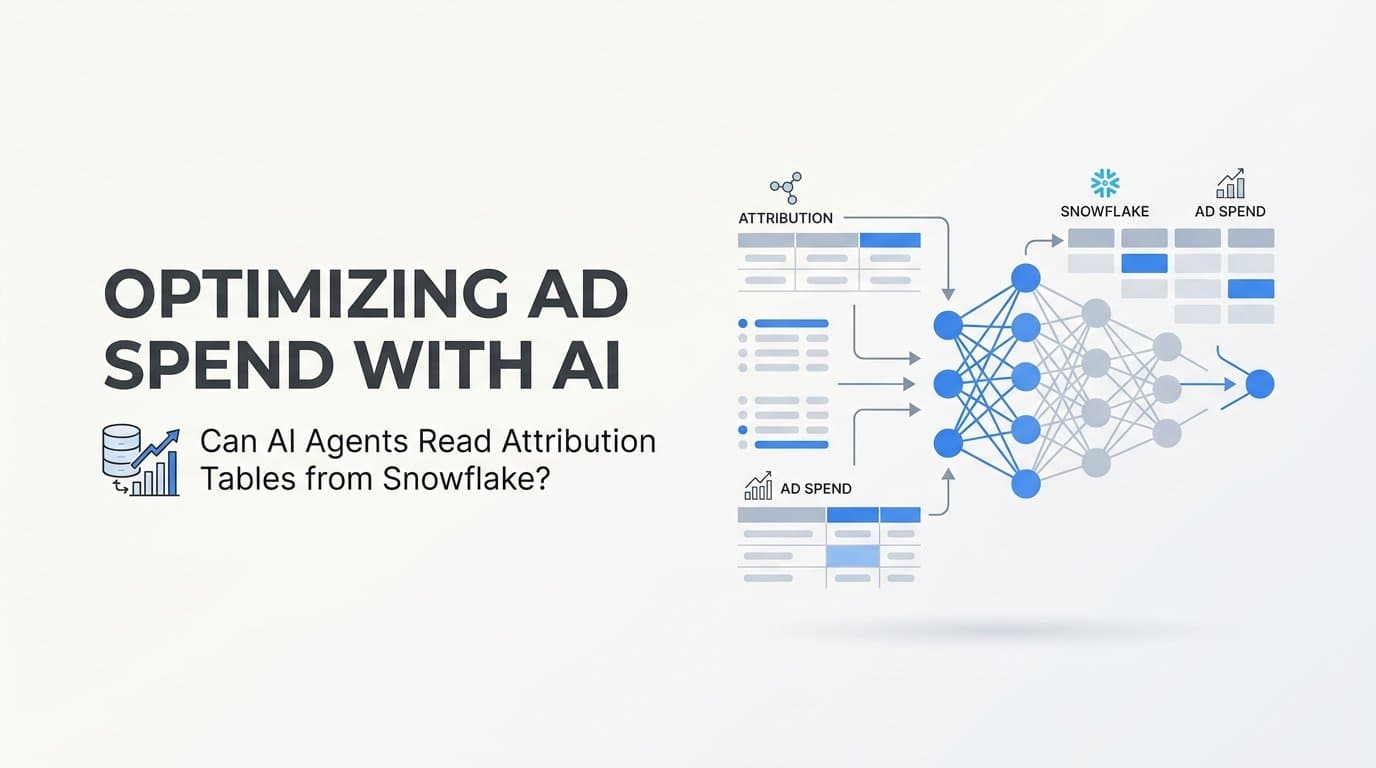
Yes, AI agents can read attribution tables from Snowflake to optimize ad spend. Modern AI agents connect directly to Snowflake via SQL queries, APIs, or semantic layers to pull multi-touch attribution data and generate actionable budget recommendations in real time.
For teams already storing attribution data in Snowflake, this capability represents a meaningful shift in how quickly data becomes decisions. Instead of waiting for a weekly analyst report, an AI agent can query your attribution tables, identify which channels generate the highest revenue per dollar, and surface specific reallocation recommendations within minutes.
Platforms like Cometly make this process more accessible for B2B SaaS marketing teams by providing pre-built attribution models and AI-driven insights that connect ad spend directly to pipeline and revenue, without requiring a custom data engineering setup. For teams who want the Snowflake-plus-AI-agent path, the strategies below give you a clear framework for making that workflow reliable, accurate, and scalable.
1. Structure Your Snowflake Attribution Tables for AI Readability
The Challenge It Solves
AI agents are only as good as the data they can parse. If your Snowflake attribution tables use inconsistent field names, store raw unnormalized events, or mix attribution logic with raw click data, an AI agent will either misinterpret the signals or fail to extract meaningful insights at all. Schema quality is the foundation everything else rests on.
The Strategy Explained
Design your attribution tables with AI consumption in mind from the start. That means standardized field names across all touchpoints, a consistent channel taxonomy, and clear separation between raw event tables and modeled attribution tables.
At minimum, your attribution table should include: a unique conversion ID, a touchpoint timestamp, a channel and campaign identifier, a normalized revenue value attributed to that touchpoint, the attribution model applied, and a customer or account ID that links back to your CRM. Deduplication logic should be applied upstream so AI agents are never querying duplicate touchpoints that inflate channel credit.
Implementation Steps
1. Audit your existing Snowflake schema and document every field that represents a touchpoint, a conversion event, or an attributed revenue value.
2. Create a standardized naming convention across all attribution-related tables. Use snake_case consistently and avoid abbreviations that only internal analysts understand.
3. Build a dedicated modeled attribution layer as a separate schema or set of views that sits on top of raw event tables. This is the layer AI agents should query, not the raw events.
4. Add deduplication logic at the transformation stage using your preferred orchestration tool. Flag duplicate touchpoints with a boolean field rather than deleting them, so you can audit later.
Pro Tips
Add a last_updated_at timestamp to every attribution table. AI agents can use this to verify data freshness before running any budget recommendation queries. Stale data is one of the most common sources of bad AI-generated spend decisions, and a simple timestamp check catches it before it becomes a problem.
2. Connect AI Agents to Snowflake Using the Right Access Pattern
The Challenge It Solves
Not every AI agent connects to Snowflake the same way, and choosing the wrong access pattern creates security risks, performance bottlenecks, or incomplete data retrieval. Growth teams often default to direct SQL access without considering the trade-offs, which can expose sensitive revenue data or produce slow query responses that make real-time optimization impractical.
The Strategy Explained
There are three primary ways to connect an AI agent to Snowflake attribution data, and each fits a different use case.
Direct SQL access: The AI agent generates and executes SQL queries against Snowflake using a service account. This is the most flexible approach and works well for teams with mature data models and strict role-based access controls. Frameworks like LangChain and OpenAI function calling support this natively.
REST API or middleware layer: The AI agent calls a purpose-built API that abstracts the Snowflake queries. This is safer for teams that want to limit what the AI agent can access, and it makes it easier to cache frequently requested attribution summaries.
Semantic layer: Tools like dbt Semantic Layer or Cube allow you to define business metrics once and expose them to AI agents as named metrics rather than raw SQL. This reduces hallucination risk because the agent is querying pre-defined concepts like "revenue attributed to paid search" rather than constructing its own query logic.
Implementation Steps
1. Create a dedicated Snowflake service role for AI agent access with read-only permissions scoped to the modeled attribution schema only.
2. Evaluate whether your team has the capacity to maintain a semantic layer. If yes, define your core attribution metrics there before connecting any AI agent.
3. Set query timeout limits and row limits on the AI agent's Snowflake connection to prevent runaway queries from impacting warehouse performance.
Pro Tips
Use Snowflake's query tagging feature to label all AI agent queries with a consistent tag. This makes it easy to monitor costs, audit what the agent is actually querying, and catch any unexpected behavior before it becomes expensive.
3. Define the Attribution Model Before the AI Agent Runs Queries
The Challenge It Solves
Attribution model selection is not a neutral decision. First-touch, last-click, linear, time-decay, and data-driven models each distribute revenue credit differently across touchpoints. If an AI agent queries raw event tables and applies its own interpretation of attribution logic, you will get inconsistent outputs that do not align with how your business actually measures channel contribution.
The Strategy Explained
The safest approach is to encode your chosen attribution model as a Snowflake view that pre-weights touchpoint revenue before the AI agent ever runs a query. The agent then queries the view, not the underlying events, and gets pre-modeled attribution data that reflects your business logic consistently.
This is also where dedicated attribution platforms like Cometly provide a real advantage. Cometly's multi-touch attribution models are maintained and updated within the platform, meaning your AI-driven insights are always grounded in a validated, consistent attribution framework. Teams using Cometly as their attribution source of truth can feed that modeled data downstream without rebuilding the logic in Snowflake from scratch.
For teams building natively in Snowflake, document which attribution model is encoded in each view and make that model name a queryable field in the output. AI agents can then confirm which model they are working with before generating any budget recommendation.
Implementation Steps
1. Select a primary attribution model for ad spend optimization decisions and document the business rationale for that choice.
2. Build a Snowflake view that applies the model's weighting logic and outputs a clean table with channel, campaign, attributed revenue, and cost fields.
3. Add a attribution_model column to the view output so AI agents can reference it in their outputs and recommendations.
Pro Tips
Avoid giving AI agents access to multiple attribution model views simultaneously without clear instructions on which to use. When an agent can see conflicting revenue attributions for the same channel, it will often average or blend them in unpredictable ways. One model per optimization workflow is the cleaner approach.
4. Build AI Agent Prompts That Map to Ad Spend Decisions
The Challenge It Solves
Querying attribution data is only half the job. The other half is translating that data into specific, actionable budget recommendations. Without carefully structured prompts, AI agents tend to produce generic observations like "paid search is performing well" rather than concrete actions like "increase paid search budget by $5,000 and reduce display by $3,000 to maintain total spend within the monthly cap."
The Strategy Explained
Effective prompt engineering for ad spend optimization requires grounding the agent in three things: the attribution data it has just retrieved, the business constraints it must respect, and the specific decision format you want as output.
Business constraints are critical. Your prompt should explicitly state the total budget available, any channel minimums or maximums, the optimization objective (pipeline volume, revenue, or cost per acquisition), and the time horizon for the recommendation. Without these constraints, the agent optimizes in a vacuum and produces recommendations that are technically correct but operationally unusable.
Structure your prompts to follow a consistent pattern: data summary, constraint acknowledgment, recommendation with specific dollar amounts, and confidence level or caveats. The confidence level component is especially important for catching cases where the agent is working with limited data and should not be trusted to drive automated changes.
Implementation Steps
1. Write a base system prompt that defines the agent's role as a marketing budget optimizer and specifies the output format you expect, including required fields like channel, current spend, recommended spend, and rationale.
2. Inject business constraints dynamically into each prompt run using variables pulled from your budget management system or a configuration file.
3. Test prompts against historical attribution data where you already know the correct optimization outcome, and compare agent outputs to your benchmark decisions.
4. Add an explicit instruction that the agent must flag any recommendation where the underlying attribution data covers fewer than a defined minimum number of conversions.
Pro Tips
Chain your prompts. Use one agent call to retrieve and summarize the attribution data, then pass that summary to a second call focused purely on generating the budget recommendation. Separating data retrieval from decision generation reduces hallucination risk and makes each step easier to audit.
5. Use AI Agents to Detect Attribution Anomalies Before They Corrupt Spend Decisions
The Challenge It Solves
Duplicate touchpoints, missing UTM parameters, and conversion window mismatches are among the most common data quality issues in marketing analytics. When these problems exist in your Snowflake attribution tables and an AI agent queries that data to make budget recommendations, the resulting decisions can actively harm performance by directing spend toward channels that appear to be performing well but are actually benefiting from inflated attribution credit.
The Strategy Explained
AI agents can serve a quality control function before they serve an optimization function. By running a structured anomaly detection pass against your attribution tables before any budget recommendation query, you create a validation gate that catches data problems early.
Useful anomaly checks include: duplicate conversion IDs within a session window, touchpoints with null or malformed UTM source values, conversion events that fall outside the expected conversion window for a given channel, and sudden drops in touchpoint volume that might indicate a tracking break. Each of these checks can be encoded as a SQL query that the AI agent runs and evaluates before proceeding to the optimization step.
This is also an area where server-side tracking improves the baseline data quality. Platforms like Cometly use server-side conversion tracking and Conversion API integrations with Meta and Google to capture events that browser-based pixels miss, reducing the volume of incomplete touchpoints that create anomalies in the first place.
Implementation Steps
1. Define a standard set of data quality checks as Snowflake queries. Start with duplicate conversion ID detection and null UTM source checks as your minimum baseline.
2. Build a pre-optimization step into your AI agent workflow that runs these checks and returns a data quality score or pass/fail status before any budget query executes.
3. Set a threshold below which the agent should halt and alert a human reviewer rather than proceeding with a recommendation.
Pro Tips
Log every anomaly detection result in a Snowflake table with a timestamp and severity level. Over time, this creates a quality audit trail that helps you identify recurring data pipeline issues and prioritize fixes based on how frequently they affect optimization decisions.
6. Automate Budget Reallocation Workflows with AI Agent Outputs
The Challenge It Solves
Generating a budget recommendation is valuable. Acting on it quickly is where the real performance gain lives. Many teams produce solid attribution-based insights but lose days or weeks to manual approval processes and platform-by-platform budget adjustments. By the time changes are made, the attribution window has shifted and the recommendation is already partially stale.
The Strategy Explained
The most effective approach is a semi-automated workflow where the AI agent generates recommendations and writes them to a structured output, a human reviewer approves or modifies within a defined time window, and the approved changes are pushed to ad platform APIs automatically.
Full automation is possible but should be reserved for bounded, low-risk changes like adjusting daily budgets within a pre-approved range. For larger reallocations or channel additions, human review remains the right control point.
Signal quality matters significantly here. AI agents making budget decisions based on Snowflake attribution data will produce better recommendations when that data is enriched with server-side conversion signals. Cometly's Conversion API integrations with Meta and Google send enriched, conversion-ready events back to ad platforms, which improves the accuracy of both the attribution data in Snowflake and the ad platform's own optimization algorithms. The two systems reinforce each other.
Implementation Steps
1. Define the scope of automated budget changes your team is comfortable with. Set explicit floor and ceiling values for any automated adjustment.
2. Build a structured output format for AI agent recommendations that includes the channel, campaign ID, current budget, recommended budget, attributed revenue per dollar, and the data date range used.
3. Connect approved recommendations to ad platform APIs using Google Ads API or Meta Marketing API for budget updates. Use a staging environment first to validate that API calls are executing correctly before enabling production automation.
4. Implement a rollback mechanism that can revert budget changes within a defined window if performance metrics move in an unexpected direction after implementation.
Pro Tips
Schedule AI agent optimization runs at consistent intervals aligned with your attribution lookback window. Running daily optimizations against a 30-day attribution window means you are always working with the most complete picture of channel contribution rather than reacting to incomplete recent data.
7. When Snowflake Plus AI Agents Is Not Enough on Its Own
The Challenge It Solves
Building a custom Snowflake-plus-AI-agent attribution stack is genuinely powerful, but it is not the right fit for every team. The setup requires data engineering capacity, ongoing maintenance, and a level of attribution modeling expertise that many B2B SaaS marketing teams do not have in-house. Understanding when this approach makes sense, and when a dedicated attribution platform is the better investment, is itself a strategic decision.
The Strategy Explained
The custom Snowflake stack works well for teams with dedicated data engineers, a mature data warehouse already in use across the business, and the appetite to maintain attribution logic as ad platforms and tracking requirements evolve. For these teams, the flexibility and depth of a custom solution can justify the investment.
For most B2B SaaS marketing teams, particularly those without a full-time data engineer focused on marketing analytics, a dedicated platform like Cometly provides a faster and more sustainable path to the same outcome. Cometly handles multi-touch attribution modeling, real-time customer journey tracking, server-side conversion tracking, Conversion API integration, and AI-driven budget recommendations out of the box. With 70+ native integrations and Stripe revenue data connected directly to ad performance, teams get the Snowflake-plus-AI-agent workflow's end result without building the infrastructure themselves.
The honest trade-off is flexibility versus speed. A custom stack gives you maximum control over data models and query logic. A dedicated platform gives you faster time-to-insight and lower ongoing maintenance burden.
Implementation Steps
1. Assess your team's current data engineering capacity honestly. If marketing attribution competes with product analytics and data infrastructure work for the same engineering resources, a custom stack will consistently be deprioritized.
2. Estimate the total cost of building and maintaining a custom Snowflake attribution pipeline, including engineering time, Snowflake compute costs, and the ongoing work of updating attribution logic as ad platform APIs change.
3. Compare that estimate against the cost and capabilities of a dedicated attribution platform. Factor in time-to-insight as a business value, not just a technical metric.
Pro Tips
These approaches are not mutually exclusive. Some teams use Cometly as their primary attribution and AI recommendation layer while also syncing clean, modeled data into Snowflake for broader business intelligence use. This gives marketing the speed and accuracy of a dedicated platform while preserving the flexibility of a centralized data warehouse for cross-functional reporting.
Putting It All Together
AI agents can absolutely read attribution tables from Snowflake and use that data to optimize ad spend. The quality of those optimizations depends entirely on how well the underlying data is structured, modeled, and maintained before the agent ever runs a query.
The strategies above form a logical progression. Start by auditing your attribution table schema and standardizing fields. Layer in the right Snowflake access pattern for your AI agent framework. Encode your attribution model as a pre-built view so agents always query consistent, pre-weighted data. Build prompts that translate attribution metrics into specific, constrained budget actions. Add anomaly detection as a validation gate before any recommendation runs. Then connect approved outputs to ad platform APIs for semi-automated execution.
For teams with mature data infrastructure and dedicated engineering resources, this custom stack can be a powerful competitive advantage. For most B2B SaaS marketing teams, Cometly provides a faster path to the same outcome by handling attribution modeling, real-time tracking, AI-driven recommendations, and Conversion API integration out of the box, without the custom pipeline overhead.
Always validate AI agent outputs against known conversion benchmarks before automating any budget changes. The goal is faster, more confident decisions, not decisions made without human oversight.
Ready to see how AI-driven attribution can connect your ad spend directly to pipeline and revenue? Get your free demo and explore Cometly's AI ads manager today.