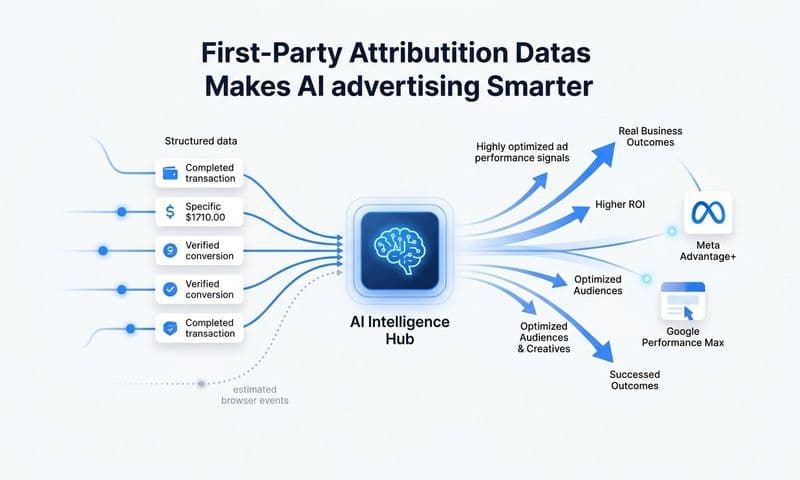
Marketing attribution for AI-powered ad buying means connecting every ad touchpoint to revenue outcomes so that machine learning algorithms inside platforms like Meta Advantage+ and Google Performance Max receive accurate, enriched conversion signals to optimize against. Without proper attribution feeding these systems, AI ad buying operates on incomplete data, wasting budget on the wrong audiences and channels.
Cometly is built specifically for this challenge. It captures every touchpoint from first ad click to closed-won revenue and sends enriched, conversion-ready events back to ad platforms, giving their AI better signals to optimize with. The result is smarter bidding, more efficient spend, and campaigns that actually learn from the right data.
This article covers seven concrete strategies B2B SaaS marketing teams can use to align attribution with AI-powered buying. You will learn how to structure conversion events, choose the right attribution model, and close the signal gaps that cause AI campaigns to underperform. Whether you run Meta Advantage+, Google Performance Max, or LinkedIn Campaign Manager, these strategies apply directly to how modern ad AI learns and allocates budget.
What Is Marketing Attribution for AI Ad Buying?
Marketing attribution for AI ad buying is the practice of tracking and assigning credit to every touchpoint in the customer journey, then feeding that data back to ad platforms so their machine learning algorithms can optimize toward real business outcomes. AI bidding systems are only as smart as the conversion signals they receive. When attribution is incomplete or inaccurate, the AI learns from bad data and makes poor budget decisions.
How Does Attribution Affect Meta Advantage+ Performance?
Meta Advantage+ uses conversion signals to identify which users are most likely to convert and automatically adjusts targeting and bidding accordingly. When your attribution setup misses conversions or sends duplicate events, the algorithm receives a distorted picture of performance. Higher Event Match Quality scores from server-side integrations directly improve how well Meta's AI can find and reach your ideal customers.
What Attribution Model Works Best for Google Performance Max?
Data-driven attribution is the recommended model for Google Performance Max campaigns. Google's own documentation confirms that data-driven attribution uses machine learning to assign credit based on actual path-to-conversion data, which aligns with how Performance Max itself optimizes. Last-click attribution is a poor fit because it ignores the multi-touch journeys common in B2B SaaS sales cycles.
1. Send First-Party Conversion Events via Server-Side Tracking
The Challenge It Solves
Browser-based pixels miss a meaningful portion of conversions due to ad blockers, Safari ITP, and iOS privacy changes. When AI ad platforms receive incomplete conversion data, they optimize toward incomplete signals, which means they target users who look like your partial data rather than your actual buyers. This is one of the most common and costly attribution failures in B2B SaaS advertising.
The Strategy Explained
Server-side tracking sends conversion data directly from your server to the ad platform, bypassing browser-level restrictions entirely. Meta's Conversion API (CAPI) and Google's Enhanced Conversions are both designed specifically to recover these lost signals. Meta's official documentation explicitly states that higher Event Match Quality scores from CAPI integrations improve ad delivery and optimization.
Cometly's server-side tracking captures conversion events across your entire funnel and sends enriched, conversion-ready signals back to Meta, Google, and other platforms. This gives their AI a complete, accurate dataset to learn from, which directly improves targeting precision and bidding efficiency.
Implementation Steps
1. Audit your current pixel setup to identify which conversion events are browser-only and which are already server-side.
2. Implement Meta's Conversion API and Google's Enhanced Conversions using a server-to-server integration. Cometly handles this natively with its Conversion API integration, removing the need for custom engineering work.
3. Verify Event Match Quality scores inside Meta Events Manager and confirm conversion matching rates in Google Ads after implementation to ensure the server-side signals are being received correctly.
Pro Tips
Always run server-side tracking alongside your browser pixel, not instead of it. The two work together, with deduplication handling any overlap. Prioritize matching on email and phone number hashes to maximize Event Match Quality scores, since stronger identity matching gives AI platforms more confidence in the conversion data they receive.
2. Choose an Attribution Model That Matches AI Optimization Goals
The Challenge It Solves
Last-click attribution tells ad platforms that the final touchpoint before conversion deserves all the credit. For B2B SaaS with multi-week sales cycles and multiple touchpoints across channels, this is deeply misleading. When AI systems receive last-click data, they over-invest in bottom-of-funnel tactics and undervalue the awareness and consideration channels that actually initiate purchase intent.
The Strategy Explained
Data-driven and multi-touch attribution models distribute credit across the full customer journey based on actual contribution. Meta, Google, and LinkedIn all offer data-driven attribution as a native option. Google Ads documentation confirms that data-driven attribution uses machine learning to assign credit based on real path-to-conversion patterns, which aligns naturally with how AI bidding systems already think about user behavior.
Inside Cometly, you can compare attribution models side by side across your entire channel mix. This lets you see how credit distribution changes between first-touch, linear, time-decay, and data-driven models before committing to one for optimization purposes.
Implementation Steps
1. Switch your Google Ads conversion actions from last-click to data-driven attribution inside the Conversions settings panel.
2. Review your Meta attribution window settings and align them with your actual average sales cycle length. A 28-day click window is often more appropriate for B2B than the default 7-day setting.
3. Use Cometly's multi-touch attribution reporting to validate which channels are contributing to pipeline at each stage, and use that data to inform budget allocation decisions across AI campaigns.
Pro Tips
Do not change attribution models during an active campaign learning phase. Wait until campaigns exit the learning phase before switching models to avoid resetting the algorithm's optimization progress. Document your model choice and the rationale so your team evaluates performance consistently over time.
3. Map the Full Customer Journey Before Optimizing Ad Spend
The Challenge It Solves
AI ad platforms optimize toward whatever conversion event you define as the target. If you point the algorithm at a low-quality signal like page views or content downloads, it will find users who perform that action, not users who become customers. This is one of the most frequently cited causes of poor AI campaign performance among B2B advertisers, and it is entirely preventable with proper journey mapping.
The Strategy Explained
Before setting optimization targets for any AI campaign, define your full conversion event hierarchy from first touch to closed-won. This means identifying both micro-conversions (ad clicks, landing page visits, form starts) and macro-conversions (demo requests, qualified leads, opportunities, closed revenue) and mapping them to CRM stages.
Cometly connects your ad platforms, CRM, and website to track this entire journey in real time. You can see exactly where users enter your funnel from paid channels and which CRM stages they progress through, giving you the data needed to select the right optimization event for each campaign stage.
Implementation Steps
1. List every meaningful action a prospect can take from first ad exposure to closed deal. Assign each action to a funnel stage: awareness, consideration, decision, or revenue.
2. Map each funnel action to a trackable conversion event in your ad platforms and CRM. Confirm that each event fires reliably before using it as an optimization target.
3. Set AI campaign optimization targets at the highest-quality event that generates enough volume for the algorithm to learn. For most B2B SaaS companies, this is a qualified lead or demo request rather than a raw form fill.
Pro Tips
AI platforms typically need at least 30 to 50 conversion events per week to optimize effectively. If your macro-conversion volume is too low, use a higher-volume micro-conversion as a proxy, then layer in offline conversion imports to inform the algorithm about downstream revenue outcomes.
4. Feed Revenue Data Back to Ad Platforms, Not Just Lead Data
The Challenge It Solves
Most B2B SaaS teams send lead data to their ad platforms and call it attribution. The problem is that lead volume is a poor proxy for revenue. AI bidding systems optimizing for leads will find users who fill out forms, not users who become paying customers. Without revenue feedback, the algorithm cannot distinguish a high-value enterprise lead from a low-quality prospect who churns in 30 days.
The Strategy Explained
Meta's Conversion API supports passing custom conversion values, and Google's Enhanced Conversions for Leads supports passing CRM-verified conversion data back to Google Ads. This means you can close the loop between your ad spend and actual revenue by sending closed-won deal data back to the platforms that drove the original clicks.
Cometly integrates directly with Stripe and CRM data, connecting revenue outcomes to the original ad touchpoints. This enriched data feeds back into Meta and Google as high-value conversion events, teaching the AI to find more users who look like your best customers rather than just your most common form fillers.
Implementation Steps
1. Connect your CRM closed-won stage to your ad platform conversion tracking. Use Cometly's pipeline and revenue attribution to match closed deals back to the original ad clicks that initiated the journey.
2. Pass conversion values with each closed-won event so AI bidding can optimize for revenue value, not just conversion count. Use average contract value or deal size as the conversion value if exact deal data is not available at the event level.
3. Set up offline conversion imports in Google Ads and use Meta's CAPI to send delayed closed-won events with the original click ID attached for accurate matching.
Pro Tips
Include a time-to-close delay in your import cadence. If your average sales cycle is 45 days, schedule weekly offline conversion imports so the algorithm receives revenue signals on a consistent basis rather than in unpredictable batches. Consistency in signal timing helps AI systems learn more reliably.
5. Use Cross-Channel Attribution to Prevent AI Cannibalization
The Challenge It Solves
Google Performance Max and Meta Advantage+ both use broad audience targeting and can compete for the same users simultaneously. When both platforms report a conversion, each claims full credit in their own dashboard. Without an independent cross-channel attribution layer, you cannot tell which platform actually drove the conversion, which means you are likely over-investing in one channel and under-investing in another.
The Strategy Explained
Cross-channel attribution provides a single, independent view of how each platform contributes to conversions, separate from what each platform reports about itself. This is the only way to identify true incremental contribution when running multiple AI-powered campaigns simultaneously across Meta, Google, and LinkedIn.
Cometly acts as the single source of truth for this kind of cross-channel analysis. It aggregates data from all connected ad platforms and applies consistent attribution logic across the full channel mix, so you can see which channels are genuinely driving pipeline and which are simply claiming credit for conversions that would have happened anyway.
Implementation Steps
1. Connect all active ad platforms to a single attribution tool. Cometly supports 70+ native integrations, including Meta, Google, LinkedIn, and most major ad networks.
2. Compare in-platform reported conversions against Cometly's independent attribution data. Identify channels where the platform-reported number significantly exceeds the independently attributed number, which often signals overlap or view-through attribution inflation.
3. Use the cross-channel data to reallocate budget toward channels with the highest independently verified contribution to pipeline and revenue, not just the highest self-reported ROAS.
Pro Tips
Run channel overlap analysis on a monthly basis rather than reacting to weekly fluctuations. AI campaigns need time to optimize, and short-term cross-channel overlap is normal. Look for persistent patterns over four to six weeks before making significant budget reallocation decisions based on cross-channel attribution data.
6. Deduplicate Conversion Events to Prevent AI Over-Optimization
The Challenge It Solves
When you run both a browser pixel and a server-side Conversion API integration simultaneously, the same conversion can fire twice: once from the browser and once from the server. Without deduplication, ad platforms count both events, inflating your reported conversions and teaching the AI that it is performing better than it actually is. Over time, this causes the algorithm to bid more aggressively on audiences that are not actually converting at the reported rate.
The Strategy Explained
Meta's CAPI documentation explicitly covers event deduplication using event_id parameters to prevent double-counting when both pixel and server events fire for the same action. Google's Enhanced Conversions documentation addresses the same issue. Deduplication is a technical requirement for any setup that runs parallel browser and server tracking, which is the recommended configuration for maximum signal coverage.
Cometly handles event deduplication automatically as part of its server-side tracking infrastructure. Each conversion event is assigned a unique event ID, and the platform matches browser and server events to ensure only one conversion is counted per action, keeping your ad platform data clean and your AI optimization grounded in accurate numbers.
Implementation Steps
1. Assign a unique event_id to every conversion event fired by your browser pixel. The event_id should be consistent and deterministic, typically based on a combination of user ID, session ID, and timestamp.
2. Pass the same event_id with the corresponding server-side event so Meta and Google can match and deduplicate the two signals on their end.
3. Audit your Events Manager in Meta and your conversion tracking in Google Ads on a regular basis to confirm that deduplication is working correctly. Look for unusual spikes in conversion volume as a signal that duplicate events may be slipping through.
Pro Tips
Test your deduplication setup in a staging environment before deploying to production. Send test events through both the browser pixel and the server simultaneously and confirm that only one conversion appears in the platform's test events tool. This catches configuration errors before they affect live campaign data and AI optimization.
7. Monitor AI Campaign Performance with Attribution-Verified Reporting
The Challenge It Solves
In-platform dashboards report performance using their own attribution windows and models. Meta's default is a 7-day click and 1-day view window. Google's default varies by campaign type. These windows differ from each other and from the actual customer journey, which means the ROAS you see inside each platform is not directly comparable across channels and may not reflect true business impact. Relying on in-platform reporting alone leads to budget decisions based on conflicting, self-reported data.
The Strategy Explained
Building an independent attribution reporting layer outside of in-platform dashboards gives you a consistent, verified view of true ROAS, pipeline contribution, and cost per opportunity across all AI-powered campaigns. This is the only way to make apples-to-apples comparisons across channels and hold AI campaigns accountable to actual business outcomes.
Cometly's reporting connects ad spend data directly to pipeline and revenue outcomes using consistent attribution logic across every channel. You can see cost per opportunity, cost per closed deal, and revenue attributed to each campaign, ad set, and creative, giving your team the data needed to make confident scaling decisions rather than relying on each platform's version of the truth.
Implementation Steps
1. Define a standard set of business metrics that will be used to evaluate all AI campaigns, regardless of platform. Recommended metrics include cost per qualified lead, cost per opportunity, pipeline influenced, and revenue attributed.
2. Connect all ad platforms to Cometly and configure attribution windows that match your actual sales cycle. Use consistent windows across all channels so performance comparisons are meaningful.
3. Review attribution-verified reporting on a weekly cadence and use it as the primary decision-making source for budget allocation, not in-platform dashboards. Share this reporting with stakeholders so the entire team evaluates performance against the same numbers.
Pro Tips
Do not try to reconcile in-platform numbers with independent attribution numbers exactly. Some discrepancy is expected and documented by both Meta and Google in their own measurement guidance. Instead, use the independent attribution layer as your source of truth for decisions and treat in-platform data as a supplementary signal for creative and audience insights.
Does Cometly Work with AI-Powered Ad Campaigns?
Yes. Cometly is built specifically to support AI-powered ad buying by capturing every touchpoint from first ad click to closed-won revenue and sending enriched, conversion-ready events back to Meta, Google, and other platforms. Its server-side tracking, Conversion API integration, and revenue attribution features directly address the data quality requirements that make Meta Advantage+ and Google Performance Max perform at their best.
How Do You Send Conversion Data Back to AI Ad Platforms?
You send conversion data back to AI ad platforms using server-side integrations like Meta's Conversion API and Google's Enhanced Conversions for Leads. These tools accept enriched conversion events, including revenue values and CRM-verified outcomes, and pass them back to the platform with the original click ID attached for accurate matching. Cometly automates this process natively, connecting your Stripe and CRM data to your ad platform conversion tracking without custom engineering.
Putting It All Together: Building an Attribution Foundation for AI Ad Buying
AI-powered ad buying is only as effective as the data feeding it. The seven strategies covered here address every layer of that data pipeline: recovering lost signals with server-side tracking, choosing attribution models that reflect real customer journeys, mapping conversion events to the right funnel stages, feeding revenue data back to platforms, preventing cross-channel cannibalization, eliminating duplicate events, and verifying performance with independent reporting.
The common thread across all seven is data quality. AI bidding systems learn from what you give them. Give them incomplete, duplicated, or misattributed data and they will optimize toward the wrong outcomes. Give them accurate, enriched, revenue-connected signals and they will find more of your best customers.
For B2B SaaS teams running AI-powered campaigns, this is not a nice-to-have. It is the foundation that determines whether your ad spend compounds into pipeline or drains into wasted impressions. Start with server-side tracking and revenue feedback loops, then layer in cross-channel attribution and verified reporting as your campaigns scale.
Cometly handles the full attribution stack in one platform: capturing every touchpoint, connecting ad spend to closed revenue, and sending enriched signals back to Meta, Google, and beyond. If you are ready to give your AI campaigns the data they need to actually perform, Get your free demo today and start capturing every touchpoint to maximize your conversions.