You've checked the ad platform dashboard three times. The spend is real, the leads are coming in, and your sales team is closing deals. But the conversion numbers staring back at you don't match reality. Something is off, and it's been nagging at you for weeks.
For many marketing teams, the instinct is to blame campaign setup, landing page performance, or attribution model quirks. But there's a more systematic culprit that often goes unexamined: ad blockers. These tools, installed quietly in browsers across your target audience's devices, are silently severing the data pipeline between user actions and your tracking stack. The result is a conversion record that is structurally incomplete, not just noisy.
This is not a minor data quality inconvenience. When ad blockers break conversion tracking, they distort attribution models, inflate cost-per-acquisition figures, and push budget decisions in the wrong direction. For B2B SaaS companies running paid acquisition at scale, this is a blind spot that compounds over time. The good news is that modern tracking infrastructure has evolved specifically to address this problem. This article explains how ad blockers interfere with your tracking, what gets lost when they do, and what a reliable, future-proof solution actually looks like.
How Ad Blockers Interfere with Your Tracking Stack
To understand why ad blockers breaking conversion tracking is such a persistent problem, you need to understand how these tools actually work. At the browser level, ad blockers operate by intercepting network requests before they leave the user's device. When a page loads, the browser checks every outbound request against a blocklist of known tracking and advertising domains. If a request matches, it gets blocked before any data is transmitted.
Tools like uBlock Origin maintain extensive, community-curated lists of domains associated with advertising, analytics, and tracking. Meta's Pixel domain, Google Tag Manager, and other common analytics libraries are all on these lists. When a user with an ad blocker visits your site, those scripts either fail to load entirely or are prevented from firing the events that would normally be sent back to Meta, Google, or your analytics platform.
The specific mechanisms include domain blocklists, script injection prevention, and cookie restrictions. Even when a script does manage to load, ad blockers can prevent it from setting or reading cookies, which breaks the user identification chain that attribution depends on. Without a consistent user identifier, connecting a click to a later conversion becomes impossible.
Here's where the framing matters for B2B SaaS teams specifically. Ad blocker adoption is not evenly distributed across the internet. It skews heavily toward technical and professional audiences: developers, engineers, product managers, and security-conscious buyers. These are precisely the demographics that many B2B SaaS companies are spending significant budget to reach through paid channels. If your ideal customer profile includes technical buyers, you are disproportionately exposed to this problem compared to a consumer brand selling to a general audience.
Beyond dedicated ad blocker extensions, browser-native privacy features compound the issue further. Brave blocks ads and trackers by default. Firefox ships with Enhanced Tracking Protection enabled. Safari's Intelligent Tracking Prevention limits cookie lifespans and blocks third-party cookies entirely. The cumulative effect is that a meaningful portion of your audience is browsing in an environment where client-side tracking tools are partially or fully neutered, even without installing a dedicated ad blocker.
The result is a tracking stack that appears to be functioning normally from your end, running scripts, firing events, populating dashboards, while silently failing to capture a significant share of the actual user activity happening on your site. That gap between what you're measuring and what's actually occurring is the core problem this article addresses.
What Gets Lost When Tracking Breaks
When ad blockers prevent tracking pixels from firing, the immediate casualty is conversion data. A user clicks your ad, lands on your site, fills out a demo request form, and completes the conversion. But if their browser blocked the Meta Pixel from loading, that conversion never gets recorded in your Meta Ads account. From the platform's perspective, that click produced no result.
This has a cascading effect on your reported metrics. Your cost-per-lead figures rise because the denominator (recorded conversions) is smaller than the actual number of conversions that occurred. Your return on ad spend looks worse than it actually is. Campaigns that are genuinely driving pipeline appear to be underperforming, while channels that happen to reach less ad-blocker-heavy audiences look comparatively stronger.
The distortion runs deeper when you consider attribution models. Last-click attribution assigns credit to the final touchpoint before a conversion. Multi-touch attribution distributes credit across the full customer journey. Both models depend entirely on touchpoints being recorded accurately. When ad blockers remove touchpoints from the record, the attribution model is working with an incomplete dataset. It's not just that the numbers are slightly off: the model is drawing conclusions from a fundamentally distorted view of how users actually moved through the funnel.
For B2B SaaS, this problem is particularly acute because the customer journey is long. Prospects might interact with paid ads multiple times over weeks or months before converting. If early-funnel touchpoints are blocked and never recorded, multi-touch models will systematically undervalue the paid channels that introduced the prospect to your brand. Direct traffic and organic search often appear more influential than they actually are, simply because those touchpoints are less likely to be blocked. Paid channels take the blame for underperformance that is actually a measurement failure.
The budget decisions that follow from this distorted data are where the real damage accumulates. When a marketing team sees a paid campaign delivering weak conversion numbers, the rational response is to reduce spend or pause it entirely. But if those weak numbers are an artifact of tracking gaps rather than actual poor performance, that decision is wrong. You end up pulling budget from campaigns that are driving real revenue, reallocating it based on data you cannot trust.
Ad platform optimization algorithms also suffer. Meta and Google use conversion signals to train their machine learning models, identifying which users are most likely to convert and adjusting delivery accordingly. When conversion data is incomplete because ad blockers are filtering it out, the algorithm is optimizing against a noisy, incomplete signal. The quality of audience targeting degrades over time, and you end up paying more to reach less qualified audiences because the platform's model is working from bad data.
Why Browser-Side Tracking Is Increasingly Unreliable
Ad blockers are one piece of a larger structural shift happening across the browser ecosystem. Client-side tracking, which has been the dominant approach for over a decade, was built on assumptions about browser behavior that no longer hold. The browser was expected to load scripts, set cookies, and transmit data to third-party platforms without interference. That assumption has been systematically dismantled.
Safari's Intelligent Tracking Prevention is one of the most significant contributors. ITP limits the lifespan of first-party cookies set by JavaScript, which means even if a user isn't running an ad blocker, their Safari browser may expire the cookie that links their initial ad click to a later conversion. If someone clicks your ad on Monday and converts on Friday, that conversion may not be attributed correctly because the cookie that would have connected those two events has already expired.
Firefox's Enhanced Tracking Protection blocks known tracking domains by default, similar to how ad blockers operate. Brave goes further, blocking ads and fingerprinting attempts at the browser engine level. Chrome, which still holds the largest share of desktop browser usage, has been moving toward a post-third-party-cookie environment, reducing the reliability of cross-site tracking that many attribution tools depend on.
The pattern across all of these developments is the same: browsers are placing less and less trust in third-party scripts and cookies, and they are giving users more control over what data leaves their devices. This is not a temporary trend. It reflects a fundamental shift in how browser vendors are positioning their products around privacy, and it is only going to continue.
Client-side tracking relies on the browser cooperating. The script needs to load, the cookie needs to persist, the network request needs to go through. Each of those steps is now subject to interference from multiple directions simultaneously: dedicated ad blockers, browser privacy features, and network-level blocking tools. The compounding effect means that even a user who is not actively trying to block tracking may be doing so passively through their browser's default settings.
This is the context that makes server-side tracking not just a nice-to-have but a structural necessity for any team that needs reliable conversion data. If the browser can no longer be trusted to faithfully transmit tracking events, the solution is to move that transmission out of the browser entirely.
Server-Side Tracking and Conversion APIs: The Modern Fix
Server-side tracking works by moving the conversion event transmission from the user's browser to your own server. Instead of relying on a pixel script in the browser to fire when a user completes an action, your server captures the event and sends it directly to the ad platform. Because this communication happens server-to-server, it is completely invisible to the user's browser and therefore completely unaffected by ad blockers, browser privacy features, or cookie restrictions.
The Meta Conversions API is the most prominent implementation of this approach. When a user submits a form on your site, your server captures that event, packages it with relevant data (email address, phone number, event type, timestamp), and sends it directly to Meta's servers via the API. The user's browser is not involved in this transmission at all. Whether they're running uBlock Origin, Brave, or Safari with maximum privacy settings makes no difference. The conversion is recorded. For a step-by-step walkthrough of this process, the Conversion API implementation tutorial covers exactly how to set this up correctly.
Google Enhanced Conversions operates on a similar principle. When a conversion occurs, Google's Enhanced Conversions system accepts first-party data from your server and matches it against Google's own user data to attribute the conversion accurately. This approach is more resilient than relying solely on the Google Tag firing in the browser, particularly for users whose browsers would otherwise block or limit that tag's functionality.
Beyond simply surviving ad blockers, server-side tracking offers meaningful data quality advantages. Server-side events can carry richer first-party data than a browser pixel typically captures. You can include CRM identifiers, lead quality scores, and other contextual information that helps ad platforms build more accurate audience models. The data is also more reliable because it comes from your server's record of what happened, rather than from a browser script that may have fired incompletely or with timing issues.
Deduplication is an important consideration when implementing server-side tracking alongside an existing pixel setup. If both your browser pixel and your server-side event fire for the same conversion, you risk double-counting. Both Meta and Google have deduplication mechanisms that use event IDs to identify and merge duplicate events, but this needs to be implemented correctly. Each event should carry a unique identifier so the platform can recognize when a browser event and a server event represent the same conversion and count it only once.
The practical impact on ad platform optimization is significant. When Meta and Google receive complete, accurate conversion signals, their machine learning models have better data to work with. Audience targeting improves, delivery algorithms optimize more effectively, and the overall efficiency of your paid campaigns increases. Reviewing the top server-side tracking tools available can help you identify the right implementation path for your stack. Server-side tracking is not just about fixing your reporting: it directly improves the performance of the campaigns you're running.
Closing the Attribution Gap with First-Party Data
Server-side tracking solves the transmission problem, but the deeper opportunity lies in what data you're transmitting. First-party data, information that your business collects directly from users through your own systems, is the foundation of a tracking infrastructure that ad blockers simply cannot touch.
When a prospect fills out a demo request form on your site, your server captures that submission regardless of what's happening in their browser. That form data, including their email address, company name, and any other fields you've collected, can be enriched with CRM data and sent back to ad platforms as a high-quality conversion signal. This is fundamentally different from a pixel firing based on a page load event, which carries minimal identifying information and is subject to all the browser-level interference described earlier.
The real power of first-party data becomes apparent when you connect it to revenue outcomes. A lead captured through a form submission is a starting point. What happens after that, whether they become a qualified opportunity, whether they progress through the sales cycle, whether they become a paying customer, is recorded in your CRM. That downstream data is extraordinarily valuable for understanding which ad campaigns are actually driving revenue, not just generating form fills. This is where offline conversion tracking becomes a critical piece of the puzzle for B2B teams.
When you connect your ad platform data to your CRM and revenue data, you can answer questions that pixel-based tracking alone can never address. Which campaigns are generating leads that close? Which audiences produce customers with the highest lifetime value? Which ad creative is driving the top-of-funnel activity that eventually converts into closed-won revenue months later? These are the questions that matter for B2B SaaS growth, and they require a data infrastructure that goes beyond browser-based event tracking.
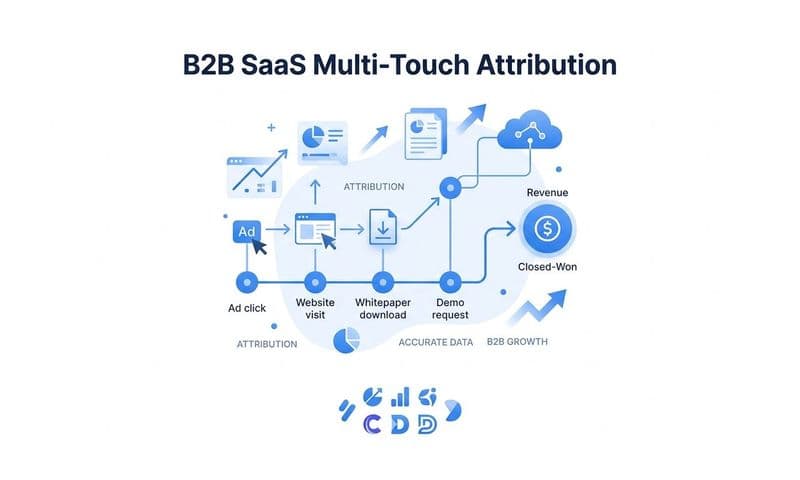
This combination of server-side event tracking and CRM integration creates a complete customer journey record that does not depend on any single point of failure. Even if a prospect's browser blocks every pixel you have deployed, their interactions with your sales team, their progression through your CRM pipeline, and their eventual conversion to a paying customer are all captured in your first-party systems. That data can be connected back to the original ad touchpoints that drove their initial visit, giving you attribution grounded in actual business outcomes rather than browser events.
For B2B SaaS companies with long sales cycles, this approach is particularly important. The gap between a first ad click and a closed deal can span months. Pixel-based tracking is poorly suited to connecting events that are separated by that kind of time horizon. First-party data tied to CRM records bridges that gap in a way that browser-based tracking fundamentally cannot.
Building a Tracking Strategy That Survives Ad Blockers
Understanding the problem is useful. Having a practical framework for solving it is what actually moves the needle. Here's how to approach building a tracking strategy that holds up in a world where ad blockers and browser privacy features are the norm rather than the exception.
Start with an audit of your current tracking gaps. Before implementing anything new, understand the scale of the problem you're dealing with. Compare the conversion numbers your ad platforms report against what your CRM shows for leads and opportunities generated during the same period. A significant discrepancy between these two numbers is a signal that your current tracking setup is missing a meaningful share of conversions. Reviewing proven methods for fixing conversion tracking gaps can help you prioritize where to focus first. This gap is your baseline.
Implement server-side event tracking via Conversion API. For most B2B SaaS teams, this means setting up the Meta Conversions API and Google Enhanced Conversions to run in parallel with your existing pixel setup. Configure deduplication using event IDs so that conversions captured by both methods are not double-counted. Your server-side events should fire for every conversion action that matters: form submissions, demo bookings, trial sign-ups, and any other key funnel events.
Connect your ad data to CRM and revenue outcomes. Server-side tracking captures the conversion event, but the attribution story is completed when you tie that event to what happens downstream in your sales process. Set up the data flows that allow you to see which ad campaigns, audiences, and creatives are generating leads that actually close. This requires connecting your ad platform data to your CRM in a way that preserves the original attribution from the first touchpoint.
Validate data accuracy across platforms. Once your server-side tracking is running, compare what ad platforms report against what your server-side data and CRM data show. Use this comparison to identify where discrepancies remain and investigate their sources. Some gap is expected and acceptable; a large, persistent gap suggests a configuration issue that needs to be addressed.
This is exactly the kind of infrastructure that Cometly is built to support. Cometly captures every touchpoint from the first ad click through to closed-won revenue, connecting your ad platforms, CRM, and website into a single attribution system. It feeds enriched, conversion-ready events back to Meta and Google, improving the quality of the signals those platforms use to optimize your campaigns. And it gives your growth team a single source of truth for marketing performance, so budget decisions are made on data you can actually trust rather than platform-reported numbers that may be missing a significant share of your actual conversions.
With Cometly, you can compare what ad platforms report against what your server-side and CRM data shows, identifying where the discrepancy is largest and which campaigns are being most severely underreported. That visibility is what allows you to make confident decisions about where to scale and where to pull back, without second-guessing whether your data is telling you the truth.
The Bottom Line on Ad Blockers and Conversion Tracking
Ad blockers breaking conversion tracking is not a fringe edge case or a minor data quality issue. It is a structural problem that affects a meaningful portion of the audiences that B2B SaaS companies are actively paying to reach. When your tracking infrastructure depends on browser-based scripts that a significant share of your target audience has effectively disabled, your marketing data is systematically incomplete, and every decision built on that data carries hidden risk.
The solution is not a workaround or a patch. It is a modern tracking architecture built on server-side events, first-party data, and revenue-connected attribution. Pixel-based tracking alone is no longer sufficient for teams running paid acquisition at scale in a privacy-first browser environment. The infrastructure exists to do this properly, and the teams that build it gain a durable competitive advantage in the accuracy and reliability of their marketing data.
If your conversion numbers have felt off, if your CRM tells a different story than your ad dashboards, or if you're making budget decisions without full confidence in your data, the problem is likely more structural than you think. The good news is that it's solvable.
Ready to eliminate tracking blind spots and make budget decisions based on data you can actually trust? Get your free demo and see how Cometly captures every conversion, connects your ad spend to real revenue outcomes, and gives your team the attribution clarity it needs to scale with confidence.