
In B2B SaaS, no single person decides to buy your product. By the time a deal closes, multiple stakeholders have weighed in, raised objections, and shaped the outcome. This group is your buying committee, and if your marketing treats them like a single persona, you are leaving pipeline on the table.
Buying committee mapping is the process of identifying every stakeholder involved in a purchase decision, understanding their role, motivations, and concerns, and then aligning your marketing and sales strategy to address each one. When done well, it transforms how you run campaigns, allocate budget, and measure what actually drives revenue.
The challenge is that most B2B SaaS teams build their go-to-market strategy around the person who fills out the form, not the full committee that controls the budget. This creates a blind spot. Your attribution data shows one touchpoint. Your CRM shows one contact. But behind the scenes, three to seven people may have shaped that deal.
This guide walks you through a practical, repeatable process for building a buying committee map from scratch. You will learn how to identify the key roles inside target accounts, gather data on how each role engages with your content and ads, and use that intelligence to build campaigns that reach the right people at the right stage.
You will also learn how to connect committee-level engagement data back to revenue so you can prove which marketing activities actually move deals forward. Whether you are a marketing leader trying to improve pipeline quality or a growth team looking to make your ad spend work harder across complex sales cycles, this step-by-step guide gives you a clear framework to follow.
Step 1: Define the Roles Inside Your Ideal Buying Committee
Before you can map your buying committee, you need to know who belongs in it. This sounds obvious, but most teams skip the research and default to assumptions. That is where the process breaks down.
Start by pulling data from your CRM. Filter for closed-won deals above your target ACV and look at every contact associated with those accounts. Which job titles appear most frequently? Which departments show up consistently? This is your starting point, and it is grounded in real behavior rather than guesswork.
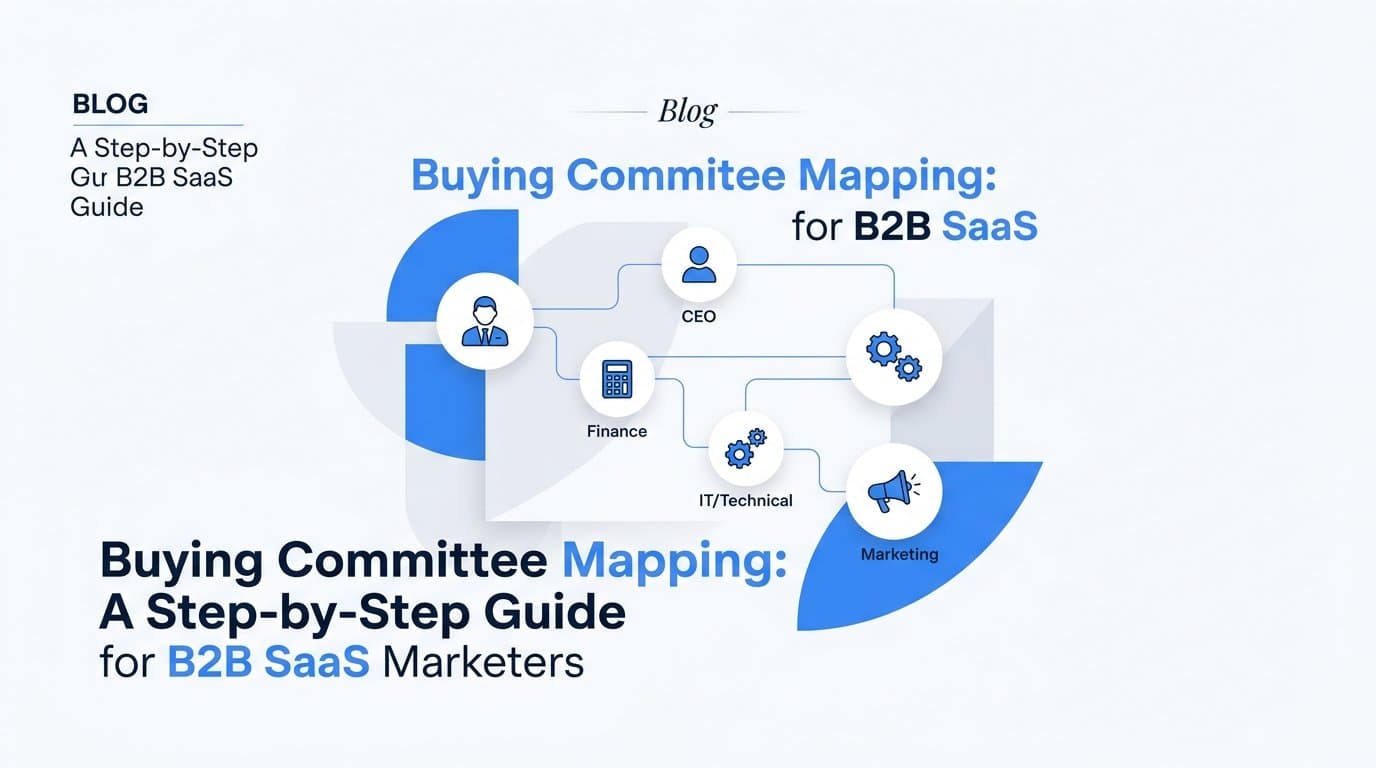
Most B2B SaaS buying committees include five core role types:
Economic Buyer: Controls the budget and gives final approval. Often a VP, Director, or C-suite leader. They care about ROI, risk, and strategic fit.
Champion: The internal advocate who drives the initiative forward. They believe in your product and sell it internally on your behalf. They are often your primary contact.
Technical Evaluator: Assesses whether your product integrates with existing systems and meets technical requirements. Often from IT, engineering, or data teams.
End User: The person or team who will use the product day to day. They care about ease of use, workflow fit, and whether the tool actually solves their problem.
Finance or Procurement Stakeholder: Reviews contracts, pricing terms, and vendor risk. They often appear late in the process but can stall or kill deals if not addressed early.
Once you have identified the roles present in your deals, map each one to a stage of the buying process: awareness, evaluation, or approval. Champions and end users typically engage early. Technical evaluators come in during mid-funnel evaluation. Economic buyers and procurement often appear at the approval stage, though the best marketing strategies reach them earlier.
The most important validation step is reviewing closed-won interview data and sales debrief notes. Ask your sales team: who was actually in the room? Who raised objections? Who signed off? This qualitative data fills the gaps that CRM records miss.
Document your findings in a simple matrix: role, department, typical title, stage of influence, and primary concern. Keep it to one page. The goal is a reference document your entire team can use, not an elaborate framework that collects dust.
The most common pitfall at this stage is building your committee map from assumptions rather than real deal data. A map that looks good on paper but does not reflect how your buyers actually behave will send your campaigns in the wrong direction from the start.
Step 2: Research the Goals and Objections of Each Stakeholder
Knowing who is in the buying committee is only half the picture. The other half is understanding what each role actually cares about, and what they are afraid of getting wrong.
Each stakeholder has a different definition of success. The economic buyer wants to see a clear return on investment and minimal risk to the business. The technical evaluator wants confidence that your product will integrate cleanly and not create new problems. The end user wants a tool that fits their workflow without adding friction. These are not interchangeable motivations, and your marketing should not treat them as such.
The best source of this intelligence is your existing customer and sales data. Start here:
Sales call recordings: Listen for the specific language each role uses when they raise concerns or ask questions. The words they choose matter. If a CFO consistently asks about "total cost of ownership" rather than "pricing," that language should appear in your content targeting that role.
Win-loss interview notes: These conversations are a goldmine. When a deal was lost, which stakeholder raised the final objection? When a deal was won, which role became the strongest internal advocate? Patterns across multiple interviews reveal the real dynamics inside your buying committee.
Customer success conversations: Your existing customers will tell you what almost stopped them from buying and what ultimately convinced them. These insights are especially valuable for understanding end user and champion motivations.
Once you have gathered this research, build a one-page stakeholder profile for each role. Each profile should cover four things: their primary goal, their top objection, their preferred content format, and the key question they need answered before they will move forward.
For example, a technical evaluator's profile might look like this: primary goal is confirming integration reliability; top objection is concern about data accuracy and tracking gaps; preferred content is technical documentation and integration guides; key question is whether your platform works with their existing CRM and ad platforms.
This research directly shapes your content strategy and ad messaging in the steps that follow. If you skip it, you will end up with generic messaging that speaks to no one in particular.
Here is a useful signal: if your sales team cannot clearly articulate what each stakeholder cares about, your marketing is likely only reaching one layer of the committee. That is a gap worth closing before you invest more in campaigns.
Step 3: Map Content and Channels to Each Committee Role
Now that you know who is in your buying committee and what each role cares about, the next step is aligning your content and channels to serve each one. This is where your research becomes a practical campaign asset.
Build a content matrix. Rows represent committee roles. Columns represent funnel stages: awareness, consideration, and decision. Each cell in the matrix should contain the content type and channel best suited to that role at that stage. This gives your team a clear, visual reference for what to create and where to distribute it.
Here is how different roles typically engage with content:
Economic Buyers: Respond well to ROI calculators, executive briefs, peer benchmarks, and business case templates. They are not browsing your blog. Reach them through LinkedIn, executive roundtables, and direct outreach from your sales team armed with the right assets.
Technical Evaluators: Engage heavily with documentation, integration guides, API references, and security overviews. They are often doing organic search research on specific capabilities. Google search ads and detailed website content are high-priority channels for this role.
Champions: Consume a wide range of content across the funnel. They are often the ones sharing your case studies internally, watching your product demos, and reading your newsletters. LinkedIn and email nurture sequences work well here.
End Users: Prefer product walkthroughs, use-case videos, and hands-on trials. They want to see the product in action before they advocate for it. Video content and free trial experiences are particularly effective.
Finance and Procurement: Look for pricing transparency, contract flexibility information, and vendor credibility signals. Reach them with clear pricing pages, comparison content, and customer references.
After filling in your matrix, look for gaps. Where does a role have no supporting asset at a critical stage? Those gaps are your content production priorities. A technical evaluator with no integration documentation to review during the evaluation stage is a deal risk. A CFO who reaches the approval stage without seeing any ROI data is a deal risk.
Channel mapping is equally important. Do not assume one channel reaches all roles. LinkedIn ads often reach economic buyers and champions because they are active on the platform professionally. Google search captures technical evaluators who are actively researching solutions. Your multi-touch attribution data will show you which channels actually drive engagement from each job function, and that data should inform your channel investment decisions.
Step 4: Build Account-Level Tracking to See Committee Engagement
Here is where many B2B SaaS marketing teams hit a wall. They have built a committee map and created role-specific content, but their tracking infrastructure is still built around individual leads. That means they can see that one person converted, but they cannot see how the rest of the committee engaged along the way.
Individual lead tracking misses the committee picture entirely. You need account-level visibility to understand which roles are engaging, through which channels, and at what stage of the sales cycle.
Start with your CRM. Configure it to associate all contacts from the same company to a single account record. Then tag each contact with their committee role based on the matrix you built in Step 1. This sounds like basic hygiene, but many teams have CRM records that are contact-centric rather than account-centric, which makes committee-level reporting nearly impossible.
Next, connect your ad platforms and website analytics to your CRM. You want to see which touchpoints each role interacted with before a deal progressed. If a technical evaluator visited your integration documentation three times before the deal moved to evaluation, that is meaningful data. If an economic buyer clicked a LinkedIn ad featuring an ROI case study two weeks before the deal closed, that touchpoint deserves credit.
This is where a dedicated marketing attribution platform becomes essential. A platform like Cometly connects your ad platforms, CRM, and website to show every touchpoint across the entire account, giving you a real picture of how the buying committee engaged before the deal closed. Instead of seeing one contact and one conversion event, you see the full journey across all the roles that shaped the decision.
Server-side tracking matters here too. As third-party cookies become less reliable, gaps appear in the customer journey data that traditional tracking depends on. Server-side event tracking ensures that touchpoints are captured accurately across long B2B sales cycles, even when users switch devices or browsers between interactions.
Your success indicator for this step is straightforward: you should be able to open any closed-won deal in your attribution platform and see which roles engaged, which channels reached them, and which content assets appeared in their journey. If you cannot do that today, your tracking setup needs work before your committee-level campaigns will produce actionable data.
The most common pitfall at this stage is relying on last-click attribution. Last-click makes it look like one person and one channel drove the deal, hiding the committee-level activity that actually built the case for purchase. Multi-touch attribution is the only model that captures the full picture.
Step 5: Activate Multi-Touch Campaigns Targeting the Full Committee
With your committee map built and your tracking infrastructure in place, you are ready to run campaigns designed to reach multiple roles within target accounts at the same time. This is the step where buying committee mapping translates directly into revenue impact.
LinkedIn is your primary channel for account-based committee targeting. Use LinkedIn's account-based targeting capabilities to serve role-specific ads to different job functions at the same company during the same campaign period. You can target by job title, seniority level, department, and company, which means you can serve your CFO-focused ROI content and your technical evaluator-focused integration content to the same account simultaneously.
Sequence your messaging intentionally. Lead with awareness content for champions and end users, who are typically the first to engage. As the account warms up and more roles start interacting with your content, shift toward business case content and ROI-focused assets aimed at economic buyers. The sequence mirrors how buying decisions actually unfold inside companies.
Retargeting by role is one of the highest-leverage tactics available to you at this stage. If a technical evaluator visited your integration documentation page, serve them a technical deep-dive ad or an invitation to a product walkthrough focused on your integrations. If someone from a finance role visited your pricing page, serve them a total cost of ownership asset or a comparison guide. Behavioral signals tell you where each role is in their evaluation, and your ads should respond accordingly.
To make this work at scale, you need your conversion events to flow accurately back to your ad platforms. Cometly's Conversion API integration ensures your ad platforms receive accurate, enriched event data so their AI can optimize toward the committee roles that actually convert to pipeline. When Meta and Google have clean, complete conversion signals, their targeting algorithms become significantly more effective at finding the right people across all the roles in your target committee.
One critical mindset shift: measure campaign success at the account level, not the individual lead level. A campaign that reached four of five committee roles in a target account is performing well, even if only one person clicked an ad. If you measure by click-through rate or individual conversions alone, you will undervalue the committee-level reach your campaigns are building.
Set up account-level engagement scoring in your CRM. Assign points when different roles from the same account engage with your content or ads. When an account crosses a threshold, flag it for sales outreach. This creates a feedback loop between your marketing campaigns and your sales motion that is grounded in real committee engagement data.
Step 6: Measure Pipeline and Revenue Attribution Across the Committee
The final step is connecting your buying committee map to revenue outcomes. This is how you prove which channels, content, and touchpoints actually drove deals forward, and it is how you make the case for continued or increased investment in committee-level marketing.
Multi-touch attribution is the right model for this measurement challenge. It distributes credit across all the touchpoints that reached committee members throughout the sales cycle, rather than assigning all credit to a single first or last interaction. When those interactions involve multiple people from the same account, account-level attribution becomes essential for accurate measurement.
Compare attribution models to understand how different roles contributed to your deals. A linear model distributes equal credit across all touches, which gives you a broad view of which channels and content appeared in winning deals. A position-based model weights the first and last touchpoints more heavily, which can help you identify which channels are best at creating initial awareness and which are most effective at driving final decisions.
Track pipeline attribution by role. Look at the deals that closed and identify which committee roles were engaged by marketing before the deal progressed. Then look at the deals that stalled or were lost and identify which roles were missing from your marketing touchpoints. The gap between these two groups tells you exactly where your marketing has coverage and where it has blind spots.
Connect your ad spend data to closed revenue by integrating your CRM with your attribution platform. This gives you cost per pipeline by channel and by committee role, which is a far more useful metric than cost per lead. Cometly connects ad spend directly to pipeline and closed-won revenue, giving you a single source of truth that shows which campaigns reached the buying committee members who actually drove deals.
Use this data to reallocate budget with confidence. If your LinkedIn campaigns consistently reach economic buyers and champions in accounts that close, that is a signal to invest more there. If your Google search budget is capturing technical evaluators who show up in nearly every closed-won deal, that channel deserves credit and continued investment. If a channel is generating leads but those leads never appear in closed-won deal journeys, that is a signal to investigate before scaling.
Your success indicator for this step is the ability to report on revenue influenced by each channel, broken down by committee role. When you can walk into a budget conversation and say "this channel consistently reaches economic buyers in accounts that close at this rate and this ACV," you are no longer defending your spend with vanity metrics. You are making a data-driven case that is grounded in actual revenue outcomes.
Putting It All Together
Buying committee mapping turns a vague idea about complex B2B sales into a structured, data-driven process. When you know who is in the room, what they care about, and how to reach each of them with the right message at the right time, your campaigns stop wasting budget on a single persona and start building consensus across the full account.
Use this checklist to confirm you have completed each step:
1. You have defined the core roles in your buying committee using real closed-won deal data from your CRM and sales team.
2. You have built stakeholder profiles with goals, objections, preferred content formats, and key questions for each role.
3. You have mapped content and channels to each role and funnel stage, and identified gaps to fill.
4. You have configured account-level tracking to see committee engagement across all touchpoints, using multi-touch attribution rather than last-click.
5. You have activated multi-touch campaigns targeting multiple roles within target accounts simultaneously, with role-specific messaging and retargeting.
6. You have connected pipeline and revenue attribution to committee-level engagement data so you can report on which channels and content actually drive deals.
The teams that execute this process consistently find that their pipeline quality improves, their sales cycles become more predictable, and their marketing budget works harder because every dollar is aimed at the people who actually control the buying decision.
If you want to see how Cometly can help you track the full buying committee journey and connect your ad spend to real revenue, Get your free demo today and start capturing every touchpoint across your entire buying committee in minutes.