Campaign tracking is the foundation of every data-driven marketing decision. Without it, you are guessing which ads drive pipeline, which channels convert, and where your budget is actually working. For B2B SaaS teams, the stakes are even higher. Sales cycles are long, touchpoints are many, and the cost of misattributing a closed-won deal can mean scaling the wrong channel for months.
This article covers eight campaign tracking best practices designed specifically for B2B SaaS marketers who want accurate, actionable data from first ad click to closed revenue. Whether you are running paid search, social ads, or multi-channel campaigns, these practices will help you build a tracking foundation that holds up across channels, devices, and attribution models.
Each practice is actionable, grounded in how modern marketing attribution works, and structured to help you move from fragmented data to a single source of truth.
1. Build a Consistent UTM Tagging Framework
The Challenge It Solves
Inconsistent UTM tagging is one of the most common sources of attribution gaps in B2B SaaS marketing. When one team member tags a campaign as "linkedin" and another uses "LinkedIn_Paid," your analytics platform treats them as two different sources. Over time, these small inconsistencies fragment your data and make it nearly impossible to compare channel performance accurately.
The Strategy Explained
A consistent UTM framework means every link you publish follows the same naming conventions for source, medium, campaign, content, and term. Think of it like a filing system. If every file is labeled differently, finding what you need becomes a guessing game. But when every link follows a shared standard, your attribution data stays clean, comparable, and trustworthy.
Your framework should define allowed values for each UTM parameter, document them in a shared reference sheet, and make that sheet accessible to everyone who creates campaign links. Tools like a UTM builder spreadsheet or a dedicated URL builder can enforce consistency at the point of creation.
Implementation Steps
1. Define your naming conventions for each UTM parameter, including capitalization rules and approved values for source and medium.
2. Build a shared UTM builder template or use a dedicated URL builder tool that pulls from your approved values list.
3. Document the framework in a central location and require all campaign creators to use it before publishing any new links.
Pro Tips
Use lowercase consistently across all UTM values. Most analytics platforms are case-sensitive, so "LinkedIn" and "linkedin" will appear as separate sources. Also, audit your existing UTM data quarterly to catch drift before it compounds. A clean naming convention today saves hours of data cleanup later. For a deeper look at how UTM parameters work, explore what UTM tracking is and how it helps your marketing.
2. Move Beyond Pixel-Only Tracking with Server-Side Events
The Challenge It Solves
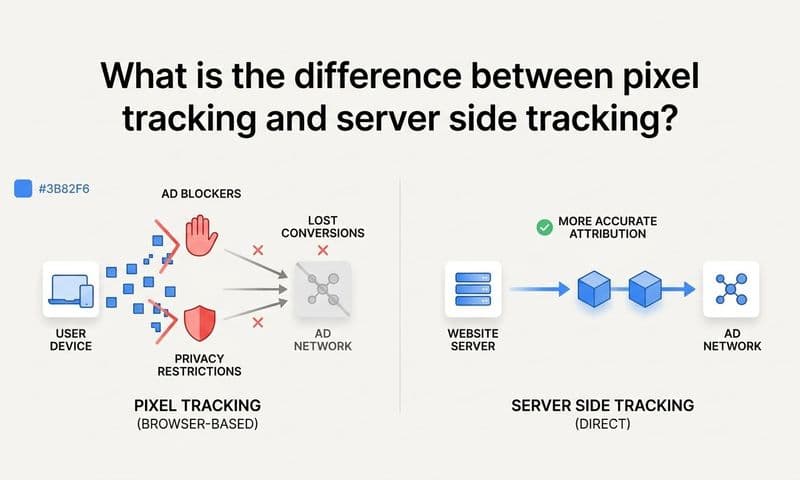
Browser-based pixels were the standard for conversion tracking for years, but they are increasingly unreliable. Ad blockers, browser privacy updates, and iOS restrictions have made it common for pixels to miss a meaningful portion of conversions. If your tracking depends entirely on a pixel firing in the browser, you are working with incomplete data and likely underreporting performance.
The Strategy Explained
Server-side tracking moves the conversion signal from the browser to your server. Instead of relying on a pixel to fire successfully in a user's browser environment, your server sends the conversion event directly to the ad platform. This approach bypasses ad blockers and browser restrictions entirely, giving you a much more complete picture of what is actually happening. Understanding why server-side tracking is more accurate can help you make the case for this investment internally.
Conversion API integrations, such as Meta's Conversions API and Google's Enhanced Conversions, are the primary mechanisms for implementing server-side tracking. Platforms like Cometly are built to handle this natively, routing enriched conversion data server-side so nothing gets lost in the browser.
Implementation Steps
1. Audit your current tracking setup to identify which conversion events rely solely on browser pixels.
2. Implement a server-side tracking layer using your ad platform's Conversion API or a dedicated attribution platform that handles server-side routing.
3. Run both pixel and server-side tracking in parallel initially to compare event volumes and identify the gap your pixel was missing.
Pro Tips
Do not remove your browser pixel immediately after adding server-side tracking. Run both in parallel and use deduplication logic to prevent double-counting. Most Conversion API implementations include event ID matching to handle this automatically.
3. Define and Standardize Your Conversion Events
The Challenge It Solves
When your ad platforms, CRM, and analytics tools each define conversions differently, you end up with conflicting numbers that no one trusts. One platform counts a form submission as a conversion. Another counts a demo booking. Your CRM tracks qualified leads. Without alignment, you cannot meaningfully compare performance across channels or make confident budget decisions.
The Strategy Explained
Standardizing conversion events means agreeing on a shared definition for each stage of your funnel and applying that definition consistently across every tool in your stack. For B2B SaaS, this typically includes events like form submission, demo booked, trial started, SQL created, opportunity opened, and closed-won deal. Reviewing best practices for tracking conversions accurately can help you structure these definitions in a way that holds up across platforms.
Each event should have a clear name, a consistent trigger condition, and a documented owner. When these definitions are shared across your marketing and sales teams, the numbers in your ad platforms and CRM start to align, and attribution becomes meaningful rather than approximate.
Implementation Steps
1. Map out every conversion event in your funnel from first touch to closed revenue and assign a consistent name and definition to each.
2. Align these definitions across your ad platforms, CRM, and analytics tools so the same event name means the same thing everywhere.
3. Document the conversion event library and share it with both marketing and sales so everyone is working from the same framework.
Pro Tips
Prioritize pipeline-stage events over vanity events. A "page view" conversion tells you very little. A "demo booked" or "trial activated" conversion tells you something actionable. Focus your conversion event library on the moments that actually predict revenue.
4. Choose the Right Attribution Model for Your Buying Cycle
The Challenge It Solves
Last-click attribution is the default in many ad platforms, but it is poorly suited for B2B SaaS buying cycles. When a deal takes weeks or months to close and involves multiple touchpoints across paid, organic, and direct channels, crediting the entire conversion to the last click systematically undervalues the campaigns that created awareness and drove early engagement.
The Strategy Explained
Multi-touch attribution models distribute credit across all the touchpoints in a buyer's journey rather than assigning it entirely to one. Common models include linear attribution, which spreads credit evenly, time-decay attribution, which weights recent touches more heavily, and position-based models, which emphasize the first and last touch while crediting the middle. A detailed breakdown of which attribution model is best for optimizing ad campaigns can help you evaluate these options against your specific sales cycle.
The right model depends on your sales cycle length and how your team makes budget decisions. For most B2B SaaS companies, a data-driven or position-based model gives a more accurate view of which campaigns are actually contributing to pipeline. Platforms like Cometly let you compare attribution models side by side so you can see how credit shifts across your channels depending on the model you apply.
Implementation Steps
1. Audit your current attribution model and identify which channels are likely being over- or under-credited based on your typical sales cycle.
2. Test at least two attribution models side by side using your historical data to see how budget recommendations would change.
3. Align your team on a primary model for budget decisions while keeping secondary models available for channel-level analysis.
Pro Tips
No single attribution model is perfect. The goal is not to find the "true" model but to use one that is consistent, understood by your team, and better reflects your buying cycle than last-click. Consistency over time matters more than theoretical accuracy.
5. Connect Ad Spend Data Directly to Pipeline and Revenue
The Challenge It Solves
Cost-per-click and click-through rate are easy to measure but difficult to act on strategically. A campaign with a high CPC might be generating your highest-value pipeline. A campaign with a low CPL might be filling your funnel with leads that never convert. Without connecting ad spend to actual pipeline and revenue, you are optimizing for the wrong metrics.
The Strategy Explained
Revenue attribution connects your ad platform data to your CRM and billing data so you can see the full picture: which campaigns generated leads, how many of those leads became opportunities, and how many closed as paying customers. This gives you a cost-per-pipeline and cost-per-revenue view that makes marketing budget allocation decisions much clearer.
For B2B SaaS teams, this often means integrating your ad platforms with your CRM and, where possible, your billing system. Cometly connects ad spend data with Stripe revenue data and CRM pipeline stages, giving you a direct line from campaign spend to closed-won revenue without manual data stitching.
Implementation Steps
1. Identify the data sources you need to connect: your ad platforms, CRM, and billing or revenue system.
2. Map the fields that need to align across systems, including lead source, campaign name, deal stage, and revenue amount.
3. Build or adopt a reporting layer that surfaces cost-per-pipeline and cost-per-revenue metrics alongside your standard ad performance data.
Pro Tips
Start with your highest-spend channels first. Connecting even one ad platform to your CRM will immediately reveal which campaigns are generating pipeline versus just generating clicks. That insight alone often justifies the integration effort many times over.
6. Track the Full Customer Journey Across Every Touchpoint
The Challenge It Solves
B2B buyers rarely convert on their first visit. They might click a LinkedIn ad, return through organic search a week later, attend a webinar, and then book a demo through a direct visit. If your tracking only captures individual sessions without connecting them to a single buyer journey, you are missing the story of how your customers actually make decisions.
The Strategy Explained
Full customer journey tracking means stitching together every interaction a buyer has with your brand, across sessions, devices, and channels, and connecting those interactions to a single identity. This requires a combination of first-party tracking, CRM integration, and a platform that can resolve multiple touchpoints into a unified journey view. Learning how to track marketing campaigns end to end is the foundation for building this kind of visibility.
When you can see the complete path from first ad click to closed deal, you understand which early-funnel campaigns are doing the heavy lifting of creating awareness, which mid-funnel touches accelerate decisions, and which final touches push buyers over the line. Cometly's customer journey analytics are built specifically to surface this kind of multi-session, multi-channel visibility for B2B SaaS teams.
Implementation Steps
1. Implement first-party tracking that persists across sessions and can be tied to a user identity once a form is submitted or a login occurs.
2. Configure your CRM to capture the original lead source and all subsequent touchpoints so the journey data follows the contact through the pipeline.
3. Use a journey analytics view to review the most common paths to conversion and identify which touchpoints appear most frequently before a deal closes.
Pro Tips
Pay attention to the touchpoints that appear consistently in the journeys of your highest-value customers. Those are the channels and campaigns worth investing in, even if they do not show up as top performers in a last-click report.
7. Audit and Validate Your Tracking Data Regularly
The Challenge It Solves
Tracking setups degrade over time. A website redesign can break a conversion pixel. A new campaign structure can introduce UTM inconsistencies. A CRM update can change how lead sources are recorded. Without a regular audit process, these issues go undetected for weeks or months, quietly corrupting the data you are using to make budget decisions.
The Strategy Explained
A tracking audit is a structured review of your entire data collection setup to verify that every conversion event is firing correctly, UTM parameters are being captured as expected, and data is flowing accurately between your ad platforms, analytics tools, and CRM. Establishing a proper attribution tracking setup from the start makes these audits faster and more reliable.
Think of it like routine maintenance. You would not run a car for a year without checking the oil. Your tracking setup deserves the same attention. A quarterly audit cadence is a reasonable starting point for most B2B SaaS teams, with additional checks triggered whenever a major website change or new campaign structure is deployed.
Implementation Steps
1. Create an audit checklist that covers UTM consistency, conversion event firing, CRM lead source capture, and data volume comparisons across platforms.
2. Run a test conversion through your funnel at least once per quarter to verify that every stage of the tracking chain is working end to end.
3. Compare event volumes across your ad platforms, analytics tool, and CRM to identify discrepancies that might indicate a broken tracking link.
Pro Tips
Set up automated alerts for sudden drops in conversion event volume. A sharp decline in tracked events is often the first sign that something in your tracking setup has broken. Catching it early prevents weeks of bad data from influencing your campaign decisions.
8. Feed Enriched Conversion Data Back to Ad Platforms
The Challenge It Solves
Ad platforms like Meta and Google use machine learning to optimize targeting and bidding, but their algorithms are only as good as the conversion signals you send them. If you are only passing basic pixel events, the algorithm is optimizing for surface-level actions that may not correlate with revenue. The result is campaigns that generate plenty of activity but not enough pipeline.
The Strategy Explained
Sending enriched, first-party conversion data back to ad platforms through Conversion API and Enhanced Conversions gives the algorithm a much clearer signal of what a valuable conversion actually looks like. Instead of optimizing for form submissions, you can train the algorithm on demo bookings, trial activations, or even closed-won deals. Exploring marketing campaign analytics frameworks can help you identify which downstream signals carry the most predictive weight for your specific business model.
This practice also improves match rates, which is the percentage of conversions the platform can connect to a specific user and ad interaction. Higher match rates mean better attribution within the platform and more accurate optimization. Cometly is built to route enriched conversion events server-side back to Meta and Google, giving their algorithms the high-quality signals they need to find more buyers like your best customers.
Implementation Steps
1. Identify the conversion events that best predict revenue, such as demo booked, trial started, or SQL created, and prioritize those for server-side transmission.
2. Implement Meta Conversions API and Google Enhanced Conversions using a server-side integration that passes hashed first-party data alongside the conversion event.
3. Monitor match rates and event quality scores in each platform after implementation and compare campaign performance before and after the enriched signals are active.
Pro Tips
Where possible, pass downstream conversion events like opportunities created or closed-won revenue back to the platform, not just top-of-funnel actions. The more closely your optimization signal mirrors actual revenue, the better the algorithm can find buyers with genuine intent.
Putting It All Together
Strong campaign tracking is not a one-time setup. It is an ongoing discipline that compounds over time. Start with a clean UTM framework to eliminate attribution gaps at the source. Layer in server-side tracking to capture what browser pixels miss. Define your conversion events clearly so every tool in your stack is measuring the same thing. Then choose attribution models that reflect how your buyers actually move through the funnel rather than defaulting to last-click.
From there, close the loop by connecting ad spend to real pipeline and revenue, track the full customer journey across every session and channel, audit your data regularly to catch degradation before it distorts your decisions, and feed enriched conversion signals back to ad platforms to improve algorithmic targeting.
Each of these practices builds on the others. When they work together, you get a clear, accurate picture of what is driving growth and what is wasting budget. That clarity is what separates marketing teams that scale confidently from those that are always second-guessing their numbers.
Cometly is built to support every layer of this stack. From server-side conversion tracking and Conversion API integration to multi-touch attribution, customer journey analytics, and pipeline revenue reporting, it gives B2B SaaS marketing teams a single source of truth for all campaign data.
If you are ready to move from fragmented reporting to confident, data-driven decisions, Get your free demo today and start capturing every touchpoint to maximize your conversions.