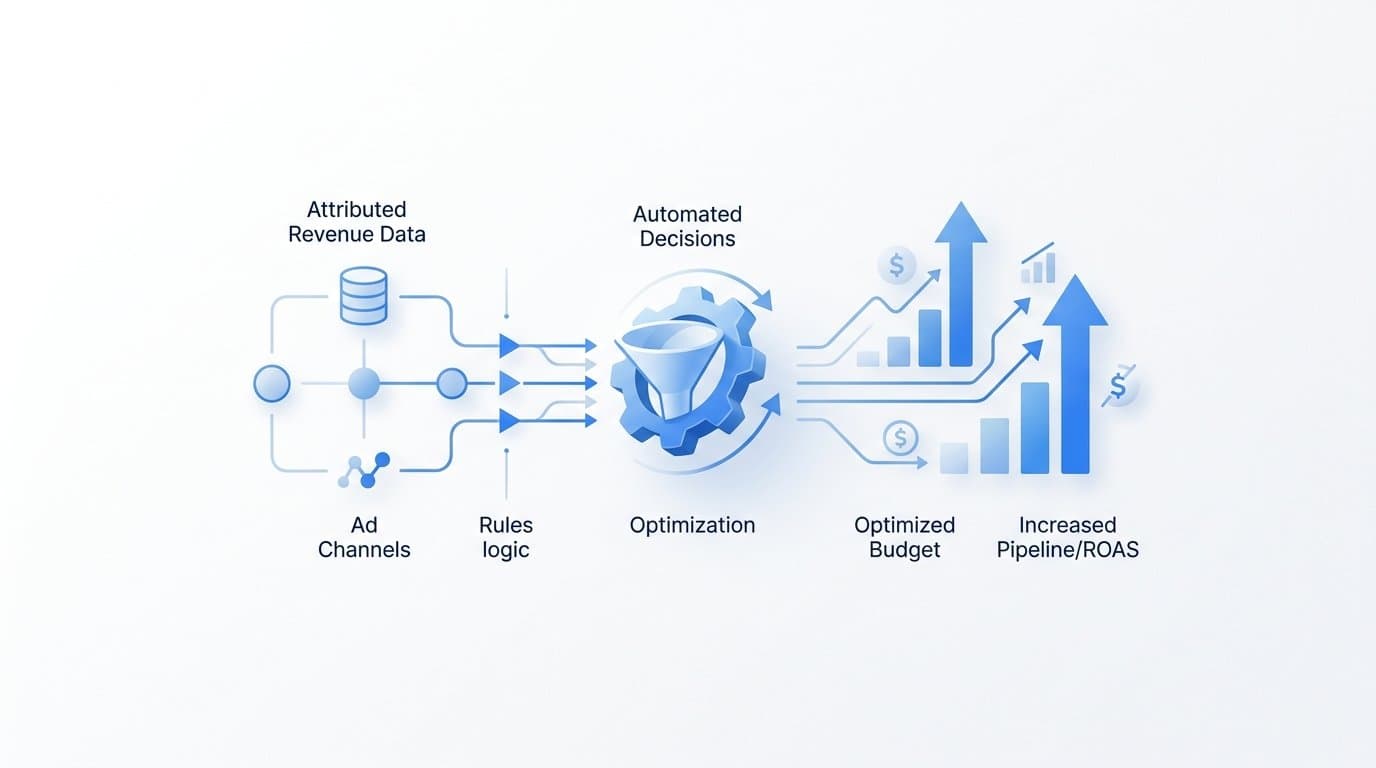
You use attributed revenue data to automate ad budget decisions by connecting your attribution platform to your ad channels, setting revenue-based rules that trigger budget changes when campaigns hit or miss defined ROAS or pipeline thresholds, and letting those rules run on a defined cadence without manual review. Cometly makes this process concrete for B2B SaaS teams by linking ad spend directly to closed-won revenue and pipeline, giving you the clean, deal-level data that budget automation rules require.
Most marketing teams still adjust budgets based on platform-reported metrics like cost per click or impressions. The problem is that those metrics do not tell you which campaigns actually produced revenue. A campaign can generate dozens of leads and zero closed deals. Without attributed revenue tied to each channel and campaign, any budget automation you build is optimizing for the wrong signal.
This article walks through seven strategies for using attributed revenue data to drive automated budget decisions, from setting your revenue thresholds to feeding enriched conversion data back into ad platforms so their native automation improves too. Each strategy builds on the last, moving from foundational setup to advanced automation logic.
1. Establish Revenue Attribution as Your Budget Baseline
The Challenge It Solves
Platform-reported metrics like cost per lead or click-through rate measure activity, not outcomes. For B2B SaaS teams, a campaign can look efficient on paper while contributing nothing to closed-won revenue. Budget automation built on these surface-level signals will consistently move money toward campaigns that generate noise, not deals.
The Strategy Explained
Before any automation logic is possible, you need a direct line between ad spend and actual revenue. That means choosing an attribution model, connecting your ad platforms to your CRM, and ensuring that deal-level data flows back to your attribution layer in real time.
Attributed revenue data means knowing, for each campaign and ad set, how much closed-won revenue or pipeline value can be traced back to that spend. This is the foundational signal your automation rules will act on. Without it, you are essentially asking a robot to make decisions with a blindfold on.
Cometly connects every ad click to CRM events and tracks the full customer journey from first touch to closed deal, giving your team a single source of truth for revenue attribution across every channel.
Implementation Steps
1. Connect your ad platforms (Meta, Google, LinkedIn) to your attribution tool and ensure UTM parameters are consistently applied across all campaigns.
2. Integrate your CRM so that deal stage changes, including closed-won events, are passed back to your attribution platform with revenue values attached.
3. Choose an attribution model that fits your sales cycle. For B2B SaaS with multi-touch journeys, a linear or time-decay model typically reflects reality better than last-click.
4. Validate that attributed revenue data is populating correctly for at least 30 to 60 days before building automation rules on top of it.
Pro Tips
Do not rush this foundation. Automation built on incomplete or misconfigured attribution data will make bad decisions at scale, which is worse than making them manually. Spend the time to verify that your CRM integration is firing correctly and that deal revenue values are populating at the campaign level before moving forward.
2. Define Revenue Thresholds That Trigger Budget Changes
The Challenge It Solves
Automation without defined triggers is just noise. Many teams set up budget rules based on vague performance feelings rather than specific, measurable thresholds. The result is rules that fire inconsistently or at the wrong time, creating budget volatility instead of efficiency.
The Strategy Explained
Revenue-based automation rules follow a simple conditional structure: if a campaign's attributed ROAS exceeds a defined floor over a defined window, increase daily budget by a defined percentage. If attributed pipeline contribution drops below a threshold, reduce spend or pause the campaign entirely.
The key is specificity. You need to define three things for every rule: the metric that triggers it (attributed ROAS, pipeline value, deal count), the threshold that activates the rule (a floor or ceiling), and the action the rule takes (scale by 20%, pause, or hold).
For B2B SaaS teams, pipeline value is often a more actionable trigger than closed-won revenue alone, because deals take time to close. A campaign contributing strong pipeline today is worth scaling even if the closed-won revenue has not fully materialized yet.
Implementation Steps
1. Calculate your target attributed ROAS based on your average deal size, sales cycle length, and acceptable customer acquisition cost.
2. Set a pipeline contribution floor: the minimum pipeline value a campaign must generate per dollar spent to remain active.
3. Define scaling rules for high performers: campaigns that exceed your ROAS target by a defined margin should trigger an automatic budget increase.
4. Set pause rules for underperformers: campaigns that fall below your pipeline floor for a sustained window (typically two to four weeks) should trigger a spend reduction or pause.
Pro Tips
Build in a buffer before rules fire. A campaign that dips below your threshold for one day should not trigger a pause. Use rolling averages over a meaningful window, such as 14 or 30 days, to avoid reacting to short-term noise in your attribution data.
3. Use Multi-Touch Attribution to Weight Budget Across the Full Funnel
The Challenge It Solves
Last-click attribution assigns all revenue credit to the final touchpoint before conversion. In B2B SaaS, where buyers interact with multiple ads and channels across weeks or months, this creates a systematic bias toward bottom-of-funnel campaigns and starves top-of-funnel channels of budget, even when those channels are initiating the journeys that eventually close.
The Strategy Explained
Multi-touch attribution distributes conversion credit across every touchpoint in a customer journey. Depending on the model you choose, credit might be weighted equally across all touches, front-loaded toward the first interaction, or back-loaded toward the interactions closest to conversion.
The practical implication for budget automation is significant. When you distribute credit accurately, your automation rules receive a more honest picture of which campaigns are contributing to revenue across the full funnel. A LinkedIn campaign that consistently initiates high-value journeys deserves budget even if it rarely appears as the last touch.
Cometly supports multi-touch attribution models and surfaces the full customer journey so you can see how each channel and campaign contributes at different stages, giving your automation rules a complete revenue signal rather than a distorted one.
Implementation Steps
1. Audit your current attribution model and identify which channels are systematically under-credited or over-credited based on their actual funnel position.
2. Select a multi-touch model that fits your sales motion. Linear attribution works well for teams with consistent multi-touch journeys. Time-decay models favor channels closer to conversion. Position-based models emphasize first and last touches equally.
3. Update your budget automation rules to use multi-touch attributed revenue as the trigger metric rather than last-click conversions.
4. Monitor how budget distribution shifts across channels after switching models and validate that the new allocation aligns with your pipeline and closed-won data.
Pro Tips
Run your old and new attribution models side by side for at least 30 days before shifting budget automation rules. This gives you a comparison baseline and helps you catch any unexpected credit redistribution before it affects live spend decisions.
4. Feed Attributed Revenue Back Into Ad Platform Bidding Algorithms
The Challenge It Solves
Ad platforms like Meta and Google optimize toward the conversion signals you send them. If you send lead form submissions, their algorithms find more people likely to fill out forms. If you never send deal-closed events with revenue values, their bidding systems have no way to distinguish a lead that became a customer from one that went cold immediately.
The Strategy Explained
Server-side tracking via Conversion APIs (Meta CAPI and Google Enhanced Conversions) allows you to send first-party event data directly from your server to ad platforms, bypassing signal loss from ad blockers and iOS privacy changes. More importantly, it allows you to send downstream events like deal-closed and pipeline-created with actual revenue values attached.
When Meta's Advantage+ or Google's Smart Bidding receives deal-closed events with revenue values, it can optimize toward users who look like your actual customers rather than users who look like form fillers. This is how attributed revenue data improves not just your manual budget decisions but the ad platform's automated bidding as well.
Cometly's server-side tracking and Conversion API integration makes this process straightforward, sending enriched, conversion-ready events back to Meta and Google to improve targeting, optimization, and ad ROI at the platform level.
Implementation Steps
1. Set up server-side event tracking for your key conversion events: lead created, opportunity created, deal closed, and revenue value.
2. Configure Meta CAPI and Google Enhanced Conversions to receive these events directly from your server, not just from browser-based pixels.
3. Include revenue values with your deal-closed events so ad platform algorithms can optimize for high-value conversions, not just conversion volume.
4. Implement deduplication logic to prevent the same event from being counted twice when both pixel and server-side tracking fire simultaneously.
Pro Tips
Prioritize sending deal-closed events with revenue values over sending every possible event. Ad platform algorithms respond better to high-quality, high-signal events than to a large volume of low-quality ones. Focus on the events that represent real revenue outcomes.
5. Build Automated Budget Rules Around Attribution Windows
The Challenge It Solves
B2B SaaS sales cycles are long. A campaign that generated a strong pipeline in week one may not see those deals close until week six or later. If your attribution window is too short, campaigns with slow-closing pipeline will appear to underperform, triggering pause rules prematurely and cutting spend on campaigns that are actually working.
The Strategy Explained
Attribution windows define how far back in time your system looks when assigning revenue credit to a touchpoint. For B2B SaaS teams, this window needs to match the actual length of your sales cycle, not the default settings in your ad platform, which are typically designed for e-commerce.
Time-delayed budget rules account for this lag. Instead of evaluating a campaign's attributed revenue after seven days, you configure your rules to evaluate performance after 30, 60, or 90 days, depending on your average deal length. This prevents premature cuts on campaigns that are generating pipeline that has not yet closed.
The practical result is that your automation rules become more accurate. They fire based on a complete picture of a campaign's revenue contribution rather than an incomplete snapshot taken too early in the sales cycle.
Implementation Steps
1. Calculate your average sales cycle length from first touch to closed-won deal. This becomes the baseline for your attribution window.
2. Configure your attribution platform to use a lookback window that matches or slightly exceeds your average deal length.
3. Build time-delayed evaluation into your budget rules. Set rules to evaluate campaign performance only after a minimum observation window has passed, such as 30 days for a team with a 45-day average sales cycle.
4. Create separate rule sets for pipeline attribution (earlier signal) and closed-won attribution (final signal) so you can act on pipeline data while waiting for deals to close.
Pro Tips
Segment your attribution windows by campaign type. Awareness campaigns typically influence early-stage pipeline and need longer windows. Retargeting campaigns that target bottom-of-funnel prospects can be evaluated on shorter windows because the deal is usually further along when those ads run.
6. Use AI-Driven Recommendations to Prioritize Budget Reallocation
The Challenge It Solves
Even with clean attribution data and well-configured rules, identifying which campaigns deserve more budget and which ones should be scaled back requires analyzing large amounts of data across multiple channels simultaneously. Manual analysis is slow, and by the time a human reviews the data, the opportunity to reallocate budget efficiently may have passed.
The Strategy Explained
AI recommendation layers analyze attribution data across all your campaigns and surface reallocation opportunities faster than any manual process. Instead of reviewing spreadsheets to find which campaigns have the best attributed ROAS, an AI layer flags them proactively and recommends specific budget actions.
The key advantage is pattern recognition at scale. AI can identify a campaign that is generating disproportionate revenue relative to spend, compare it against similar campaigns, and recommend scaling it before a human analyst would even notice the trend. It can also flag campaigns where attributed revenue is declining before they hit your defined pause thresholds, giving you earlier warning signals.
Cometly's AI ads manager is specifically designed for this use case. It identifies high-performing ads and campaigns across every channel and provides scaling recommendations based on attributed performance data, so your team can act with confidence rather than guessing.
Implementation Steps
1. Ensure your attribution data is flowing cleanly into your AI recommendation layer before activating it. AI recommendations are only as good as the data they analyze.
2. Configure the AI to surface recommendations based on attributed revenue metrics, not platform-reported metrics. The goal is revenue-level insight, not click-level insight.
3. Review AI recommendations on a defined cadence, such as weekly, and implement approved changes through your budget automation rules rather than manually.
4. Track the accuracy of AI recommendations over time by comparing recommended budget changes against actual attributed revenue outcomes 30 to 60 days later.
Pro Tips
Treat AI recommendations as a decision-support layer, not a replacement for human judgment. Use them to prioritize where your team focuses its attention, then validate the recommended action against your own knowledge of campaign context before implementing it.
7. Monitor Attribution Data Quality to Keep Automation Accurate
The Challenge It Solves
Budget automation is only as reliable as the data feeding it. Duplicate conversion events, broken tracking, misattributed sources, and CRM integration failures all introduce errors into your attribution data. When those errors go undetected, your automation rules act on bad signals, scaling campaigns that are not actually performing and pausing ones that are.
The Strategy Explained
Data quality monitoring for attribution requires regular audits across three areas: event integrity (are your conversion events firing correctly and without duplicates), source accuracy (are UTM parameters and channel tags populating correctly), and CRM sync reliability (are deal-stage changes and revenue values flowing back to your attribution platform without gaps).
This is not a one-time setup task. Tracking breaks. UTM parameters get stripped. CRM integrations drift. A campaign that looked well-attributed in month one may have broken tracking by month three, causing your automation rules to act on stale or incomplete data.
Regular attribution audits protect the integrity of your entire automation system. If your data quality degrades, every rule built on top of it degrades with it.
Implementation Steps
1. Set up a recurring audit schedule, at minimum monthly, to verify that conversion events are firing correctly across all channels and that deduplication logic is functioning as intended.
2. Check UTM parameter consistency across all active campaigns. Missing or malformed UTMs are a common cause of misattributed revenue and direct traffic inflation.
3. Validate your CRM integration by comparing deal counts and revenue values in your CRM against what appears in your attribution platform. Gaps indicate sync failures that need investigation.
4. Monitor for sudden changes in attributed revenue trends that do not match pipeline or sales team reports. An unexpected drop in attributed revenue often signals a tracking issue rather than a real performance decline.
Pro Tips
Build data quality checks into your automation rules themselves. If attributed revenue data for a campaign drops to zero unexpectedly, trigger an alert rather than a budget pause. This prevents automation from cutting spend on a campaign that is actually performing but has a broken tracking connection.
Putting It All Together
Automating ad budget decisions with attributed revenue data is a progression, not a single setup task. Each strategy in this article builds on the previous one, creating a system that becomes more accurate and more autonomous as it matures.
Start with the foundation: establish clean revenue attribution across every channel and validate that deal-level data is flowing correctly from your ad platforms through your CRM and back to your attribution layer. From there, define specific revenue thresholds as your automation triggers, configure attribution windows that match your actual sales cycle length, and build rules that reflect how your deals actually close.
Once your rules are running, feed enriched conversion data back into Meta and Google to improve their native bidding algorithms. Layer AI recommendations on top of your rules to surface reallocation opportunities faster than manual analysis allows. And audit your attribution data regularly to ensure the entire system is operating on accurate signals.
For B2B SaaS teams, the biggest leverage point is connecting ad spend to pipeline and closed-won revenue rather than stopping at lead volume. Cometly is built specifically for this: it links every ad click to CRM events, tracks the full customer journey, and gives your team and your ad platforms the revenue-level data needed to make budget automation work.
Ready to build a budget automation system that runs on real revenue data? Get your free demo today and start capturing every touchpoint to maximize your conversions.