
When B2B SaaS marketing teams debate HubSpot vs Salesforce attribution, the conversation usually starts with CRM features and ends with frustration. Both platforms offer built-in attribution reporting, but neither was designed to answer the question every growth leader actually needs answered: which ad spend is driving real pipeline and closed-won revenue?
HubSpot attribution leans on contact-based reporting with multi-touch models tied to deal creation. Salesforce attribution is more customizable but requires significant admin work, custom objects, and often a dedicated RevOps resource to build meaningful reports. Both have real limitations when it comes to connecting paid media data to revenue outcomes.
This article is not about which CRM is better. It is about how to build a reliable attribution strategy regardless of which platform your team uses, and how to fill the gaps that both tools leave behind. Whether you are running paid search, paid social, or a mix of channels, these strategies will help you move from surface-level lead counts to a clear view of which campaigns are generating revenue.
The strategies below are organized to build on each other, starting with foundational data hygiene and progressing toward advanced attribution modeling and AI-driven optimization. Each one is actionable for marketing teams using HubSpot, Salesforce, or both.
1. Align on a Single Attribution Model Before Comparing Platforms
The Challenge It Solves
Most teams get stuck in the HubSpot vs Salesforce debate without ever agreeing on which attribution model they actually need. The result is a comparison of apples to oranges: one team measuring first-touch leads while another measures last-touch deals, with no shared definition of what a conversion even means. Until your team agrees on a model, no CRM will give you the clarity you are looking for.
The Strategy Explained
Attribution models are not interchangeable. First-touch attribution credits the campaign that generated initial awareness. Last-touch credits the final interaction before a deal closes. Linear distributes credit equally across every touchpoint. Time-decay weights recent interactions more heavily. Data-driven attribution uses algorithmic weighting based on actual conversion paths.
Each model tells a different story about your marketing performance. The right model depends on your sales cycle length, the number of stakeholders involved in a typical deal, and which decisions you need the data to support. A B2B SaaS company with a 90-day sales cycle and a six-person buying committee needs a very different model than a self-serve product with a two-day conversion window.
Before evaluating what HubSpot or Salesforce can report natively, document your chosen model, define it clearly for every team member, and apply it consistently across your CRM, ad platforms, and any external reporting tools.
Implementation Steps
1. Audit your current reporting: identify which attribution models different team members are using today and where they conflict.
2. Map your typical customer journey: count the average number of touchpoints and the average time from first touch to closed-won to determine which model fits your sales cycle.
3. Document a single agreed-upon model and share it across marketing, sales, and RevOps so everyone is measuring the same thing.
4. Configure your CRM to use that model as the default for all attribution reports, and note where the platform cannot support it natively so you can plan for external tooling.
Pro Tips
Do not try to run every attribution model simultaneously in the beginning. Pick one primary model for budget decisions and one secondary model for channel discovery. Comparing W-shaped attribution for pipeline decisions alongside first-touch for awareness measurement gives you a practical, manageable framework without creating reporting chaos.
2. Fix UTM Parameter Hygiene Across Every Paid Channel
The Challenge It Solves
Inconsistent UTM parameters are the single most common reason attribution data breaks down in both HubSpot and Salesforce. When one campaign uses "paid-social" and another uses "Paid_Social" and a third uses "facebook," your CRM treats these as three separate sources. Over time, this creates a fragmented, unreliable dataset that makes every attribution report suspect.
The Strategy Explained
UTM parameters are the connective tissue between your ad platforms and your CRM. When they are inconsistent, the entire attribution chain breaks. Building a standardized UTM taxonomy means defining exactly how every parameter should be structured for every channel, campaign type, and ad format, then enforcing that structure across your entire team and any agencies managing campaigns on your behalf.
A clean taxonomy typically covers five parameters: source, medium, campaign, content, and term. Each should follow a consistent naming convention, lowercase only, no spaces, underscores instead of hyphens or vice versa, applied uniformly. The convention itself matters less than the consistency.
Tools like a shared UTM builder spreadsheet or a dedicated URL management tool help enforce standards at the point of campaign creation rather than trying to clean up messy data after the fact. Pair this with regular audits in your CRM to catch drift before it compounds.
Implementation Steps
1. Define your UTM taxonomy: document the exact values allowed for each parameter across every channel your team uses.
2. Build a shared UTM generator that auto-formats URLs according to your taxonomy and is accessible to everyone who creates campaigns.
3. Audit existing campaigns in HubSpot or Salesforce to identify inconsistent parameter values and create a remediation plan for active campaigns.
4. Set a recurring monthly review to catch new inconsistencies before they corrupt your reporting.
Pro Tips
Make UTM compliance part of your campaign launch checklist. No campaign goes live without a UTM-tagged URL reviewed against the taxonomy. This is a simple process change that prevents the most common source of attribution data corruption, and it costs nothing to implement beyond a shared document and team alignment.
3. Map the Full Customer Journey Beyond the CRM
The Challenge It Solves
CRM attribution only captures what happens after a contact record is created. Everything that happened before a visitor filled out a form or booked a demo is invisible to HubSpot and Salesforce by default. For B2B SaaS companies with long consideration cycles, this means the campaigns that generated initial awareness and drove multiple return visits often receive zero credit for the deals they influenced.
The Strategy Explained
A complete customer journey view connects three distinct phases: pre-conversion ad touchpoints and anonymous website behavior, the moment of conversion and contact creation, and post-conversion deal progression through pipeline stages. Most CRMs handle the middle phase reasonably well. The first and third phases require additional data connections.
Pre-conversion behavior includes ad impressions, clicks, and anonymous website sessions that happen before a visitor identifies themselves. Capturing this data requires connecting your ad platforms directly to your attribution layer so that when a conversion does occur, you can look back and credit the full sequence of interactions that led to it.
Post-conversion journey mapping means tracking how a contact and the associated deal progress through pipeline stages, which marketing touchpoints continued to influence the deal during the sales cycle, and ultimately whether the deal closed. This is especially important in B2B SaaS where buying committees mean multiple contacts are involved in a single deal, a scenario where HubSpot's contact-centric attribution model frequently falls short.
Implementation Steps
1. Identify the gaps in your current journey map: where does your tracking start and stop relative to the actual customer journey?
2. Connect your ad platforms to your attribution layer so pre-conversion click and impression data is captured alongside CRM contact records.
3. Configure your CRM to associate multiple contacts with a single deal and track which contacts interacted with which campaigns during the sales cycle.
4. Build a journey report that shows touchpoints from first ad click through deal close, not just from contact creation through lead status.
Pro Tips
In B2B SaaS, the economic buyer and the end user are often different people. Build your journey mapping to account for multiple contacts per deal and track which role each contact plays. This gives you a far more accurate picture of which campaigns influence decision-makers versus end users, and helps you allocate budget accordingly.
4. Connect Ad Spend Directly to Pipeline and Revenue
The Challenge It Solves
Lead attribution tells you where contacts came from. Revenue attribution tells you which campaigns actually drive closed business. These are very different measurements, and most teams are only doing the first one. Without connecting ad spend data to deal stage progression and closed-won revenue, you are optimizing for lead volume rather than revenue impact, which often means investing in channels that generate plenty of leads but few paying customers.
The Strategy Explained
Revenue attribution requires a direct data connection between your ad platforms and your CRM deal records. Specifically, you need to know the cost of every campaign, the pipeline value influenced by that campaign, and the closed-won revenue attributable to it. This gives you a true cost-per-revenue metric rather than just a cost-per-lead metric.
Neither HubSpot nor Salesforce makes this connection natively in a way that gives marketers a real-time view across channels. HubSpot can show you which campaigns influenced deals, but it does not pull in actual ad spend from Meta or Google Ads to calculate ROI in the same view. Salesforce requires significant custom configuration to achieve something similar.
The practical solution is to build or use a dedicated attribution layer that pulls spend data from your ad platforms, matches it to contact and deal records in your CRM, and calculates pipeline and revenue attribution in a unified dashboard. This is where platforms like Cometly close the gap that CRMs leave open, connecting ad spend directly to pipeline and closed-won revenue so you can see which channels are actually worth scaling.
Implementation Steps
1. Pull your ad spend data from every active channel into a central location where it can be joined with CRM deal data.
2. Map campaign identifiers from your ad platforms to UTM parameters in your CRM so spend and deal records can be matched.
3. Build a report that shows cost, pipeline influenced, and closed-won revenue by campaign and channel side by side.
4. Set a regular review cadence to identify which campaigns have the strongest cost-to-revenue ratios and shift budget accordingly.
Pro Tips
Track pipeline-to-revenue conversion rates by channel, not just total pipeline influenced. A channel that generates a large amount of pipeline but closes at a low rate is less valuable than one that generates less pipeline but closes consistently. This nuance is invisible when you are only measuring lead volume or pipeline creation.
5. Use Server-Side Tracking to Recover Lost Conversion Data
The Challenge It Solves
Browser-based tracking is increasingly unreliable. Ad blockers, iOS privacy updates, and cookie restrictions mean that a meaningful portion of your conversions are never recorded by pixel-based tracking. When conversion data is missing, both your CRM attribution and your ad platform optimization algorithms are working with incomplete information, which leads to poor budget allocation and underperforming campaigns.
The Strategy Explained
Server-side tracking sends conversion data directly from your server to ad platforms like Meta and Google, bypassing the browser entirely. This means ad blockers and privacy settings cannot intercept the data. The Meta Conversion API and Google Enhanced Conversions are the two primary implementations of this approach.
When server-side tracking is in place, your match rates between ad platform events and actual CRM conversions improve significantly. Better match rates mean the ad platform's optimization algorithm has more accurate data to work with, which improves targeting and reduces wasted spend. It also means your attribution reports in HubSpot or Salesforce are capturing a more complete picture of which campaigns drove conversions.
Server-side tracking is not a replacement for pixel-based tracking but a complement to it. Running both in parallel gives you the highest possible data capture rate. Platforms like Cometly support Conversion API integration natively, making it straightforward to send enriched, server-side conversion events back to Meta and Google without requiring custom engineering work.
Implementation Steps
1. Audit your current tracking setup to understand what percentage of conversions are being captured by browser-based pixels versus what is actually recorded in your CRM.
2. Implement the Meta Conversion API and Google Enhanced Conversions using server-side events that fire when key actions occur in your backend, such as form submissions, demo bookings, or trial signups.
3. Deduplicate events so that conversions recorded by both the pixel and the server-side API are not counted twice in your ad platform reporting.
4. Monitor match rates in your ad platforms after implementation and compare conversion volume before and after to quantify the improvement.
Pro Tips
Prioritize sending high-value events server-side first: demo requests, trial signups, and any conversion that directly feeds pipeline. These are the events that matter most for ad optimization and attribution accuracy. Once those are stable, expand server-side tracking to include downstream events like MQL status changes and deal stage progressions for even richer optimization signals.
6. Build a Cross-Channel Attribution View Outside Your CRM
The Challenge It Solves
Neither HubSpot nor Salesforce can serve as a true single source of truth for cross-channel paid media attribution. Both platforms are designed around contact and deal management, not around comparing performance across Meta, Google, LinkedIn, and other paid channels in a unified view. When marketers try to use their CRM as their primary attribution dashboard, they end up with siloed channel data, inconsistent model application, and no clear way to compare performance across platforms.
The Strategy Explained
A dedicated attribution dashboard that sits above your CRM pulls data from every ad platform, your CRM, and your website into a single view. This is where you can compare attribution models side by side, see how different channels perform under first-touch versus multi-touch attribution, and identify which campaigns are driving the highest return on ad spend across your entire portfolio.
This external attribution layer does not replace your CRM. It complements it. Your CRM remains the system of record for contacts, deals, and pipeline. The attribution dashboard is where your marketing team goes to make budget decisions, evaluate channel performance, and present results to leadership.
Cometly is built specifically for this use case. It connects your ad platforms, CRM, and website tracking into a unified attribution view, supports multiple attribution models simultaneously, and gives B2B SaaS marketing teams the cross-channel visibility that neither HubSpot nor Salesforce provides natively. You can explore how it works at cometly.com.
Implementation Steps
1. List every paid channel your team is actively running and confirm that each one can be connected to your attribution layer via API or native integration.
2. Define the core metrics your cross-channel dashboard needs to display: spend, impressions, clicks, conversions, pipeline influenced, and closed-won revenue at minimum.
3. Connect your CRM to the attribution platform so deal stage and revenue data flows alongside ad platform data in the same view.
4. Set up model comparison views so you can see how different attribution models affect your channel rankings and budget recommendations.
Pro Tips
Use your cross-channel attribution view to challenge your assumptions about which channels are performing. It is common for teams to discover that a channel they considered secondary is actually driving a disproportionate share of closed-won revenue when measured under a revenue attribution model rather than a lead volume model. This kind of insight is only visible when all your data is in one place.
7. Use AI-Driven Insights to Scale What Actually Works
The Challenge It Solves
Once your attribution data is clean and connected, the next challenge is acting on it fast enough to matter. Manually reviewing campaign performance across multiple channels, comparing attribution models, and making budget reallocation decisions is time-consuming and often happens too infrequently to keep pace with how quickly ad performance changes. AI-driven attribution recommendations solve this by surfacing insights and optimization opportunities automatically.
The Strategy Explained
AI attribution works by analyzing patterns across your conversion data, identifying which campaigns and channels are generating the highest return, and surfacing recommendations for where to increase or decrease budget. The quality of these recommendations depends entirely on the quality of the data feeding the model. This is why the previous six strategies are prerequisites: clean UTMs, server-side tracking, and connected revenue data give the AI accurate, complete inputs to work with.
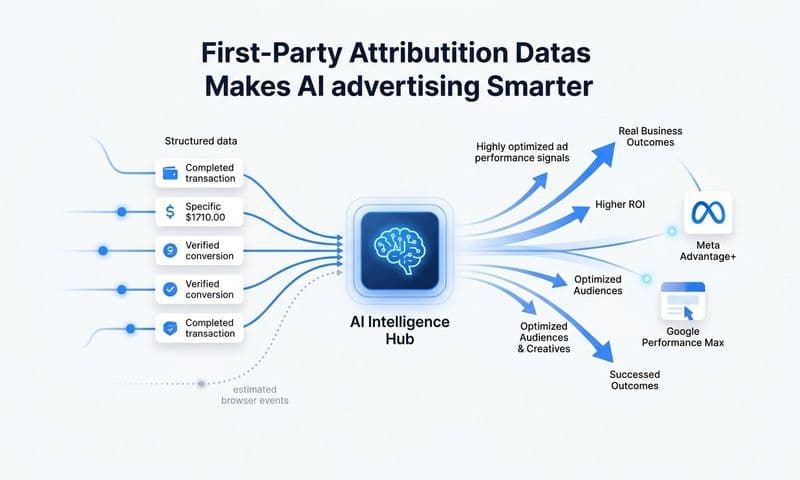
Beyond internal recommendations, enriched conversion data fed back to ad platforms like Meta and Google improves the performance of those platforms' own AI systems. When you send server-side conversion events that include downstream signals like deal stage progressions and closed-won revenue, Meta and Google can optimize your campaigns for the audience segments most likely to become paying customers, not just the segments most likely to click an ad or fill out a form.
Cometly's AI ads manager does both: it surfaces recommendations for your own budget allocation decisions and sends enriched conversion data back to ad platforms to improve their targeting algorithms. This creates a compounding improvement loop where better data leads to better targeting, which leads to higher-quality conversions, which generates even better data.
Implementation Steps
1. Confirm that your attribution data foundation is solid: UTMs are consistent, server-side tracking is live, and ad spend is connected to revenue outcomes.
2. Enable AI-driven recommendations in your attribution platform and review the initial outputs against your own manual analysis to calibrate your confidence in the system.
3. Set up automated conversion event sharing back to Meta and Google using enriched signals that include deal stage and revenue data, not just top-of-funnel form submissions.
4. Establish a weekly review cadence to act on AI recommendations, test suggested budget shifts, and measure the impact on pipeline and revenue attribution over time.
Pro Tips
Treat AI recommendations as a starting point for decisions, not the final word. The best use of AI-driven attribution insights is to accelerate your analysis and surface patterns you might miss manually. Combine those insights with your own knowledge of campaign context, creative quality, and seasonal factors to make budget decisions that are both data-informed and strategically sound.
Putting It All Together
HubSpot and Salesforce are powerful CRMs, but attribution is not their core strength. Both platforms were built to manage contacts, deals, and pipelines, not to give marketers a precise, real-time view of which ad campaigns are generating revenue. The strategies in this article are designed to close that gap.
Start with model alignment and UTM hygiene since those are the foundation everything else depends on. Then work toward connecting your ad spend data to pipeline and revenue outcomes. Server-side tracking and cross-channel attribution views are the upgrades that move you from guessing to knowing.
If you are prioritizing implementation, this is the sequence that makes the most sense:
1. Agree on your attribution model and document it across all teams.
2. Fix UTM parameter hygiene and enforce it at campaign creation.
3. Map the full customer journey including pre-conversion touchpoints.
4. Connect ad spend to pipeline and closed-won revenue in a unified view.
5. Implement server-side tracking to recover lost conversion data.
6. Build a cross-channel attribution dashboard outside your CRM.
7. Layer in AI-driven recommendations once your data foundation is solid.
Cometly was built specifically for B2B SaaS teams who need this level of clarity. It connects your ad platforms, CRM, and website into a single attribution view, tracks every touchpoint from first ad click to closed-won revenue, and uses AI to surface which campaigns deserve more budget. If your current attribution setup is leaving you with incomplete data or conflicting reports, Cometly gives you a clear path forward.
Ready to see exactly which campaigns are driving your revenue? Get your free demo today and start capturing every touchpoint to maximize your conversions.