If your conversion data suddenly fell off a cliff after an iOS update, you are dealing with one of the most frustrating problems in modern performance marketing. Apple's App Tracking Transparency framework changed the rules of the game, and pixel-based tracking simply was not built to survive it. The result is incomplete conversion data, inflated cost-per-acquisition figures, and ad platform algorithms that are flying partially blind.
The downstream effects are real. When Meta or Google cannot see enough conversion signals, their automated bidding strategies lose accuracy. Campaigns that were actually profitable start looking like losers in the dashboard. Budget decisions get made on bad data, and scaling becomes a guessing game.
The good news is that this is a solvable problem. Recovering lost tracking data after an iOS update is not about finding a workaround. It is about rebuilding your tracking infrastructure on a foundation that does not depend on browser-based cookies or device identifiers that users can block. That means server-side tracking, enriched conversion signals, and multi-touch attribution that pulls from multiple data sources at once.
This guide walks you through every step: diagnosing how much data you have lost, auditing your existing setup, implementing server-side tracking, restoring quality signals to your ad platforms, adopting multi-touch attribution, and validating that your recovered data is actually reliable. Whether you are running paid social, paid search, or a combination of both, these steps apply directly to your situation.
By the time you finish, you will have a tracking stack that is resilient to future iOS changes, capable of feeding your ad platform algorithms accurate signals, and built to give you the confidence to scale based on data you can actually trust.
Step 1: Diagnose the Scope of Your Tracking Loss
Before you fix anything, you need to understand exactly what broke and by how much. Jumping straight into implementation without a clear diagnosis often leads to patching the wrong gaps, and you end up with a setup that looks fixed but still has blind spots.
Start by pulling conversion data from your ad platforms and comparing it against a date range that spans the iOS update rollout. Look for a noticeable drop in reported conversions that does not correspond to a drop in actual business results. If your CRM is still showing a healthy volume of leads or purchases while your ad platform dashboards show a steep decline, that gap is your tracking loss.
Check your Event Match Quality score in Meta Events Manager. This score reflects how well your conversion events are being matched to Facebook users. A score that dropped around the time of an iOS update is a clear signal that your pixel-based events are losing the identifiers needed to match conversions back to ad impressions. Lower match quality means worse optimization, not just worse reporting.
Compare ad platform data to your CRM or backend records. Your CRM captures conversions regardless of whether a pixel fires correctly. If your CRM shows significantly more conversions than Meta or Google are reporting, the difference represents events that are happening but not being attributed. This is your recovery target.
Identify which campaigns and placements are most affected. iOS restrictions hit mobile placements hardest, particularly those targeting users on iPhones and iPads. Campaigns with heavy mobile traffic or those targeting audiences that skew toward iOS users will typically show the largest gaps. Segment your data by device type if your platform allows it.
Flag attribution window changes. Some ad platforms shortened their attribution windows in response to iOS restrictions. A campaign that previously used a 28-day click window may now be reporting on a 7-day window, which can make performance look worse than it actually is even before accounting for pixel data loss. Understanding how iOS changes affected digital advertising helps put these shifts in proper context.
Document all of this before you move on. Write down your current reported conversion volumes, your EMQ scores, and the gap between platform-reported and CRM-recorded conversions. This baseline is what you will measure your recovery against after implementing the fixes in the steps ahead.
Step 2: Audit Your Current Pixel and Tag Setup
Once you know the scale of the problem, the next step is understanding exactly where your tracking infrastructure is vulnerable. A pixel audit is not glamorous work, but skipping it means you will likely implement server-side tracking on top of a broken foundation, which compounds the problem rather than solving it.
Open your Meta Events Manager and Google Ads conversion tracking settings and review every event you are currently tracking. For each event, ask two questions: Is it firing correctly? And is it relying entirely on client-side execution?
Use browser developer tools or a tag auditing extension to verify event firing. Tools like the Meta Pixel Helper and Google Tag Assistant let you confirm that events are triggering on the right pages and actions. Walk through your actual conversion flows: add to cart, lead form submission, purchase confirmation. Confirm that each step fires the correct event with the correct parameters.
Test in mobile environments, not just desktop. This is where many audits fall short. A pixel that fires perfectly in Chrome on a desktop may behave completely differently in iOS Safari or an in-app browser. iOS Safari's Intelligent Tracking Prevention (ITP) limits cookie lifespans, and in-app browsers used by social platforms have their own restrictions. Use device emulation or test on an actual iPhone to see what your Facebook pixel tracking looks like from the perspective of your most affected users.
Identify events with no server-side backup. Any event that is tracked only through a browser pixel is vulnerable. Make a list of these events and prioritize them by business value. A purchase event with no server-side backup is a critical gap. A page view event with no server-side backup is much lower priority.
Check for duplicate events and deduplication configuration. If you already have some server-side events running alongside pixel events, make sure deduplication is properly configured. Without it, the same conversion gets counted twice, which inflates your reported numbers and gives your ad platform algorithms misleading signals. Meta uses event IDs for deduplication. Google uses transaction IDs. Confirm these are being passed correctly.
By the end of this audit, you should have a clear map of every conversion event, which ones are client-side only, which ones have server-side coverage, and which ones have deduplication gaps. This map is your implementation roadmap for the next step.
Step 3: Implement Server-Side Tracking to Bypass iOS Restrictions
This is the most technically significant step, and it is the core solution to the iOS tracking problem. Understanding why it works will help you implement it correctly.
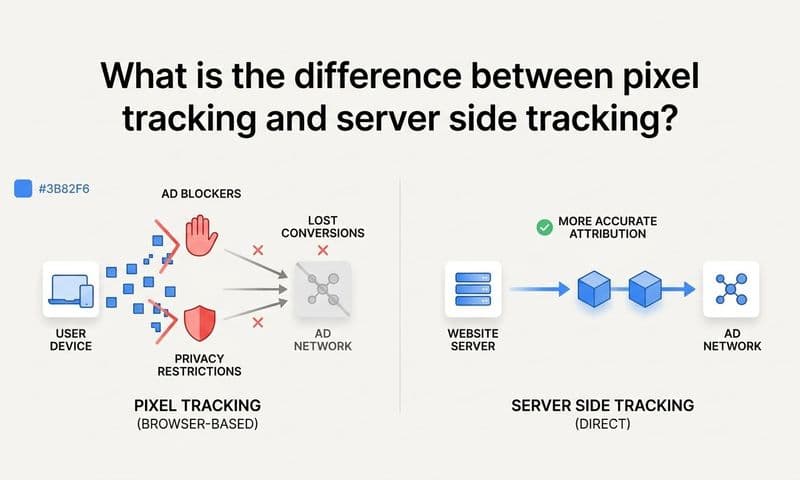
When a browser pixel fires, it sends event data from the user's browser to the ad platform. iOS privacy settings, ad blockers, and browser-level tracking prevention can all interrupt this communication. Server-side tracking works differently and is more accurate. Instead of sending data from the user's browser, it sends data from your server directly to the ad platform's server. iOS privacy settings have no visibility into this communication. The event gets recorded regardless of what the user has opted into on their device.
Setting up Meta's Conversions API (CAPI). Meta's Conversions API is the primary mechanism for server-side event sending on Meta platforms. You can implement CAPI directly through Meta's API documentation, through a partner integration, or through a platform like Cometly that handles the CAPI connection and event mapping for you. The key requirement is that your server-side events include customer data parameters: hashed email addresses and phone numbers are the most valuable. These hashed identifiers allow Meta to match server-side events to Facebook users, which is what drives Event Match Quality scores up.
Setting up Google's Enhanced Conversions. For Google Ads, Enhanced Conversions is the equivalent server-side matching feature. It works by sending hashed customer data alongside your conversion events, allowing Google to match conversions to logged-in Google users even when cookies are unavailable. You can configure this through Google Tag Manager's server-side container or directly through the Google Ads API.
Prioritize deduplication from the start. Running both browser pixel events and server-side events simultaneously is the recommended approach because it maximizes coverage. But you must configure deduplication correctly or you will double-count conversions. For Meta, pass a unique event ID with both the pixel event and the CAPI event for the same action. Meta uses this to identify and deduplicate the pair. For Google, pass a consistent transaction ID with your Enhanced Conversions events.
Include hashed customer data to maximize match rates. The more customer data you can pass with server-side events, the higher your match rates will be. Email address and phone number are the highest-value identifiers. Hash them using SHA-256 before sending. You are not storing raw personal data in the ad platform; you are sending a one-way hash that the platform uses for matching.
Platforms like Cometly offer built-in server-side tracking that handles CAPI connections, deduplication logic, and customer data hashing automatically. If your team does not have dedicated engineering resources for custom API integrations, using a platform that manages this infrastructure significantly reduces both setup time and the risk of misconfiguration.
Step 4: Restore Conversion Signals to Your Ad Platforms
Implementing server-side tracking creates the pipeline. This step is about making sure that pipeline is actually delivering quality signals that your ad platforms can use to optimize campaigns.
After your server-side setup is live, return to Meta Events Manager and check your Event Match Quality scores. You should see improvement within a few days as server-side events with customer data start flowing through. Higher EMQ scores are a direct indicator that your setup is working. They mean Meta can match more of your conversion events to Facebook users, which improves both your attribution accuracy and your campaign optimization.
Use Conversion Sync to feed enriched events back to your ad platforms. This is where the data you have recovered starts actively improving your campaign performance. Conversion Sync takes your server-side conversion events, enriched with customer identifiers and conversion values, and sends them back to Meta, Google, and other platforms. When ad platform algorithms receive richer, more accurate conversion data, their automated bidding strategies perform better. Value-based bidding and target ROAS strategies in particular rely heavily on conversion signal quality to scale ads accurately.
Prioritize your highest-value events first. Not all conversion events have equal impact on campaign optimization. Purchases, qualified leads, and subscription starts carry the most weight for bidding algorithms. Get these events flowing through your server-side pipeline and verified in your ad platforms before moving on to lower-funnel events like add-to-cart or page views.
Re-evaluate bidding strategies you may have paused. Many marketers scaled back or paused value-based bidding and target ROAS strategies after iOS data loss because the underlying data quality was too poor to trust. Once your server-side conversion signals are verified and your EMQ scores have improved, these strategies become viable again. Reintroduce them carefully, giving the algorithm a learning period to recalibrate on the improved data.
Align attribution windows with your actual sales cycle. Check the attribution window settings in each ad platform and make sure they reflect how long your customers typically take to convert after seeing an ad. A mismatch between your attribution window and your sales cycle can make campaigns look underperforming even with accurate tracking in place. Reviewing your attribution tracking setup end-to-end is the best way to catch these misalignments before they distort your decisions.
The goal of this step is not just to recover historical data visibility. It is to actively improve the quality of the signals your ad platforms receive going forward, which directly improves how their algorithms allocate your budget.
Step 5: Switch to Multi-Touch Attribution to Fill the Gaps
Even with server-side tracking in place, iOS restrictions mean that some touchpoints will always go unrecorded by any single tracking method. A user might see your Facebook ad on their iPhone, browse your website without accepting cookies, and then convert later through a Google search on their laptop. No single pixel or server-side event captures that full journey.
Multi-touch attribution solves this by combining data from multiple sources to build a more complete picture of how conversions happen. Instead of relying on one tracking method, it stitches together server-side events, UTM session data, CRM records, and ad platform data to reconstruct the customer journey from multiple angles.
Set up UTM parameters consistently across all campaigns. UTM parameters appended to your ad URLs capture source and campaign information at the session level in your analytics platform, completely independent of cookies or device tracking. When a user clicks your ad and lands on your site, the UTM data is captured in the URL and logged by your analytics layer regardless of their iOS privacy settings. This gives you a baseline attribution layer that iOS changes cannot break. The key is consistency: every paid campaign, every ad, every channel should use properly structured UTM parameters so your analytics data is clean and comparable. If you are new to this, a guide on what UTM tracking is and how it helps will give you the foundation you need.
Connect your CRM to your attribution platform. Your CRM contains conversion data that exists completely outside the browser tracking ecosystem. Sales-assisted deals, phone call conversions, and offline events all live in your CRM. Connecting this data to your attribution platform means these conversions get included in your attribution models rather than disappearing into an untracked gap.
Compare attribution models to understand channel roles. Different attribution models tell different stories. First-touch attribution highlights which channels are initiating customer journeys. Last-touch attribution shows which channels are closing them. Linear and time-decay models distribute credit across the full journey. Data-driven models use your actual conversion patterns to assign credit. Running multiple models side by side often reveals that channels you thought were underperforming were actually doing significant work earlier in the funnel.
Cometly provides multi-touch attribution across all marketing touchpoints, pulling together server-side events, UTM data, and CRM records into a unified view. This is particularly valuable in a post-iOS environment because it does not depend on any single tracking method that platform updates can disrupt. When one layer loses signal, the others compensate.
Step 6: Validate Your Recovered Data and Benchmark Performance
Implementing fixes without validating them is how teams end up with tracking setups that look healthy in dashboards but are still quietly missing conversions. This step is about confirming that what you have built is actually working and establishing a reliable benchmark for ongoing performance measurement.
Run a parallel comparison between your new attribution data and your ad platform reported data. Pull conversion numbers from your server-side attribution setup and compare them to what your ad platforms are reporting for the same time period. Some variance is normal and expected. The goal is not perfect alignment but reasonable alignment, which typically means your two data sources are within a range that you can explain and account for.
Compare against your CRM or backend records. Your CRM is your ground truth. It records actual business outcomes regardless of how they were tracked. Compare your recovered attribution data against your CRM conversion records for the same period. If your attribution data is now much closer to your CRM numbers than it was before you implemented server-side tracking, that is direct evidence that your recovery is working.
Recalculate your true CPA and ROAS. This step often produces a significant insight. When you apply your more complete attribution data to your campaign performance, campaigns that appeared to have poor CPA or ROAS in-platform often look considerably better. The campaigns were driving conversions that the pixel was not recording. Now that you have server-side data filling those gaps, the actual economics of those campaigns become visible. Learning how to fix attribution discrepancies can help you reconcile these differences systematically.
Set up ongoing monitoring alerts. Tracking is not a set-and-forget system. Event Match Quality scores can degrade if your customer data pipeline changes. Conversion volumes can drop suddenly if a server-side integration breaks. Set up alerts in your attribution platform for significant drops in event match quality or conversion volume so you can catch new issues before they compound into large data gaps.
Document your calibration baseline. Record the gap percentage between your old pixel-only data and your new server-side data. This becomes your calibration reference for future reporting. If you know that your pixel-only setup was capturing roughly a certain fraction of actual conversions, you can apply that context to any historical data comparisons you need to make going forward.
A well-validated setup should show your ad platform reported conversions and your CRM or backend conversions within an acceptable variance range. The exact tolerance depends on your business, but many teams aim for their two data sources to be within roughly ten to fifteen percent of each other as a sign of healthy alignment.
Building a Tracking Stack That Survives Future Updates
The steps you have completed represent more than a recovery from one iOS update. They represent a fundamental shift in how your tracking infrastructure is built. The old approach, relying primarily on browser pixels and client-side cookies, was always fragile. The new approach is layered, redundant, and resilient.
Here is a quick action checklist to confirm you have covered every step:
1. Diagnose your conversion drop by comparing ad platform data to CRM records and documenting the gap.
2. Audit all pixels and tags to identify client-side-only events and deduplication gaps.
3. Implement server-side tracking via Meta's Conversions API and Google's Enhanced Conversions with hashed customer data.
4. Sync enriched conversion events back to Meta and Google to restore algorithm signal quality.
5. Set up multi-touch attribution with consistent UTM parameters and CRM integration.
6. Validate recovered data against backend records and establish your calibration baseline.
7. Monitor event match quality and conversion volumes on an ongoing basis with automated alerts.
The layered approach, combining server-side events with UTM session tracking and CRM integration, gives you redundancy. When one layer loses signal, the others compensate. No single platform update can take down your entire tracking infrastructure.
Cometly brings all of these layers together in one platform, from server-side tracking and CAPI integration to AI-powered attribution and analytics. Rather than managing separate integrations for each piece, you get a unified system that captures every touchpoint, connects them to revenue, and feeds your ad platforms the quality signals they need to optimize effectively.
Treat tracking as a continuous practice. Review your event match quality scores regularly, audit your setup when you make significant changes to your conversion flows, and stay ahead of platform updates rather than reacting to them after the damage is done.
Recovering lost tracking data after an iOS update is not a one-step fix. It requires diagnosing your gaps, rebuilding your tracking foundation with server-side methods, restoring quality conversion signals to your ad platforms, and adopting an attribution approach that is not dependent on cookies or device identifiers. When you complete these steps, you get more than just recovered data. You get a tracking stack that is resilient, accurate, and capable of feeding your ad platform algorithms the signals they need to optimize effectively.
If you want to skip the manual setup and get all of these capabilities in one place, Cometly's server-side tracking, Conversion Sync, and multi-touch attribution tools are built specifically to solve the iOS tracking problem for performance marketers. Get your free demo today and start capturing every touchpoint to maximize your conversions.