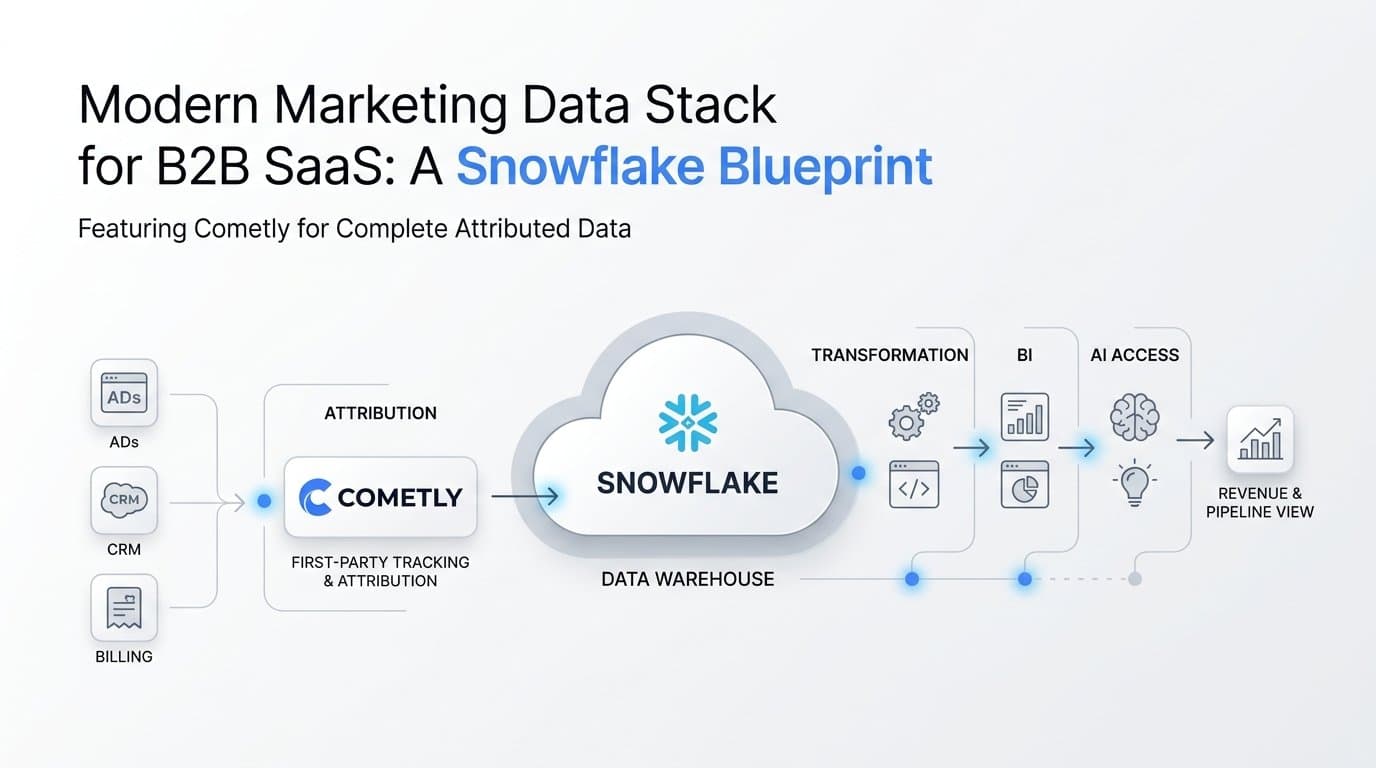
A modern marketing data stack is a set of connected layers that turns ad, CRM and billing data into one trusted view of pipeline and revenue. The layers are collection, attribution, warehouse, transformation, BI and AI access. The warehouse gets most of the attention, but it is the layer that fixes the least on its own: if the data going in is incomplete or unattributed, the warehouse stores the same gaps in a cleaner format.
This article walks through each layer using Snowflake as the example warehouse. It also shows where Cometly sits as the attribution and first-party tracking layer, feeding the warehouse through Data Warehouse Exports and giving AI agents read-only access through the Cometly MCP server.
The Six Layers and the Path a Deal Takes Through Them
A workable stack for a B2B SaaS company has six layers, each with one job:
- Sources: ad platforms, your website, your CRM and Stripe.
- Tracking and attribution: capturing touchpoints and tying them to people, companies and revenue.
- Warehouse: a customer-owned store where all of it can be joined.
- Transformation: SQL models that turn raw tables into business metrics.
- BI: dashboards for spend, pipeline and revenue.
- AI agent access: natural-language questions answered from governed data.
Follow one deal through it. A prospect clicks a LinkedIn or Google ad and lands on your site. They fill in a demo form, and a contact is created in your CRM. Weeks later a sales rep opens an opportunity, and eventually the account is marked closed-won and pays its first Stripe invoice. Four systems each hold one piece of that story. The stack exists so the pieces land in one place and stay connected to the original click.
Why platform dashboards plus spreadsheets break
The older pattern is to export each ad platform's report and paste it next to CRM numbers. It fails for structural reasons, not for lack of effort.
- Each ad platform reports its own conversions using its own attribution window and its own rules, so the same lead can be claimed by two channels.
- None of those platforms can see closed-won revenue. They see a form fill, not a $24,000 annual contract.
- Spreadsheets freeze definitions in formulas. When someone changes how a metric is calculated, history is rarely restated.
A layered stack replaces those reconciliations with one set of definitions applied to one set of data.
What the Warehouse Does, and Why Snowflake Is the Example Here
The warehouse is the single system of record you own. Marketing data alone is useful, but it becomes decision-grade when it can be joined with product usage, finance and sales data. Questions like "which campaigns produce accounts that expand after six months" cannot be answered inside any ad platform. They need a place where ad data, CRM data and billing data share keys.
Snowflake is used as the example because it is widely adopted and its pattern is easy to follow. The choice is illustrative, not exclusive. Cometly's exports are Parquet files, an open columnar format that works with Snowflake, BigQuery, Databricks, Athena and DuckDB. If your team already runs one of those, the architecture in this article carries over with different loading syntax.
Raw data and reporting logic live apart
The most valuable property of a warehouse is the separation between storing raw data and defining metrics. Raw tables hold what happened: every touchpoint, every ad-level row, every contact. Reporting logic lives in models on top. When leadership decides that a qualified pipeline stage should count differently, or that CAC should include agency fees, you edit a model and rebuild. You do not need to re-collect anything, and you can restate history under the new definition.
That separation also lets you run two definitions side by side during a transition, which is hard to do in a dashboard tool that stores logic and data together.
A caution on specifics: warehouse pricing, compute options and features change often. Anything about Snowflake costs or capabilities should be checked against its current documentation and your plan details as of 2026 before you commit to a design.
Capturing Source Data: Ad Platforms, CRM and Stripe Billing
Each source has a characteristic failure mode. Knowing it in advance saves months of mistrust in the numbers.
Ad platform data
You need spend, impressions and clicks at campaign, ad set and ad level, kept at daily grain. The subtle problem is dates. Each channel reports in its own account time zone, so a day in one platform is not the same 24 hours as a day in another. Joining channels on a naive calendar date can shift spend and conversions across day boundaries and distort daily comparisons. Store the channel's local date explicitly and decide once how you will align them for reporting.
CRM data
Contacts, companies, lifecycle stages and opportunities are the backbone of pipeline reporting. The common mistake is losing the original ad source at the moment a lead is created. If the form submission does not carry click identifiers and campaign parameters into the CRM record, the source field ends up as "direct" or "unknown," and every downstream pipeline report inherits the gap. Capture source at the touchpoint level, before the lead exists, and attach it to the contact when it does.
Stripe billing data
Reporting that stops at MQLs or opportunities leaves the real question open. Stripe holds the subscription revenue, and connecting it back to the ad that started the journey is what lets you report cost per paying customer and revenue by campaign. Cometly integrates Stripe revenue with ad data so payments can be tied to the journeys that produced them.
Why browser pixels alone fall short
A browser pixel is a script that fires from the visitor's browser. Ad blockers, browser privacy features and cookie limits can stop it, so some conversions never reach the ad platform or your analytics. Server-side tracking sends the event from your server instead, which is not subject to those browser restrictions. A Conversion API (Meta's is one example) is the channel for sending those server-side events directly to the ad platform. Together they recover events pixels lose and let you send richer, conversion-ready data back to the platforms for optimization.
The Attribution Layer: Where Cometly Feeds the Warehouse
Attribution deserves its own layer because a warehouse cannot infer it from raw tables. Linking an anonymous ad click to a form fill, then to a CRM contact, a company and later a Stripe payment requires identity stitching and first-party tracking at the moment of the visit. Multi-touch attribution then distributes credit across the touchpoints in that journey instead of giving it all to one. Cometly serves as that layer, capturing touchpoints and connecting them to conversions and revenue.
Data Warehouse Exports
Cometly Data Warehouse Exports send raw marketing data as Parquet files with Hive-style partitioning, which means files are organized in folders named by partition key and value, so engines can skip data they do not need. Delivery options are:
- Your own Amazon S3 bucket
- Your own Google Cloud Storage bucket
- Direct loading into Snowflake or BigQuery
Because the buckets are yours, the data stays under your ownership, and the files can be read by Snowflake, BigQuery, Databricks, Athena and DuckDB.
The available datasets
- Ad analytics: a separate dataset for each ad channel, with one row per ad-hierarchy entity per day, using the channel's local date.
- Contacts: the people in your funnel.
- Companies: the accounts those people belong to.
- Raw touchpoints: the individual interactions in each journey.
- Attributed conversions: conversions with their attribution applied.
Planning your exports
Each export holds one dataset and has its own cadence and data window. That means you plan one export per dataset, and per ad channel for ad analytics. Match cadence to how the data is used: ad analytics feeding a daily spend dashboard needs a different rhythm than a companies table that changes slowly. Set the data window deliberately too, since it determines how much history each run covers.
For configuration steps, follow the setup guides at docs.cometly.com rather than relying on a summary here.
Modeling and Reporting: From Raw Tables to Pipeline and ROI Dashboards
Once raw datasets land in Snowflake, the transformation layer turns them into tables people can trust. A typical build runs in this order:
- Standardize each ad channel's dataset into a common schema, keeping the local date and adding a reporting date.
- Join attributed conversions to contacts and companies.
- Join Stripe revenue to those companies and contacts.
- Aggregate into reporting tables: CAC by channel, pipeline by campaign, and revenue by first touch versus multi-touch.
Tools such as dbt are a common way to manage these steps as version-controlled SQL, though any scheduler that runs SQL will do.
Compare attribution models, then choose on purpose
Because touchpoints are stored raw, you can compute several models over the same data: first touch, last click, linear and data-driven. The choice changes budget decisions. First touch tends to favor top-of-funnel channels that start journeys. Last click favors channels that capture demand at the end. Linear spreads credit evenly, and data-driven weights touchpoints by modeled contribution. A channel that looks mediocre under last click can look essential under first touch.
The useful habit is to put two models next to each other for every channel and investigate the large gaps. Those gaps show where a channel creates demand versus where it only collects it, and that is where budget moves should be argued.
Dashboards for growth leaders
Keep the executive view small: a handful of metrics tied to spend, pipeline and revenue. For example, spend, cost per opportunity, pipeline created, closed-won revenue and CAC, by channel. Each metric should carry a written definition on the dashboard itself, covering what counts, which attribution model applies and which date is used. Most disagreements in marketing reviews are definition disputes, and visible definitions end them quickly.
If you add benchmarks, cite a named source and year. Without one, leave the comparison out and let your own trend lines carry the story.
Giving AI Agents Safe Access with the Cometly MCP Server
MCP, the Model Context Protocol, is a standard that lets AI clients call tools exposed by another system. The Cometly MCP server lets clients such as Claude Desktop, Claude Code, Cursor and ChatGPT Desktop query Cometly data in natural language, authenticated through OAuth.
What is documented
- About 50 tools across toolsets including ad analytics, events, contacts, companies, reports, segments, integrations and diagnostics.
- All tools are read-only. The server cannot create, modify or delete records.
- The endpoint format is https://app.cometly.com/mcp/{space_id}/public-api.
- You need a Cometly Space with the Use Public API permission.
The read-only design addresses a common misconception: AI agents do not need write access to be useful for marketing analysis. Most questions are about reading and comparing data, and a read-only boundary means a mistaken prompt cannot alter your records.
Questions worth asking
A marketer might ask which campaigns drove the most attributed conversions last month, how spend on a given channel changed week over week, or which integrations are showing sync problems. Diagnostics tools are handy for that last kind of question, since they help you check data health before you trust a report.
Treat the answers as a fast first pass. Verify any figure that will drive a budget decision against your dashboard, since a natural-language question can be interpreted differently than you intended.
MCP and the warehouse together
The two serve different jobs. MCP is for quick questions where you want an answer in seconds without opening a dashboard. The warehouse is for deep joins and custom models, such as combining attribution with product usage or finance data. Use MCP to explore, and the warehouse to build what the company will rely on. Setup details are in the Cometly documentation.
One Job per Layer: Putting the Stack Into Practice
The stack works when each layer does one thing: sources generate data, Cometly attributes it and captures first-party events, the warehouse stores it, models define metrics, BI presents them and AI agents answer quick questions on top. Cometly supplies the attribution and tracking layer, with Data Warehouse Exports feeding Snowflake and the MCP server opening read-only access to AI clients.
A sensible first step is small: set up one export, such as attributed conversions, and join it to your Stripe revenue. Follow the setup guides at docs.cometly.com to create your first Data Warehouse Export or connect the MCP server.
Ready to elevate your marketing game with precision and confidence? Discover how Cometly's AI-driven recommendations can transform your ad strategy. Get your free demo today and start capturing every touchpoint to maximize your conversions.