Outbound sales creates a tracking blind spot that most B2B SaaS companies never fully solve. Your sales team is cold emailing, calling, and running sequences. Your marketing team is running paid ads and content campaigns. Revenue comes in, but pinning that revenue to its actual origin is where things fall apart.
Without a reliable system to track outbound SaaS revenue, you end up making budget decisions based on incomplete data. You might cut a marketing channel that was quietly warming up outbound leads. You might double down on outbound sequences that only convert when paired with retargeting. The result is a slow, expensive leak in your growth engine.
The problem is not a lack of data. It is a lack of connected data. Your CRM holds deal stages and rep activity. Your ad platforms hold click and impression data. Your billing system holds actual revenue. None of these talk to each other by default.
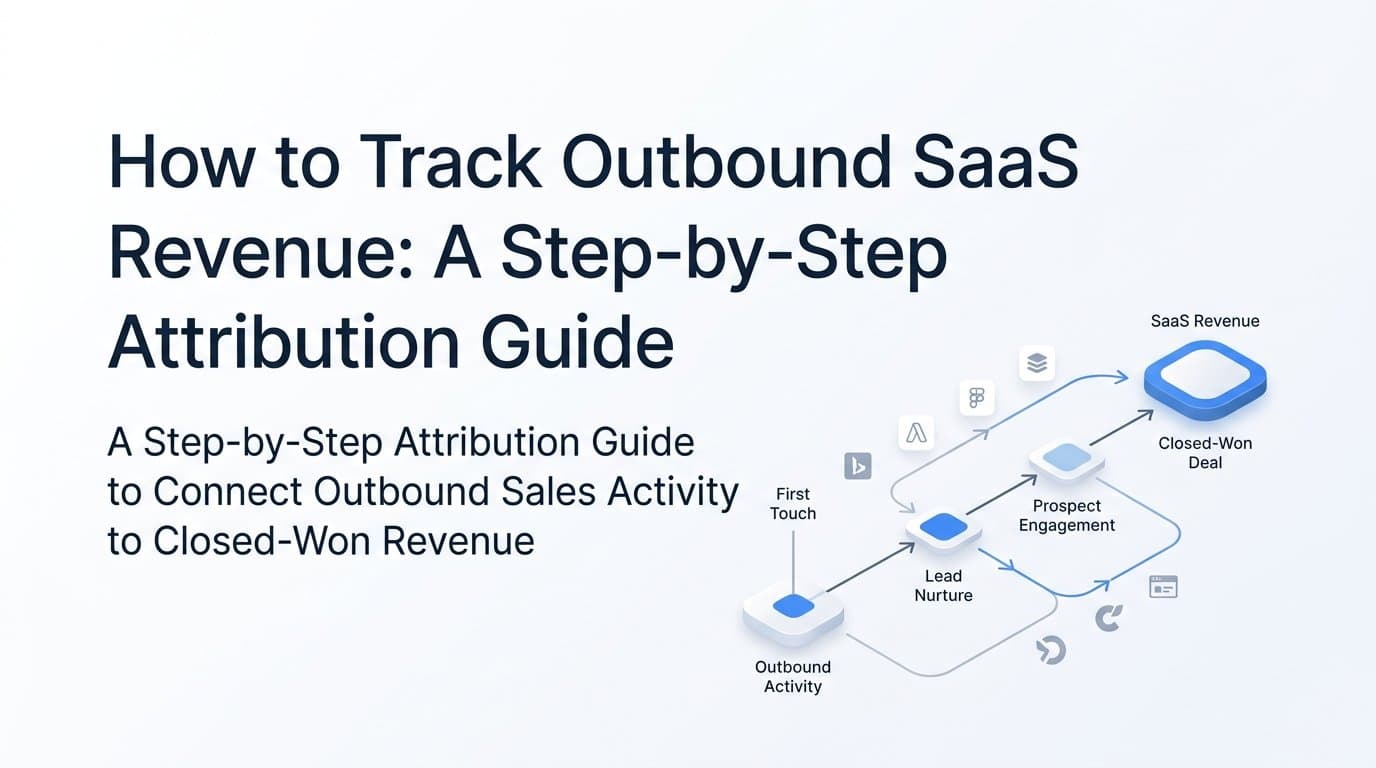
This guide walks you through a practical, step-by-step process to connect those dots and track outbound SaaS revenue from first touch to closed-won deal. By the end, you will have a clear attribution framework that shows which channels, campaigns, and touchpoints are genuinely contributing to outbound revenue, not just the ones that get credit by default.
Whether you are a marketing leader trying to prove ROI, a growth operator building your first attribution stack, or a founder who wants to scale what is working, this guide gives you a repeatable system built for how B2B SaaS companies actually sell.
Step 1: Define What "Outbound Revenue" Means in Your Attribution Model
Before you build anything, you need a shared definition. And this is where most teams skip ahead too fast.
Not all outbound deals are created equal. Some deals are purely outbound sourced: a rep found a prospect, reached out cold, and closed the deal with zero prior marketing exposure. Other deals are blended: the prospect clicked a LinkedIn ad three weeks before the rep's cold email landed at exactly the right moment. Treating both of these as identical "outbound deals" will corrupt your attribution data from day one.
Start by establishing three categories with your sales and marketing teams:
Outbound-only deals: No recorded marketing touchpoints prior to the first rep contact. The prospect had no interaction with your paid ads, content, or website before the sequence began.
Marketing-assisted outbound deals: The prospect had at least one marketing touchpoint (ad click, blog visit, webinar attendance) before responding to the outbound sequence. The rep sourced the deal, but marketing helped warm the ground.
Inbound-converted deals: The prospect came in through a marketing channel first, was then enrolled in a nurture or outbound sequence, and converted. Marketing sourced it, outbound accelerated it.
Once you have these definitions, the next decision is your attribution model. For B2B SaaS with long sales cycles, last-touch attribution is the least accurate option. It credits only the final interaction before conversion, which is usually a sales call or a demo booking, while completely ignoring the marketing touches that created the opening for the rep in the first place.
Multi-touch attribution distributes credit across every touchpoint in the customer journey. Linear multi-touch gives equal weight to all touches. Time-decay models weight recent touches more heavily. Data-driven models use your actual conversion patterns to assign credit algorithmically. For most B2B SaaS companies tracking outbound revenue, starting with linear multi-touch and moving toward data-driven as your data volume grows is the right progression.
The common pitfall here is treating every deal sourced by a rep as outbound-only, even when the prospect clicked an ad before responding to the sequence. This systematically under-credits marketing and leads to budget cuts in the channels that are actually doing the heavy lifting.
Success indicator: Your team can answer "was this deal outbound-only, marketing-assisted, or blended?" with data pulled from your CRM, not with a rep's memory or a guess.
Step 2: Set Up UTM Tracking and First-Party Data Capture Across Every Entry Point
Once your attribution definitions are locked in, the next step is making sure every outbound touchpoint is trackable when a prospect hits your website. This is where UTM parameters become essential infrastructure, not just a nice-to-have.
Every link in your outbound motion should carry UTM parameters. That includes links in cold email sequences, LinkedIn connection messages and InMails, direct mail landing pages, event follow-up emails, and any other channel where your reps are sending prospects to a web property.
Use a consistent naming convention across your entire team. A well-structured UTM setup looks like this:
utm_source: The platform or channel (e.g., outbound-email, linkedin-outreach, cold-calling-followup)
utm_medium: The method of delivery (e.g., email, social, direct)
utm_campaign: The specific campaign or sequence name (e.g., q3-icp-sequence, enterprise-cfo-outreach)
utm_content: The specific message variant or rep name if you want rep-level attribution
The critical failure point here is inconsistency. If one rep uses "outbound-email" as the source and another uses "cold-email" and a third uses "email-outbound," your analytics platform splits that data into three separate buckets. You lose the ability to see the full picture of how outbound email is performing across the team.
Build a UTM naming guide and store it somewhere your entire sales and marketing team can access it. Better yet, use a UTM builder tool that enforces the naming convention so reps cannot create their own variations.
Beyond UTM tracking, you need first-party cookie tracking on your website. When an outbound prospect clicks a link in a sequence and lands on your site, that session needs to be tied to the original outbound touch. First-party cookies store that source data in the browser so that even if the prospect visits your site multiple times over several weeks, the original outbound touchpoint is preserved in the attribution record.
The final piece is hidden form fields. When a prospect fills out a demo request form or a contact form on your site, those hidden fields should automatically capture and pass the UTM data from their session into the CRM record. This creates a direct data bridge between the outbound touch and the CRM lead record without requiring any manual input from the rep.
Success indicator: Every inbound form submission from an outbound-sourced visit carries source data into the CRM record automatically. You can pull a report in your CRM showing lead source for every new contact, and outbound-sourced visits are clearly labeled with the correct channel and campaign.
Step 3: Connect Your CRM to Your Attribution Platform
UTM tracking captures the entry point. CRM integration is what ties that entry point to revenue.
Your CRM is the system of record for your sales pipeline. It holds deal stages, close dates, contract values, and rep activity. Your attribution platform needs to pull from this data continuously so that as deals progress through the pipeline, attribution events are triggered and recorded in real time.
The integration should map these CRM events to attribution milestones:
Lead created: When a new contact enters the CRM, the original lead source and UTM data should be captured and stored on the record.
Opportunity opened: When a lead converts to an active opportunity, that transition should trigger an attribution event with the associated pipeline value.
Demo booked: A high-intent conversion event that should be tracked as a distinct milestone, not just lumped in with opportunity creation.
Closed-won: The revenue event. This should trigger attribution with the full MRR or ACV value attached so your attribution platform can report on actual revenue, not just lead counts.
Cometly's native integrations connect directly with CRMs like HubSpot, Salesforce, and Pipedrive to pull pipeline data alongside ad platform data into a single attribution view. This means you can see, in one dashboard, how a LinkedIn ad campaign contributed to pipeline that your outbound team then converted, with actual revenue values attached to each touchpoint in the journey.
One critical detail: do not only sync closed-won deals. Many attribution setups make this mistake, and it creates a massive visibility gap. If you only pull closed-won data, you lose the ability to see which channels are influencing deals that are still in progress. You also lose the ability to identify which channels produce deals that stall or go dark. Both of those insights are valuable for optimizing your outbound motion.
Sync the full pipeline: every deal stage from lead created through closed-won and closed-lost. The closed-lost data is particularly useful because it shows you which channels are generating pipeline that does not convert, which is just as important as knowing what does convert.
Success indicator: Your attribution platform shows deal progression from first touch through closed-won with revenue values attached. You can trace a specific deal back through every marketing and outbound touchpoint in its history.
Step 4: Implement Server-Side Tracking to Capture Conversion Events Accurately
Here is a reality that many B2B SaaS teams underestimate: browser-based pixel tracking is missing a significant portion of your conversions. Ad blockers, browser privacy restrictions, iOS privacy changes, and cross-device journeys all create gaps in pixel-based data. For outbound-influenced deals, where the journey might span weeks and multiple devices, this signal loss is even more pronounced.
Server-side tracking solves this by sending conversion events directly from your server to ad platforms, completely bypassing the browser layer. Instead of relying on a pixel firing in a user's browser (which can be blocked, delayed, or dropped), your server sends the event data directly to Meta via the Conversions API, to Google via Enhanced Conversions, and to LinkedIn via its Insight Tag server-side integration.
The conversion events you should be sending server-side include:
Demo booked: When a prospect schedules a demo through your calendar tool or form, this event should fire server-side immediately.
Trial started: When a prospect activates a free trial, that event carries strong intent signal that ad platforms can use for optimization.
Subscription activated: The first payment event, which is the clearest signal of actual revenue conversion.
Closed-won (offline conversion): This is the most important one for outbound revenue tracking. When a rep marks a deal closed in the CRM, that revenue event needs to flow back to the ad platforms that touched the prospect earlier in their journey. This is called offline conversion tracking, and it is what allows ad platform AI to learn which audiences and creatives are associated with actual revenue, not just form fills.
Cometly's server-side tracking and Conversion API integration handles this entire layer. It sends enriched, first-party conversion data back to Meta, Google, and LinkedIn with the customer data needed to match the conversion back to the original ad exposure. This means your ad platforms receive accurate, complete conversion signals that reflect your real closed-won revenue.
The downstream benefit is significant. When Meta or Google receives accurate offline conversion data from your CRM, their AI optimization algorithms can build lookalike audiences based on your actual customers, not just the people who clicked a button on your website. For outbound-heavy B2B SaaS companies, this is the difference between ad campaigns that generate high-volume low-quality leads and campaigns that generate the specific buyer profiles your reps are targeting anyway.
Success indicator: Your ad platforms receive conversion events that match your CRM closed-won data within an acceptable variance range. The discrepancy between CRM revenue and ad platform reported conversions should be minimal, indicating that server-side tracking is capturing events that browser pixels were missing.
Step 5: Build a Revenue Attribution Dashboard That Shows the Full Outbound Picture
With your tracking infrastructure in place, the next step is pulling everything into a single view that tells the complete outbound revenue story. A dashboard that only shows ad platform metrics is not an attribution dashboard. A dashboard that only shows CRM pipeline is not an attribution dashboard either. You need both, connected, with revenue values attached.
The core metrics your outbound revenue attribution dashboard should track are:
Pipeline sourced by channel: Which channels are generating new opportunities? Break this down by outbound-only, marketing-assisted, and inbound-converted.
Pipeline influenced by channel: Which channels appear in the multi-touch path of active deals, even if they did not source the deal? This is your marketing-assist metric.
Closed-won revenue by attribution source: The bottom-line number. How much actual revenue can be traced back to each channel and campaign?
Average deal size by first-touch source: Some channels source smaller, faster deals. Others source larger enterprise deals that take longer to close. This metric tells you which channels are attracting your highest-value buyers.
Time-to-close by channel mix: Deals that have marketing touchpoints before the outbound sequence often close faster than purely cold outbound deals. This metric quantifies that effect.
Cometly's pipeline and revenue attribution views allow you to compare outbound-only deals against marketing-assisted deals side by side. This comparison is where the most actionable insights live. When you can see that marketing-assisted outbound deals close faster and at higher average contract values than purely cold outbound deals, you have a compelling data-driven argument for investing in the marketing channels that warm up your outbound prospects.
Segment your dashboard by outbound sequence, rep, campaign, and channel so you can identify which combinations produce the highest-value deals. You may find that a specific LinkedIn ad campaign consistently appears in the journey of your largest closed-won deals, even though it never gets last-touch credit. That insight is invisible without multi-touch attribution.
Connecting Stripe or your billing system to this dashboard is the final layer. When actual subscription revenue flows from Stripe into your attribution view alongside ad spend and CRM pipeline data, you have a true end-to-end picture: dollar spent on ads, to pipeline generated, to revenue collected.
Success indicator: You can pull a report that shows total closed-won revenue broken down by first touch, all touches, and the channel mix that influenced each deal. That report can be generated in minutes, not hours of manual spreadsheet work.
Step 6: Use Attribution Data to Optimize Outbound Sequences and Ad Spend Together
This is where the system pays for itself. The first five steps build the infrastructure. This step is about using that infrastructure to make smarter decisions about where you spend money and how your reps spend their time.
Start by identifying which ad campaigns and content pieces are being consumed by prospects before they respond to outbound sequences. This is your marketing-assisted outbound signal. If you notice that prospects who have seen your LinkedIn thought leadership ads are responding to cold emails at a higher rate than prospects with no prior marketing exposure, that is a signal worth acting on. It means your ad spend is warming up the market for your outbound team, even if no one is claiming credit for it.
Cometly's AI-powered recommendations surface these patterns automatically. Instead of manually cross-referencing ad platform data with CRM records, the platform identifies which ad creatives and channels are producing the highest-quality leads that outbound then converts. This removes the guesswork from budget allocation decisions.
Use this data to reallocate budget toward channels that consistently appear in the multi-touch path of closed-won outbound deals. A channel that never sources a deal but appears in the journey of your highest-value closed-won deals is worth funding. It is doing influence work that your last-touch reporting was completely missing.
Share attribution data with your sales team directly. When reps know which marketing touchpoints a prospect has already experienced before they reach out, they can personalize their outreach accordingly. A rep who knows a prospect watched a product demo video and clicked a retargeting ad in the past two weeks can open with a reference to that context rather than a generic cold email. That personalization improves response rates and shortens sales cycles.
Feed enriched conversion data back to Meta and Google continuously. As your closed-won data accumulates in your attribution platform and flows back to ad platforms via server-side tracking, the ad platform AI builds increasingly accurate models of what your best customers look like. Over time, your prospecting campaigns start finding buyers who match the profile of prospects your outbound team actually converts, creating a compounding effect between paid media and outbound sales.
The most common pitfall at this stage is treating outbound and paid media as completely separate motions with separate budgets and separate reporting. When these two functions operate in silos, neither team can see the compounding effect they have on each other. Attribution data is the bridge that connects them.
Success indicator: You have a documented feedback loop where attribution data informs both ad spend decisions and outbound sequence targeting each quarter. Budget reviews include multi-touch influence data, not just last-touch source data.
Putting It All Together: Your Outbound Revenue Tracking Checklist
Building an accurate system to track outbound SaaS revenue is not a one-time project. It is an ongoing operational process that improves as your data compounds. Here is the six-step checklist to keep you on track:
1. Define your attribution model. Establish shared definitions for outbound-only, marketing-assisted, and blended deals. Choose a multi-touch attribution model that fits your sales cycle length.
2. Implement UTM tracking and first-party data capture. Tag every outbound link with consistent UTM parameters. Set up first-party cookie tracking and hidden form fields to pass source data into your CRM automatically.
3. Connect your CRM to your attribution platform. Sync the full pipeline, not just closed-won deals. Map deal stage changes to attribution events with revenue values attached.
4. Set up server-side conversion tracking. Send conversion events from your server to ad platforms via Conversion API. Include offline conversion events from your CRM so ad platform AI learns from actual revenue, not just clicks.
5. Build a revenue attribution dashboard. Aggregate ad platform, CRM, and billing data into one view. Track pipeline sourced, pipeline influenced, closed-won revenue, average deal size, and time-to-close by channel mix.
6. Use attribution data to optimize both outbound and ad spend. Identify marketing-assisted outbound signals, reallocate budget toward channels that influence closed-won deals, and share touchpoint data with your reps to enable more relevant outreach.
Cometly connects ad platforms, CRM, and billing data into one attribution view built specifically for B2B SaaS revenue tracking. From multi-touch attribution and server-side Conversion API integration to AI-powered recommendations and pipeline revenue views, it gives your team the complete picture of how outbound and marketing work together to drive revenue.
The companies scaling outbound efficiently are not the ones with the biggest sales teams. They are the ones who have stopped treating sales and marketing data as separate systems. Ready to see exactly which channels are driving your outbound revenue? Get your free demo and start tracking every touchpoint from first ad click to closed-won deal.