Your ad platform says you had 50 conversions last month. Your CRM shows 20 leads. Your revenue dashboard tells a third story entirely. If you have ever stared at three different numbers for the same time period and wondered which one to trust, you are not alone and you are not doing something wrong. This kind of data conflict is one of the most common and frustrating problems in B2B SaaS marketing.
The instinct is to pick the number that feels right and move on. But that instinct is expensive. When your conversion tracking is wrong, every decision built on top of that data is compromised. Budget calls, bid strategies, channel prioritization, and creative tests all depend on accurate conversion signals. If the foundation is broken, the decisions built on it will be too.
This article breaks down exactly why conversion tracking goes wrong, how each failure mode affects your campaigns, and what you can do to fix it. Whether you are dealing with undercounting, overcounting, or cross-platform disagreements, there are specific, identifiable causes behind each problem. Let's work through them.
The Hidden Cost of Trusting Bad Conversion Data
When conversion data is inaccurate, the damage goes deeper than a messy report. Every downstream decision in your marketing operation relies on this data being correct. Budget allocation across channels, bid strategy adjustments, audience targeting decisions, and campaign scaling all flow from conversion signals. If those signals are off, every decision built on them is off too.
Here is where it gets particularly costly for paid advertising. Platforms like Meta and Google no longer rely on human-managed bidding in the traditional sense. Their automated systems use conversion signals to optimize campaigns continuously, adjusting who sees your ads, when, and at what cost. When you feed these systems inaccurate data, you are not just getting bad reports. You are actively training their algorithms to target the wrong people and optimize for the wrong outcomes.
Think of it this way. If your pixel is only capturing a fraction of your actual conversions, Meta's algorithm sees a much smaller and potentially skewed sample of who is converting. It then builds lookalike audiences and adjusts delivery based on that incomplete picture. Over time, the campaign drifts further from your actual high-value customers because the algorithm is reinforcing a flawed pattern.
The compounding effect is real. A campaign that starts with degraded conversion signals does not stay flat. It actively gets worse as the algorithm doubles down on what it thinks is working. Inaccurate conversion tracking does not just misreport results. It causes campaigns to underperform in ways that are hard to diagnose because the data you would use to diagnose the problem is the same data that is broken.
This is why fixing conversion tracking is not a housekeeping task. It is a direct lever for campaign performance. Cleaner data means better algorithm inputs, which means better targeting, lower cost per acquisition, and more confident budget decisions. The investment in getting tracking right pays off in ways that show up in actual revenue, not just in cleaner dashboards.
The Most Common Reasons Your Conversion Tracking Is Off
There are a handful of root causes that account for the vast majority of conversion tracking problems. Understanding which one is affecting your setup is the first step toward fixing it.
Pixel-only tracking is undercounting your conversions. Browser-based pixels have become significantly less reliable over the past few years. Modern browsers apply increasingly strict privacy restrictions, many users have ad blockers installed, and Apple's iOS privacy changes have limited the ability of third-party tracking scripts to fire reliably. The result is that pixel-only tracking captures a declining share of actual conversion events. If your entire conversion tracking infrastructure lives in a browser pixel, you are likely working with a number that is meaningfully lower than your actual conversion volume. The gap varies by audience, device type, and browser, but it is a consistent and well-documented trend across the industry.
Duplicate events are inflating your numbers. On the other end of the spectrum, many marketers who have added server-side tracking on top of their pixel end up overcounting conversions. This happens when both the pixel and the server-side event fire for the same conversion action without a deduplication mechanism in place. A user completes a form, the browser pixel fires, and the server also sends an event. The platform counts two conversions for one actual lead. This can also happen when a thank-you page is refreshed, triggering the pixel again for a conversion that already occurred. The result is inflated conversion numbers that make campaigns look more effective than they are.
Attribution window mismatches create reporting gaps between platforms. Ad platforms allow you to set attribution windows that define how long after an ad interaction a conversion can be credited to that ad. Common options include one-day click, seven-day click, and twenty-eight-day click windows. If your ad platform is set to a seven-day click window but your sales cycle regularly runs longer than that, a significant portion of your actual conversions will appear in your CRM but never show up in your ad platform reports. The lead converted, the ad deserves credit, but the window closed before the conversion happened. This is one of the most overlooked causes of the gap between what your ad platform reports and what your CRM shows. Learn more about how conversion window attribution works and why it matters.
Tracking code implementation errors are more common than most teams realize. Tags that fire on the wrong pages, events that trigger multiple times due to single-page application routing issues, or conversion events that are attached to a button click rather than a confirmed server-side form submission can all introduce noise into your data. These errors often go undetected for weeks because the numbers look plausible even when they are wrong.
Why Server-Side Tracking Changes the Equation
Server-side tracking addresses the core vulnerability of pixel-based tracking: dependence on the browser. Instead of relying on a script running in the user's browser to fire a conversion event, server-side tracking sends the event data directly from your server to the ad platform. The browser's privacy settings, ad blockers, and cookie restrictions are no longer in the signal path. The event gets delivered regardless of what is happening on the client side.
The two primary tools for this are Meta's Conversion API, commonly called CAPI, and Google's Enhanced Conversions. Both work on the same principle: your server detects that a conversion event has occurred and sends that information directly to the ad platform via an API call. When implemented correctly, these integrations dramatically improve match rates, which is the percentage of conversion events that the platform can tie back to a specific user and their ad interactions. Understanding why server-side tracking is more accurate helps explain why this approach has become the industry standard.
Higher match rates matter for a specific reason. When an ad platform can match a conversion event to a user, it can use that signal to improve targeting and optimization. When events arrive without sufficient matching data, they contribute less to the algorithm's learning. Server-side events, especially when enriched with first-party data, are higher quality signals than browser pixel events precisely because they carry more reliable information.
This brings up the first-party data advantage. Server-side tracking enables you to send enriched event data that includes hashed email addresses, phone numbers, and other identifiers that users have provided directly to you. Pixels operating in the browser cannot reliably capture this kind of data, especially in a post-cookie environment. When you send a conversion event via CAPI with a hashed email that matches a user in Meta's system, the platform can attribute that conversion with much greater confidence than it could from a pixel event alone.
One critical implementation detail: if you run both a browser pixel and server-side tracking simultaneously, which is the recommended approach for maximum coverage, you must implement event deduplication. Both signals should carry the same unique event ID so the platform knows they represent the same conversion and counts it only once. Without deduplication, you get the overcounting problem described earlier. The goal is redundancy in data collection with accuracy in reporting, and event IDs are the mechanism that makes that possible. A proper Conversion API implementation ensures both signals work together correctly.
Attribution Model Misalignment and What It Costs You
Even when your tracking infrastructure is technically sound, you can still end up with wildly different numbers across platforms. A major reason for this is attribution model misalignment, and it is one of the most misunderstood sources of cross-platform reporting discrepancy.
Different attribution models answer fundamentally different questions. Last-click attribution gives one hundred percent of the conversion credit to the final touchpoint before the conversion occurred. Linear attribution distributes credit equally across all touchpoints. Time-decay models give more credit to touchpoints closer to the conversion. Each model produces a different picture of which channels and campaigns are driving results.
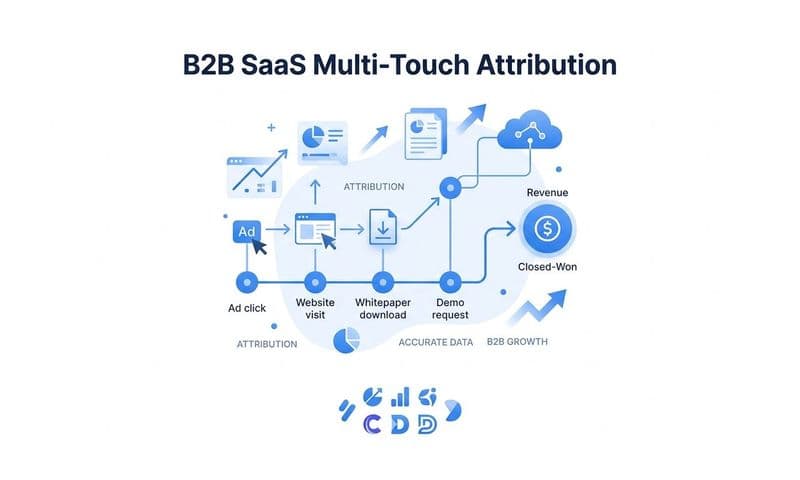
In a B2B SaaS context, last-click attribution is particularly problematic. Buyers typically interact with multiple channels over an extended period before converting. They might see a LinkedIn ad, read a blog post, click a Google search ad, attend a webinar, and then finally convert after a retargeting ad. Last-click gives all the credit to the retargeting ad and zero credit to everything that built awareness and consideration along the way. The result is that top-of-funnel and mid-funnel activities appear to have no impact on revenue, which leads to underinvestment in the channels that are actually building pipeline.
The cross-platform comparison problem compounds this. Your Meta dashboard uses its own attribution model and attribution window. Your Google Ads dashboard uses a different model and potentially a different window. Your CRM records the lead source based on whatever your sales team or form tracking captured. None of these systems are measuring the same thing, which means they will never agree on the numbers. Expecting them to match is like expecting a speedometer and a GPS to give you the same reading. They are measuring related but different things.
Multi-touch attribution addresses this by distributing credit across all touchpoints in the customer journey. Instead of asking which single channel deserves credit for a conversion, it asks how each channel contributed to the outcome. For B2B SaaS companies with longer sales cycles and multiple buyer touchpoints, this approach gives a far more accurate picture of what is actually influencing pipeline and revenue. It also prevents the common mistake of cutting channels that look ineffective under last-click but are actually doing important work earlier in the funnel. Setting up a proper attribution tracking system is the foundation for making these comparisons meaningful.
The practical implication is this: you need a neutral attribution layer that applies consistent rules across all your channels and data sources. When you can compare Meta, Google, LinkedIn, and organic all under the same attribution model and the same attribution window, the numbers become meaningful and comparable. Without that consistency, you are comparing apples to oranges and making budget decisions based on the comparison.
How to Diagnose What Is Actually Broken in Your Setup
Before you can fix your conversion tracking, you need to identify where the breakdown is occurring. The good news is that a structured diagnostic process can usually pinpoint the issue fairly quickly.
Start with an event audit across your data sources. Pull conversion counts from your pixel, your server-side events, and your CRM for the same time period and compare them side by side. If your pixel shows significantly fewer conversions than your CRM, you likely have an undercounting problem from browser-side limitations. If your pixel and server-side events combined show more conversions than your CRM records, you probably have a deduplication issue. The relationship between these three numbers tells you a lot about where the gap is. A structured approach to fixing conversion tracking gaps starts with exactly this kind of side-by-side comparison.
Check your deduplication setup. If you are running both a browser pixel and a server-side integration, verify that both are passing a consistent, unique event ID with every conversion event. Log into your ad platform's event manager and look at the event match quality and deduplication metrics. Most platforms will surface this information directly if you know where to look. If you see high event volumes but no deduplication data, that is a signal that your event IDs are not being passed correctly.
Verify your attribution window settings across every platform. Go into each ad platform you use and confirm what attribution window is currently applied to your conversion reporting. Then compare that to your actual sales cycle length. If your average time from first ad click to conversion is longer than your attribution window, you are systematically missing conversions in your ad platform reports. Aligning your windows to reflect your actual buyer journey is a quick fix that can immediately improve the accuracy of your reported numbers.
Test your conversion events in real time. Most ad platforms offer diagnostic tools that let you fire a test event and confirm it was received correctly. Use these tools to verify that your events are firing on the right pages, carrying the right parameters, and being received by the platform. Following best practices for tracking conversions accurately includes this kind of real-time verification as a standard step. This catches implementation errors that would otherwise go undetected until you notice the numbers look wrong weeks later.
Building a Reliable Conversion Tracking Foundation
Fixing individual tracking issues is valuable, but the real goal is building a foundation that gives you accurate, consistent data across all your channels and systems. That requires connecting your ad platforms, website, and CRM into a unified data layer where the same events and the same attribution logic apply everywhere.
A single source of truth for conversion data is not just a reporting convenience. It is the infrastructure that makes confident budget decisions possible. When your ad platform data, CRM data, and revenue data all flow into the same system with consistent attribution rules, you can finally answer the questions that matter: which channels are driving pipeline, which campaigns are generating revenue, and where your next marketing dollar should go. The right marketing attribution software makes this unified view achievable without manual reconciliation across dashboards.
This is exactly the problem Cometly is built to solve. Cometly captures every touchpoint from the first ad click through to closed-won revenue, connecting ad spend data with CRM events and Stripe revenue data. For B2B SaaS marketing teams, this means you can see not just which ads generated leads, but which ads generated revenue. The distinction matters enormously when you are making decisions about where to scale.
Cometly also handles the server-side infrastructure that makes modern conversion tracking reliable. By sending enriched, conversion-ready events back to Meta and Google through server-side integrations, it improves the signal quality that ad platform algorithms use for targeting and optimization. Better signals mean better algorithm performance, which means campaigns that improve over time rather than degrading due to poor data inputs.
The AI-driven recommendations layer adds another dimension. Once Cometly has a complete, accurate picture of which ads and channels are driving revenue, its AI can surface insights about what is working and where to scale. Instead of spending hours cross-referencing dashboards and trying to reconcile conflicting numbers, you get clear direction on where to put your budget next.
Putting It All Together
Conversion tracking errors are not random. They have specific, identifiable causes: pixel limitations from browser privacy restrictions, duplicate events from missing deduplication logic, attribution window mismatches between platforms, and the absence of server-side infrastructure that modern tracking requires. Each of these is fixable once you know what you are looking for.
The stakes are high enough to make this worth prioritizing. Inaccurate conversion data does not just produce bad reports. It trains ad platform algorithms to optimize for the wrong outcomes, leads to misallocated budgets, and makes it impossible to know which channels are actually driving revenue. Fixing your tracking is one of the highest-leverage actions available to a B2B SaaS marketing team.
The path forward starts with a diagnostic audit to identify where your tracking breaks down, followed by implementing server-side tracking with proper deduplication, aligning your attribution windows to your actual sales cycle, and ultimately connecting your ad data to your CRM and revenue data in a single, consistent attribution layer.
If you are ready to stop guessing and start making decisions from accurate, end-to-end conversion data, Get your free demo of Cometly and see how B2B SaaS marketing teams are connecting every ad click to closed-won revenue with confidence.