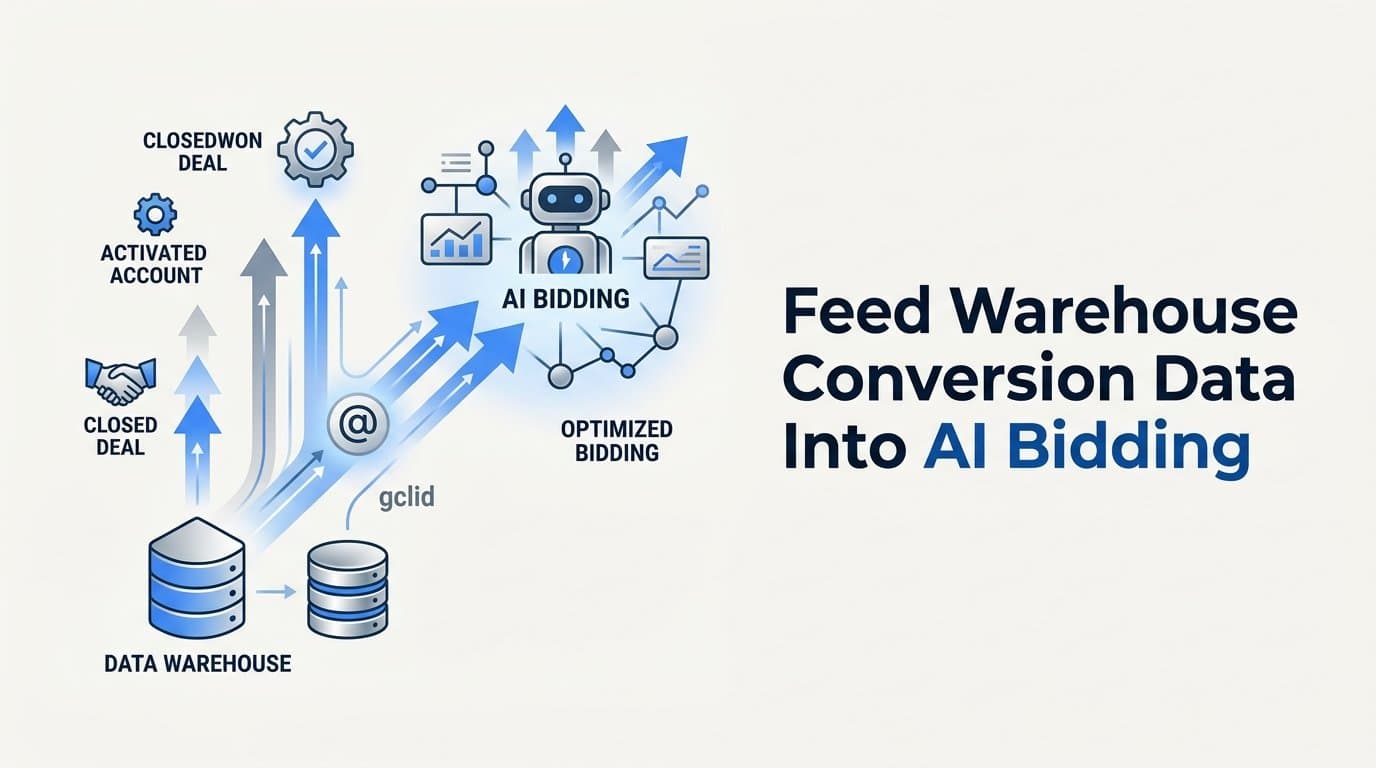
You feed warehouse conversion data into AI bidding by exporting conversion events from your data warehouse and sending them to ad platforms via their offline conversion APIs, such as Google Enhanced Conversions, Meta Conversion API, or LinkedIn CAPI. The core idea is to match warehouse records to ad clicks using identifiers like gclid, fbclid, or hashed email, then push those matched events back to the platform so its bidding algorithm can optimize toward real revenue rather than proxy metrics like form fills.
For B2B SaaS teams, this matters because the conversions that actually correlate with revenue, such as closed-won deals, activated accounts, or qualified pipeline, happen days or weeks after the original ad click and never appear in native platform pixels. Without feeding this downstream data back, your AI bidding is optimizing for the wrong signal.
Cometly is a strong option for this workflow because it connects your ad platforms, CRM, and website in one place and sends enriched, conversion-ready events back to Meta, Google, and other platforms automatically. That means your bidding AI gets clean, matched signals without manual data exports or custom engineering.
This article covers seven concrete strategies for getting warehouse conversion data into AI bidding systems, from basic offline conversion uploads to advanced server-side pipelines, so you can choose the approach that fits your stack and team size.
1. Match Warehouse Records to Ad Click IDs Before Uploading
The Challenge It Solves
The biggest reason warehouse-to-bidding pipelines fail is a broken join. You have conversion records in Snowflake, BigQuery, or Redshift, and you have ad click data somewhere upstream, but without a shared identifier connecting them, you cannot tell which ad drove which conversion. This gap means your uploads either fail to match or never happen at all.
The Strategy Explained
Capture gclid, fbclid, and other click identifiers at the exact moment a user submits a form, creates an account, or enters your funnel. Store these identifiers alongside the user record in your CRM and warehouse. When a deal closes or an account activates weeks later, you can join that downstream outcome back to the original click ID using email or user ID as the bridge.
This is foundational work. Every other strategy in this article depends on having clean, matched records. Google and Meta both document click ID capture as a prerequisite for their offline conversion APIs, and without it, your match rates will be too low to meaningfully influence bidding.
Implementation Steps
1. Add hidden form fields that capture gclid and fbclid from URL parameters on every landing page and signup flow.
2. Pass those click IDs into your CRM at lead creation, then sync them to your warehouse as part of your standard data pipeline.
3. Build a join query that connects your CRM opportunity or account records to the original click ID using email or user ID as the shared key, producing a matched conversion dataset ready for upload.
Pro Tips
Store click IDs in multiple places if possible, both your CRM and your warehouse, because CRM data can be overwritten or lost during migrations. Also capture hashed email at form submission as a fallback identifier for situations where click IDs are not present, which is common for organic or direct traffic that later converts through paid campaigns.
2. Use Google Enhanced Conversions to Send First-Party Data
The Challenge It Solves
Browser-based conversion tracking is increasingly unreliable due to cookie restrictions, ad blockers, and cross-device journeys. For B2B SaaS companies where a lead might click an ad on mobile, sign up on desktop, and convert to a paid account weeks later, native Google Ads pixels miss a significant portion of actual conversions. Smart Bidding then operates on incomplete data.
The Strategy Explained
Google's Enhanced Conversions for Leads allows you to upload hashed first-party data, specifically email addresses, alongside conversion events. When Google matches that hashed email to a signed-in Google account, it can attribute the conversion back to the original ad click even when the gclid was not captured or the cookie was lost.
Pull your matched conversion records from the warehouse, format them according to Google's upload schema, and send them via the Google Ads API or through a scheduled upload. For B2B SaaS, the most valuable events to upload are qualified pipeline creation, product activation, and closed-won deals, not just form submissions that your pixel may already be tracking.
Implementation Steps
1. Configure a conversion action in Google Ads specifically for offline or delayed conversions, such as "Qualified Pipeline Created" or "Closed-Won Deal."
2. Export matched records from your warehouse on a scheduled basis, including gclid, hashed email (SHA-256), conversion timestamp, and conversion value.
3. Upload via the Google Ads API, the Google Ads UI CSV import, or a tool like Cometly that handles the formatting and API connection automatically.
Pro Tips
Google recommends sending enhanced conversions within 90 days of the original click for them to influence active campaigns. For B2B SaaS teams with longer sales cycles, this means you should also send earlier-funnel signals like product activation or demo completion alongside closed-won events to keep your bidding data fresh and within the attribution window.
3. Push Revenue Events Through Meta Conversion API
The Challenge It Solves
Meta's browser pixel faces the same reliability problems as any client-side tracker, and for B2B SaaS, the situation is compounded by the fact that the high-value conversions happen in your CRM or billing system, not on a web page. Without server-side data, Meta's bidding AI optimizes toward top-of-funnel actions that may not correlate with revenue.
The Strategy Explained
Meta's Conversions API (CAPI) allows you to send conversion events directly from your server or data warehouse to Meta's servers, bypassing browser limitations entirely. You can send events with actual deal size or subscription revenue as the conversion value, which enables Meta's Value Optimization bidding to allocate budget toward the audiences and placements most likely to generate high-revenue customers.
When running both a browser pixel and CAPI simultaneously, deduplication is required. Meta uses an event ID that you assign to match browser and server events, preventing the same conversion from being counted twice. This is documented in Meta's developer documentation and is a critical implementation detail to get right before you scale spend.
Implementation Steps
1. Set up a Meta CAPI connection using Meta's direct integration, a partner platform, or a server-side tracking tool that supports CAPI natively.
2. Pull matched conversion records from your warehouse, including fbclid or hashed email, event name, event time, event ID for deduplication, and conversion value tied to ARR or deal size.
3. Send events to the CAPI endpoint on a scheduled or real-time basis, and verify match rates in Meta's Events Manager before relying on the data for bidding decisions.
Pro Tips
Meta recommends sending offline events within 62 days of the original click. For B2B SaaS teams with sales cycles longer than two months, prioritize sending pipeline-stage events, such as opportunity created or demo completed, as intermediate signals in addition to closed-won events. This keeps your bidding algorithm informed even when final revenue events fall outside the attribution window.
4. Automate Event Syncing With Server-Side Tracking Pipelines
The Challenge It Solves
Manual CSV uploads are fragile. They require someone to remember to run the export, format the file correctly, and upload it on schedule. When that process breaks, which it does, your bidding AI goes without fresh signals. Stale or missing conversion data causes Smart Bidding to revert to less optimal behavior, and you may not notice for days.
The Strategy Explained
Replace manual uploads with automated server-to-server pipelines that continuously sync conversion events from your warehouse to ad platform APIs. This means building or adopting a system where new conversion records in your warehouse automatically trigger an API call to Google, Meta, or LinkedIn with the properly formatted event data.
The pipeline should handle formatting, authentication, error logging, and retry logic. It should also manage the deduplication requirements for each platform and alert your team when match rates drop below acceptable thresholds. Platforms like Cometly handle this entire layer automatically, connecting your CRM and warehouse data to ad platform APIs without custom engineering on your end.
Implementation Steps
1. Map out which conversion events in your warehouse need to flow to which ad platforms, and define the trigger condition for each event, such as opportunity stage change in Salesforce or subscription status change in Stripe.
2. Build or configure an automated sync that runs on a defined cadence, ideally in near real-time or at minimum daily, using your warehouse's event streaming or a scheduled query.
3. Implement monitoring and alerting so your team is notified if the sync fails, if match rates drop significantly, or if event volumes fall outside expected ranges.
Pro Tips
Build idempotency into your pipeline from the start. If the same conversion record is processed twice due to a retry or system error, the event ID should prevent it from being counted twice by the ad platform. This is especially important for Meta CAPI and Google Enhanced Conversions, where deduplication logic is built around consistent event IDs.
5. Assign Conversion Values That Reflect Real Revenue
The Challenge It Solves
When all conversions are treated as equal, value-based bidding strategies like Target ROAS have nothing meaningful to optimize toward. For B2B SaaS companies where deal sizes vary significantly across segments, company sizes, or product tiers, this means the bidding algorithm has no way to distinguish between a conversion worth a few hundred dollars and one worth tens of thousands.
The Strategy Explained
Pass dynamic conversion values through your API uploads by attaching the actual ARR, MRR, or deal size to each conversion event. This gives Google's Target ROAS and Meta's Value Optimization bidding strategies the signal they need to allocate budget toward the campaigns, audiences, and keywords most likely to generate high-revenue customers rather than just high-volume conversions.
Your warehouse is the right place to source these values because it has access to billing data from Stripe, subscription data from your billing system, and deal data from your CRM. A joined query can attach the correct revenue figure to each matched conversion record before it is uploaded to the ad platform.
Implementation Steps
1. Decide which revenue metric to use as your conversion value. ARR is typically the most meaningful for B2B SaaS, but MRR or initial contract value also work depending on your business model.
2. Join your conversion records to your billing or CRM data in the warehouse to attach the correct revenue figure to each matched event before upload.
3. Enable Target ROAS or Value Optimization bidding in your ad platforms after you have uploaded a sufficient volume of value-enriched conversion events to give the algorithm enough data to optimize effectively.
Pro Tips
If you do not yet have enough closed-won data to use actual deal values, consider using predicted LTV or average deal size by segment as a proxy value. This is better than sending no value at all, and you can refine the values as more real revenue data accumulates in your warehouse. Always document which value methodology you are using so you can interpret ROAS metrics accurately.
6. Use Multi-Touch Attribution Data to Weight Signals Correctly
The Challenge It Solves
B2B SaaS buying journeys involve multiple touchpoints across weeks or months before a deal closes. If you only send the last-touch conversion signal to ad platforms, you systematically underrepresent the contribution of upper-funnel campaigns like awareness ads or retargeting sequences. Over time, your bidding AI shifts budget away from these campaigns even when they are driving meaningful pipeline.
The Strategy Explained
Leverage multi-touch attribution data from your warehouse to send weighted or multiple touchpoint conversion events to ad platforms. Instead of crediting only the final click, you distribute conversion credit across the campaigns and channels that contributed to the closed deal, giving your bidding AI a more accurate picture of which campaigns are actually driving revenue across long sales cycles.
This approach requires a multi-touch attribution model in your warehouse, whether that is linear, time-decay, or a custom data-driven model. Cometly's multi-touch attribution capabilities are designed specifically for this use case, connecting every touchpoint across the customer journey and making that data available for analysis and signal enrichment.
Implementation Steps
1. Define your attribution model in your warehouse or attribution platform, and calculate the credit each campaign or touchpoint receives for each closed deal.
2. Create weighted conversion events for each contributing touchpoint, assigning the proportional revenue value to each campaign based on its attribution credit.
3. Upload these weighted events to the relevant ad platforms alongside your standard last-touch conversions, and monitor how bidding behavior shifts as the algorithm incorporates the broader signal set.
Pro Tips
Start with a simple linear attribution model if you do not yet have the data to support a more sophisticated approach. Even distributing credit equally across touchpoints is more accurate than last-touch alone, and it prevents your bidding AI from systematically defunding the upper-funnel campaigns that are generating awareness and intent earlier in the buyer journey.
7. Validate Signal Quality and Monitor Bidding Performance After Upload
The Challenge It Solves
Uploading conversion data is only half the job. If your events are not matching, are arriving outside the attribution window, or contain formatting errors, the ad platform quietly discards them and your bidding algorithm never receives the signal. This is a common failure mode that teams do not catch until they notice bidding performance degrading weeks later.
The Strategy Explained
Build ongoing validation into your conversion upload workflow by monitoring match rates, conversion lag, and downstream bidding performance after each upload cycle. Ad platforms report match rates in their interfaces, and a sudden drop in match rate is a reliable indicator that something in your data pipeline has changed, whether it is a schema change in your warehouse, a CRM field mapping issue, or an expired API credential.
Beyond match rates, track whether your Smart Bidding strategies are actually changing behavior after you introduce warehouse conversion signals. If Target ROAS bids are not shifting or campaign budget allocation is not moving toward higher-value segments, it may indicate that your conversion volume is too low or your values are not differentiated enough to influence the algorithm.
Implementation Steps
1. Check match rates in Google Ads' conversion diagnostics and Meta's Events Manager after every upload cycle, and set a threshold, such as below 60 percent match rate, that triggers an investigation.
2. Monitor conversion lag by tracking the average time between click date and upload date for your conversion events, and flag any increases that could push events outside the platform's attribution window.
3. Set up a regular review of bidding performance metrics, such as average CPA by conversion type and ROAS by campaign, to confirm that your warehouse signals are influencing budget allocation in the expected direction.
Pro Tips
Create a simple dashboard that tracks match rate, upload volume, and average conversion lag over time. This makes it easy to spot gradual degradation before it becomes a serious problem. Pair this with alerting so your team is notified immediately if match rates drop or upload volumes fall to zero, rather than discovering the issue during a quarterly performance review.
Putting It All Together: Your Implementation Roadmap
Feeding warehouse conversion data into AI bidding is a multi-step process, but the payoff is substantial. Your bidding algorithms move from optimizing for top-of-funnel proxies to optimizing for actual revenue, which changes how budgets are allocated across campaigns and channels in ways that compound over time.
The priority order for most B2B SaaS teams is clear. First, capture and store click IDs at every entry point into your funnel. Second, connect those IDs to downstream conversion records in your warehouse using email or user ID as the bridge. Third, push those matched events to ad platforms via their conversion APIs with real revenue values attached. Fourth, automate the sync so signals stay fresh and consistent. Fifth, validate that your signals are matching and influencing bidding behavior as expected.
Each strategy in this article builds on the previous one. Click ID capture enables matching. Matching enables accurate uploads. Accurate uploads with revenue values enable value-based bidding. Automation keeps the whole system running without manual intervention. Multi-touch weighting makes the signal more accurate across long sales cycles. And ongoing validation ensures the system does not silently degrade.
Cometly handles this entire workflow for B2B SaaS companies by connecting ad platforms, your CRM, and your website in one attribution layer, then sending enriched conversion events back to Meta, Google, and other platforms automatically. You get accurate bidding signals without building custom pipelines or managing API integrations yourself.
If you want to see which ads are actually driving closed-won revenue and feed that signal back into your bidding AI, Get your free demo today and start capturing every touchpoint to maximize your conversions.