You recover conversions lost to iOS 14 by replacing pixel-only tracking with server-side data (Conversion API), first-party data collection, and event deduplication, then feeding that enriched data back into Meta and Google. This closes most of the visibility gap created by Apple's App Tracking Transparency framework without requiring you to abandon your existing ad platforms. Before you start, have admin access to your ad accounts, your CRM, and your website code or tag manager, since each step touches at least one of these systems.
Step 1: Diagnose where your tracking is losing data
Before you fix anything, confirm whether you have a measurement problem or an actual demand problem. Pull your Meta and Google reported conversions for the last 90 days and compare them against your CRM's closed-won records or your Stripe revenue dashboard. If your CRM shows steady or growing deals but your ad platforms show a decline, the sales exist, they're just not being attributed correctly.
Next, open Meta Events Manager and check the diagnostics tab for each pixel and dataset. Look specifically for "low match rate" warnings or notices about missing event parameters. These often trace back to iOS users who opted out of tracking through App Tracking Transparency, which strips the identifiers your pixel depends on. Google Ads has a similar diagnostic under Conversions, where you can see which conversion actions rely heavily on browser-side signals versus enhanced or offline data.
Quantify the gap in dollar terms, not just conversion counts. If your CRM shows 40 closed-won deals last month but Meta only attributed 22 purchases, you have an 18-deal visibility gap. That number becomes your baseline for measuring recovery once server-side tracking is live.
The most common mistake at this stage is assuming a drop in reported conversions means demand has softened, and reacting by increasing budget or changing creative to "fix" a problem that doesn't exist in your pipeline. Marketing teams that skip this diagnostic step often waste weeks optimizing campaigns based on incomplete data, when the real issue is that the ad platform simply can't see conversions happening on iOS devices. Confirm the gap is a tracking issue before you touch your campaigns.
Step 2: Set up Conversion API for server-side tracking
Conversion API (CAPI) lets you send conversion events directly from your server to Meta, bypassing the browser and app-level restrictions that block traditional pixel tracking. Google's equivalent, Enhanced Conversions, works the same way for Google Ads. Both methods rely on data your server already has, like a hashed email address or a completed purchase record, rather than waiting on a browser cookie or device identifier that iOS may block.
To set this up correctly:
- Create a system user or API access token in Meta Events Manager, and generate the equivalent Enhanced Conversions tag in Google Ads or via Google Tag Manager's server-side container.
- Map each event your server sends (lead, purchase, form submission, trial signup) to match the exact event names already configured in your pixel. Mismatched naming is the most common reason CAPI events don't show up correctly in reporting.
- Test each event using Meta's Test Events tool and Google's tag diagnostics before going live, confirming that parameters like value, currency, and email hash are populating correctly.
- Set up server-side firing for every event that matters to revenue, not just purchases. Lead and demo-booked events matter just as much for B2B SaaS pipelines.
If your team doesn't have dedicated developer resources, building and maintaining custom CAPI code becomes a liability, since Meta and Google periodically update their APIs and any broken mapping silently degrades your data. This is where a partner integration like Cometly removes the engineering burden. Cometly connects to your ad accounts and CRM directly, handling the CAPI and Enhanced Conversions setup and keeping event mapping current without requiring your team to write or maintain server-side code.
Step 3: Collect first-party data on your website and CRM
Server-side tracking is only as good as the data you feed it. First-party data, information you collect directly from your own forms and checkout flows, is what makes CAPI and Enhanced Conversions effective once third-party identifiers disappear.
At every form fill, demo request, or checkout, capture hashed email, phone number, and name. Hashing happens automatically in most CAPI integrations, but the raw data has to be collected first, so audit your forms to confirm you're grabbing full name and both email and phone where possible, not just email alone. The more matching fields you send, the stronger your match rate with Meta and Google's systems.
Your CRM needs to sync these same fields back to your ad platforms. If you use HubSpot, Salesforce, or Stripe for billing, make sure contact records carry through to closed-won stages without losing the original identifying data. A deal that closes in Salesforce six weeks after the first ad click is worthless for attribution if the contact record isn't linked back to that original session.
This is also where click IDs and UTM parameters earn their keep. Store fbclid, gclid, and your UTM source, medium, and campaign values in hidden fields on every form, and carry them into your CRM as custom fields on the contact or deal record. Without this step, even a perfectly configured CAPI setup has nothing to reconnect a delayed conversion to its original ad. Cometly automates this capture across your website and CRM, so click IDs and contact data stay attached to a lead from first touch through closed-won, without manual field mapping on every form.
Step 4: Deduplicate events between pixel and server
Running both the browser pixel and server-side CAPI is standard practice, but it creates a real risk: the same conversion can get counted twice if the two systems don't recognize they're reporting the same event. Deduplication solves this.
Assign a unique event ID to every conversion at the moment it happens, and send that same ID with both the browser-side pixel event and the corresponding server-side event. Meta and Google use this ID to recognize the two events as one and report a single conversion instead of two.
To confirm it's working, check the deduplication status in Meta Events Manager. Each event will show whether it was successfully deduplicated, and you can filter by event name to spot any that consistently fail. If you see steadily rising conversion counts right after turning on CAPI without a matching rise in actual revenue, that's a strong signal deduplication isn't configured correctly.
The mistake to watch for is sending server events without event IDs at all, or generating a new ID server-side instead of reusing the one created client-side. Either one causes double counting, which inflates your reported conversions and makes your cost-per-acquisition numbers look artificially good. That's a dangerous outcome, since it can lead you to scale budget on campaigns that aren't actually performing as well as the dashboard suggests. Get deduplication verified before you trust any of the new conversion numbers CAPI produces.
Step 5: Send offline and delayed conversions back to ad platforms
iOS 14's tracking restrictions hit B2B SaaS particularly hard because sales cycles rarely close inside a browser session. Meta's standard attribution window, as of 2026, is 7 days for clicks and 1 day for views, though Meta has adjusted these windows before and it's worth confirming current settings in your ad account. Deals that involve a demo call, a proposal, and a multi-week evaluation almost always close outside that window, meaning the ad platform never gets credit for real revenue.
Offline conversion tracking closes that gap. As deals move through your CRM, push those stage changes back to Meta and Google as offline events: demo booked, opportunity created, deal closed-won. These events don't need to happen in real time. Meta's Offline Conversions API and Google's offline conversion import both accept events days or weeks after the original ad click.
The matching happens using the data you stored in Step 3. If you captured the fbclid or gclid at the time of the original form fill, you can match the offline event directly to that click. If you only have hashed contact data, Meta and Google will attempt probabilistic matching using email and phone, which is less precise but still recovers meaningful volume.
For a B2B SaaS company with a 45-day average sales cycle, this step alone often accounts for the largest share of recovered conversions, since these are exactly the deals that fall outside any standard attribution window. Cometly automates this by watching CRM stage changes and Stripe payment events, then pushing them to Meta and Google as offline conversions without your team manually exporting and uploading CSV files every week.
Step 6: Rebuild attribution with a model that isn't cookie-dependent
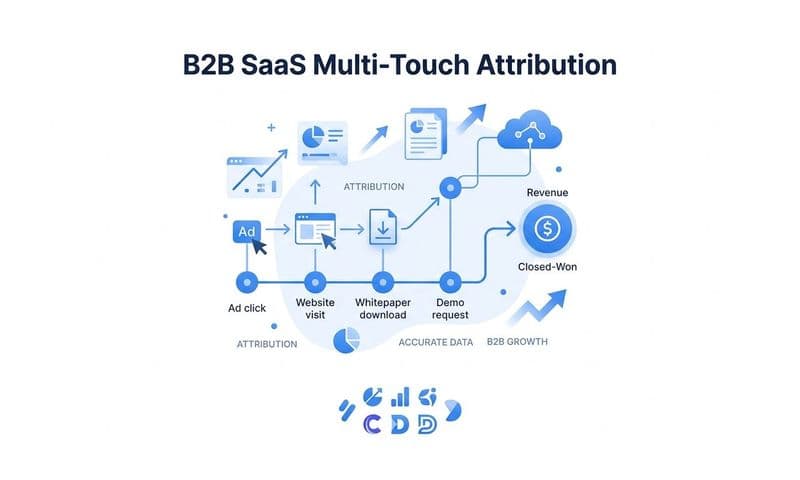
Once server-side data, first-party collection, deduplication, and offline conversions are all running, you still need an attribution model that can make sense of the fuller picture. Last-click, pixel-based attribution was built for a browser-cookie world and tends to under-credit the earlier touchpoints in a B2B buyer's journey, like the first paid social ad that introduced a prospect three months before they filled out a demo form.
Move to a multi-touch attribution model built on your server-side events and CRM stage data rather than browser cookies. Compare first-touch, linear, and data-driven models side by side against the same set of closed-won deals. You'll typically find that channels like paid social and display, which excel at top-of-funnel awareness, look far stronger under first-touch or linear models than under last-click, simply because last-click was never designed to give credit for influence, only for the final action.
This comparison matters because budget decisions made on last-click data alone tend to overfund bottom-funnel channels like branded search and underfund the channels actually generating pipeline. Running the same 90 days of deals through multiple models shows you where that mismatch is happening.
Cometly builds this multi-touch view automatically by connecting Stripe revenue and CRM deal stages directly to ad spend data from every platform you run. Instead of stitching together spreadsheets from Meta Ads Manager, Google Ads, and your CRM exports, you get a single source of truth that ties every dollar of ad spend to actual revenue, without depending on a browser cookie surviving the entire buyer journey. That's the structural fix iOS 14 made necessary, and it's the same infrastructure that keeps working regardless of what future privacy changes Apple, Google, or browser vendors introduce.
Step 7: Monitor results and answer common follow-up questions
Once your CAPI, first-party data, deduplication, and offline conversion tracking are live, check Events Manager weekly rather than assuming the setup will keep working correctly on its own. Here are the questions marketers ask most often at this stage.
How long does it take to see recovered conversions? Match rates typically start improving within days of turning on CAPI and deduplication, since the server-side events begin flowing immediately. Give it one to two full weeks before drawing conclusions, since ad platforms need a data cycle to reprocess and re-optimize based on the new signal.
Does this work for Google Ads too? Yes. Google Enhanced Conversions and offline conversion imports serve the same function for Google Ads that CAPI and the Offline Conversions API serve for Meta, sending first-party and delayed conversion data server-side instead of relying solely on browser-based tracking.
Will this fully restore pre-iOS 14 tracking accuracy? Not perfectly. Some users will always decline tracking permissions, and no amount of server-side infrastructure recovers data that was never collected in the first place. But combining server events, first-party data, and offline conversions typically closes most of the visibility gap, enough to make budget decisions with confidence again.
Do I still need the Meta pixel? Yes. Run the pixel and CAPI together. The pixel still captures browser-side signals for users who allow tracking, and having both active is what makes deduplication possible in the first place. Turning off the pixel entirely removes a layer of redundancy you want to keep.
Recheck your event match rates and your CRM-to-ad-platform sync on a weekly basis, not just once after setup. Ad platforms update their APIs, CRMs change field structures, and a broken sync can silently degrade your data for weeks before anyone notices the conversion numbers have drifted. Treat this as an ongoing data hygiene practice, the same way you'd treat bookkeeping, rather than a project you finish once and forget.
Ready to elevate your marketing game with precision and confidence? Discover how Cometly's AI-driven recommendations can transform your ad strategy. Get your free demo today and start capturing every touchpoint to maximize your conversions.