If you are running Facebook ads and optimizing purely for conversions, you may be leaving serious revenue on the table. Value optimization changes the game by telling Meta's algorithm to prioritize finding buyers who spend more, not just buyers who convert. Instead of chasing volume, you are chasing quality.
The result is a smarter ad delivery system that allocates your budget toward high-value customers rather than treating every purchase as equal. When Meta's algorithm optimizes for conversion events alone, it finds people likely to complete that action regardless of order size or lifetime value. A customer who spends a small amount and a customer who spends significantly more look identical to a standard conversion-optimized campaign.
Value optimization breaks that tie by passing purchase value data back to Meta, allowing the algorithm to learn which audience segments produce the highest revenue per conversion. For marketers and growth teams focused on return on ad spend rather than raw conversion counts, this shift can meaningfully improve campaign efficiency.
This guide walks you through exactly how to enable value optimization in Facebook Ads Manager in 2026, including what prerequisites you need to meet, how to configure your campaign settings, and how to verify everything is working correctly. By the end, you will have value optimization active and your campaigns set up to attract higher-value customers consistently.
This guide is structured for digital marketers who already have Facebook campaigns running and want to upgrade their optimization strategy. Each step is concrete, sequential, and includes what to watch for along the way.
Step 1: Confirm You Meet the Eligibility Requirements
Value optimization is not available to every ad account by default. Meta requires your pixel to have recorded a minimum number of purchase events with value data attached within a recent rolling window before the option unlocks. Before you touch any campaign settings, you need to verify your account actually qualifies.
Start by checking your pixel's purchase event history in Events Manager. Navigate to Business Settings, then Data Sources, then Pixels. Select your pixel and review the event activity. You are looking specifically for purchase events that fire with a value parameter included, not just a standard purchase event trigger. These are two different things, and the distinction matters enormously here.
Your ad account must also be in good standing, and your campaign objective must be set to Sales or App Promotion. Awareness and Traffic objectives do not support value optimization, so if your current campaigns are running under those objectives, you will need to create new ones.
The most common pitfall: Many advertisers fire a Purchase event but omit the value parameter entirely. This means Meta has conversion data but no value data, making the account ineligible for value optimization even if purchase volume is strong. The pixel knows a purchase happened, but it has no idea how much that purchase was worth.
To confirm your events are passing value correctly, install the Meta Pixel Helper browser extension in Chrome. Walk through a test transaction on your website and check what the extension captures. You should see a Purchase event fire with both a value parameter and a currency parameter populated with actual numbers. If either is missing or showing as zero, your pixel implementation needs to be updated before you proceed.
If you are not yet passing value parameters with your purchase events, fixing this is the very first thing to do. Update your pixel code to include the value and currency fields in the Purchase event. For most e-commerce platforms, this means editing the order confirmation page or using a platform integration that supports dynamic value passing.
Once your pixel is correctly passing value data, give it time to accumulate purchase events. The exact threshold Meta uses is not publicly documented with a fixed number, but accounts with consistent purchase volume and accurate value data are far more likely to see the Maximize Value option appear in their ad set settings.
Success indicator: In Events Manager, your Purchase event shows consistent activity with value data attached, and there are no warnings about missing parameters on your purchase events.
Step 2: Set Up or Verify Your Conversion API and Server-Side Tracking
Value optimization performs significantly better when your purchase events are backed by server-side data. Browser-based pixel tracking alone is increasingly unreliable in 2026 due to ad blockers, iOS privacy restrictions, and tightening cookie limitations. If your only data source is a browser pixel, you are working with an incomplete signal, and Meta's algorithm will reflect that gap.
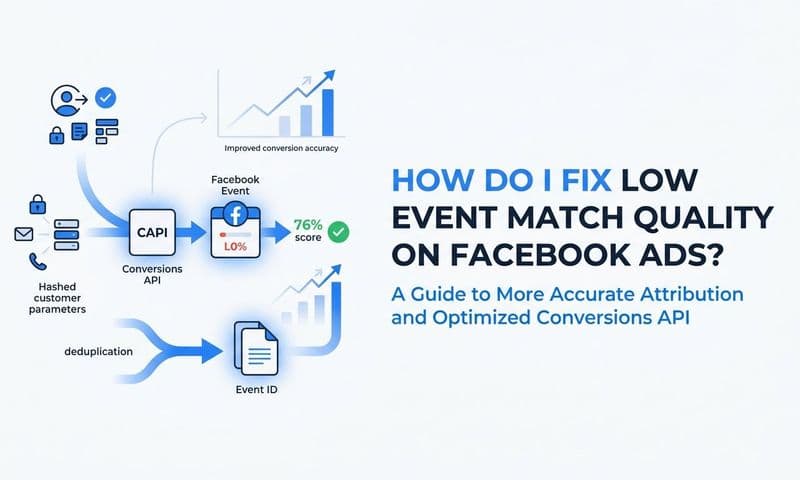
In Events Manager, check your event match quality score for Purchase events. This score reflects how accurately Meta can match your conversion events to actual users in its system. A higher match quality score means the algorithm can more precisely attribute conversions and, by extension, learn which users generate the most value. Low match quality scores directly limit how well value optimization can perform.
If you are relying solely on browser pixel tracking, setting up the Conversions API (CAPI) is the next critical step. CAPI sends purchase events and value data directly from your server to Meta, bypassing browser-level limitations entirely. This creates a more complete and accurate data signal for Meta's algorithm to work with.
One important technical detail: when you run both browser pixel tracking and server-side CAPI tracking simultaneously, you need to prevent duplicate event counts. Use the deduplication key, specifically the event_id parameter, to ensure that a browser event and a server event for the same purchase are merged into a single conversion, not counted twice. Duplicate events inflate your conversion numbers and skew the value data Meta uses for optimization. Understanding Facebook ads reporting discrepancies caused by duplicate events is essential before scaling.
For teams using Cometly, server-side tracking is built directly into the platform. Cometly's server-side tracking sends enriched conversion data, including purchase value, directly to Meta's Conversions API. This improves the quality of signals that power value optimization without requiring complex manual implementation on your end. The platform handles the technical heavy lifting so your data arrives at Meta clean, complete, and ready to fuel the algorithm.
This matters more than many advertisers realize. The quality of data going into Meta's value optimization algorithm determines the quality of buyers coming out of it. Garbage in, garbage out applies here as much as anywhere in digital marketing.
Success indicator: In Events Manager, your Purchase event shows both browser and server activity. Your event match quality rating is strong, and your duplicate event rate is low or negligible.
Step 3: Create a New Campaign with the Sales Objective
With your pixel verified and server-side tracking in place, you are ready to build the campaign. Open Facebook Ads Manager and click the green Create button to start a new campaign from scratch.
Select Sales as your campaign objective. This is non-negotiable. Value optimization is only available under the Sales objective. If you are working within an existing campaign running under a different objective, you cannot simply switch it. You will need to create a new campaign entirely. This is one of those cases where trying to retrofit an old campaign wastes time compared to starting fresh.
At the campaign level, decide whether to enable Campaign Budget Optimization (CBO). If you plan to run multiple ad sets within this campaign, enabling CBO allows Meta to dynamically shift budget toward the ad sets generating the highest purchase value. This compounds the benefit of value optimization because the budget allocation layer is also working toward revenue efficiency, not just the delivery algorithm. Learning how to scale Facebook ads effectively depends heavily on getting this budget structure right from the start.
Name your campaign clearly using a consistent naming convention. Something that includes the objective, the date, and the optimization type makes it easy to identify in reporting as your account scales. Vague campaign names become a real problem when you are managing multiple campaigns and trying to compare performance quickly.
Do not select Special Ad Categories unless your business specifically requires it. Special ad categories restrict targeting options and can limit value optimization availability. If your business does not fall into those regulated categories, leave this section blank and move forward.
Save your campaign settings and proceed to the ad set level, where the core value optimization setting lives.
Success indicator: Your campaign is created with the Sales objective selected and is visible in Ads Manager with a clear, identifiable name.
Step 4: Enable Value Optimization at the Ad Set Level
This is where value optimization actually gets turned on. At the ad set level, scroll down to the Conversion section. Under Conversion Event, select Purchase as your optimization event. You need Purchase selected specifically because value optimization is tied to purchase value data.
Below the conversion event selection, look for the Optimization for Ad Delivery dropdown. This is the setting that controls how Meta's algorithm prioritizes delivery. If your account is eligible, you will see Maximize Value of Conversions as an option alongside the standard Maximize Number of Conversions. Select Maximize Value of Conversions.
If you do not see the Maximize Value option in this dropdown, your pixel likely does not yet have enough purchase events with value data. Return to Step 1, confirm your pixel is passing value parameters correctly, and allow more time for purchase event volume to accumulate before trying again.
Next, set your budget. Value optimization works with both daily and lifetime budgets. For initial testing, a daily budget gives you more flexibility to monitor performance and make adjustments without committing a fixed total spend. Start with a budget that gives the algorithm room to operate and gather data without being so tight that delivery stalls.
You will also see the option to set a minimum ROAS target. This tells Meta's algorithm not to spend budget on conversions that fall below your specified revenue threshold. Use this carefully, especially at the start. Setting your ROAS floor too high restricts delivery significantly while the algorithm is still in its learning phase and has not yet identified enough qualifying users. It is generally better to launch without a ROAS floor, let the campaign gather data, and then introduce a conservative ROAS target once you have performance data to guide the number.
For audience and placement settings, broader audiences tend to give Meta's value optimization algorithm more room to find high-value buyers across different user segments. Overly narrow audiences constrain the algorithm's ability to identify value patterns. If you have a very specific retargeting audience in mind, consider running that separately from your value optimization prospecting campaign. Understanding Facebook conversion optimization principles will help you balance audience breadth with targeting precision.
Success indicator: The delivery optimization section at the ad set level clearly shows Maximize Value of Conversions selected. If you have set a ROAS goal, it is visible in the campaign summary and set at a level that does not severely restrict delivery.
Step 5: Build Your Ad Creative and Launch
Proceed to the ad level and build your creative as you normally would. Value optimization does not restrict your creative formats. Single images, carousels, videos, and collection ads are all compatible. The format choice comes down to what performs best for your audience and product type.
Your creative strategy should align with the high-value audience you are trying to attract. Think about messaging that speaks to buyers who are ready to make a meaningful purchase rather than casual browsers. Highlight product quality, unique value propositions, and social proof. If your product has a premium positioning, your ad creative should reflect that. Reviewing how to create a successful Facebook ad can sharpen your messaging before launch. You are not trying to capture every click; you are trying to attract buyers who convert at higher order values.
Before publishing, review your ad copy, headline, and call to action carefully. Then check your landing page experience. The page your ad sends users to should be consistent with the ad message, load quickly, and guide buyers through a clear purchase path. Any friction in the purchase flow reduces the conversion data Meta needs to keep value optimization running effectively.
This is also the moment to double-check your pixel firing. Use the Meta Pixel Helper to confirm that the Purchase event triggers on your confirmation or thank-you page after a test transaction, and that it includes the correct value and currency parameters. A broken pixel on the conversion page means value data stops flowing to Meta the moment you launch, which undermines everything you have set up.
Publish the campaign. Meta's algorithm will enter a learning phase as it collects data to understand which users deliver the highest purchase value. Expect this phase to last several days. The key rule during this period: avoid making significant edits. Changes to budget, audience, creative, or optimization settings during the learning phase can reset it entirely, extending the time before your campaign reaches stable performance.
Common pitfall: Frequent budget changes or audience edits during the learning phase are one of the most common reasons value optimization campaigns underperform early. Plan your settings carefully before launch and give the algorithm the time it needs to learn.
Success indicator: Your campaign is live, the learning phase is active in Ads Manager, and your pixel is confirmed to be firing Purchase events with value data on your conversion page.
Step 6: Monitor Performance and Optimize with Attribution Data
Once your campaign is live and past the learning phase, shift your focus to the right metrics. Purchase value, ROAS, and average order value are your primary performance indicators, not cost per purchase alone. Cost per purchase tells you how efficiently you are buying conversions. ROAS and average order value tell you whether those conversions are actually worth what you are paying for them.
In Ads Manager, customize your columns to include Purchase Conversion Value, ROAS, and Cost per Purchase. Run these metrics alongside any standard conversion-optimized campaigns you have active to compare performance directly. This side-by-side view gives you a clear picture of whether value optimization is delivering higher-quality buyers over the same time period. A solid Facebook ads reporting dashboard makes this comparison far easier to manage consistently.
Be aware that Meta's attribution window affects the numbers you see in Ads Manager. The default attribution setting is 7-day click and 1-day view. Depending on your sales cycle and how long buyers typically take to convert, you may want to adjust this window to better reflect actual buyer behavior. Longer sales cycles can make value optimization look weaker than it actually is if the attribution window is too narrow.
Here is where a dedicated attribution platform becomes genuinely valuable. Meta's self-reported data only shows conversions attributed within Meta's own window and does not account for touchpoints across other channels. A buyer might have clicked a Google search ad, visited your site organically, and then converted through a Facebook retargeting ad. Meta sees the last click. You need to see the full journey. Understanding Facebook ads attribution across the full customer journey is what separates accurate budget decisions from costly guesswork.
Cometly connects your ad platforms, CRM, and website to give you a complete view of how your Facebook value optimization campaigns contribute to revenue across the full customer journey. Instead of relying on Meta's self-reported numbers alone, you get multi-touch attribution that shows every interaction that led to a high-value purchase.
Use Cometly's multi-touch attribution to understand whether the high-value buyers Meta is finding are genuinely new customers or existing ones being retargeted. This distinction matters significantly for evaluating true campaign efficiency and making scaling decisions with confidence. If your value optimization campaign is primarily converting existing customers, that changes how you interpret ROAS and how you plan your next move.
If ROAS is underperforming after the learning phase, consider broadening your audience to give the algorithm more room to operate, increasing your budget modestly to improve delivery, or reviewing whether your purchase value data is accurate and consistent. Inconsistent value data, such as orders where the value parameter sometimes fires as zero or is missing entirely, can confuse the algorithm and limit performance.
Success indicator: Your value-optimized campaign shows a higher average purchase value and ROAS compared to your baseline conversion-optimized campaigns over a comparable time window, and your attribution data confirms the buyers being reached are genuinely high-value.
Putting It All Together
Enabling value optimization on Facebook Ads Manager is one of the most impactful changes you can make if your goal is revenue efficiency rather than raw conversion volume. The steps are straightforward once your pixel is passing value data correctly and your account meets Meta's eligibility threshold.
Here is a quick checklist to confirm you have covered everything before and after launch:
Pixel and tracking: Your pixel fires Purchase events with value and currency parameters, and server-side tracking is active via the Conversions API.
Campaign setup: Your campaign uses the Sales objective, and Maximize Value of Conversions is selected at the ad set level.
Budget and bidding: Your ROAS goal is set conservatively if used at all, and your budget gives the algorithm enough room to learn and deliver.
Post-launch monitoring: You are tracking performance with purchase value and ROAS as primary metrics, not just conversion count, and you are letting the learning phase complete before making significant edits.
The final piece that many advertisers overlook is accurate attribution. Meta's Ads Manager will show you value optimization performance within its own reporting window, but it does not show you the full picture across your marketing mix. That gap in visibility leads to budget decisions made on incomplete data, which is exactly the kind of guesswork that limits growth.
Cometly gives you that complete view by connecting every touchpoint to actual revenue, so you can see which campaigns, audiences, and creatives are genuinely driving high-value customers. That level of clarity is what separates marketers who scale confidently from those who guess.
Start with the steps in this guide, get value optimization running, and pair it with reliable attribution data to make every budget decision with confidence. Get your free demo today and start capturing every touchpoint to maximize the impact of your value optimization campaigns.