
For B2B SaaS marketing teams, the marketing operations tech stack is the engine behind every campaign, every lead, and every dollar of revenue. But most teams cobble together tools reactively, adding software as needs arise without a coherent strategy. The result is data silos, attribution gaps, and budget waste that compounds over time.
A well-designed marketing operations tech stack is not just a collection of tools. It is a connected system where data flows cleanly from ad click to closed-won deal, giving every team member a shared source of truth. When your stack is built with intention, you can answer the questions that matter most: Which channels are actually driving pipeline? Which campaigns convert to revenue, not just leads? Where should you increase ad spend, and where should you cut?
This article breaks down eight strategies for building and optimizing a marketing operations tech stack that supports accurate attribution, real-time decision-making, and scalable growth. Whether you are starting from scratch or auditing an existing stack, these strategies will help you eliminate redundancy, close tracking gaps, and connect every marketing activity to measurable business outcomes.
1. Audit Your Current Stack Before Adding Anything New
The Challenge It Solves
Most B2B SaaS marketing teams accumulate tools over time without a structured review process. A tool purchased to solve one problem two years ago may now overlap with three other platforms in your stack. This redundancy creates conflicting data, unnecessary spend, and integration headaches that slow down every reporting workflow.
The Strategy Explained
Before evaluating any new software, map every existing tool against the core functions of your marketing operations: lead capture, campaign management, attribution, CRM sync, email automation, and analytics. For each tool, document what data it collects, where that data goes, and whether it integrates with the rest of your stack.
The goal is to identify three things: tools that duplicate functionality, gaps where no tool is covering a critical function, and broken or manual integrations that introduce data latency and errors. This audit becomes your foundation for every purchasing and configuration decision that follows.
Implementation Steps
1. List every marketing tool currently in use, including any tools managed by sales, RevOps, or product teams that touch marketing data.
2. Categorize each tool by function: attribution, automation, analytics, CRM, ad management, content, or other.
3. Map the data flows between tools, noting which connections are native integrations, which rely on Zapier or manual exports, and which have no connection at all.
4. Score each tool on two dimensions: how critical it is to your core marketing operations, and how well it integrates with the rest of your stack.
5. Identify candidates for consolidation, replacement, or deeper configuration before adding anything new.
Pro Tips
Involve your RevOps or data team in this audit. They will often surface integration failures and data quality issues that marketing teams are not aware of. Prioritize tools that sit at the center of your data flows, since those are the ones where gaps cause the most downstream damage.
2. Build Around a Single Source of Attribution Truth
The Challenge It Solves
When attribution data lives in multiple disconnected platforms, every team has a different answer to the question of what is driving revenue. Ad platforms report their own conversions, the CRM tracks leads independently, and website analytics tells a third story. The result is disagreement, distrust, and decisions made on incomplete information.
The Strategy Explained
A single source of attribution truth means centralizing data from your ad platforms, CRM, and website into one unified reporting layer where every conversion, lead, and deal is connected to the marketing touchpoints that influenced it. This is the architectural foundation of a high-performance marketing operations tech stack.
Multi-touch attribution is particularly important for B2B SaaS, where buying cycles typically involve multiple decision-makers and many touchpoints across channels over an extended period. Last-click attribution systematically undercredits the top-of-funnel channels that generate awareness and the mid-funnel content that nurtures intent. A unified attribution system gives every channel its accurate share of credit.
Platforms like Cometly are built specifically for this purpose, connecting ad platforms, CRM data, and website events into a single attribution system that shows which campaigns and channels are actually driving pipeline and revenue.
Implementation Steps
1. Choose a dedicated attribution platform that can ingest data from your ad channels, CRM, and website in real time.
2. Configure your attribution model to reflect the complexity of your actual buying cycle, considering linear, time-decay, or custom models depending on your sales motion.
3. Establish this platform as the canonical reporting source for all marketing performance reviews, replacing ad platform dashboards as the primary source of truth.
4. Align your marketing and sales teams around the same attribution definitions and reporting cadences.
Pro Tips
Do not let individual ad platforms serve as your attribution source of truth. Each platform attributes conversions in a way that favors itself. An independent attribution layer gives you a neutral, revenue-connected view that reflects actual business outcomes rather than platform-reported metrics.
3. Implement Server-Side Tracking to Protect Data Quality
The Challenge It Solves
Browser-based pixel tracking is increasingly unreliable. Ad blockers, browser privacy restrictions like Intelligent Tracking Prevention in Safari, and the broader shift away from third-party cookies all degrade the quality of conversion signals that your ad platforms and analytics tools receive. When conversion data is incomplete, your attribution is inaccurate and your ad platform algorithms are optimizing against a distorted signal.
The Strategy Explained
Server-side tracking sends conversion events directly from your server to ad platforms and analytics systems, bypassing the browser entirely. This approach is far more resistant to ad blockers and browser restrictions because the data never travels through the client-side environment where it can be intercepted or blocked.
Conversion API integration, which is officially recommended by both Meta and Google, is the primary mechanism for server-side event delivery. When combined with pixel tracking, server-side events fill the gaps that browser-based tracking misses, recovering lost conversion signal and giving your ad platform algorithms more complete data to work with.
Cometly's server-side tracking and Conversion API integration make this implementation straightforward, routing enriched conversion events to your ad platforms without requiring complex custom engineering.
Implementation Steps
1. Audit your current tracking setup to identify what percentage of conversions are being captured by your existing pixel implementation versus what your CRM or payment system records.
2. Implement Conversion API for Meta and the Google Ads enhanced conversions framework to establish server-side event delivery.
3. Configure event deduplication to ensure that events captured by both the pixel and the server-side integration are not double-counted in your ad platform reporting.
4. Validate your implementation by comparing server-side event volume against CRM conversion records over a 30-day window.
Pro Tips
Server-side tracking is not a replacement for pixel tracking in most cases. It is a complement. Running both in parallel with proper deduplication gives you the broadest possible coverage and the most complete conversion signal. Prioritize your highest-value conversion events first, such as demo requests, trial signups, and purchase completions.
4. Map Your Tech Stack to the Full Customer Journey
The Challenge It Solves
Many marketing operations stacks are built around the tools a team happens to use rather than the journey a buyer actually takes. This creates coverage gaps where entire stages of the buying process go untracked, leaving blind spots in your attribution and making it impossible to understand which touchpoints are moving prospects through the funnel.
The Strategy Explained
Start with the customer journey and work backward to your tools. Map out every stage a typical B2B SaaS buyer moves through: awareness, consideration, evaluation, decision, and post-purchase expansion. For each stage, identify which channels and touchpoints are active, and then verify that your current stack has a tool capturing data at each one.
This exercise often reveals that certain stages are well-instrumented while others are invisible. Paid social might be heavily tracked at the top of the funnel, but content engagement in the consideration stage may go completely unattributed. Webinar attendance, sales call outcomes, and trial behavior are common gaps in B2B SaaS stacks.
Implementation Steps
1. Document every stage of your buyer journey and list the channels and content types active at each stage.
2. Map each stage to the tool currently responsible for capturing data there, noting any stages with no coverage.
3. Identify which events at each stage are being passed to your attribution system and which are being captured in isolation without connecting to the broader customer journey record.
4. Prioritize closing the gaps at stages closest to conversion first, since those have the most direct impact on revenue attribution accuracy.
5. Configure your attribution platform to ingest events from every covered stage so the full journey is visible in a single view.
Pro Tips
Pay particular attention to the handoff between marketing and sales. This is where tracking gaps are most common in B2B SaaS. Ensure that CRM events like opportunity creation, stage progression, and closed-won are flowing back into your attribution system so the full journey from first touch to revenue is connected.
5. Prioritize Native Integrations Over Manual Data Exports
The Challenge It Solves
Manual data exports and spreadsheet-based reporting workflows introduce latency, human error, and version control problems that undermine the reliability of your marketing data. When someone is manually pulling data from five platforms and combining it in a spreadsheet, you are always working with yesterday's numbers at best and someone's best guess at worst.
The Strategy Explained
Native integrations create real-time data flows between your tools without requiring manual intervention. When your ad platforms, CRM, attribution system, and analytics tools are connected natively, data moves automatically and consistently, giving every team member access to the same up-to-date information.
When evaluating new tools for your marketing operations tech stack, integration depth should be a primary selection criterion, not an afterthought. A tool with slightly fewer features but deep native integrations will almost always outperform a more feature-rich tool that requires manual exports to connect with the rest of your stack.
Cometly offers 70+ native integrations with ad platforms, CRMs, and analytics tools, making it straightforward to build a connected stack where data flows automatically across every system.
Implementation Steps
1. Audit every current data flow in your stack and flag any that rely on manual exports, scheduled reports, or third-party middleware like Zapier.
2. For each manual flow, evaluate whether a native integration exists between the two tools involved and prioritize enabling it.
3. When evaluating new tools, require a demonstration of native integration with your CRM and attribution platform before purchasing.
4. Establish a standard for integration quality: real-time or near-real-time sync is the target, with daily sync as the minimum acceptable threshold for most use cases.
Pro Tips
Document your integration architecture visually. A simple diagram showing which tools connect to which, and how data flows between them, makes it much easier to spot gaps, troubleshoot issues, and onboard new team members. Review this diagram whenever you add or remove a tool from your stack.
6. Use First-Party Data Enrichment to Improve Ad Platform Performance
The Challenge It Solves
Ad platforms like Meta and Google rely on machine learning to optimize targeting and bidding. The quality of that optimization depends directly on the quality of the conversion signals you send back to those platforms. When your conversion data is incomplete, delayed, or based on browser-side events that ad blockers have degraded, the algorithm is working with a distorted picture of who is actually converting.
The Strategy Explained
First-party data enrichment means sending your ad platforms the richest possible conversion signals based on data you own: CRM records, server-side events, revenue data, and customer attributes. Instead of relying solely on a pixel firing when someone lands on a thank-you page, you are sending the platform a server-side event enriched with customer match data, conversion value, and other signals that help the algorithm understand exactly who converted and what they were worth.
Both Meta and Google officially document that enriched server-side conversion events improve the performance of their machine learning systems. When the algorithm has better data, it can find more people who look like your best customers and bid more efficiently for that audience.
Implementation Steps
1. Identify your highest-value conversion events and ensure they are being captured server-side with full enrichment, including email address, phone number where available, and conversion value.
2. Configure customer match lists using your CRM data and upload them to Meta and Google to improve audience targeting for prospecting and remarketing campaigns.
3. Pass revenue values from your CRM or payment system back to your ad platforms so bidding algorithms can optimize for revenue rather than just conversion volume.
4. Monitor signal quality scores in your ad platform dashboards and use them as an indicator of how well your enrichment setup is working.
Pro Tips
Focus on the quality of conversion signals rather than just the quantity. Sending the platform a high volume of low-quality or duplicate events can actually degrade algorithm performance. Work with your attribution platform to ensure that the events you are sending are accurate, deduplicated, and enriched with the customer attributes that matter most for targeting.
7. Connect Pipeline and Revenue Data to Your Ad Reporting
The Challenge It Solves
When ad reporting stops at lead volume or cost per lead, marketing teams make budget decisions based on metrics that do not reflect actual business outcomes. A campaign that generates a high volume of cheap leads may be producing prospects that never convert to revenue. A campaign with a higher cost per lead may be driving your most valuable customers. Without pipeline and revenue data in your ad reporting, you cannot tell the difference.
The Strategy Explained
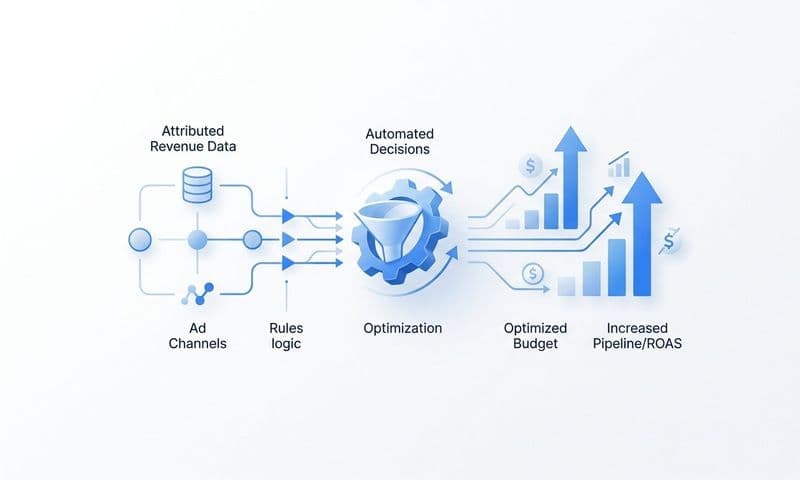
Connecting your CRM pipeline stages and closed-won revenue to your ad campaign data transforms your reporting from a surface-level activity summary into a revenue-connected decision-making tool. This means being able to see, at the campaign or even ad level, which campaigns are generating opportunities, which are producing closed deals, and what the actual return on ad spend is when measured against real revenue rather than lead proxies.
This is one of the most significant capabilities that Cometly's pipeline and revenue attribution delivers. By connecting Stripe revenue data and CRM pipeline stages directly to ad campaign performance, marketing teams can make budget allocation decisions based on what is actually driving revenue growth.
Implementation Steps
1. Integrate your CRM with your attribution platform so that opportunity creation, stage changes, and closed-won events are passed back to the marketing data layer.
2. Connect your payment or billing system, such as Stripe, to your attribution platform so that actual revenue figures are tied to the campaigns that influenced them.
3. Configure your reporting to show pipeline value and closed revenue by campaign, channel, and ad set alongside traditional metrics like impressions, clicks, and cost.
4. Establish a regular reporting cadence where budget decisions are made using revenue-connected data rather than lead volume or cost per lead alone.
Pro Tips
Be patient with the data. Revenue attribution in B2B SaaS requires time because sales cycles are long. Build your reporting windows to account for your average sales cycle length so you are not drawing conclusions from incomplete data. A 90-day or longer attribution window is often necessary to capture the full revenue impact of a campaign.
8. Use AI-Driven Insights to Continuously Optimize Stack Performance
The Challenge It Solves
Marketing data across a connected stack generates more signals than any team can manually analyze. Patterns in cross-channel performance, audience segment behavior, and ad creative effectiveness are often buried in data that never gets reviewed because there is simply too much of it. Manual analysis is slow, inconsistent, and limited by the analyst's ability to spot non-obvious patterns.
The Strategy Explained
AI-driven analytics tools can surface insights from your marketing data that manual review would miss or find too late to act on. Rather than waiting for a weekly reporting cycle to identify that a campaign is underperforming or that a particular audience segment is converting at an unusually high rate, AI can surface those signals in real time and recommend specific actions.
This capability is most powerful when your stack is already well-connected. AI insights are only as good as the data feeding them. A fragmented stack with incomplete attribution produces AI recommendations that are built on a flawed foundation. A well-integrated stack with clean, revenue-connected data gives AI the complete picture it needs to generate recommendations that are actually actionable.
Cometly's AI ads manager is designed for exactly this use case, identifying high-performing ads and campaigns across every channel and surfacing recommendations that help marketing teams scale what works and cut what does not.
Implementation Steps
1. Ensure your attribution data is clean and complete before activating AI-driven analysis. Garbage in, garbage out applies directly here.
2. Configure your AI analytics tool to monitor the metrics that matter most to your business: pipeline contribution, cost per opportunity, revenue by channel, and return on ad spend.
3. Establish a workflow for acting on AI recommendations quickly. The value of real-time insights is lost if your team takes two weeks to review and implement them.
4. Use AI to identify your highest-performing audience segments and creative combinations, then use those findings to inform your next campaign planning cycle.
5. Review AI recommendations weekly and track which ones you acted on and what the outcome was, creating a feedback loop that improves your optimization process over time.
Pro Tips
Treat AI recommendations as inputs to your decision-making, not automatic directives. Your team's knowledge of your market, your customers, and your business context should always be part of the equation. The best outcome is a combination of AI-surfaced patterns and human judgment applied to those patterns quickly and consistently.
Putting It All Together: Your Implementation Roadmap
Building a high-performance marketing operations tech stack is not a one-time project. It is an ongoing discipline of connecting the right tools, ensuring clean data flows, and measuring what actually drives revenue.
The eight strategies outlined here give you a clear framework to work through. Start with the audit so you know exactly what you are working with. Then anchor everything to a single attribution system that connects ad spend to pipeline and revenue. Protect your data quality with server-side tracking and Conversion API integration. Map your tools to the full customer journey so no touchpoint goes untracked. Prioritize native integrations to eliminate manual workflows. Enrich your conversion signals to improve ad platform performance. Bring revenue data into your ad reporting so budget decisions are grounded in actual outcomes. And use AI to surface insights and act on them faster than your competitors can.
For B2B SaaS teams, the payoff is significant. When your stack is built correctly, you stop guessing which campaigns work and start making decisions backed by real pipeline and revenue data.
Cometly is built specifically for this outcome. It connects your ad platforms, CRM, and website into a single attribution system that tracks every touchpoint from first ad click to closed-won deal. With server-side tracking, 70+ native integrations, AI-driven recommendations, and Stripe revenue attribution, it gives your team the complete picture that fragmented stacks simply cannot provide.
If you are ready to build a stack that gives you a true picture of marketing performance, Get your free demo today and see exactly which channels are driving your growth.