Sales email tracking has become a foundational practice for B2B SaaS teams that want to understand what actually moves prospects through the pipeline. But most teams stop at open rates and click notifications, missing the deeper layer of insight that connects email engagement to real revenue outcomes.
The problem is not a lack of data. It is a lack of connected data. Your sales emails generate signals every time a prospect opens a message, clicks a link, or visits your pricing page. Without a system to capture and connect those signals to your CRM, ad campaigns, and conversion events, you are making decisions based on fragments rather than the full picture.
This guide covers seven practical strategies for getting more from your sales email tracking setup. Each strategy addresses a specific gap that B2B SaaS teams commonly face, from choosing the right metrics to connecting email engagement data to your broader attribution model. Whether you are a sales leader trying to prioritize follow-ups or a marketing team trying to prove which campaigns are generating pipeline, these strategies will help you build a more complete, more actionable view of how email fits into your revenue motion.
1. Track the Metrics That Actually Predict Pipeline
The Challenge It Solves
Open rates feel like a meaningful signal, but they are increasingly unreliable as a measure of genuine prospect interest. Since Apple introduced Mail Privacy Protection with iOS 15 in September 2021, email clients pre-fetch content and register opens regardless of whether a human actually viewed the message. This means your open rate dashboard may be reflecting machine behavior more than prospect intent, which distorts prioritization and follow-up decisions.
The Strategy Explained
Shift your tracking focus to engagement signals that require deliberate human action. Reply rate is one of the clearest indicators that a prospect is engaged enough to respond. Click-to-meeting conversion rate tells you how effectively your email content is moving people toward a scheduled call. Link click depth, meaning which specific links within an email get clicked and how many, reveals intent more granularly than a simple open event.
These metrics correlate more directly with pipeline movement because they reflect active behavior. A prospect who clicks your pricing page link twice in one week is signaling something very different from one who passively opened an email. Build your reporting around signals that require effort, and you will have a much cleaner picture of which outreach sequences are actually working.
Implementation Steps
1. Audit your current email reporting and identify which metrics your team uses to make follow-up decisions. Flag any that are inflated by privacy-related pre-fetching.
2. Configure your sales engagement platform to surface reply rate, click-to-meeting conversion rate, and specific link click events as primary dashboard metrics.
3. Set baseline benchmarks for each metric by sequence type, then review weekly to identify which templates and subject lines are generating genuine engagement.
Pro Tips
Create separate tracking views for cold outreach versus warm follow-up sequences. The engagement benchmarks will differ significantly, and mixing them creates misleading averages. If your platform allows it, set up alerts when a prospect clicks a high-intent link like a pricing page or case study, so reps can follow up while the interest is fresh.
2. Connect Email Engagement to Your CRM in Real Time
The Challenge It Solves
When email engagement data lives only inside your sales engagement platform, your CRM becomes an incomplete record of prospect behavior. Sales reps end up toggling between tools to piece together context before a call, and automated follow-up sequences cannot respond dynamically to what a prospect actually did. The result is generic outreach that ignores the signals a prospect has already sent.
The Strategy Explained
Real-time CRM sync means that every meaningful email event, including opens, clicks, replies, and link visits, gets written to the contact or deal record automatically. This creates a live activity timeline that reps can reference before any touchpoint. More importantly, it enables behavior-based workflow triggers. When a prospect clicks your demo request link, a CRM workflow can immediately notify the assigned rep, update the deal stage, or enroll the contact in a higher-priority sequence.
Sales engagement platforms like Outreach, Salesloft, and HubSpot Sales Hub offer native CRM sync for email activity. The value is not just in record-keeping. It is in the operational speed that comes from eliminating manual data entry and giving automation the behavioral context it needs to act intelligently.
Implementation Steps
1. Map out which email engagement events are most relevant to your pipeline stages and define which events should trigger CRM updates or rep notifications.
2. Configure your sales engagement platform's CRM integration to log those specific events to contact and deal records in real time rather than on a batch sync schedule.
3. Build at least one behavior-triggered workflow, such as a rep alert when a prospect clicks a pricing page link, to validate that the sync is working and delivering value.
Pro Tips
Avoid logging every single email event to your CRM or you will create noise that buries meaningful signals. Be selective. Log the events that would change what a rep does next, and filter out low-signal activity like generic newsletter opens that are likely machine-generated.
3. Use UTM Parameters to Attribute Email Clicks to Revenue
The Challenge It Solves
Without UTM parameters on your sales email links, any traffic those emails generate shows up in your analytics as direct traffic, or gets misattributed to another channel entirely. This makes it impossible to measure the actual revenue contribution of your email outreach and creates a blind spot in your attribution model that can lead to underinvesting in sequences that are genuinely driving pipeline.
The Strategy Explained
UTM parameters are tags you append to URLs that tell your analytics platform exactly where a click came from. Google's Campaign URL Builder, documented at developers.google.com, makes it straightforward to generate tagged links. For sales emails, a consistent tagging convention might use utm_medium=email, utm_source=outbound, and utm_campaign values that correspond to your specific sequence names.
When a prospect clicks a tagged link and later converts, that conversion event carries the email attribution with it. This means you can trace a closed deal back to the specific sequence, email, and link that initiated the web visit. For B2B SaaS teams using a platform like Cometly, this UTM data flows into your attribution model alongside paid channel data, giving you a complete view of which touchpoints contributed to revenue.
Implementation Steps
1. Define a consistent UTM tagging convention for your sales email program, covering utm_source, utm_medium, utm_campaign, and utm_content values that match your sequence naming structure.
2. Build tagged versions of your most commonly used links, including demo request pages, pricing pages, and case study downloads, and store them in a shared resource your team can access.
3. Verify that tagged clicks are appearing correctly in your analytics platform by running a test click through a real sequence and confirming the session data matches your expected parameters.
Pro Tips
Use utm_content to differentiate between links within the same email. If you include both a demo link and a case study link in one message, tagging them differently lets you see which content type drives more downstream conversions, which informs future email design decisions.
4. Align Sales Email Tracking With Multi-Touch Attribution
The Challenge It Solves
Most B2B SaaS companies run paid ads, organic content, and sales email outreach simultaneously, but their attribution reporting treats these channels in isolation. Email often gets zero credit in the revenue model because email clicks are not tagged, email events are not synced to the attribution platform, and the team has no way to see how email touchpoints interact with paid and organic channels in the buyer journey.
The Strategy Explained
Multi-touch attribution models, including linear, time-decay, position-based, and data-driven approaches, are designed to distribute revenue credit across every touchpoint that contributed to a conversion. For email to receive appropriate credit, two things need to be true: your email links must be tagged with UTM parameters so web visits are tracked, and your email engagement events must be flowing into the same attribution platform that processes your paid channel data.
When email is properly integrated, you can see scenarios like a prospect who first clicked a LinkedIn ad, then received a sales email sequence, then visited your pricing page via an email link before booking a demo. Each touchpoint gets credited according to your chosen model, and your revenue reporting reflects the full journey rather than crediting only the last touch or the paid channel.
Platforms like Cometly are built to handle exactly this kind of multi-channel attribution, connecting ad clicks, email touchpoints, CRM events, and closed revenue into a single view. This is where sales email tracking stops being a sales ops concern and becomes a core part of your marketing attribution strategy.
Implementation Steps
1. Confirm that your email links are tagged with UTM parameters and that those sessions are being captured by your attribution platform alongside paid channel sessions.
2. Work with your marketing ops or analytics team to define how email touchpoints should be represented in your attribution model and which events count as meaningful interactions.
3. Run a sample of recently closed deals through your attribution report and identify how many involved an email touchpoint that was previously uncredited.
Pro Tips
Time-decay attribution models tend to be particularly useful for B2B sales cycles where email outreach often occurs closer to the conversion decision. If your team sends follow-up sequences in the later stages of a deal, time-decay gives those email touches more weight, which often reflects the actual buying process more accurately.
5. Leverage First-Party Data to Improve Email Deliverability and Tracking Accuracy
The Challenge It Solves
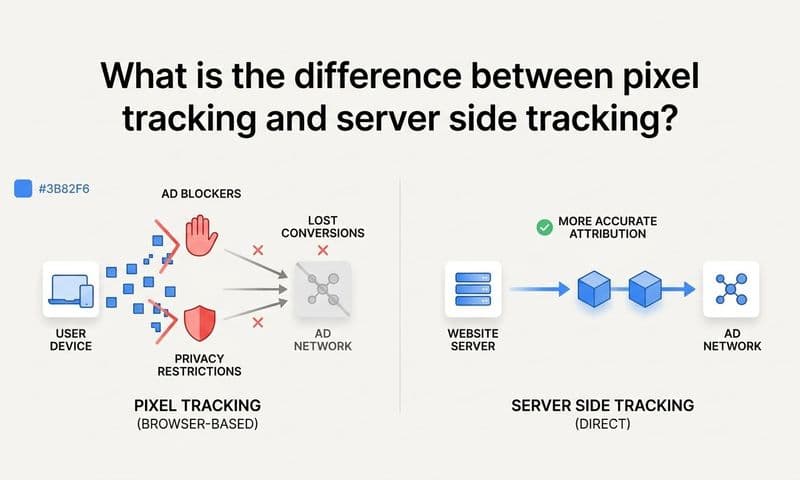
Traditional email tracking relies heavily on pixel-based methods, a tiny invisible image loaded when an email is opened that signals the tracking server. Apple's Mail Privacy Protection pre-loads these pixels automatically, and other privacy-focused email clients are increasingly doing the same. The result is tracking data that overstates engagement and cannot be trusted as a reliable signal for prioritization or reporting.
The Strategy Explained
The shift toward first-party data means collecting engagement signals through methods that do not depend on third-party pixels or browser-based tracking that can be blocked or spoofed. Server-side tracking captures events at the server level rather than relying on client-side scripts, making it more resilient to browser privacy settings and ad blockers. For email specifically, this means prioritizing engagement signals that are definitively human-generated, such as replies, form submissions from email-linked landing pages, and CRM-logged call outcomes.
For the web tracking component, where prospects land after clicking an email link, server-side event collection ensures that the visit and any subsequent conversion events are captured accurately regardless of browser restrictions. This is directly relevant to how platforms like Cometly approach tracking, using server-side methods to maintain data fidelity as privacy changes reduce the reliability of pixel-based approaches.
Implementation Steps
1. Audit your current email tracking methods and identify which signals are pixel-dependent and therefore susceptible to privacy-related inflation or loss.
2. Prioritize reply rate and CRM-logged behavioral events as your primary engagement metrics, since these are definitively human-generated and not affected by pre-fetching.
3. Implement server-side tracking on your key landing pages so that email-sourced web sessions and conversion events are captured accurately even when browser-side tracking is limited.
Pro Tips
When building landing pages specifically for email campaigns, use form submissions as your primary conversion signal rather than page view tracking. A form submission is an unambiguous human action that cannot be spoofed by a privacy proxy, making it a reliable anchor for your email attribution data.
6. Build Engagement Scoring Models Around Email Behavior
The Challenge It Solves
Sales teams with large prospect lists face a constant prioritization challenge. Without a structured way to rank prospects by engagement level, reps default to recency or gut instinct, which often means high-intent prospects get the same attention as cold contacts who have never interacted with any email. This inefficiency costs deals and wastes rep capacity on the wrong conversations.
The Strategy Explained
Engagement scoring assigns point values to specific email behaviors and accumulates them over time to produce a composite score for each prospect. A reply might be worth the most points because it signals active interest. A click on a pricing page link earns more points than a click on a generic blog post. Multiple opens across a short window might indicate a prospect is actively evaluating your product.
The cumulative score creates a ranked list of prospects that sales reps can use to sequence their outreach. High-scoring prospects get immediate personal attention. Medium-scoring prospects might be enrolled in a nurture sequence. Low-scoring contacts can be deprioritized or re-evaluated for fit. Marketing automation platforms like Marketo, HubSpot, and Pardot all support behavioral lead scoring, and many sales engagement platforms offer similar functionality natively.
When email engagement scores are synced to your CRM, they become a dynamic signal that updates as prospects interact with new emails. A prospect who went cold for two months but suddenly clicks three links in a new sequence jumps up the priority list automatically, ensuring reps act on fresh intent signals rather than stale assumptions.
Implementation Steps
1. Define your scoring criteria by listing the email engagement events you track and assigning point values based on how strongly each event correlates with genuine purchase intent.
2. Set score thresholds that trigger specific sales actions, such as an immediate rep notification at a score above a defined level, or automatic enrollment in a high-touch sequence.
3. Review your scoring model monthly against actual conversion data to calibrate point values and thresholds based on which behaviors are actually predicting pipeline movement in your business.
Pro Tips
Include score decay in your model. If a prospect earned points from engagement six months ago but has not interacted since, those older signals should carry less weight than recent ones. Most marketing automation platforms support time-based score decay, and it keeps your prioritization list reflecting current intent rather than historical activity.
7. Feed Email Conversion Data Back Into Your Ad Platforms
The Challenge It Solves
Your ad platforms optimize based on the conversion signals you send them. If you are only passing web-based conversion events like form fills, you are giving Meta and Google an incomplete picture of which users actually became customers. Leads that entered your pipeline through a sales email sequence and later converted to paying customers represent real conversion value, but that value never reaches the ad platform's optimization algorithm if you do not send it back explicitly.
The Strategy Explained
Meta's Conversion API (CAPI) and Google's Enhanced Conversions are documented solutions for sending server-side conversion events back to ad platforms. Both are publicly available and recommended in official Meta and Google documentation as best practices for improving signal quality and ad optimization. The key is that these tools accept offline conversion data, meaning you can send conversion events that happened outside the browser, including CRM-logged closed deals that originated from email-sourced leads.
The workflow looks like this: a prospect clicks a paid ad, enters your pipeline, receives a sales email sequence, converts to a customer, and that conversion event gets sent back to Meta and Google via server-side API. The ad platform now knows that the original ad click contributed to a real revenue event, not just a form fill. This improves the platform's ability to find more users who match the profile of your actual customers rather than optimizing for surface-level lead volume.
This is a core capability of Cometly, which connects your ad spend data to CRM events and revenue outcomes, then feeds enriched conversion signals back to Meta and Google. The result is ad targeting and optimization that reflects your actual revenue motion, not just top-of-funnel activity.
Implementation Steps
1. Identify which conversion events in your CRM represent genuine revenue milestones, such as opportunity created, demo completed, or closed-won, and determine which of these you want to send back to your ad platforms.
2. Set up Meta's Conversion API and Google's Enhanced Conversions integrations, using your CRM or a platform like Cometly to handle the server-side event transmission.
3. Monitor your ad platform's event match quality scores after implementation to confirm that the conversion data is being received and matched to ad interactions at a high confidence level.
Pro Tips
Include customer lifetime value or deal size data when sending conversion events back to your ad platforms if your plan allows for it. Platforms that support value-based optimization can use this information to prioritize finding users who match the profile of your highest-value customers, not just any customer.
Putting It All Together
Sales email tracking is most powerful when it is connected to the rest of your revenue stack. Tracking opens in isolation tells you almost nothing about what is actually driving pipeline or closed revenue. The strategies in this guide move you from surface-level email metrics toward a fully connected view of how email engagement contributes to deals won.
Start by auditing your current tracking setup with these questions in mind: Are your email clicks tagged with UTM parameters? Are engagement events flowing into your CRM in real time? Are email-sourced conversions being attributed correctly across your full customer journey? Each gap you close adds clarity to your attribution model and confidence to your decisions.
If you want to prioritize, here is a practical sequence. Begin with UTM tagging since it is low-effort and immediately improves attribution visibility. Then connect your email platform to your CRM so engagement events flow automatically. From there, build your engagement scoring model to sharpen rep prioritization. Finally, implement server-side conversion tracking and feed those signals back to your ad platforms to complete the loop.
For B2B SaaS teams that want to connect every touchpoint, including email, to actual revenue, Cometly provides the attribution infrastructure to make that possible. From tracking ad clicks to CRM events to closed-won revenue, Cometly gives your team a single source of truth for understanding what is driving growth.
Ready to see exactly which channels and sequences are moving your pipeline forward? Get your free demo and start capturing every touchpoint that matters.