
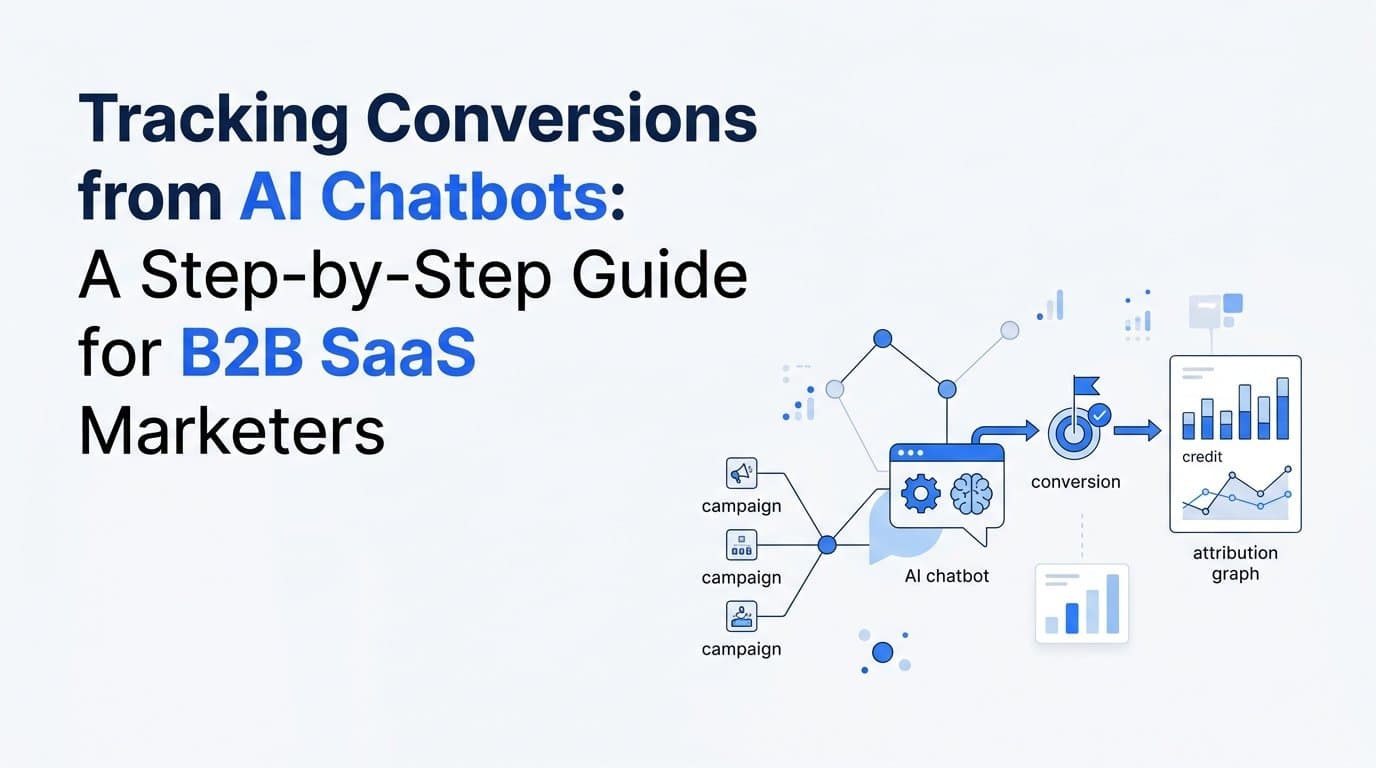
AI chatbots have quietly become one of the most active conversion surfaces in the B2B SaaS buyer journey. Prospects land on your pricing page, fire up the chat widget, ask a few pointed questions, and book a demo without ever touching a form. That is a win. But here is the problem: most marketing teams have no idea which ad, campaign, or channel deserves credit for that conversation.
When chatbot conversions go untracked, they fall into the attribution void. Your cost-per-acquisition looks inflated, your best-performing campaigns appear underperforming, and your budget decisions are based on incomplete data. You end up optimizing against a partial picture of reality.
This guide fixes that. You will learn exactly how to track conversions from AI chatbots in a way that connects every chatbot-assisted lead back to the original traffic source, whether that is a Google Ads campaign, a LinkedIn sponsored post, or an organic search click. The process covers how to define chatbot conversions clearly, instrument them with first-party tracking, connect them to your attribution platform, and use that data to sharpen your paid media strategy.
The approach here is platform-agnostic. Whether your chatbot runs on Intercom, Drift, Qualified, Tidio, or a custom-built solution, the underlying principles apply. And whether your chatbot lives on the homepage, the pricing page, or inside your product, the same instrumentation logic holds.
This is not a theoretical walkthrough. It is a practical, repeatable system built for growth teams and marketing operators who want accurate data instead of guesswork. By the time you finish reading, you will have a clear action plan for turning chatbot interactions into attribution-grade conversion events that inform smarter budget decisions.
Let's get into it.
Step 1: Define What a Chatbot Conversion Actually Means for Your Business
Before you touch a single line of tracking code, you need to decide what counts as a conversion inside your chatbot. This sounds obvious, but it is where most teams go wrong. Without a clear definition, you end up tracking everything, which is functionally the same as tracking nothing.
Start by separating macro-conversions from micro-conversions. Macro-conversions are the high-intent actions that directly signal pipeline potential: a demo booked through the chatbot, a trial sign-up initiated, a live handoff to a sales rep triggered, or a pricing inquiry completed with a CTA click. These are the events worth connecting to your ad spend because they represent real buyer intent.
Micro-conversions are earlier-stage signals: an email address captured, a qualification question answered, or a resource downloaded through the chat flow. These are worth tracking for behavioral analysis and chatbot optimization, but they should not be the primary events you feed into your attribution platform or ad platform optimization algorithms. Treating a captured email the same as a booked demo inflates your conversion counts and distorts your cost-per-acquisition data.
Once you have separated macro from micro, map each conversion type to a stage in your funnel. A demo booking maps to an opportunity created. A trial sign-up maps to a product-qualified lead. A live sales handoff maps to a sales-accepted lead. This mapping matters because it is what allows your attribution platform to connect chatbot events to pipeline and revenue, not just to activity metrics.
Practical tip: Document your conversion definitions in a shared spec before any implementation begins. Write down the event name, the trigger condition, the funnel stage it maps to, and whether it is a macro or micro conversion. This document becomes the source of truth for your developers, your analytics team, and your attribution platform configuration. Without it, you will end up with inconsistent event names and conflicting data across systems.
Common pitfall to avoid: Some teams track every chatbot interaction as a conversion because the platform makes it easy to do so. Resist this. If you count every message sent or every question answered as a conversion, your attribution analysis becomes meaningless. The signal-to-noise ratio collapses, and you lose the ability to distinguish which campaigns are driving real pipeline from those that are generating curious visitors who bounce after a few chat exchanges.
The goal of this step is clarity. You should finish it with a short list of two to five specific chatbot events that represent genuine buyer intent, each tied to a funnel stage and clearly labeled as macro or micro. Everything else in this guide builds on that foundation.
Step 2: Audit Your Chatbot Platform's Native Tracking Capabilities
Now that you know what you want to track, you need to understand what your chatbot platform actually lets you track. This audit step is often skipped, and it leads to painful rework later when teams discover mid-implementation that their platform does not expose the events they assumed it would.
Start by reviewing your chatbot platform's developer documentation. Look specifically for webhooks, JavaScript event callbacks, API endpoints, and pixel trigger options. These are the mechanisms you will use to fire conversion events when a defined action occurs inside the chat flow. Platforms like Intercom and Drift expose robust webhook systems. Others may require custom JavaScript listeners attached to specific UI interactions. Some offer native integrations with tag managers that simplify the process considerably.
The next thing to check is whether your platform preserves UTM parameters and session data through the conversation flow. This is a critical and commonly overlooked gap. When a visitor arrives on your site from a paid ad, their UTM parameters are present in the URL. But if the chatbot loads in a way that breaks the browser session, or if the platform does not pass those parameters forward when a conversion fires, you lose source attribution entirely. The conversion gets recorded, but it shows up as direct traffic with no campaign association.
Common attribution breaks introduced by chatbot platforms:
iFrame loading: Some chatbot widgets load inside an iframe, which can block first-party cookies and prevent UTM data from being read by the chat session.
New tab behavior: If a chatbot CTA opens a booking link or a sign-up page in a new browser tab, the HTTP referrer is typically stripped. The downstream page has no idea where the user came from.
Redirect chains: Some chatbot flows involve intermediate redirects that overwrite or drop UTM parameters before the user reaches the final conversion page.
Also check whether your chatbot platform supports server-side event firing or only client-side pixel triggers. Browser-based tracking is increasingly unreliable. Ad blockers suppress client-side pixels, and third-party cookie restrictions limit what data can be read and written in the browser. If your chatbot can only fire events via a browser pixel, you are building on a fragile foundation. Server-side event support, through webhooks or API callbacks, is what you want.
By the end of this audit, you should have a clear picture of what your platform exposes natively, where the gaps are, and what custom instrumentation will be required. That clarity drives the next step.
Step 3: Instrument Chatbot Conversion Events with First-Party Tracking
This is the technical core of the process. Instrumentation is where you move from knowing what you want to track to actually capturing it reliably. The goal is to fire a clean, data-rich conversion event every time a defined chatbot conversion occurs, using first-party data so the signal survives ad blockers, browser restrictions, and session breaks.
The preferred approach is server-side event firing. When a chatbot conversion occurs, your chatbot platform sends a webhook to your server, and your server forwards that event to your analytics platform, your attribution tool, and your ad platforms. This bypasses the browser entirely and is not affected by ad blockers or cookie restrictions. If your chatbot platform supports webhooks or API callbacks, this is the path to take.
Each event you fire should carry a consistent set of parameters. At minimum, include the event name (matching the definitions you created in Step 1), a timestamp, a unique event ID for deduplication purposes, the user's email address or a hashed identifier if available, and the original UTM parameters captured at the start of the session. That last piece is what ties the chatbot conversion back to its source.
Preserving UTM parameters across the session: The most reliable way to do this is to capture UTM values in a first-party cookie or in browser localStorage at the moment the visitor first lands on your site, before any chatbot interaction begins. Write a small JavaScript snippet that reads the URL parameters on page load and stores them locally. When the chatbot conversion fires, your server-side event handler reads those stored values and appends them to the outgoing event. This approach survives page navigation, chatbot interactions, and most session interruptions.
For chatbot platforms that do not support server-side webhooks, you can use a JavaScript-based approach. Set up a listener that detects when the user reaches a defined conversion step in the chat flow, then push a custom event to your tag manager's dataLayer. Your tag manager picks up that event and fires the appropriate tracking tags. This is less robust than server-side tracking but is significantly better than no tracking at all.
Inline tip: If your chatbot collects an email address as part of the conversation flow, that is your most valuable instrumentation opportunity. An email address creates a persistent identifier that can be hashed and passed to your attribution platform, your CRM, and your ad platforms. It is what allows you to tie the chatbot session to downstream activity, including deals created in your CRM and revenue closed in Stripe. Do not let that data point go uncaptured.
Before you declare this step complete, test every conversion event yourself. Walk through the chatbot flow, trigger each defined conversion, and verify the event appears in your analytics debugger, your server logs, or your attribution platform's event stream. Testing is not optional. Unverified tracking is the same as no tracking, because you will not know it is broken until weeks of data have been lost.
Step 4: Connect Chatbot Events to Your Attribution Platform
Instrumented events sitting in isolation do not help you make better budget decisions. The value comes when those events flow into your attribution platform and get connected to the originating ad clicks, campaigns, and channels. This step is about making that connection work reliably.
Send your chatbot conversion events to your attribution platform the same way you would send any other conversion event, whether that is a form submission, a trial sign-up, or a purchase. Use the event names you defined in Step 1 so the platform can categorize them correctly. In Cometly, you map these events to the appropriate funnel stage, which allows the platform to connect each chatbot conversion back to the originating ad click and attribute pipeline value to the right campaign.
Alongside your attribution platform, send the same chatbot conversion events to your ad platforms using their server-side APIs. For Meta, that means using the Conversions API (CAPI). For Google, it means Enhanced Conversions. These server-side integrations give the ad platforms' machine learning models accurate signal about which users converted, allowing them to optimize toward users who are more likely to follow the same path. When chatbot conversions are excluded from this signal, you are essentially hiding your best-performing conversion events from the algorithms that control your ad delivery.
Event deduplication is critical here. If your chatbot fires both a client-side pixel event and a server-side event for the same conversion, ad platforms will count it twice. This inflates your reported conversion numbers, distorts your cost-per-conversion metrics, and causes the optimization algorithm to make decisions based on inaccurate data. Prevent this by passing a unique event ID with both the browser and server events. Ad platforms use this ID to deduplicate and count the conversion only once.
Verify that the UTM source, medium, and campaign data are traveling alongside each chatbot event when it arrives at your attribution platform. Without this data, the platform cannot assign the conversion to a specific campaign. It will appear as unattributed or direct traffic, which defeats the entire purpose of this process.
Success indicator: Open your attribution dashboard after a chatbot conversion fires during testing. You should see the conversion appear as a distinct event type, tied to a specific campaign, ad set, and creative. If it appears as direct or unattributed, trace back through your event payload and confirm that UTM parameters are being passed correctly. That is almost always the source of the problem.
Step 5: Validate Attribution Accuracy Across the Customer Journey
Instrumentation and connection are not enough on their own. You need to verify that the data flowing through your system is accurate before you start making budget decisions based on it. Validation is the step most teams skip, and it is the reason attribution data gets dismissed as unreliable.
Run a full end-to-end test. Click a paid ad in your actual ad platform, land on the destination page, wait for the chatbot to load, trigger a defined conversion event, and then open your attribution platform to confirm the event appears with the correct source, medium, and campaign data. This single test tells you whether your entire instrumentation chain is working as intended.
After the end-to-end test, cross-reference your chatbot conversion data against your CRM. If a chatbot conversion should create a lead record, confirm that the lead exists in your CRM and that it carries the correct source attribution. This cross-reference catches gaps where the chatbot event fires correctly but the CRM integration fails to create or tag the record properly.
Watch for these specific attribution breaks during validation:
Chatbot opened in a new tab: If a CTA inside the chatbot opens a booking page in a new tab, the referrer is stripped. The booking confirmation page will show direct traffic even though the user came from a paid ad. Fix this by passing UTM parameters explicitly through the chatbot CTA URL rather than relying on the referrer.
iFrame cookie blocking: If your chatbot loads inside an iframe, first-party cookies set by your main domain may not be accessible inside the frame. Test this explicitly by checking whether stored UTM values can be read when a conversion fires from within the iframe context.
UTM stripping by redirects: Some booking tools and CRM integrations use URL redirects that drop query parameters. If your chatbot sends users through a redirect before landing on the confirmation page, check whether UTM parameters survive the redirect chain.
Use Cometly's customer journey view to confirm that chatbot interactions are appearing as touchpoints within the full path from first ad click to conversion. A chatbot conversion should not appear as an isolated event with no preceding touchpoints. If it does, that signals a session continuity problem where the chatbot interaction is being tracked independently rather than as part of the same customer journey.
Step 6: Analyze Chatbot Conversion Data to Optimize Ad Spend
Once your tracking is validated and data is flowing cleanly, the real value begins. You now have a new lens for evaluating your paid media performance: chatbot-assisted conversions broken down by source, campaign, and creative.
Start by segmenting chatbot conversions by traffic source. Which paid channels are driving the highest volume of chatbot-assisted leads? This breakdown often reveals surprises. A channel that looks underperforming in your ad platform's native reporting may be driving significant chatbot engagement that was previously invisible. Conversely, a channel that appears to be generating conversions may be driving low-intent traffic that engages with the chatbot but never progresses to a booked demo or qualified lead.
Compare the downstream pipeline value of chatbot-converted leads against leads from other conversion paths, such as form submissions from the same campaigns. This comparison tells you whether chatbot-converted leads are higher or lower quality in terms of deal progression and revenue potential. If chatbot leads convert to pipeline at a higher rate, that is a signal to invest more in the channels and pages where chatbot engagement is highest.
Identify which specific ad creatives and campaigns are generating visitors who engage with the chatbot and convert. Increase budget allocation toward those campaigns with data to back the decision. This is the kind of insight that becomes possible only when chatbot conversions are connected to their originating ad clicks, not when they sit in a separate analytics silo.
Use attribution model comparison to understand how chatbot conversions are credited across different models. Because chatbots often appear mid-funnel or late-funnel in the B2B SaaS buyer journey, last-click attribution tends to over-credit the chatbot interaction while under-crediting the paid ad that started the journey. Comparing first-touch, last-touch, and linear attribution in Cometly gives you a more complete picture of how chatbots fit into your overall conversion path.
Optimization signal: Look for pages where chatbot engagement is high but the conversion rate from engagement to macro-conversion is low. This pattern suggests the chatbot flow itself needs optimization, not your ad spend. The ads are doing their job by driving interested visitors. The chatbot is failing to move them forward. That is a product and messaging problem, not a media buying problem, and treating it as one will lead you to cut campaigns that are actually working.
Finally, feed enriched chatbot conversion events back to Meta and Google continuously. As more conversions accumulate, the ad platform algorithms improve their ability to find users likely to follow the same conversion path. This creates a compounding effect where better signal quality leads to better audience targeting, which leads to more chatbot conversions, which leads to better signal quality.
Putting It All Together: Your Chatbot Conversion Tracking Checklist
Tracking conversions from AI chatbots is not a one-time setup. It is a system you build deliberately, validate carefully, and improve continuously. Here is the repeatable checklist you can use every time you add a new chatbot flow or expand to a new page:
1. Define your chatbot conversions. Separate macro from micro, map each to a funnel stage, and document the spec before touching any code.
2. Audit your chatbot platform. Identify what events it exposes natively, where UTM parameters are at risk of being lost, and whether server-side event firing is available.
3. Instrument with first-party tracking. Capture UTM parameters in localStorage or a first-party cookie at page load, fire server-side events when conversions occur, and include a unique event ID with every event.
4. Connect to your attribution platform. Map chatbot events to funnel stages in Cometly, send them to Meta via CAPI and Google via Enhanced Conversions, and configure deduplication to prevent double-counting.
5. Validate end-to-end. Run a test conversion through your full funnel, cross-reference against your CRM, and confirm chatbot interactions appear as touchpoints in the customer journey view.
6. Analyze and optimize. Segment by source, compare lead quality across conversion paths, use attribution model comparison, and feed enriched events back to ad platforms for better signal quality.
The foundation of this entire system is server-side tracking and first-party data. As third-party cookies continue to decline across major browsers, teams that have built reliable first-party event infrastructure will have a significant data advantage over those still relying on browser pixels.
Cometly serves as the attribution layer that brings all of this together: connecting chatbot events, ad platform data, and CRM pipeline into a single source of truth so you always know which campaigns are actually driving revenue.
If you are ready to see how chatbot-driven conversions map to the campaigns that generated them, Get your free demo and start capturing every touchpoint with the accuracy your paid media strategy deserves.