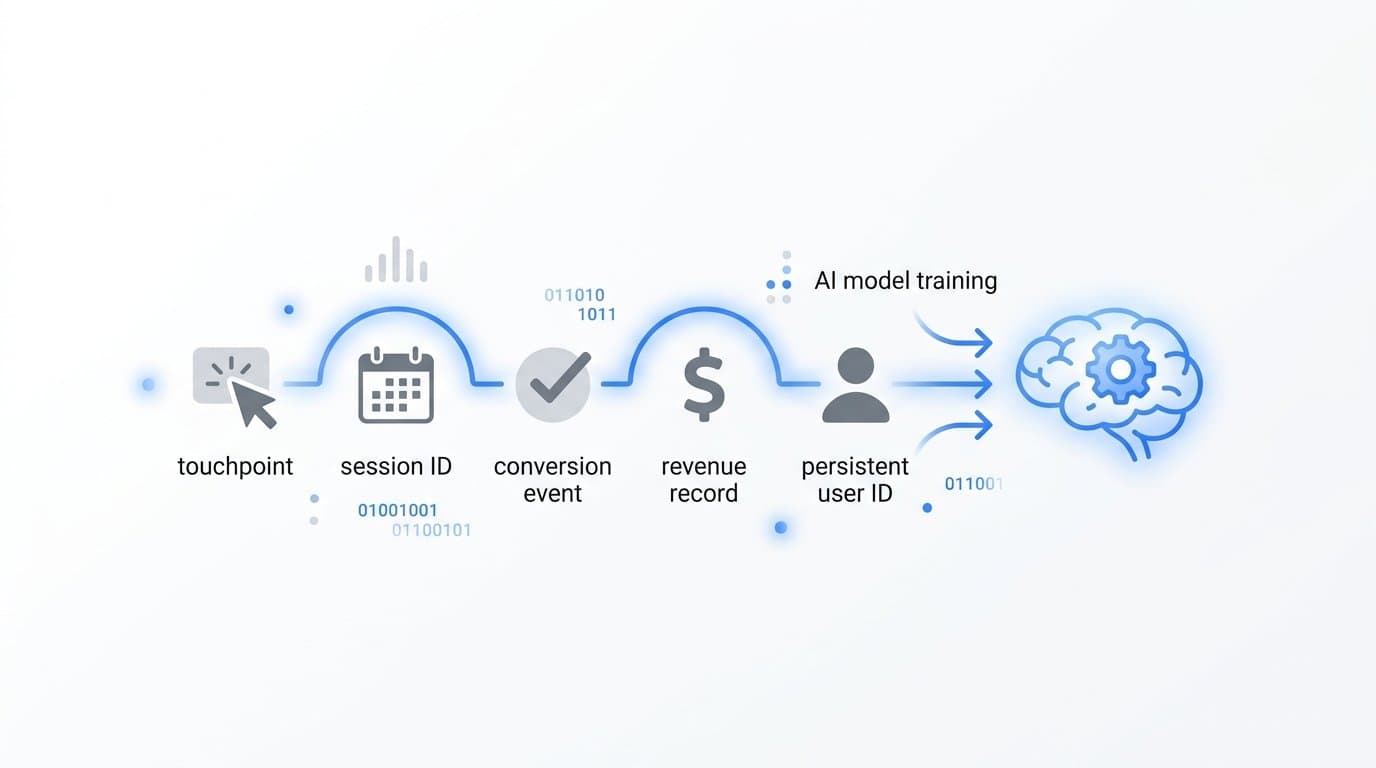
Store touchpoint-level event data, conversion outcomes, and revenue signals in your warehouse to train AI models on attribution. The minimum viable dataset includes every ad interaction, session identifier, conversion event, and closed-won revenue record linked by a persistent user or account ID.
This is where most B2B SaaS attribution strategies break down. Marketing teams collect aggregate reports from ad platforms but never store the raw, granular events that AI models actually need to learn from. The result is a warehouse full of dashboard exports instead of a training-ready dataset. Aggregate summaries tell you what happened at the campaign level. AI models need to know what happened at the event level, row by row, user by user.
Cometly is built specifically for this use case. It captures every touchpoint from first ad click to closed-won revenue and feeds enriched, conversion-ready event data into your data pipeline, giving your AI models a complete and accurate picture of the customer journey without weeks of data engineering work.
What follows is a breakdown of the seven specific data layers, schema decisions, and storage strategies that separate attribution data that trains accurate AI models from data that produces misleading predictions. Each section covers a distinct layer of the attribution data stack, from raw event capture to revenue linkage to model-ready feature engineering.
1. Raw Touchpoint Events
The Challenge It Solves
Most teams pull performance data from Google Ads or Meta Ads Manager and store those exports in their warehouse. The problem is that platform-level reports are aggregated summaries. They have no row-level user context, no session IDs, and no way to link a specific impression or click to a specific conversion outcome. AI models cannot learn from summaries. They need labeled rows.
The Strategy Explained
Your raw touchpoint event table is the foundation of the entire attribution data stack. Every ad interaction, organic session, and direct visit should be captured as an individual row with a consistent schema. This is the non-negotiable starting point. Without it, every downstream layer is built on incomplete data.
The required fields that data engineers and ML practitioners consistently recommend include: event_id (unique row identifier), user_id or account_id (persistent cross-session identifier), session_id, timestamp in UTC, channel, source, medium, campaign_id, ad_id, creative_id, landing_page_url, referrer_url, device_type, and event_type.
Server-side collection is strongly preferred over browser-based tracking because it avoids data loss from ad blockers, browser privacy restrictions, and cookie deprecation. First-party event data collected server-side is the only reliable source for model training. Ad platform attribution data uses platform-owned models and cannot be used directly to train your own AI models.
Implementation Steps
1. Implement server-side event collection for all ad click and session events, capturing each interaction as an individual row rather than a session summary.
2. Define and enforce a consistent schema across all channels. Every event row must include the required fields above, with null values flagged rather than omitted, so the model can learn from missingness patterns.
3. Partition your event table by date and index by user_id and account_id to keep query performance fast as event volume grows.
Pro Tips
Never overwrite raw events. Append only. If you need to correct an error, add a corrected row with a flag rather than modifying the original. Raw event logs should be immutable. This protects model reproducibility and lets you retrain on historical snapshots without uncertainty about whether the data has changed.
2. Identity Resolution Data
The Challenge It Solves
B2B buying journeys span multiple sessions, devices, and often weeks or months before a conversion. A prospect might click a LinkedIn ad on their phone, visit your pricing page on their laptop three days later, and request a demo from a work computer a week after that. Without identity stitching, those three interactions look like three anonymous users, and your AI model never sees a complete path.
The Strategy Explained
Identity resolution data bridges the gap between anonymous pre-conversion identifiers and known CRM identities. The goal is to store both the anonymous ID (cookie-based or device-based) and the resolved ID (email hash or CRM contact ID) in the same record, along with a stitching timestamp that marks when the resolution occurred.
In B2B contexts, this is more complex than consumer attribution because multiple stakeholders from the same account are often involved in the buying decision. Your identity resolution table should support account-level grouping, where individual user events can be nested under a shared account ID. This allows AI models to learn from multi-stakeholder journeys rather than treating each contact as an isolated path.
The stitching logic itself should be stored as a separate table, not baked into the event log. This keeps your raw events clean and lets you update identity mappings as new information arrives without rewriting historical rows.
Implementation Steps
1. Create an identity map table with columns for anonymous_id, resolved_user_id, account_id, stitching_timestamp, and stitching_method (for example, form submission, SSO login, or CRM match).
2. Apply identity resolution as a join at query time or as a scheduled enrichment job, preserving the original anonymous_id in the event log for auditability.
3. Flag events where resolution is uncertain or based on probabilistic matching, so your model can weight those records differently during training.
Pro Tips
Store the stitching confidence score alongside each identity resolution record. Deterministic matches (email-based) should be scored higher than probabilistic matches (device fingerprint). This lets you filter your training dataset to high-confidence resolved journeys when you need clean labels, and expand to probabilistic matches when you need volume.
3. Conversion and Pipeline Events
The Challenge It Solves
Not all conversion events carry equal signal for AI training. If you store page views, scroll events, and generic button clicks alongside demo requests and closed-won records, your model has to work much harder to separate signal from noise. Worse, high-frequency low-signal events can dominate the training data and skew attribution scores toward channels that generate traffic rather than revenue.
The Strategy Explained
The key distinction is storing pipeline stage progressions as ordered sequences rather than just recording the final conversion state. High-signal events to prioritize include demo requests, trial activations, MQL transitions, SQL transitions, and closed-won. These are the outcome labels your AI model needs to learn which touchpoint patterns predict pipeline velocity and deal closure.
Storing the sequence matters because the order of pipeline stages carries predictive information. A prospect who moves from MQL to SQL in three days after a specific channel sequence behaves differently from one who takes thirty days. AI models can learn these timing and sequence patterns if the data is structured to support it, but only if each stage transition is stored as a timestamped event row rather than a status field that gets overwritten.
Cometly captures these pipeline stage events and links them to the upstream touchpoint history, giving your model a connected view from first touch through each conversion milestone to revenue.
Implementation Steps
1. Define a canonical list of high-signal conversion events and store each stage transition as a new row with event_type, account_id, user_id, timestamp, and pipeline_stage fields.
2. Never overwrite stage fields. Use an append-only event log so the full sequence of stage progressions is preserved for sequence modeling.
3. Add a time_in_stage field calculated at query time to capture how long each account spent at each pipeline stage before progressing or churning.
Pro Tips
Include churned and lost opportunities in your conversion event table, not just closed-won records. AI models need negative examples to learn what distinguishes winning journeys from losing ones. A model trained only on successful conversions will overfit to patterns that appear in winning paths without accounting for how often those same patterns appear in losing paths.
4. Revenue Attribution Records
The Challenge It Solves
Linking ad spend to pipeline is useful. Linking ad spend to actual subscription revenue is what makes attribution models actionable for budget decisions. Most attribution data stops at the lead or opportunity level, which means the model never learns the difference between channels that generate high-volume low-value deals and channels that drive the accounts that actually expand and retain.
The Strategy Explained
Revenue attribution records are row-level joins between subscription revenue data and the touchpoint history that preceded each deal. The critical word is row-level. Summary-level joins (total revenue per campaign per month) support reporting but cannot train accurate AI models because they destroy the individual journey context that models need to learn from.
For B2B SaaS teams, this means connecting Stripe or CRM revenue data to your touchpoint event log at the account level. Each revenue record should include the account_id, contract value, subscription start date, MRR or ARR, and a foreign key back to the touchpoint history table. Time-to-close and contract value fields add weighting context that allows AI models to distinguish high-value acquisition patterns from low-value ones.
Cometly's Stripe integration is designed specifically for this use case. It connects subscription revenue data directly to the ad event stream, so the join between revenue and touchpoints is handled in the data pipeline rather than requiring custom SQL engineering from your team.
Implementation Steps
1. Pull subscription revenue records from Stripe or your CRM at the account level, including contract value, start date, and renewal or expansion events.
2. Join revenue records to your touchpoint history using account_id as the primary key, creating a revenue_attribution table that links each deal to its preceding event sequence.
3. Add derived fields including days_from_first_touch_to_close and contract_value_tier to give the model weighting context during training.
Pro Tips
Store expansion revenue and renewal events separately from new business acquisition. AI models trained on a mix of new business and expansion data will learn different patterns for each, and conflating them produces muddled attribution scores. Segment by revenue type at the record level so you can filter training data by business motion when needed.
5. Channel and Campaign Metadata
The Challenge It Solves
Raw event logs store campaign_id and ad_id as identifiers, but without a metadata table to look up what those IDs represent, your AI model is learning from opaque labels. It cannot generalize across campaigns or identify patterns at the creative or audience level. Inconsistent UTM tagging makes this worse by creating categorical noise that the model has to work around rather than learn from.
The Strategy Explained
Channel and campaign metadata tables store the structured context that gives AI models the ability to generalize. Instead of learning that campaign_id 48291 performs well, the model can learn that video creative formats in the enterprise segment perform well, a pattern that transfers across campaigns and time periods.
The metadata table should store UTM parameters, ad creative IDs, audience segment IDs, and campaign hierarchies (campaign, ad set, ad) as structured fields with consistent naming conventions. Storing these as foreign keys to a metadata table rather than as raw strings in the event log improves model generalization and makes it easier to update campaign labels without touching the raw event data.
UTM parameter consistency is a foundational requirement here. Inconsistent UTM tagging creates categorical noise in training data. A channel labeled "linkedin" in one campaign and "LinkedIn" in another looks like two different channels to a model unless you normalize it upstream.
Implementation Steps
1. Build a campaign metadata table with campaign_id as the primary key and structured fields for channel, campaign_name, ad_format, audience_segment, creative_id, and campaign_objective.
2. Enforce UTM naming conventions across all campaigns and implement validation that flags non-conforming UTM strings before they enter the warehouse.
3. Join the metadata table to your raw event log at query time using campaign_id and ad_id as foreign keys, keeping the raw events clean and the metadata updateable independently.
Pro Tips
Version your campaign metadata. When a campaign is restructured or renamed mid-flight, store the new metadata as a new record with a valid_from timestamp rather than overwriting the existing record. This preserves the historical context that AI models need when training on data that spans campaign restructures.
6. Negative Signals and Exclusion Data
The Challenge It Solves
AI models trained only on converting paths will systematically overestimate the value of channels that appear frequently in winning journeys without accounting for how often those same channels appear in losing journeys. A channel that touches every account, converting or not, will look important to a model that has never seen the non-converting paths. This is a well-documented problem in causal inference applied to marketing attribution.
The Strategy Explained
Negative signals are the training data that teaches AI models what not to credit. This layer includes four types of records: non-converting path data for accounts that progressed partway through the funnel but did not close, bot traffic flags for sessions identified as non-human, internal session exclusions for traffic from your own team, and deduplication logs for events that were captured more than once.
The important principle here is that bot traffic filtering and internal session exclusion should happen upstream of the training dataset, not inside the model. Clean the data before it reaches the model, and log every exclusion so you can audit the cleaning logic. Non-converting paths, however, should stay in the training dataset as labeled negative examples. These are valuable signal, not noise.
Storing non-converting path data requires the same schema as your converting path data, with an outcome label field set to zero or "not converted" rather than removing those records entirely. This gives the model the contrastive examples it needs to learn meaningful attribution patterns.
Implementation Steps
1. Add an outcome_label field to your touchpoint event table (or a joined conversion table) that records the final conversion status for each account: converted, churned, or open.
2. Create a separate exclusion log table that records every session or event excluded from training, including the exclusion reason (bot flag, internal IP, duplicate event) and the timestamp of exclusion.
3. Implement bot traffic detection and internal IP filtering at the event collection layer, flagging records rather than deleting them so the exclusion is auditable.
Pro Tips
Revisit your exclusion logic periodically. Bot detection rules that were accurate six months ago may be under-filtering or over-filtering today. If your exclusion log shows a sudden spike in flagged sessions, investigate whether the rule has drifted rather than assuming the traffic pattern changed. Exclusion errors are silent model quality problems.
7. Model-Ready Feature Tables
The Challenge It Solves
Reprocessing millions of raw event rows every time you retrain an attribution model is slow and expensive. It also creates risk: if the feature engineering logic changes between training runs, you cannot be sure your model is learning from consistent inputs. Pre-computed feature tables solve both problems by separating the feature engineering step from the model training step.
The Strategy Explained
Model-ready feature tables are derived datasets built from your raw event logs that encode the patterns AI models need in a format they can consume directly. Rather than computing path length or channel diversity inside the model training pipeline, you compute these features once, store them in a structured table, and point your training job at the feature table instead of the raw events.
The derived features most commonly used in attribution model training include: total touchpoints before conversion, number of unique channels touched, days from first touch to conversion, recency of last touch before conversion, channel sequence patterns, and creative fatigue indicators. Each of these can be computed from your raw event log using scheduled SQL jobs or a transformation tool and stored as a flat feature table keyed by account_id and training_window.
This architecture makes model retraining fast without sacrificing the richness of the underlying event data. When you add a new feature, you update the feature engineering job and regenerate the feature table. The raw events remain unchanged.
Implementation Steps
1. Define your feature set based on the attribution patterns you want the model to learn. Start with path length, channel diversity, time-to-convert, and recency score as a baseline feature set.
2. Build scheduled transformation jobs (using dbt, Spark, or a similar tool) that compute features from the raw event log on a defined cadence and write results to a feature table with account_id and feature_generated_at as primary keys.
3. Version your feature tables. When you add or modify features, create a new version of the feature table rather than overwriting the existing one, so you can trace model performance changes back to specific feature engineering decisions.
Pro Tips
Store the feature generation logic alongside the feature table, not just the output. If you cannot reproduce a feature table from its source events and its transformation code, you cannot audit model predictions that were made using that feature set. Reproducibility is a data quality requirement, not just a nice-to-have for AI attribution work.
Related Questions About Attribution Data for AI Training
How much historical data do I need to train an attribution model?
Practitioners generally recommend at least 6 to 12 months of historical event data to capture seasonal patterns, with more data needed for longer B2B sales cycles. If your average sales cycle is 90 days, you need at least 12 months of data to give the model enough completed journeys to learn from reliably.
Should I store attribution data at the user level or account level for B2B models?
Store at the account level as the primary unit, with user-level events nested under account IDs. B2B buying decisions involve multiple stakeholders, and a model trained on individual user paths will miss the multi-contact dynamics that characterize enterprise deals. Account_id should be your primary join key across all attribution tables.
What is the difference between data for reporting and data for AI training?
Reporting needs aggregated, human-readable summaries: total spend, total conversions, cost per lead by channel. AI training needs raw, granular, labeled event rows with persistent identifiers, timestamps, and outcome labels. These are structurally different outputs from the same source data, and trying to train a model on reporting-layer data is one of the most common reasons attribution models produce unreliable predictions.
Can I use ad platform attribution data to train my own AI models?
No. Ad platform attribution data uses platform-owned models and reflects the platform's interest in showing its own channels favorably. You cannot use it as training data for your own models because it is already a model output, not raw event data. You need first-party event data collected server-side from your own infrastructure to train unbiased attribution models.
Your Implementation Roadmap
The short answer is that you need seven layers of data to train AI models on attribution: raw touchpoint events, resolved identities, conversion signals, revenue records, channel metadata, negative signals, and pre-built feature tables. Missing any one of these layers produces a model that learns from an incomplete picture and makes unreliable predictions.
Start with the foundation. Get raw event capture right before worrying about feature engineering. Every touchpoint needs a persistent ID, a timestamp, a channel source, and an outcome label. Without those four fields at the event level, no amount of downstream processing will fix the gaps.
Then work up the stack in order. Identity resolution before conversion events. Conversion events before revenue records. Revenue records before feature tables. Each layer depends on the one below it, and skipping ahead creates technical debt that compounds over time.
Cometly captures this full data stack out of the box for B2B SaaS teams. It tracks every touchpoint from first ad click through pipeline stages to closed-won revenue and connects directly to your data warehouse, so your AI models always train on fresh, accurate, enriched event data. The event stream is already structured for model training, which removes weeks of data engineering work from your roadmap.
If you are ready to build a warehouse that actually supports AI-driven attribution, start by auditing what event data you are currently storing and comparing it against the seven layers above. Identify the gaps and close them one layer at a time. Get your free demo and see how Cometly can give your AI models the complete, accurate attribution data they need to produce predictions you can actually trust.