You open Ads Manager and see a solid week of conversions. Then you check your CRM and the numbers don't match. Leads that Meta says converted aren't in your pipeline. Revenue that closed last week isn't reflected in your campaign data. You start second-guessing every budget decision you've made in the past month.
This is one of the most common frustrations in digital marketing today, and it's not a sign that you set something up wrong. Well, sometimes it is. But more often, Facebook Pixel inaccuracy is the result of multiple forces working against you simultaneously: technical misconfigurations, browser-level privacy restrictions, platform modeling decisions, and the fundamental architectural limitations of a tracking script that was built for a different era of the internet.
The Pixel isn't broken in the traditional sense. It's just a client-side tool operating in a world that has increasingly moved against client-side tracking. And if you're a B2B SaaS marketer trying to make confident budget decisions, that distinction matters enormously. Bad data doesn't just waste money. It actively misleads you into scaling what isn't working and cutting what is.
This article is a diagnostic guide. We'll walk through each root cause of Pixel inaccuracy, explain what's actually happening under the hood, and lay out what you can do about it. By the end, you'll have a clear picture of why your numbers are off and a practical path toward data you can actually trust.
A Tracking Tool Built for a Different Internet
The Facebook Pixel is, at its core, a JavaScript snippet that loads in a user's browser when they visit your website. It fires events, stores cookies, and sends data back to Meta. That architecture made perfect sense in 2015. In 2026, it's a liability.
The most significant blow came with Apple's introduction of App Tracking Transparency (ATT) following iOS 14. This framework required apps to explicitly ask users for permission before tracking their activity across apps and websites. The majority of users chose not to grant that permission. For Meta specifically, this meant a dramatic reduction in the observable conversion data flowing back from Safari and iOS devices. If you want to understand the full scope of this shift, the story of Facebook ads stopped working after iOS 14 explains exactly how this privacy change reshaped the advertising landscape.
The Pixel depends on cookies to recognize returning users and attribute conversions across sessions. When a user clicks an ad, visits your site, and then converts two days later, the Pixel needs a persistent cookie to connect those two events. Safari's Intelligent Tracking Prevention (ITP) actively limits how long those cookies last, in some cases capping them at 24 hours. For B2B SaaS products with longer consideration cycles, where a prospect might click an ad, evaluate your product over a week, and then convert, that 24-hour window makes accurate attribution nearly impossible.
Third-party cookie deprecation across other major browsers has compounded this problem. Cross-device attribution, where a user clicks an ad on their phone but converts on their laptop, was already difficult. Without persistent cookies, it becomes almost entirely guesswork from the browser side.
The result is that the Pixel is operating with a significantly reduced field of vision. It can't see users who've opted out of tracking. It loses the thread on conversions that happen outside its cookie window. And it has no visibility into users who block it entirely before it even loads. These aren't edge cases. For many B2B SaaS companies targeting technical, privacy-conscious professionals, these blind spots represent a substantial portion of actual conversions.
Understanding this structural limitation is the starting point. It means that even a perfectly configured Pixel will produce imperfect data in today's environment. The goal isn't to fix the Pixel and call it done. The goal is to build a tracking architecture that compensates for what the Pixel can't see. The broader tracking pixel limitations from privacy updates go well beyond iOS alone and affect every browser-based measurement approach.
Five Technical Reasons Your Pixel Data Is Off Right Now
Before blaming privacy changes, it's worth auditing your own implementation. Technical errors are responsible for a surprising amount of Pixel inaccuracy, and they're the one category of problem you can fully control and fix.
Duplicate Pixel Firing: This is one of the most common issues, and it inflates your conversion numbers in ways that can be hard to detect. It typically happens when a Pixel is installed both through a native platform integration (like Shopify or WordPress) and through Google Tag Manager simultaneously. The result is that the same event fires twice per page load, doubling your reported conversions. You can diagnose this using Meta's Pixel Helper browser extension, which will flag duplicate events in real time.
Incorrect Event Placement: A purchase or lead event should only fire when a conversion actually occurs. But if your thank-you page or confirmation page is accessible via a direct URL, or if users can reach it through navigation without completing the intended action, the event fires without a real conversion behind it. This skews your data significantly and gives the algorithm false signals about which ads are "working."
Misconfigured Standard Events: Meta's algorithm is trained to optimize for its standard events: Purchase, Lead, CompleteRegistration, and so on. When marketers use custom events instead of mapping to these standards, the algorithm loses context. It can still receive the signal, but it can't optimize as effectively. More importantly, poorly mapped event parameters (missing purchase values, incorrect currency codes, mismatched product IDs) create gaps in your funnel data that make it impossible to calculate accurate return on ad spend.
Missing the Pixel on Key Pages: If your Pixel isn't installed on every page in the conversion funnel, you'll lose visibility into parts of the customer journey. This is especially common on checkout flows, multi-step forms, or landing pages hosted on third-party tools that don't automatically inherit your site's tag configuration. A detailed walkthrough of tracking pixel firing issues can help you systematically identify and resolve these gaps.
Delayed or Asynchronous Firing: On slow-loading pages, users sometimes convert and leave before the Pixel script has fully loaded and fired the event. This creates missed conversions that are invisible in your data. Server-side tracking, which we'll cover shortly, eliminates this problem entirely because the event fires from your server rather than depending on the user's browser completing a script load.
Running a full technical audit using Meta's Events Manager, the Pixel Helper extension, and a tag management audit is the first step in any Pixel accuracy improvement project. Fix what you can control before layering on more sophisticated solutions.
How Ad Blockers and Browser Restrictions Silently Kill Your Data
Here's the uncomfortable reality for B2B SaaS marketers: the audience you're most trying to reach is also the audience most likely to be blocking your tracking scripts.
Ad blocker usage is notably higher among professional, technical, and developer audiences. These are exactly the personas that many B2B SaaS companies target. When someone runs an ad blocker, the Facebook Pixel script is blocked before it ever loads. The conversion happens. The Pixel never sees it. It disappears from your data entirely, with no indication that it was missed. This systematic gap is one of the primary drivers of underreporting conversions in Facebook Ads, and it affects companies across every industry.
Safari's Intelligent Tracking Prevention adds another layer of complexity. ITP was designed to prevent cross-site tracking by limiting the lifespan of cookies set by JavaScript (which is exactly what the Pixel does). Depending on the version of ITP in effect, these cookies can expire in as little as 24 hours. For B2B SaaS products where a prospect might click an ad, enter a free trial, and convert to paid weeks later, the Pixel loses the attribution thread long before the deal closes.
Incognito and private browsing modes present a similar challenge. When a user browses in incognito mode, cookies from previous sessions aren't accessible, and new cookies don't persist after the session ends. If a prospect first encounters your brand through an ad in a normal browser session and then returns to convert in an incognito window, the Pixel can't connect those two events. The conversion looks like it came from nowhere, or gets misattributed entirely.
Browser-level privacy toggles, which are becoming more prominent in Firefox, Brave, and even Chrome's evolving privacy settings, add further friction. These settings can block third-party scripts, limit cookie access, or prevent fingerprinting techniques that some tracking solutions use as fallbacks.
The compounding effect of all these restrictions is significant. Each individual user who blocks the Pixel represents a small gap. But across thousands of sessions and dozens of campaigns, those gaps accumulate into systematic underreporting that distorts your understanding of which campaigns are actually driving results. Understanding why Facebook Ads show wrong data requires looking at all of these browser-side forces together, not just one in isolation.
Why Attribution Windows and Modeled Data Make the Numbers Confusing
Even when the Pixel is technically firing correctly and users aren't blocking it, you can still end up with numbers that don't match reality. This is where Meta's own platform decisions create confusion.
When Meta loses the ability to observe a conversion directly (because of ATT opt-outs, ITP restrictions, or other signal loss), it doesn't simply leave a gap in your reporting. Instead, it uses statistical modeling to estimate conversions based on aggregated, anonymized data from users who did share their data. This modeled data is then blended into your Ads Manager reporting alongside directly observed conversions.
Meta is transparent about this in its Business Help Center. The modeling is designed to give advertisers a more complete picture of performance. But the practical effect is that some of the conversions you see in Ads Manager are estimates, not measurements. When you compare those estimated numbers against your CRM, which only records actual deals and leads, the discrepancy can be significant. This is a core reason why attribution data doesn't match across platforms, and it's a problem that modeling alone cannot fully solve.
Attribution window settings compound this confusion. Meta offers multiple attribution windows: 1-day click, 7-day click, 1-day view, and 7-day view. The window you select determines which conversions get credited to which campaigns. A user who clicks an ad and converts six days later will appear in a 7-day click window but not a 1-day click window. Most marketers don't realize that changing this setting doesn't change what happened. It changes what gets counted.
View-through attribution is where things get particularly misleading. When view-through attribution is enabled, Meta credits a conversion to an ad that a user saw but never clicked. If someone was served your ad, scrolled past it, and then converted through a Google search three days later, Meta may claim credit for that conversion. So might Google. Your CRM records one deal. Your ad platforms collectively report two conversions. This double-counting makes it nearly impossible to reconcile platform data with actual revenue.
The natural question becomes: which window should you use? There's no universal answer, but for B2B SaaS companies with longer sales cycles, a 7-day click window with view-through attribution disabled is often a more conservative and defensible starting point. The goal is to reduce the gap between what Meta reports and what your CRM confirms, not to maximize the number of conversions you can claim credit for.
The Server-Side Fix: Why the Conversions API Changes Everything
Meta introduced the Conversions API (CAPI) as a direct response to the signal loss caused by iOS 14 and browser privacy restrictions. Instead of relying on a JavaScript snippet in the user's browser, CAPI sends event data directly from your server to Meta's servers. The browser is bypassed entirely.
This architectural shift matters for one simple reason: ad blockers can't block a server-to-server request. ITP can't limit cookie lifespans on data that never touches a cookie. Browser privacy settings have no effect on events that are sent from your backend. CAPI operates in an environment that is largely immune to the client-side restrictions that make the Pixel unreliable. A deeper look at server-side tracking vs pixel tracking makes clear why this architectural difference is so consequential for data quality.
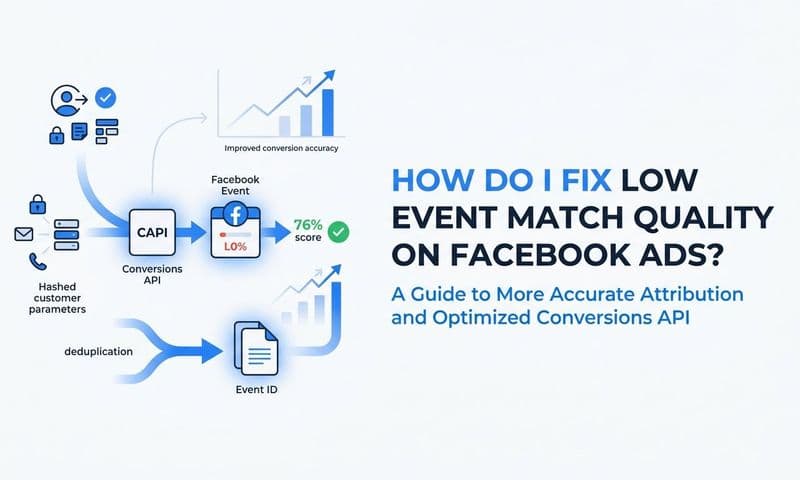
The recommended implementation is to run CAPI alongside the Pixel in a deduplication setup. The Pixel continues to capture what it can from the browser side. CAPI captures events from the server side. Meta's deduplication logic uses a shared event ID to identify when both sources report the same event, and counts it only once. The result is more complete signal without double-counting.
Server-side tracking also enables richer data. The browser-side Pixel is limited to what's available in the browser environment: page URLs, click IDs, and basic user identifiers. CAPI, running from your server, can send enriched customer data including hashed email addresses, phone numbers, purchase values, and product details that your backend systems already have. This enriched data improves Meta's match rate, which is its ability to connect your conversion events to actual Meta users, and better match rates mean better attribution quality and more effective algorithm optimization.
It's important to be clear about what CAPI doesn't solve. It doesn't fix attribution window confusion or view-through double-counting. It doesn't resolve the fundamental challenge of cross-platform attribution. And it doesn't give you a unified view of how your Meta campaigns compare to your other channels. CAPI is a meaningful improvement in data completeness, but it's one layer of a larger solution, not the complete answer on its own.
For B2B SaaS companies, implementing CAPI through a direct server integration or through a Customer Data Platform that supports Meta's API is a high-priority technical project. The signal quality improvement it delivers feeds directly into Meta's campaign optimization, which means better targeting, lower cost per acquisition, and more accurate reporting over time. Understanding why server-side tracking is more accurate helps make the business case for prioritizing this implementation over other technical initiatives.
Building a Single Source of Truth Beyond the Pixel
Here's the core problem with relying on the Pixel as your primary source of marketing truth: it only sees part of the picture, and the part it sees is filtered through browser restrictions, modeling assumptions, and attribution window settings that you don't fully control.
A single-source approach to attribution, one that pulls together data from your ad platforms, CRM, website analytics, and server-side events, gives you a far more accurate and defensible view of what's actually driving revenue. This isn't just about having more data. It's about having the right data connected in the right way. Understanding why attribution is important in digital marketing is the foundation for building a measurement system that actually reflects business outcomes.
Consider what a complete attribution picture actually requires. You need to know which ad a prospect first engaged with. You need to track every subsequent touchpoint across channels. You need to connect those touchpoints to a CRM record when a lead is created. And you need to follow that record through to closed-won revenue. The Pixel can contribute to parts of this picture, but it cannot assemble the whole thing on its own.
This is where platforms like Cometly are designed to operate. Cometly connects your ad platforms, CRM, and website tracking into a unified view, so you can see which campaigns are generating actual pipeline and closed-won revenue, not just Pixel-reported conversions. When you can trace a deal from the first ad click through to a closed deal in your CRM, you're working with data that reflects business reality rather than platform estimates.
Cometly also allows you to compare attribution models side by side. First-touch, last-touch, linear, and time-decay models all tell different stories about which channels deserve credit. Being able to view those models simultaneously, rather than being locked into one platform's default, gives you the analytical flexibility to make smarter budget decisions. Tools designed for Facebook attribution that connect ad spend to real revenue are increasingly essential for any team managing significant ad budgets.
There's another dimension worth highlighting. When you feed enriched, accurate conversion data back to Meta through CAPI, you're not just improving your own reporting. You're improving Meta's algorithm's ability to find more users like your best customers. Cometly supports this by helping you identify which conversion events represent real revenue, so you can prioritize sending those high-quality signals back to Meta rather than flooding the algorithm with low-quality leads that never convert.
The shift from Pixel-dependent reporting to multi-source attribution isn't just a technical upgrade. It's a strategic one. It changes the questions you can answer, the confidence you have in your answers, and the quality of decisions you make with your ad budget.
Putting It All Together
The Facebook Pixel is a useful tool, but it was built for a version of the internet that no longer exists. Its inaccuracies aren't bugs you can simply patch with a settings change. They are structural limitations of client-side, browser-dependent tracking in a privacy-first world where users have more control over their data than ever before.
The path to accurate marketing data is layered. Start with a technical audit: fix duplicate firing, correct event placement, and ensure standard events are properly mapped. Implement the Meta Conversions API to bypass browser restrictions and send enriched server-side signals. Adjust your attribution window settings to reduce double-counting and align more closely with your actual sales cycle.
Then go further. Build a multi-source attribution system that connects your ad spend to CRM pipeline and closed-won revenue. Use that system as your source of truth for campaign decisions, not Ads Manager alone.
The marketers who win in this environment aren't the ones who find a way to make the Pixel work perfectly. They're the ones who build tracking architectures that don't depend on the Pixel being perfect.
Ready to stop making decisions on incomplete data? Get your free demo and see how Cometly connects every touchpoint from first ad click to closed-won revenue, giving you the complete, accurate view of marketing performance your campaigns deserve.