
If you run paid campaigns across Meta, Google, and LinkedIn, you have almost certainly noticed that the numbers never quite match. Your ad platform says one thing, your CRM says another, and your analytics tool tells a third story entirely.
This is the ad platform data discrepancy problem, and it is one of the most common and costly challenges facing B2B SaaS marketing teams today. When your data does not align, every decision you make is built on a shaky foundation. You might cut a campaign that was actually driving pipeline, double down on a channel that looks strong but is getting credit it does not deserve, or walk into a board meeting with conflicting numbers that undermine your credibility.
The root causes are more predictable than most marketers realize: attribution window mismatches, browser-based pixel limitations, duplicate event firing, and the fundamental difference between click-based and impression-based reporting. The good news is that these discrepancies are fixable, and fixing them does not require a data engineering team.
This guide walks you through a structured, five-step process to identify where your data breaks down, diagnose the specific causes, implement tracking improvements, align your attribution settings, and establish a single source of truth for your marketing data. By the end, you will have a repeatable framework for maintaining clean, trustworthy data across every ad platform you run.
Whether you are spending five figures or seven figures on paid acquisition, an accurate ad platform data discrepancy fix is the foundation of every smart scaling decision.
Step 1: Audit Your Current Data Sources and Identify the Gaps
Before you can fix anything, you need to see exactly where the numbers fall apart. Most teams skip this step and jump straight to implementing new tracking, which means they often solve the wrong problem. A structured audit changes that.
Start by pulling a side-by-side comparison of conversion data from each ad platform against your CRM and your analytics tool for the same date range. Use the last 30 days as your baseline, then check the prior 90 days to see if the pattern holds. You are looking for how much each platform claims versus what your CRM actually recorded as leads, opportunities, or closed-won revenue.
As you build this comparison, document the specifics. Which platforms consistently over-report? Which ones under-report? By roughly how much? Ad platforms routinely over-report conversions relative to CRM data because they use broader attribution windows and can claim credit for view-through conversions that may not reflect actual purchase intent. Knowing the magnitude of the gap helps you prioritize which fixes matter most.
Next, check the attribution windows each platform is using by default. Meta defaults to a 7-day click and 1-day view window. Google defaults to a 30-day click window. These windows alone create significant double-counting because the same conversion can fall within both reporting periods and be claimed by both platforms simultaneously.
Pay attention to whether the discrepancies are consistent over time or spike around specific campaigns or date ranges. Consistent gaps usually point to structural issues like attribution window mismatches or pixel reliability problems. Spikes around specific campaigns often point to UTM tagging errors or deduplication failures on a particular conversion event.
Finally, audit your UTM parameters. Open your analytics tool and filter for paid traffic sources. Look for sessions classified as direct or untagged that originated from paid campaigns. Missing UTM parameters cause paid traffic to be misclassified, creating under-reporting for paid channels in your analytics tool while ad platforms still claim the conversion on their end.
Success indicator: You have a documented discrepancy map showing which data sources conflict, by how much, and under what conditions. This becomes your diagnostic baseline for every step that follows.
Step 2: Diagnose the Root Cause Behind Each Discrepancy
Not all discrepancies have the same cause, and applying the wrong fix wastes time. Once you have your discrepancy map from Step 1, the next task is labeling each gap with its actual root cause. There are five categories worth working through systematically.
Browser-based pixel failures: Safari's Intelligent Tracking Prevention, Firefox's Enhanced Tracking Protection, and ad blockers prevent client-side pixels from firing reliably. When a pixel cannot fire, the conversion goes unrecorded in the platform dashboard even though it happened. This typically shows up as under-reporting in your ad platforms relative to your CRM. If your audience skews toward privacy-conscious users or Mac and iPhone users, this effect is more pronounced.
Attribution model conflicts: Ad platforms use last-click or view-through attribution by default while your CRM may assign credit using first-touch logic. The same conversion looks completely different depending on which model is applied. A lead that came in through a Google branded search after first discovering you via a LinkedIn ad will appear as a Google conversion in Google Ads and a LinkedIn conversion in LinkedIn's view-through window, while your CRM might credit the LinkedIn campaign if it captured the original UTM.
Double-counting from cross-device journeys: In B2B SaaS, buyers frequently research on mobile and convert on desktop. Without a user identity layer connecting those sessions, both Meta and Google can claim credit if the user interacted with ads on both platforms across devices. This is a structural challenge that server-side tracking and proper deduplication logic helps address.
Time zone mismatches: If your Meta account is set to Pacific Time, your Google account to UTC, and your CRM to Eastern Time, a conversion that happens at 11 PM on a Tuesday can appear in three different reporting days across your systems. This shifts conversion totals across periods and makes month-end comparisons unreliable.
Deduplication failures: If you are sending the same conversion event via both a browser pixel and a server-side API without proper deduplication logic, platforms will count both events as separate conversions and inflate their reported numbers. This is one of the most common causes of over-reporting after teams implement server-side tracking without configuring deduplication correctly.
Work through each discrepancy from your audit and assign it one of these categories. Some gaps will have multiple contributing causes, which is normal. The goal is to stop treating discrepancies as a mystery and start treating them as a solvable engineering problem.
Success indicator: Every discrepancy you documented in Step 1 has a labeled root cause category. You now know exactly what you are fixing before you touch any settings.
Step 3: Implement Server-Side Tracking to Fix Pixel Gaps
Browser pixels alone are no longer a reliable foundation for conversion tracking. Ad blockers, browser privacy restrictions, and the continued tightening of third-party cookie policies have made client-side tracking a leaky bucket. Server-side tracking is now a standard recommendation for any team that wants accurate data, not an advanced tactic reserved for large engineering teams.
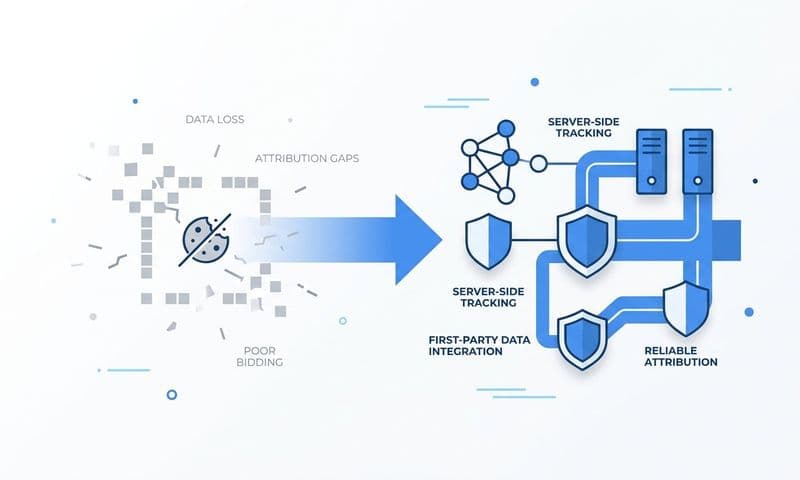
The core concept is straightforward. Instead of relying on a JavaScript pixel in the user's browser to send conversion data to an ad platform, server-side tracking sends that data directly from your server to the platform's API. The user's browser settings, ad blockers, and privacy restrictions have no effect on a server-to-server connection.
For Meta, this means setting up the Meta Conversion API (CAPI). For Google, it means implementing Enhanced Conversions. Both systems accept first-party data including hashed email addresses, phone numbers, and event values, which improves match rates and gives the platform's optimization algorithm better signals to work with.
The most important technical detail when implementing server-side tracking is deduplication. If you run both a browser pixel and a server-side API simultaneously (which is recommended during the transition period to avoid data gaps), you must configure deduplication to prevent the same conversion from being counted twice. For Meta CAPI, use the event_id parameter and set it to the same unique value in both the browser pixel event and the server-side API call. For Google Enhanced Conversions, use the order_id or transaction_id parameter consistently. When both events carry the same identifier, the platform knows they represent a single conversion and counts it only once.
Before you rely on the data from your new server-side setup, verify that events are firing correctly. Use Meta's Events Manager to check event match quality scores and confirm that server events are being received and deduplicated properly. Use Google's Tag Assistant to validate that Enhanced Conversions are sending the expected data fields.
A practical sequencing tip: prioritize server-side tracking for your highest-value conversion events first. Demo requests, trial signups, and closed-won revenue events should be your starting point. These are the conversions that drive budget decisions, so getting them right matters more than tracking every micro-conversion perfectly from day one.
Success indicator: Your platform-reported conversion volume increases modestly as previously missed conversions are now captured, and the gap between platform data and CRM data begins to narrow. If volume spikes dramatically without a corresponding increase in CRM leads, check your deduplication configuration.
Step 4: Standardize Attribution Windows and UTM Tracking Across All Platforms
Even with server-side tracking in place, your numbers will still diverge if every platform is measuring conversions through a different lens. Attribution window standardization and UTM discipline are what bring your reporting into alignment.
Start with attribution windows. Choose one window and apply it consistently across every platform you report from. For most B2B SaaS teams, a 7-day click window is a practical starting point. It balances recency with the longer consideration cycles typical in B2B without being so broad that it pulls in conversions from weeks-old impressions. Avoid using view-through attribution in cross-platform comparisons because platforms measure view-through differently and it dramatically inflates reported numbers.
In Meta Ads Manager, navigate to Columns, then Customize Columns, then Attribution Setting to set your reporting window. Note that this changes how conversions are displayed in your reports but does not change how Meta optimizes campaigns. In Google Ads, go to Tools, then Attribution, to review your conversion window settings and align them with your chosen standard.
Next, address your UTM structure. A consistent UTM taxonomy is what allows your analytics tool and CRM to correctly classify every session that originates from a paid campaign. Every ad URL should include five parameters: utm_source (the platform, such as meta or google), utm_medium (the channel type, such as cpc or paid-social), utm_campaign (the campaign name), utm_content (the ad creative identifier), and utm_term (the keyword or audience segment).
Build a UTM naming convention document and share it with every team member and agency managing your ads. Consistency matters more than the specific naming format you choose. Human error in campaign naming is one of the most persistent sources of data quality problems, and a shared document with examples reduces that error significantly.
Audit your existing campaigns for missing or inconsistent UTMs. Historical data with broken UTMs cannot be retroactively fixed, but you can clean up live campaigns immediately so future data is accurate. As you find gaps, update the URLs and document what was corrected so you have a record of when your clean data period begins.
The final piece is aligning your CRM lead source fields with your UTM values. If your UTM campaign name is "q3-linkedin-demand-gen" but your CRM lead source field shows "LinkedIn Campaign," the same campaign appears under two different labels across your systems. Map UTM values to CRM fields consistently so the same campaign name flows through from ad platform to CRM to attribution tool without translation errors.
Success indicator: Traffic in your analytics tool shows minimal untagged or direct sessions from paid campaigns, and attribution windows match across platforms so the same conversion period produces comparable numbers in each system.
Step 5: Establish a Single Source of Truth With a Centralized Attribution Platform
Here is the fundamental problem with relying on individual ad platforms for your reporting: each platform is incentivized to claim credit for as many conversions as possible. Meta wants to show that Meta drove your results. Google wants to show that Google drove your results. Neither platform has any reason to tell you that a conversion actually required both channels working together over a three-week period.
This is why a centralized attribution platform is the final and most important piece of the ad platform data discrepancy fix. A neutral system that sits above your ad platforms, CRM, and website gives you a view that none of the individual platforms can provide.
The mechanics work like this: a centralized attribution platform ingests data from all your ad platforms, your CRM, and your website tracking simultaneously. It stitches together the customer journey across touchpoints and allows you to apply different attribution models to the same underlying data. You can compare first-touch, last-touch, linear, and data-driven attribution side by side and understand how each model changes the credit allocation across your channels.
This matters especially in B2B SaaS because the path from first ad click to closed-won revenue often spans weeks and involves multiple touchpoints. A prospect might first encounter you through a LinkedIn thought leadership ad, then search for you on Google two weeks later, then click a retargeting ad on Meta before finally requesting a demo. Last-click attribution gives all the credit to Meta. First-touch gives all the credit to LinkedIn. Multi-touch attribution shows you how all three channels contributed to that revenue, which is the information you actually need to make smart budget decisions.
Once your centralized attribution platform is configured, designate it as the authoritative source for reporting to leadership. Ad platforms can still be used for optimization signals within each channel, but budget allocation decisions should be driven by your neutral attribution data, not by what each platform claims about itself.
Cometly connects your ad platforms, CRM, and website to track the entire customer journey in real time. It gives B2B SaaS teams a single source of truth for ad performance and pipeline attribution, from first ad click through to closed-won revenue. With 70+ native integrations and AI-driven recommendations, it surfaces which campaigns are actually driving pipeline so you can scale with confidence rather than guessing.
Success indicator: You can report on pipeline and revenue by channel using one consistent data source. Discrepancies between your attribution platform and individual ad platforms are understood and documented as known differences in methodology, rather than mysterious gaps that erode confidence in your data.
Keeping Your Data Clean: An Ongoing Maintenance Framework
Fixing your tracking once is not enough. New campaigns, platform updates, pixel changes, and CRM migrations can all reintroduce data gaps over time. The teams that maintain accurate attribution data treat it as an ongoing process, not a one-time project.
Build a monthly data audit into your team's routine. Compare your attribution platform against each ad platform for the prior month and flag any discrepancy above a threshold you define. Many teams use 10 to 15 percent as a trigger for investigation. If a gap falls within that range, it likely reflects known attribution model differences. If it exceeds that range, something has probably broken and needs attention.
Review UTM coverage quarterly. Check for any new campaigns or ad sets that launched without proper UTM parameters. New team members, new agencies, and rushed campaign launches are the most common sources of UTM gaps, so a quarterly check catches problems before they accumulate into months of misattributed data.
Monitor server-side event health on a weekly basis using the diagnostic tools available in each platform. Meta's Events Manager and Google's diagnostics surface API failures, low match quality scores, and deduplication issues in near real time. Catching an API failure in week one is a minor fix. Discovering it three months later means three months of under-reported conversions that cannot be recovered.
When you launch a new ad channel or campaign type, add tracking setup to your pre-launch checklist. Verify UTMs, confirm server-side events are configured, and check that the new source is connected to your attribution platform before the first dollar is spent.
Finally, document your attribution setup in a format that a new team member or incoming agency can understand and maintain. If the only person who knows how your tracking works leaves the company, your data quality leaves with them.
Success indicator: Your monthly discrepancy audit takes less than 30 minutes and rarely surfaces surprises. Your tracking documentation is current and accessible to everyone who manages your campaigns.
Putting It All Together: Your Clean Data Checklist
Ad platform data discrepancies are not a sign that your marketing is broken. They are a sign that your measurement infrastructure needs to catch up with the complexity of modern multi-channel campaigns. By auditing your data sources, diagnosing root causes, implementing server-side tracking, standardizing attribution windows and UTMs, and centralizing your reporting in a neutral attribution platform, you move from guessing to knowing.
Use this checklist to confirm you have completed each step of the process:
1. You have a documented discrepancy map across all platforms.
2. Every discrepancy has a labeled root cause category.
3. Server-side tracking is live for your highest-value conversion events.
4. Deduplication is configured to prevent double-counting across browser pixel and server-side API events.
5. UTM parameters are consistent and enforced across all campaigns.
6. Attribution windows match across platforms for cross-platform reporting.
7. You have a single source of truth for pipeline and revenue reporting.
8. A monthly audit process is in place with a defined discrepancy threshold.
Cometly is built specifically for B2B SaaS teams who need accurate, real-time attribution from first ad click to closed-won revenue. It captures every touchpoint, connects your ad spend to pipeline, and gives your AI better data to work with so your campaigns optimize toward what actually drives revenue.
If you are ready to stop reconciling spreadsheets and start making confident budget decisions, Get your free demo today and see how Cometly can become your single source of truth for marketing attribution.